display GMC YUKON XL 2007 User Guide
[x] Cancel search | Manufacturer: GMC, Model Year: 2007, Model line: YUKON XL, Model: GMC YUKON XL 2007Pages: 608, PDF Size: 3.01 MB
Page 162 of 608
Compass Variance
The mirror is set in zone eight upon leaving the
factory. It will be necessary to adjust the compass
to compensate for compass variance if the
vehicle is outside zone eight. Under certain
circumstances, as during a long distance
cross-country trip, it will be necessary to adjust for
compass variance. Compass variance is the
difference between earth’s magnetic north and true
geographic north. If not adjusted to account for
compass variance, your compass could give false
readings.
To adjust for compass variance:
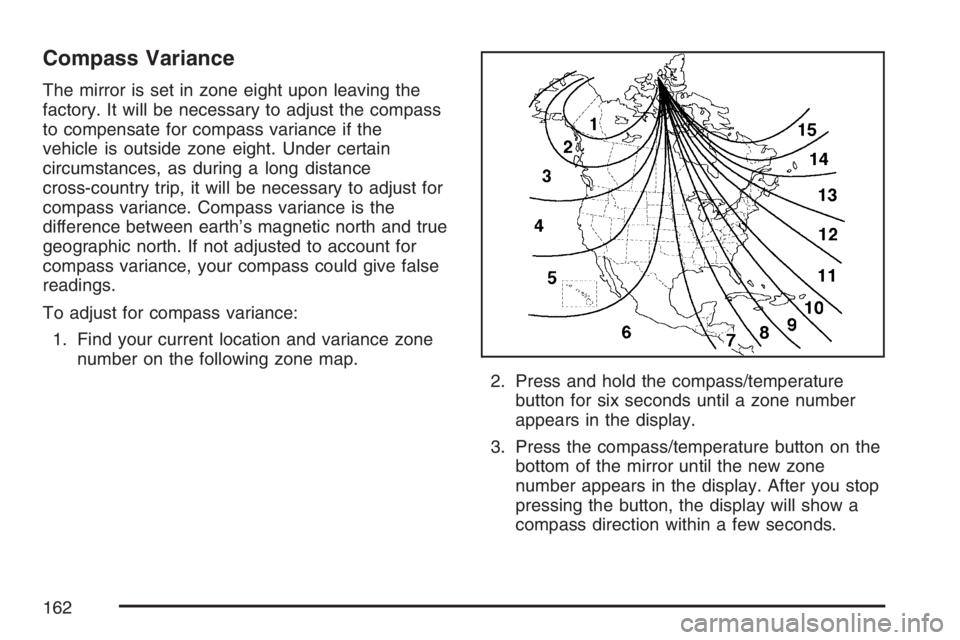
1. Find your current location and variance zone
number on the following zone map.
2. Press and hold the compass/temperature
button for six seconds until a zone number
appears in the display.
3. Press the compass/temperature button on the
bottom of the mirror until the new zone
number appears in the display. After you stop
pressing the button, the display will show a
compass direction within a few seconds.
162
Page 184 of 608
Brake System Warning Light......................232
Anti-Lock Brake System Warning Light.......233
StabiliTrak
®Indicator Light..........................234
Engine Coolant Temperature Gage.............234
Tire Pressure Light.....................................235
Malfunction Indicator Lamp.........................236
Oil Pressure Gage.....................................239
Oil Pressure Light......................................240
Security Light.............................................241
Fog Lamp Light..........................................241
Cruise Control Light...................................242
Highbeam On Light....................................242
Tow/Haul Mode Light.................................242
Fuel Gage..................................................243
Low Fuel Warning Light.............................243
Driver Information Center (DIC)..................244
DIC Operation and Displays
(With DIC Buttons)..................................244
DIC Operation and Displays
(Without DIC Buttons).............................251
DIC Warnings and Messages.....................254
DIC Vehicle Customization
(With DIC Buttons)..................................264Audio System(s)..........................................274
Setting the Time (Radio with a
Single CD Player)...................................276
Setting the Time (Radio with a
Six-Disc CD Player)................................277
Radio with CD (MP3).................................278
Radio with CD and DVD (MP3)..................295
XM Radio Messages..................................319
Navigation/Radio System............................321
Rear Seat Entertainment System................321
Rear Seat Audio (RSA)..............................332
Theft-Deterrent Feature..............................334
Audio Steering Wheel Controls...................334
Radio Reception.........................................335
Care of Your CDs and DVDs.....................336
Care of the CD and DVD Player................337
Rear Side Window Antenna.......................337
XM™ Satellite Radio Antenna System........337
Section 3 Instrument Panel
184
Page 203 of 608
Auxiliary Roof Mounted Lamp
If your vehicle has this feature, this button includes
wiring provisions for a dealer or a qualied
service center to install an auxiliary roof lamp.
This button is located
on the overhead
console.
When the wiring is connected to an auxiliary roof
mounted lamp, pressing the button will activate
the lamp and illuminate an indicator light near the
button. Pressing the button again will turn off
the roof mounted lamp.
If your vehicle has this button, your vehicle may
have the snow plow prep package. For further
information seeAdding a Snow Plow or Similar
Equipment on page 396.
Instrument Panel Brightness
D(Instrument Panel Brightness):This feature
controls the brightness of the instrument panel
lights.
The knob for this feature is located next to the
headlamp control.
Turn the knob clockwise or counterclockwise to
adjust the brightness of the instrument panel lights.
Turn the knob clockwise to return the instrument
panel cluster or radio display to full brightness
when the headlamps or parking lamps are on.
To turn on the dome lamps, turn the knob to the
farthest clockwise position.
Dome Lamps
The dome lamps come on when a door is opened.
The dome lamps can also be turned on by
turning the knob, located next to the exterior lamps
control, clockwise to the farthest position. In this
position, the dome lamps will remain on whether a
door is opened or closed.
203
Page 206 of 608
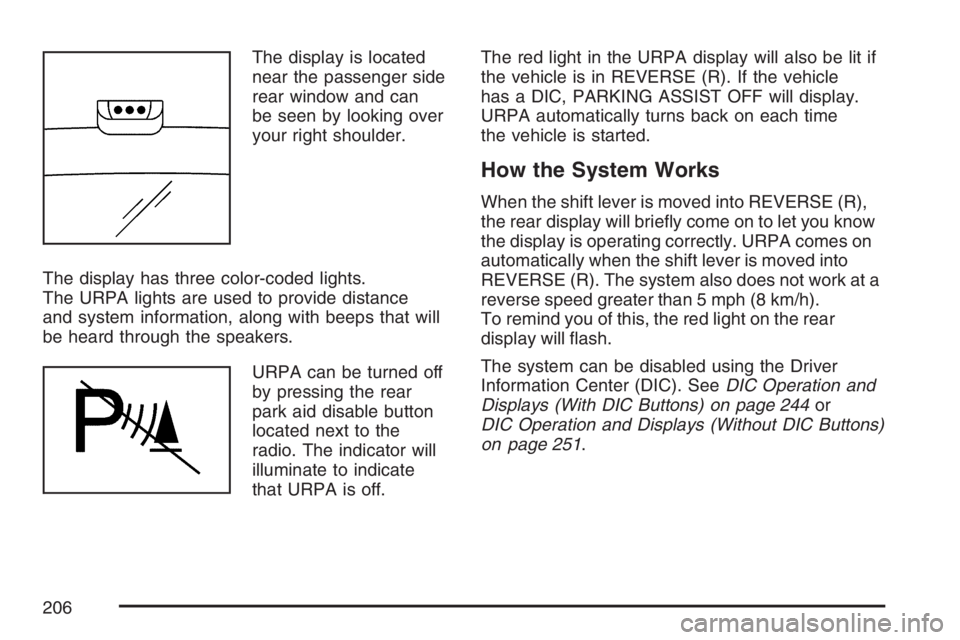
The display is located
near the passenger side
rear window and can
be seen by looking over
your right shoulder.
The display has three color-coded lights.
The URPA lights are used to provide distance
and system information, along with beeps that will
be heard through the speakers.
URPA can be turned off
by pressing the rear
park aid disable button
located next to the
radio. The indicator will
illuminate to indicate
that URPA is off.The red light in the URPA display will also be lit if
the vehicle is in REVERSE (R). If the vehicle
has a DIC, PARKING ASSIST OFF will display.
URPA automatically turns back on each time
the vehicle is started.
How the System Works
When the shift lever is moved into REVERSE (R),
the rear display will briey come on to let you know
the display is operating correctly. URPA comes on
automatically when the shift lever is moved into
REVERSE (R). The system also does not work at a
reverse speed greater than 5 mph (8 km/h).
To remind you of this, the red light on the rear
display will ash.
The system can be disabled using the Driver
Information Center (DIC). SeeDIC Operation and
Displays (With DIC Buttons) on page 244or
DIC Operation and Displays (Without DIC Buttons)
on page 251.
206
Page 207 of 608
How the System Works when Backing
If the shift lever is in REVERSE (R), URPA detects
objects close to the rear bumper. The rst time an
object is detected a single beep will sound. If an
object is detected at a REVERSE (R) speed
between 0 mph (0 km/h) and 5 mph (8 km/h), the
following describes what will occur based on your
distance to a detected object located behind the
vehicle:
At distances between 40 inches (1 m) and
8 ft (2.5 m), a single amber light will come on.
At distances between 23 inches (0.6 m) and
40 inches (1 m), both amber lights will be on.
At distances between 12 inches (0.3 m) and
23 inches (0.6 m), all three lights (amber/
amber/red) will be on.
At distances less than 12 inches (0.3 m), a
beeping sound will repeat for a short time and
all three lights (amber/amber/red) will be on and
ashing.
When the System Does Not Seem to
Work Properly
If the URPA system will not activate due to a
temporary condition, the message PARKING
ASSIST OFF will be displayed on the DIC and a
red light will be shown on the rear URPA display
when the shift lever is moved into REVERSE (R).
This occurs under the following conditions:
The driver disables the system. SeeDIC
Operation and Displays (With DIC Buttons)
on page 244orDIC Operation and Displays
(Without DIC Buttons) on page 251.
The parking brake pedal is depressed.
A trailer was attached to your vehicle, or a
bicycle or an object was hanging out of your
trunk during your last drive when you turned off
the vehicle. If the attached objects are removed
from your vehicle before the start of your next
drive, the system will return to normal operation
unless an object is detected when the vehicle is
shifted into REVERSE (R). If this occurs, URPA
assumes the object is still attached, so you will
have to wait until the vehicle is driven forward
above 15 mph (25 km/h) before URPA will
return to normal operation.
207
Page 208 of 608
The ultrasonic sensors are not kept clean.
So, be sure to keep your vehicle’s rear bumper
free of mud, dirt, snow, ice, and slush. For
cleaning instructions, seeWashing Your
Vehicle on page 532. If the DIC still displays the
PARKING ASSIST OFF message after
cleaning the bumper and driving forward at a
speed of at least 15 mph (25 km/h), see your
dealer.
Other conditions that may affect system
performance include vibrations from a
jackhammer or the compression of air brakes
on a very large truck or other mechanical
devices that interfere with URPA performance.
When URPA is disabled without driver action
and the driver attempts to turn URPA back on
using the Driver Information Center (DIC), the
PARKING ASSIST ON option will not be
selectable if the necessary conditions stated
above for normal system operation are not met.
As always, drivers should use care when backing
up a vehicle. Always look behind you, being
sure to check for other vehicles, obstructions and
blind spots.For Driver Information Center messages related to
URPA, seeDIC Warnings and Messages on
page 254.
If the bumper is damaged, your URPA system
may not work properly. Take the vehicle to
your dealer to repair the system.
Accessory Power Outlet(s)
With accessory power outlets you can plug in
auxiliary electrical equipment, such as a cellular
telephone or CB radio.
Your vehicle will have two accessory power
outlets under the climate controls, one on the back
of the oor console and a additional accessory
power outlet in the rear cargo area on the
passenger side.
To use the power outlet, lift the spring cap and
insert electrical 12V device plug. To close
the power outlet, remove 12V electrical device
plug and the spring cap will close.
Certain power accessory plugs may not be
compatible to the accessory power outlet and
could result in blown adapter or vehicle fuses.
208
Page 214 of 608
Driver’s Side Temperature Control
The driver’s side temperature buttons are used to
adjust the temperature of the air coming through
the system on the driver’s side. The temperature
can be adjusted even if the system is turned
off. This is possible since outside air will always
ow through the system as the vehicle is moving
forward unless it is set to recirculation mode.
See “Recirculation” later in this section.
Press the + or−buttons to increase or decrease
the cabin temperature. The driver side
temperature display will show the temperature
setting decreasing or increasing.
Passenger’s Side Temperature Control
The passenger’s temperature buttons can be used
to change the temperature of the air coming
through the system on the passenger’s side of the
vehicle. The temperature can be adjusted even
if the system is turned off. This is possible
since outside air will always ow through the
system as the vehicle is moving forward unless it
is set to recirculation mode. See “Recirculation”
later in this section.
Press the + or−buttons to increase or decrease
the cabin temperature. The passenger side
display will show the temperature setting
decreasing or increasing.
The passenger’s temperature setting can be set to
match the driver’s temperature setting by pressing
the PASS button and turning off the PASS indicator.
When the passenger’s temperature setting is set
different than the driver’s setting, the indicator on
the PASS button will illuminate and both the driver’s
side and passenger’s side temperature displays will
be shown.
214
Page 215 of 608
Automatic Operation
AUTO (Automatic):When automatic operation
is active the system will control the inside
temperature, the air delivery, and the fan speed.
Use the steps below to place the entire system in
automatic mode:
1. Press the AUTO button.
When AUTO is selected, the display will
change to show the current temperature(s)
and AUTO will be lit on the display. The current
delivery mode and fan speed will also be
displayed for approximately 5 seconds.
When AUTO is selected, the air conditioning
operation and air inlet will be automatically
controlled. The air conditioning compressor will
run when the outside temperature is over
about 40°F (4°C). The air inlet will normally be
set to outside air. If it’s hot outside, the air
inlet may automatically switch to recirculate
inside air to help quickly cool down your
vehicle. The light on the button will illuminate
in recirculation.2. Set the driver’s and passenger’s temperature.
To nd your comfort setting, start with a
74°F (23°C) temperature setting and allow
about 20 minutes for the system to regulate.
Use the driver’s or passenger’s temperature
buttons to adjust the temperature setting as
necessary. If you choose the temperature
setting of 60°F (15°C), the system will remain at
the maximum cooling setting. If you choose the
temperature setting of 90°F (32°C), the system
will remain at the maximum heat setting.
Choosing either maximum setting will not cause
the vehicle to heat or cool any faster.
Be careful not to cover the sensor located on the
top of the instrument panel near the windshield.
This sensor regulates air temperature based
on sun load and also turns on your headlamps.
To avoid blowing cold air in cold weather, the
system will delay turning on the fan until warm air
is available. The length of delay depends on
the engine coolant temperature. Pressing the fan
switch will override this delay and change the
fan to a selected speed.
215
Page 216 of 608
O(On/Off):Press this button to turn off the
climate control system. Outside air will still enter
the vehicle, and will be directed to the oor.
This direction can be changed by pressing the
mode button. Recirculation can be selected once
you have selected vent or bi-level mode. The
temperature can also be adjusted using either
temperature button. If you adjust the air delivery
mode or temperature settings with the system
off, the display will illuminate briey to show you
the settings and then return off. Press the
on/off button or the up down arrows on the fan
switch, the defrost button, AUTO button, or the air
conditioning button to turn the system on when
it is off.
Manual Operation
You may manually adjust the air delivery mode or
fan speed.
y9 z(Fan):The buttons with the fan symbols
allow you to manually adjust the fan speed.
Press the up arrow to increase fan speed and the
down arrow to decrease fan speed.Pressing one of these buttons when the system is
off will turn the system on. Pressing one of
these buttons when in automatic control will place
the fan under manual control. The fan setting
will remain displayed and the AUTO light will turn
off. The air delivery mode will remain under
automatic control.
yNz(Mode):Press the mode up and down
buttons to manually change the direction of
the airow in your vehicle. Repeatedly press the
button until the desired mode appears on the
display. Pressing one of these buttons when the
system is off will change air delivery mode without
turning the system on. Pressing one of these
buttons when in automatic control will place the
mode under manual control.
The air delivery mode setting will be displayed and
the AUTO light will turn off. The fan will remain
under automatic control.
H(Vent):This setting will deliver air to the
instrument panel outlets.
216
Page 223 of 608
Automatic Operation
AUTO:Press the mode button until this setting is
selected to control the inside temperature, the
air delivery, and the fan speed. AUTO will
illuminate in the display when automatic operation
is active.
+/−(Increase/Decrease Temperature):Press the
+or−buttons to increase or decrease the cabin
temperature. The rear control temperature
display will show the temperature setting
decreasing or increasing.
The display will only indicate climate control
functions when the system is in rear
independent mode.
Manual Operation
y9 z(Fan):The fan buttons on the rear seat
audio control panel allows you to manually
adjust the fan speed. To decrease airow, press
the button with the fan and down arrow symbol.
Pressing the fan up button when the system is off
will turn the system on. The air delivery mode
will remain under automatic control. To turn
the rear system off, keep pressing the button with
the fan and down arrow symbol.
+/−(Increase/Decrease Temperature):These
buttons select the temperature of the air owing into
the passenger area. Press the + button for warmer
air and press the−button for cooler air.
N(Mode):Press the mode button to manually
change the direction of the airow in your vehicle.
Repeatedly press the button until the desired
mode appears on the display. Multiple presses will
cycle through the delivery selections.
223