lock GMC YUKON XL 2007 Manual PDF
[x] Cancel search | Manufacturer: GMC, Model Year: 2007, Model line: YUKON XL, Model: GMC YUKON XL 2007Pages: 608, PDF Size: 3.01 MB
Page 212 of 608
Defogging and Defrosting
Fog on the inside of the windows is a result of
high humidity (moisture) condensing on the
cool window glass. This can be minimized if the
climate control system is used properly. There
are two modes to clear fog or frost from your
windshield. Turn the right knob clockwise to select
the defog or defrost mode.
-(Defog):The defog mode is used to clear
the windows of fog or moisture and warm
the passengers. This mode directs air to the
windshield, oor outlets, and side window vents.
When you select this mode, the system turns
off recirculation and runs the air conditioning
compressor unless the outside temperature is
close to freezing. The recirculation mode cannot
be selected while in the defog mode. Do not drive
the vehicle until all the windows are clear.
0(Defrost):The defrost mode is used to
remove fog or frost from the windshield more
quickly. This mode directs a portion of the air to
the windshield and side window vents and some to
the oor vents. In this mode, the system will
automatically force outside air into your vehicle.
The recirculation mode cannot be selected while in
the defrost mode. The air conditioning compressor
will run automatically in this setting, unless the
outside temperature is close to freezing.
Do not drive the vehicle until all the windows
are clear.
212
Page 221 of 608
Fan Knob
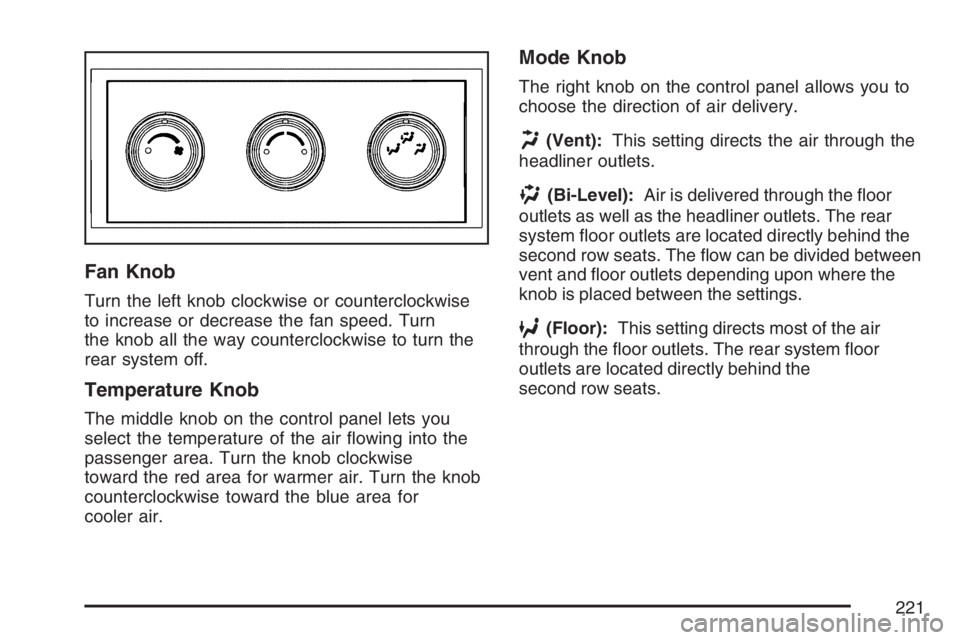
Turn the left knob clockwise or counterclockwise
to increase or decrease the fan speed. Turn
the knob all the way counterclockwise to turn the
rear system off.
Temperature Knob
The middle knob on the control panel lets you
select the temperature of the air owing into the
passenger area. Turn the knob clockwise
toward the red area for warmer air. Turn the knob
counterclockwise toward the blue area for
cooler air.
Mode Knob
The right knob on the control panel allows you to
choose the direction of air delivery.
H(Vent):This setting directs the air through the
headliner outlets.
)(Bi-Level):Air is delivered through the oor
outlets as well as the headliner outlets. The rear
system oor outlets are located directly behind the
second row seats. The ow can be divided between
vent and oor outlets depending upon where the
knob is placed between the settings.
6(Floor):This setting directs most of the air
through the oor outlets. The rear system oor
outlets are located directly behind the
second row seats.
221
Page 233 of 608
Anti-Lock Brake System Warning
Light
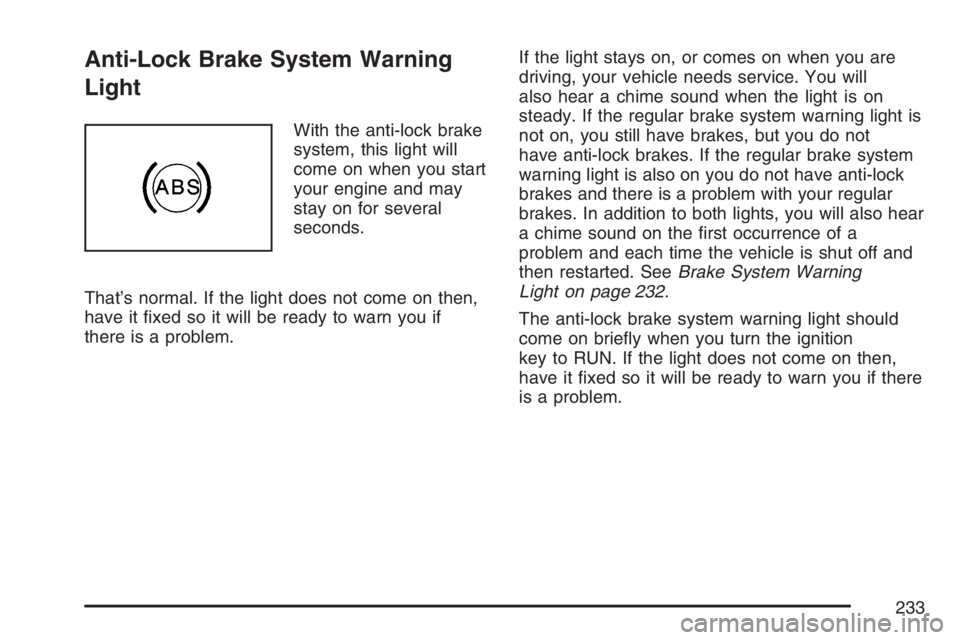
With the anti-lock brake
system, this light will
come on when you start
your engine and may
stay on for several
seconds.
That’s normal. If the light does not come on then,
have it xed so it will be ready to warn you if
there is a problem.If the light stays on, or comes on when you are
driving, your vehicle needs service. You will
also hear a chime sound when the light is on
steady. If the regular brake system warning light is
not on, you still have brakes, but you do not
have anti-lock brakes. If the regular brake system
warning light is also on you do not have anti-lock
brakes and there is a problem with your regular
brakes. In addition to both lights, you will also hear
a chime sound on the rst occurrence of a
problem and each time the vehicle is shut off and
then restarted. SeeBrake System Warning
Light on page 232.
The anti-lock brake system warning light should
come on briey when you turn the ignition
key to RUN. If the light does not come on then,
have it xed so it will be ready to warn you if there
is a problem.
233
Page 250 of 608
If a low or high tire pressure condition is detected
by the system while driving, a message advising
you to check the pressure in a specic tire
will appear in the display. SeeInation - Tire
Pressure on page 490andDIC Warnings
and Messages on page 254for more information.
Engine Hours
Press the vehicle information button until ENGINE
HOURS displays. This display shows the total
number of hours the engine has run.
Relearn Tire Positions
If your vehicle has a Tire Pressure Monitor (TPM)
system, after rotating the tires or after replacing
a tire or sensor, the system must re-learn the tire
positions. To re-learn the tire positions, see
Tire Pressure Monitor System on page 492. See
Tire Inspection and Rotation on page 497andDIC
Warnings and Messages on page 254for more
information.
Relearn Remote Key
This display allows you to match remote keyless
entry transmitters to your vehicle. To match a
remote keyless entry transmitter to your vehicle,
do the following:
1. Press the vehicle information button until
PRESS
VTO RELEARN REMOTE KEY
displays.
2. Press the set/reset button until REMOTE KEY
LEARNING ACTIVE is displayed.
3. Press and hold the lock and unlock buttons
on the rst transmitter at the same time for
approximately 15 seconds.
A chime will sound indicating that the
transmitter is matched.
4. To match additional transmitters at this time,
repeat Step 3.
Each vehicle can have a maximum of eight
transmitters matched to it.
5. To exit the programming mode, you must
cycle the key to LOCK.
Blank Display
This display shows no information.
250
Page 251 of 608
DIC Operation and Displays
(Without DIC Buttons)
If your vehicle does not have DIC buttons, the
information below explains the operation of
this system.
The DIC has different displays which can be
accessed by pressing the trip odometer reset stem
located on the instrument panel cluster. Pressing
the trip odometer reset stem will also turn off,
or acknowledge, DIC messages.
The DIC displays trip and vehicle system
information, and warning messages if a system
problem is detected.
If your vehicle does not have DIC buttons, you can
use the trip odometer reset stem to view the
following displays: odometer, engine hours, trip
odometer, oil life, Tire Pressure Monitor (TPM)
system programming for vehicles with a TPM
system, remote keyless entry transmitter
programming, and display language.
If your vehicle has DIC buttons, you can use the
trip odometer reset stem to view the following
displays: odometer, engine hours, trip odometer,
and display language.
Trip Odometer Reset Stem Menu Items
Odometer
Press the trip odometer reset stem until
ODOMETER displays. This display shows the
distance the vehicle has been driven in either
miles (mi) or kilometers (km).
Engine Hours
To display the ENGINE HOURS, place the ignition
in LOCK or ACCESSORY, then press and hold
the trip odometer reset stem for four seconds while
viewing the ODOMETER. This display shows
the total number of hours the engine has run.
Trip Odometer
Press the trip odometer reset stem until TRIP
displays. This display shows the current distance
traveled in either miles (mi) or kilometers (km)
since the last reset for the trip odometer.
The trip odometer can be reset to zero by pressing
and holding the trip odometer reset stem while
the trip odometer is displayed.
251
Page 253 of 608
Remember, you must reset the OIL LIFE display
yourself after each oil change. It will not reset
itself. Also, be careful not to reset the OIL LIFE
display accidentally at any time other than
when the oil has just been changed. It cannot
be reset accurately until the next oil change.
To reset the engine oil life system, seeEngine Oil
Life System on page 441.
Relearn Tire Positions
To access this display, the vehicle must be in
PARK (P). If your vehicle has a Tire Pressure
Monitor (TPM) system, after rotating the tires or
after replacing a tire or sensor, the system
must re-learn the tire positions. To re-learn the tire
positions, seeTire Pressure Monitor System on
page 492. SeeTire Inspection and Rotation
on page 497andDIC Warnings and Messages on
page 254for more information.
Relearn Remote Key
To access this display, the vehicle must be in
PARK (P). This display allows you to match remote
keyless entry transmitters to your vehicle.
To match a remote keyless entry transmitter to
your vehicle, do the following:
1. Press the trip odometer reset stem until
RELEARN REMOTE KEY displays.
2. Press and hold the trip odometer reset stem
for three seconds.
The message REMOTE KEY LEARNING
ACTIVE will display.
3. Press and hold the lock and unlock buttons
on the rst transmitter at the same time for
approximately 15 seconds.
A chime will sound indicating that the
transmitter is matched.
4. To match additional transmitters at this time,
repeat Step 3.
Each vehicle can have a maximum of eight
transmitters matched to it.
5. To exit the programming mode, you must
cycle the key to LOCK.
253
Page 266 of 608
AUTO DOOR LOCK
This feature allows you to select when the vehicle’s
doors will automatically lock. SeeProgrammable
Automatic Door Locks on page 121for more
information.
Press the customization button until AUTO DOOR
LOCK appears on the DIC display. Press the
set/reset button once to access the settings for this
feature. Then press the customization button to
scroll through the following settings:
SHIFT OUT OF PARK (default):The doors will
automatically lock when the vehicle is shifted out of
PARK (P).
AT VEHICLE SPEED:The doors will
automatically lock when the vehicle speed is
above 8 mph (13 km/h) for three seconds.
NO CHANGE:No change will be made to this
feature. The current setting will remain.
Choose one of the available settings and press
the set/reset button while it is displayed on the DIC
to select it.
AUTO DOOR UNLOCK
This feature allows you to select whether or not to
turn off the automatic door unlocking feature.
It also allows you to select which doors and
when the doors will automatically unlock.
SeeProgrammable Automatic Door Locks on
page 121for more information.
Press the customization button until AUTO DOOR
UNLOCK appears on the DIC display. Press the
set/reset button once to access the settings for this
feature. Then press the customization button to
scroll through the following settings:
OFF:None of the doors will automatically unlock.
DRIVER AT KEY OUT:Only the driver’s door
will unlock when the key is taken out of the
ignition.
DRIVER IN PARK:Only the driver’s door will
unlock when the vehicle is shifted into PARK (P).
ALL AT KEY OUT:All of the doors will unlock
when the key is taken out of the ignition.
ALL IN PARK (default):All of the doors will
unlock when the vehicle is shifted into PARK (P).
266
Page 267 of 608
NO CHANGE:No change will be made to this
feature. The current setting will remain.
Choose one of the available settings and press
the set/reset button while it is displayed on the DIC
to select it.
REMOTE DOOR LOCK
This feature allows you to select the type of
feedback you will receive when locking the vehicle
with the remote keyless entry transmitter. You will
not receive feedback when locking the vehicle with
the remote keyless entry transmitter if the doors are
open. SeeRemote Keyless Entry System
Operation on page 113for more information.
Press the customization button until REMOTE
DOOR LOCK appears on the DIC display. Press
the set/reset button once to access the settings for
this feature. Then press the customization button to
scroll through the following settings:
OFF:There will be no feedback when you press
the lock button on the remote keyless entry
transmitter.
LIGHTS ONLY:The exterior lamps will ash when
you press the lock button on the remote keyless
entry transmitter.HORN ONLY:The horn will sound on the second
press of the lock button on the remote keyless
entry transmitter.
HORN & LIGHTS (default):The exterior lamps
will ash when you press the lock button on the
remote keyless entry transmitter, and the horn will
sound when the lock button is pressed again within
ve seconds of the previous command.
NO CHANGE:No change will be made to this
feature. The current setting will remain.
Choose one of the available settings and press
the set/reset button while it is displayed on the DIC
to select it.
267
Page 268 of 608
REMOTE DOOR UNLOCK
This feature allows you to select the type of
feedback you will receive when unlocking the
vehicle with the remote keyless entry transmitter.
You will not receive feedback when unlocking
the vehicle with the remote keyless entry
transmitter if the doors are open. SeeRemote
Keyless Entry System Operation on page 113for
more information.
Press the customization button until REMOTE
DOOR UNLOCK appears on the DIC display. Press
the set/reset button once to access the settings for
this feature. Then press the customization button to
scroll through the following settings:
LIGHTS OFF:The exterior lamps will not ash
when you press the unlock button on the remote
keyless entry transmitter.
LIGHTS ON (default):The exterior lamps will
ash when you press the unlock button on
the remote keyless entry transmitter.NO CHANGE:No change will be made to this
feature. The current setting will remain.
Choose one of the available settings and press
the set/reset button while it is displayed on the DIC
to select it.
DELAY DOOR LOCK
This feature allows you to select whether or not
the locking of the vehicle’s doors and liftgate
will be delayed. When locking the doors and
liftgate with the power door lock switch or the
remote keyless entry transmitter and a door or the
liftgate is open, this feature will delay locking
the doors and liftgate until ve seconds after the
last door is closed. You will hear three chimes
to signal that the delayed locking feature is in use.
The key must be out of the ignition for this
feature to work. You can temporarily override
delayed locking by pressing the power door lock
switch or the remote keyless entry transmitter
a second time. SeeDelayed Locking on page 121
for more information.
268
Page 269 of 608
Press the customization button until DELAY
DOOR LOCK appears on the DIC display. Press
the set/reset button once to access the settings
for this feature. Then press the customization
button to scroll through the following settings:
OFF:There will be no delayed locking of
the vehicle’s doors.
ON (default):The doors will not lock until
ve seconds after the last door or the liftgate is
closed.
NO CHANGE:No change will be made to this
feature. The current setting will remain.
Choose one of the available settings and press
the set/reset button while it is displayed on the DIC
to select it.EXIT LIGHTING
If it is dark enough outside, this feature allows
you to select the amount of time you want the
exterior lamps to remain on. This happens after the
vehicle is unlocked using the remote keyless entry
transmitter or if the vehicle key is turned to LOCK
from RUN.
Press the customization button until EXIT
LIGHTING appears on the DIC display. Press the
set/reset button once to access the settings for
this feature. Then press the customization button
to scroll through the following settings:
OFF:The exterior lamps will not turn on.
30 SECONDS (default):The exterior lamps will
stay on for 30 seconds.
1 MINUTE:The exterior lamps will stay on for
one minute.
2 MINUTES:The exterior lamps will stay on for
two minutes.
NO CHANGE:No change will be made to this
feature. The current setting will remain.
Choose one of the available settings and press
the set/reset button while it is displayed on the DIC
to select it.
269