buttons GMC YUKON XL 2011 User Guide
[x] Cancel search | Manufacturer: GMC, Model Year: 2011, Model line: YUKON XL, Model: GMC YUKON XL 2011Pages: 528, PDF Size: 7.64 MB
Page 45 of 528
Black plate (9,1)GMC Yukon/Yukon XL Owner Manual - 2011
Keys, Doors and Windows 2-9
Delayed Locking
When locking the doors with the
power lock switch and a door or the
liftgate is open, the doors will lock
five seconds after the last door is
closed. You will hear three chimes
to signal that the delayed locking
feature is in use.
Pressing the power lock switch
twice will override the delayed
locking feature and immediately lock
all the doors.
This feature will not operate if the
key is in the ignition.
You can program this feature using
the Driver Information Center (DIC).
See“Delay Door Lock” under
Vehicle Personalization (With DIC
Buttons) on page 5‑47.
Automatic Door Locks
The vehicle may have an automatic
lock/unlock feature. This feature
can be programmed using the
Driver Information Center (DIC). See
Vehicle Personalization (With
DIC Buttons) on page 5‑47 for more
information on DIC programming.
Lockout Protection
If the driver side power door lock
switch is pressed when the driver
door is open and the key is in the
ignition, all of the doors will lock and
then the driver door will unlock.
If the passenger side power door
lock switch is pressed when the
front passenger door is open and
the key is in the ignition, all of the
doors will lock and then the front
passenger door will unlock.
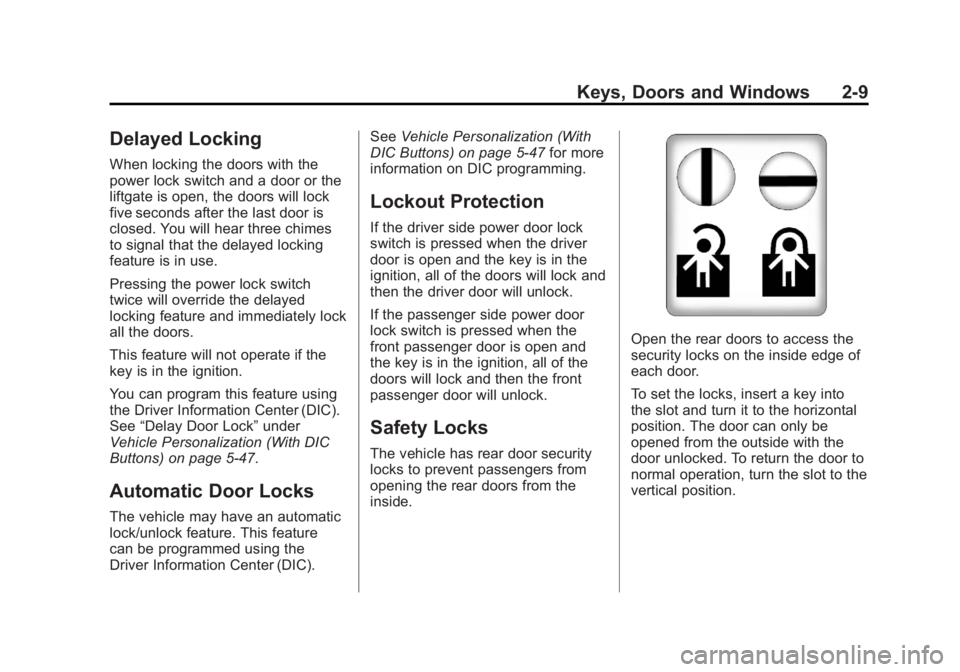
Safety Locks
The vehicle has rear door security
locks to prevent passengers from
opening the rear doors from the
inside.
Open the rear doors to access the
security locks on the inside edge of
each door.
To set the locks, insert a key into
the slot and turn it to the horizontal
position. The door can only be
opened from the outside with the
door unlocked. To return the door to
normal operation, turn the slot to the
vertical position.
Page 48 of 528
Black plate (12,1)GMC Yukon/Yukon XL Owner Manual - 2011
2-12 Keys, Doors and Windows
The taillamps will flash and a chime
will sound when the power liftgate is
moving.
{WARNING
You or others could be injured if
caught in the path of the power
liftgate. Make sure there is no one
in the way of the liftgate as it is
opening and closing.
Notice: If you open the liftgate
without checking for overhead
obstructions such as a garage
door, you could damage the
liftgate or the liftgate glass.
Always check to make sure the
area above and behind the liftgate
is clear before opening it. The power liftgate can be power
opened and closed in the
following ways:
.Press and hold&on the
Remote Keyless Entry (RKE)
transmitter until the liftgate starts
moving. See Remote Keyless
Entry (RKE) System Operation
on page 2‑3.
.Press&on the overhead
console.
.Press the touchpad on the
outside liftgate handle.
Pressing the buttons, or touchpad
switch a second time while the
liftgate is moving reverses the
direction.
l: The liftgate can also be
closed by pressing this button next
to the liftgate latch.
Press the button a second time
during liftgate operation to reverse
that operation. The power liftgate may be
temporarily disabled under extreme
temperatures, or under low battery
conditions. If this occurs, the liftgate
can still be operated manually.
If the transmission is shifted out of
P (Park) while the power function
is in progress, the liftgate power
function will continue to completion.
If the transmission is shifted out of
P (Park) and the vehicle accelerates
before the power liftgate latches
closed, the liftgate may reverse to
the open position. Cargo could fall
out of the vehicle. Always make
sure the power liftgate is closed and
latched before you drive away.
If you power open the liftgate and
the liftgate support struts have lost
pressure, the lamps will flash and a
chime will sound. The liftgate will
stay open temporarily, then slowly
close. See your dealer for service
before using the liftgate.
Page 56 of 528
Black plate (20,1)GMC Yukon/Yukon XL Owner Manual - 2011
2-20 Keys, Doors and Windows
Side Blind Zone Alert (SBZA)
If your vehicle has the Side Blind
Zone Alert (SBZA) system, see
Side Blind Zone Alert (SBZA) on
page 9‑60.
Automatic Dimming
Mirror
Vehicles with the dimming feature
have a driver outside mirror that
adjusts for the glare of headlamps
behind you. SeeManual Rearview
Mirror on page 2‑20 for more
information.
Park Tilt Mirrors
Vehicles with the memory package
have a passenger and/or driver
mirror that tilts to a preselected
position when the vehicle is in
R (Reverse). This feature lets the
driver view the curb when parallel
parking. The mirror(s) return to the
original position when the vehicle is
shifted out of R (Reverse), or the
ignition is turned off.
Turn this feature on or off through
the Driver Information Center (DIC).
See Vehicle Personalization (With
DIC Buttons) on page 5‑47 for more
information.
Interior Mirrors
Manual Rearview Mirror
Hold the mirror in the center to
move it for a clearer view of behind
your vehicle. Adjust the mirror to
avoid glare from the headlamps
behind you. Push the tab at the
bottom of the mirror forward for
daytime use and pull it for
nighttime use.
Automatic Dimming
Rearview Mirror
The vehicle may have an automatic
dimming inside rearview mirror.
Automatic dimming reduces the
glare from the headlamps of the
vehicle behind you. The dimming
feature comes on and the indicator
light illuminates each time the
ignition is turned to start.
O(On/Off): Press to turn the
dimming feature on or off.
Page 57 of 528
Black plate (21,1)GMC Yukon/Yukon XL Owner Manual - 2011
Keys, Doors and Windows 2-21
The vehicle may also have a Rear
Vision Camera (RVC). SeeRear
Vision Camera (RVC) on page 9‑63
for more information.
If the vehicle has RVC, the
Obutton
for turning the dimming feature on or
off will not be available.
Vehicles with OnStar have three
additional control buttons for the
OnStar system. See your dealer
for more information about OnStar
and how to subscribe to it. See the
OnStar Owner Guide for more
information about the services
OnStar provides.
Cleaning the Mirror
Do not spray glass cleaner directly
on the mirror. Use a soft towel
dampened with water.
Windows
{WARNING
Leaving children, helpless
adults, or pets in a vehicle
with the windows closed is
dangerous. They can be
overcome by the extreme heat
and suffer permanent injuries
or even death from heat stroke.
Never leave a child, a helpless
adult, or a pet alone in a vehicle,
especially with the windows
closed in warm or hot weather.
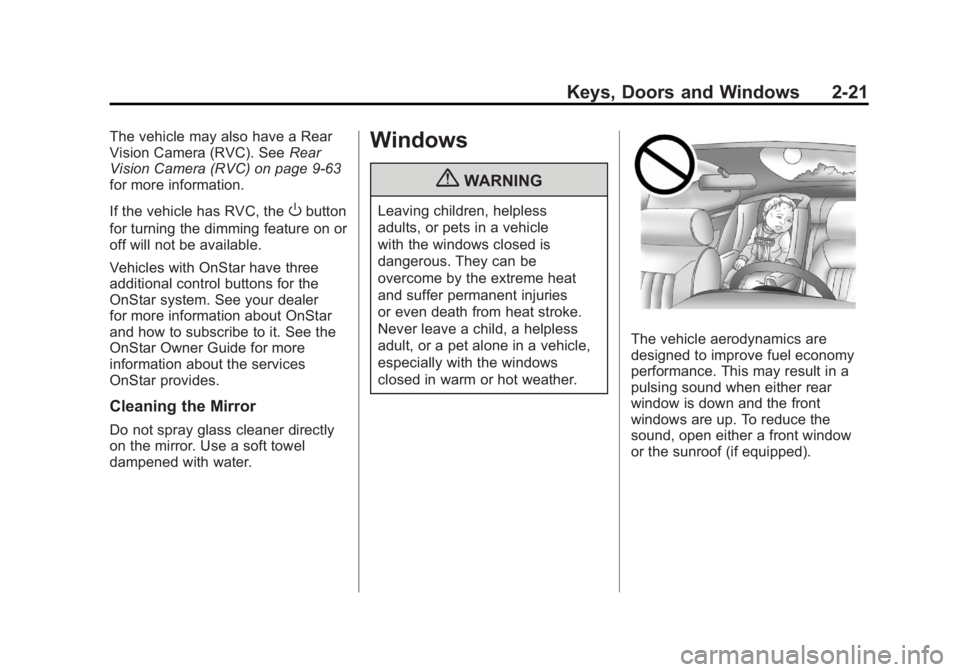
The vehicle aerodynamics are
designed to improve fuel economy
performance. This may result in a
pulsing sound when either rear
window is down and the front
windows are up. To reduce the
sound, open either a front window
or the sunroof (if equipped).
Page 65 of 528

Black plate (5,1)GMC Yukon/Yukon XL Owner Manual - 2011
Seats and Restraints 3-5
Storing Memory Positions
To save into memory:
1. Adjust the driver seat, seatbackrecliner, both outside mirrors,
and the throttle and brake
pedals, if available.
See Power Mirrors on page 2‑18
and Adjustable Throttle and
Brake Pedal on page 9‑28 for
more information.
Not all mirrors and adjustable
throttles and brake pedals will
have the ability to save and
recall their positions.
2. Press and hold “1”until
two beeps sound.
3. Repeat for a second driver position using “2.” To recall, press and release
“1”
or “2.” The vehicle must be in
P (Park). A single beep will sound.
The seat, outside mirrors, and
adjustable throttle and brake pedals
will move to the position previously
stored for the identified driver.
Memory Remote Recall
The memory feature can recall the
driver seat, outside mirrors, and
pedals, if available, to stored
positions when entering the vehicle.
To activate, unlock the driver
door with the Remote Keyless
Entry (RKE) transmitter. The driver
seat, outside mirrors, and adjustable
pedals, if available, will move to the
memory position associated with
the transmitter used to unlock the
vehicle. This feature can be turned on or off
using the vehicle personalization
menu. See
“Memory Seat Recall”
under Vehicle Personalization (With
DIC Buttons) on page 5‑47 for more
information.
To stop recall movement, press one
of the power seat controls, memory
buttons, or power mirror buttons,
or the adjustable pedal switch.
If something has blocked the driver
seat and/or the adjustable pedals
while recalling a memory position,
the recall may stop. Remove the
obstruction; then press and hold the
appropriate manual control for the
memory item that is not recalling
for two seconds. Try recalling the
memory position again by pressing
the appropriate memory button.
If the memory position is still not
recalling, see the dealer for service.
Page 66 of 528
Black plate (6,1)GMC Yukon/Yukon XL Owner Manual - 2011
3-6 Seats and Restraints
Easy Exit Driver Seat
This feature can move the seat
rearward to allow extra room to exit
the vehicle.
B(Easy Exit Driver Seat):Press
to recall the easy exit seat position.
The vehicle must be in P (Park).
If the easy exit seat feature is
programmed on in the vehicle
personalization menu, automatic
seat movement occurs when the
ignition key is removed.
A single beep sounds. The driver
seat moves back approximately
8 cm (3 in). To move the seat back
farther, press the easy exit seat
button again until the seat is all the
way back.
If something has blocked the driver
seat while recalling the exit position,
the recall may stop. Remove the
obstruction; then press and hold
the power seat control rearward for
two seconds. Try recalling the exit position again. If the exit position is
still not recalling, see the dealer for
service.
See
“Easy Exit Recall” and
“Easy Exit Setup” underVehicle
Personalization (With DIC Buttons)
on page 5‑47 for more information.
Lumbar Adjustment
Manual Lumbar
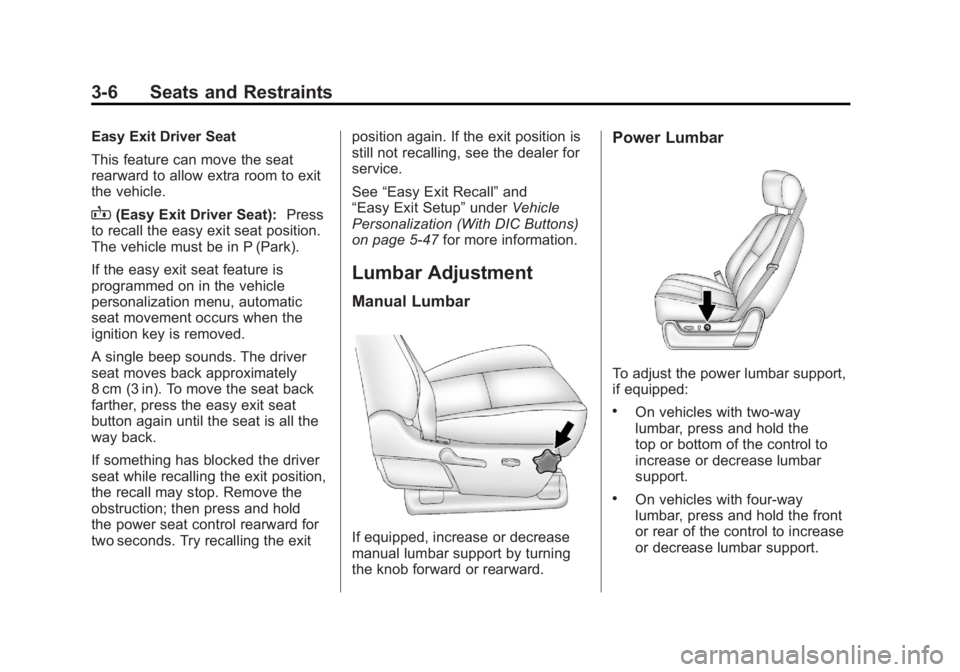
If equipped, increase or decrease
manual lumbar support by turning
the knob forward or rearward.
Power Lumbar
To adjust the power lumbar support,
if equipped:
.On vehicles with two-way
lumbar, press and hold the
top or bottom of the control to
increase or decrease lumbar
support.
.On vehicles with four-way
lumbar, press and hold the front
or rear of the control to increase
or decrease lumbar support.
Page 69 of 528
Black plate (9,1)GMC Yukon/Yukon XL Owner Manual - 2011
Seats and Restraints 3-9
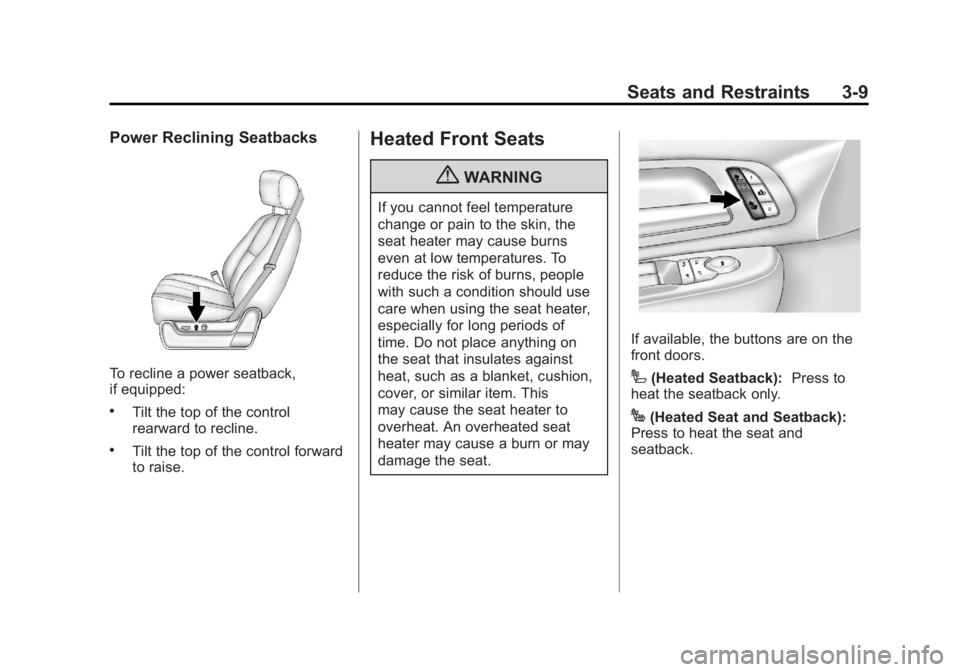
Power Reclining Seatbacks
To recline a power seatback,
if equipped:
.Tilt the top of the control
rearward to recline.
.Tilt the top of the control forward
to raise.
Heated Front Seats
{WARNING
If you cannot feel temperature
change or pain to the skin, the
seat heater may cause burns
even at low temperatures. To
reduce the risk of burns, people
with such a condition should use
care when using the seat heater,
especially for long periods of
time. Do not place anything on
the seat that insulates against
heat, such as a blanket, cushion,
cover, or similar item. This
may cause the seat heater to
overheat. An overheated seat
heater may cause a burn or may
damage the seat.
If available, the buttons are on the
front doors.
I(Heated Seatback):Press to
heat the seatback only.
J(Heated Seat and Seatback):
Press to heat the seat and
seatback.
Page 70 of 528

Black plate (10,1)GMC Yukon/Yukon XL Owner Manual - 2011
3-10 Seats and Restraints
Press the button once for the
highest setting. With each press
of the button, the heated seat will
change to the next lower setting,
and then to the off setting. The
lights indicate three for the highest
setting and one for the lowest.
The passenger seat may take
longer to heat up.
The heated seats will be canceled
10 seconds after the ignition is
turned off.Remote Start Heated Seats
When it is cold outside, the heated
seats may turn on automatically
during a remote vehicle start. The
heated seats will be canceled when
the ignition is turned on. Press the
desired button to use the heated
seats after the vehicle is started.
The lights on the heated seat
buttons do not turn on during a
remote start.
The temperature performance of an
unoccupied seat may be reduced.
This is normal.
See
Remote Vehicle Start on
page 2‑5 for more information.Heated and Ventilated
Front Seats
{WARNING
If you cannot feel temperature
change or pain to the skin, the
seat heater may cause burns
even at low temperatures. See
the Warning under Heated Front
Seats on page 3‑9.
Page 71 of 528
Black plate (11,1)GMC Yukon/Yukon XL Owner Manual - 2011
Seats and Restraints 3-11
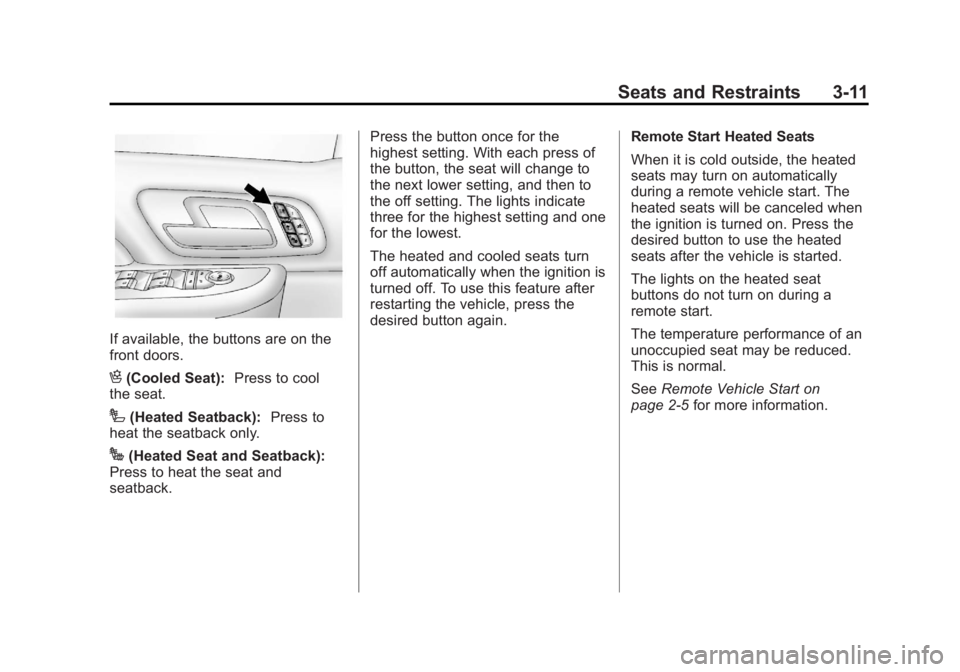
If available, the buttons are on the
front doors.
H(Cooled Seat):Press to cool
the seat.
I(Heated Seatback): Press to
heat the seatback only.
J(Heated Seat and Seatback):
Press to heat the seat and
seatback. Press the button once for the
highest setting. With each press of
the button, the seat will change to
the next lower setting, and then to
the off setting. The lights indicate
three for the highest setting and one
for the lowest.
The heated and cooled seats turn
off automatically when the ignition is
turned off. To use this feature after
restarting the vehicle, press the
desired button again.
Remote Start Heated Seats
When it is cold outside, the heated
seats may turn on automatically
during a remote vehicle start. The
heated seats will be canceled when
the ignition is turned on. Press the
desired button to use the heated
seats after the vehicle is started.
The lights on the heated seat
buttons do not turn on during a
remote start.
The temperature performance of an
unoccupied seat may be reduced.
This is normal.
See
Remote Vehicle Start on
page 2‑5 for more information.
Page 72 of 528
Black plate (12,1)GMC Yukon/Yukon XL Owner Manual - 2011
3-12 Seats and Restraints
Rear Seats
Heated Rear Seats
{WARNING
If you cannot feel temperature
change or pain to the skin, the
seat heater may cause burns
even at low temperatures. See
the Warning underHeated Front
Seats on page 3‑9.
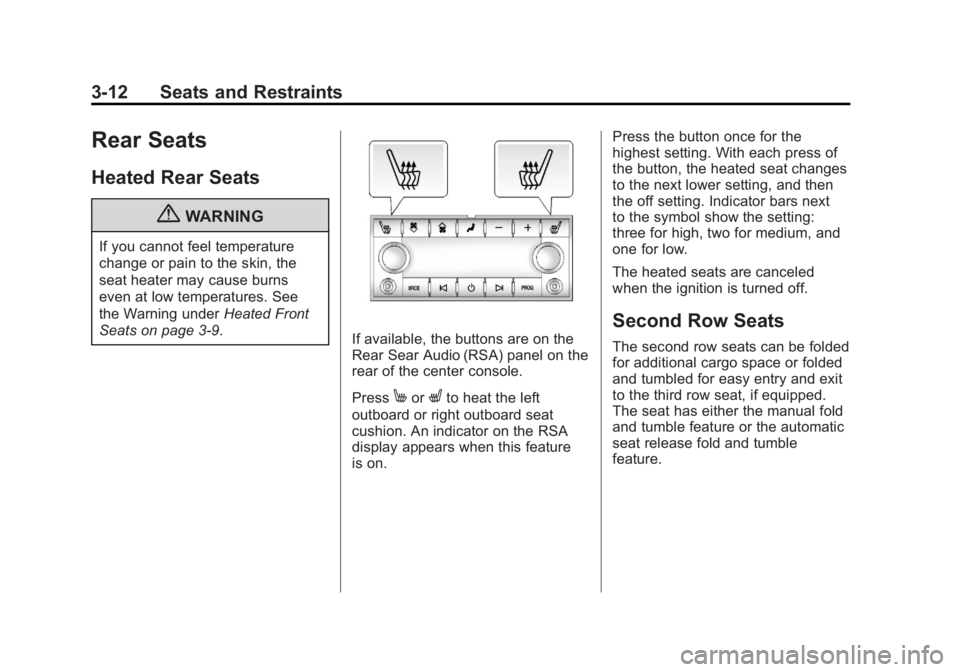
If available, the buttons are on the
Rear Sear Audio (RSA) panel on the
rear of the center console.
Press
MorLto heat the left
outboard or right outboard seat
cushion. An indicator on the RSA
display appears when this feature
is on. Press the button once for the
highest setting. With each press of
the button, the heated seat changes
to the next lower setting, and then
the off setting. Indicator bars next
to the symbol show the setting:
three for high, two for medium, and
one for low.
The heated seats are canceled
when the ignition is turned off.
Second Row Seats
The second row seats can be folded
for additional cargo space or folded
and tumbled for easy entry and exit
to the third row seat, if equipped.
The seat has either the manual fold
and tumble feature or the automatic
seat release fold and tumble
feature.