air condition GMC YUKON XL 2011 Owner's Manual
[x] Cancel search | Manufacturer: GMC, Model Year: 2011, Model line: YUKON XL, Model: GMC YUKON XL 2011Pages: 528, PDF Size: 7.64 MB
Page 270 of 528
Black plate (4,1)GMC Yukon/Yukon XL Owner Manual - 2011
8-4 Climate Controls
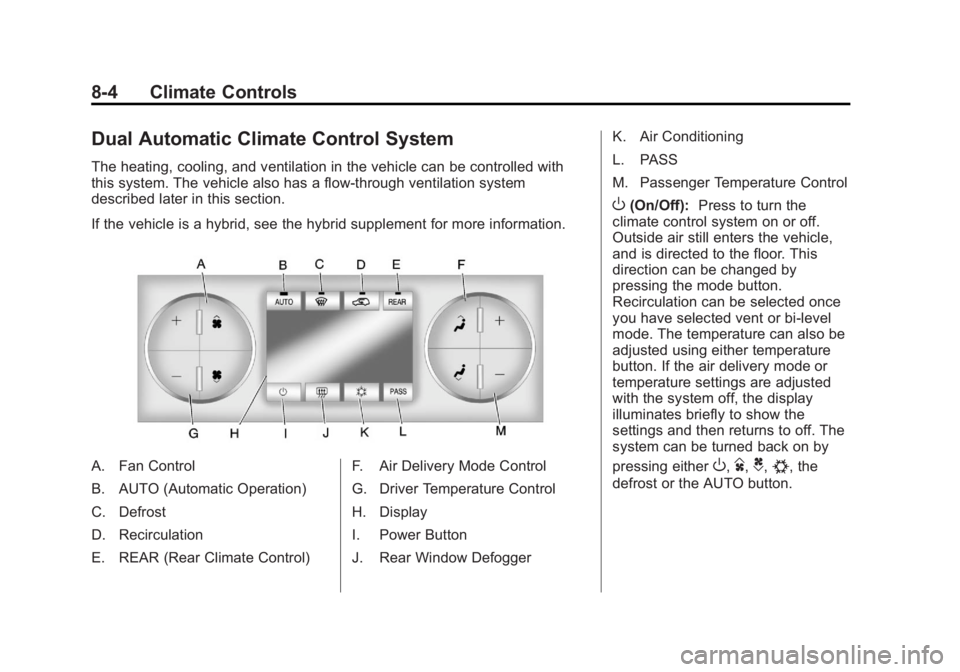
Dual Automatic Climate Control System
The heating, cooling, and ventilation in the vehicle can be controlled with
this system. The vehicle also has a flow-through ventilation system
described later in this section.
If the vehicle is a hybrid, see the hybrid supplement for more information.
A. Fan Control
B. AUTO (Automatic Operation)
C. Defrost
D. Recirculation
E. REAR (Rear Climate Control)F. Air Delivery Mode Control
G. Driver Temperature Control
H. Display
I. Power Button
J. Rear Window DefoggerK. Air Conditioning
L. PASS
M. Passenger Temperature Control
O(On/Off):
Press to turn the
climate control system on or off.
Outside air still enters the vehicle,
and is directed to the floor. This
direction can be changed by
pressing the mode button.
Recirculation can be selected once
you have selected vent or bi-level
mode. The temperature can also be
adjusted using either temperature
button. If the air delivery mode or
temperature settings are adjusted
with the system off, the display
illuminates briefly to show the
settings and then returns to off. The
system can be turned back on by
pressing either
O,D,C,#, the
defrost or the AUTO button.
Page 271 of 528
Black plate (5,1)GMC Yukon/Yukon XL Owner Manual - 2011
Climate Controls 8-5
Driver and Passenger Side
Temperature Control
The driver and passenger side
temperature buttons are used to
adjust the temperature of the air
coming through the system on the
driver or passenger side of the
vehicle. The temperature can be
adjusted even if the system is
turned off. This is possible since
outside air always flows through
the system as the vehicle is
moving forward unless it is
set to recirculation mode. See
“Recirculation”later in this section.
Press the + or −buttons to increase
or decrease the cabin temperature.
The driver side or passenger side
temperature display shows the
temperature setting decreasing or
increasing.
The passenger temperature
setting can be set to match the
driver temperature setting by
pressing the PASS button and
turning off the PASS indicator. When the passenger temperature
setting is set different than the driver
setting, the indicator on the PASS
button illuminates and both the
driver side and passenger side
temperature displays are shown.
When in defrost mode the
passenger temperature setting
cannot be changed.
Automatic Operation
AUTO (Automatic):
When
automatic operation is active the
system will control the inside
temperature, the air delivery, and
the fan speed.
Use the steps below to place the
entire system in automatic mode:
1. Press the AUTO button.
When AUTO is selected, the
display will change to show
the current temperature(s) and
AUTO will be lit on the display.
The current delivery mode and
fan speed will also be displayed
for approximately 5 seconds. When AUTO is selected, the
air conditioning operation and
air inlet will be automatically
controlled. The air conditioning
compressor will run when the
outside temperature is over
about 4°C (40°F). The air inlet
will normally be set to outside
air. If it is hot outside, the air
inlet may automatically switch
to recirculate inside air to help
quickly cool down the vehicle.
The light on the button comes on
in recirculation.
2. Set the driver and passenger temperature.
To find your comfort setting,
start with a 23°C (74°F)
temperature setting and allow
about 20 minutes for the system
to regulate. Use the driver or
passenger temperature buttons
to adjust the temperature setting
as necessary. If a temperature
setting of 15°C (60°F) is chosen,
the system remains at the
maximum cooling setting.
Page 273 of 528
Black plate (7,1)GMC Yukon/Yukon XL Owner Manual - 2011
Climate Controls 8-7
-(Defog):This mode clears the
windows of fog or moisture. Air is
directed to the windshield, floor
outlets, and side window vents.
In this mode, the system turns
off recirculation and runs the air
conditioning compressor unless
the outside temperature is close to
freezing. The recirculation mode
cannot be selected while in the
defog mode.
0(Defrost): This mode removes
fog or frost from the windshield
more quickly. Air is directed to the
windshield and side window vents,
with some directed to the floor
vents. In this mode, the system
automatically forces outside air
into the vehicle and runs the air
conditioning compressor unless
the outside temperature is close to
freezing. The recirculation mode
cannot be selected while in the
defrost mode. The passenger temperature
control cannot be activated while in
defrost mode. If the PASS button is
pressed, the button indicator flashes
three times and will not work. If the
passenger temperature buttons are
adjusted, the driver temperature
indicator changes. The passenger
temperature will not be displayed.
If vent, bi-level, or floor mode is
selected again, the climate control
system displays the previous
temperature settings.
Do not drive the vehicle until all the
windows are clear.
#(Air Conditioning):
Press
to turn the air conditioning (A/C)
compressor on and off. An indicator
light comes on to show that the air
conditioning is on. If this button is pressed when the
air conditioning compressor is
unavailable, the indicator flashes
three times and then turns off. If
the air conditioning is on and the
outside temperature drops below a
temperature which is too cool for air
conditioning to be effective, the air
conditioning light turns off to show
that the air conditioning mode has
been canceled.
On hot days, open the windows long
enough to let hot inside air escape.
This helps to reduce the time it
takes for the vehicle to cool down.
It also helps the system to operate
more efficiently.
The air conditioning system
removes moisture from the air, so
a small amount of water might drip
under the vehicle while idling or
after turning off the engine. This is
normal.
Page 274 of 528
Black plate (8,1)GMC Yukon/Yukon XL Owner Manual - 2011
8-8 Climate Controls
@(Recirculation):Press to turn
the recirculation mode on or off. An
indicator light comes on to show
that the recirculation is on.
This mode recirculates and helps
to quickly cool the air inside the
vehicle. It can be used to help
prevent outside air and odors from
entering the vehicle.
The recirculation mode cannot
be used with floor, defog, or
defrost modes. If recirculation
is selected with one of those
modes, the indicator light flashes
three times and then turns off. The
air conditioning compressor also
comes on when this mode is
activated. While in recirculation
mode the windows may fog when
the weather is cold and damp. To clear the fog, select either the
defog or defrost mode and increase
the fan speed.
The recirculation mode can also be
turned off by turning off the ignition.
REAR:
For vehicles with the rear
heat and air conditioning controls.
Press to turn the rear climate control
system on or off. See Rear Climate
Control System (Rear Climate
Control Only) on page 8‑10 orRear
Climate Control System (Rear
Climate with Rear Seat Audio) on
page 8‑11.
Rear Window Defogger
The rear window defogger uses a
warming grid to remove fog from the
rear window.
<(Rear Window Defogger):
Press to turn the rear window
defogger on or off. It automatically
turns off several minutes after it has
been activated. The defogger can
also be turned off by turning off the
engine. Do not drive the vehicle until
all the windows are clear.
Notice: Do not use a razor blade
or sharp object to clear the inside
rear window. Do not adhere
anything to the defogger grid
lines in the rear glass. These
actions may damage the rear
defogger. Repairs would not be
covered by your warranty.
Heated Mirrors: Press
of the outside mirror. See Power
Mirrors on page 2‑18.
Page 277 of 528
Black plate (11,1)GMC Yukon/Yukon XL Owner Manual - 2011
Climate Controls 8-11
)(Bi-Level):Air is directed
through the floor and headliner
outlets. The rear system floor
outlets are located directly behind
the second row seats. The flow can
be divided between vent and floor
outlets depending upon where the
knob is placed between the settings.
6(Floor): Air is directed to the
floor outlets. The rear system floor
outlets are located directly behind
the second row seats.
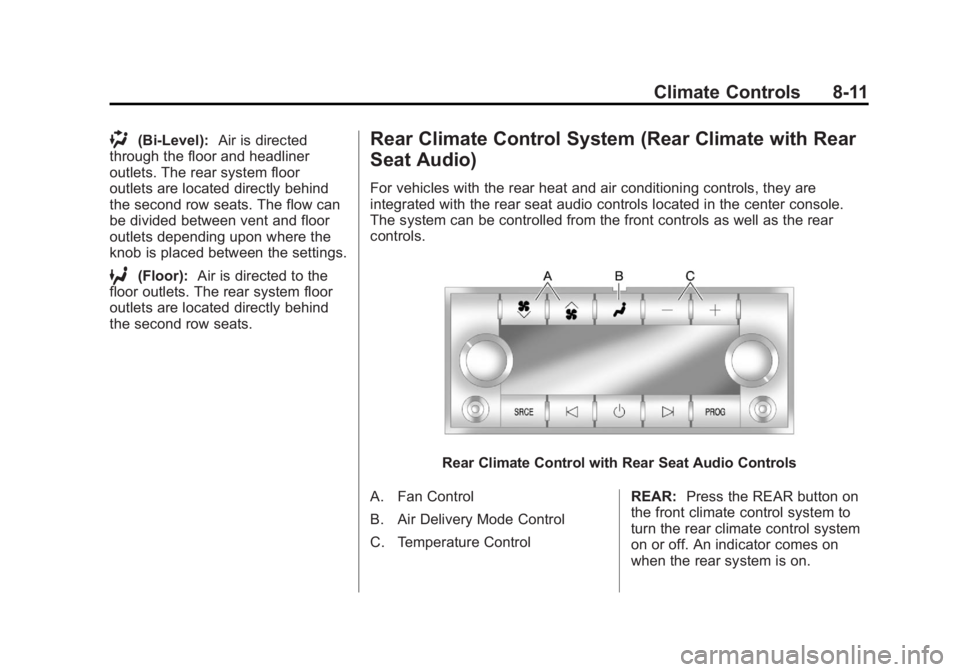
Rear Climate Control System (Rear Climate with Rear
Seat Audio)
For vehicles with the rear heat and air conditioning controls, they are
integrated with the rear seat audio controls located in the center console.
The system can be controlled from the front controls as well as the rear
controls.
Rear Climate Control with Rear Seat Audio Controls
A. Fan Control
B. Air Delivery Mode Control
C. Temperature Control REAR:
Press the REAR button on
the front climate control system to
turn the rear climate control system
on or off. An indicator comes on
when the rear system is on.
Page 279 of 528
Black plate (13,1)GMC Yukon/Yukon XL Owner Manual - 2011
Climate Controls 8-13
Air Vents
Use the air outlets located in the
center and on the side of the
instrument panel to direct the
airflow.
Operation Tips
.Keep the hood and front air
inlets free of ice, snow, or any
other obstruction (such as
leaves). The heater and
defroster will work far better,
reducing the chance of fogging
the inside of the windows.
.When you enter a vehicle in cold
weather, press the fan up button
to the maximum fan level before
driving. This helps clear the
intake ducts of snow and
moisture, and reduces the
chance of fogging the inside of
the window.
.Keep the air path under the front
seats clear of objects. This helps
air to circulate throughout the
vehicle.
.Adding outside equipment to the
front of the vehicle, such as
hood-air deflectors, may affect
the performance of the heating
and air conditioning system.
Check with your dealer before
adding equipment to the outside
of the vehicle.
Page 286 of 528
Black plate (6,1)GMC Yukon/Yukon XL Owner Manual - 2011
9-6 Driving and Operating
The fact that such emergency
situations are always possible is a
good reason to practice defensive
driving at all times and wear safety
belts properly.
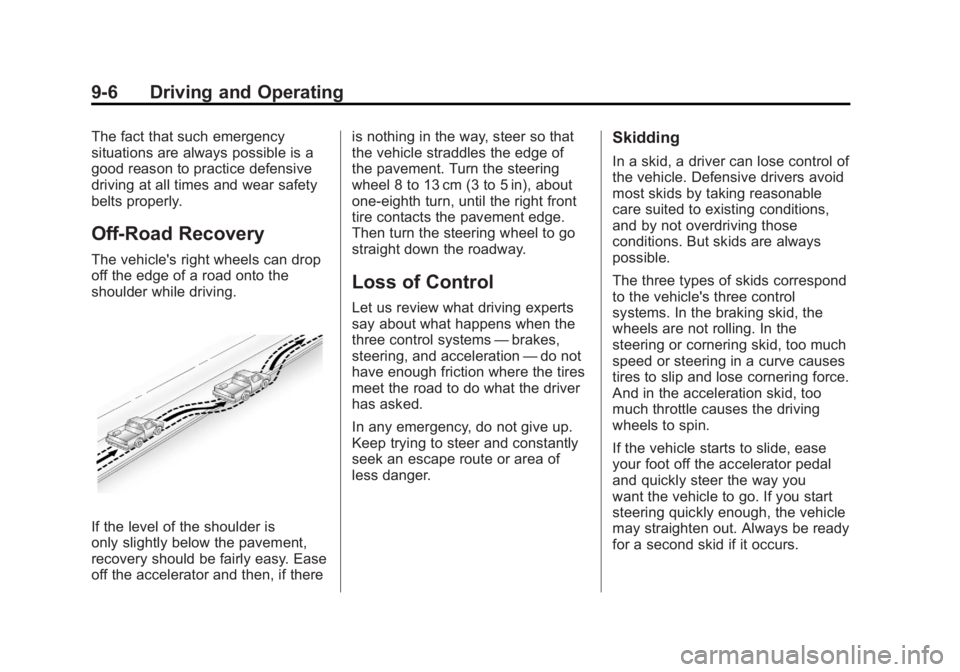
Off-Road Recovery
The vehicle's right wheels can drop
off the edge of a road onto the
shoulder while driving.
If the level of the shoulder is
only slightly below the pavement,
recovery should be fairly easy. Ease
off the accelerator and then, if thereis nothing in the way, steer so that
the vehicle straddles the edge of
the pavement. Turn the steering
wheel 8 to 13 cm (3 to 5 in), about
one-eighth turn, until the right front
tire contacts the pavement edge.
Then turn the steering wheel to go
straight down the roadway.
Loss of Control
Let us review what driving experts
say about what happens when the
three control systems
—brakes,
steering, and acceleration —do not
have enough friction where the tires
meet the road to do what the driver
has asked.
In any emergency, do not give up.
Keep trying to steer and constantly
seek an escape route or area of
less danger.
Skidding
In a skid, a driver can lose control of
the vehicle. Defensive drivers avoid
most skids by taking reasonable
care suited to existing conditions,
and by not overdriving those
conditions. But skids are always
possible.
The three types of skids correspond
to the vehicle's three control
systems. In the braking skid, the
wheels are not rolling. In the
steering or cornering skid, too much
speed or steering in a curve causes
tires to slip and lose cornering force.
And in the acceleration skid, too
much throttle causes the driving
wheels to spin.
If the vehicle starts to slide, ease
your foot off the accelerator pedal
and quickly steer the way you
want the vehicle to go. If you start
steering quickly enough, the vehicle
may straighten out. Always be ready
for a second skid if it occurs.
Page 287 of 528
Black plate (7,1)GMC Yukon/Yukon XL Owner Manual - 2011
Driving and Operating 9-7
Of course, traction is reduced when
water, snow, ice, gravel, or other
material is on the road. For safety,
slow down and adjust your driving to
these conditions. It is important to
slow down on slippery surfaces
because stopping distance is longer
and vehicle control more limited.
While driving on a surface with
reduced traction, try to avoid
sudden steering, acceleration,
or braking, including reducing
vehicle speed by shifting to a lower
gear. Any sudden changes could
cause the tires to slide. You might
not realize the surface is slippery
until the vehicle is skidding. Learn to
recognize warning clues—such as
enough water, ice, or packed snow
on the road to make a mirrored
surface —and slow down when you
have any doubt.
Remember: Antilock brakes help
avoid only the braking skid.Off-Road Driving
Vehicles with four-wheel drive
can be used for off-road driving.
Vehicles without four-wheel drive
and vehicles with 20‐inch tire/wheel
assemblies should not be driven
off-road except on a level, solid
surface.
The airbag system is designed to
work properly under a wide range of
conditions, including off‐road usage.
Always wear your safety belt and
observe safe driving speeds,
especially on rough terrain.
Drinking and driving can be very
dangerous on any road and this is
certainly true for off-road driving.
At the very time you need special
alertness and driving skills, your
reflexes, perceptions, and judgment
can be affected by even a small
amount of alcohol. You could have a
serious —or even fatal —accident
if you drink and drive or ride with a
driver who has been drinking. Off-roading can be great fun but has
some definite hazards. The greatest
of these is the terrain itself. When
off-road driving, traffic lanes are not
marked, curves are not banked, and
there are no road signs. Surfaces
can be slippery, rough, uphill,
or downhill.
Avoid sharp turns and abrupt
maneuvers. Failure to operate the
vehicle correctly off‐road could
result in loss of vehicle control or
vehicle rollover.
Off-roading involves some new
skills. That is why it is very
important that you read these
driving tips and suggestions to
help make off-road driving safer
and more enjoyable.
Page 319 of 528
Black plate (39,1)GMC Yukon/Yukon XL Owner Manual - 2011
Driving and Operating 9-39
{WARNING
Shifting into a drive gear while the
engine is running at high speed is
dangerous. Unless your foot is
firmly on the brake pedal, the
vehicle could move very rapidly.
You could lose control and hit
people or objects. Do not shift
into a drive gear while the engine
is running at high speed.
Notice: Shifting out of P (Park)
or N (Neutral) with the engine
running at high speed may
damage the transmission. The
repairs would not be covered by
the vehicle warranty. Be sure the
engine is not running at high
speed when shifting the vehicle. D (Drive):
This position is for
normal driving. It provides the best
fuel economy. If you need more
power for passing, and you are:
.Going less than about 55 km/h
(35 mph), push the accelerator
pedal about halfway down.
.Going about 55 km/h (35 mph) or
more, push the accelerator all
the way down.
By doing this, the vehicle shifts
down to the next gear and has
more power.
D (Drive) can be used when towing
a trailer, carrying a heavy load,
driving on steep hills, or for off-road
driving. You might want to shift
the transmission to a lower gear
selection if the transmission shifts
too often.
Downshifting the transmission in
slippery road conditions could result
in skidding. See “Skidding”under
Loss of Control on page 9‑6. The vehicle has a shift stabilization
feature that adjusts the transmission
shifting to the current driving
conditions in order to reduce rapid
upshifts and downshifts. This shift
stabilization feature is designed
to determine, before making an
upshift, if the engine is able to
maintain vehicle speed by analyzing
things such as vehicle speed,
throttle position, and vehicle load.
If the shift stabilization feature
determines that a current vehicle
speed cannot be maintained, the
transmission does not upshift and
instead holds the current gear. In
some cases, this could appear
to be a delayed shift, however the
transmission is operating normally.
The vehicle's transmission
uses adaptive shift controls.
Adaptive shift controls continually
compares key shift parameters to
pre-programmed ideal shifts stored
in the transmissions computer.
Page 320 of 528
Black plate (40,1)GMC Yukon/Yukon XL Owner Manual - 2011
9-40 Driving and Operating
The transmission constantly makes
adjustments to improve vehicle
performance according to how the
vehicle is being used, such as
with a heavy load or when the
temperature changes. During this
adaptive shift control process,
shifting might feel different as the
transmission determines the best
settings.
When temperatures are very cold,
shifting could be delayed providing
more stable shifts until the engine
warms up. Shifts could be more
noticeable with a cold transmission.
This difference in shifting is normal.
M (Manual Mode):This position
lets drivers select the range of gears
appropriate for current driving
conditions. If the vehicle has this
feature, see “Range Selection
Mode” underManual Mode on
page 9‑41. 3 (Third):
This position is also used
for normal driving. It reduces vehicle
speed more than D (Drive) without
using the brakes. You might choose
3 (Third) instead of D (Drive) when
driving on hilly, winding roads, when
towing a trailer, so there is less
shifting between gears and when
going down a steep hill.
2 (Second): This position reduces
vehicle speed even more than
3 (Third) without using the brakes.
You can use 2 (Second) on hills.
It can help control vehicle speed as
you go down steep mountain roads,
but then you would also want to use
the brakes off and on.
If you manually select 2 (Second)
in an automatic transmission,
the transmission will start in
second gear. You can use this
feature for reducing the speed of the
rear wheels when you are trying to
start the vehicle from a stop on
slippery road surfaces. 1 (First):
This position reduces
vehicle speed without using the
brakes. You can use it for major/
severe downgrades and off-road
driving where the vehicle would
otherwise accelerate due to
steepness of grade. When you shift
to 1 (First) it provides the lowest
gear appropriate to the vehicle's
current road speed and continues
to downshift as the vehicle slows,
eventually downshifting to
1 (First) gear.
Notice: Spinning the tires
or holding the vehicle in one
place on a hill using only the
accelerator pedal may damage
the transmission. The repair will
not be covered by the vehicle
warranty. If you are stuck, do not
spin the tires. When stopping on
a hill, use the brakes to hold the
vehicle in place.