clock GMC YUKON XL 2018 User Guide
[x] Cancel search | Manufacturer: GMC, Model Year: 2018, Model line: YUKON XL, Model: GMC YUKON XL 2018Pages: 425, PDF Size: 7.37 MB
Page 309 of 425
GMC Yukon/Yukon XL/Denali Owner Manual (GMNA-Localizing-U.S./
Canada/Mexico-11349262) - 2018 - crc - 6/20/17
308 Vehicle Care 5. Turn the bulb socket
counterclockwise to remove it
from the taillamp assembly.
6. Pull the bulb straight out from
the socket.
7. Put a new bulb into the socket,
insert it into the taillamp
assembly, and turn the bulb
socket clockwise until it clicks.
8. Reinstall the taillamp assembly
and tighten the screws.
9. Reinstall the taillamp cover by
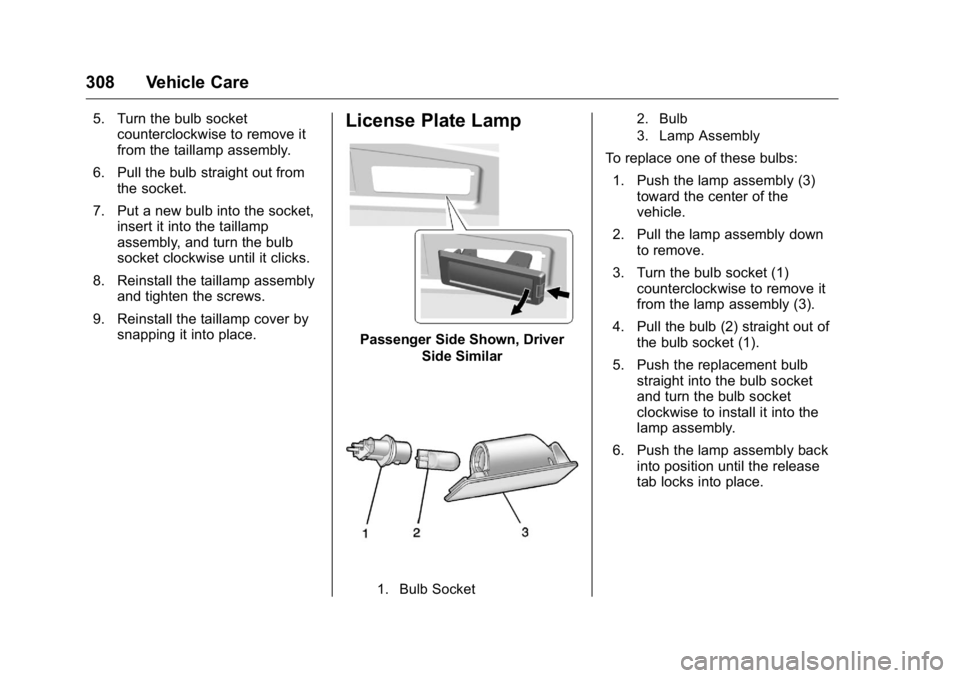
snapping it into place. License Plate Lamp
Passenger Side Shown, Driver
Side Similar
1. Bulb Socket 2. Bulb
3. Lamp Assembly
To replace one of these bulbs:
1. Push the lamp assembly (3)
toward the center of the
vehicle.
2. Pull the lamp assembly down
to remove.
3. Turn the bulb socket (1)
counterclockwise to remove it
from the lamp assembly (3).
4. Pull the bulb (2) straight out of
the bulb socket (1).
5. Push the replacement bulb
straight into the bulb socket
and turn the bulb socket
clockwise to install it into the
lamp assembly.
6. Push the lamp assembly back
into position until the release
tab locks into place.
Page 344 of 425
GMC Yukon/Yukon XL/Denali Owner Manual (GMNA-Localizing-U.S./
Canada/Mexico-11349262) - 2018 - crc - 6/20/17
Vehicle Care 343
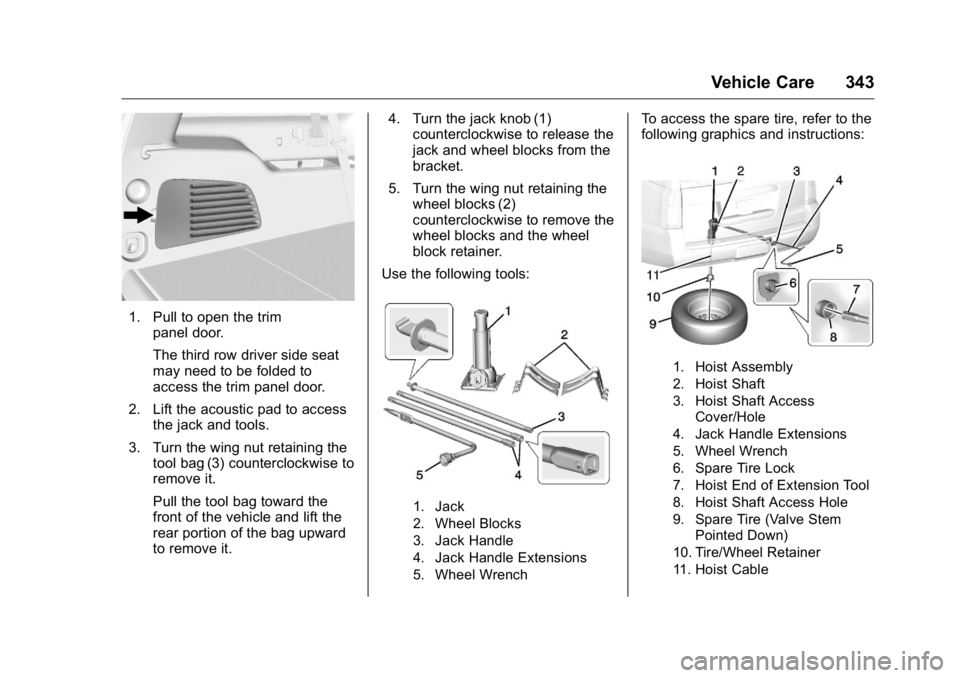
1. Pull to open the trim
panel door.
The third row driver side seat
may need to be folded to
access the trim panel door.
2. Lift the acoustic pad to access
the jack and tools.
3. Turn the wing nut retaining the
tool bag (3) counterclockwise to
remove it.
Pull the tool bag toward the
front of the vehicle and lift the
rear portion of the bag upward
to remove it. 4. Turn the jack knob (1)
counterclockwise to release the
jack and wheel blocks from the
bracket.
5. Turn the wing nut retaining the
wheel blocks (2)
counterclockwise to remove the
wheel blocks and the wheel
block retainer.
Use the following tools:
1. Jack
2. Wheel Blocks
3. Jack Handle
4. Jack Handle Extensions
5. Wheel Wrench To access the spare tire, refer to the
following graphics and instructions:
1. Hoist Assembly
2. Hoist Shaft
3. Hoist Shaft Access
Cover/Hole
4. Jack Handle Extensions
5. Wheel Wrench
6. Spare Tire Lock
7. Hoist End of Extension Tool
8. Hoist Shaft Access Hole
9. Spare Tire (Valve Stem
Pointed Down)
10. Tire/Wheel Retainer
11. Hoist Cable
Page 345 of 425
GMC Yukon/Yukon XL/Denali Owner Manual (GMNA-Localizing-U.S./
Canada/Mexico-11349262) - 2018 - crc - 6/20/17
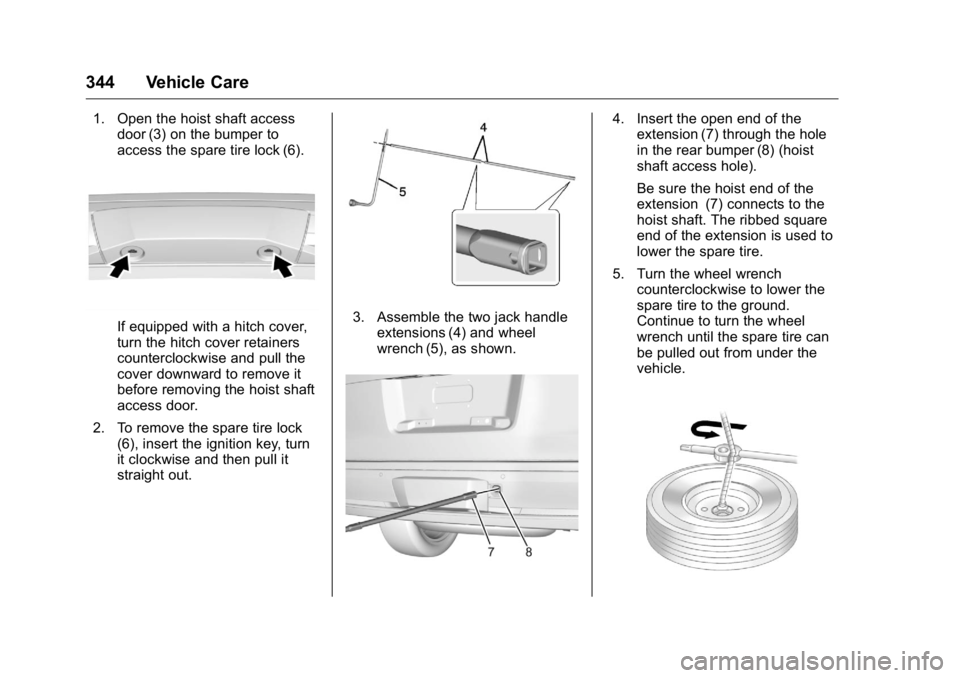
344 Vehicle Care 1. Open the hoist shaft access
door (3) on the bumper to
access the spare tire lock (6).
If equipped with a hitch cover,
turn the hitch cover retainers
counterclockwise and pull the
cover downward to remove it
before removing the hoist shaft
access door.
2. To remove the spare tire lock
(6), insert the ignition key, turn
it clockwise and then pull it
straight out. 3. Assemble the two jack handle
extensions (4) and wheel
wrench (5), as shown. 4. Insert the open end of the
extension (7) through the hole
in the rear bumper (8) (hoist
shaft access hole).
Be sure the hoist end of the
extension (7) connects to the
hoist shaft. The ribbed square
end of the extension is used to
lower the spare tire.
5. Turn the wheel wrench
counterclockwise to lower the
spare tire to the ground.
Continue to turn the wheel
wrench until the spare tire can
be pulled out from under the
vehicle.
Page 346 of 425
GMC Yukon/Yukon XL/Denali Owner Manual (GMNA-Localizing-U.S./
Canada/Mexico-11349262) - 2018 - crc - 6/20/17
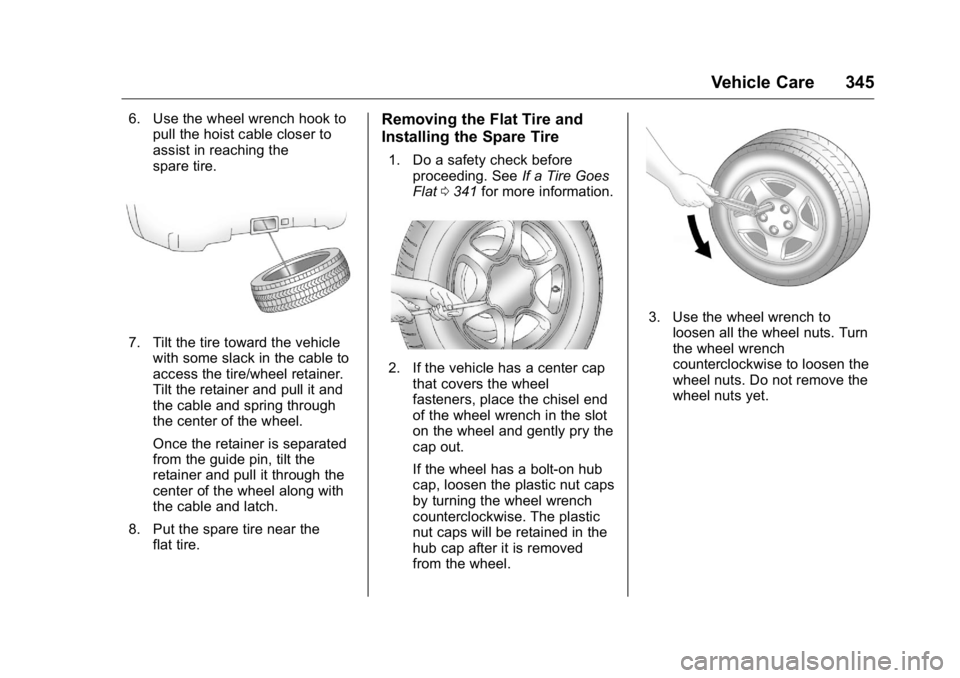
Vehicle Care 3456. Use the wheel wrench hook to
pull the hoist cable closer to
assist in reaching the
spare tire.
7. Tilt the tire toward the vehicle
with some slack in the cable to
access the tire/wheel retainer.
Tilt the retainer and pull it and
the cable and spring through
the center of the wheel.
Once the retainer is separated
from the guide pin, tilt the
retainer and pull it through the
center of the wheel along with
the cable and latch.
8. Put the spare tire near the
flat tire. Removing the Flat Tire and
Installing the Spare Tire 1. Do a safety check before
proceeding. See If a Tire Goes
Flat 0 341 for more information.
2. If the vehicle has a center cap
that covers the wheel
fasteners, place the chisel end
of the wheel wrench in the slot
on the wheel and gently pry the
cap out.
If the wheel has a bolt-on hub
cap, loosen the plastic nut caps
by turning the wheel wrench
counterclockwise. The plastic
nut caps will be retained in the
hub cap after it is removed
from the wheel. 3. Use the wheel wrench to
loosen all the wheel nuts. Turn
the wheel wrench
counterclockwise to loosen the
wheel nuts. Do not remove the
wheel nuts yet.
Page 347 of 425
GMC Yukon/Yukon XL/Denali Owner Manual (GMNA-Localizing-U.S./
Canada/Mexico-11349262) - 2018 - crc - 6/20/17
346 Vehicle Care
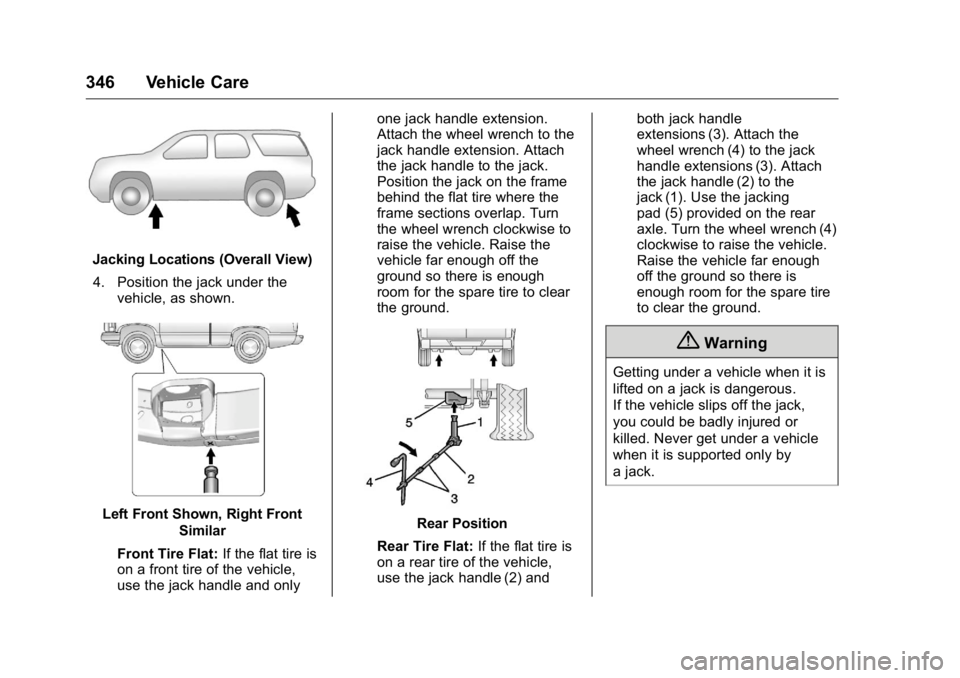
Jacking Locations (Overall View)
4. Position the jack under the
vehicle, as shown.
Left Front Shown, Right Front
Similar
Front Tire Flat: If the flat tire is
on a front tire of the vehicle,
use the jack handle and only one jack handle extension.
Attach the wheel wrench to the
jack handle extension. Attach
the jack handle to the jack.
Position the jack on the frame
behind the flat tire where the
frame sections overlap. Turn
the wheel wrench clockwise to
raise the vehicle. Raise the
vehicle far enough off the
ground so there is enough
room for the spare tire to clear
the ground.
Rear Position
Rear Tire Flat: If the flat tire is
on a rear tire of the vehicle,
use the jack handle (2) and both jack handle
extensions (3). Attach the
wheel wrench (4) to the jack
handle extensions (3). Attach
the jack handle (2) to the
jack (1). Use the jacking
pad (5) provided on the rear
axle. Turn the wheel wrench (4)
clockwise to raise the vehicle.
Raise the vehicle far enough
off the ground so there is
enough room for the spare tire
to clear the ground.
{ WarningGetting under a vehicle when it is
lifted on a jack is dangerous.
If the vehicle slips off the jack,
you could be badly injured or
killed. Never get under a vehicle
when it is supported only by
a jack.
Page 348 of 425
GMC Yukon/Yukon XL/Denali Owner Manual (GMNA-Localizing-U.S./
Canada/Mexico-11349262) - 2018 - crc - 6/20/17
Vehicle Care 347
{ WarningRaising the vehicle with the jack
improperly positioned can
damage the vehicle and even
make the vehicle fall. To help
avoid personal injury and vehicle
damage, be sure to fit the jack lift
head into the proper location
before raising the vehicle.
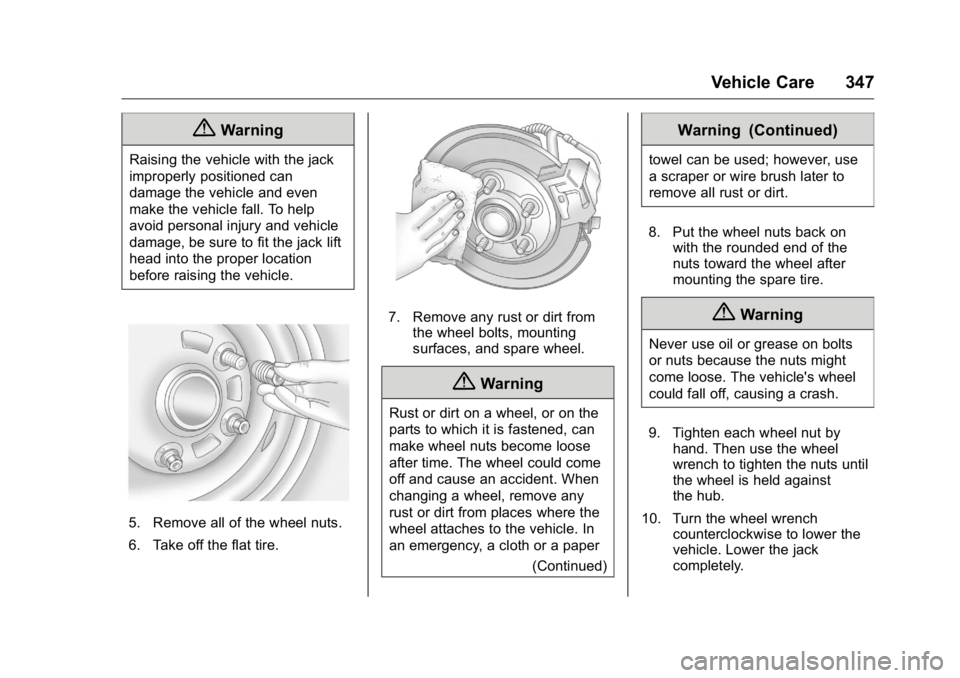
5. Remove all of the wheel nuts.
6. Take off the flat tire. 7. Remove any rust or dirt from
the wheel bolts, mounting
surfaces, and spare wheel.
{ WarningRust or dirt on a wheel, or on the
parts to which it is fastened, can
make wheel nuts become loose
after time. The wheel could come
off and cause an accident. When
changing a wheel, remove any
rust or dirt from places where the
wheel attaches to the vehicle. In
an emergency, a cloth or a paper
(Continued) Warning (Continued) towel can be used; however, use
a scraper or wire brush later to
remove all rust or dirt.
8. Put the wheel nuts back on
with the rounded end of the
nuts toward the wheel after
mounting the spare tire.
{ WarningNever use oil or grease on bolts
or nuts because the nuts might
come loose. The vehicle's wheel
could fall off, causing a crash.
9. Tighten each wheel nut by
hand. Then use the wheel
wrench to tighten the nuts until
the wheel is held against
the hub.
10. Turn the wheel wrench
counterclockwise to lower the
vehicle. Lower the jack
completely.
Page 349 of 425
GMC Yukon/Yukon XL/Denali Owner Manual (GMNA-Localizing-U.S./
Canada/Mexico-11349262) - 2018 - crc - 6/20/17
348 Vehicle Care
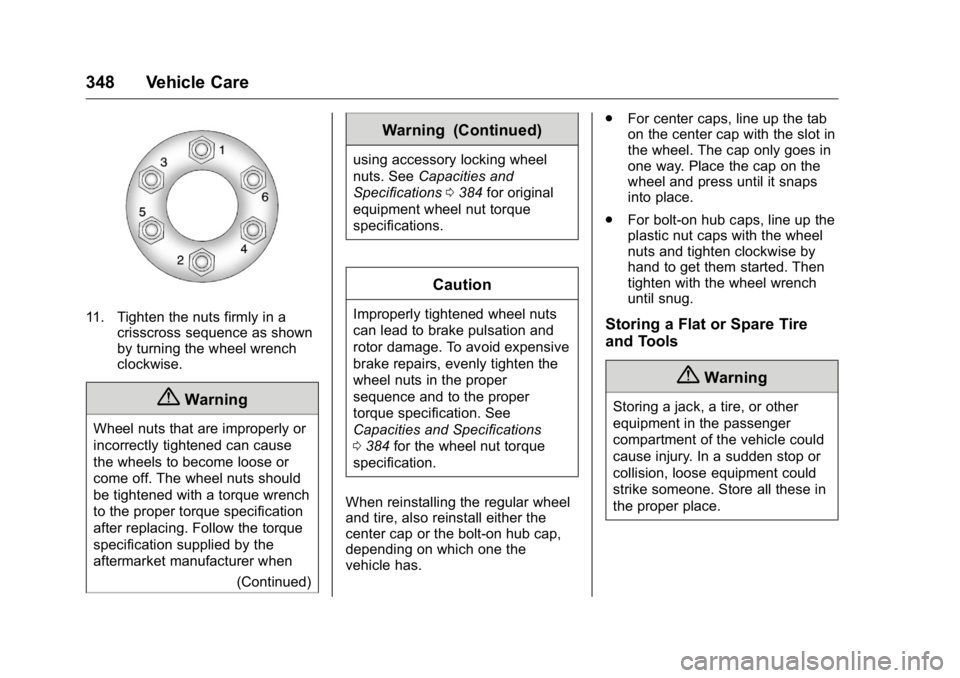
11. Tighten the nuts firmly in a
crisscross sequence as shown
by turning the wheel wrench
clockwise.
{ Warning
Wheel nuts that are improperly or
incorrectly tightened can cause
the wheels to become loose or
come off. The wheel nuts should
be tightened with a torque wrench
to the proper torque specification
after replacing. Follow the torque
specification supplied by the
aftermarket manufacturer when
(Continued) Warning (Continued) using accessory locking wheel
nuts. See Capacities and
Specifications 0 384 for original
equipment wheel nut torque
specifications.
CautionImproperly tightened wheel nuts
can lead to brake pulsation and
rotor damage. To avoid expensive
brake repairs, evenly tighten the
wheel nuts in the proper
sequence and to the proper
torque specification. See
Capacities and Specifications
0 384 for the wheel nut torque
specification.
When reinstalling the regular wheel
and tire, also reinstall either the
center cap or the bolt-on hub cap,
depending on which one the
vehicle has. .
For center caps, line up the tab
on the center cap with the slot in
the wheel. The cap only goes in
one way. Place the cap on the
wheel and press until it snaps
into place.
.
For bolt-on hub caps, line up the
plastic nut caps with the wheel
nuts and tighten clockwise by
hand to get them started. Then
tighten with the wheel wrench
until snug.
Storing a Flat or Spare Tire
and Tools
{ WarningStoring a jack, a tire, or other
equipment in the passenger
compartment of the vehicle could
cause injury. In a sudden stop or
collision, loose equipment could
strike someone. Store all these in
the proper place.
Page 351 of 425
GMC Yukon/Yukon XL/Denali Owner Manual (GMNA-Localizing-U.S./
Canada/Mexico-11349262) - 2018 - crc - 6/20/17
350 Vehicle Care 3. Assemble the two jack handle
extensions (4) and wheel
wrench (5).
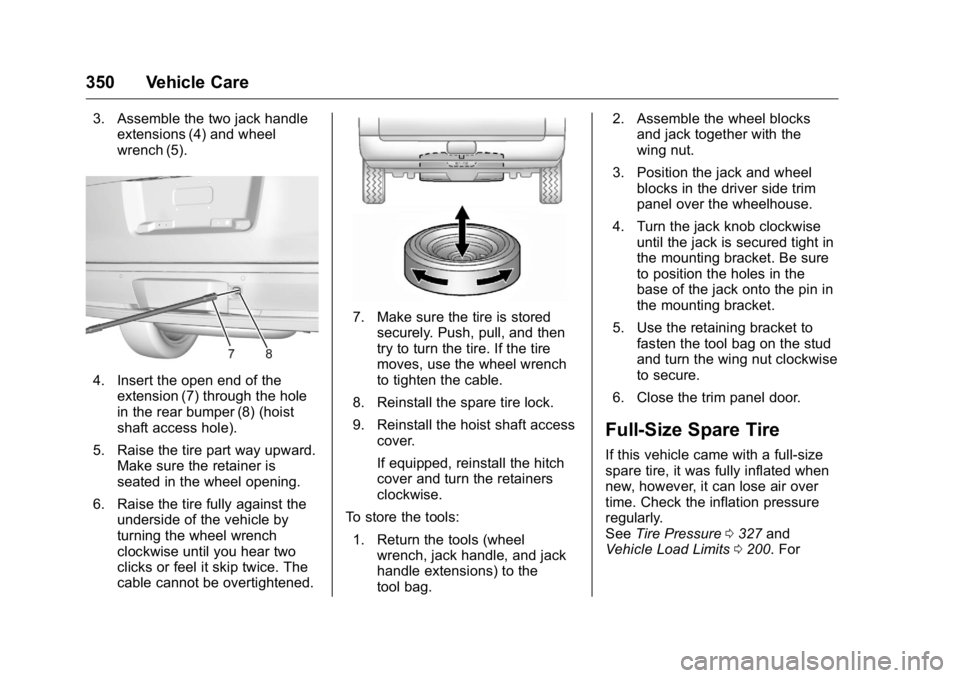
4. Insert the open end of the
extension (7) through the hole
in the rear bumper (8) (hoist
shaft access hole).
5. Raise the tire part way upward.
Make sure the retainer is
seated in the wheel opening.
6. Raise the tire fully against the
underside of the vehicle by
turning the wheel wrench
clockwise until you hear two
clicks or feel it skip twice. The
cable cannot be overtightened. 7. Make sure the tire is stored
securely. Push, pull, and then
try to turn the tire. If the tire
moves, use the wheel wrench
to tighten the cable.
8. Reinstall the spare tire lock.
9. Reinstall the hoist shaft access
cover.
If equipped, reinstall the hitch
cover and turn the retainers
clockwise.
To store the tools:
1. Return the tools (wheel
wrench, jack handle, and jack
handle extensions) to the
tool bag. 2. Assemble the wheel blocks
and jack together with the
wing nut.
3. Position the jack and wheel
blocks in the driver side trim
panel over the wheelhouse.
4. Turn the jack knob clockwise
until the jack is secured tight in
the mounting bracket. Be sure
to position the holes in the
base of the jack onto the pin in
the mounting bracket.
5. Use the retaining bracket to
fasten the tool bag on the stud
and turn the wing nut clockwise
to secure.
6. Close the trim panel door.
Full-Size Spare Tire If this vehicle came with a full-size
spare tire, it was fully inflated when
new, however, it can lose air over
time. Check the inflation pressure
regularly.
See Tire Pressure 0 327 and
Vehicle Load Limits 0 200 . For
Page 415 of 425

GMC Yukon/Yukon XL/Denali Owner Manual (GMNA-Localizing-U.S./
Canada/Mexico-11349262) - 2018 - crc - 6/21/17
414 Index Check (cont'd)
Ignition Transmission Lock . . . 303
Child Restraints
Infants and Young Children . . . . . 98
Lower Anchors and Tethers
for Children . . . . . . . . . . . . . . . . . 104
Older Children . . . . . . . . . . . . . . . . . . 97
Securing . . . . . . . . . . . . . . . . . .112, 114
Systems . . . . . . . . . . . . . . . . . . . . . . 101
Child-View Mirror . . . . . . . . . . . . . . . . 56
Circuit Breakers . . . . . . . . . . . . . . . . 309
Cleaning
Exterior Care . . . . . . . . . . . . . . . . . 360
Interior Care . . . . . . . . . . . . . . . . . . 364
Climate Control Systems
Dual Automatic . . . . . . . . . . . . . . . 180
Rear . . . . . . . . . . . . . . . . . . . . . . . . . . 184
Clock . . . . . . . . . . . . . . . . . . . . . . . . . . . 126
Cluster, Instrument . . . . . . . . . . . . . 133
Collision Damage Repair . . . . . . . 393
Compartments
Storage . . . . . . . . . . . . . . . . . . . . . . . .118
Compass . . . . . . . . . . . . . . . . . . . . . . . 126
Connections
OnStar . . . . . . . . . . . . . . . . . . . . . . . 403
Control
Hill Descent . . . . . . . . . . . . . . . . . . 231 Control (cont'd)
Traction and Electronic
Stability . . . . . . . . . . . . . . . . . . . . . 229
Control of a Vehicle . . . . . . . . . . . . . 190
Convenience Net . . . . . . . . . . . . . . . 120
Convex Mirrors . . . . . . . . . . . . . . . . . . 52
Coolant
Engine Temperature Gauge . . 138
Engine Temperature
Warning Light . . . . . . . . . . . . . . . 148
Cooling . . . . . . . . . . . . . . . . . . . . 180, 184
Cooling System . . . . . . . . . . . . . . . . . 291
Courtesy Transportation
Program . . . . . . . . . . . . . . . . . . . . . . . 392
Cruise Control . . . . . . . . . . . . . . . . . . 233
Light . . . . . . . . . . . . . . . . . . . . . . . . . . 150
Cruise Control, Adaptive . . . . . . . . 235
Cupholders . . . . . . . . . . . . . . . . . . . . . 118
Customer Assistance . . . . . . . . . . . 389
Offices . . . . . . . . . . . . . . . . . . . . . . . . 388
Text Telephone (TTY)
Users . . . . . . . . . . . . . . . . . . . . . . . 389
Customer Information
Service Publications
Ordering Information . . . . . . . . 395
Customer Satisfaction
Procedure . . . . . . . . . . . . . . . . . . . . . 386 D Damage Repair, Collision . . . . . . . 393
Danger, Warning, and Caution . . . . 2
Data Collection
Infotainment System . . . . . . . . . . 399
OnStar . . . . . . . . . . . . . . . . . . . . . . . 399
Data Recorders, Event . . . . . . . . . 398
Daytime Running
Lamps (DRL) . . . . . . . . . . . . . . . . . . 173
Defensive Driving . . . . . . . . . . . . . . . 190
Delayed Locking . . . . . . . . . . . . . . . . . 42
Diagnostics
OnStar . . . . . . . . . . . . . . . . . . . . . . . 405
Distracted Driving . . . . . . . . . . . . . . . 189
Dome Lamps . . . . . . . . . . . . . . . . . . . 176
Door
Ajar Light . . . . . . . . . . . . . . . . . . . . . 150
Delayed Locking . . . . . . . . . . . . . . . . 42
Locks . . . . . . . . . . . . . . . . . . . . . . . . . . . 41
Power Locks . . . . . . . . . . . . . . . . . . . . 42
Drive Belt Routing, Engine . . . . . . 385
Driver Assistance Systems . . . . . 242
Driver Information
Center (DIC) . . . . . . . . . . . . . . . . . . 151
Driving
Assistance Systems . . . . . . . . . . 246
Characteristics and
Towing Tips . . . . . . . . . . . . . . . . . 259