reset GMC YUKON XL 2018 Owners Manual
[x] Cancel search | Manufacturer: GMC, Model Year: 2018, Model line: YUKON XL, Model: GMC YUKON XL 2018Pages: 425, PDF Size: 7.37 MB
Page 22 of 425
GMC Yukon/Yukon XL/Denali Owner Manual (GMNA-Localizing-U.S./
Canada/Mexico-11349262) - 2018 - crc - 6/20/17
In Brief 21
o or
p : Press to move between
the interactive display zones in the
cluster.
V : Press to open a menu or select
a menu item. Press and hold to
reset values on certain screens.
See Driver Information Center (DIC)
0 151 .
Forward Collision Alert
(FCA) System If equipped, FCA may help avoid or
reduce the harm caused by
front-end crashes. FCA provides a
green indicator,
V , when a vehicle
is detected ahead. This indicator
displays amber if you follow a
vehicle too closely. When
approaching a vehicle ahead too
quickly, FCA provides a flashing red
alert on the windshield and rapidly
beeps or pulses the driver seat.
See Forward Collision Alert (FCA)
System 0 246 . Forward Automatic
Braking (FAB) If the vehicle has Forward Collision
Alert (FCA), it also has FAB, which
includes Intelligent Brake
Assist (IBA). When the system
detects a vehicle ahead in your path
that is traveling in the same
direction that you may be about to
crash into, it can provide a boost to
braking or automatically brake the
vehicle. This can help avoid or
lessen the severity of crashes when
driving in a forward gear.
See Forward Automatic Braking
(FAB) 0 248 .
Lane Keep Assist (LKA) If equipped, LKA may help avoid
crashes due to unintentional lane
departures. It may assist by gently
turning the steering wheel if the
vehicle approaches a detected lane
marking without using a turn signal
in that direction. It may also provide
a Lane Departure Warning (LDW)
alert as the lane marking is crossed.
The system will not assist or alert if it detects that you are actively
steering. Override LKA by turning
the steering wheel. LKA uses a
camera to detect lane markings
between 60 km/h (37 mph) and
180 km/h (112 mph).
See Lane Departure Warning (LDW)
0 252 and Lane Keep Assist (LKA)
0 252 .
Lane Change Alert (LCA) If equipped, the LCA system is a
lane-changing aid that assists
drivers with avoiding lane change
crashes that occur with moving
vehicles in the side blind zone (or
spot) areas or with vehicles rapidly
approaching these areas from
behind. The LCA warning display
will light up in the corresponding
outside mirror and will flash if the
turn signal is on. The Side Blind
Zone Alert (SBZA) system is
included as part of the LCA system.
See Side Blind Zone Alert (SBZA)
0 250 and Lane Change Alert (LCA)
0 250 .
Page 26 of 425
GMC Yukon/Yukon XL/Denali Owner Manual (GMNA-Localizing-U.S./
Canada/Mexico-11349262) - 2018 - crc - 6/20/17
In Brief 25Loading Information label. See
Vehicle Load Limits 0 200 . The
warning light will remain on until the
tire pressure is corrected.
The low tire pressure warning light
may come on in cool weather when
the vehicle is first started, and then
turn off as the vehicle is driven. This
may be an early indicator that the
tire pressures are getting low and
the tires need to be inflated to the
proper pressure.
The TPMS does not replace normal
monthly tire maintenance. Maintain
the correct tire pressures.
See Tire Pressure Monitor System
0 329 .
Tire Fill Alert (If Equipped)
This feature provides visual and
audible alerts outside the vehicle to
help when inflating an underinflated
tire to the recommended cold tire
pressure. See “ Tire Fill Alert (If
Equipped) ” under Tire Pressure
Monitor Operation 0 330 . Fuel (L83 5.3L V8 Engine) Regular Fuel
Use only unleaded gasoline rated
87 octane or higher in your vehicle.
Do not use gasoline with an octane
rating lower as it may result in
vehicle damage and lower fuel
economy. See Fuel 0 254 .
Fuel (L86 6.2L V8 Engine)
Premium Recommended Fuel
Use premium 93 octane unleaded
gasoline in your vehicle. Unleaded
gasoline with an octane rating as low as 87 may be used, but it will
reduce performance and fuel
economy. See Fuel 0 254 .
E85 or FlexFuel
FlexFuel Possible
Certain models are compatible with
E85 fuel. See E85 or FlexFuel
0 256 .
Engine Oil Life System The engine oil life system calculates
engine oil life based on vehicle use
and displays a DIC message when
it is necessary to change the engine
oil and filter. The oil life system
should be reset to 100% only
following an oil change.
Page 27 of 425
GMC Yukon/Yukon XL/Denali Owner Manual (GMNA-Localizing-U.S./
Canada/Mexico-11349262) - 2018 - crc - 6/20/17
26 In Brief Resetting the Oil Life System
To reset the engine oil life system:
1. Display REMAINING OIL LIFE
on the DIC. See Driver
Information Center (DIC) 0 151 .
2. Press and hold
V on the DIC.
The oil life will change
to 100%.
The oil life system can also be reset
as follows:
1. Display REMAINING OIL LIFE
on the DIC. See Driver
Information Center (DIC) 0 151 .
2. Fully press the accelerator
pedal slowly three times within
five seconds.
3. If the display changes to 100%,
the system is reset.
See Engine Oil Life System 0 285 .Driving for Better Fuel
Economy Driving habits can affect fuel
mileage. Here are some driving tips
to get the best fuel economy
possible.
.
Avoid fast starts and accelerate
smoothly.
.
Brake gradually and avoid
abrupt stops.
.
Avoid idling the engine for long
periods of time.
.
When road and weather
conditions are appropriate, use
cruise control.
.
Always follow posted speed
limits or drive more slowly when
conditions require.
.
Keep vehicle tires properly
inflated.
.
Combine several trips into a
single trip.
.
Replace the vehicle's tires with
the same TPC Spec number
molded into the tire's sidewall
near the size. .
Follow recommended scheduled
maintenance.
Roadside Assistance
Program U.S.: 1-888-881-3302
TTY Users (U.S. Only):
1-888-889-2438
Canada: 1-800-268-6800
New GMC owners are automatically
enrolled in the Roadside Assistance
Program.
See Roadside Assistance Program
0 390 .
Page 42 of 425
GMC Yukon/Yukon XL/Denali Owner Manual (GMNA-Localizing-U.S./
Canada/Mexico-11349262) - 2018 - crc - 6/20/17
Keys, Doors, and Windows 41
Door Locks
{ WarningUnlocked doors can be
dangerous.
.
Passengers, especially
children, can easily open
the doors and fall out of a
moving vehicle. The doors
can be unlocked and
opened while the vehicle is
moving. The chance of
being thrown out of the
vehicle in a crash is
increased if the doors are
not locked. So, all
passengers should wear
seat belts properly and the
doors should be locked
whenever the vehicle is
driven.
.
Young children who get into
unlocked vehicles may be
unable to get out. A child
can be overcome by
extreme heat and can suffer
permanent injuries or even
(Continued) Warning (Continued) death from heat stroke.
Always lock the vehicle
whenever leaving it.
.
Outsiders can easily enter
through an unlocked door
when you slow down or stop
the vehicle. Locking the
doors can help prevent this
from happening.
To lock or unlock the doors from
outside the vehicle:
.
Press
Q or
K on the Remote
Keyless Entry (RKE) transmitter.
.
Use the key in the driver door.
To lock or unlock the doors from
inside the vehicle:
.
Press
Q or
K on the power door
lock switch.
.
Pushing down the manual lock
knob on the driver door will lock
all doors. Pushing down the manual lock knob on a
passenger door will lock only
that door.
.
Pulling an interior door handle
will unlock the door. Pulling the
door handle again unlatches it.
Keyless Access
If equipped, the RKE transmitter
must be within 1 m (3 ft) of the
liftgate or door being opened. Press
the button on the door handle to
open. See “ Keyless Access
Operation ” in Remote Keyless Entry
(RKE) System Operation (Key
Access) 0 31 or Remote Keyless
Entry (RKE) System Operation
(Keyless Access) 0 33 .
Free-Turning Locks
The door key lock cylinder turns
freely when either the wrong key is
used, or the correct key is not fully
inserted. The free-turning door lock
feature prevents the lock from being
forced open. To reset the lock, turn
it to the vertical position with the
correct key fully inserted. Remove
the key and insert it again. If this
Page 43 of 425
GMC Yukon/Yukon XL/Denali Owner Manual (GMNA-Localizing-U.S./
Canada/Mexico-11349262) - 2018 - crc - 6/20/17
42 Keys, Doors, and Windows does not reset the lock, turn the key
halfway around in the cylinder and
repeat the reset procedure.
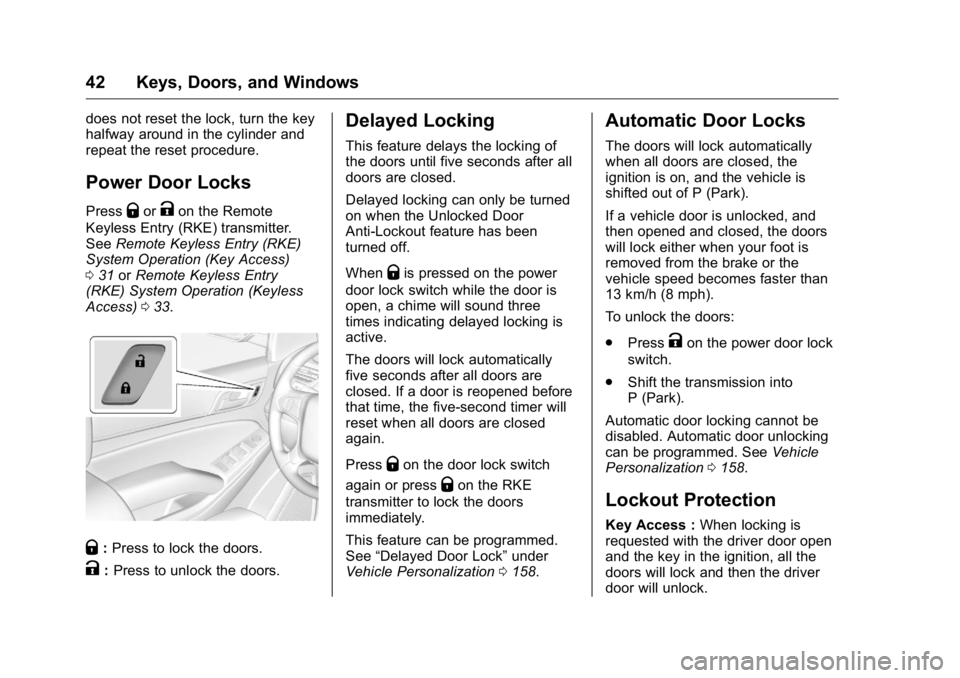
Power Door Locks Press
Q or
K on the Remote
Keyless Entry (RKE) transmitter.
See Remote Keyless Entry (RKE)
System Operation (Key Access)
0 31 or Remote Keyless Entry
(RKE) System Operation (Keyless
Access) 0 33 .
Q : Press to lock the doors.
K : Press to unlock the doors. Delayed Locking This feature delays the locking of
the doors until five seconds after all
doors are closed.
Delayed locking can only be turned
on when the Unlocked Door
Anti-Lockout feature has been
turned off.
When
Q is pressed on the power
door lock switch while the door is
open, a chime will sound three
times indicating delayed locking is
active.
The doors will lock automatically
five seconds after all doors are
closed. If a door is reopened before
that time, the five-second timer will
reset when all doors are closed
again.
Press
Q on the door lock switch
again or press
Q on the RKE
transmitter to lock the doors
immediately.
This feature can be programmed.
See “ Delayed Door Lock ” under
Vehicle Personalization 0 158 .Automatic Door Locks The doors will lock automatically
when all doors are closed, the
ignition is on, and the vehicle is
shifted out of P (Park).
If a vehicle door is unlocked, and
then opened and closed, the doors
will lock either when your foot is
removed from the brake or the
vehicle speed becomes faster than
13 km/h (8 mph).
To unlock the doors:
.
Press
K on the power door lock
switch.
.
Shift the transmission into
P (Park).
Automatic door locking cannot be
disabled. Automatic door unlocking
can be programmed. See Vehicle
Personalization 0 158 .
Lockout Protection Key Access : When locking is
requested with the driver door open
and the key in the ignition, all the
doors will lock and then the driver
door will unlock.
Page 54 of 425
GMC Yukon/Yukon XL/Denali Owner Manual (GMNA-Localizing-U.S./
Canada/Mexico-11349262) - 2018 - crc - 6/20/17
Keys, Doors, and Windows 53
Power Mirrors
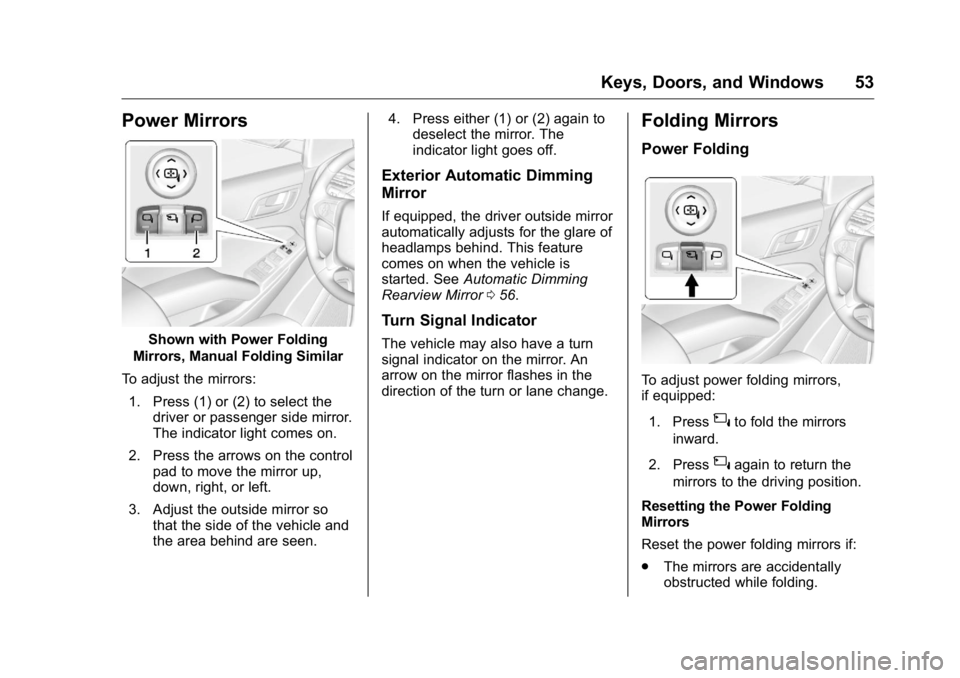
Shown with Power Folding
Mirrors, Manual Folding Similar
To adjust the mirrors:
1. Press (1) or (2) to select the
driver or passenger side mirror.
The indicator light comes on.
2. Press the arrows on the control
pad to move the mirror up,
down, right, or left.
3. Adjust the outside mirror so
that the side of the vehicle and
the area behind are seen. 4. Press either (1) or (2) again to
deselect the mirror. The
indicator light goes off.
Exterior Automatic Dimming
Mirror If equipped, the driver outside mirror
automatically adjusts for the glare of
headlamps behind. This feature
comes on when the vehicle is
started. See Automatic Dimming
Rearview Mirror 0 56 .
Turn Signal Indicator The vehicle may also have a turn
signal indicator on the mirror. An
arrow on the mirror flashes in the
direction of the turn or lane change. Folding Mirrors Power Folding
To adjust power folding mirrors,
if equipped:
1. Press
{ to fold the mirrors
inward.
2. Press
{ again to return the
mirrors to the driving position.
Resetting the Power Folding
Mirrors
Reset the power folding mirrors if:
.
The mirrors are accidentally
obstructed while folding.
Page 55 of 425
GMC Yukon/Yukon XL/Denali Owner Manual (GMNA-Localizing-U.S./
Canada/Mexico-11349262) - 2018 - crc - 6/20/17
54 Keys, Doors, and Windows .
They are accidentally manually
folded/unfolded.
.
The mirrors will not stay in the
unfolded position.
.
The mirrors vibrate at normal
driving speeds.
Fold and unfold the mirrors one time
using the mirror controls to reset
them to their normal position.
A popping noise may be heard
during the resetting of the power
folding mirrors. This sound is normal
after a manual folding operation.
Manual Folding Fold the mirrors inward to prevent
damage when going through an
automatic car wash. To fold, pull the
mirror toward the vehicle. Push the
mirror outward, to return to its
original position.
Heated Mirrors
K : Press to heat the mirrors.
See “ Rear Window Defogger ” under
Dual Automatic Climate Control
System 0 180 . Automatic Dimming
Mirror If the vehicle has the automatic
dimming mirror, the driver outside
mirror automatically adjusts for the
glare of the headlamps from behind.
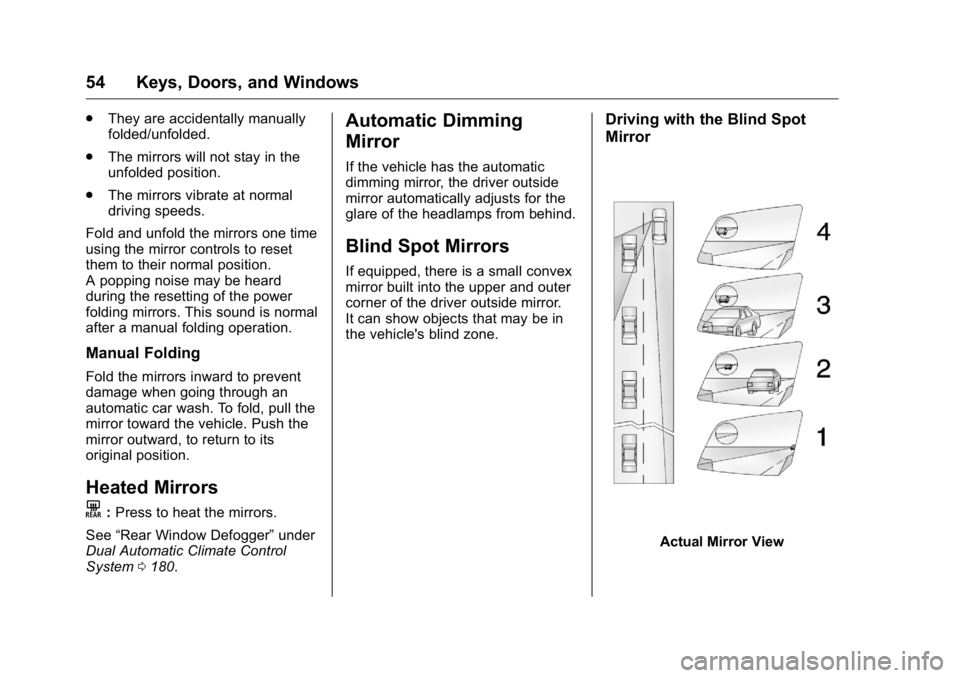
Blind Spot Mirrors If equipped, there is a small convex
mirror built into the upper and outer
corner of the driver outside mirror.
It can show objects that may be in
the vehicle's blind zone. Driving with the Blind Spot
Mirror
Actual Mirror View
Page 126 of 425
GMC Yukon/Yukon XL/Denali Owner Manual (GMNA-Localizing-U.S./
Canada/Mexico-11349262) - 2018 - crc - 6/20/17
Instruments and Controls 125when
z AUTO is turned on or off,
a message may display indicating if
Rainsense was turned on or off.
If the ignition is in on and
zFRONT is not in one of the
sensitivity settings when
z AUTO
is turned on, a message may
display indicating that the wiper
band must be in one of the
sensitivity settings for Rainsense to
operate.
Wiper Arm Assembly Protection
When using an automatic car wash,
move the windshield wiper lever to
OFF. This disables the automatic
Rainsense windshield wipers.
With Rainsense, if the transmission
is in N (Neutral) and the vehicle
speed is very slow, the wipers will
automatically stop at the base of the
windshield.
The wiper operations return to
normal when the transmission is no
longer in N (Neutral) or the vehicle
speed has increased. Windshield Washer
{ WarningIn freezing weather, do not use
the washer until the windshield is
warmed. Otherwise the washer
fluid can form ice on the
windshield, blocking your vision.
L m : Push the paddle marked with
the windshield washer symbol at the
top of the turn signal lever to spray
washer fluid and activate the wipers.
The wipers will continue until the
paddle is released or the maximum
wash time is reached. When the
paddle is released, additional wipes
may occur depending on how long
the windshield washer had been
activated. See Washer Fluid 0 296
for information on filling the
windshield washer fluid reservoir. Rear Window Wiper/
Washer
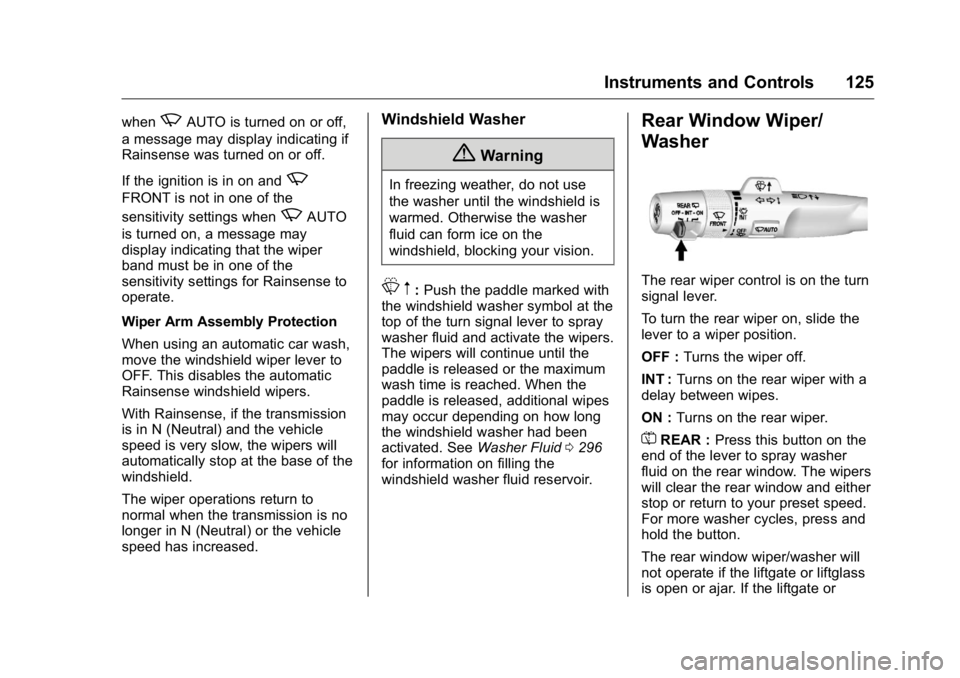
The rear wiper control is on the turn
signal lever.
To turn the rear wiper on, slide the
lever to a wiper position.
OFF : Turns the wiper off.
INT : Turns on the rear wiper with a
delay between wipes.
ON : Turns on the rear wiper.
= REAR : Press this button on the
end of the lever to spray washer
fluid on the rear window. The wipers
will clear the rear window and either
stop or return to your preset speed.
For more washer cycles, press and
hold the button.
The rear window wiper/washer will
not operate if the liftgate or liftglass
is open or ajar. If the liftgate or
Page 130 of 425
GMC Yukon/Yukon XL/Denali Owner Manual (GMNA-Localizing-U.S./
Canada/Mexico-11349262) - 2018 - crc - 6/20/17
Instruments and Controls 129When adding electrical equipment,
be sure to follow the proper
installation instructions included with
the equipment. See Add-On
Electrical Equipment 0 274 .
CautionHanging heavy equipment from
the power outlet can cause
damage not covered by the
vehicle warranty. The power
outlets are designed for
accessory power plugs only, such
as cell phone charge cords.
Power Outlet 110/120-Volt
Alternating Current If equipped with this power outlet, it
can be used to plug in electrical
equipment that uses a maximum
limit of 150 watts.
For vehicles with a center console,
the 110/120-volt power outlet is on
the rear of the center console. For vehicles with bench seats, the
110/120-volt power outlet is on the
center stack below the climate
controls.
An indicator light on the outlet turns
on to show it is in use. The light
comes on when the ignition is on,
equipment requiring less than 150
watts is plugged into the outlet, and
no system fault is detected.
The indicator light does not come on
when the ignition is off or if the
equipment is not fully seated into
the outlet.
If equipment is connected using
more than 150 watts or a system
fault is detected, a protection circuit
shuts off the power supply and the
indicator light turns off. To reset the
circuit, unplug the item and plug it
back in or turn the ignition off and
then back to on. The power restarts
when equipment using 150 watts or
less is plugged into the outlet and a
system fault is not detected. The power outlet is not designed for
the following, and may not work
properly if they are plugged in:
.
Equipment with high initial peak
wattage, such as
compressor-driven refrigerators
and electric power tools
.
Other equipment requiring an
extremely stable power supply,
such as
microcomputer-controlled
electric blankets and touch
sensor lamps
.
Medical equipment
Wireless Charging The vehicle may have wireless
charging on top of the center
console. See Center Console
Storage 0 120 . The system
operates at 145 kHz and wirelessly
charges one PMA or Qi compatible
mobile device. The power output of
the system is capable of charging at
a rate up to 1 amp (5W), as
requested by the compatible mobile
device. See Radio Frequency
Statement 0 396 .
Page 137 of 425
GMC Yukon/Yukon XL/Denali Owner Manual (GMNA-Localizing-U.S./
Canada/Mexico-11349262) - 2018 - crc - 6/20/17
136 Instruments and Controls Display Themes (Denali) : There
are three instrument cluster display
configurations to choose from:
Standard, Technology, and Media.
Info Pages : Press
p while Info
Pages is displayed to enter the Info
Pages menu and select the items to
be displayed in the Info app. See
Driver Information Center (DIC)
0 151 .
Head-up Display (HUD) Rotation :
If equipped, this feature allows for
adjusting the angle of the HUD
image. Press
p on the steering
wheel controls while Head-up
Display Rotation is highlighted to
enter Adjust Mode. Press
w or
xto adjust the angle of the HUD
display. Press
V to confirm and
save the setting. To cancel the
setting, press
o . The vehicle must
be in P (Park).
Speed Warning : The Speed
Warning display allows the driver to
set a speed that they do not want to
exceed. To set the Speed Warning,
press
p when Speed Warning is displayed. Enable the speed
warning and then use
w or
x to
adjust the value. Press
V to set the
speed. Once the speed is set, this
feature can be turned off by
pressing
V while viewing this page.
If the selected speed limit is
exceeded, a pop-up warning is
displayed with a chime.
Software Information : Displays
open source software information.
Speedometer The speedometer shows the
vehicle's speed in either kilometers
per hour (km/h) or miles per
hour (mph).
Odometer The odometer shows how far the
vehicle has been driven, in either
kilometers or miles. The odometer
displays on the Speed page of the
Driver Information Center (DIC). Trip Odometer The trip odometer shows how far
the vehicle has been driven since
the trip odometer was last reset.
The trip odometer is accessed and
reset through the Driver Information
Center (DIC). See Driver
Information Center (DIC) 0 151 .
Tachometer The tachometer displays the engine
speed in revolutions per
minute (rpm).