door lock GREAT WALL FLORID 2008 User Guide
[x] Cancel search | Manufacturer: GREAT WALL, Model Year: 2008, Model line: FLORID, Model: GREAT WALL FLORID 2008Pages: 281, PDF Size: 43.97 MB
Page 184 of 281
Downloaded from www.Manualslib.com manuals search engine 177Electrical Accessories
Reverse Sensor ................................................................178
Combination Meter ...........................................................180
Central Door Lock.............................................................181
Power Windows ................................................................184
Immobilizer System ..........................................................186
CD Player ........................................................................\
.193
DVD Player .......................................................................195
Electrical Accessories
Page 187 of 281
Downloaded from www.Manualslib.com manuals search engine GWFLORID Maintenance Manual180
Combination Meter
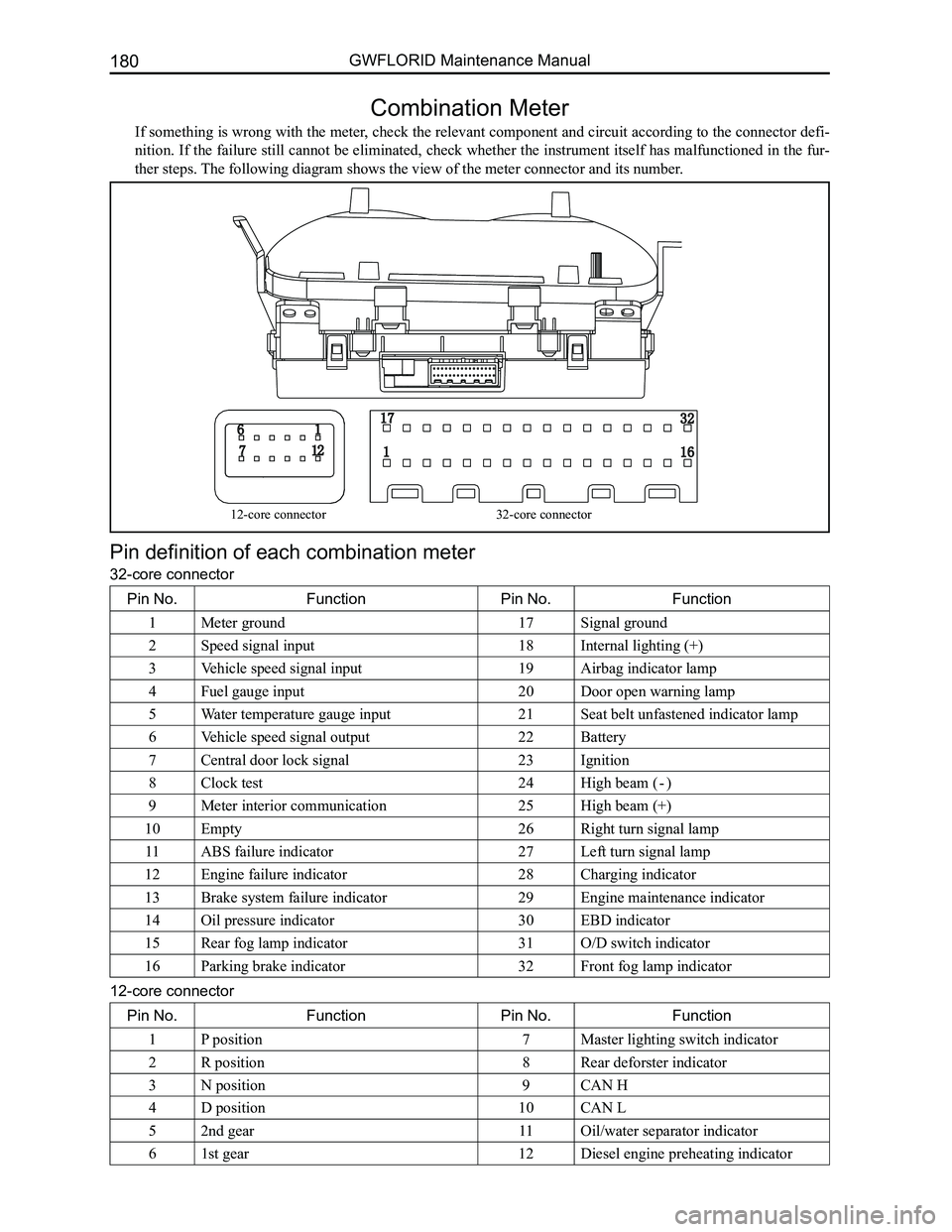
If something is wrong with the meter, check the relevant component and circuit according to the connector defi-
nition. If the failure still cannot be eliminated, check whether the instrument itself has malfunctioned in the fur-
ther steps. The following diagram shows the view of the meter connector and its numb\
er.
Pin definition of each combination meter
32-core connector
Pin No.FunctionPin No.Function
1Meter ground17Signal ground
2Speed signal input18Internal lighting (+)
3Vehicle speed signal input19Airbag indicator lamp
4Fuel gauge input20Door open warning lamp
5Water temperature gauge input21Seat belt unfastened indicator lamp
6Vehicle speed signal output22Battery
7Central door lock signal23Ignition
8Clock test24High beam ( - )
9Meter interior communication25High beam (+)
10Empty26Right turn signal lamp
11ABS failure indicator27Left turn signal lamp
12Engine failure indicator28Charging indicator
13Brake system failure indicator29Engine maintenance indicator
14Oil pressure indicator30EBD indicator
15Rear fog lamp indicator31O/D switch indicator
16Parking brake indicator32Front fog lamp indicator
12-core connector
Pin No.FunctionPin No.Function
1P position7Master lighting switch indicator
2R position8Rear deforster indicator
3N position9CAN H
4D position10CAN L
52nd gear11Oil/water separator indicator
61st gear12Diesel engine preheating indicator
12-core connector32-core connector
Page 188 of 281
Downloaded from www.Manualslib.com manuals search engine 181Electrical Accessories
Central Door Lock
1. Lock
After closing the door (when unlocked), press the LOCK button once on the remote controller, the car lamp
flashs once, and all five doors will be locked.
2. Unlock
When locked, press the UNLOCK button once on the remote controller, the car lamp will flash twice, and all
four front doors will be unlocked.
3. Vehicle pager function
Press the LOCK button once on the remote controller while all the doors are closed and locked. The car lamp
will then flash ten times. Press the UNLOCK button to exit the vehicle pager function. If the doors are not well
closed and locked, then press the LOCK button once on the remote controller, in which case the lamps will not
flash.
4. Auto-defense function
While locked, press the UNLOCK button on the remote controller. If the doors are not open, it will automatically
lock after 30s.
5. Auto-close window function (jam protection window regulator)
(a) Pull the key out and make sure all the doors are closed, then press the LOCK button on remote controller,
the side windows will close after 1 second of negative output.
(b) After pulling out the key, the sunroof will close after 60 seconds of negative output (reserve)\
.
6. Remote controller function suspension
When the key is inserted into the ignition lock, the remote controller will not work, but the head unit will work
as normal.
7. Manual lock and unlock
Locking or unlocking can be manually controlled.
8. Deleting or registering remote learning functions of the remote controll\
er
Step one: Under normal circumstances, open the front left door (do not close). Insert the key into the ignition
lock, within five seconds, switch it ON and LOCK five times and stop it at the ON position the fifth time. The
buzzer will sound once and the light will flash once. It is now in the l\
earning state.
Step two: Press any key on the remote controller within 10 seconds, the buzzer will sound twice, and the light
will flash twice. This is the first learning state. Press any key on another remote controller, it will sound twice,
and the light will flash twice. Second learning successful (A total of four remote controllers can learn).
Step three: After successful learning, pull the key out (ON-LOCK) to exit the learning state. If no key is pressed
within 10 seconds, the system will exit from the learning state automati\
cally.
9. Dome lamp delay function
(a) Open the door and then close it, the lamp will light for 10 seconds. If the key is inserted into the ignition
lock head or door lock within these 10 seconds, the lamp will gradually \
extinguish.
(b) When the key is pulled out of the ignition lock head, the dome lamp will turn on. If the key is inserted into
it again or the door is locked, the dome lamp will turn off gradually after one minute.
10. Alert function
(a) If the key is inserted (low) and is not at the ON gear (high), when the front left door is opened (low), the
buzzer will emit an intermittent chirp.
(b) If the key is not inserted (low) and the lamplet is on (high), when the front left door is open (low), the
buzzer will emit a long chirp.
11. Trunk door independent open function
(a) After pressing the trunk lock striker of the remote controller and turning the trunk door switch on, the trunk
door actuator will open (14th pin will output positive voltage), and then the trunk door can be opened. If
the trunk door does not open after pressing the trunk lock striker for 60 seconds and then switching the
trunk door on, then the trunk door actuator is unable to open (14th pin\
is not outputting positive voltage).
(b) When the trunk lock striker of the remote controller is not pressed or the trunk door is not opened after
pressing the button for 60 seconds, the trunk door actuator cannot be opened after switching the trunk door
on (14th pin is not outputting positive voltage).
Page 189 of 281
Downloaded from www.Manualslib.com manuals search engine GWFLORID Maintenance Manual182
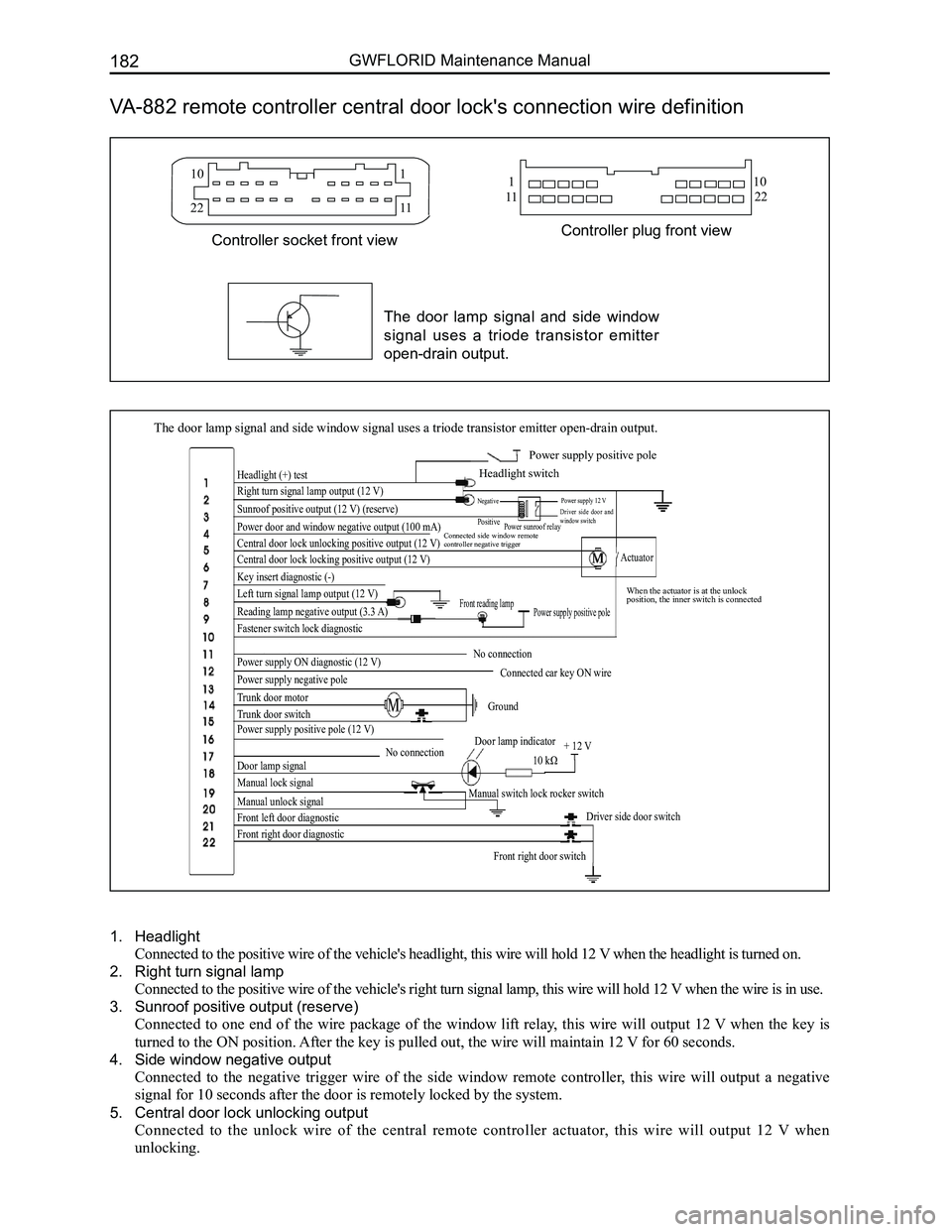
VA-882 remote controller central door lock's connection wire definition
The door lamp signal and side window signal uses a triode transistor emi\
tter open-drain output.
Headlight (+) test
Right turn signal lamp output (12 V)
Sunroof positive output (12 V) (reserve)
Power door and window negative output (100 mA)
Central door lock unlocking positive output (12 V)
Central door lock locking positive output (12 V)
Key insert diagnostic (-)
Left turn signal lamp output (12 V)
Reading lamp negative output (3.3 A)
Fastener switch lock diagnostic
Power supply ON diagnostic (12 V)
Power supply negative pole
Trunk door motor
Trunk door switch
Power supply positive pole (12 V)
Door lamp signal
Manual lock signal
Manual unlock signal
Front left door diagnostic
Front right door diagnostic
Front right door switch
Driver side door switch
Manual switch lock rocker switch
No connectionDoor lamp indicator
10 kΩ + 12 V
Ground
Connected car key ON wire
No connection
Power supply positive poleFront reading lamp
Actuator
When the actuator is at the unlock position, the inner switch is connected
Connected side window remote controller negative trigger
Power sunroof relay
Power supply 12 VDriver side door and window switch
Negative
Positive
Power supply positive pole
Headlight switch
10
22
110
1122
1
11
Controller plug front viewController socket front view
The door lamp signal and side window
signal uses a triode transistor emitter
open-drain output.
1. Headlight
Connected to the positive wire of the vehicle's headlight, this wire will hold 12 V when the headlight is turned on.
2. Right turn signal lamp
Connected to the positive wire of the vehicle's right turn signal lamp, this wire will hold 12 V when the wire is in use.
3. Sunroof positive output (reserve)
Connected to one end of the wire package of the window lift relay, this wire will output 12 V when the key is
turned to the ON position. After the key is pulled out, the wire will maintain 12 V for 60 seconds.
4. Side window negative output
Connected to the negative trigger wire of the side window remote controller, this wire will output a negative
signal for 10 seconds after the door is remotely locked by the system.
5. Central door lock unlocking output
Connected to the unlock wire of the central remote controller actuator, this wire will output 12 V when
unlocking.
Page 190 of 281
Downloaded from www.Manualslib.com manuals search engine 183Electrical Accessories
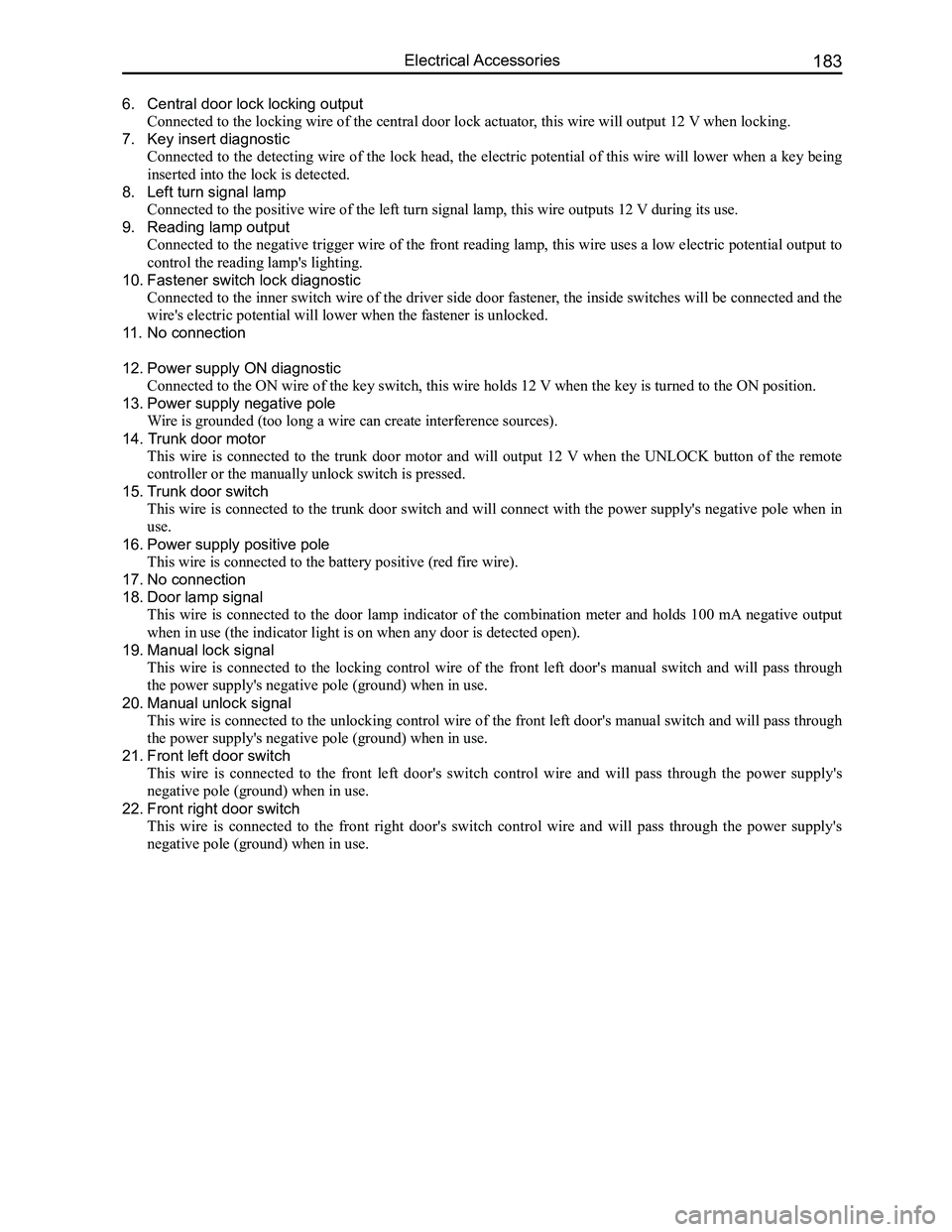
6. Central door lock locking output
Connected to the locking wire of the central door lock actuator, this wire will output 12 V when locking.
7. Key insert diagnostic
Connected to the detecting wire of the lock head, the electric potential of this wire will lower when a key being
inserted into the lock is detected.
8. Left turn signal lamp
Connected to the positive wire of the left turn signal lamp, this wire o\
utputs 12 V during its use.
9. Reading lamp output
Connected to the negative trigger wire of the front reading lamp, this wire uses a low electric potential output to
control the reading lamp's lighting.
10. Fastener switch lock diagnostic
Connected to the inner switch wire of the driver side door fastener, the inside switches will be connected and the
wire's electric potential will lower when the fastener is unlocked.
11. No connection
12. Power supply ON diagnostic
Connected to the ON wire of the key switch, this wire holds 12 V when the key is turned to the ON position.
13. Power supply negative pole
Wire is grounded (too long a wire can create interference sources).
14. Trunk door motor
This wire is connected to the trunk door motor and will output 12 V when the UNLOCK button of the remote
controller or the manually unlock switch is pressed.
15. Trunk door switch
This wire is connected to the trunk door switch and will connect with the power supply's negative pole when in
use.
16. Power supply positive pole
This wire is connected to the battery positive (red fire wire).
17. No connection
18. Door lamp signal
This wire is connected to the door lamp indicator of the combination meter and holds 100 mA negative output
when in use (the indicator light is on when any door is detected open)\
.
19. Manual lock signal
This wire is connected to the locking control wire of the front left door's manual switch and will pass through
the power supply's negative pole (ground) when in use.
20. Manual unlock signal
This wire is connected to the unlocking control wire of the front left door's manual switch and will pass through
the power supply's negative pole (ground) when in use.
21. Front left door switch
This wire is connected to the front left door's switch control wire and will pass through the power supply's
negative pole (ground) when in use.
22. Front right door switch
This wire is connected to the front right door's switch control wire and will pass through the power supply's
negative pole (ground) when in use.
Page 191 of 281
Downloaded from www.Manualslib.com manuals search engine GWFLORID Maintenance Manual184
Power Windows
The GWFLORID electric power window actuator consist of a motor and module. Its functions include: jam
protection, centralized control rise, soft-stop, characterized by easy control, long life, etc.
The functions of electric power window actuator
1. Jam protection
Power windows have an jam protection function when manually or automatically rising after it has been
initialized. There is no limit on the amount of jam protections. When room temperature is 25±5oC, wire
resistance 150 mΩ and 14.5 V working voltage, the jam protection force risen glass is less than 100 N. When the
window is manually or electrically rising, once it encounters a force greater than the jam protection force, the glass
will immediately stop rising and make the motor rotate in reverse. Rever\
se rotation distance is about 125 mm.
2. Centralized control rise
The central door lock controller provides four lifters with a low level signal. The power windows will close until
they are completely closed. This enables the two power window actuators to start separately, which can avoid
hitting peak currents if they start up at the same time. As long as the centralized controller's rising pin receives
the low level signal, the motor will close the window until it is comple\
tely closed.
3. Soft-stop
If the motor suffers from an impacting block when the window is rolled all the way up or all the way down, it
would shorten the power window actuator's use life. In order to avoid this, the soft-stop function must be used,
in which both manual and automatic rolling up and down should have this \
function.
(a) Soft close function:
When the window is about to get to the top, that is to say, when it's rising to the soft-stop point, the engine's
power will cut off to make the motor stop working, meanwhile the rising inertia will continue to roll the
window up to the top. The soft-stop point is about 2 mm under the top limiting position.
(b) When the window is about to lower to the bottom, that is to say, when it's lowering to the soft-stop point,
the engine's power will cut off to make it stop working, meanwhile the lowering inertia will continue to roll
the window down to the bottom. The soft-stop point is about 12 mm above the bottom limiting position.
(c) Zero position calibration: This position takes the top limiting position as the zero position. In order to
guarantee reliable and safer system operation while in use, the zero pos\
ition will need constant calibration.
Manual calibration: When the window stops at the rising soft-stop position after rising for a period,
press the rise button so it will rise to the limiting position. Zero cal\
ibration is then complete.
Automatic calibration: After the motor runs forward and reverse more than 20 times, it will undergo
zero position calibration one time. That is to say, when it completely starts or stops operating, the motor will
be blocked one time. Currently, there is no soft close or start-up function. Zero position calibration is com-
pleted when the window is completely closed to the limiting position.
4. Motor locked protection
The control module will cut off the power supply to stop the motor from working within 250 ms of the l\
ocking.
5. Motor temperature protection
When the control module is powered on, the initial temperature of the motor is set at 40oC. There are two
temperature limits for the motor's thermal protection function. If the temperature of the coil exceeds the first
temperature limit (170oC), the motor will not respond to any new operation input, but it will still complete the present
operation. If the motor's temperature exceeds the first temperature limit during its operation, it will keep working until
the temperature of the motor coil reaches the second temperature limit (190oC), then the motor will not be limited by
the second temperature's threshold while reversing, so as to guarantee the safety of the users. Once the temperature of
the motor has lowered below the temperature limit, the motor will work normally.
6. Self-diagnostic protection function
So as to guarantee the system's reliability while improving the system's average non-failure time, self-diagnostic
protection measures are used: If the power supply voltage exceeds 16 V, the control module will close the auto-
rising function.
(a) Switch contact point adhesion:
If it is detected that the switch contact point adhesion has reached up to 10 m input instructions will no
longer be received. If later the switch contact is detected to be disconnected again, it's function will return
to normal.
(b) Relay contact point adhesion:
The power window actuator is controlled by two contact point relays.
After a shutoff command is sent to one of the relays, if the system detects that this relay is still on, then
the system will choose this relay contact point for adhesion. Thereupon, the system will send out another
command to make the other electric relay switch on as well, so as to guarantee the motor's power supply is
Page 192 of 281
Downloaded from www.Manualslib.com manuals search engine 185Electrical Accessories
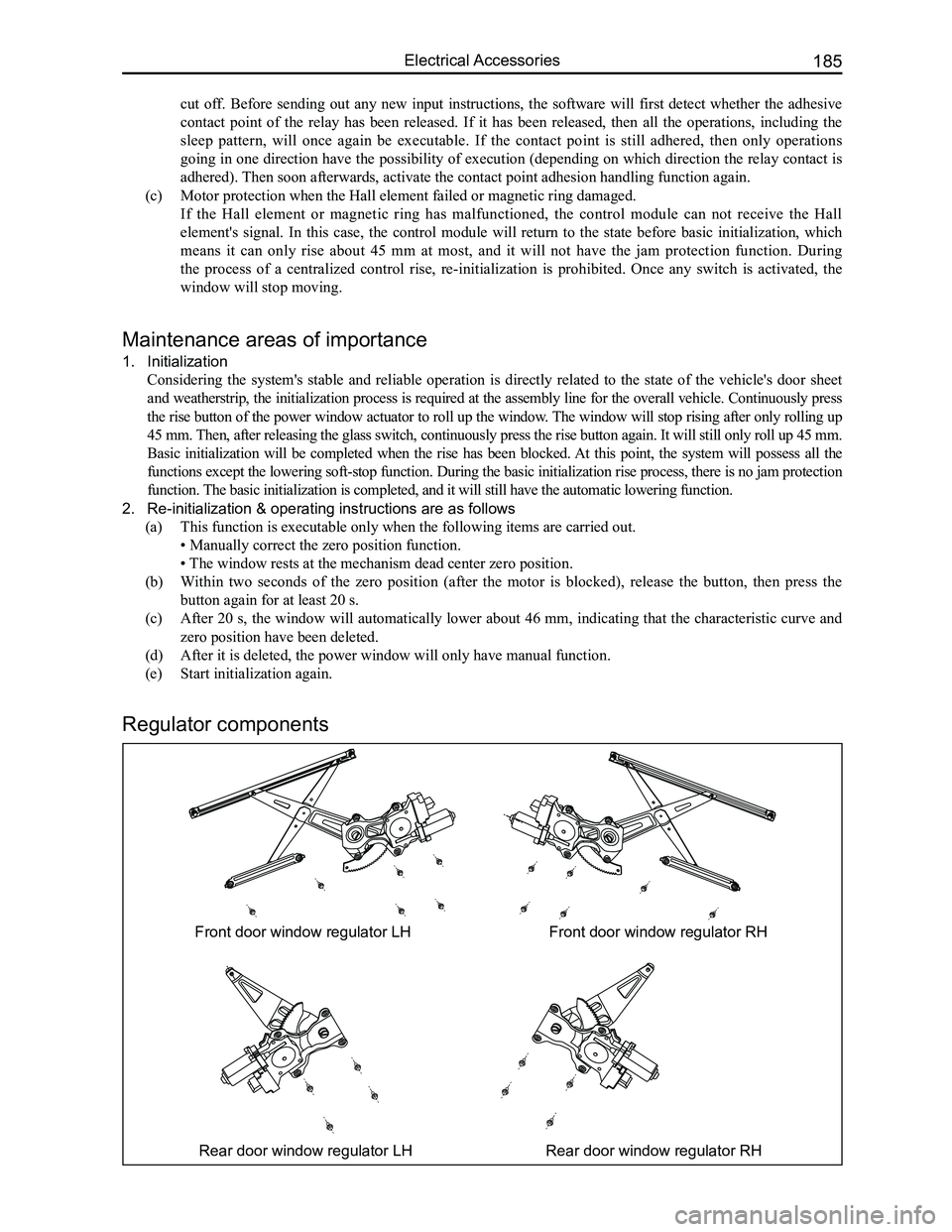
Front door window regulator LHFront door window regulator RH
Rear door window regulator LHRear door window regulator RH
Regulator components
Maintenance areas of importance
1. Initialization
Considering the system's stable and reliable operation is directly related to the state of the vehicle's door sheet
and weatherstrip, the initialization process is required at the assembly line for the overall vehicle. Continuously press
the rise button of the power window actuator to roll up the window. The window will stop rising after only rolling up
45 mm. Then, after releasing the glass switch, continuously press the rise button again. It will still only roll up 45 mm.
Basic initialization will be completed when the rise has been blocked. At this point, the system will possess all the
functions except the lowering soft-stop function. During the basic initialization rise process, there is no jam protection
function. The basic initialization is completed, and it will still have the automa\
tic lowering function.
2. Re-initialization & operating instructions are as follows
(a) This function is executable only when the following items are carried out.
• Manually correct the zero position function.
• The window rests at the mechanism dead center zero position.
(b) Within two seconds of the zero position (after the motor is blocked), release the button, then press the
button again for at least 20 s.
(c) After 20 s, the window will automatically lower about 46 mm, indicating that the characteristic curve and
zero position have been deleted.
(d) After it is deleted, the power window will only have manual function.
(e) Start initialization again.
cut off. Before sending out any new input instructions, the software will first detect whether the adhesive
contact point of the relay has been released. If it has been released, then all the operations, including the
sleep pattern, will once again be executable. If the contact point is still adhered, then only operations
going in one direction have the possibility of execution (depending on which direction the relay contact is
adhered). Then soon afterwards, activate the contact point adhesion handling funct\
ion again.
(c) Motor protection when the Hall element failed or magnetic ring damaged.
If the Hall element or magnetic ring has malfunctioned, the control module can not receive the Hall
element's signal. In this case, the control module will return to the state before basic initialization, which
means it can only rise about 45 mm at most, and it will not have the jam protection function. During
the process of a centralized control rise, re-initialization is prohibited. Once any switch is activated, the
window will stop moving.
Page 218 of 281
Downloaded from www.Manualslib.com manuals search engine 211Air Conditioning System
Clutch Installation
1. Install the solenoid coil at the place pressing up against the head cover's end surface and pay atten-
tion to insert the dowel pin of the solenoid coil into the bottom hole of the head cover. Put the retaining
ring into the groove with circlip pliers, and press the solenoid coil's connecting wire onto the pressing
line plate on the head cover with a SST.
2. Put the compressor on a specially designed fixture or platform, with its head cover facing upwards.
Press the pulley into the head cover shaft, and put the pulley bearing's retaining ring into the groove
with circlip pliers.
3. Install the armature onto the main shaft's spline and seize the clutch's triangular piece with a clamp.
Then tighten the inner hexagon lock screws and washers with a torque wrench. Screw torque should
be between 150-180 N·m. After installation is done, make sure to check if the clutch's pulley and
armature are able to operate freely, and also check the clearance between the pulley and armature,
which should be 0.3-0.6 mm.
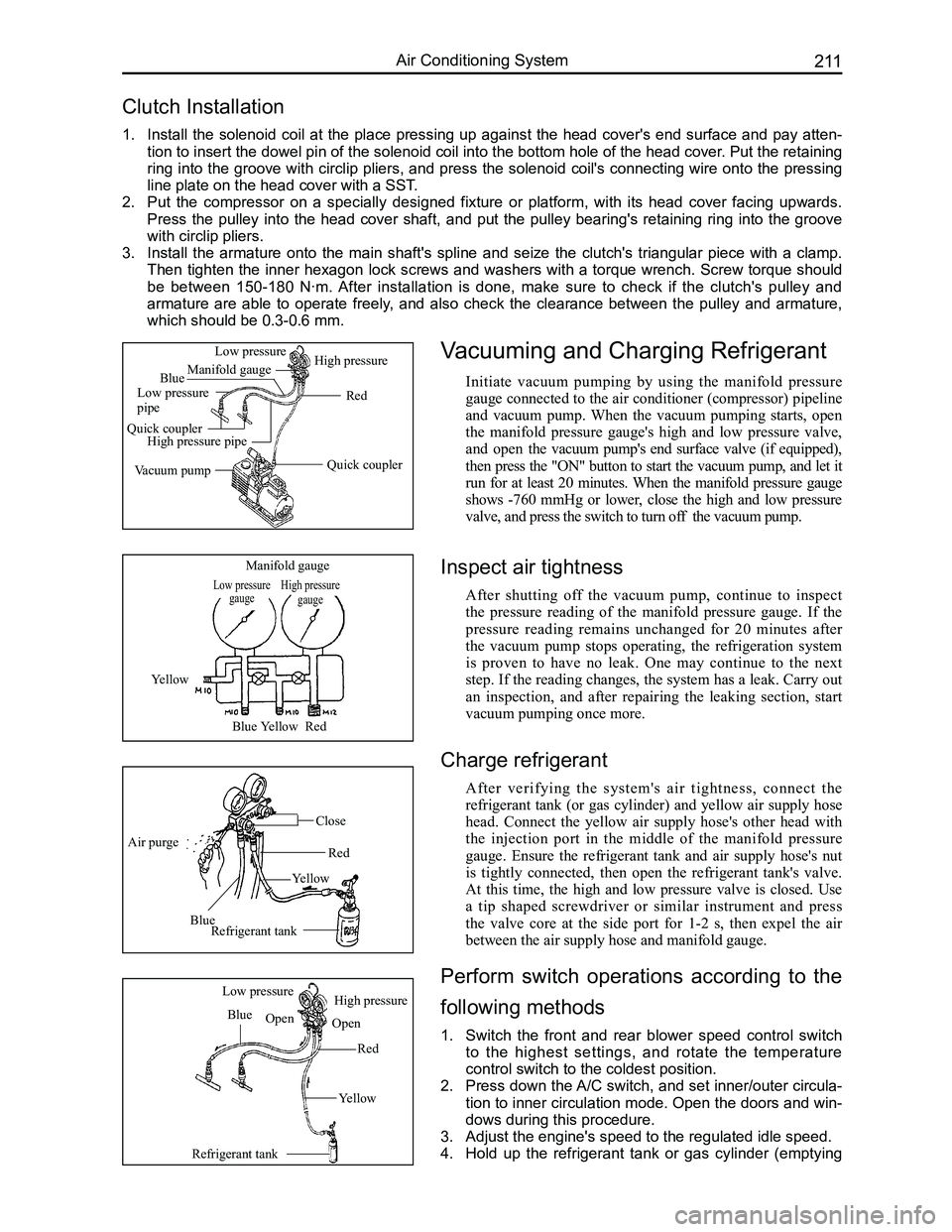
Vacuuming and Charging Refrigerant
Initiate vacuum pumping by using the manifold pressure
gauge connected to the air conditioner (compressor) pipeline
and vacuum pump. When the vacuum pumping starts, open
the manifold pressure gauge's high and low pressure valve,
and open the vacuum pump's end surface valve (if equipped),
then press the "ON" button to start the vacuum pump, and let it
run for at least 20 minutes. When the manifold pressure gauge
shows -760 mmHg or lower, close the high and low pressure
valve, and press the switch to turn off the vacuum pump.
Low pressure gaugeHigh pressure gauge
Manifold gauge
Yellow
BlueYellowRed
Air purge
Blue
Yellow
Red
Close
Refrigerant tank
Refrigerant tank
Blue
Red
Yellow
Low pressureHigh pressure
OpenOpen
Quick coupler
Red
Manifold gauge
Low pressure pipe
Quick couplerHigh pressure pipe
Vacuum pump
Low pressureHigh pressure
Blue
Inspect air tightness
After shutting off the vacuum pump, continue to inspect
the pressure reading of the manifold pressure gauge. If the
pressure reading remains unchanged for 20 minutes after
the vacuum pump stops operating, the refrigeration system
is proven to have no leak. One may continue to the next
step. If the reading changes, the system has a leak. Carry out
an inspection, and after repairing the leaking section, start
vacuum pumping once more.
Charge refrigerant
After verifying the system's air tightness, connect the
refrigerant tank (or gas cylinder) and yellow air supply hose
head. Connect the yellow air supply hose's other head with
the injection port in the middle of the manifold pressure
gauge. Ensure the refrigerant tank and air supply hose's nut
is tightly connected, then open the refrigerant tank's valve.
At this time, the high and low pressure valve is closed. Use
a tip shaped screwdriver or similar instrument and press
the valve core at the side port for 1-2 s, then expel the air
between the air supply hose and manifold gauge.
Perform switch operations according to the
following methods
1. Switch the front and rear blower speed control switch
to the highest settings, and rotate the temperature
control switch to the coldest position.
2. Press down the A/C switch, and set inner/outer circula-
tion to inner circulation mode. Open the doors and win-
dows during this procedure.
3. Adjust the engine's speed to the regulated idle speed.
4. Hold up the refrigerant tank or gas cylinder (emptying
Page 219 of 281
Downloaded from www.Manualslib.com manuals search engine GWFLORID Maintenance Manual212
High pressure side pressure(MPa)
Appropriate pressure
Appropriate chargeExcessive charge
Refrigerant charge (g)
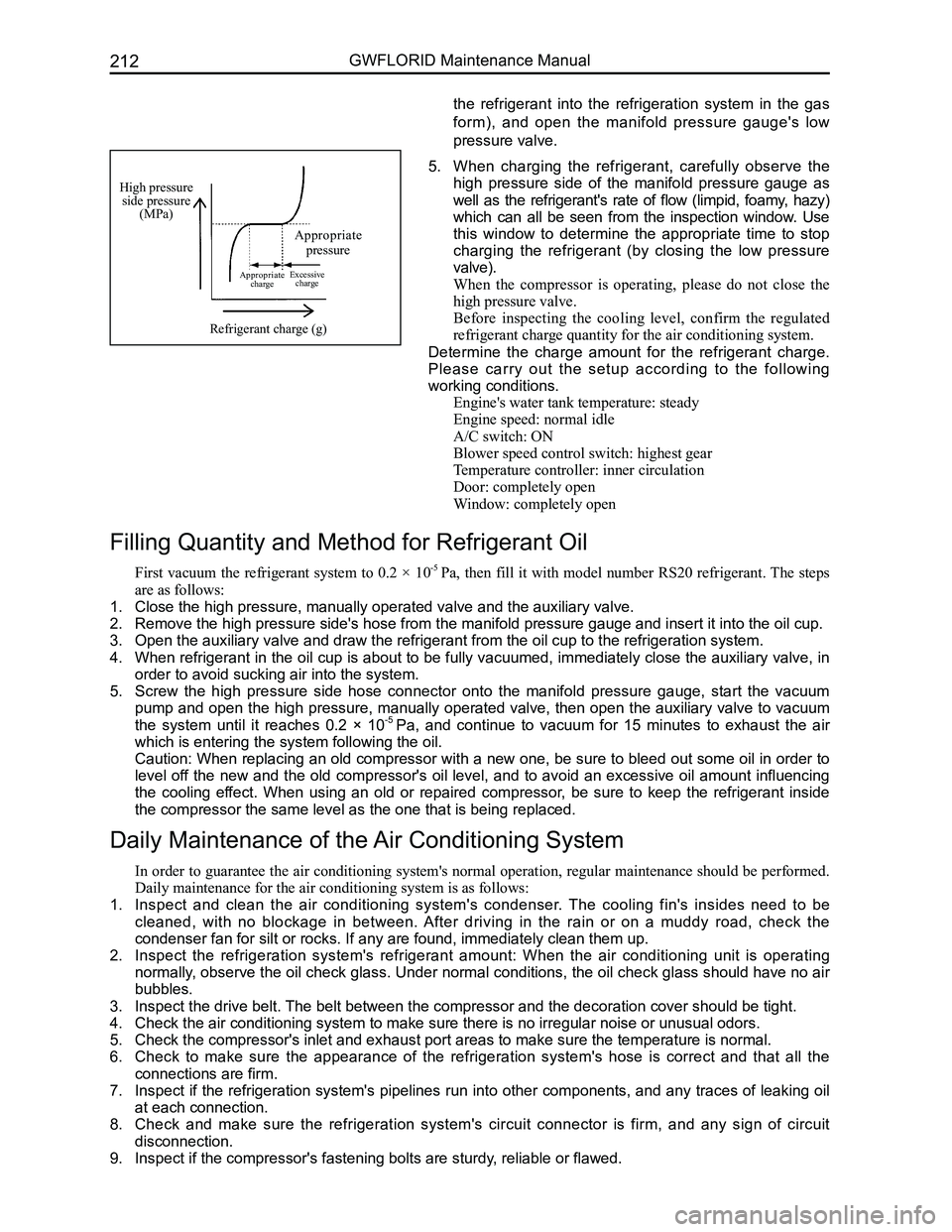
5. When charging the refrigerant, carefully observe the
high pressure side of the manifold pressure gauge as
well as the refrigerant's rate of flow (limpid, foamy, hazy)
which can all be seen from the inspection window. Use
this window to determine the appropriate time to stop
charging the refrigerant (by closing the low pressure
valve).
When the compressor is operating, please do not close the
high pressure valve.
Before inspecting the cooling level, confirm the regulated
refrigerant charge quantity for the air conditioning system.
Determine the charge amount for the refrigerant charge.
Please carry out the setup according to the following
working conditions.
Engine's water tank temperature: steady
Engine speed: normal idle
A/C switch: ON
Blower speed control switch: highest gear
Temperature controller: inner circulation
Door: completely open
Window: completely open
Filling Quantity and Method for Refrigerant Oil
First vacuum the refrigerant system to 0.2 × 10⁻⁵ Pa, then fill it with model number RS20 refrigerant. The steps
are as follows:
1. Close the high pressure, manually operated valve and the auxiliary valve\
.
2. Remove the high pressure side's hose from the manifold pressure gauge an\
d insert it into the oil cup.
3. Open the auxiliary valve and draw the refrigerant from the oil cup to th\
e refrigeration system.
4. When refrigerant in the oil cup is about to be fully vacuumed, immediately close the auxiliary valve, in
order to avoid sucking air into the system.
5. Screw the high pressure side hose connector onto the manifold pressure gauge, start the vacuum
pump and open the high pressure, manually operated valve, then open the auxiliary valve to vacuum
the system until it reaches 0.2 × 10⁻⁵ Pa, and continue to vacuum for 15 minutes to exhaust the air
which is entering the system following the oil.
Caution: When replacing an old compressor with a new one, be sure to bleed out some oil in order to
level off the new and the old compressor's oil level, and to avoid an excessive oil amount influencing
the cooling effect. When using an old or repaired compressor, be sure to keep the refrigerant inside
the compressor the same level as the one that is being replaced.
Daily Maintenance of the Air Conditioning System
In order to guarantee the air conditioning system's normal operation, regular maintenance should be performed.
Daily maintenance for the air conditioning system is as follows:
1. Inspect and clean the air conditioning system's condenser. The cooling fin's insides need to be
cleaned, with no blockage in between. After driving in the rain or on a muddy road, check the
condenser fan for silt or rocks. If any are found, immediately clean the\
m up.
2. Inspect the refrigeration system's refrigerant amount: When the air conditioning unit is operating
normally, observe the oil check glass. Under normal conditions, the oil check glass should have no air
bubbles.
3. Inspect the drive belt. The belt between the compressor and the decoration cover should be tight\
.
4. Check the air conditioning system to make sure there is no irregular noi\
se or unusual odors.
5. Check the compressor's inlet and exhaust port areas to make sure the tem\
perature is normal.
6. Check to make sure the appearance of the refrigeration system's hose is correct and that all the
connections are firm.
7. Inspect if the refrigeration system's pipelines run into other components, and any traces of leaking oil
at each connection.
8. Check and make sure the refrigeration system's circuit connector is firm, and any sign of circuit
disconnection.
9. Inspect if the compressor's fastening bolts are sturdy, reliable or flawed.
the refrigerant into the refrigeration system in the gas
form), and open the manifold pressure gauge's low
pressure valve.
Page 238 of 281
Downloaded from www.Manualslib.com manuals search engine 231Airbags
Driver side airbag module
Wi r e h a r n e s s u s e d for deployment
Old tire with no hub
Wire harness used for deployment
Wire harness used for deployment
Wire harness used for deploymentShort circuit area
Longer than 6 m
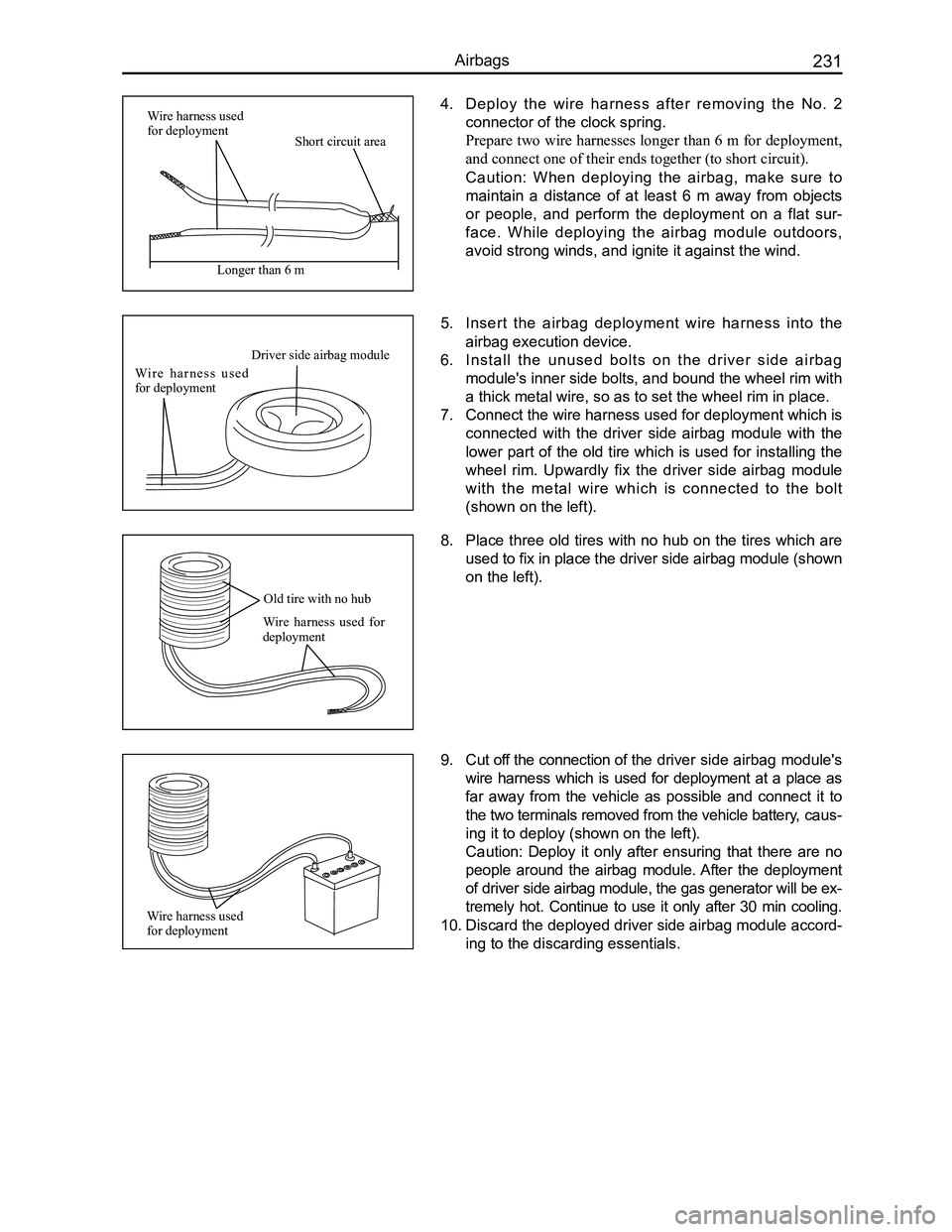
4. Deploy the wire harness after removing the No. 2
connector of the clock spring.
Prepare two wire harnesses longer than 6 m for deployment,
and connect one of their ends together (to short circuit).
Caution: When deploying the airbag, make sure to
maintain a distance of at least 6 m away from objects
or people, and perform the deployment on a flat sur-
face. While deploying the airbag module outdoors,
avoid strong winds, and ignite it against the wind.
8. Place three old tires with no hub on the tires which are
used to fix in place the driver side airbag module (shown
on the left).
9. Cut off the connection of the driver side airbag module's
wire harness which is used for deployment at a place as
far away from the vehicle as possible and connect it to
the two terminals removed from the vehicle battery, caus-
ing it to deploy (shown on the left).
Caution: Deploy it only after ensuring that there are no
people around the airbag module. After the deployment
of driver side airbag module, the gas generator will be ex-
tremely hot. Continue to use it only after 30 min cooling.
10. Discard the deployed driver side airbag module accord-
ing to the discarding essentials.
5. Insert the airbag deployment wire harness into the
airbag execution device.
6. Install the unused bolts on the driver side airbag
module's inner side bolts, and bound the wheel rim with
a thick metal wire, so as to set the wheel rim in place.
7. Connect the wire harness used for deployment which is
connected with the driver side airbag module with the
lower part of the old tire which is used for installing the
wheel rim. Upwardly fix the driver side airbag module
with the metal wire which is connected to the bolt
(shown on the left).