dashboard GREAT WALL FLORID 2008 Owner's Manual
[x] Cancel search | Manufacturer: GREAT WALL, Model Year: 2008, Model line: FLORID, Model: GREAT WALL FLORID 2008Pages: 281, PDF Size: 43.97 MB
Page 232 of 281
Downloaded from www.Manualslib.com manuals search engine 225Airbags
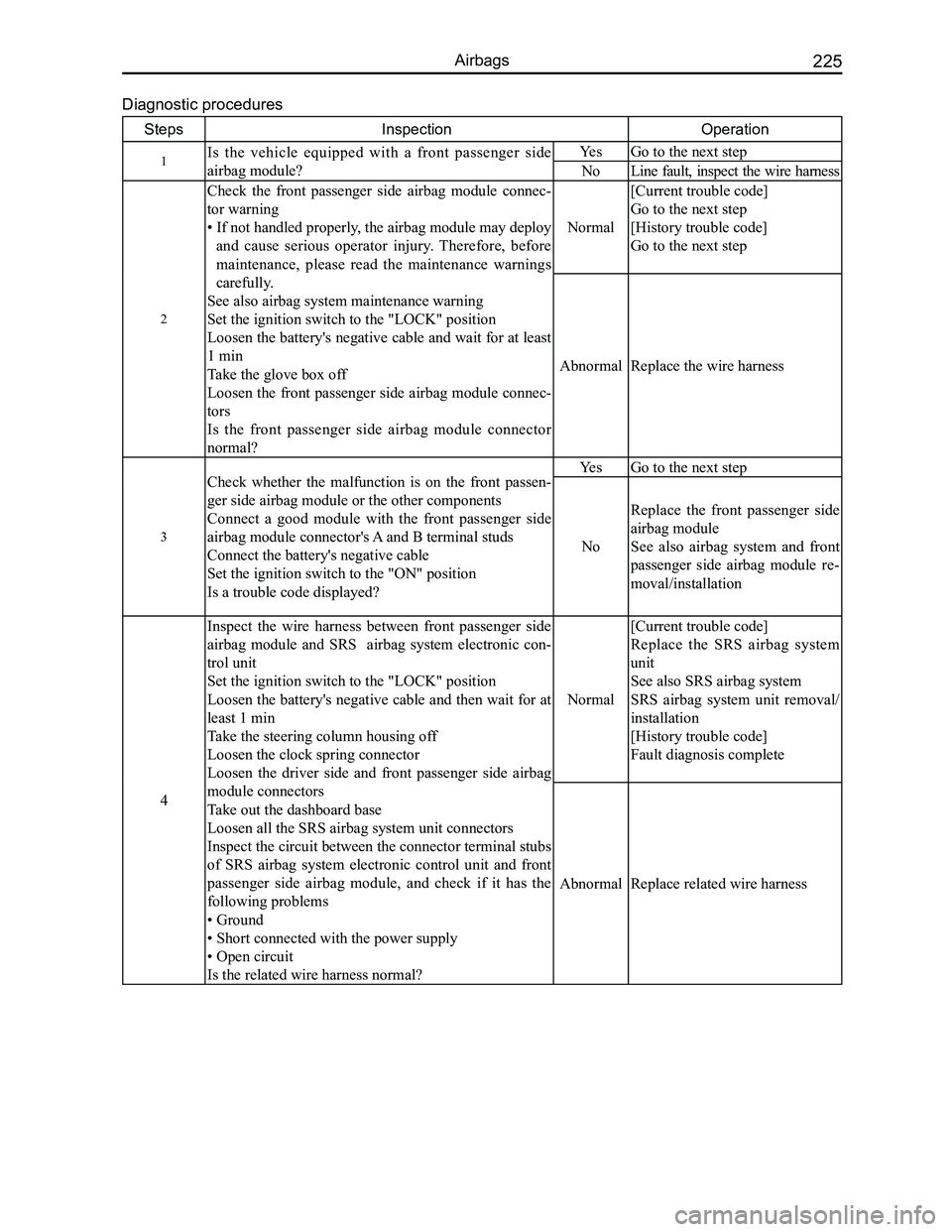
Diagnostic procedures
StepsInspectionOperation
1Is the vehicle equipped with a front passenger side
airbag module?
YesGo to the next step
NoLine fault, inspect the wire harness
2
Check the front passenger side airbag module connec-
tor warning
• If not handled properly, the airbag module may deploy
and cause serious operator injury. Therefore, before
maintenance, please read the maintenance warnings
carefully.
See also airbag system maintenance warning
Set the ignition switch to the "LOCK" position
Loosen the battery's negative cable and wait for at least
1 min
Take the glove box off
Loosen the front passenger side airbag module connec-
tors
Is the front passenger side airbag module connector
normal?
Normal
[Current trouble code]
Go to the next step
[History trouble code]
Go to the next step
AbnormalReplace the wire harness
3
Check whether the malfunction is on the front passen-
ger side airbag module or the other components
Connect a good module with the front passenger side
airbag module connector's A and B terminal studs
Connect the battery's negative cable
Set the ignition switch to the "ON" position
Is a trouble code displayed?
YesGo to the next step
No
Replace the front passenger side
airbag module
See also airbag system and front
passenger side airbag module re-
moval/installation
4
Inspect the wire harness between front passenger side
airbag module and SRS airbag system electronic con-
trol unit
Set the ignition switch to the "LOCK" position
Loosen the battery's negative cable and then wait for at
least 1 min
Take the steering column housing off
Loosen the clock spring connector
Loosen the driver side and front passenger side airbag
module connectors
Take out the dashboard base
Loosen all the SRS airbag system unit connectors
Inspect the circuit between the connector terminal stubs
of SRS airbag system electronic control unit and front
passenger side airbag module, and check if it has the
following problems
• Ground
• Short connected with the power supply
• Open circuit
Is the related wire harness normal?
Normal
[Current trouble code]
Replace the SRS airbag system
unit
See also SRS airbag system
SRS airbag system unit removal/
installation
[History trouble code]
Fault diagnosis complete
AbnormalReplace related wire harness
Page 233 of 281
Downloaded from www.Manualslib.com manuals search engine GWFLORID Maintenance Manual226
Vehicle Collision Diagnostics
Whether the airbag is deployed or not, vehicle collision diagnostic and maintenance must be conducted
according to the following procedures.
1. Check the SRS-ECU diagnostic signal
(a) Connect the diagnostic connector (X-431 diagnostic scanner).
(b) Read the diagnostic result with the X-431 diagnostic.
Caution: Due to impact, and when the battery's power supply is insufficient, the scanner will be unable
to communicate with the SRS-ECU. At this time, use an external power supply, or make sure to
perform inspection and maintenance on the dashboard's wire harness.
2. Maintenance sequence
When the airbag is deployed, the following components should be replaced\
.
(a) Driver side airbag module.
(b) Front passenger side airbag module.
(c) SRS-ECU.
(d) Driver side and front passenger side preload seat belts.
Inspect the following components, if anything is abnormal, replace with \
a new one.
(a) Clock spring.
(b) Steering wheel, steering column, and steering lower shaft components.
Installation status of the driver side airbag module regarding the steer\
ing wheel.
(a) Inspect whether the steering wheel's noise is abnormal, for improper movement, or abnormal cleara\
nce.
(b) Inspect whether the wire harness connectors are broken and whether the terminals are deformed.
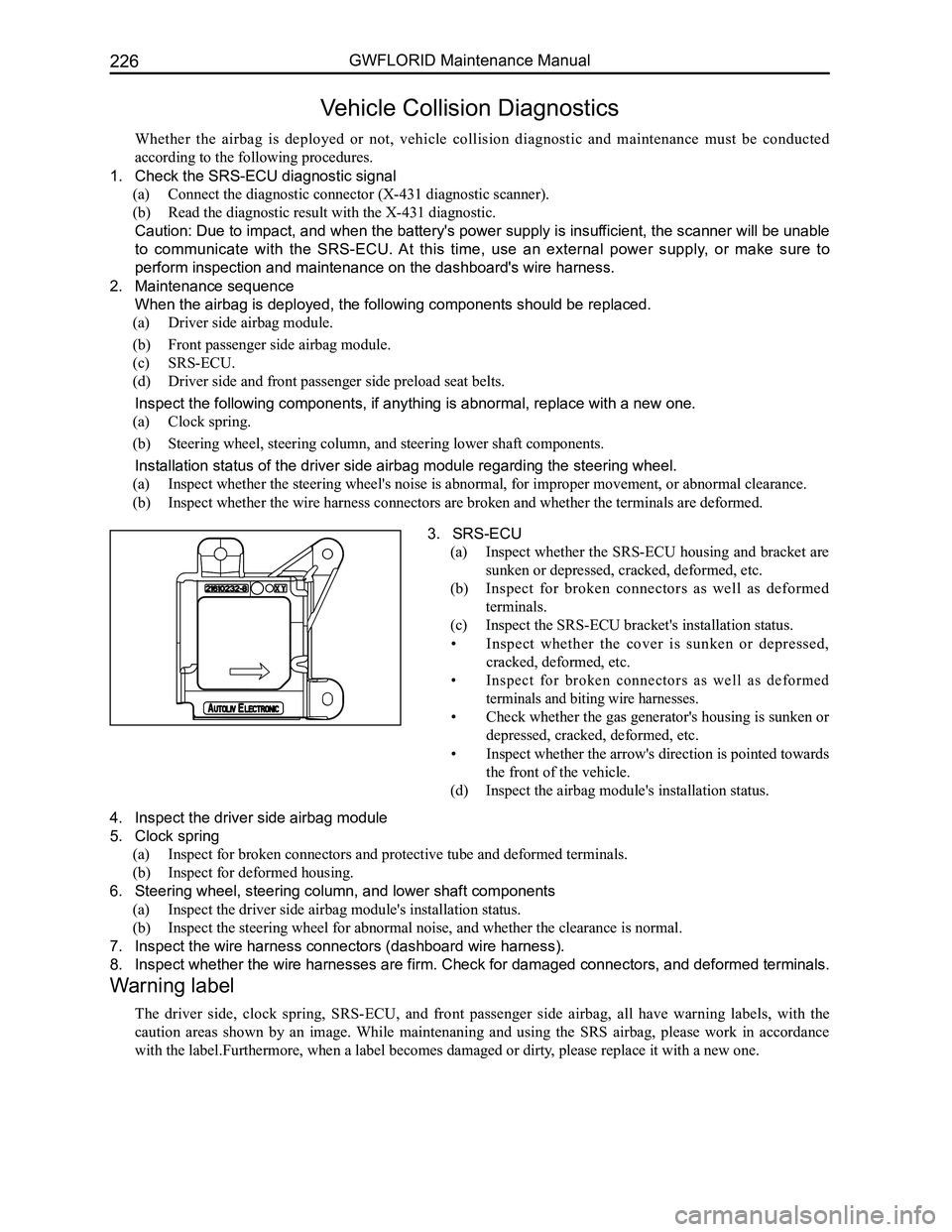
3. SRS-ECU
(a) Inspect whether the SRS-ECU housing and bracket are
sunken or depressed, cracked, deformed, etc.
(b) Inspect for broken connectors as well as deformed
terminals.
(c) Inspect the SRS-ECU bracket's installation status.
• Inspect whether the cover is sunken or depressed,
cracked, deformed, etc.
• Inspect for broken connectors as well as deformed
terminals and biting wire harnesses.
• Check whether the gas generator's housing is sunken or
depressed, cracked, deformed, etc.
• Inspect whether the arrow's direction is pointed towards
the front of the vehicle.
(d) Inspect the airbag module's installation status.
4. Inspect the driver side airbag module
5. Clock spring
(a) Inspect for broken connectors and protective tube and deformed terminals.
(b) Inspect for deformed housing.
6. Steering wheel, steering column, and lower shaft components
(a) Inspect the driver side airbag module's installation status.
(b) Inspect the steering wheel for abnormal noise, and whether the clearance is normal.
7. Inspect the wire harness connectors (dashboard wire harness).
8. Inspect whether the wire harnesses are firm. Check for damaged connectors, and deformed terminals.
Warning label
The driver side, clock spring, SRS-ECU, and front passenger side airbag, all have warning labels, with the
caution areas shown by an image. While maintenaning and using the SRS airbag, please work in accordance
with the label.Furthermore, when a label becomes damaged or dirty, please replace it with a new one.
Page 234 of 281
Downloaded from www.Manualslib.com manuals search engine 227Airbags
Removal Method for Individual Components
SRS airbag system electronic control component (SRS-ECU)
1. Areas of Importance
(a) After taking off the battery's negative (-) terminal, wait for 60 s before operating. Wrap the removed
negative (-) terminal in tape to insulate it.
(b) The SRS-ECU can not be dismantled or repaired. If there is any malfunction, please replace it with a new
one.
(c) Do not let the SRS-ECU vibrate or collide with anything. If sunken or depressed, cracked, deformed, etc.,
please replace with a new SRS-ECU.
(d) Every time the airbag is deployed, please replace with a new SRS-ECU.
(e) Do not knock the SRS-ECU while removing or performing maintenance on the SRS-ECU's surrounding
components.
2. Operation before removal
(a) Set the ignition switch to the LOCK position.
(b) After taking off the battery's negative (-) terminal, put them in a proper place or wrap them in\
tape.
3. Removal sequence
(a) Remove the auxiliary facia console.
(b) Reomve the connectors connected with the airbag ECU.
(c) Remove the SRS-ECU.
4. Installation sequence
(a) SRS-ECU.
(b) Install the connectors connected with the airbag ECU.
(c) Dashboard base.
(d) Connect the battery's negative (-) terminal.
5. Installation points
(a) Install the SRS-ECU
Caution: If SRS-ECU isn't installed correctly, the SRS airbag will not operate properly.
(b) Inspection after installation
• Set the ignition switch to the ON position.
• SRS warning lamp stays on for 6-7 s.
• If the lamp does not turn off, malfunction inspection and troubleshooting should be performed.
6. Inspection
(a) Whether the SRS-ECU cover has sunken or depressed, cracked, deformed, etc.
(b) Whether the connectors are damaged or deformed.
Caution: Please replace with a new SRS-ECU, if there is any sunkeness or depression, cracking, de-
formity, etc.
Except for the areas described above, to perform SRS-ECU inspections, please refer to the related troubleshooting
contents.
Page 235 of 281
Downloaded from www.Manualslib.com manuals search engine GWFLORID Maintenance Manual228
Driver Side Airbag Module (DAB), Front Passenger Side Air-
bag Module (PAB), Clock Spring, and Steering Wheel
Areas of Importance
1. Take off the battery's negative (-) terminal, and wait for 60 s before operating. Wrap the removed
negative (-) terminal in tape to insulate it.
2. The airbag module and clock spring must not be dismantled or repaired. If there is any malfunction,
replace the part.
3. Pay attention to the usage of the airbag module and clock spring. Do not drop it or immerge it in water
or oil. Furthermore, if there is any sinking or depression, cracking, deformity, etc., please replace it
with a new part.
4. Make sure the extended surface is faced upwards when the airbag module is to be deployed. Put it on
a flat surface and do not place anything on top of it.
5. Do not put the airbag module in a place where the temperature is over 93\
oC.
6. After the airbag module is deployed, replace it with a new one. At the same time, inspect the clock
spring (contact resistance between corresponding terminals should not be more than 0.8 Ω). If there
is anything abnormal, replace it with a new one.
7. Use gloves and protective glasses while operating on a deployed airbag.
8. While scraping an undeployed airbag, make sure to discard it after it ha\
s been deployed first.
9. During removal, to avoid experiencing static electricity interference leading to faulty execution, make
sure to remove the other wire harness connectors after the DAB and PAB module wire harness
connectors have been removed. Installation is done in reverse order.
Driver side front airbag, steering wheel, and clock spring removal
1. Operation before removal
(a) When the steering wheel and front tires are pointing straight ahead, take out the ignition swit\
ch.
(b) Disconnect the battery's negative (-) terminal.
2. Driver side airbag module removal sequence
(a) Loosen the screws on both sides.
(b) Lightly pick up the airbag module.
(c) Disconnect the wire harness plug-in which is plugged into the airbag module.
(d) Remove the driver side airbag module.
(e) Remove steering wheel mounting bolt on the steering column.
(f) Remove the steering wheel.
3. Clock spring removal sequence (after steering wheel removal is complete\
d)
(a) Lightly remove the steering wheel (please refer to the areas of importance).
(b) Open the combination switch's upper and lower protective cover, find and disconnect the wire harness connector
at lower end.
(c) Remove the clock spring.
Driver side front airbag, steering wheel, and clock spring installation
1. Clock spring installation sequence
(a) Inspection before installation.
This operation requires the inspection of the front tires to make sure they are first pointed straight ahead. If they
are not, be sure to place them in the right position first.
• Install the clock spring onto the steering column.
• Firmly wedge the clock spring to the steering column.
• Install the dashboard wire harness under the clock spring.
• Install the combination switch hood.
(b) Inspection after installation.
2. Steering wheel installation sequence (after clock spring installation i\
s completed)
(a) Pull out the clock spring's position pin.
(b) Install the steering wheel, making sure to insert the wire above the clock spring through the hole on the
steering wheel body.
(c) Tighten the steering wheel mounting nuts.
Page 236 of 281

(a) Install the horn's w")
Downloaded from www.Manualslib.com manuals search engine 229Airbags
3. Driver side airbag module installation sequence (after steering wheel i\
nstallation is completed)
(a) Install the horn's wire harness.
(b) Install the airbag module executing equipment's (gas generator) wire harness.
(c) Place the airbag module onto the steering wheel's proper installation position (avoid heavy knocking while
placing).
(d) Tighten the airbag module mounting bolt.
(e) Connect the battery's negative (-) terminal.
(f) Inspection after installation.
Auxiliary airbag removal and installation
1. Auxiliary airbag removal
(a) Remove the glove box.
(b) Pull out the dashboard wire harness and the auxiliary airbag wire harness connectors.
(c) Remove the airbag mounting bolt.
(d) Remove the upper dashboard.
(e) Remove the auxiliary airbag's two mounting nuts.
(f) Press the buckle and remove the auxiliary airbag.
2. Installation sequence for the auxiliary airbag is reverse to the removal\
sequence.
Caution: Please do not place anything on the auxiliary airbag, as to avoid accidents while deploying
the airbag.
Operation essentials
1. Driver side airbag and steering wheel removal
Caution: The following operations should only be performed after the battery's negative (-) terminal
has been disconnected, and after the ignition switch key has been pulled\
out for 60 s.
(a) Remove the mounting screws from the two holes under the steering wheel bottom cap, and lightly pick up
the driver side airbag module.
(b) Pull out the deployed airbag module's wire harness and the horn line, and remove the airbag module\
.
Attention: Diagnose the airbag module's circuit with an electrical measuring instruments but do not
dismantle it. Face the bottom of the removed passenger side airbag upwards and store it in a clean
and dry place.
(c) Remove the steering wheel mounting bolt on the steering column.
Caution: Due to the over-tight occlusion of the spline and column, the steering wheel and steering
column may be hard to separate, in which case make sure not to use force to remove the steering
wheel. The correct method is to tighten the screw into the column just a bit, and then pull up the
steering wheel (because the steering wheel bottom is connected to the clock spring, if force is used to
remove it, it may damage it).
2. Clock spring removal
(a) After steering wheel removal is completed, remove the combination switch hood.
(b) Pull out the dashboard wire harness connectors under the clock spring.
(c) Take off the clock spring.
Caution: Store the removed clock spring in a clean and dry place.
3. Installation notes
(a) Inspection before installation, inspection of driver side airbag module.
(b) Inspect the new airbag or clock spring before installing them.
4. Driver side airbag module inspection
Inspect each of the following items. If any faults are found, replace with a new corresponding airbag module
part. Discard the old components after they have been deployed in the pr\
oper order.
(a) Whether the cover sunken or depressed, cracked, or deformed.
(b) Whether the wire harness has broken connectors and deformed terminals.
(c) Whether the gas generator's housing is sunken or depressed, cracked, or deformed.
(d) Airbag module installation status.
Caution: The specified measuring instrument cannot measure the airbag module (tube rupture) circuit
resistance. Test the resistance with a testing instrument. There is an electric current in the tube rup-
ture which may lead to accidental deployment due to static electricity a\
nd cause serious accidents.
5. Clock spring inspection
Inspect each of the following items. If any fault is found, replace with\
a new clock spring.
Page 240 of 281
Downloaded from www.Manualslib.com manuals search engine 233Vehicle Body
Front Door Lock Assembly ...............................................234
Rear Door Lock Assembly ................................................237
Trunk Door Lock Assembly ...............................................239
Wiper Arm and Vent Panel Assembly ...............................240
Front & Rear Window Glasses .........................................241
Dashboard ........................................................................\
242
Cooling Unit ......................................................................246
Front Door Assembly ........................................................248
Rear Door Assembly.........................................................251
Trunk Door Assembly .......................................................254
Front Bumper....................................................................256
Rear Bumper ....................................................................259
Seat Belt ........................................................................\
...262
Seats ........................................................................\
........266
Sunroof Assembly.............................................................268
Vehicle Body
Page 249 of 281
Downloaded from www.Manualslib.com manuals search engine GWFLORID Maintenance Manual242
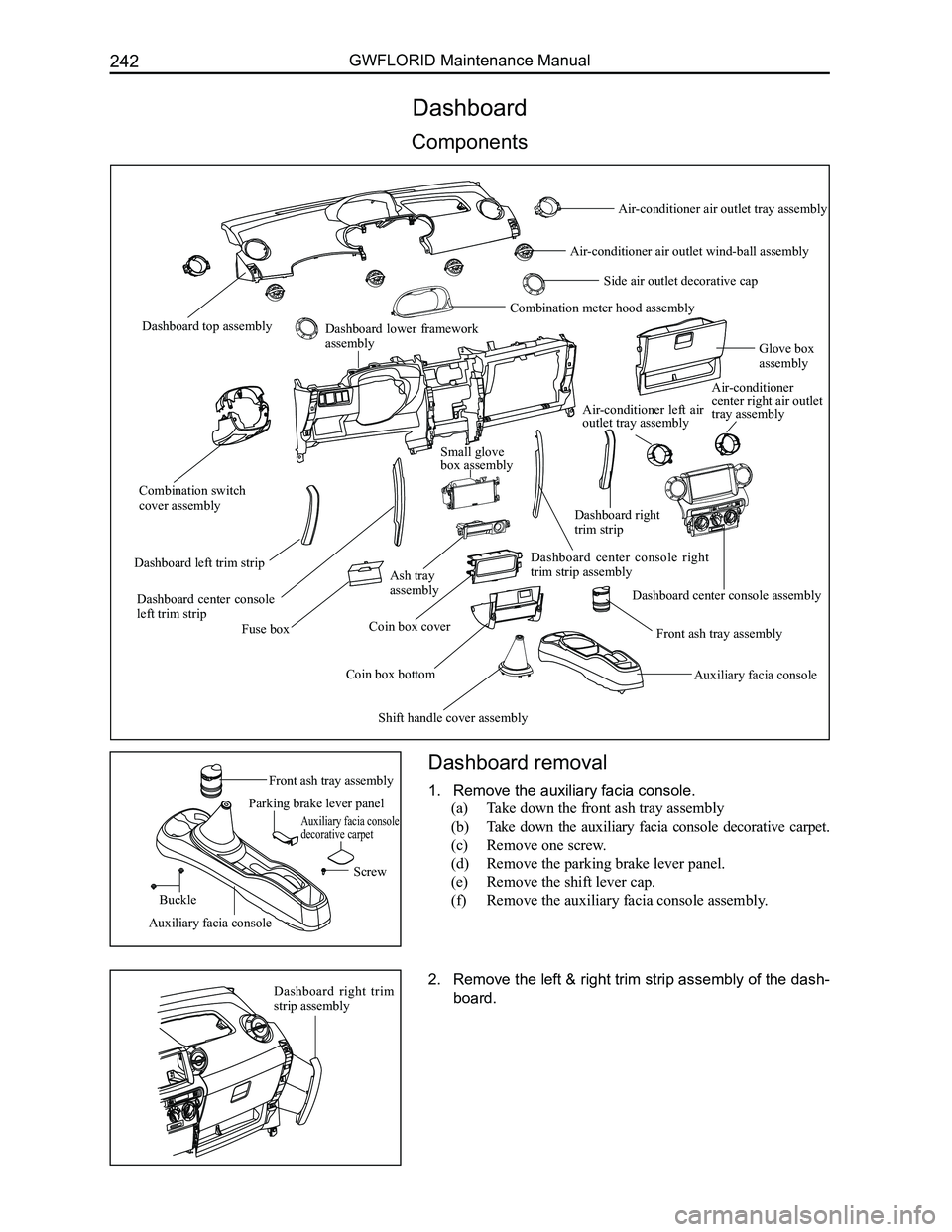
Dashboard
Components
Dashboard removal
1. Remove the auxiliary facia console.
(a) Take down the front ash tray assembly
(b) Take down the auxiliary facia console decorative carpet.
(c) Remove one screw.
(d) Remove the parking brake lever panel.
(e) Remove the shift lever cap.
(f) Remove the auxiliary facia console assembly.
2. Remove the left & right trim strip assembly of the dash-
board.
Front ash tray assembly
Dashboard top assembly
Combination switch cover assembly
Dashboard lower framework assemblyGlove box assembly
Fuse box
Dashboard left trim strip
Dashboard center console left trim strip
Ash tray assembly
Coin box bottom
Coin box coverFront ash tray assembly
Dashboard center console right trim strip assembly
Small glove box assembly
Shift handle cover assembly
Auxiliary facia console
Dashboard center console assembly
Air-conditioner center right air outlet tray assembly
Combination meter hood assembly
Side air outlet decorative cap
Air-conditioner air outlet wind-ball assembly
Air-conditioner air outlet tray assembly
Air-conditioner left air outlet tray assembly
Dashboard right trim strip
Parking brake lever panel
Auxiliary facia console decorative carpet
Screw
Buckle
Auxiliary facia console
Dashboard right trim strip assembly
Page 250 of 281
Downloaded from www.Manualslib.com manuals search engine 243Vehicle Body
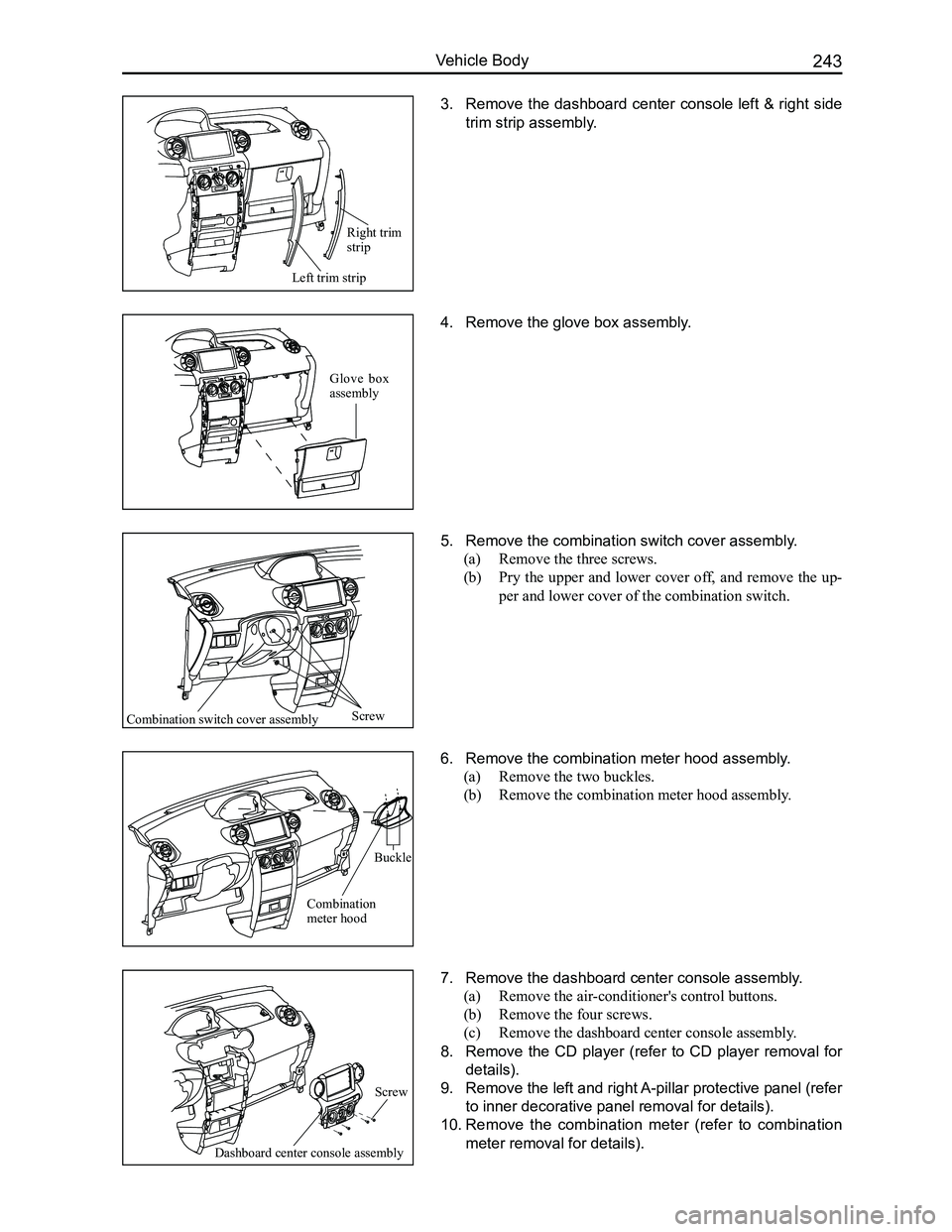
3. Remove the dashboard center console left & right side
trim strip assembly.
4. Remove the glove box assembly.
5. Remove the combination switch cover assembly.
(a) Remove the three screws.
(b) Pry the upper and lower cover off, and remove the up-
per and lower cover of the combination switch.
6. Remove the combination meter hood assembly.
(a) Remove the two buckles.
(b) Remove the combination meter hood assembly.
7. Remove the dashboard center console assembly.
(a) Remove the air-conditioner's control buttons.
(b) Remove the four screws.
(c) Remove the dashboard center console assembly.
8. Remove the CD player (refer to CD player removal for
details).
9. Remove the left and right A-pillar protective panel (refer
to inner decorative panel removal for details).
10. Remove the combination meter (refer to combination
meter removal for details).
Left trim strip
Screw
Buckle
Glove box assembly
Right trim strip
Combination switch cover assembly
Combination meter hood
Dashboard center console assembly
Screw
Page 251 of 281
Downloaded from www.Manualslib.com manuals search engine 244GWFLORID Maintenance Manual
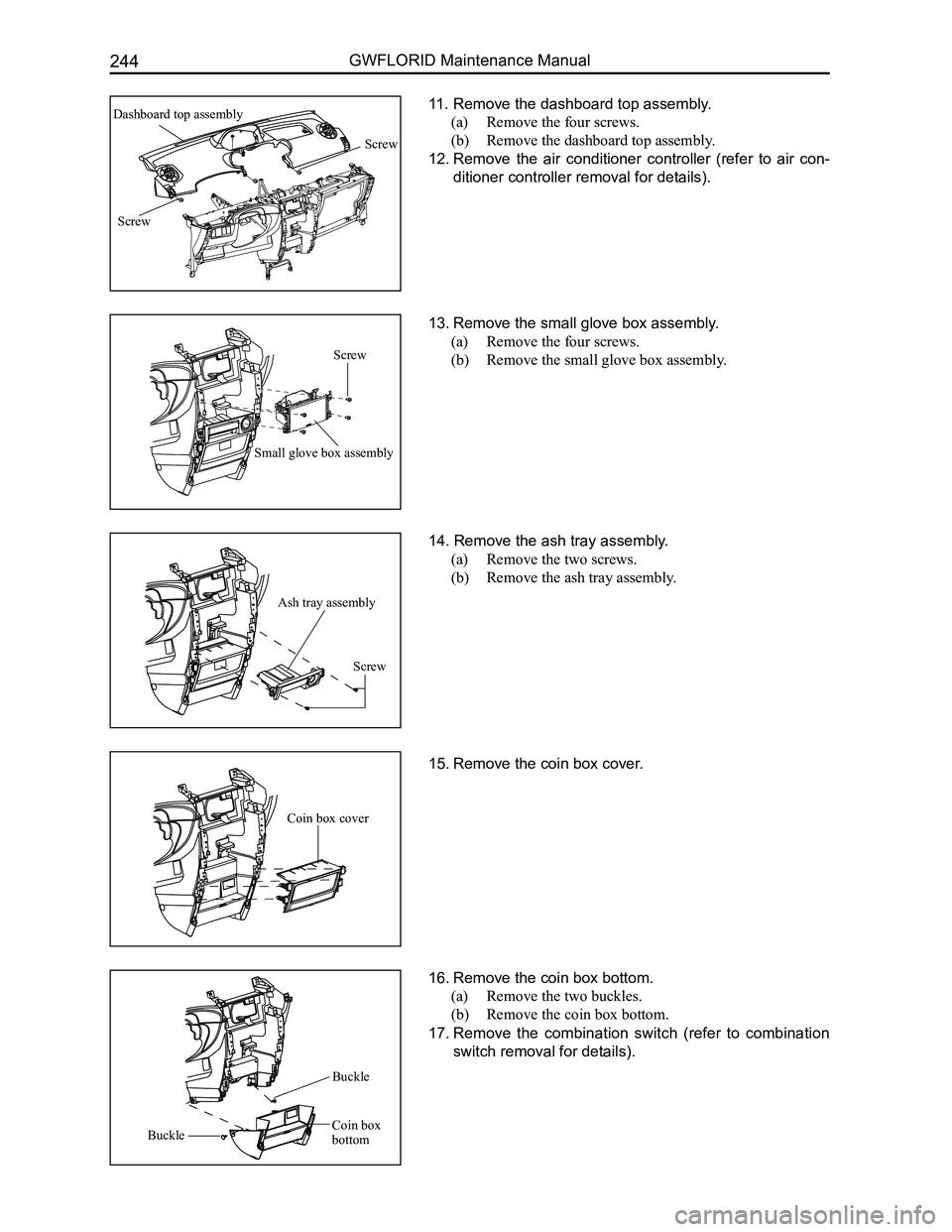
11. Remove the dashboard top assembly.
(a) Remove the four screws.
(b) Remove the dashboard top assembly.
12. Remove the air conditioner controller (refer to air con-
ditioner controller removal for details).
13. Remove the small glove box assembly.
(a) Remove the four screws.
(b) Remove the small glove box assembly.
14. Remove the ash tray assembly.
(a) Remove the two screws.
(b) Remove the ash tray assembly.
15. Remove the coin box cover.
16. Remove the coin box bottom.
(a) Remove the two buckles.
(b) Remove the coin box bottom.
17. Remove the combination switch (refer to combination
switch removal for details).
Small glove box assembly
Ash tray assembly
Coin box cover
Screw
Screw
Dashboard top assembly
Screw
Screw
Coin box
bottomBuckle
Buckle
Page 252 of 281
Downloaded from www.Manualslib.com manuals search engine 245Vehicle Body
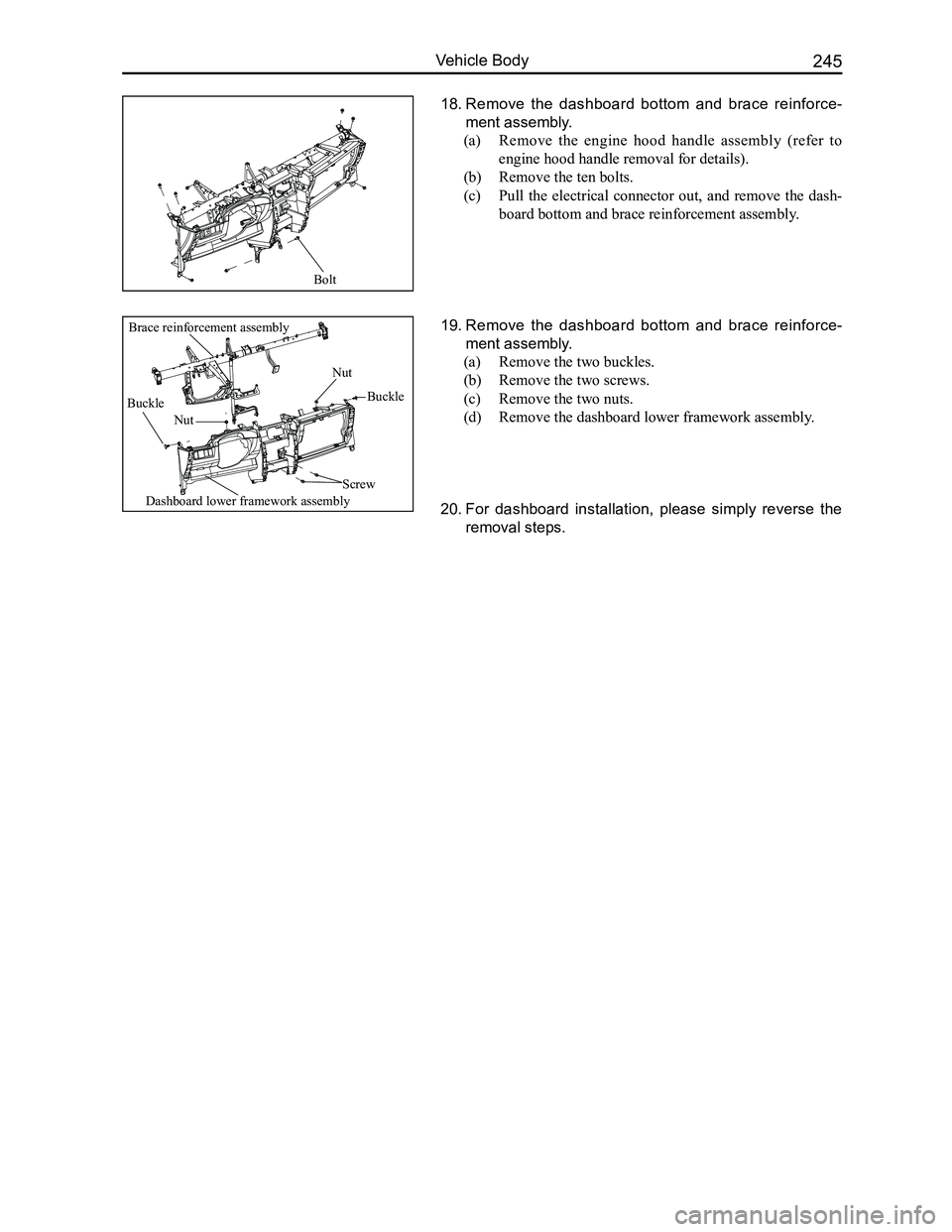
18. Remove the dashboard bottom and brace reinforce-
ment assembly.
(a) Remove the engine hood handle assembly (refer to
engine hood handle removal for details).
(b) Remove the ten bolts.
(c) Pull the electrical connector out, and remove the dash-
board bottom and brace reinforcement assembly.
19. Remove the dashboard bottom and brace reinforce-
ment assembly.
(a) Remove the two buckles.
(b) Remove the two screws.
(c) Remove the two nuts.
(d) Remove the dashboard lower framework assembly.
20. For dashboard installation, please simply reverse the
removal steps.
Bolt
Brace reinforcement assembly
Buckle
Nut
Nut
Buckle
Dashboard lower framework assembly
Screw