Brake HONDA ACCORD 2013 9.G User Guide
[x] Cancel search | Manufacturer: HONDA, Model Year: 2013, Model line: ACCORD, Model: HONDA ACCORD 2013 9.GPages: 595, PDF Size: 20.67 MB
Page 69 of 595
68Instrument Panel
Indicators*1:Models with the smart entry system have an ENGINE START/STOP button instead of an ignition switch.Indicator
Name
On/Blinking
Explanation
Message
*
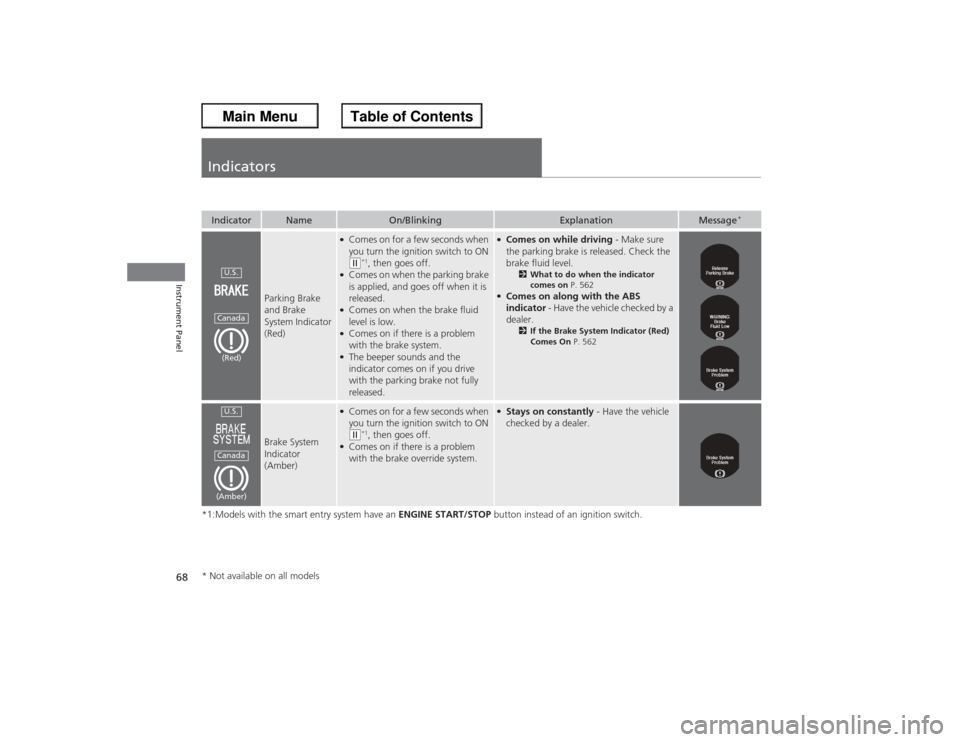
Parking Brake
and Brake
System Indicator
(Red)
●Comes on for a few seconds when
you turn the ignition switch to ON (w*1, then goes off.
●Comes on when the parking brake
is applied, and goes off when it is
released.●Comes on when the brake fluid
level is low.●Comes on if there is a problem
with the brake system.●The beeper sounds and the
indicator comes on if you drive
with the parking brake not fully
released.
●Comes on while driving - Make sure
the parking brake is released. Check the
brake fluid level.
2 What to do when the indicator
comes on P. 562
●Comes on along with the ABS
indicator - Have the vehicle checked by a
dealer.
2 If the Brake System Indicator (Red)
Comes On P. 562
Brake System
Indicator
(Amber)
●Comes on for a few seconds when
you turn the ignition switch to ON (w*1, then goes off.
●Comes on if there is a problem
with the brake override system.
●Stays on constantly - Have the vehicle
checked by a dealer.
U.S.Canada(Red)U.S.Canada(Amber)
* Not available on all models
Page 73 of 595
72
uuIndicators u
Instrument Panel
*1:Models with the smart entry system have an ENGINE START/STOP button instead of an ignition switch.Indicator
Name
On/Blinking
Explanation
Message
*
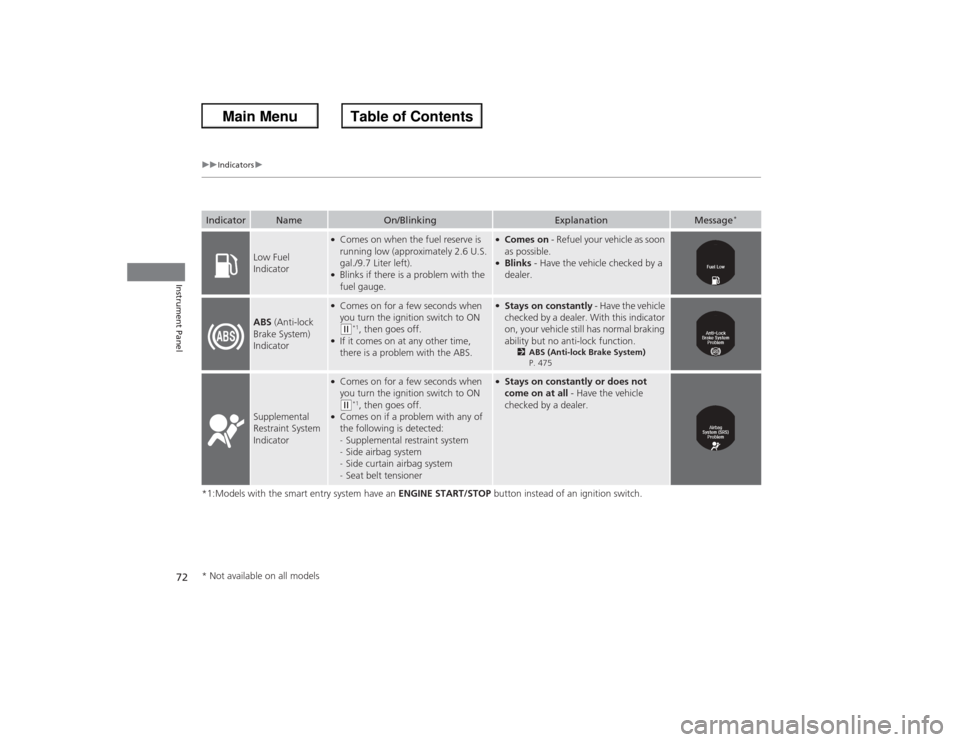
Low Fuel
Indicator
●Comes on when the fuel reserve is
running low (approximately 2.6 U.S.
gal./9.7 Liter left).●Blinks if there is a problem with the
fuel gauge.
●Comes on - Refuel your vehicle as soon
as possible.●Blinks - Have the vehicle checked by a
dealer.
ABS (Anti-lock
Brake System)
Indicator
●Comes on for a few seconds when
you turn the ignition switch to ON ( w*1, then goes off.
●If it comes on at any other time,
there is a problem with the ABS.
●Stays on constantly - Have the vehicle
checked by a dealer. With this indicator
on, your vehicle still has normal braking
ability but no anti-lock function.
2 ABS (Anti-lock Brake System)
P. 475
Supplemental
Restraint System
Indicator
●Comes on for a few seconds when
you turn the ignition switch to ON ( w*1, then goes off.
●Comes on if a problem with any of
the following is detected:
- Supplemental restraint system
- Side airbag system
- Side curtain airbag system
- Seat belt tensioner
●Stays on constantly or does not
come on at all - Have the vehicle
checked by a dealer.
* Not available on all models
Page 79 of 595
78
uuIndicators u
Instrument Panel
*1:On the left: Models with information display On the right: Models with multi-information displayIndicator
Name
On/Blinking
Explanation
Message
*1
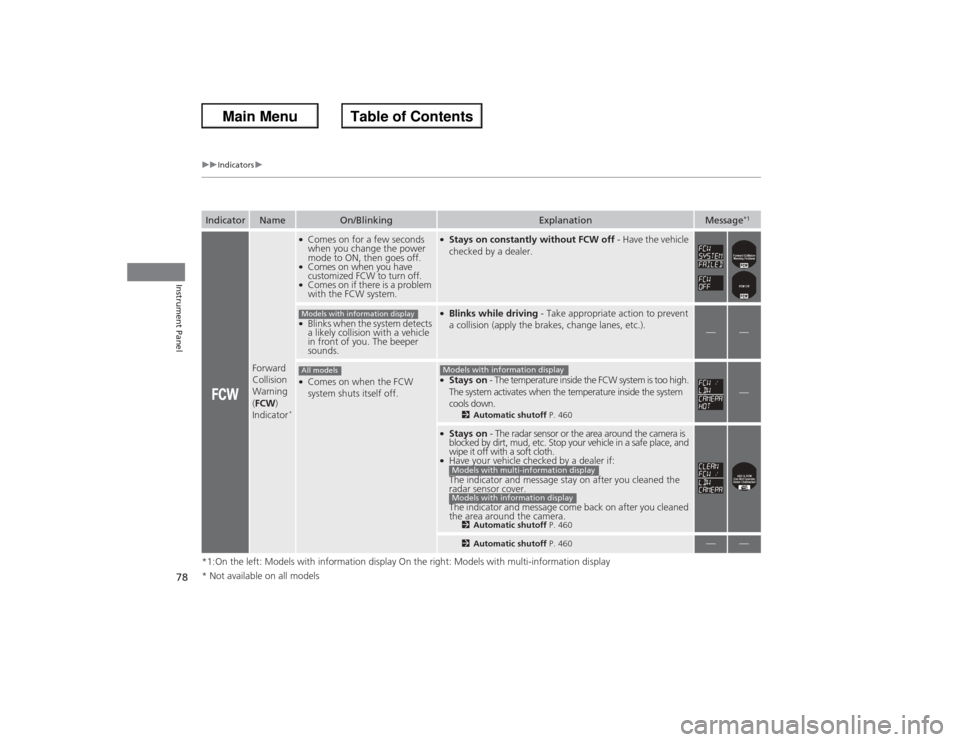
Forward
Collision
Warning
(FCW )
Indicator
*●Comes on for a few seconds
when you change the power
mode to ON, then goes off.●Comes on when you have
customized FCW to turn off.●Comes on if there is a problem
with the FCW system.
●Stays on constantly without FCW off - Have the vehicle
checked by a dealer.
●Blinks when the system detects
a likely collision with a vehicle
in front of you. The beeper
sounds.
●Blinks while driving - Take appropriate action to prevent
a collision (apply the brakes, change lanes, etc.).
—
—
●Comes on when the FCW
system shuts itself off.
●Stays on - The temperature inside the FCW system is too high.
The system activates when the temperature inside the system
cools down.
2 Automatic shutoff P. 460
—
●Stays on - The radar sensor or the area around the camera is
blocked by dirt, mud, etc. Stop your vehicle in a safe place, and
wipe it off with a soft cloth.●Have your vehicle checked by a dealer if:
The indicator and message stay on after you cleaned the
radar sensor cover.
The indicator and message come back on after you cleaned
the area around the camera.
2 Automatic shutoff P. 4602Automatic shutoff P. 460
—
—
Models with information displayAll models
Models with information displayModels with multi-information displayModels with information display
* Not available on all models
Page 82 of 595
81
uuIndicators u
Instrument Panel
*1:Models with the smart entry system have an ENGINE START/STOP button instead of an ignition switch.Indicator
Name
On/Blinking
Explanation
Message
*
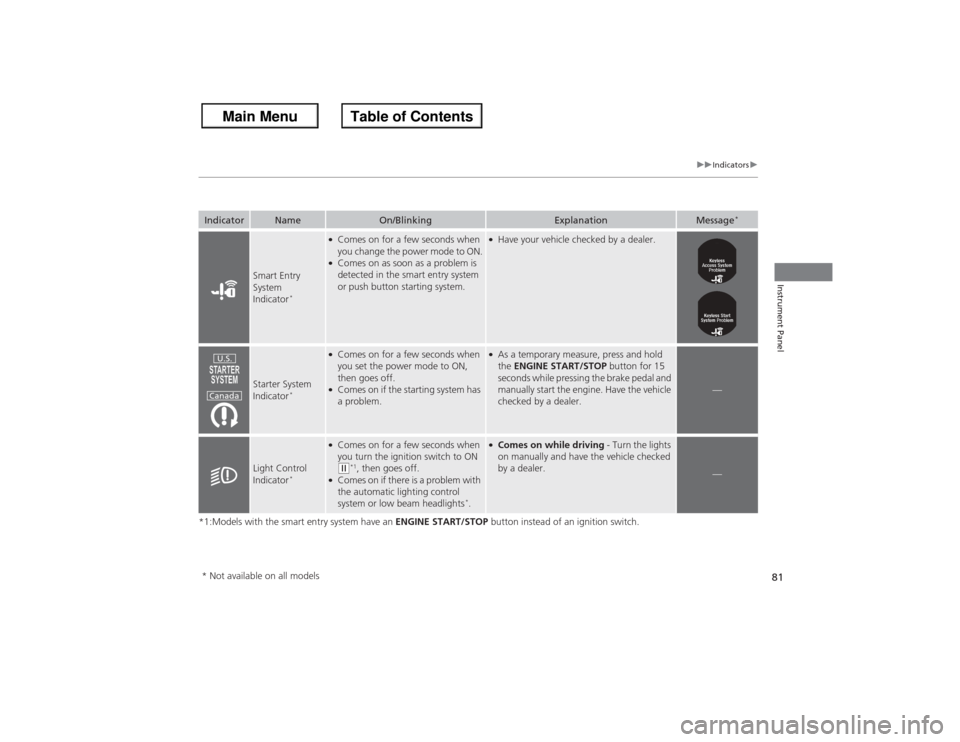
Smart Entry
System
Indicator
*
●Comes on for a few seconds when
you change the power mode to ON.●Comes on as soon as a problem is
detected in the smart entry system
or push button starting system.
●Have your vehicle checked by a dealer.
Starter System
Indicator
*
●Comes on for a few seconds when
you set the power mode to ON,
then goes off.●Comes on if the starting system has
a problem.
●As a temporary measure, press and hold
the ENGINE START/STOP button for 15
seconds while pressing the brake pedal and
manually start the engine. Have the vehicle
checked by a dealer.
—
Light Control
Indicator
*
●Comes on for a few seconds when
you turn the ignition switch to ON ( w*1, then goes off.
●Comes on if there is a problem with
the automatic lighting control
system or low beam headlights
*.
●Comes on while driving - Turn the lights
on manually and have the vehicle checked
by a dealer.
—
U.S.
Canada
* Not available on all models
Page 87 of 595
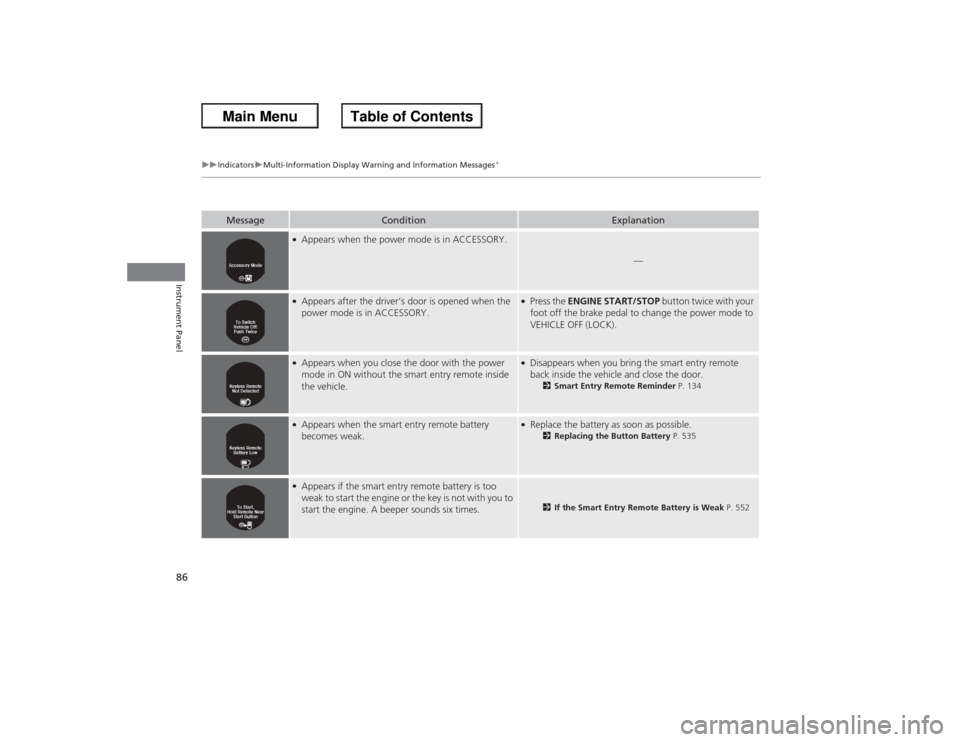
86
uuIndicators uMulti-Information Display Warning and Information Messages
*
Instrument Panel
Message
Condition
Explanation
●Appears when the power mode is in ACCESSORY.
—
●Appears after the driver’s door is opened when the
power mode is in ACCESSORY.
●Press the ENGINE START/STOP button twice with your
foot off the brake pedal to change the power mode to
VEHICLE OFF (LOCK).
●Appears when you close the door with the power
mode in ON without the smart entry remote inside
the vehicle.
●Disappears when you bring the smart entry remote
back inside the vehicle and close the door.
2 Smart Entry Remote Reminder P. 134
●Appears when the smart entry remote battery
becomes weak.
●Replace the battery as soon as possible.
2Replacing the Button Battery P. 535
●Appears if the smart entry remote battery is too
weak to start the engine or the key is not with you to
start the engine. A beeper sounds six times.
2If the Smart Entry Remote Battery is Weak P. 552
Page 88 of 595
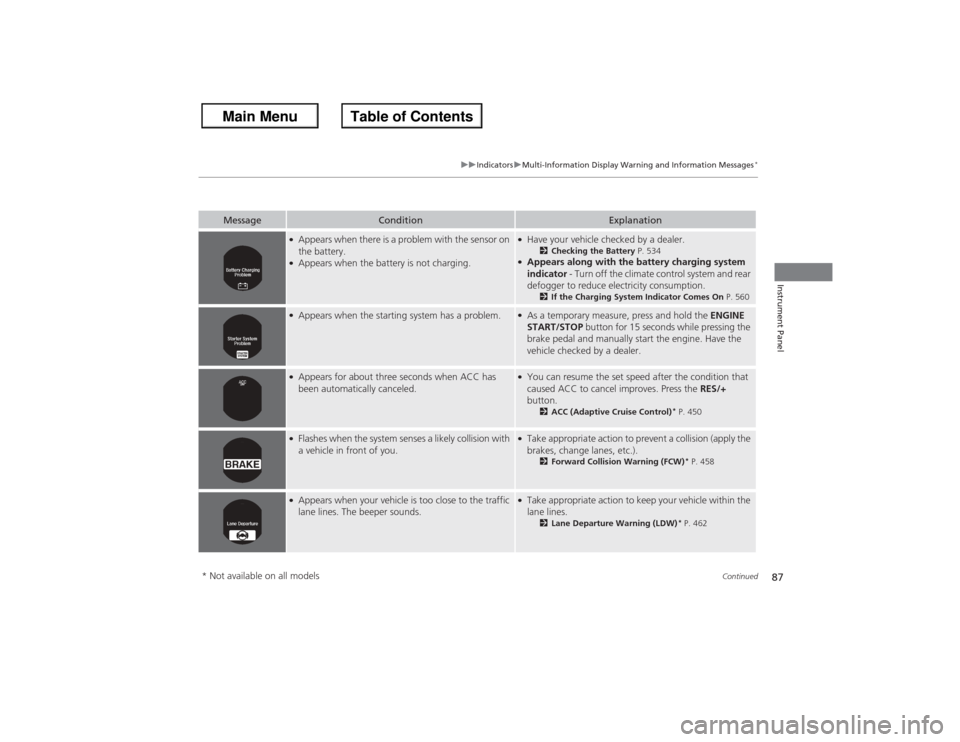
87
uuIndicators uMulti-Information Display Warning and Information Messages
*
Continued
Instrument Panel
Message
Condition
Explanation
●Appears when there is a problem with the sensor on
the battery.●Appears when the battery is not charging.
●Have your vehicle checked by a dealer.
2Checking the Battery P. 534
●Appears along with the battery charging system
indicator - Turn off the climate control system and rear
defogger to reduce electricity consumption.
2 If the Charging System Indicator Comes On P. 560
●Appears when the starting system has a problem.
●As a temporary measure, press and hold the ENGINE
START/STOP button for 15 seconds while pressing the
brake pedal and manually start the engine. Have the
vehicle checked by a dealer.
●Appears for about three seconds when ACC has
been automatically canceled.
●You can resume the set speed after the condition that
caused ACC to cancel improves. Press the RES/+
button.
2 ACC (Adaptive Cruise Control)
* P. 450
●Flashes when the system senses a likely collision with
a vehicle in front of you.
●Take appropriate action to prevent a collision (apply the
brakes, change lanes, etc.).
2Forward Collision Warning (FCW)
* P. 458
●Appears when your vehicle is too close to the traffic
lane lines. The beeper sounds.
●Take appropriate action to keep your vehicle within the
lane lines.
2Lane Departure Warning (LDW)
* P. 462
* Not available on all models
Page 133 of 595
132
uuOperating the Switches Around the Steering Wheel uENGINE START/STOP Button
*
Controls
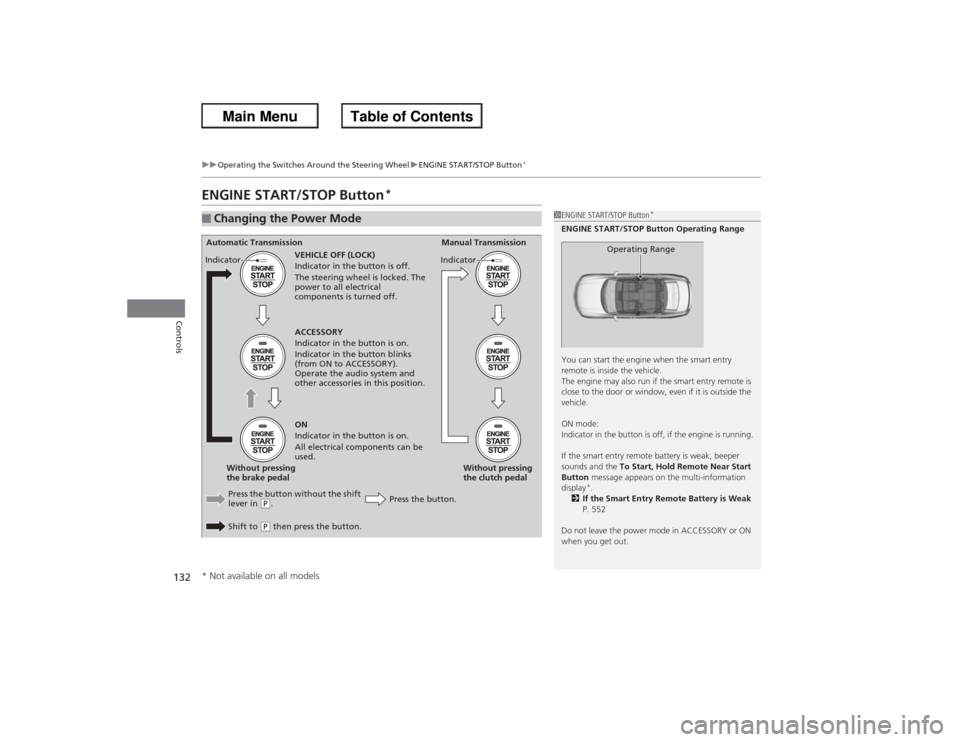
ENGINE START/STOP Button
*
■Changing the Power Mode
1ENGINE START/STOP Button
*
ENGINE START/STOP Button Operating Range
You can start the engine when the smart entry
remote is inside the vehicle.
The engine may also run if the smart entry remote is
close to the door or window, even if it is outside the
vehicle.
ON mode:
Indicator in the button is off, if the engine is running.
If the smart entry remote battery is weak, beeper
sounds and the To Start, Hold Remote Near Start
Button message appears on the multi-information
display
*.
2 If the Smart Entry Remote Battery is Weak
P. 552
Do not leave the power mode in ACCESSORY or ON
when you get out.
Operating Range
Automatic Transmission Manual Transmission
VEHICLE OFF (LOCK)
Indicator in the button is off.
The steering wheel is locked. The
power to all electrical
components is turned off.
Press the button without the shift
lever in
(P.
Shift to (P then press the button. Press the button.Without pressing
the clutch pedal
Without pressing
the brake pedal ACCESSORY
Indicator in the button is on.
Indicator in the button blinks
(from ON to ACCESSORY).
Operate the audio system and
other accessories in this position.
ON
Indicator in the button is on.
All electrical components can be
used.
Indicator
Indicator
* Not available on all models
Page 140 of 595
139
uuOperating the Switches Around the Steering Wheel uDaytime Running Lights
Controls
Daytime Running LightsThe high beam headlights come on slightly dimmer than normal when the following
conditions have been met:
The parking/daytime running lights come on when the following conditions have
been met:
• The power mode is ON.
• The headlight switch is off, or in .
• The parking brake is released.
• The ignition switch is in ON
(w*1.
• The headlight switch is off.
• The parking brake is released.
The lights remain on even if you set the parking brake. Turning off the ignition switch
or setting the power mode to VEHICLE OFF will turn off the daytime running lights.
The high beam headlights return to the original brightness once the headlight
switch is turned on.
*1: Models with the smart entry system have an ENGINE START/STOP button instead of an
ignition switch.Models with bulb type parking lightsModels with LED type parking/daytime running lightsModels with LED low beam headlightsModels with halogen low beam headlightsModels with bulb type parking lights
Page 145 of 595
uuOperating the Switches Around the Steering Wheel uDriving Position Memory System
*
144Controls
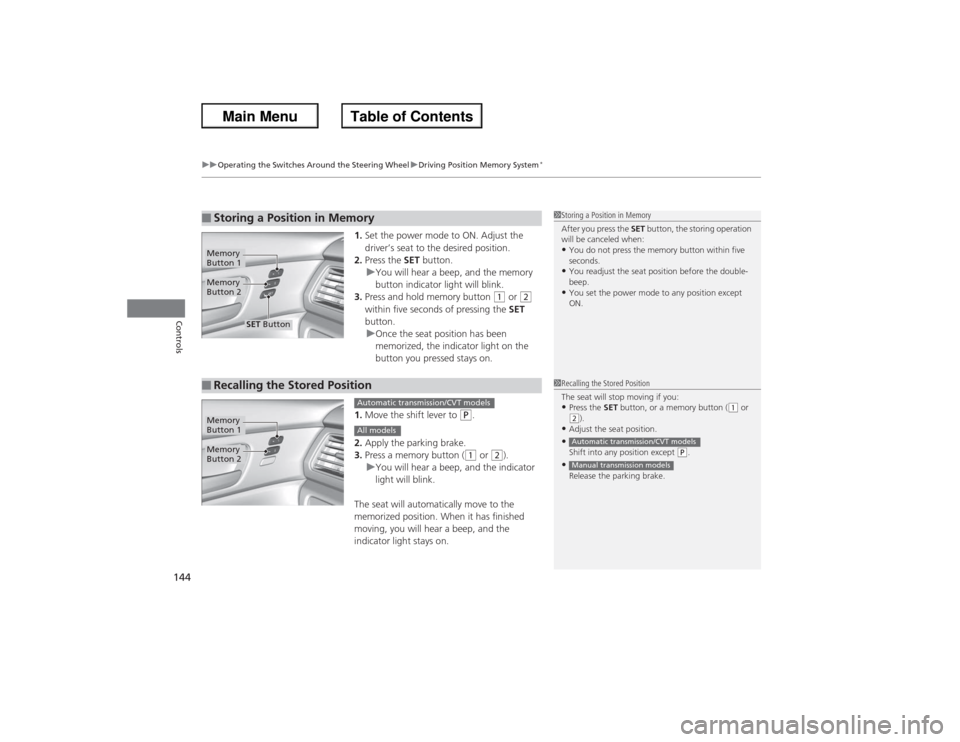
1. Set the power mode to ON. Adjust the
driver’s seat to the desired position.
2. Press the SET button.
u You will hear a beep, and the memory
button indicator light will blink.
3. Press and hold memory button
(1 or
(2
within five seconds of pressing the SET
button.
u Once the seat position has been
memorized, the indicator light on the
button you pressed stays on.
1. Move the shift lever to
(P.
2. Apply the parking brake.
3. Press a memory button ((1 or
(2).
u You will hear a beep, and the indicator
light will blink.
The seat will automatically move to the
memorized position. When it has finished
moving, you will hear a beep, and the
indicator light stays on.
■Storing a Position in Memory
1 Storing a Position in Memory
After you press the SET button, the storing operation
will be canceled when: •You do not press the memory button within five
seconds.•You readjust the seat position before the double-
beep.•You set the power mode to any position except
ON.
Memory
Button 1Memory
Button 2
SET Button
■Recalling the Stored Position
1Recalling the Stored Position
The seat will stop moving if you: •Press the SET button, or a memory button (
(1 or
(2).
•Adjust the seat position.•Shift into any position except
(P.
•Release the parking brake.Automatic transmission/CVT modelsManual transmission models
Memory
Button 1Memory
Button 2
Automatic transmission/CVT modelsAll models
Page 155 of 595
154
uuAdjusting the Seats uRear Seats
Controls
Rear Seats
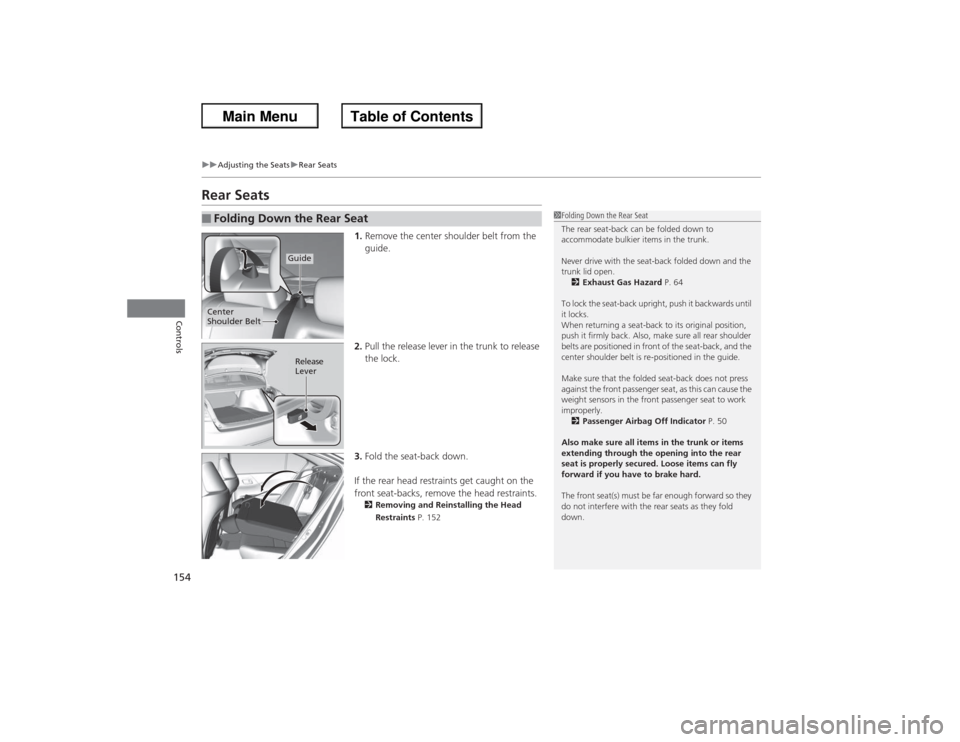
1. Remove the center shoulder belt from the
guide.
2. Pull the release lever in the trunk to release
the lock.
3. Fold the seat-back down.
If the rear head restraints get caught on the
front seat-backs, remove the head restraints.2 Removing and Reinstalling the Head
Restraints P. 152
■Folding Down the Rear Seat
1Folding Down the Rear Seat
The rear seat-back can be folded down to
accommodate bulkier items in the trunk.
Never drive with the seat-back folded down and the
trunk lid open.
2 Exhaust Gas Hazard P. 64
To lock the seat-back upright, push it backwards until
it locks.
When returning a seat-back to its original position,
push it firmly back. Also, make sure all rear shoulder
belts are positioned in front of the seat-back, and the
center shoulder belt is re-positioned in the guide.
Make sure that the folded seat-back does not press
against the front passenger seat, as this can cause the
weight sensors in the front passenger seat to work
improperly. 2 Passenger Airbag Off Indicator P. 50
Also make sure all items in the trunk or items
extending through the opening into the rear
seat is properly secured. Loose items can fly
forward if you have to brake hard.
The front seat(s) must be far enough forward so they
do not interfere with the rear seats as they fold
down.
Guide
Center
Shoulder Belt
Release
Lever