power HONDA ACCORD 2013 9.G User Guide
[x] Cancel search | Manufacturer: HONDA, Model Year: 2013, Model line: ACCORD, Model: HONDA ACCORD 2013 9.GPages: 595, PDF Size: 20.67 MB
Page 75 of 595
74
uuIndicators u
Instrument Panel
*1:Models with the smart entry system have an ENGINE START/STOP button instead of an ignition switch.Indicator
Name
On/Blinking
Explanation
Message
*
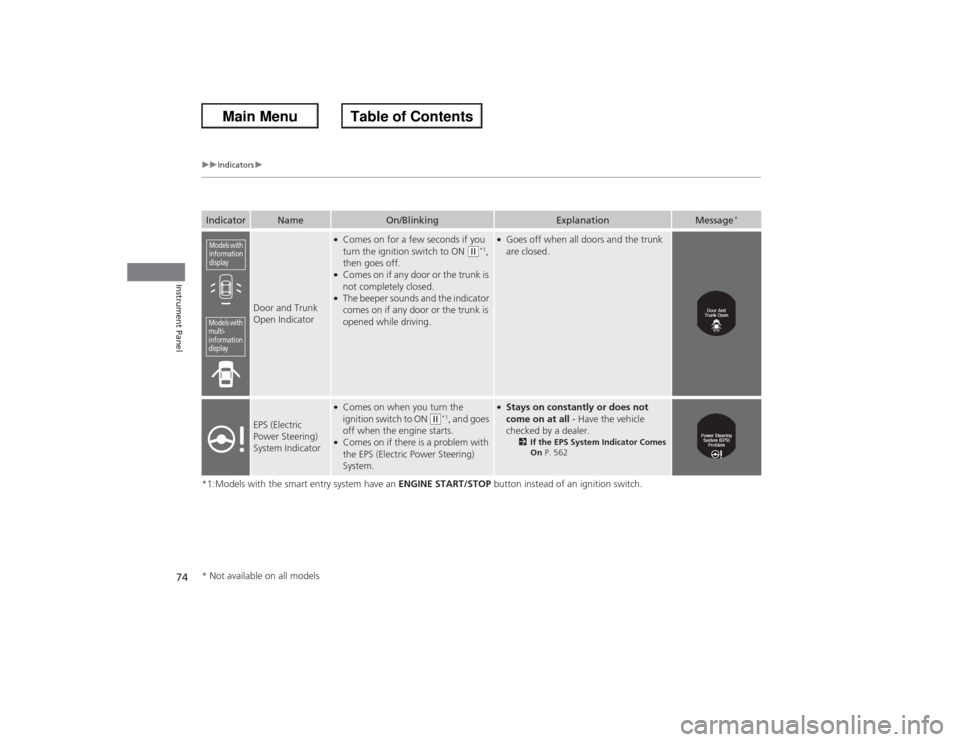
Door and Trunk
Open Indicator
●Comes on for a few seconds if you
turn the ignition switch to ON
(w*1,
then goes off.
●Comes on if any door or the trunk is
not completely closed.●The beeper sounds and the indicator
comes on if any door or the trunk is
opened while driving.
●Goes off when all doors and the trunk
are closed.
EPS (Electric
Power Steering)
System Indicator
●Comes on when you turn the
ignition switch to ON
(w*1, and goes
off when the engine starts.
●Comes on if there is a problem with
the EPS (Electric Power Steering)
System.
●Stays on constantly or does not
come on at all - Have the vehicle
checked by a dealer.
2 If the EPS System Indicator Comes
On P. 562
Models with
information
displayModels with
multi-
information
display* Not available on all models
Page 77 of 595
76
uuIndicators u
Instrument Panel
*1:Models with the smart entry system have an ENGINE START/STOP button instead of an ignition switch.Indicator
Name
On/Blinking
Explanation
Message
*
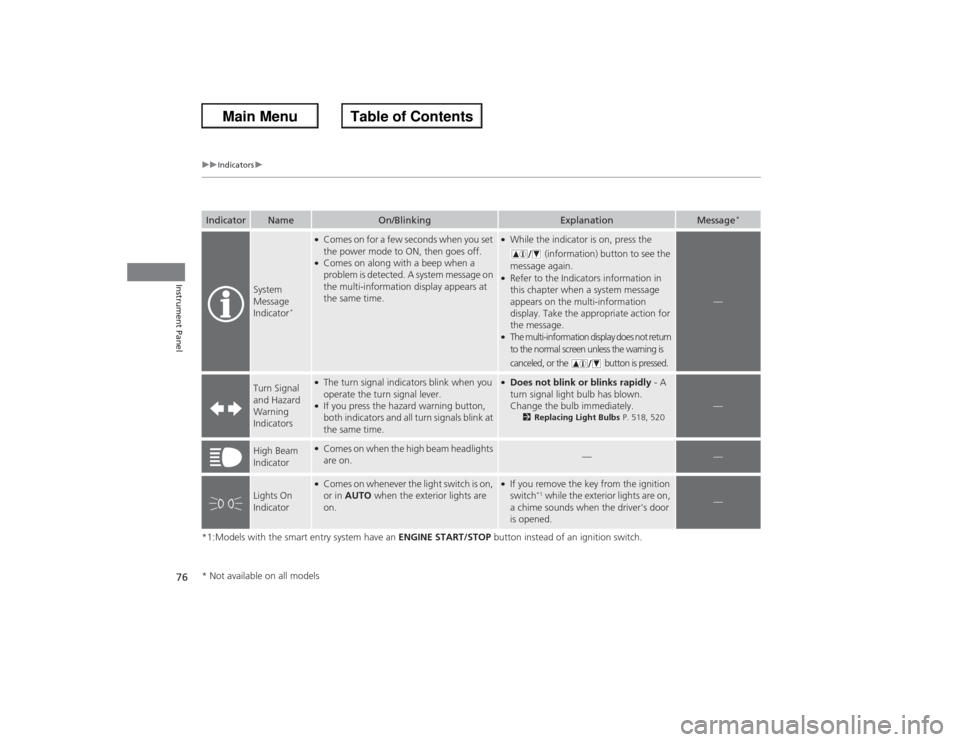
System
Message
Indicator
*
●Comes on for a few seconds when you set
the power mode to ON, then goes off.●Comes on along with a beep when a
problem is detected. A system message on
the multi-information display appears at
the same time.
●While the indicator is on, press the
(information) button to see the
message again.●Refer to the Indicators information in
this chapter when a system message
appears on the multi-information
display. Take the appropriate action for
the message.●The multi-information display does not return
to the normal screen unless the warning is
canceled, or the button is pressed.
—
Turn Signal
and Hazard
Warning
Indicators
●The turn signal indicators blink when you
operate the turn signal lever.●If you press the hazard warning button,
both indicators and all turn signals blink at
the same time.
●Does not blink or blinks rapidly - A
turn signal light bulb has blown.
Change the bulb immediately.
2 Replacing Light Bulbs P. 518, 520
—
High Beam
Indicator
●Comes on when the high beam headlights
are on.
—
—
Lights On
Indicator
●Comes on whenever the light switch is on,
or in AUTO when the exterior lights are
on.
●If you remove the key from the ignition
switch
*1 while the exterior lights are on,
a chime sounds when the driver's door
is opened.
—
* Not available on all models
Page 79 of 595
78
uuIndicators u
Instrument Panel
*1:On the left: Models with information display On the right: Models with multi-information displayIndicator
Name
On/Blinking
Explanation
Message
*1
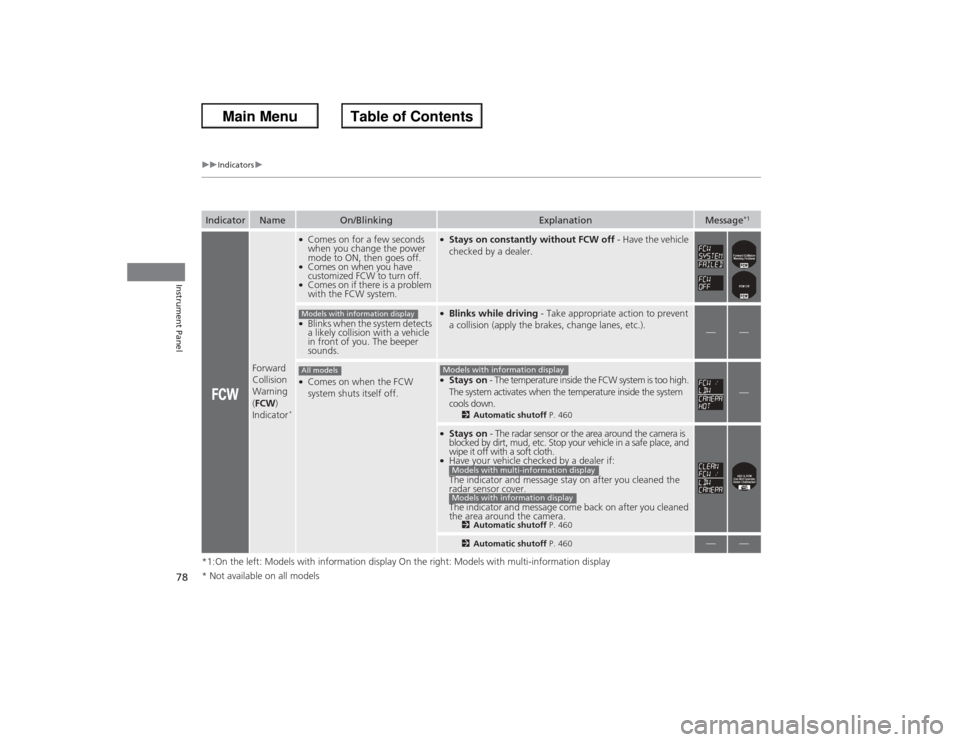
Forward
Collision
Warning
(FCW )
Indicator
*●Comes on for a few seconds
when you change the power
mode to ON, then goes off.●Comes on when you have
customized FCW to turn off.●Comes on if there is a problem
with the FCW system.
●Stays on constantly without FCW off - Have the vehicle
checked by a dealer.
●Blinks when the system detects
a likely collision with a vehicle
in front of you. The beeper
sounds.
●Blinks while driving - Take appropriate action to prevent
a collision (apply the brakes, change lanes, etc.).
—
—
●Comes on when the FCW
system shuts itself off.
●Stays on - The temperature inside the FCW system is too high.
The system activates when the temperature inside the system
cools down.
2 Automatic shutoff P. 460
—
●Stays on - The radar sensor or the area around the camera is
blocked by dirt, mud, etc. Stop your vehicle in a safe place, and
wipe it off with a soft cloth.●Have your vehicle checked by a dealer if:
The indicator and message stay on after you cleaned the
radar sensor cover.
The indicator and message come back on after you cleaned
the area around the camera.
2 Automatic shutoff P. 4602Automatic shutoff P. 460
—
—
Models with information displayAll models
Models with information displayModels with multi-information displayModels with information display
* Not available on all models
Page 80 of 595
79
uuIndicators u
Continued
Instrument Panel
*1:On the left: Models with information display
On the right: Models with multi-information displayIndicator
Name
On/Blinking
Explanation
Message
*1
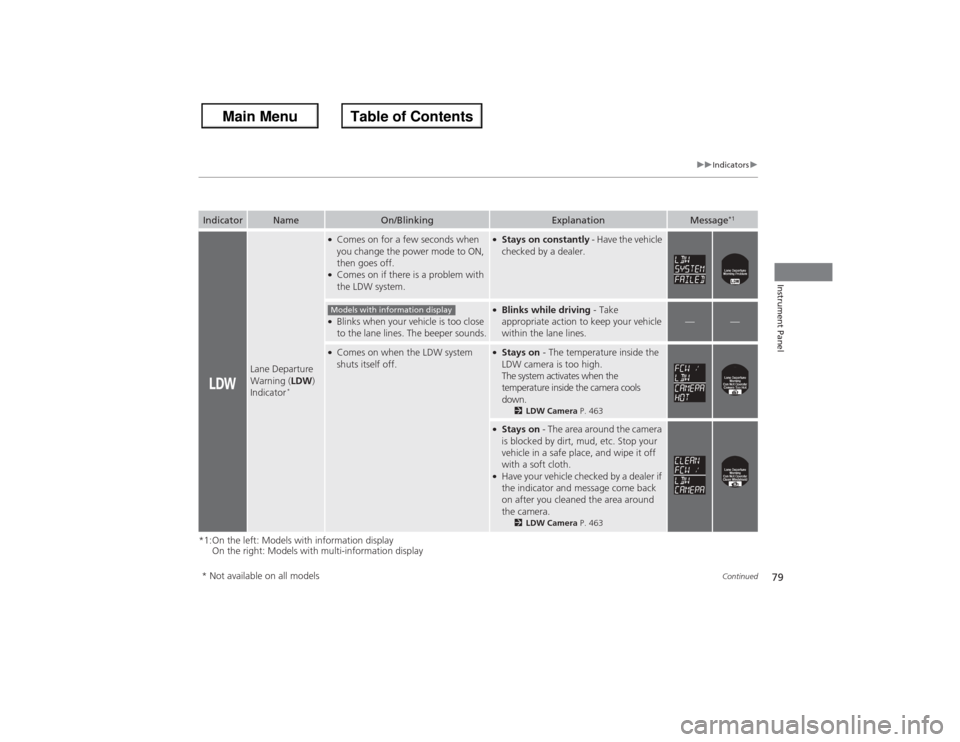
Lane Departure
Warning ( LDW)
Indicator
*
●Comes on for a few seconds when
you change the power mode to ON,
then goes off.●Comes on if there is a problem with
the LDW system.
●Stays on constantly - Have the vehicle
checked by a dealer.
●Blinks when your vehicle is too close
to the lane lines. The beeper sounds.
●Blinks while driving - Take
appropriate action to keep your vehicle
within the lane lines.
—
—
●Comes on when the LDW system
shuts itself off.
●Stays on - The temperature inside the
LDW camera is too high.
The system activates when the
temperature inside the camera cools
down.
2 LDW Camera P. 463
●Stays on - The area around the camera
is blocked by dirt, mud, etc. Stop your
vehicle in a safe place, and wipe it off
with a soft cloth.●Have your vehicle checked by a dealer if
the indicator and message come back
on after you cleaned the area around
the camera.
2 LDW Camera P. 463
Models with information display
* Not available on all models
Page 81 of 595
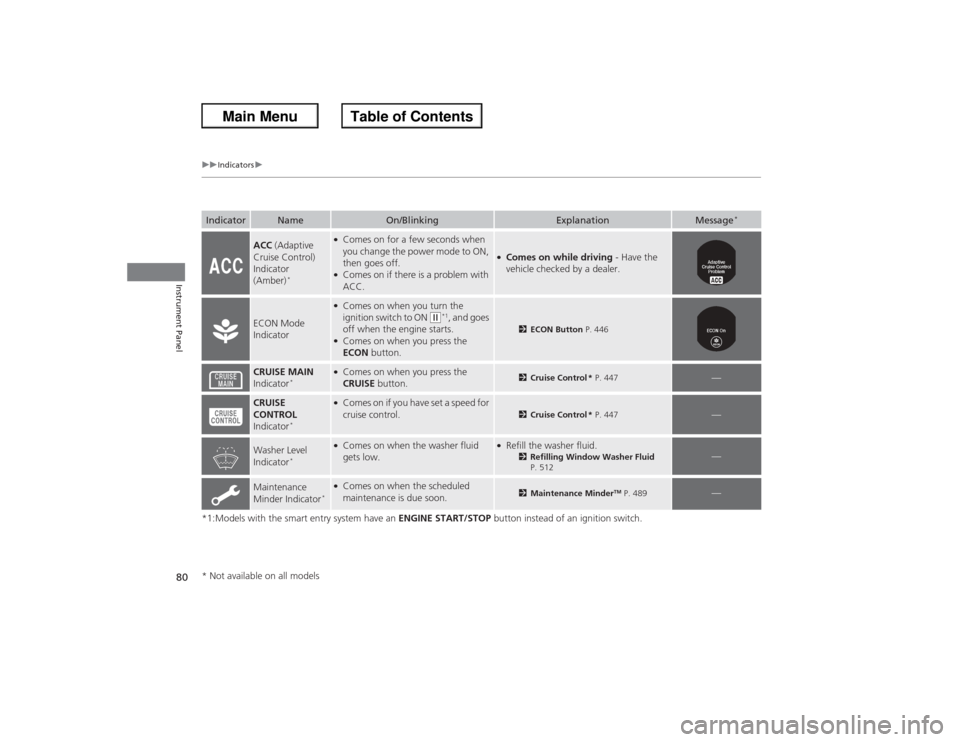
80
uuIndicators u
Instrument Panel
*1:Models with the smart entry system have an ENGINE START/STOP button instead of an ignition switch.Indicator
Name
On/Blinking
Explanation
Message
*
ACC (Adaptive
Cruise Control)
Indicator
(Amber)
*
●Comes on for a few seconds when
you change the power mode to ON,
then goes off.●Comes on if there is a problem with
ACC.
●Comes on while driving - Have the
vehicle checked by a dealer.
ECON Mode
Indicator
●Comes on when you turn the
ignition switch to ON
(w*1, and goes
off when the engine starts.
●Comes on when you press the
ECON button.
2ECON Button P. 446
CRUISE MAIN
Indicator
*
●Comes on when you press the
CRUISE button.
2Cruise Control * P. 447
—
CRUISE
CONTROL
Indicator
*
●Comes on if you have set a speed for
cruise control.
2 Cruise Control * P. 447
—
Washer Level
Indicator
*
●Comes on when the washer fluid
gets low.
●Refill the washer fluid.
2Refilling Window Washer Fluid
P. 512
—
Maintenance
Minder Indicator
*●Comes on when the scheduled
maintenance is due soon.
2 Maintenance Minder
TM P. 489
—
* Not available on all models
Page 82 of 595
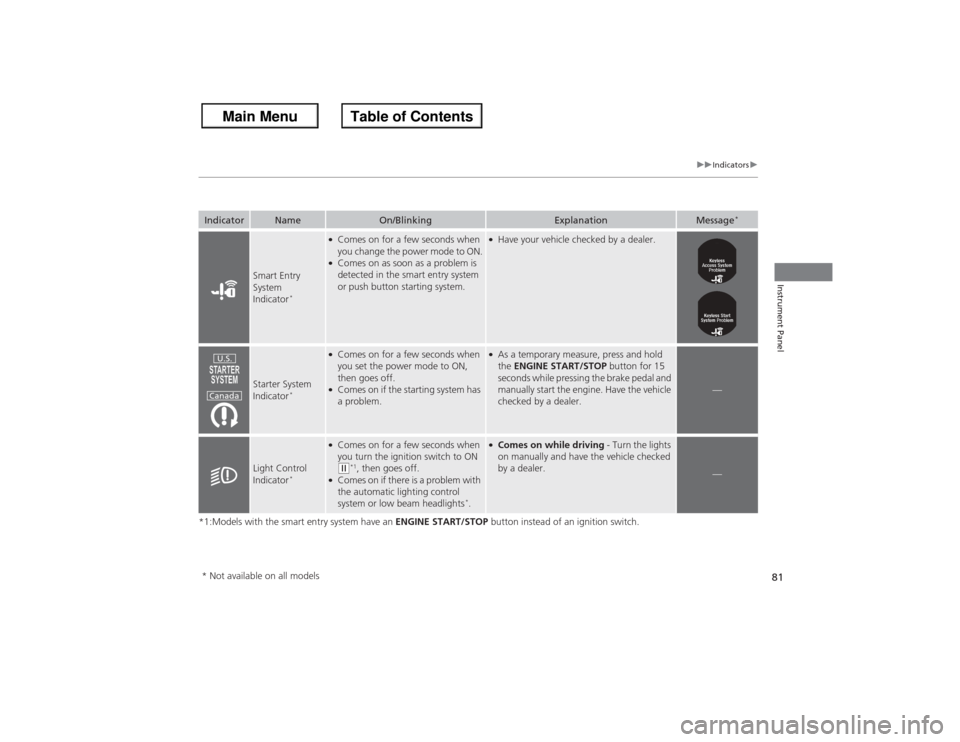
81
uuIndicators u
Instrument Panel
*1:Models with the smart entry system have an ENGINE START/STOP button instead of an ignition switch.Indicator
Name
On/Blinking
Explanation
Message
*
Smart Entry
System
Indicator
*
●Comes on for a few seconds when
you change the power mode to ON.●Comes on as soon as a problem is
detected in the smart entry system
or push button starting system.
●Have your vehicle checked by a dealer.
Starter System
Indicator
*
●Comes on for a few seconds when
you set the power mode to ON,
then goes off.●Comes on if the starting system has
a problem.
●As a temporary measure, press and hold
the ENGINE START/STOP button for 15
seconds while pressing the brake pedal and
manually start the engine. Have the vehicle
checked by a dealer.
—
Light Control
Indicator
*
●Comes on for a few seconds when
you turn the ignition switch to ON ( w*1, then goes off.
●Comes on if there is a problem with
the automatic lighting control
system or low beam headlights
*.
●Comes on while driving - Turn the lights
on manually and have the vehicle checked
by a dealer.
—
U.S.
Canada
* Not available on all models
Page 84 of 595
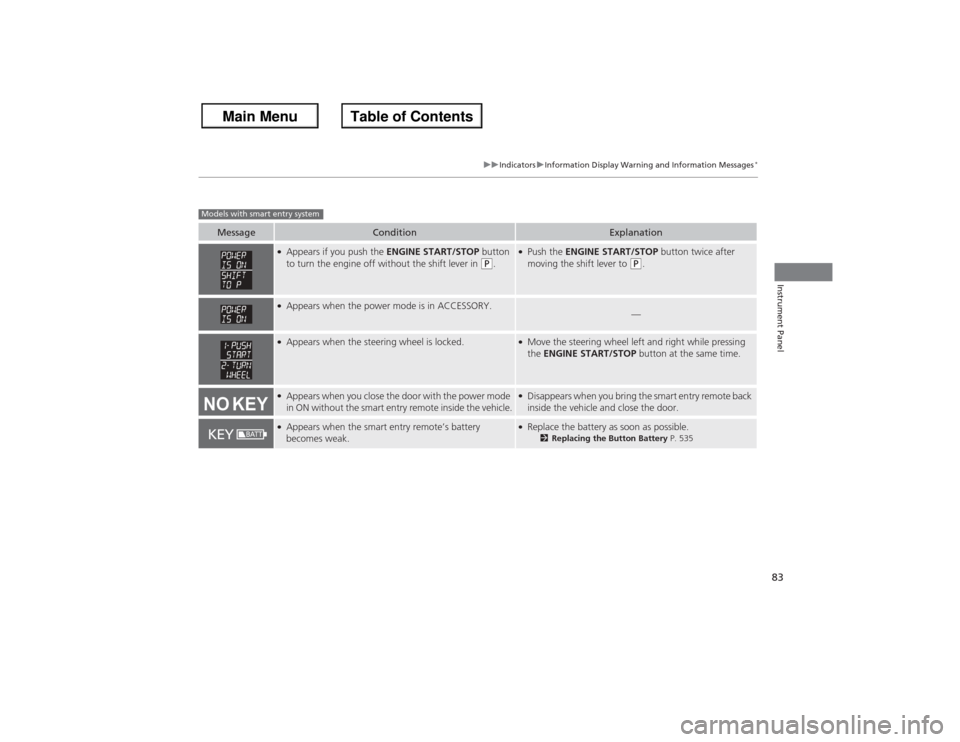
83
uuIndicators uInformation Display Warning and Information Messages
*
Instrument Panel
Message
Condition
Explanation
●Appears if you push the ENGINE START/STOP button
to turn the engine off without the shift lever in
(P.
●Push the ENGINE START/STOP button twice after
moving the shift lever to
(P.
●Appears when the power mode is in ACCESSORY.
—
●Appears when the steering wheel is locked.
●Move the steering wheel left and right while pressing
the ENGINE START/STOP button at the same time.
●Appears when you close the door with the power mode
in ON without the smart entry remote inside the vehicle.
●Disappears when you bring the smart entry remote back
inside the vehicle and close the door.
●Appears when the smart entry remote’s battery
becomes weak.
●Replace the battery as soon as possible.
2Replacing the Button Battery P. 535
Models with smart entry system
Page 87 of 595
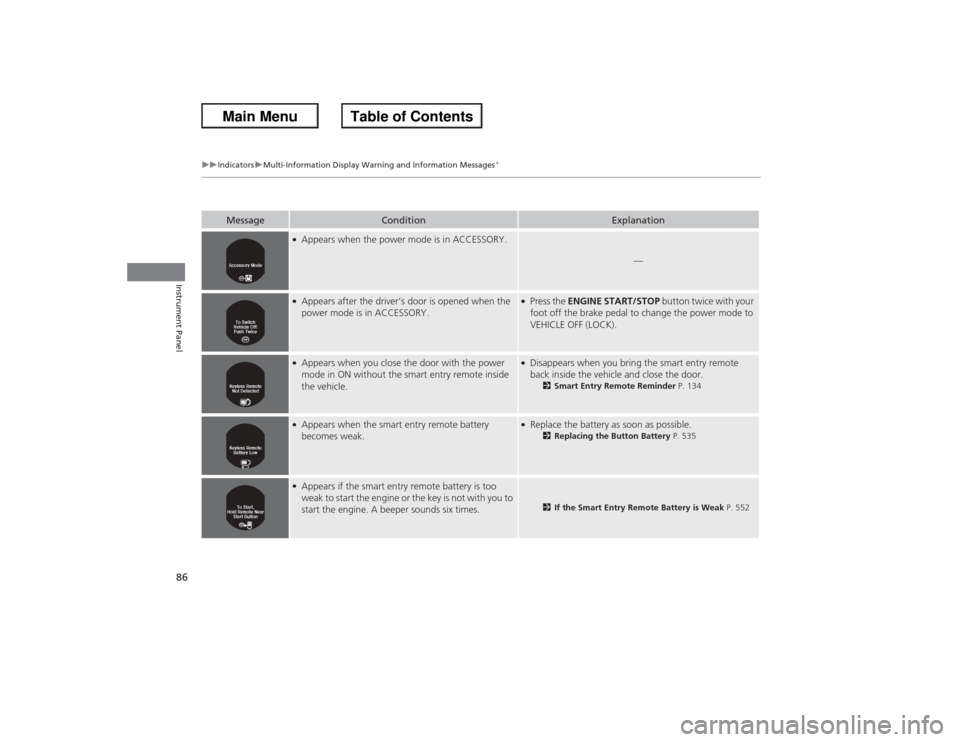
86
uuIndicators uMulti-Information Display Warning and Information Messages
*
Instrument Panel
Message
Condition
Explanation
●Appears when the power mode is in ACCESSORY.
—
●Appears after the driver’s door is opened when the
power mode is in ACCESSORY.
●Press the ENGINE START/STOP button twice with your
foot off the brake pedal to change the power mode to
VEHICLE OFF (LOCK).
●Appears when you close the door with the power
mode in ON without the smart entry remote inside
the vehicle.
●Disappears when you bring the smart entry remote
back inside the vehicle and close the door.
2 Smart Entry Remote Reminder P. 134
●Appears when the smart entry remote battery
becomes weak.
●Replace the battery as soon as possible.
2Replacing the Button Battery P. 535
●Appears if the smart entry remote battery is too
weak to start the engine or the key is not with you to
start the engine. A beeper sounds six times.
2If the Smart Entry Remote Battery is Weak P. 552
Page 98 of 595
Continued
97
uuGauges and Displays uMulti-Information Display
*
Instrument Panel
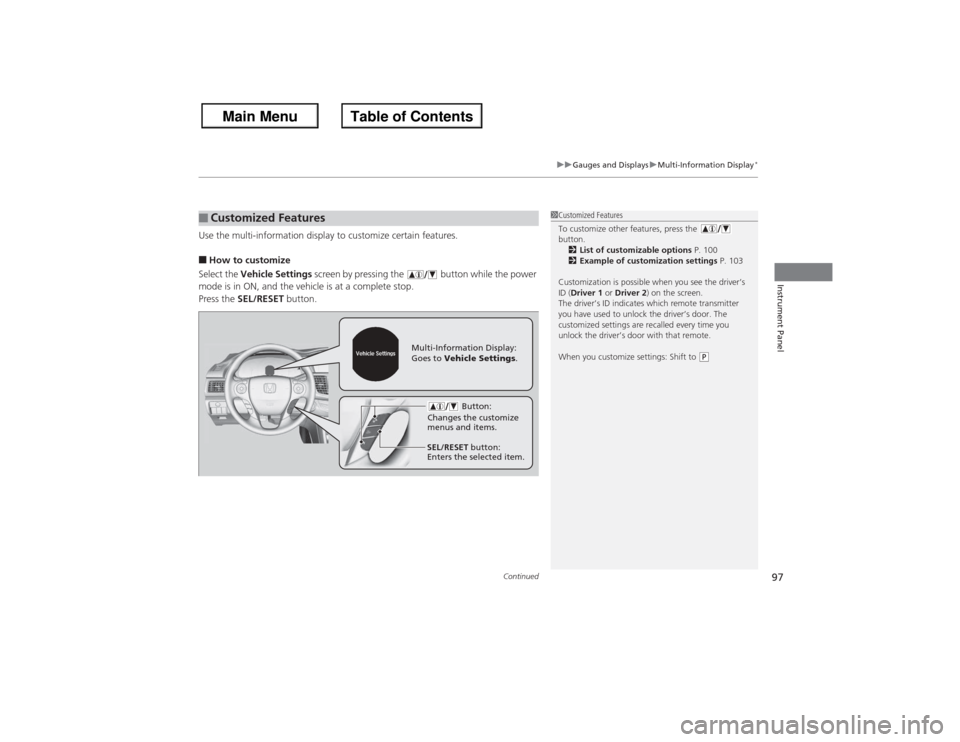
Use the multi-information display to customize certain features.■How to customize
Select the Vehicle Settings screen by pressing the button while the power
mode is in ON, and the vehicle is at a complete stop.
Press the SEL/RESET button.■Customized Features
1Customized Features
To customize other features, press the
button.
2 List of customizable options P. 100
2 Example of customization settings P. 103
Customization is possible when you see the driver’s
ID (Driver 1 or Driver 2 ) on the screen.
The driver’s ID indicates which remote transmitter
you have used to unlock the driver’s door. The
customized settings are recalled every time you
unlock the driver’s door with that remote.
When you customize settings: Shift to
(P
Button:
Changes the customize
menus and items.
Multi-Information Display:
Goes to Vehicle Settings .
SEL/RESET button:
Enters the selected item.
Page 101 of 595
100
uuGauges and Displays uMulti-Information Display
*
Instrument Panel
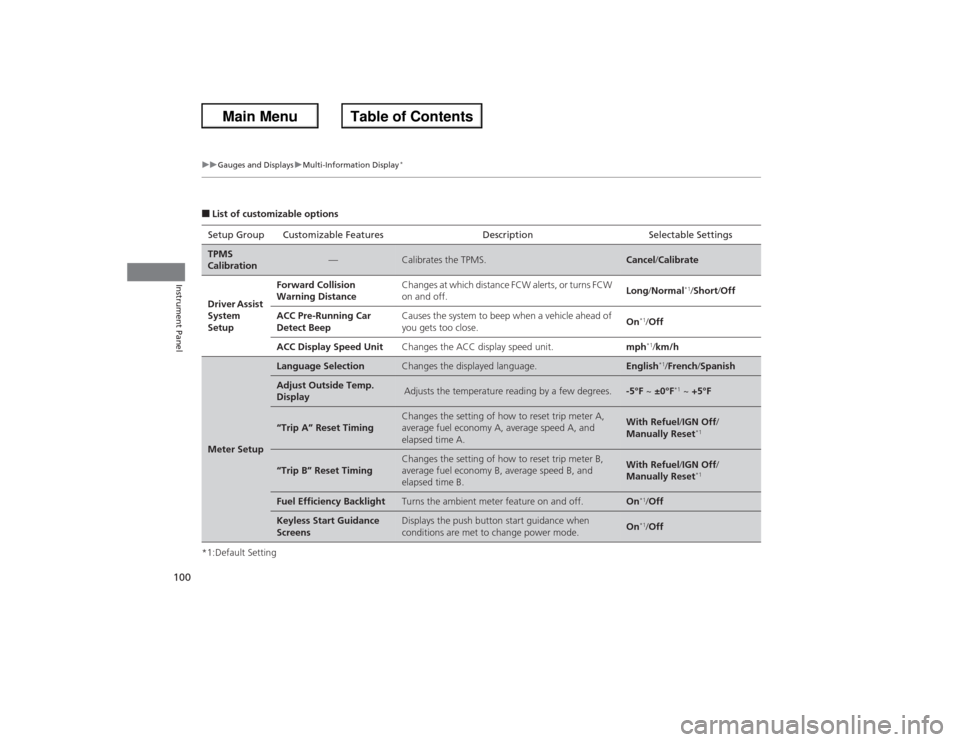
■List of customizable options
*1:Default Setting Setup Group Customizable Features
Description Selectable SettingsTPMS
Calibration
—
Calibrates the TPMS.
Cancel/Calibrate
Driver Assist
System
Setup
Forward Collision
Warning Distance
Changes at which distance FCW alerts, or turns FCW
on and off.
Long /Normal
*1/Short /Off
ACC Pre-Running Car
Detect Beep
Causes the system to beep when a vehicle ahead of
you gets too close.
On
*1/ Off
ACC Display Speed Unit
Changes the ACC display speed unit.
mph
*1/km/h
Meter Setup
Language Selection
Changes the displayed language.
English
*1/French /Spanish
Adjust Outside Temp.
Display
Adjusts the temperature reading by a few degrees.
-5°F ~ ±0°F
*1 ~ +5°F
“Trip A” Reset Timing
Changes the setting of how to reset trip meter A,
average fuel economy A, average speed A, and
elapsed time A.
With Refuel /IGN Off /
Manually Reset
*1
“Trip B” Reset Timing
Changes the setting of how to reset trip meter B,
average fuel economy B, average speed B, and
elapsed time B.
With Refuel /IGN Off /
Manually Reset
*1
Fuel Efficiency Backlight
Turns the ambient meter feature on and off.
On
*1/ Off
Keyless Start Guidance
Screens
Displays the push button start guidance when
conditions are met to change power mode.
On
*1/Off