power HONDA ACCORD 2013 9.G Owners Manual
[x] Cancel search | Manufacturer: HONDA, Model Year: 2013, Model line: ACCORD, Model: HONDA ACCORD 2013 9.GPages: 595, PDF Size: 20.67 MB
Page 5 of 595
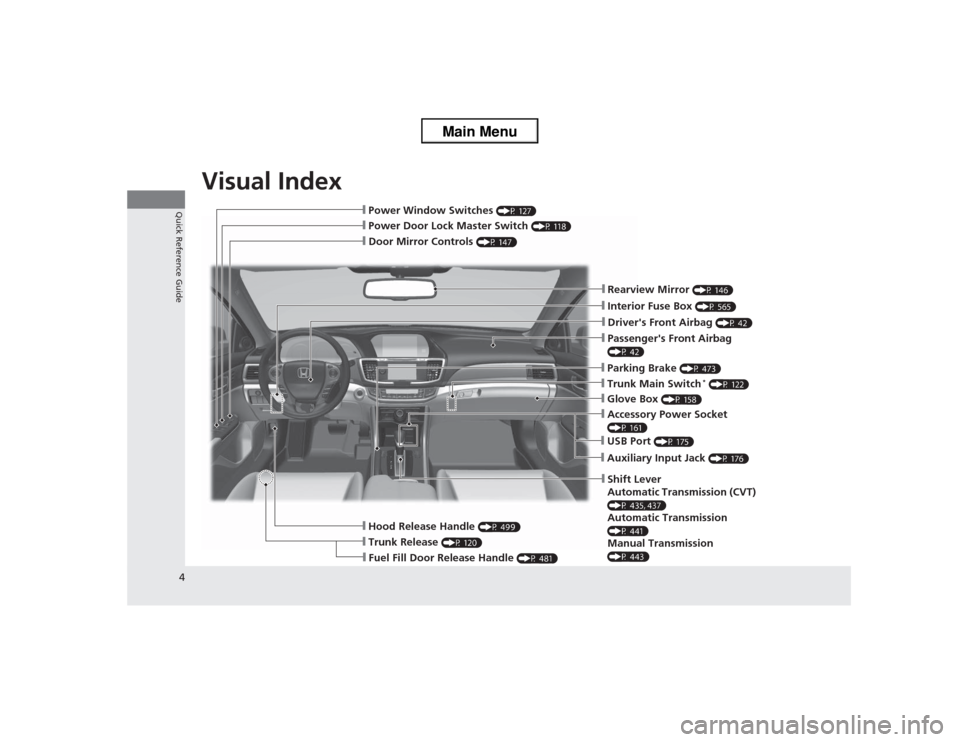
Visual Index
4Quick Reference Guide
❙Door Mirror Controls
(P 147)
❙Passenger's Front Airbag (P 42)❙Parking Brake
(P 473)
❙Glove Box
(P 158)
❙Rearview Mirror
(P 146)
❙Hood Release Handle
(P 499)
❙Power Door Lock Master Switch
(P 118)
❙Power Window Switches
(P 127)
❙Interior Fuse Box
(P 565)
❙Driver's Front Airbag
(P 42)
❙Trunk Main Switch
* (P 122)
❙Fuel Fill Door Release Handle
(P 481)
❙Trunk Release
(P 120)
❙Shift Lever
Automatic Transmission (CVT) (P 435, 437)Automatic Transmission (P 441)Manual Transmission (P 443)❙USB Port
(P 175)
❙Auxiliary Input Jack
(P 176)
❙Accessory Power Socket (P 161)
Page 6 of 595
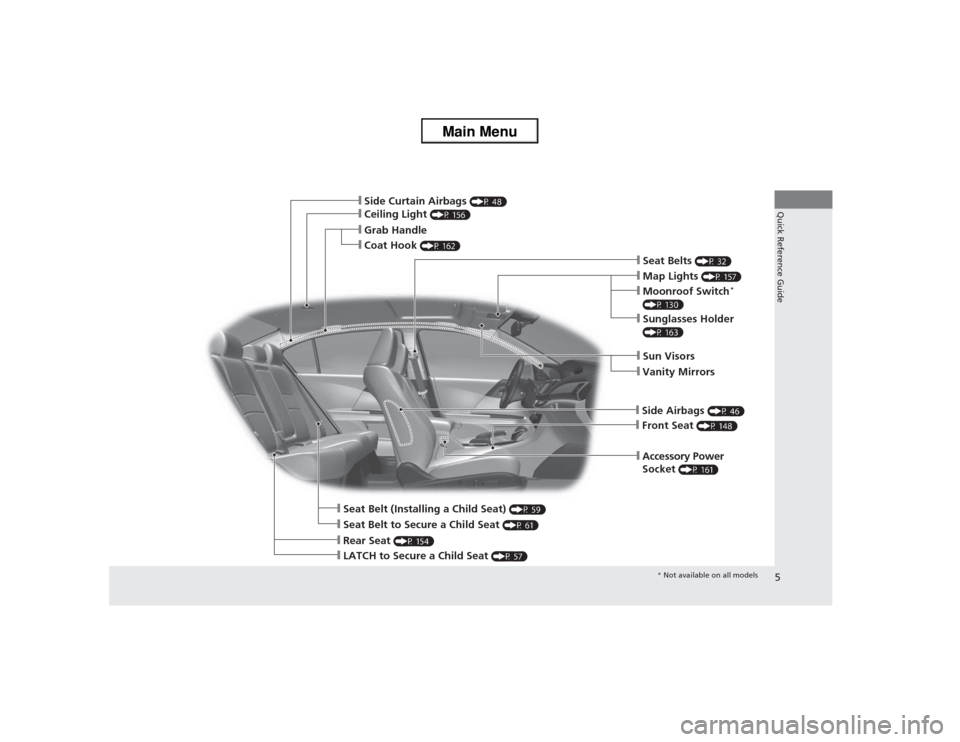
5Quick Reference Guide
❙Seat Belt to Secure a Child Seat
(P 61)
❙Sun Visors❙Vanity Mirrors❙Map Lights
(P 157)
❙Front Seat
(P 148)
❙Seat Belts
(P 32)
❙LATCH to Secure a Child Seat
(P 57)
❙Side Curtain Airbags
(P 48)
❙Grab Handle❙Ceiling Light
(P 156)
❙Coat Hook
(P 162)
❙Seat Belt (Installing a Child Seat)
(P 59)
❙Rear Seat
(P 154)
❙Accessory Power
Socket
(P 161)
❙Side Airbags
(P 46)
❙Sunglasses Holder (P 163)❙Moonroof Switch
*
(P 130)
* Not available on all models
Page 7 of 595
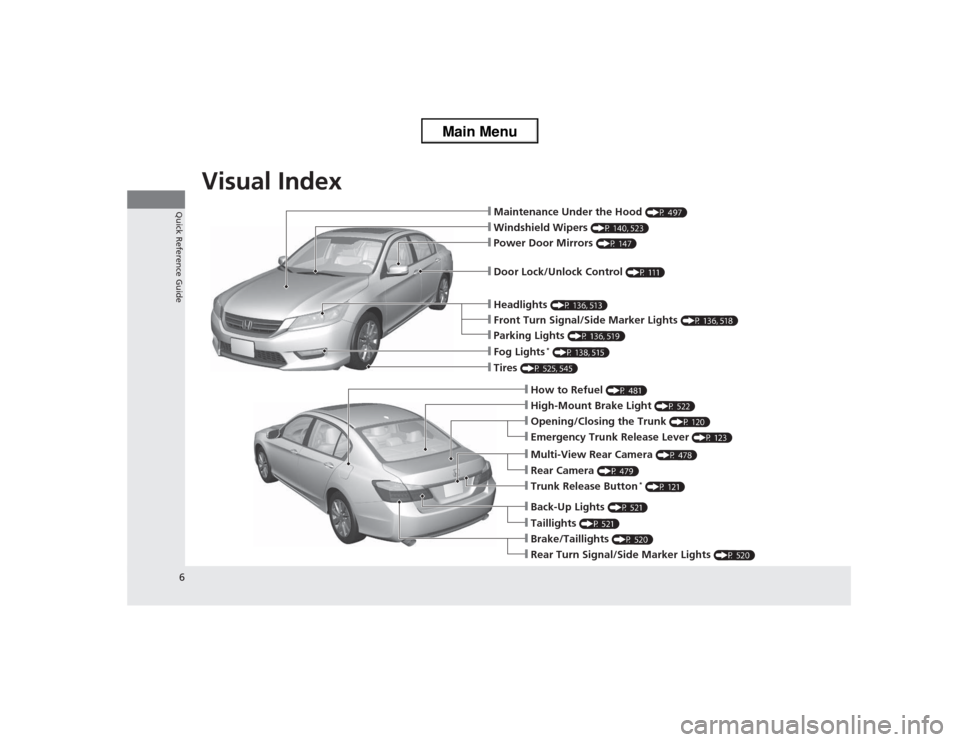
Visual Index
6Quick Reference Guide
❙Maintenance Under the Hood
(P 497)
❙Windshield Wipers
(P 140, 523)
❙Tires
(P 525, 545)
❙Door Lock/Unlock Control
(P 111)
❙Power Door Mirrors
(P 147)
❙Headlights
(P 136, 513)
❙How to Refuel
(P 481)
❙High-Mount Brake Light
(P 522)
❙Emergency Trunk Release Lever
(P 123)
❙Opening/Closing the Trunk
(P 120)
❙Parking Lights
(P 136, 519)
❙Front Turn Signal/Side Marker Lights
(P 136, 518)
❙Fog Lights
* (P 138, 515)
❙Multi-View Rear Camera
(P 478)
❙Trunk Release Button
* (P 121)
❙Back-Up Lights
(P 521)
❙Taillights
(P 521)
❙Brake/Taillights
(P 520)
❙Rear Turn Signal/Sid e Marker Lights
(P 520)
❙Rear Camera
(P 479)
Page 10 of 595
9Quick Reference Guide
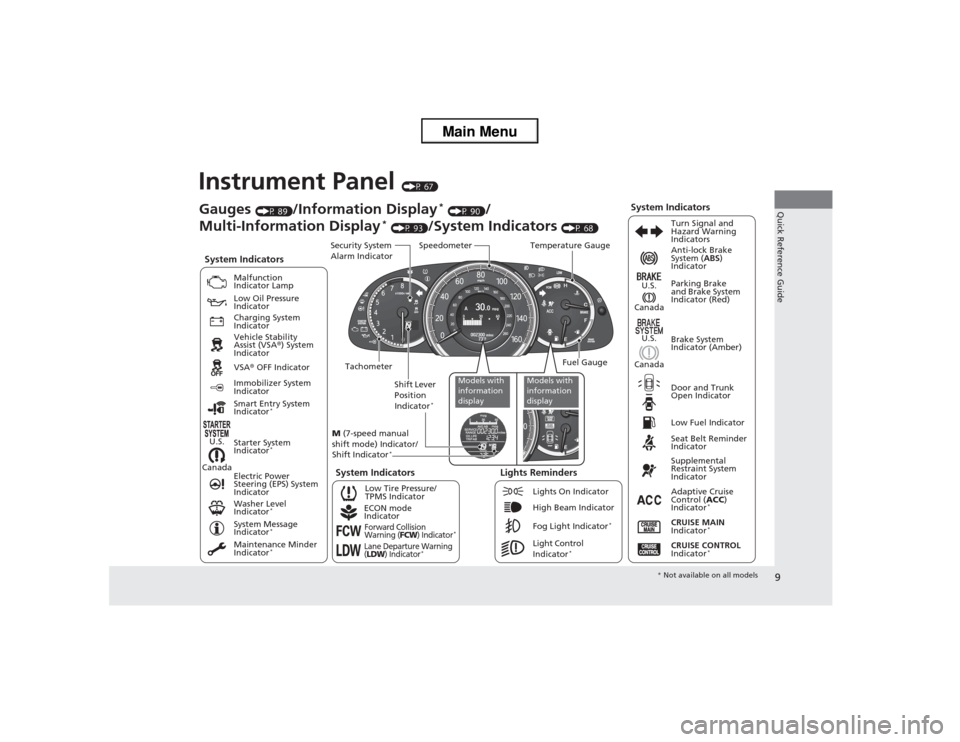
Instrument Panel
(P 67)
CanadaU.S.
Low Fuel IndicatorAnti-lock Brake
System (
ABS)
Indicator
Parking Brake
and Brake System
Indicator (Red)
Canada U.S.
Washer Level
Indicator
*
System Indicators
Malfunction
Indicator Lamp
Low Oil Pressure
Indicator
Charging System
Indicator
Vehicle Stability
Assist (VSA ®) System
Indicator
VSA ® OFF Indicator
Low Tire Pressure/
TPMS Indicator
Electric Power
Steering (EPS) System
Indicator
Lights Reminders
Lights On Indicator
High Beam Indicator
Fog Light Indicator
*
Immobilizer System
Indicator
Seat Belt Reminder
Indicator
System Indicators
CRUISE CONTROL
Indicator
*
Adaptive Cruise
Control ( ACC)
Indicator
*
CRUISE MAIN
Indicator
*
Tachometer Speedometer
Fuel Gauge
Security System
Alarm Indicator
Shift Lever
Position
Indicator
*
Gauges
(P 89)
/Information Display
* (P 90)
/
Multi-Information Display
* (P 93)
/System Indicators
(P 68) Turn Signal and
Hazard Warning
Indicators
System Indicators
Temperature Gauge
M (7-speed manual
shift mode) Indicator/
Shift Indicator
*
Maintenance Minder
Indicator
*
Smart Entry System
Indicator
*
Starter System
Indicator
*
System Message
Indicator
*
ECON mode
IndicatorForward Collision
Warning (
FCW
) Indicator
*
Lane Departure Warning
(LDW
) Indicator
*
Light Control
Indicator
*
Door and Trunk
Open Indicator Brake System
Indicator (Amber)
Supplemental
Restraint System
Indicator
Canada U.S.
Models with
information
display
Models with
information
display
*
Not available on all models
Page 12 of 595
11Quick Reference Guide
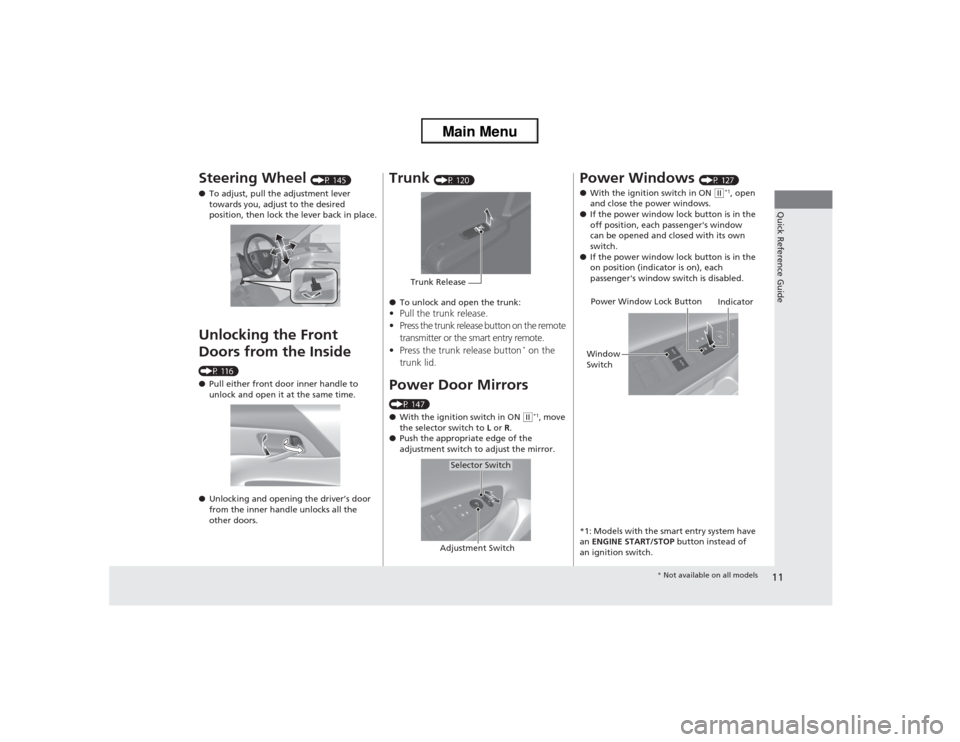
Steering Wheel
(P 145)
● To adjust, pull the adjustment lever
towards you, adjust to the desired
position, then lock the lever back in place.
Unlocking the Front
Doors from the Inside (P 116)
●Pull either front door inner handle to
unlock and open it at the same time.
● Unlocking and opening the driver’s door
from the inner handle unlocks all the
other doors.
Trunk
(P 120)
● To unlock and open the trunk:
•Pull the trunk release.
• Press the trunk release button on the remote
transmitter or the smart entry remote.
• Press the trunk release button
* on the
trunk lid.
Power Door Mirrors(P 147)
● With the ignition switch in ON
(w*1, move
the selector switch to L or R.
● Push the appropriate edge of the
adjustment switch to adjust the mirror.
Trunk Release
Selector Switch
Adjustment Switch
Power Windows
(P 127)
● With the ignition switch in ON
(w*1, open
and close the power windows.
● If the power window lock button is in the
off position, each passenger's window
can be opened and closed with its own
switch.
● If the power window lock button is in the
on position (indicator is on), each
passenger's window switch is disabled.
*1: Models with the smart entry system have
an ENGINE START/STOP button instead of
an ignition switch.
Power Window Lock Button
Window
Switch Indicator
*
Not available on all models
Page 15 of 595
14Quick Reference Guide
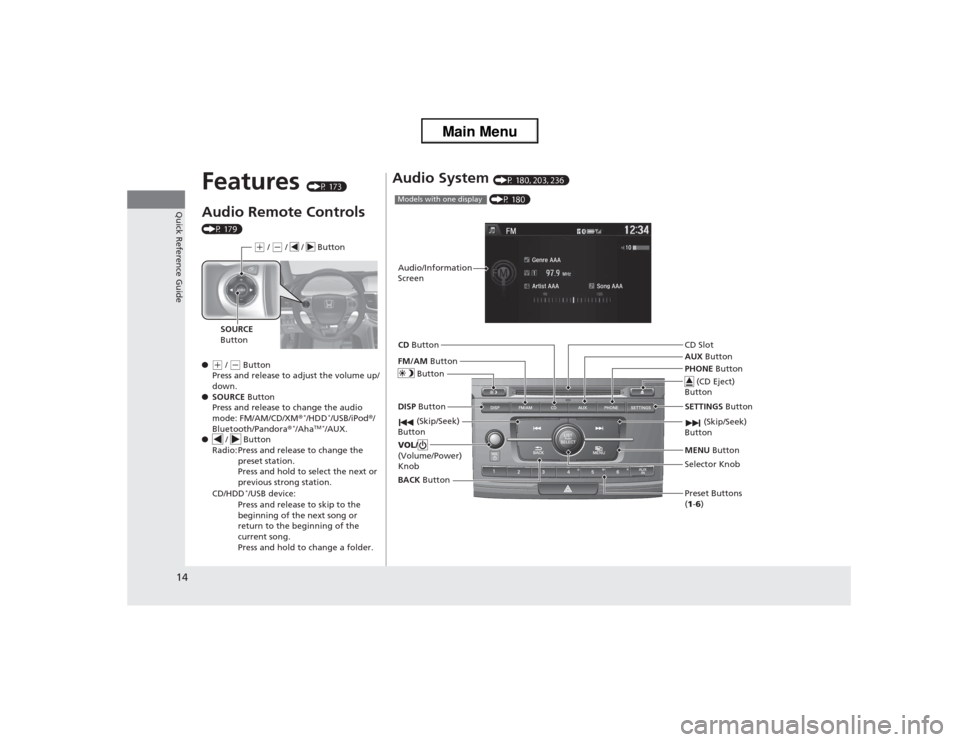
Features
(P 173)
Audio Remote Controls (P 179)
●(+ / (- Button
Press and release to adjust the volume up/
down.
● SOURCE Button
Press and release to change the audio
mode: FM/AM/CD/XM ®
*/HDD
*/USB/iPod®/
Bluetooth/Pandora ®
*/Aha
TM */AUX.
● / Button
Radio: Press and release to change the preset station.
Press and hold to select the next or
previous strong station.
CD/HDD
*/USB device:
Press and release to skip to the
beginning of the next song or
return to the beginning of the
current song.
Press and hold to change a folder.(+ / (- / / Button
SOURCE
Button
Audio System
(P 180, 203, 236) (P 180)
Models with one displayAudio/Information
Screen
BACK Button
FM/AM
Button
(Skip/Seek)
Button
Selector Knob
Button
VOL/
(Volume/Power)
KnobCD
Button
AUX Button
CD Slot
(CD Eject)
Button
Preset Buttons
(1 -6 )
SETTINGS
Button
(Skip/Seek)
ButtonPHONE ButtonMENU Button
DISP Button
Page 16 of 595
15Quick Reference Guide
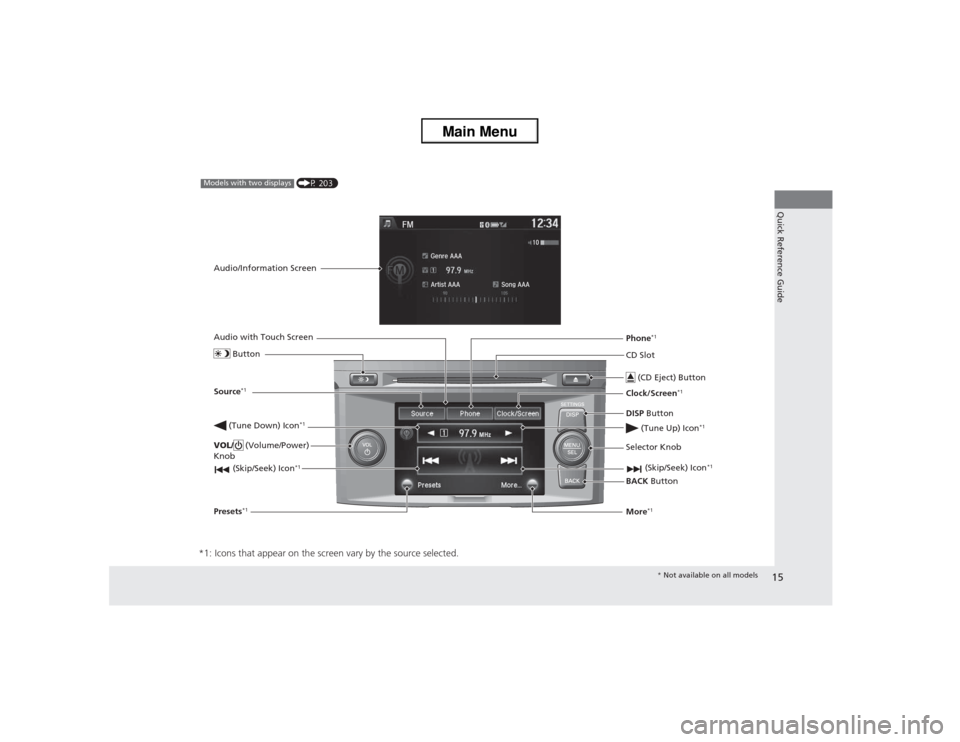
*1: Icons that appear on the screen vary by the source selected.
CD Slot (CD Eject) ButtonBACK Button
Selector Knob
(Tune Down) Icon
*1
(Skip/Seek) Icon
*1
(P 203)
Models with two displaysAudio/Information Screen
Audio with Touch Screen
ButtonSource
*1
VOL/ (Volume/Power)
Knob
(Skip/Seek) Icon
*1
Presets
*1
Phone
*1
Clock/Screen
*1
DISP Button
(Tune Up) Icon
*1
More
*1* Not available on all models
Page 17 of 595
16Quick Reference Guide
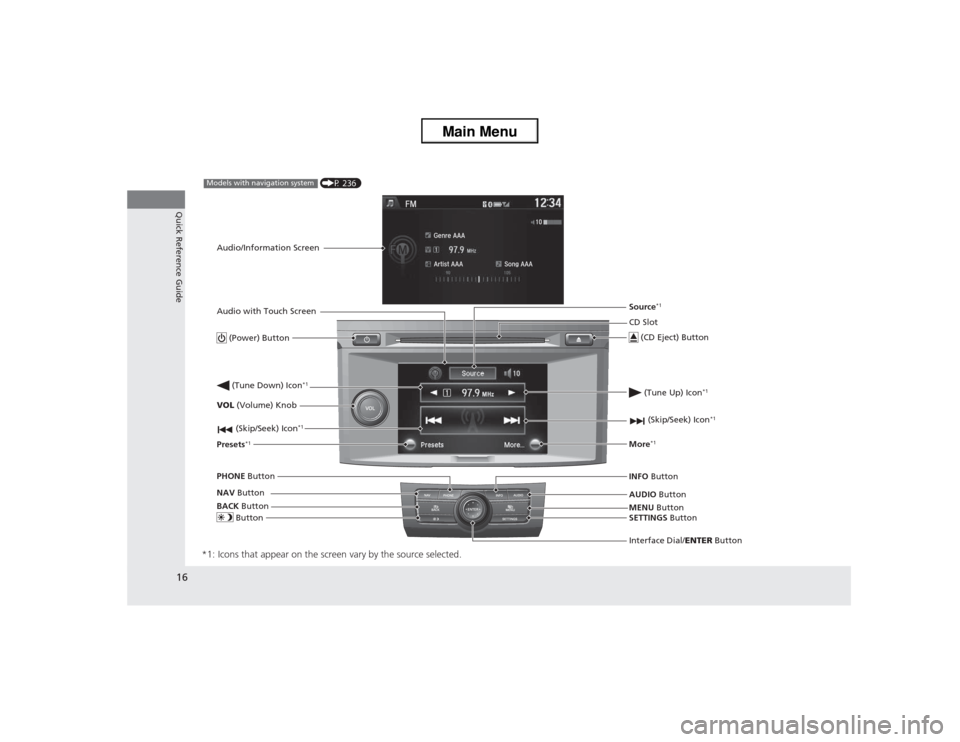
*1: Icons that appear on the screen vary by the source selected.
CD Slot
(CD Eject) ButtonMENU Button
Interface Dial/ ENTER Button
(Skip/Seek) Icon
*1
(P 236)
Models with navigation systemAudio/Information Screen
Audio with Touch Screen
Button
Source
*1
VOL (Volume) Knob
(Skip/Seek) Icon
*1
Presets
*1
(Tune Up) Icon
*1
More
*1
(Power) Button (Tune Down) Icon
*1
INFO Button
AUDIO Button
SETTINGS Button
BACK
Button
NAV
Button
PHONE
Button
Page 24 of 595
23Quick Reference Guide
Why do the doors lock
after I unlocked the doors
using a remote
transmitter?
If you do not open the doors within 30 seconds, the doors are
relocked automatically for security.
Why does the beeper
sound when I open the
driver's door?
The beeper sounds when:●The key is left in the ignition switch
*.
●The power mode
* is in ACCESSORY.
●The exterior lights are left on.
Why does the beeper
sound when I start driving?
The beeper sounds when:●Driver and/or front passenger are not wearing their seat belts.●The parking brake lever is not fully released.
Why do I hear a screeching
sound when I apply the
brake pedal?
The brake pads may need to be replaced. Have your vehicle
inspected by a dealer.
* Not available on all models
Page 25 of 595
24Quick Reference Guide
California Proposition 65 WarningEvent Data RecordersThis vehicle is equipped with an event data recorder (EDR).
The main purpose of an EDR is to record, in certain crash or near
crash-like situations, such as an air bag deployment or hitting a
road obstacle, data that will assist in understanding how a vehicle’s
systems performed. The EDR is designed to record data related
to vehicle dynamics and safety systems for a short period of
time, typically 30 seconds or less. The EDR in this vehicle is
designed to record such data as:
• How various systems in yo ur vehicle were operating;
• Whether or not the driver and passenger safety belts were
buckled/fastened;
• How far (if at all) the driver was depressing the accelerator
and/or brake pedal; and,
• How fast the vehicle was traveling.
These data can help provide a better understanding of the
circumstances in which crashes and injuries occur. NOTE: EDR data
are recorded by your vehicle only if a non-trivial crash situation
occurs; no data are recorded by the EDR under normal driving
conditions and no personal data (e.g., name, gender, age, and
crash location) are recorded. However, other parties, such as law
enforcement, could combine the EDR data with the type of
personally identifying data routinely acquired during a crash
investigation.WARNING: This product contains or emits
chemicals known to the state of California to cause
cancer and birth defects or other reproductive
harm.
To read data recorded by an EDR, special equipment is required,
and access to the vehicle or the EDR is needed. In addition to the
vehicle manufacturer, other parties, such as law enforcement, that
have the special equipment, can read the information if they have
access to the vehicle or the EDR.
The data belongs to the vehicle owner and may not be accessed by
anyone else except as legally required or with the permission of the
vehicle owner.Service Diagnostic RecordersThis vehicle is equipped with service-related devices that record
information about powertrain performance. The data can be used
to verify emissions law requirements and/or help technicians
diagnose and solve service problems. It may also be combined with
data from other sources for research purposes, but it remains
confidential.California Perchlorate Contamination Prevention ActThe airbags, seat belt tensioners, and CR type batteries in this
vehicle may contain perchlorate materials - special handling may
apply. See www.dtsc.ca.gov /hazardouswaste/perchlorate/
As you read this manual, you will find information that is preceded
by a symbol. This information is intended to help you avoid
damage to your vehicle, other property, or the environment.
NOTICE