display HONDA ACCORD 2013 9.G Owners Manual
[x] Cancel search | Manufacturer: HONDA, Model Year: 2013, Model line: ACCORD, Model: HONDA ACCORD 2013 9.GPages: 595, PDF Size: 20.67 MB
Page 497 of 595
uuMaintenance Minder
TMuTo Use Maintenance Minder
TM
496Maintenance
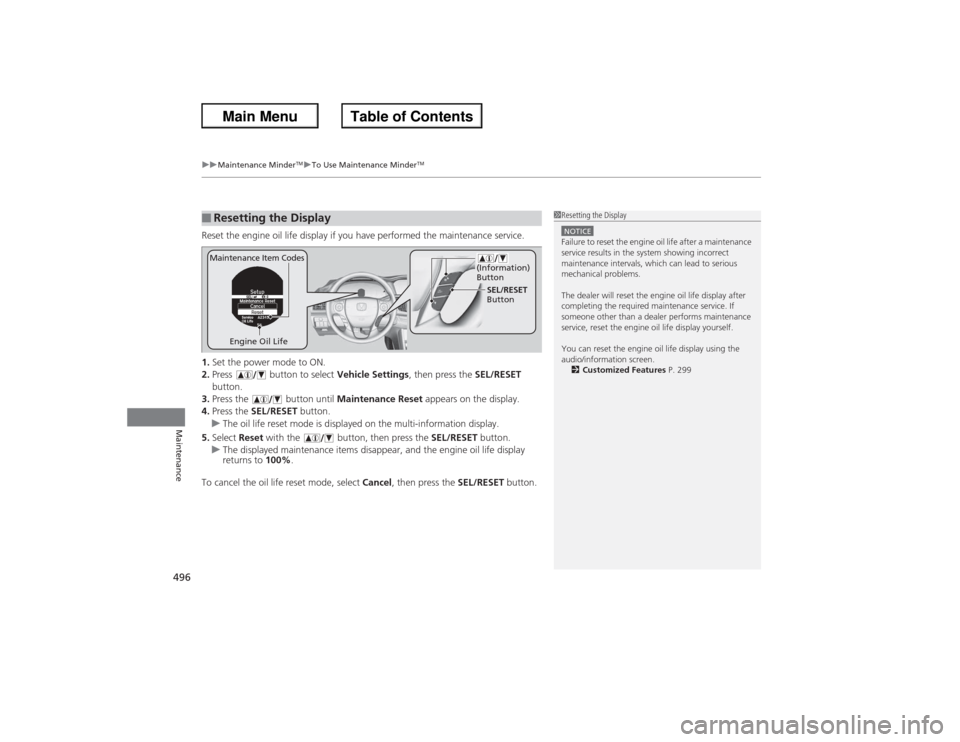
Reset the engine oil life display if you have performed the maintenance service.
1. Set the power mode to ON.
2. Press button to select Vehicle Settings, then press the SEL/RESET
button.
3. Press the button until Maintenance Reset appears on the display.
4. Press the SEL/RESET button.
u The oil life reset mode is displayed on the multi-information display.
5. Select Reset with the button, then press the SEL/RESET button.
u The displayed maintenance items disappear, and the engine oil life display
returns to 100%.
To cancel the oil life reset mode, select Cancel, then press the SEL/RESET button.■Resetting the Display
1Resetting the DisplayNOTICEFailure to reset the engine oil life after a maintenance
service results in the system showing incorrect
maintenance intervals, which can lead to serious
mechanical problems.
The dealer will reset the engine oil life display after
completing the required maintenance service. If
someone other than a dealer performs maintenance
service, reset the engine oil life display yourself.
You can reset the engine oil life display using the
audio/information screen.
2 Customized Features P. 299
Engine Oil Life SEL/RESET
Button
Maintenance Item Codes
(Information)
Button
Page 506 of 595
505
uuMaintenance Under the Hood uChanging the Engine Oil and Oil Filter
Continued
Maintenance
Changing the Engine Oil and Oil FilterYou must change the engine oil and oil filter regularly in order to maintain the
engine's lubrication. The engine may be damaged if they are not changed regularly.
Change the oil and filter in accordance with the maintenance message on the
information display
*/multi-information display
*.
1. Run the engine until it reaches normal
operating temperature, and then turn the
engine off.
2. Open the hood and remove the engine oil
fill cap.
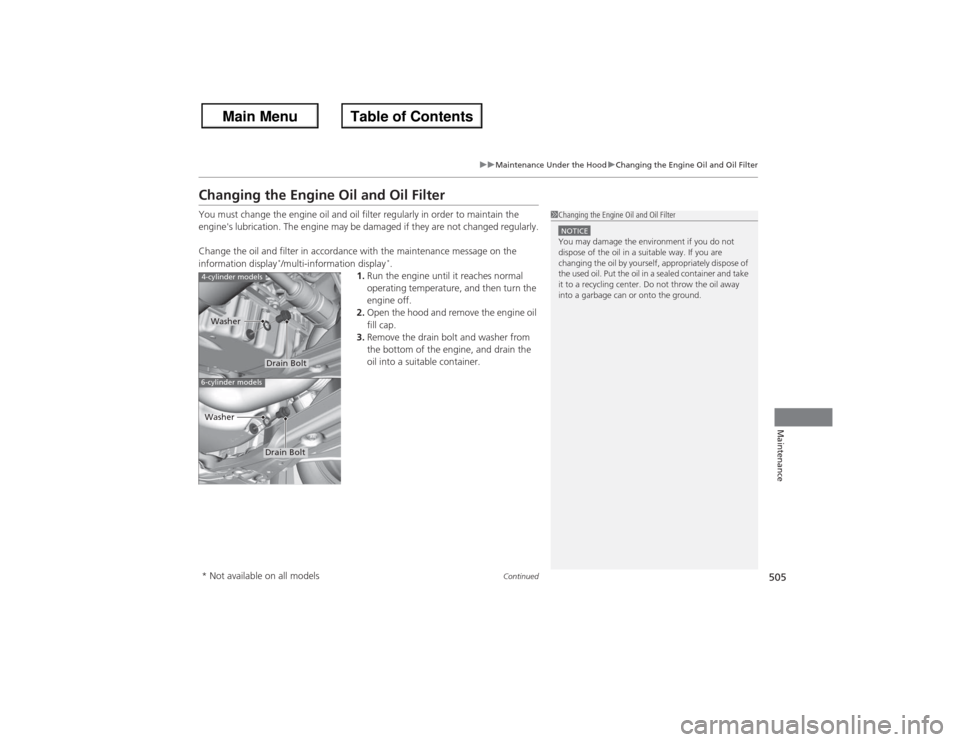
3. Remove the drain bolt and washer from
the bottom of the engine, and drain the
oil into a suitable container.
1Changing the Engine Oil and Oil FilterNOTICEYou may damage the environment if you do not
dispose of the oil in a suitable way. If you are
changing the oil by yourself, appropriately dispose of
the used oil. Put the oil in a sealed container and take
it to a recycling center. Do not throw the oil away
into a garbage can or onto the ground.
4-cylinder models6-cylinder models
Drain Bolt
Washer
Drain Bolt
Washer
* Not available on all models
Page 533 of 595
532
uu Checking and Maintaining Tires uTire Rotation
Maintenance
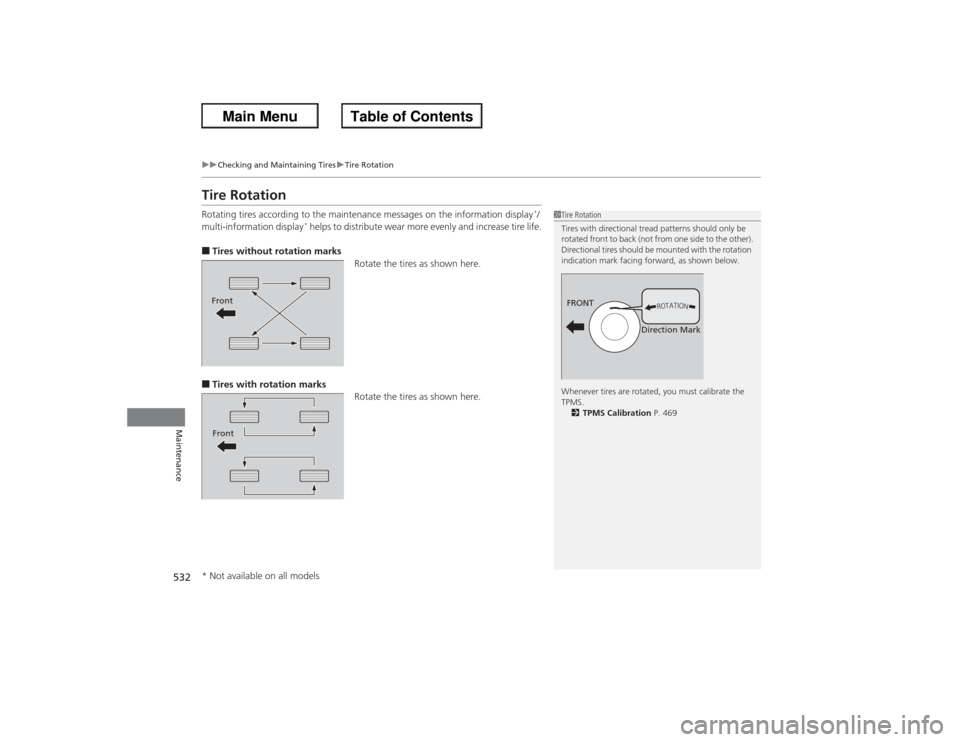
Tire RotationRotating tires according to the maintenance messages on the information display
*/
multi-information display
* helps to distribute wear more evenly and increase tire life.
■Tires without rotation marks Rotate the tires as shown here.■Tires with rotation marksRotate the tires as shown here.
1Tire Rotation
Tires with directional tread patterns should only be
rotated front to back (not from one side to the other).
Directional tires should be mounted with the rotation
indication mark facing forward, as shown below.
Whenever tires are rotated, you must calibrate the
TPMS.
2 TPMS Calibration P. 469
FRONT
Direction Mark
FrontFront* Not available on all models
Page 535 of 595
53 4Maintenance
BatteryChecking the Battery
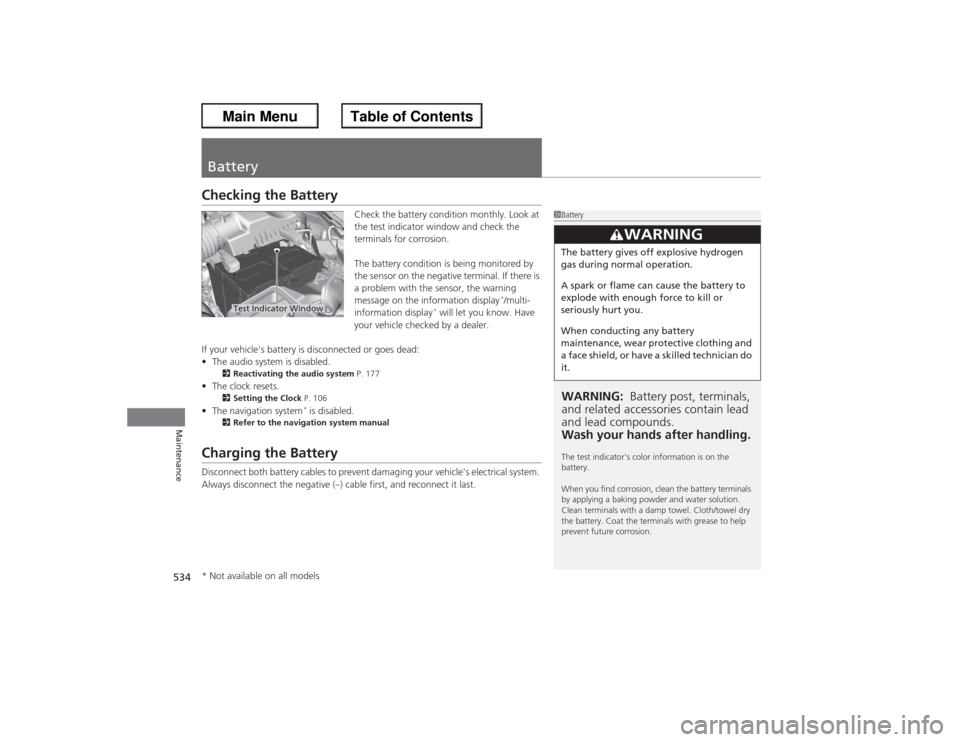
Check the battery condition monthly. Look at
the test indicator window and check the
terminals for corrosion.
The battery condition is being monitored by
the sensor on the negative terminal. If there is
a problem with the sensor, the warning
message on the information display
*/multi-
information display
* will let you know. Have
your vehicle checked by a dealer.
If your vehicle's battery is disconnected or goes dead:
• The audio system is disabled.
2 Reactivating the audio system P. 177
•The clock resets.
2 Setting the Clock P. 106
•The navigation system
* is disabled.
2 Refer to the navigation system manual
Charging the BatteryDisconnect both battery cables to prevent damaging your vehicle's electrical system.
Always disconnect the negative (–) cable first, and reconnect it last.
1BatteryWARNING: Battery post, terminals,
and related accessories contain lead
and lead compounds.
Wash your hands after handling.The test indicator's color information is on the
battery.
When you find corrosion, clean the battery terminals
by applying a baking powder and water solution.
Clean terminals with a damp towel. Cloth/towel dry
the battery. Coat the terminals with grease to help
prevent future corrosion.
3
WARNING
The battery gives off explosive hydrogen
gas during normal operation.
A spark or flame can cause the battery to
explode with enough force to kill or
seriously hurt you.
When conducting any battery
maintenance, wear protective clothing and
a face shield, or have a skilled technician do
it.
Test Indicator Window
* Not available on all models
Page 551 of 595
uuIf a Tire Goes Flat uChanging a Flat Tire
550Handling the Unexpected
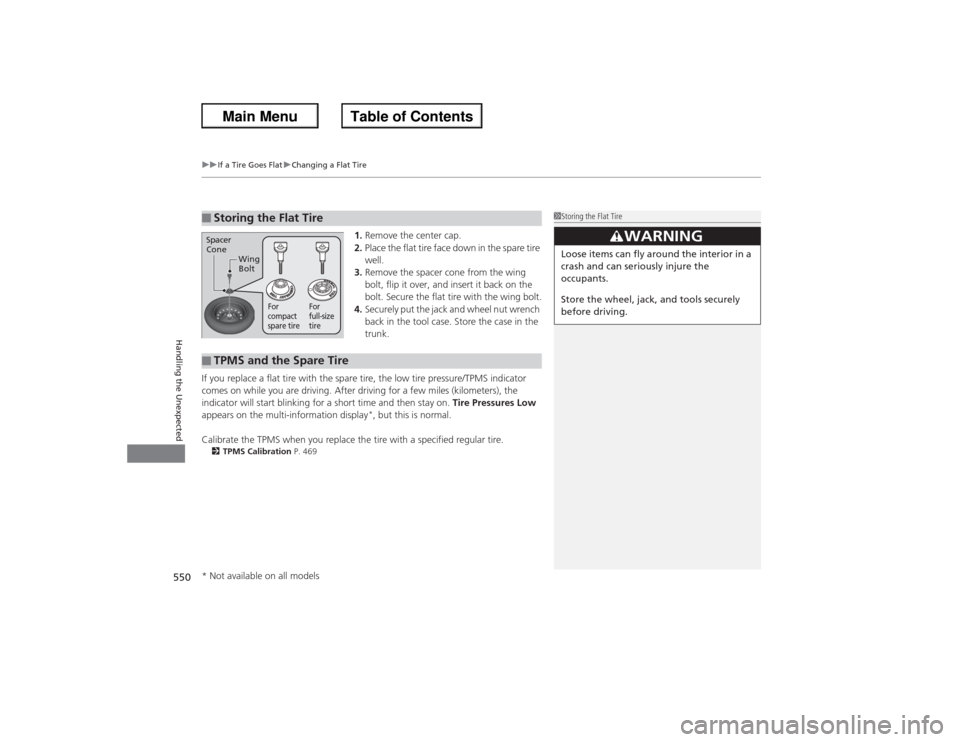
1. Remove the center cap.
2. Place the flat tire face down in the spare tire
well.
3. Remove the spacer cone from the wing
bolt, flip it over, and insert it back on the
bolt. Secure the flat tire with the wing bolt.
4. Securely put the jack and wheel nut wrench
back in the tool case. Store the case in the
trunk.
If you replace a flat tire with the spare tire, the low tire pressure/TPMS indicator
comes on while you are driving. After driving for a few miles (kilometers), the
indicator will start blinking for a short time and then stay on. Tire Pressures Low
appears on the multi-information display
*, but this is normal.
Calibrate the TPMS when you replace the tire with a specified regular tire.
2 TPMS Calibration P. 469■Storing the Flat Tire
1Storing the Flat Tire
3
WARNING
Loose items can fly around the interior in a
crash and can seriously injure the
occupants.
Store the wheel, jack, and tools securely
before driving.
Spacer
Cone
Wing
Bolt
For
compact
spare tire For
full-size
tire
■TPMS and the Spare Tire* Not available on all models
Page 552 of 595
551Handling the Unexpected
Engine Does Not StartChecking the EngineIf the engine does not start, check the starter.
Starter condition
Checklist
Starter doesn’t turn or turns
over slowly.
The battery may be dead. Check
each of the items on the right and
respond accordingly.
Check for a message on the multi-information display.●If the To Start, Hold Remote Near Start Button message appears
2 If the Smart Entry Remote Battery is Weak P. 552
uMake sure the smart entry remote is in its operating range.
2 ENGINE START/STOP Button Operating Range P. 132
Check brightness of the interior light.
Turn on interior lights and check brightness.●If the interior lights are dim or do not come on at all
2Battery P. 534
●If the interior lights come on normally
2 Fuses P. 564
The starter turns over normally
but the engine doesn’t start.
There may be a problem with the
fuse. Check each of the items on
the right and respond accordingly. Review the engine start procedure.
Follow its instructions, and try to start the engine again.
2
Starting the Engine P. 427
Check the immobilizer system indicator.
When the immobilizer system indicator is blinking, the engine cannot be started.2Immobilizer System P. 124Check the fuel level.
There should be enough fuel in the tank.
2 Fuel Gauge P. 89
Check the fuse.
Check all fuses, or have the vehicle checked by a dealer.2Inspecting and Changing Fuses P. 566If the problem continues:2Emergency Towing P. 567
1Checking the Engine
If you must start the vehicle immediately, use an
assisting vehicle to jump start it.
2 Jump Starting P. 554
Models with multi-information display
Page 553 of 595
552
uu Engine Does Not Start uIf the Smart Entry Remote Battery is Weak
Handling the Unexpected
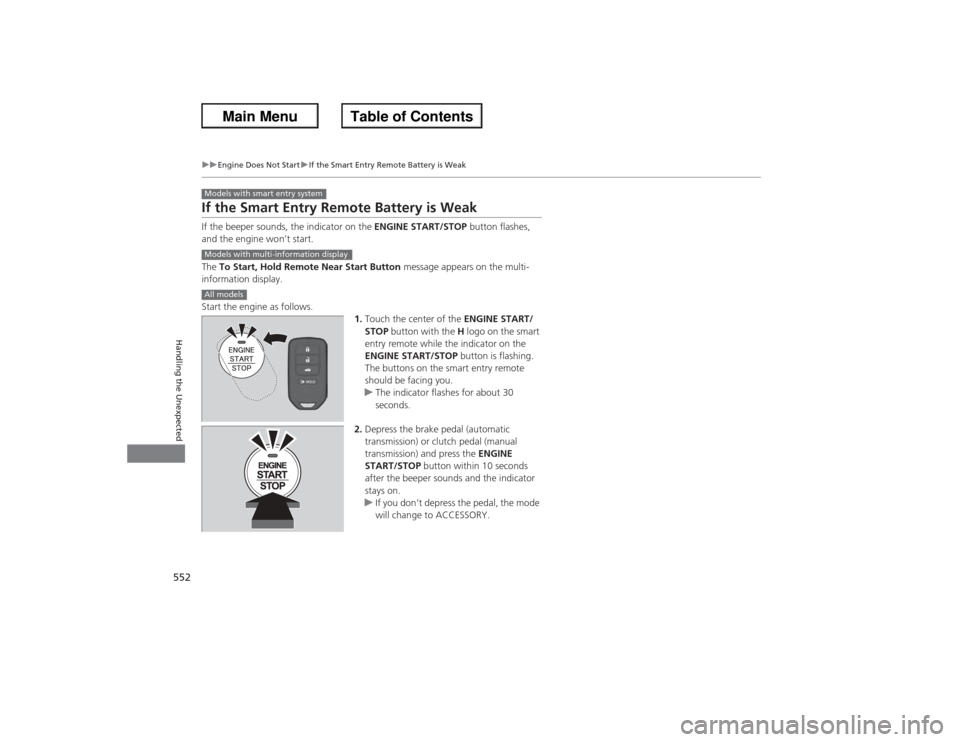
If the Smart Entry Remote Battery is WeakIf the beeper sounds, the indicator on the ENGINE START/STOP button flashes,
and the engine won’t start.
The To Start, Hold Remote Near Start Button message appears on the multi-
information display.
Start the engine as follows. 1.Touch the center of the ENGINE START/
STOP button with the H logo on the smart
entry remote while the indicator on the
ENGINE START/STOP button is flashing.
The buttons on the smart entry remote
should be facing you.
u The indicator flashes for about 30
seconds.
2. Depress the brake pedal (automatic
transmission) or clutch pedal (manual
transmission) and press the ENGINE
START/STOP button within 10 seconds
after the beeper sounds and the indicator
stays on.
u If you don’t depress the pedal, the mode
will change to ACCESSORY.Models with smart entry systemModels with multi-information displayAll models
Page 584 of 595
583
uu Customer Service Information u
Continued
Information
Music recognition technology and related
data are provided by Gracenote®.
Gracenote is the industry standard in music
recognition technology and related content
delivery.
For more information, visit
www.gracenote.com.
When music is recorded to the HDD from a
CD, information such as the recording artist
and track name are retrieved from the
Gracenote Database and displayed (when
available).
Gracenote may not contain information for
all albums.
Gracenote is an internet-based music
recognition service that allows artist, album,
and track information from CDs to display
on the HDD.
Gracenote users are allowed 4 free updates
a year. More information about Gracenote,
its features, and downloads are available at ■Gracenote Music Recognition
Service (CDDB)
www.honda.com (in U.S.) or
www.honda.ca (in Canada).
CD and music-related data from Gracenote,
Inc., copyright © 2000 to present
Gracenote. Gracenote Software, copyright
© 2000 to present Gracenote.
One or more patents owned by Gracenote
apply to this product and service. See the
Gracenote website for a non-exhaustive list
of applicable Gracenote patents.
Gracenote, CDDB, MusicID, MediaVOCS,
the Gracenote logo and logotype, and the
“Powered by Gracenote” logo are either
registered trademarks or trademarks of
Gracenote in the United States and/or other
countries.
This application or device contains software
from Gracenote, Inc. of Emeryville,
California (“Gracenote”). The software
from Gracenote (the “Gracenote
Software”) enables this application to
perform disc and/or file identification and
obtain music- related information, including
name, artist, track, and title information
(“Gracenote Data”) from online servers or ■
Gracenote ® END USER LICENSE
AGREEMENT
embedded databases (collectively,
“Gracenote Servers”) and to perform other
functions. You may use Gracenote Data
only by means of the intended End-User
functions or this application or device.
You agree that you will use Gracenote Data,
the Gracenote Software, and Gracenote
Servers for your own personal non-
commercial use only.
You agree not to assign, copy, transfer, or
transmit the Gracenote Software or any
Gracenote Data to any third party.
YOU AGREE NOT TO USE OR EXPLOIT
GRACENOTE DATA, THE GRACENOTE
SOFTWARE, OR GRACENOTE SERVERS,
EXCEPT AS EXPRESSLY PERMITTED HEREIN.
You agree that your non-exclusive license to
use the Gracenote Data, the Gracenote
Software, and Gracenote Servers will
terminate if you violate these restrictions. If
your license terminates, you agree to cease
any and all use of the Gracenote Data, the
Gracenote Software, and Gracenote
Servers.
Page 589 of 595
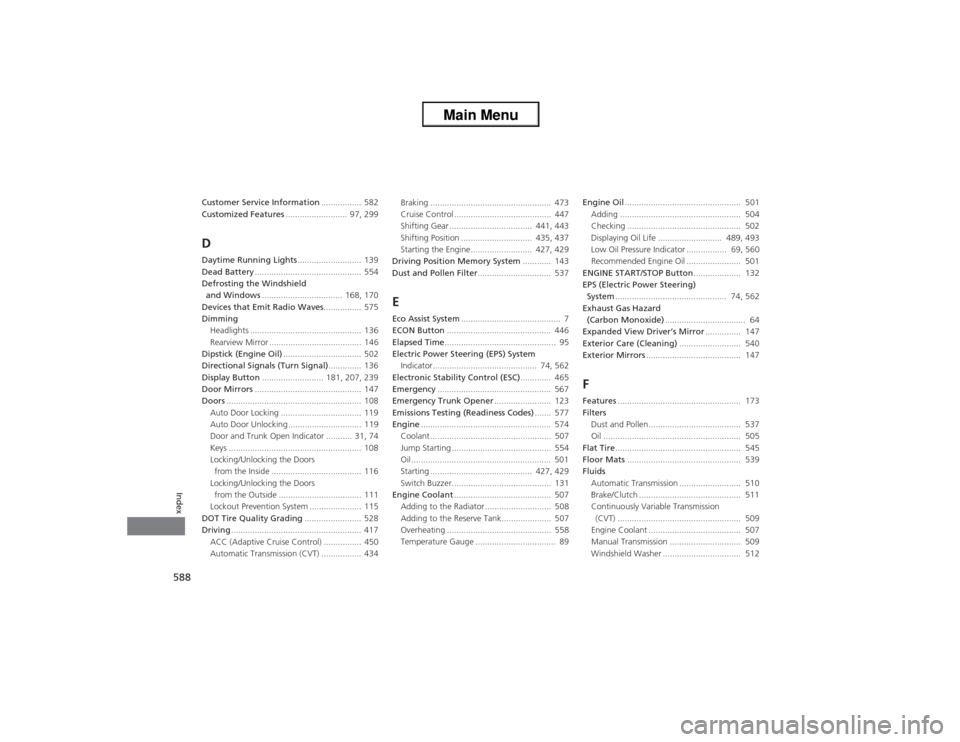
588Index
Customer Service Information................. 582
Customized Features .......................... 97, 299DDaytime Running Lights ........................... 139
Dead Battery ............................................. 554
Defrosting the Windshield and Windows .................................. 168, 170
Devices that Emit Radio Waves ................ 575
Dimming Headlights ............................................... 136
Rearview Mirror ....................................... 146
Dipstick (Engine Oil) ................................. 502
Directional Signals (Turn Signal) .............. 136
Display Button .......................... 181, 207, 239
Door Mirrors ............................................. 147
Doors ......................................................... 108
Auto Door Locking .................................. 119
Auto Door Unlocking ............................... 119
Door and Trunk Open Indicator ........... 31, 74
Keys ........................................................ 108
Locking/Unlocking the Doors from the Inside ...................................... 116
Locking/Unlocking the Doors
from the Outside ................................... 111
Lockout Prevention System ...................... 115
DOT Tire Quality Grading ........................ 528
Driving ....................................................... 417
ACC (Adaptive Cruise Control) ................ 450
Automatic Transmission (CVT) ................. 434 Braking ................................................... 473
Cruise Control ......................................... 447
Shifting Gear ................................... 441, 443
Shifting Position .............................. 435, 437
Starting the Engine.......................... 427, 429
Driving Position Memory System ............ 143
Dust and Pollen Filter ............................... 537
EEco Assist System.......................................... 7
ECON Button ............................................ 446
Elapsed Time ............................................... 95
Electric Power Steering (EPS) System Indicator............................................ 74, 562
Electronic Stability Control (ESC) ............. 465
Emergency ................................................ 567
Emergency Trunk Opener ........................ 123
Emissions Testing (Readiness Codes) ....... 577
Engine ....................................................... 574
Coolant ................................................... 507
Jump Starting .......................................... 554
Oil ........................................................... 501
Starting ........................................... 427, 429
Switch Buzzer.......................................... 131
Engine Coolant ......................................... 507
Adding to the Radiator ............................ 508
Adding to the Reserve Tank..................... 507
Overheating ............................................ 558
Temperature Gauge .................................. 89 Engine Oil
................................................. 501
Adding ................................................... 504
Checking ................................................ 502
Displaying Oil Life ........................... 489, 493
Low Oil Pressure Indicator ................. 69, 560
Recommended Engine Oil ....................... 501
ENGINE START/STOP Button .................... 132
EPS (Electric Power Steering)
System ............................................... 74, 562
Exhaust Gas Hazard (Carbon Monoxide) .................................. 64
Expanded View Driver’s Mirror ............... 147
Exterior Care (Cleaning) .......................... 540
Exterior Mirrors ........................................ 147
FFeatures.................................................... 173
Filters
Dust and Pollen....................................... 537
Oil .......................................................... 505
Flat Tire ..................................................... 545
Floor Mats ................................................ 539
Fluids Automatic Transmission .......................... 510
Brake/Clutch ........................................... 511
Continuously Variable Transmission (CVT) .................................................... 509
Engine Coolant ....................................... 507
Manual Transmission .............................. 509
Windshield Washer ................................. 512
Page 590 of 595
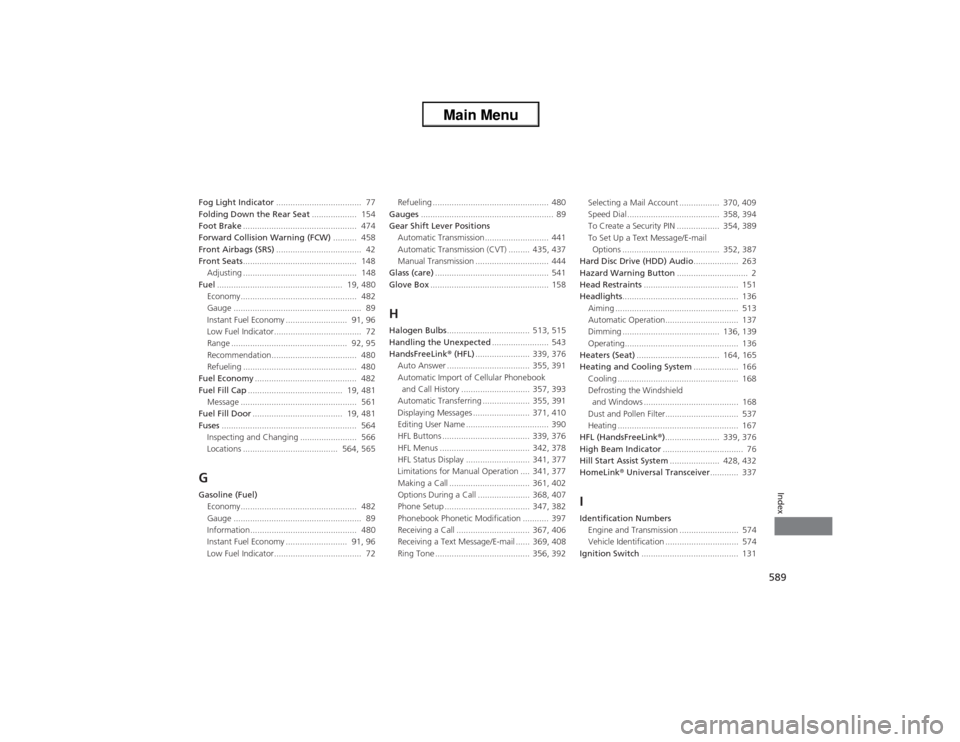
589Index
Fog Light Indicator.................................... 77
Folding Down the Rear Seat ................... 154
Foot Brake ................................................ 474
Forward Collision Warning (FCW) .......... 458
Front Airbags (SRS) .................................... 42
Front Seats ................................................ 148
Adjusting ................................................ 148
Fuel ..................................................... 19, 480
Economy................................................. 482
Gauge ...................................................... 89
Instant Fuel Economy .......................... 91, 96
Low Fuel Indicator..................................... 72
Range ................................................. 92, 95
Recommendation.................................... 480
Refueling ................................................ 480
Fuel Economy ........................................... 482
Fuel Fill Cap ........................................ 19, 481
Message ................................................. 561
Fuel Fill Door ...................................... 19, 481
Fuses ......................................................... 564
Inspecting and Changing ........................ 566
Locations ........................................ 564, 565GGasoline (Fuel) Economy................................................. 482
Gauge ...................................................... 89
Information............................................. 480
Instant Fuel Economy .......................... 91, 96
Low Fuel Indicator..................................... 72 Refueling ................................................. 480
Gauges ........................................................ 89
Gear Shift Lever Positions Automatic Transmission........................... 441
Automatic Transmission (CVT) ......... 435, 437
Manual Transmission ............................... 444
Glass (care) ................................................ 541
Glove Box .................................................. 158
HHalogen Bulbs ................................... 513, 515
Handling the Unexpected ........................ 543
HandsFreeLink® (HFL)....................... 339, 376
Auto Answer ................................... 355, 391
Automatic Import of Cellular Phonebook
and Call History ............................. 357, 393
Automatic Transferring .................... 355, 391
Displaying Messages ........................ 371, 410
Editing User Name ................................... 390
HFL Buttons ..................................... 339, 376
HFL Menus ...................................... 342, 378
HFL Status Display ........................... 341, 377
Limitations for Manual Operation .... 341, 377
Making a Call .................................. 361, 402
Options During a Call ...................... 368, 407
Phone Setup .................................... 347, 382
Phonebook Phonetic Modification ........... 397
Receiving a Call ............................... 367, 406
Receiving a Text Message/E-mail ...... 369, 408
Ring Tone ........................................ 356, 392 Selecting a Mail Account ................. 370, 409
Speed Dial ....................................... 358, 394
To Create a Security PIN .................. 354, 389
To Set Up a Text Message/E-mail
Options ......................................... 352, 387
Hard Disc Drive (HDD) Audio ................... 263
Hazard Warning Button .............................. 2
Head Restraints ........................................ 151
Headlights ................................................. 136
Aiming .................................................... 513
Automatic Operation............................... 137
Dimming ......................................... 136, 139
Operating................................................ 136
Heaters (Seat) ................................... 164, 165
Heating and Cooling System ................... 166
Cooling ................................................... 168
Defrosting the Windshield
and Windows ........................................ 168
Dust and Pollen Filter............................... 537
Heating ................................................... 167
HFL (HandsFreeLink® )....................... 339, 376
High Beam Indicator .................................. 76
Hill Start Assist System ..................... 428, 432
HomeLink ® Universal Transceiver ............ 337
IIdentification Numbers
Engine and Transmission ......................... 574
Vehicle Identification ............................... 574
Ignition Switch ......................................... 131