Display settings HONDA ACCORD 2013 9.G Owner's Manual
[x] Cancel search | Manufacturer: HONDA, Model Year: 2013, Model line: ACCORD, Model: HONDA ACCORD 2013 9.GPages: 595, PDF Size: 20.67 MB
Page 242 of 595
Continued
241
uuAudio System Basic Operation uAudio/Information Screen
Features
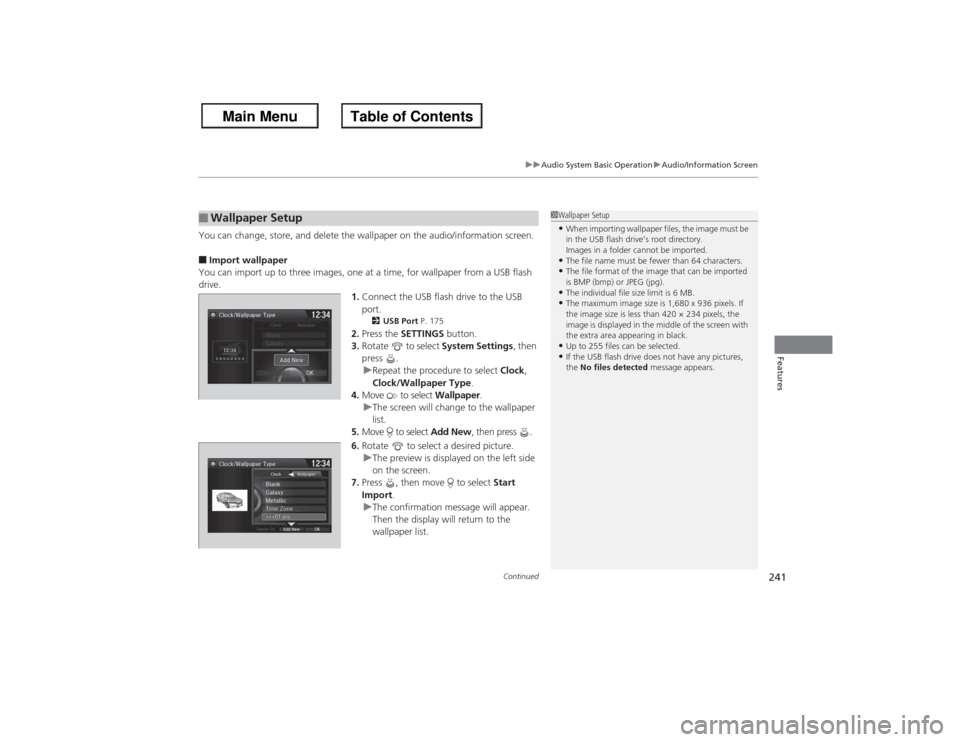
You can change, store, and delete the wallpaper on the audio/information screen.■Import wallpaper
You can import up to three images, one at a time, for wallpaper from a USB flash
drive. 1.Connect the USB flash drive to the USB
port.
2 USB Port P. 175
2.Press the SETTINGS button.
3. Rotate to select System Settings, then
press .
u Repeat the procedure to select Clock,
Clock/Wallpaper Type .
4. Move to select Wallpaper.
u The screen will change to the wallpaper
list.
5. Move to select Add New, then press .
6. Rotate to select a desired picture.
u The preview is displayed on the left side
on the screen.
7. Press , then move to select Start
Import .
u The confirmation message will appear.
Then the display will return to the
wallpaper list.
■Wallpaper Setup
1Wallpaper Setup•When importing wallpaper files, the image must be
in the USB flash drive’s root directory.
Images in a folder cannot be imported.•The file name must be fewer than 64 characters.•The file format of the image that can be imported
is BMP (bmp) or JPEG (jpg).•The individual file size limit is 6 MB.•The maximum image size is 1,680 x 936 pixels. If
the image size is less than 420 × 234 pixels, the
image is displayed in the middle of the screen with
the extra area appearing in black.•Up to 255 files can be selected.•If the USB flash drive does not have any pictures,
the No files detected message appears.
Page 243 of 595
uuAudio System Basic Operation uAudio/Information Screen
242Features
■Select wallpaper
1. Press the SETTINGS button.
2. Rotate to select System Settings, then press .
u Repeat the procedure to select Clock/Wallpaper Type.
3. Move to select Wallpaper.
u The screen changes to the wallpaper list.
4. Rotate to select a desired wallpaper.
u The preview is displayed on the left side on the screen.
5. Press .
u The pop-up menu appears on the screen.
6. Rotate to select Set, then press .
u The display will return to the wallpaper list.■Delete wallpaper
1. Press the SETTINGS button.
2. Rotate to select System Settings, then press .
u Repeat the procedure to select Clock/Wallpaper Type.
3. Move to select Wallpaper.
u The screen changes to the wallpaper list.
4. Rotate to select a wallpaper that you want to delete, then press .
u The preview is displayed on the left side on the screen.
5. Press .
u The pop-up menu appears on the screen.
6. Rotate to select Delete, then press .
u The confirmation message will appear.
7. Rotate to select Yes, then press to delete completely.
u The display will return to the wallpaper list.
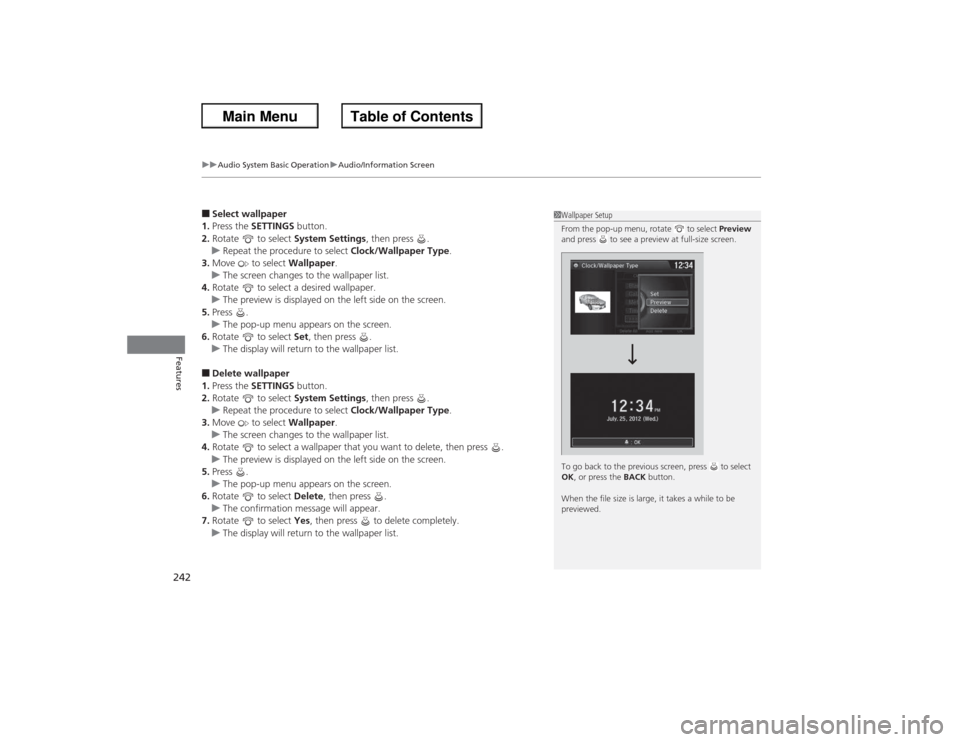
1Wallpaper Setup
From the pop-up menu, rotate to select Preview
and press to see a preview at full-size screen.
To go back to the previous screen, press to select
OK , or press the BACK button.
When the file size is large, it takes a while to be
previewed.
Page 245 of 595
244
uuAudio System Basic Operation uDisplay Setup
Features
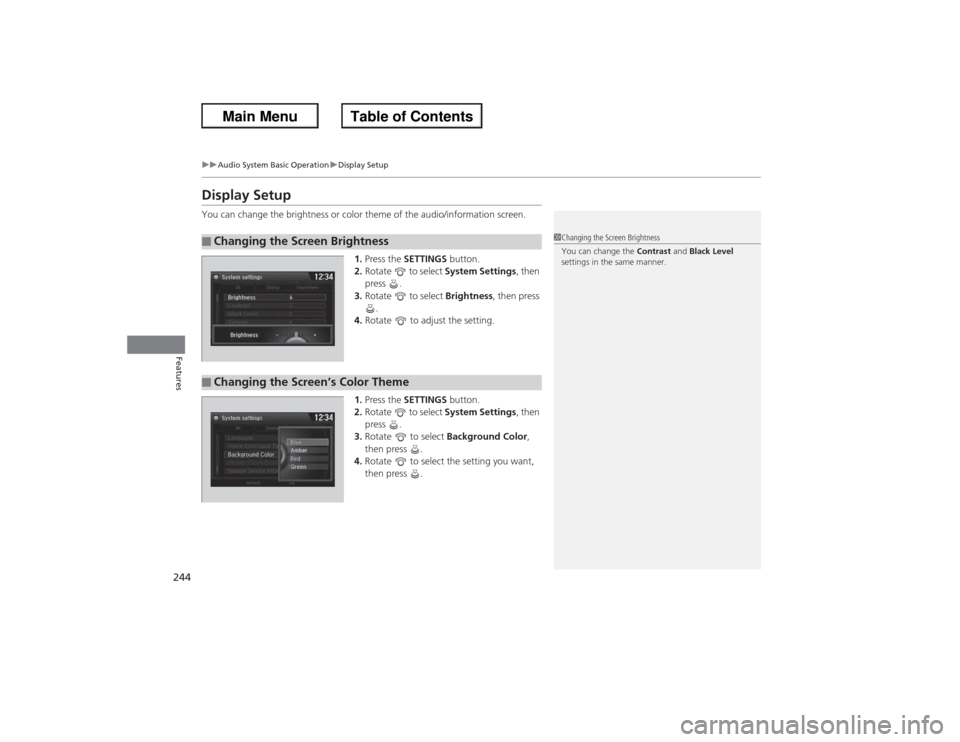
Display SetupYou can change the brightness or color theme of the audio/information screen.
1.Press the SETTINGS button.
2. Rotate to select System Settings, then
press .
3. Rotate to select Brightness, then press
.
4. Rotate to adjust the setting.
1. Press the SETTINGS button.
2. Rotate to select System Settings, then
press .
3. Rotate to select Background Color,
then press .
4. Rotate to select the setting you want,
then press .■Changing the Screen Brightness
1Changing the Screen Brightness
You can change the Contrast and Black Level
settings in the same manner.
■Changing the Screen’s Color Theme
Page 264 of 595
263
uuAudio System Basic Operation uPlaying Hard Disc Drive (HDD) Audio
Continued
Features
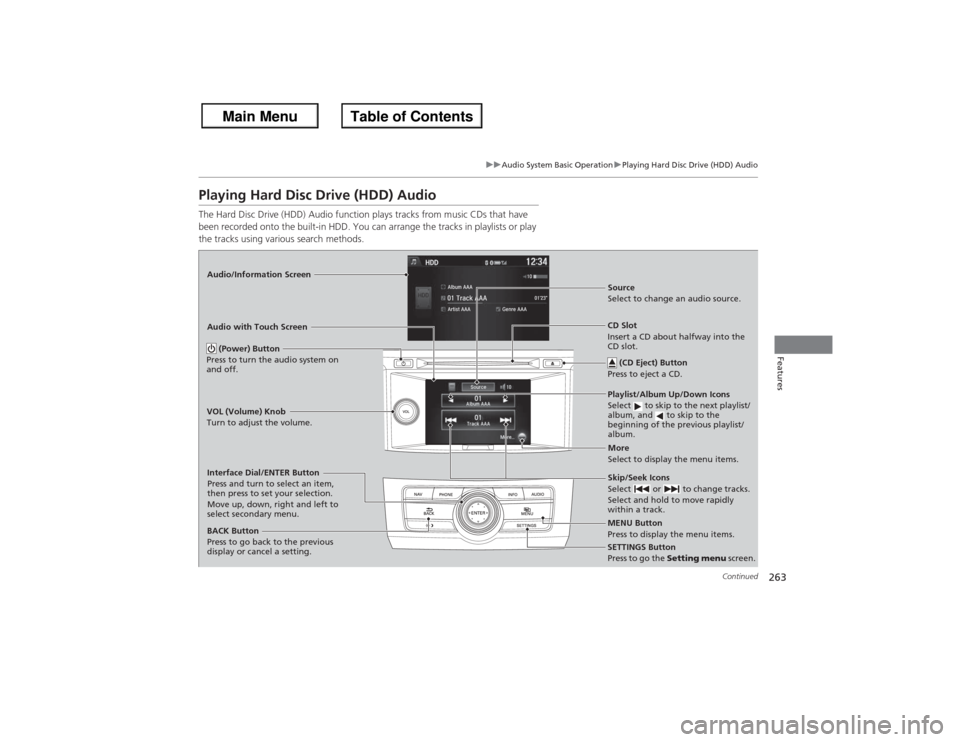
Playing Hard Disc Drive (HDD) AudioThe Hard Disc Drive (HDD) Audio function plays tracks from music CDs that have
been recorded onto the built-in HDD. You can arrange the tracks in playlists or play
the tracks using various search methods.Audio/Information Screen
Audio with Touch Screen
MENU Button
Press to display the menu items.
CD Slot
Insert a CD about halfway into the
CD slot. (CD Eject) Button
Press to eject a CD.Playlist/Album Up/Down Icons
Select to skip to the next playlist/
album, and to skip to the
beginning of the previous playlist/
album.Source
Select to change an audio source.
Skip/Seek Icons
Select or to change tracks.
Select and hold to move rapidly
within a track.More
Select to display the menu items.
(Power) Button
Press to turn the audio system on
and off.BACK Button
Press to go back to the previous
display or cancel a setting.
VOL (Volume) Knob
Turn to adjust the volume.Interface Dial/ENTER Button
Press and turn to select an item,
then press to set your selection.
Move up, down, right and left to
select secondary menu.
SETTINGS Button
Press to go the
Setting menu screen.
Page 300 of 595
299
Continued
Features
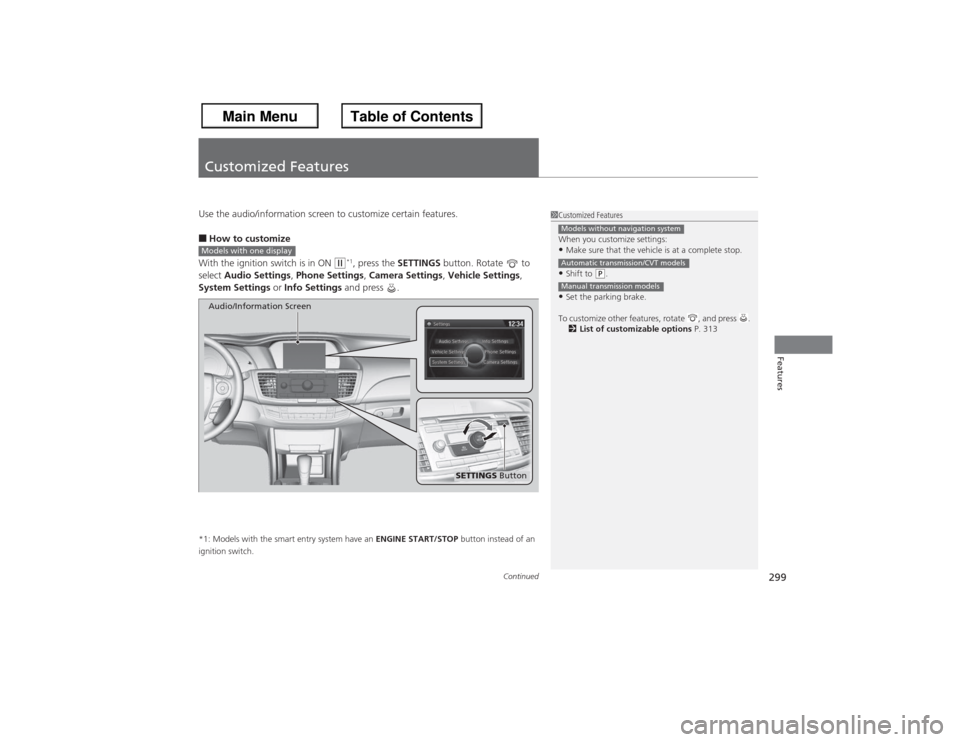
Customized FeaturesUse the audio/information screen to customize certain features.■How to customize
With the ignition switch is in ON
(w*1, press the SETTINGS button. Rotate to
select Audio Settings , Phone Settings , Camera Settings , Vehicle Settings,
System Settings or Info Settings and press .
*1: Models with the smart entry system have an ENGINE START/STOP button instead of an
ignition switch.
1 Customized Features
When you customize settings:•Make sure that the vehicle is at a complete stop.•Shift to
(P.
•Set the parking brake.
To customize other features, rotate , and press . 2 List of customizable options P. 313Models without navigation systemAutomatic transmission/CVT modelsManual transmission models
Models with one display
SETTINGS Button
Audio/Information Screen
Page 301 of 595
300
uuCustomized Features u
Features
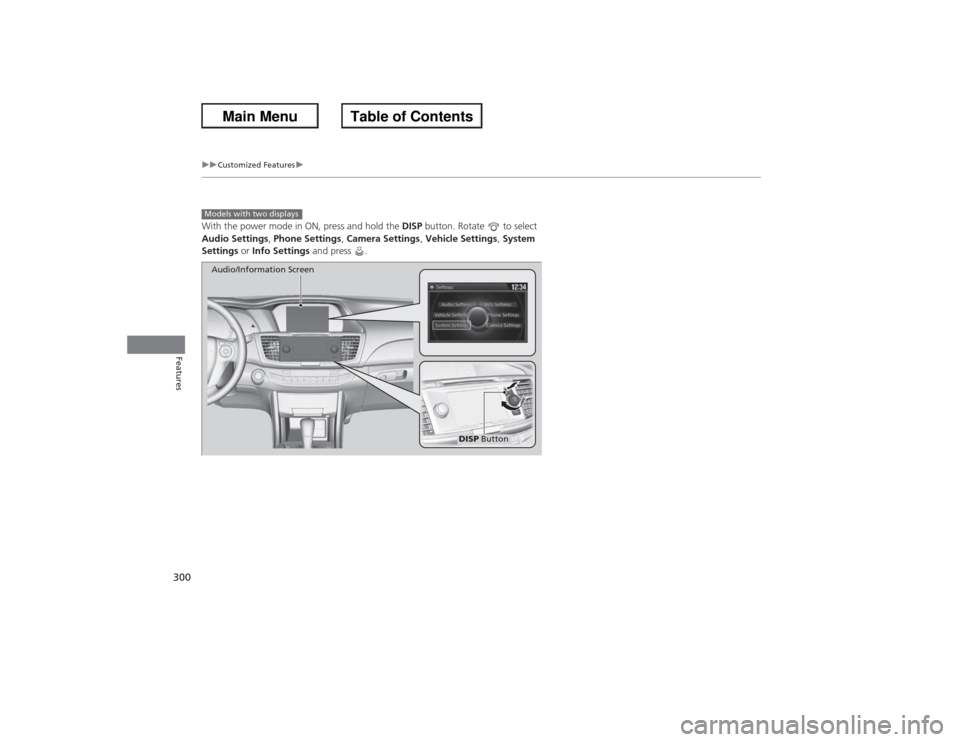
With the power mode in ON, press and hold the DISP button. Rotate to select
Audio Settings , Phone Settings , Camera Settings , Vehicle Settings , System
Settings or Info Settings and press .Models with two displays
DISP Button
Audio/Information Screen
Page 303 of 595
302
uuCustomized Features u
Features
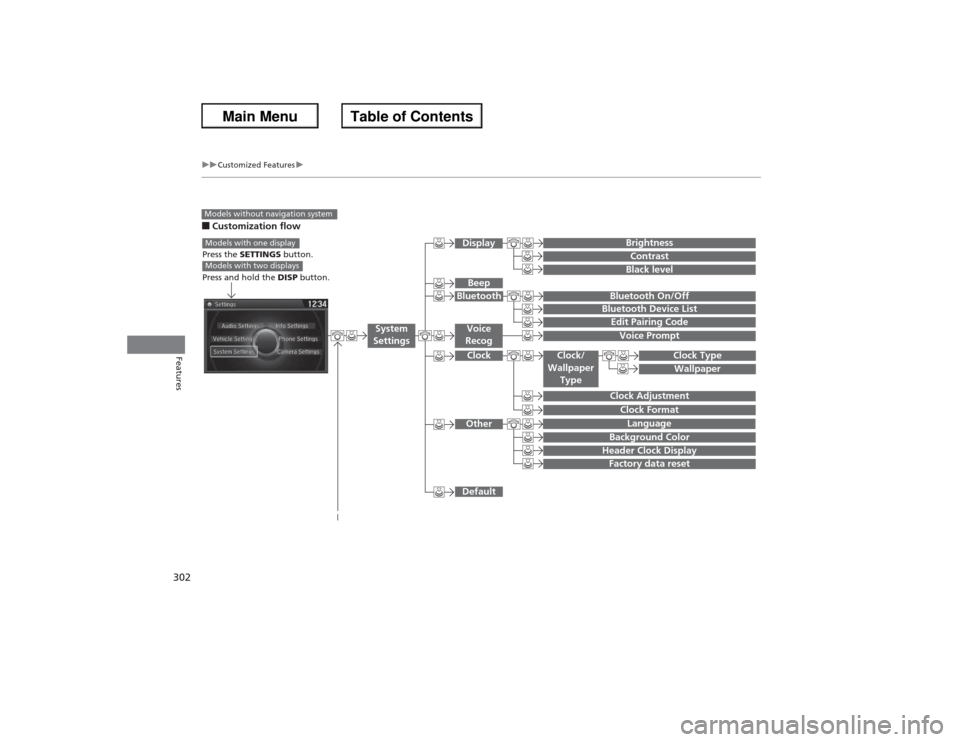
■Customization flowModels without navigation system
Clock FormatBackground ColorHeader Clock DisplayFactory data resetClock Adjustment
Press the SETTINGS button.
Press and hold the DISP button.Models with one displayModels with two displays
Language
Default
Edit Pairing CodeBluetooth On/OffBluetooth Device List
Voice PromptBrightnessContrastBlack level
Beep
Clock/
Wallpaper Type
Clock TypeWallpaper
System
Settings
Voice
RecogBluetoothDisplayClockOther
Page 304 of 595
303
uuCustomized Features u
Continued
Features
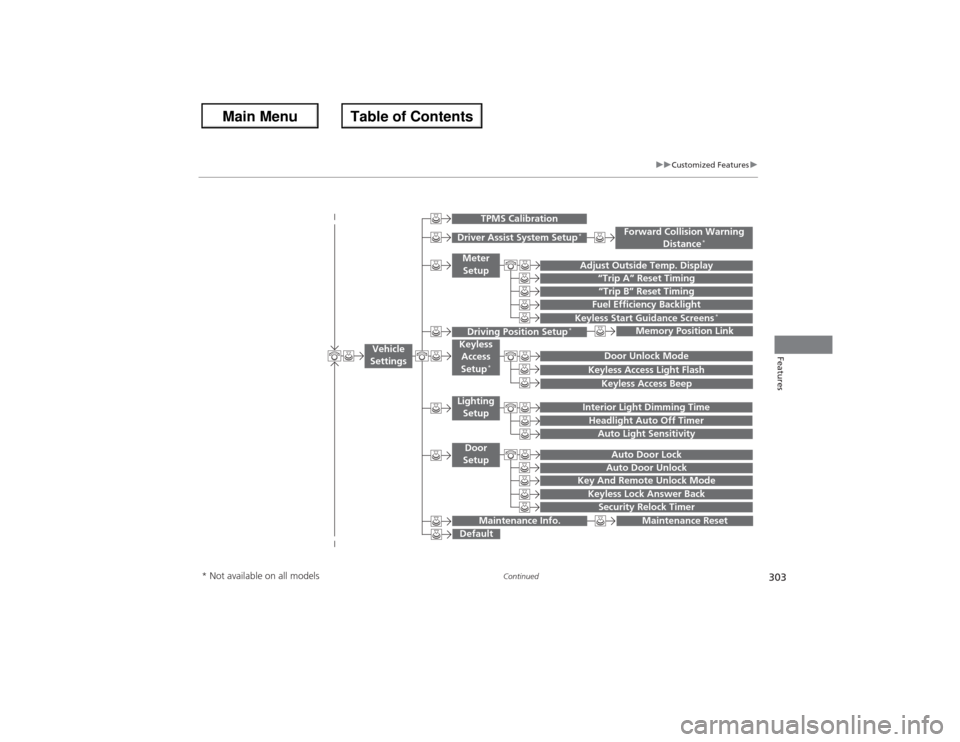
“Trip B” Reset Timing
Adjust Outside Temp. Display
“Trip A” Reset TimingKeyless Access Light FlashAuto Light Sensitivity
Auto Door LockAuto Door Unlock
Fuel Efficiency Backlight
Forward Collision Warning
Distance
*
Door Unlock Mode
Interior Light Dimming TimeHeadlight Auto Off Timer
Memory Position Link
Keyless Start Guidance Screens
*
Key And Remote Unlock ModeKeyless Lock Answer BackSecurity Relock Timer
Maintenance Reset
Default
Vehicle
Settings
Driver Assist System Setup
*
Meter Setup
TPMS Calibration
Driving Position Setup
*
Keyless Access
Setup
*
Lighting SetupDoor
Setup
Maintenance Info.
Keyless Access Beep
* Not available on all models
Page 306 of 595
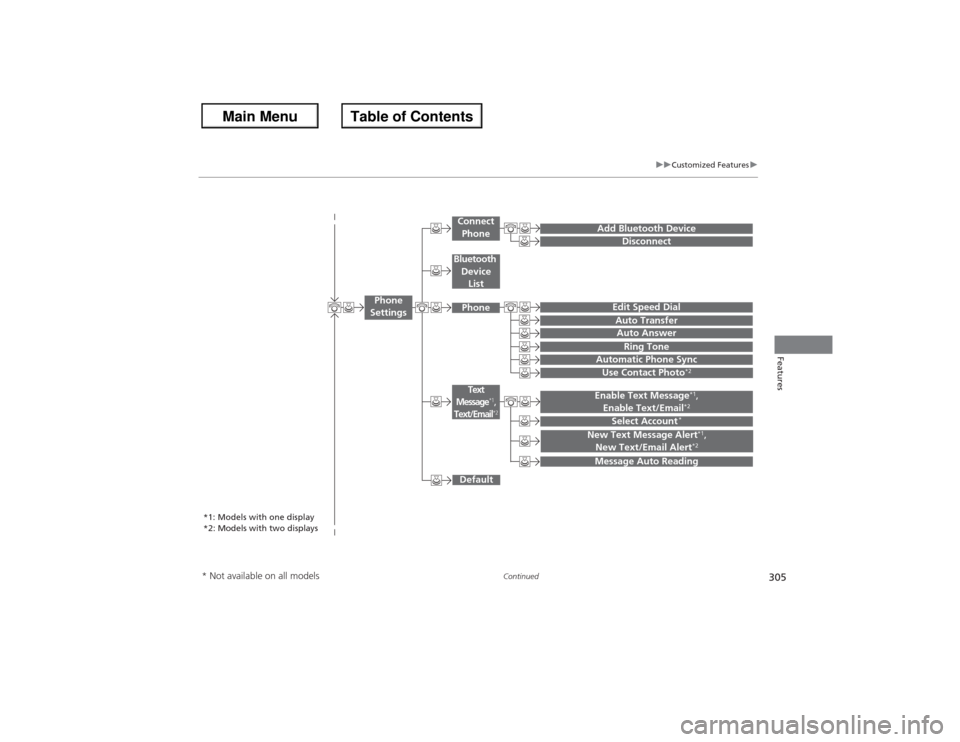
305
uuCustomized Features u
Continued
Features
Add Bluetooth Device
DisconnectEdit Speed DialAuto Transfer
Auto AnswerRing Tone
Automatic Phone Sync
Default
Use Contact Photo
*2
Enable Text Message
*1,
Enable Text/Email*2
Select Account
*
Message Auto ReadingNew Text Message Alert
*1,
New Text/Email Alert*2
*1: Models with one display
*2: Models with two displays
Phone
Settings
Connect PhoneText
Message
*1,
Text/Email
*2
Bluetooth
Device ListPhone
* Not available on all models
Page 307 of 595
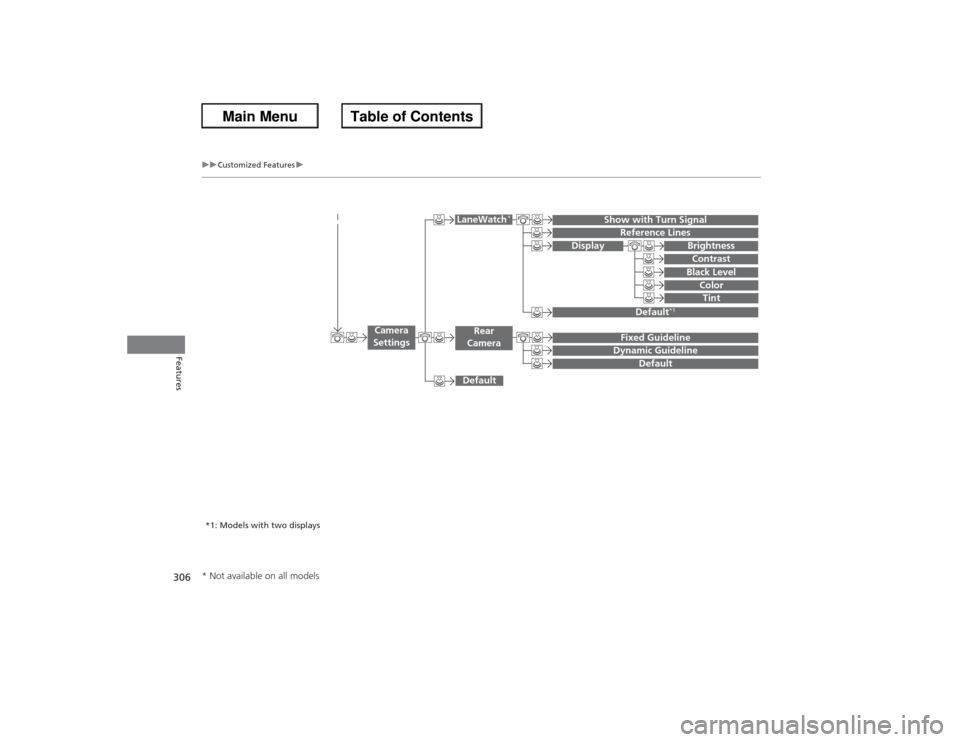
306
uuCustomized Features u
Features
Display
Show with Turn Signal
Reference Lines
Default
*1
Default
Default
Fixed GuidelineDynamic Guideline
Camera
Settings
LaneWatch
*
Rear
Camera
BrightnessContrastBlack Level
ColorTint
*1: Models with two displays* Not available on all models