start stop button HONDA ACCORD 2013 9.G Repair Manual
[x] Cancel search | Manufacturer: HONDA, Model Year: 2013, Model line: ACCORD, Model: HONDA ACCORD 2013 9.GPages: 595, PDF Size: 20.67 MB
Page 467 of 595
uuWhen Driving uVSA ® (Vehicle Stability Assist), aka ESC (Electronic Stability Control), System
466Driving
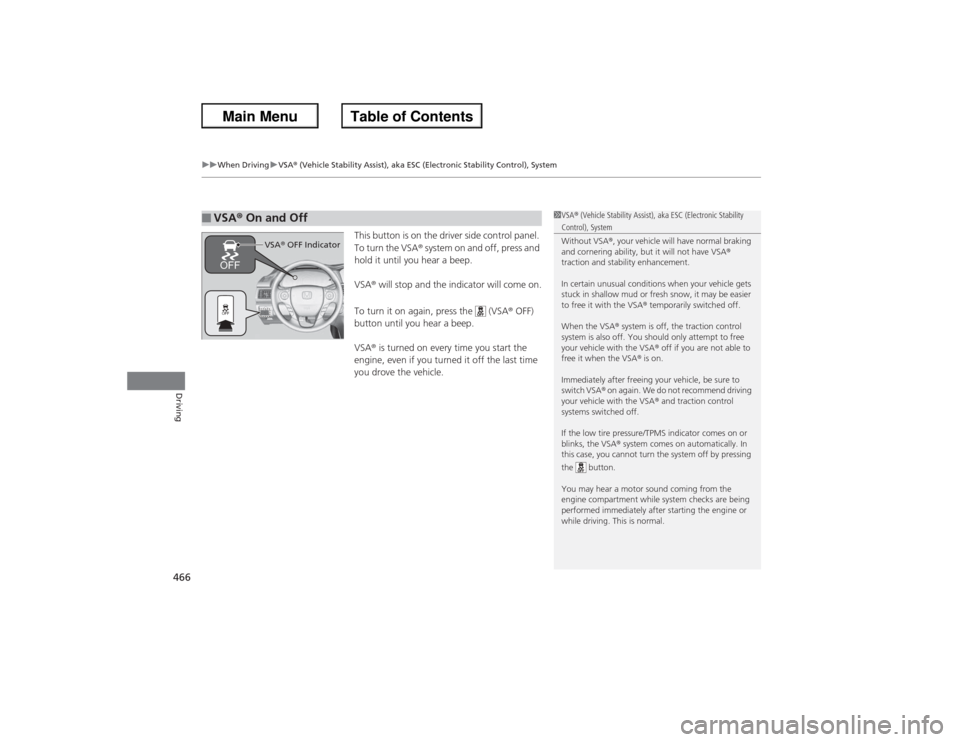
This button is on the driver side control panel.
To turn the VSA® system on and off, press and
hold it until you hear a beep.
VSA ® will stop and the indicator will come on.
To turn it on again, press the (VSA ® OFF)
button until you hear a beep.
VSA ® is turned on every time you start the
engine, even if you turned it off the last time
you drove the vehicle.
■VSA ® On and Off
1 VSA ® (Vehicle Stability Assist), aka ESC (Electronic Stability Control), System
Without VSA ®, your vehicle will have normal braking
and cornering ability, but it will not have VSA ®
traction and stability enhancement.
In certain unusual conditions when your vehicle gets
stuck in shallow mud or fresh snow, it may be easier
to free it with the VSA ® temporarily switched off.
When the VSA ® system is off, the traction control
system is also off. You should only attempt to free
your vehicle with the VSA ® off if you are not able to
free it when the VSA ® is on.
Immediately after freeing your vehicle, be sure to
switch VSA ® on again. We do not recommend driving
your vehicle with the VSA ® and traction control
systems switched off.
If the low tire pressure/TPMS indicator comes on or
blinks, the VSA ® system comes on automatically. In
this case, you cannot turn the system off by pressing
the button.
You may hear a motor sound coming from the
engine compartment while system checks are being
performed immediately after starting the engine or
while driving. This is normal.
VSA ® OFF Indicator
Page 470 of 595
469
uuWhen Driving uTPMS (Tire Pressure Monitoring System)
Continued
Driving
TPMS (Tire Pressure Monitoring System)Instead of directly measuring the pressure in each tire, the TPMS on this vehicle
monitors and compares the rolling radius and rotational characteristics of each
wheel and tire while you are driving to determine if one or more tires are
significantly under-infl ated. This will cause the low tire pressure/TPMS indicator to
come on and a message to appear on the multi-information display
*.
Calibrate the TPMS if you have:
• Adjusted the pressure in one or more tires.
• Rotated the tires.
• Replaced one or more tires.
u Before calibrating the TPMS, turn the ignition switch to ON
(w*1, and make
sure that the vehicle is at a complete stop.
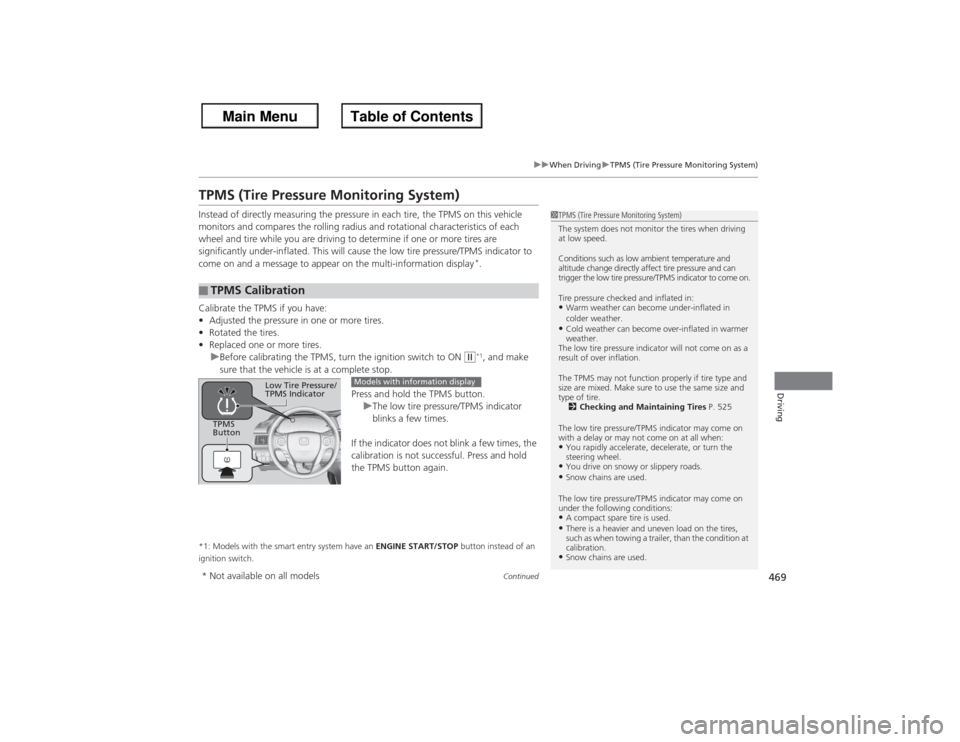
Press and hold the TPMS button.uThe low tire pressure/TPMS indicator
blinks a few times.
If the indicator does not blink a few times, the
calibration is not successful. Press and hold
the TPMS button again.
*1: Models with the smart entry system have an ENGINE START/STOP button instead of an
ignition switch.■TPMS Calibration
1 TPMS (Tire Pressure Monitoring System)
The system does not monitor the tires when driving
at low speed.
Conditions such as low ambient temperature and
altitude change directly affect tire pressure and can
trigger the low tire pressure/TPMS indicator to come on.
Tire pressure checked and inflated in:•Warm weather can become under-inflated in
colder weather.•Cold weather can become over-inflated in warmer
weather.
The low tire pressure indicator will not come on as a
result of over inflation.
The TPMS may not function properly if tire type and
size are mixed. Make sure to use the same size and
type of tire. 2 Checking and Maintaining Tires P. 525
The low tire pressure/TPMS indicator may come on
with a delay or may not come on at all when:•You rapidly accelerate, decelerate, or turn the
steering wheel.•You drive on snowy or slippery roads.•Snow chains are used.
The low tire pressure/TPMS indicator may come on
under the following conditions:•A compact spare tire is used.•There is a heavier and uneven load on the tires,
such as when towing a trailer, than the condition at
calibration.•Snow chains are used.
TPMS
Button
Low Tire Pressure/
TPMS Indicator
Models with information display
* Not available on all models
Page 490 of 595
489
Continued
Maintenance
Maintenance Minder
TM
If the engine oil life is less than 15%, you will see the Maintenance Minder messages
appear on the information display
* or the multi-information display
* every time you
turn the ignition switch to ON
(w*1. The messages notify you when to change the
engine oil, or when to bring your vehicle to a dealer for indicated maintenance
services.
To Use Maintenance Minder
TM
1. Turn the ignition switch to ON
(w*1.
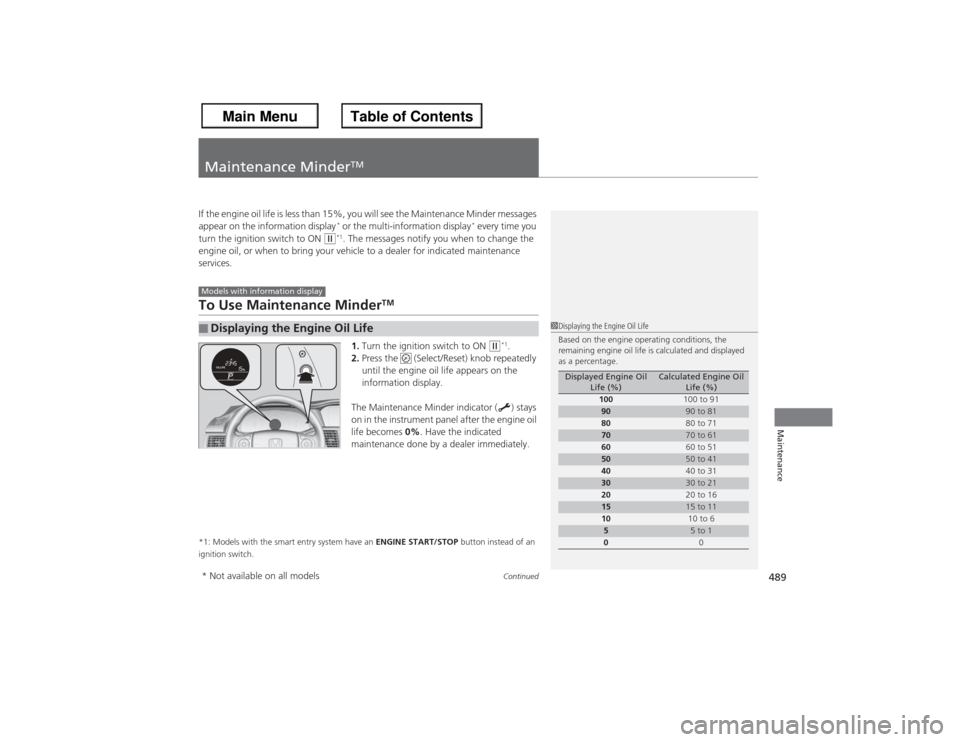
2. Press the (Select/Reset) knob repeatedly
until the engine oil life appears on the
information display.
The Maintenance Minder indicator ( ) stays
on in the instrument panel after the engine oil
life becomes 0%. Have the indicated
maintenance done by a dealer immediately.
*1: Models with the smart entry system have an ENGINE START/STOP button instead of an
ignition switch.■Displaying the Engine Oil LifeModels with information display
1 Displaying the Engine Oil Life
Based on the engine operating conditions, the
remaining engine oil life is calculated and displayed
as a percentage.
Displayed Engine Oil
Life (%)
Calculated Engine Oil Life (%)
100 100 to 91
90
90 to 81
80 80 to 71
70
70 to 61
60 60 to 51
50
50 to 41
40 40 to 31
30
30 to 21
20 20 to 16
15
15 to 11
10 10 to 6
5
5 to 1
0 0
* Not available on all models
Page 493 of 595
uuMaintenance Minder
TMuTo Use Maintenance Minder
TM
49 2Maintenance
Reset the engine oil life display if you have performed the maintenance service.
1.Turn the ignition switch to ON
(w*1.
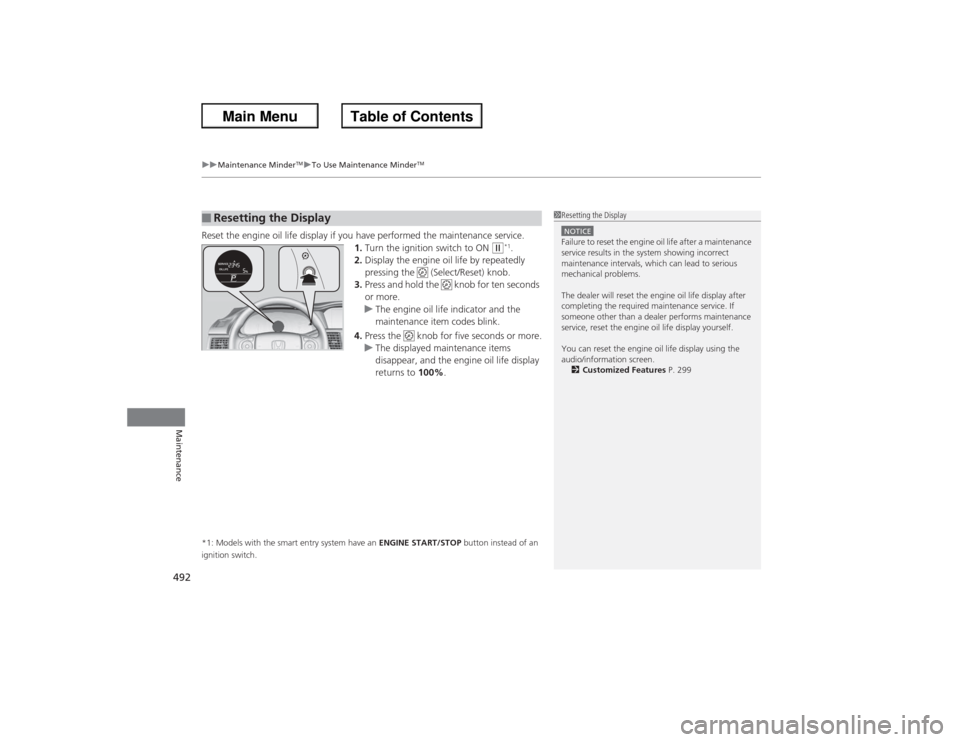
2. Display the engine oil life by repeatedly
pressing the (Select/Reset) knob.
3. Press and hold the knob for ten seconds
or more.
u The engine oil life indicator and the
maintenance item codes blink.
4. Press the knob for five seconds or more.
u The displayed maintenance items
disappear, and the engine oil life display
returns to 100%.
*1: Models with the smart entry system have an ENGINE START/STOP button instead of an
ignition switch.■Resetting the Display
1 Resetting the DisplayNOTICEFailure to reset the engine oil life after a maintenance
service results in the system showing incorrect
maintenance intervals, which can lead to serious
mechanical problems.
The dealer will reset the engine oil life display after
completing the required maintenance service. If
someone other than a dealer performs maintenance
service, reset the engine oil life display yourself.
You can reset the engine oil life display using the
audio/information screen.
2 Customized Features P. 299
Page 546 of 595
545
Continued
Handling the Unexpected
If a Tire Goes FlatChanging a Flat TireIf a tire goes flat while driving, grasp the steering wheel firmly, and brake gradually
to reduce speed. Then, stop in a safe place. Replace the flat tire with a compact
spare tire. Go to a dealer as soon as possible to have the full-size tire repaired or
replaced.
1.Park the vehicle on firm, level, and non-slippery surface and apply the parking
brake.
2. Move the shift lever to
(P.
2. Move the shift lever to (R.
3. Turn on the hazard warning lights and turn the ignition switch to LOCK
(0*1.
*1: Models with the smart entry system have an ENGINE START/STOP button instead of an
ignition switch.
1 Changing a Flat Tire
Periodically check the tire pressure of the compact
spare. It should be set to the specified pressure.
Specified Pressure: 60 psi (420 kPa, 4.2 kgf/cm
2)
When driving with the compact spare tire, keep the
vehicle speed under 50 mp h (80 km/h). Replace with
a full-size tire as soon as possible.
The compact spare tire and wheel in your vehicle are
specifically for this model.
Do not use them with another vehicle.
Do not use another type of compact spare tire or
wheel with your vehicle.
Do not mount tire chains on a compact spare tire.
If a chain-mounted front tire goes flat, remove one of
the full-size rear tires and replace it with the compact
spare tire. Remove the flat front tire and replace it
with the full size tire that was removed from the rear.
Mount the tire chains on the front tire.
Automatic transmission/CVT modelsManual transmission modelsAll models
Page 552 of 595
551Handling the Unexpected
Engine Does Not StartChecking the EngineIf the engine does not start, check the starter.
Starter condition
Checklist
Starter doesn’t turn or turns
over slowly.
The battery may be dead. Check
each of the items on the right and
respond accordingly.
Check for a message on the multi-information display.●If the To Start, Hold Remote Near Start Button message appears
2 If the Smart Entry Remote Battery is Weak P. 552
uMake sure the smart entry remote is in its operating range.
2 ENGINE START/STOP Button Operating Range P. 132
Check brightness of the interior light.
Turn on interior lights and check brightness.●If the interior lights are dim or do not come on at all
2Battery P. 534
●If the interior lights come on normally
2 Fuses P. 564
The starter turns over normally
but the engine doesn’t start.
There may be a problem with the
fuse. Check each of the items on
the right and respond accordingly. Review the engine start procedure.
Follow its instructions, and try to start the engine again.
2
Starting the Engine P. 427
Check the immobilizer system indicator.
When the immobilizer system indicator is blinking, the engine cannot be started.2Immobilizer System P. 124Check the fuel level.
There should be enough fuel in the tank.
2 Fuel Gauge P. 89
Check the fuse.
Check all fuses, or have the vehicle checked by a dealer.2Inspecting and Changing Fuses P. 566If the problem continues:2Emergency Towing P. 567
1Checking the Engine
If you must start the vehicle immediately, use an
assisting vehicle to jump start it.
2 Jump Starting P. 554
Models with multi-information display
Page 553 of 595
552
uu Engine Does Not Start uIf the Smart Entry Remote Battery is Weak
Handling the Unexpected
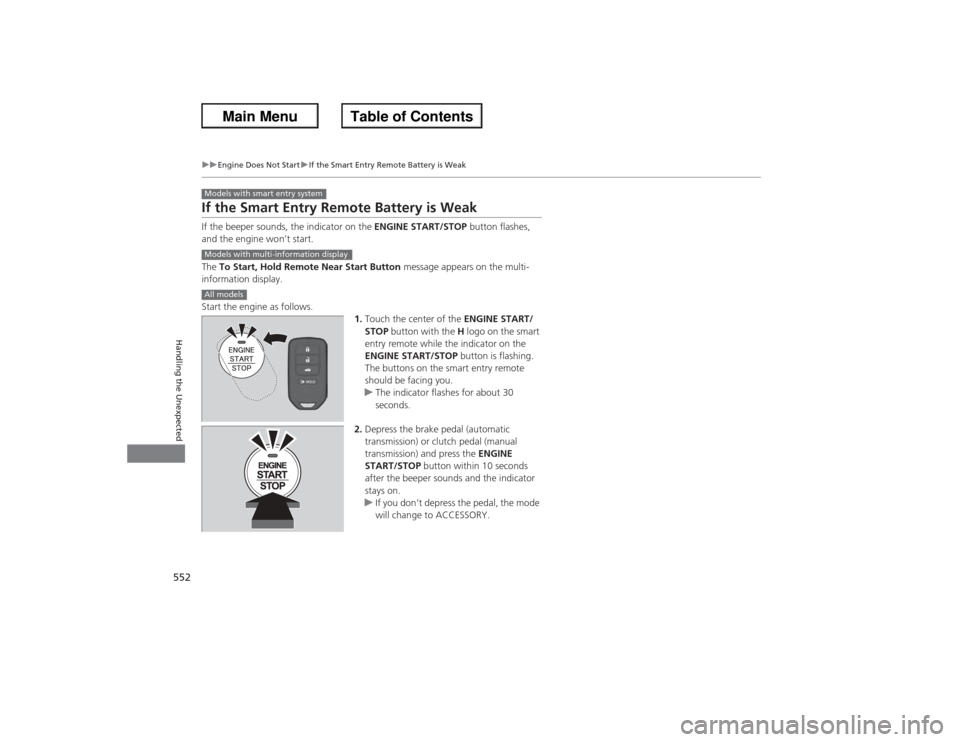
If the Smart Entry Remote Battery is WeakIf the beeper sounds, the indicator on the ENGINE START/STOP button flashes,
and the engine won’t start.
The To Start, Hold Remote Near Start Button message appears on the multi-
information display.
Start the engine as follows. 1.Touch the center of the ENGINE START/
STOP button with the H logo on the smart
entry remote while the indicator on the
ENGINE START/STOP button is flashing.
The buttons on the smart entry remote
should be facing you.
u The indicator flashes for about 30
seconds.
2. Depress the brake pedal (automatic
transmission) or clutch pedal (manual
transmission) and press the ENGINE
START/STOP button within 10 seconds
after the beeper sounds and the indicator
stays on.
u If you don’t depress the pedal, the mode
will change to ACCESSORY.Models with smart entry systemModels with multi-information displayAll models
Page 554 of 595
553
uu Engine Does Not Start uEmergency Engine Stop
Handling the Unexpected
Emergency Engine StopIf you cannot stop the engine by pressing the ENGINE START/STOP button, do
either of the following operations:
• Press and hold the ENGINE START/STOP button for about two seconds.
• Firmly press the ENGINE START/STOP button two times.
The steering wheel will not lock.
The power mode changes to VEHICLE OFF with the shift lever in
(P, and to
ACCESSORY with the shift lever in any position other than
(P.
The power mode changes to VEHICLE OFF.
Models with smart entry system
1 Emergency Engine Stop
Do not press the button while driving unless it is
absolutely necessary for the engine to be switched
off.
Automatic transmission/CVT modelsManual transmission models
Page 565 of 595
564Handling the Unexpected
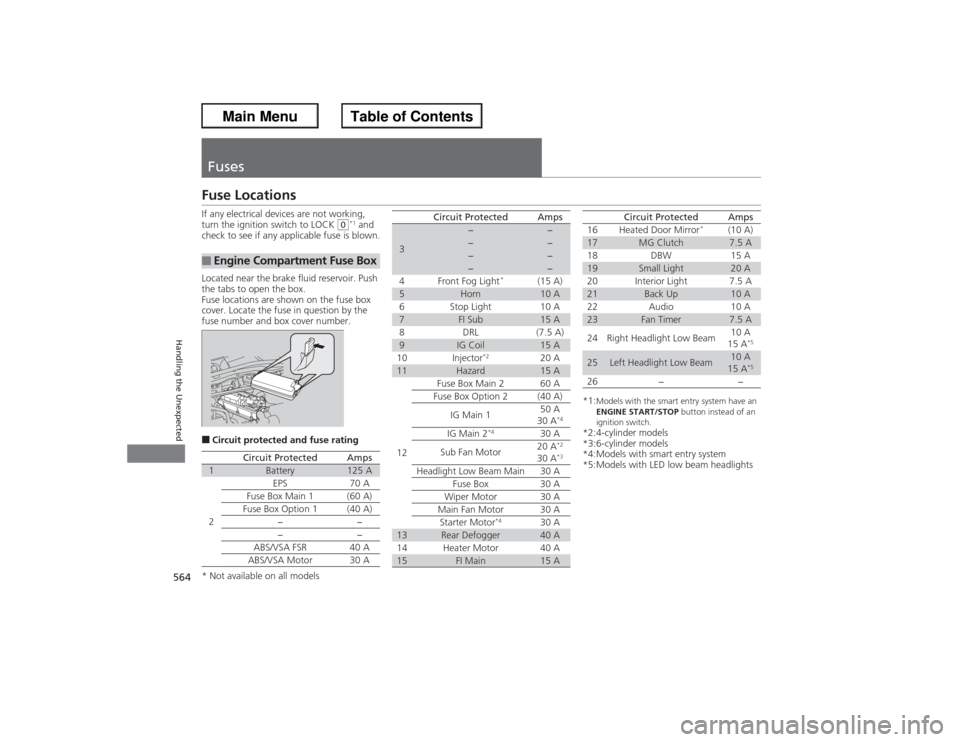
FusesFuse LocationsIf any electrical devices are not working,
turn the ignition switch to LOCK
(0*1 and
check to see if any applicable fuse is blown.
Located near the brake fluid reservoir. Push
the tabs to open the box.
Fuse locations are shown on the fuse box
cover. Locate the fuse in question by the
fuse number and box cover number.
■Circuit protected and fuse rating■Engine Compartment Fuse Box
Circuit Protected
Amps
1
Battery
125 A
2
EPS
70 A
Fuse Box Main 1 (60 A)
Fuse Box Option 1
(40 A)
−−
−
−
ABS/VSA FSR 40 A
ABS/VSA Motor 30 A
3
−
−
−
−
−
−
−
−
4 Front Fog Light
*
(15 A)
5
Horn
10 A
6 Stop Light 10 A
7
FI Sub
15 A
8 DRL (7.5 A)
9
IG Coil
15 A
10 Injector
*2
20 A
11
Hazard
15 A
12 Fuse Box Main 2 60 A
Fuse Box Option 2 (40 A)
IG Main 1 50 A
30 A
*4
IG Main 2
*4
30 A
Sub Fan Motor 20 A
*2
30 A
*3
Headlight Low Beam Main 30 A
Fuse Box 30 A
Wiper Motor 30 A
Main Fan Motor 30 A Starter Motor
*4
30 A
13
Rear Defogger
40 A
14 Heater Motor 40 A
15
FI Main
15 A
Circuit Protected
Amps
*1:
Models with the smart entry system have an
ENGINE START/STOP button instead of an
ignition switch.
*2:4-cylinder models
*3:6-cylinder models
*4:Models with smart entry system
*5:Models with LED low beam headlights 16 Heated Door Mirror
*
(10 A)
17
MG Clutch
7.5 A
18 DBW 15 A
19
Small Light
20 A
20 Interior Light 7.5 A
21
Back Up
10 A
22 Audio 10 A
23
Fan Timer
7.5 A
24 Right Headlight Low Beam 10 A
15 A
*5
25
Left Headlight Low Beam
10 A
15 A
*5
26 − −
Circuit Protected
Amps
* Not available on all models
Page 567 of 595
566
uuFuses uInspecting and Changing Fuses
Handling the Unexpected
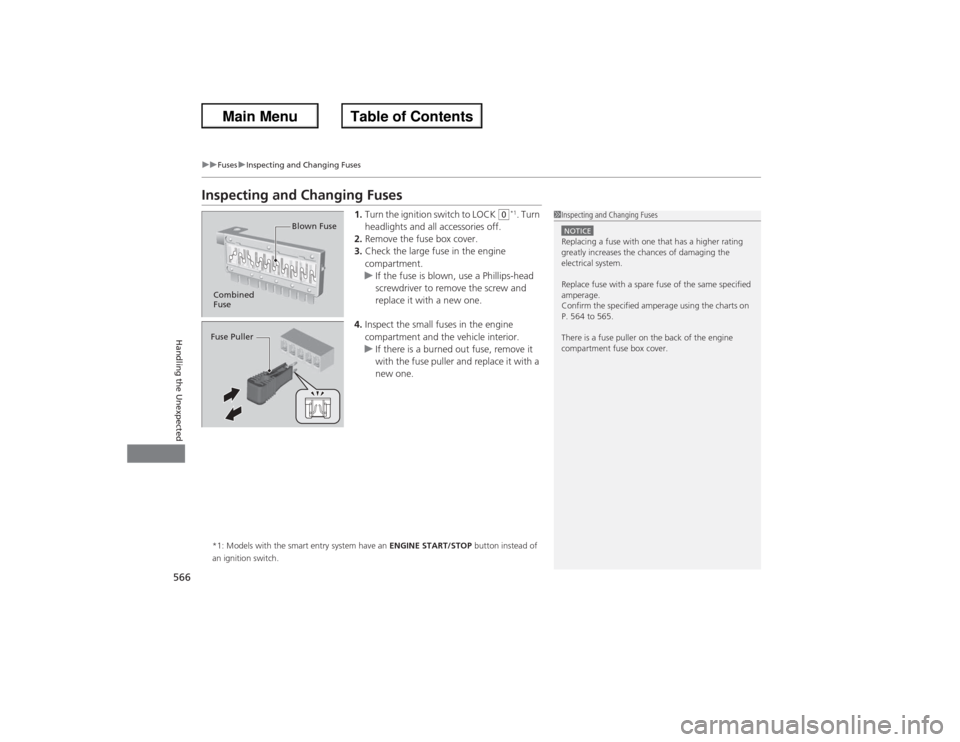
Inspecting and Changing Fuses
1. Turn the ignition switch to LOCK
(0*1. Turn
headlights and all accessories off.
2. Remove the fuse box cover.
3. Check the large fuse in the engine
compartment.
u If the fuse is blown, use a Phillips-head
screwdriver to remove the screw and
replace it with a new one.
4. Inspect the small fuses in the engine
compartment and the vehicle interior.
u If there is a burned out fuse, remove it
with the fuse puller and replace it with a
new one.
*1: Models with the smart entry system have an ENGINE START/STOP button instead of
an ignition switch.
1 Inspecting and Changing FusesNOTICEReplacing a fuse with one that has a higher rating
greatly increases the chances of damaging the
electrical system.
Replace fuse with a spare fuse of the same specified
amperage.
Confirm the specified amperage using the charts on
P. 564 to 565.
There is a fuse puller on the back of the engine
compartment fuse box cover.
Combined
Fuse Blown FuseFuse Puller