display HONDA ACCORD 2014 9.G Owners Manual
[x] Cancel search | Manufacturer: HONDA, Model Year: 2014, Model line: ACCORD, Model: HONDA ACCORD 2014 9.GPages: 595
Page 324 of 595
323
uuCustomized Features u
Continued
Features
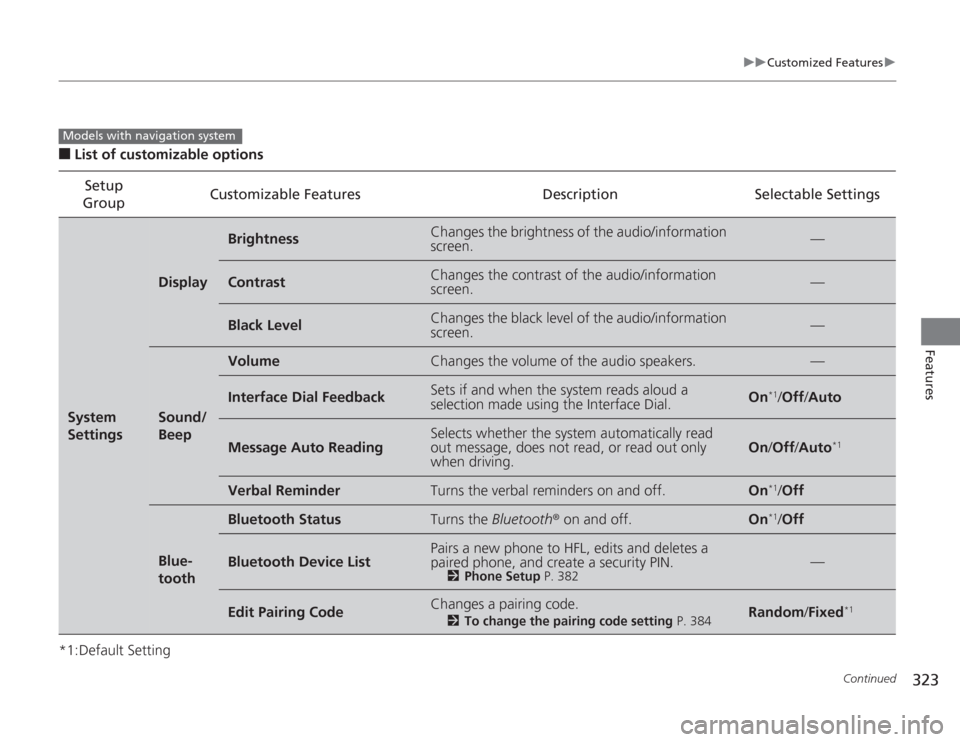
■
List of customizable options
*1:Default Setting Setup
Group Customizable Features Description Selectable SettingsSystem
Settings
Display
Brightness
Changes the brightness of the audio/information
screen.
—
Contrast
Changes the contrast of the audio/information
screen.
—
Black Level
Changes the black level of the audio/information
screen.
—
Sound/
Beep
Volume
Changes the volume of the audio speakers.
—
Interface Dial Feedback
Sets if and when the system reads aloud a
selection made using the Interface Dial.
On
*1/
Off /Auto
Message Auto Reading
Selects whether the system automatically read
out message, does not read, or read out only
when driving.
On /Off /Auto
*1
Verbal Reminder
Turns the verbal reminders on and off.
On
*1/Off
Blue-
tooth
Bluetooth Status
Turns the Bluetooth® on and off.
On
*1/Off
Bluetooth Device List
Pairs a new phone to HFL, edits and deletes a
paired phone, and create a security PIN.
2 Phone Setup P. 382
—
Edit Pairing Code
Changes a pairing code.
2To change the pairing code setting P. 384
Random/Fixed
*1
Models with navigation system
Page 325 of 595
324
uuCustomized Features u
Features
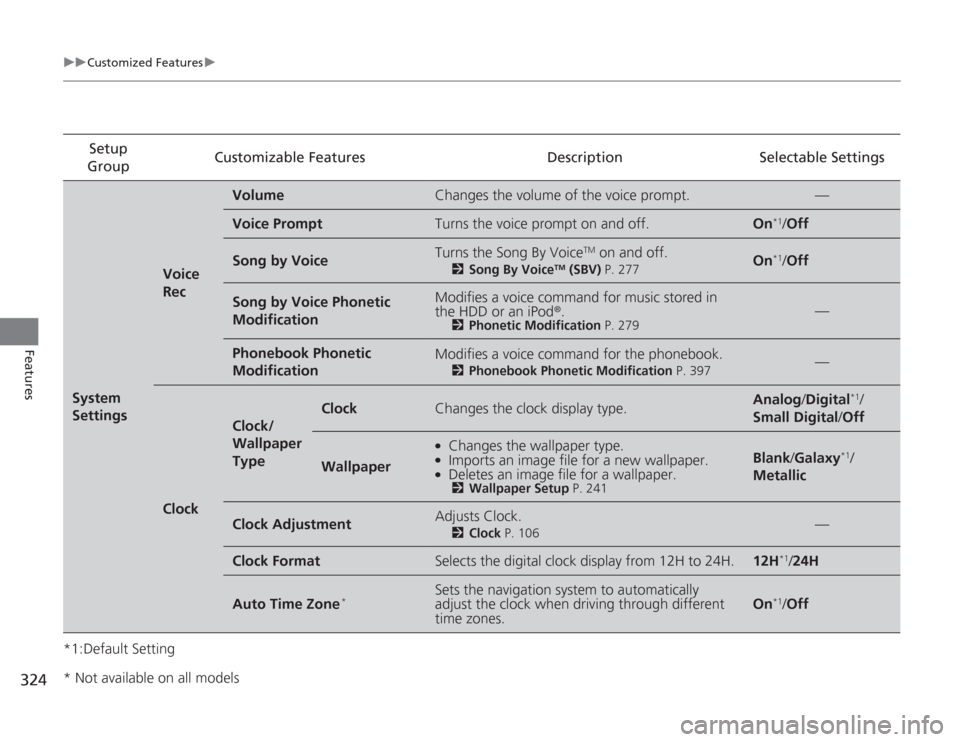
*1:Default SettingSetup
Group Customizable Features Description Selectable SettingsSystem
Settings
Voice
Rec
Volume
Changes the volume of the voice prompt.
—
Voice Prompt
Turns the voice prompt on and off.
On
*1/
Off
Song by Voice
Turns the Song By Voice
TM on and off.
2 Song By Voice
TM (SBV) P. 277
On
*1/Off
Song by Voice Phonetic
Modification
Modifies a voice command for music stored in
the HDD or an iPod ®.
2Phonetic Modification P. 279
—
Phonebook Phonetic
Modification
Modifies a voice command for the phonebook.
2Phonebook Phonetic Modification P. 397
—
Clock
Clock/
Wallpaper
Type
Clock
Changes the clock display type.
Analog/Digital
*1/
Small Digital /Off
Wallpaper
●
Changes the wallpaper type.
●
Imports an image file for a new wallpaper.
●
Deletes an image file for a wallpaper.2 Wallpaper Setup P. 241
Blank/Galaxy
*1/
Metallic
Clock Adjustment
Adjusts Clock.
2 Clock P. 106
—
Clock Format
Selects the digital clock display from 12H to 24H.
12H
*1/24H
Auto Time Zone
*
Sets the navigation system to automatically
adjust the clock when driving through different
time zones.
On
*1/ Off
* Not available on all models
Page 326 of 595
325
uuCustomized Features u
Continued
Features
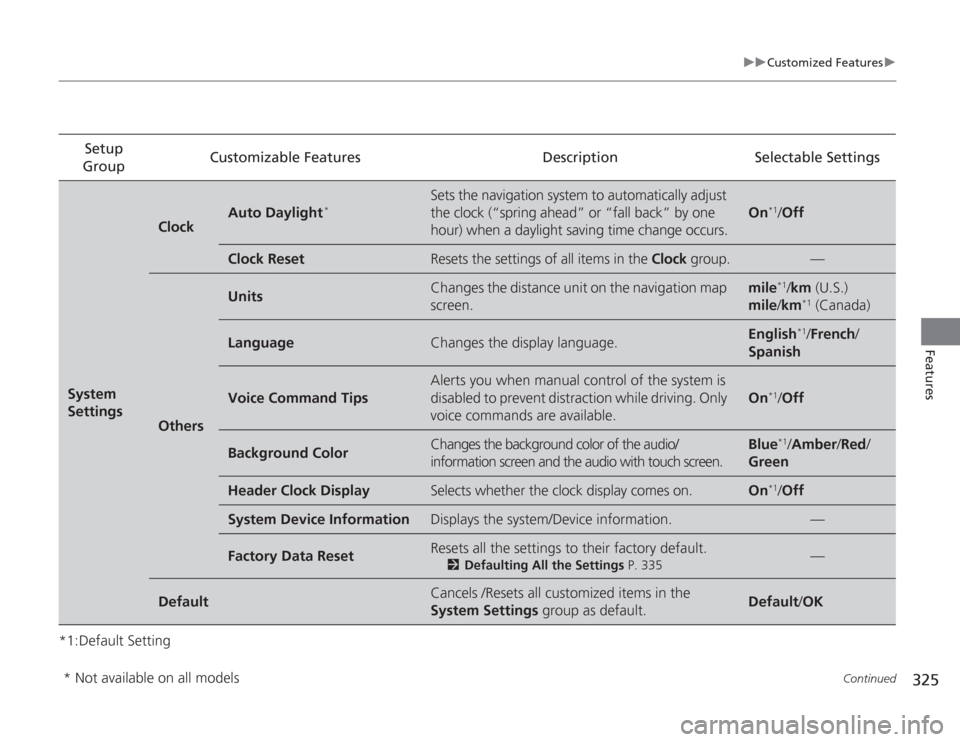
*1:Default SettingSetup
Group Customizable Features Description Selectable SettingsSystem
Settings
Clock
Auto Daylight
*
Sets the navigation system to automatically adjust
the clock (“spring ahead” or “fall back” by one
hour) when a daylight saving time change occurs.
On
*1/
Off
Clock Reset
Resets the settings of all items in the Clock group.
—
Others
Units
Changes the distance unit on the navigation map
screen.
mile
*1/km (U.S.)
mile /km
*1 (Canada)
Language
Changes the display language.
English
*1/ French /
Spanish
Voice Command Tips
Alerts you when manual control of the system is
disabled to prevent distraction while driving. Only
voice commands are available.
On
*1/ Off
Background Color
Changes the background color of the audio/
information screen and the audio with touch screen.
Blue
*1/Amber /Red /
Green
Header Clock Display
Selects whether the clock display comes on.
On
*1/ Off
System Device Information
Displays the system/Device information.
—
Factory Data Reset
Resets all the settings to their factory default.
2 Defaulting All the Settings P. 335
—
Default
Cancels /Resets all customized items in the
System Settings group as default.
Default/OK
* Not available on all models
Page 327 of 595
326
uuCustomized Features u
Features
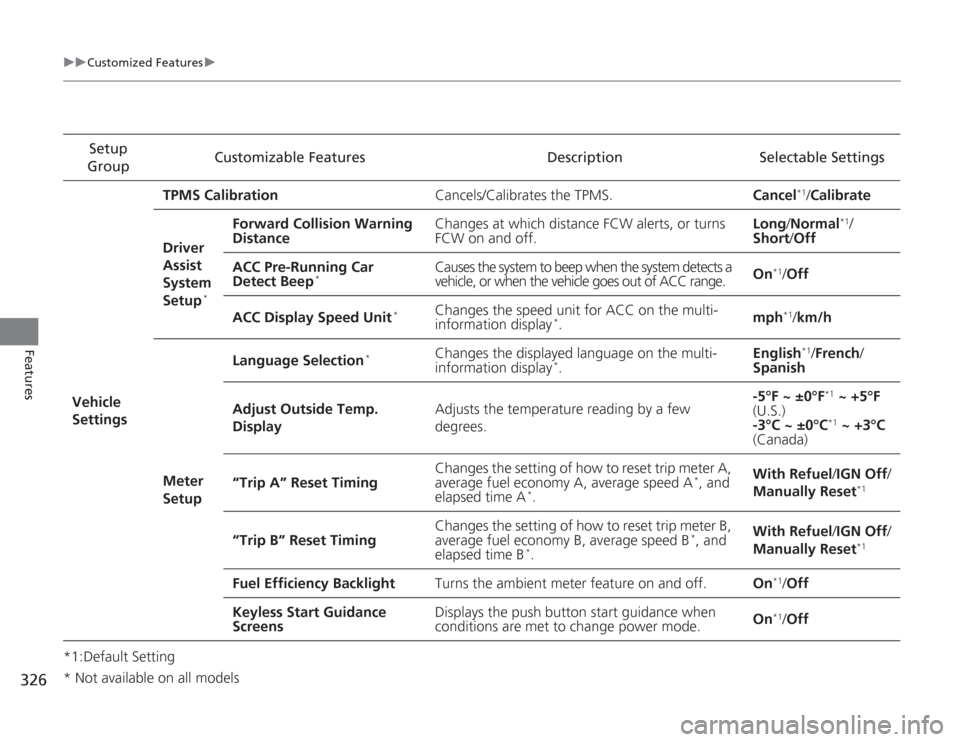
*1:Default SettingSetup
Group Customizable Features Description Selectable Settings
Vehicle
Settings TPMS Calibration
Cancels/Calibrates the TPMS. Cancel
*1/Calibrate
Driver
Assist
System
Setup
*
Forward Collision Warning
Distance Changes at which distance FCW alerts, or turns
FCW on and off. Long
/Normal
*1/
Short /Off
ACC Pre-Running Car
Detect Beep
*
Causes the system to beep when the system detects a
vehicle, or when the vehicle goes out of ACC range. On
*1/
Off
ACC Display Speed Unit
*
Changes the speed unit for ACC on the multi-
information display
*. mph
*1/
km/h
Meter
Setup Language Selection
*
Changes the displayed language on the multi-
information display
*.
English
*1/
French /
Spanish
Adjust Outside Temp.
Display Adjusts the temperature reading by a few
degrees. -5°F ~ ±0°F
*1
~ +5°F
(U.S.)
-3°C ~ ±0°C*1 ~ +3°C
(Canada)
“Trip A” Reset Timing Changes the setting of how to reset trip meter A,
average fuel economy A, average speed A
*, and
elapsed time A
*. With Refuel
/IGN Off /
Manually Reset
*1
“Trip B” Reset Timing Changes the setting of how to reset trip meter B,
average fuel economy B, average speed B
*, and
elapsed time B
*. With Refuel
/IGN Off /
Manually Reset
*1
Fuel Efficiency Backlight Turns the ambient meter feature on and off. On
*1/Off
Keyless Start Guidance
Screens Displays the push button start guidance when
conditions are met to change power mode.
On*1/
Off
* Not available on all models
Page 329 of 595
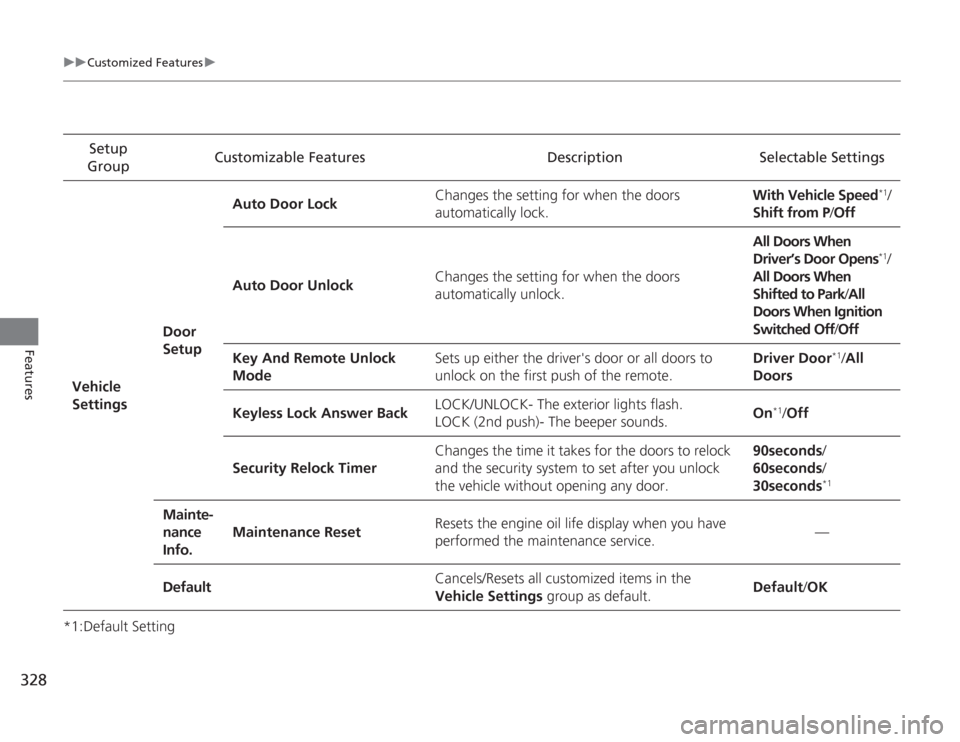
328
uuCustomized Features u
Features
*1:Default SettingSetup
Group Customizable Features Description Selectable Settings
Vehicle
Settings Door
SetupAuto Door Lock
Changes the setting for when the doors
automatically lock. With Vehicle Speed
*1/
Shift from P/ Off
Auto Door Unlock Changes the setting for when the doors
automatically unlock. All Doors When
Driver’s Door Opens*1/
All Doors When
Shifted to Park /All
Doors When Ignition
Switched Off /Off
Key And Remote Unlock
Mode Sets up either the driver's door or all doors to
unlock on the first push of the remote. Driver Door
*1/
All
Doors
Keyless Lock Answer Back LOCK/UNLOCK- The exterior lights flash.
LOCK (2nd push)- The beeper sounds.
On
*1/
Off
Security Relock Timer Changes the time it takes for the doors to relock
and the security system to set after you unlock
the vehicle without opening any door. 90seconds/
60seconds/
30seconds
*1
Mainte-
nance
Info.
Maintenance Reset
Resets the engine oil life display when you have
performed the maintenance service. —
Default Cancels/Resets all customized items in the
Vehicle Settings
group as default. Default
/OK
Page 330 of 595
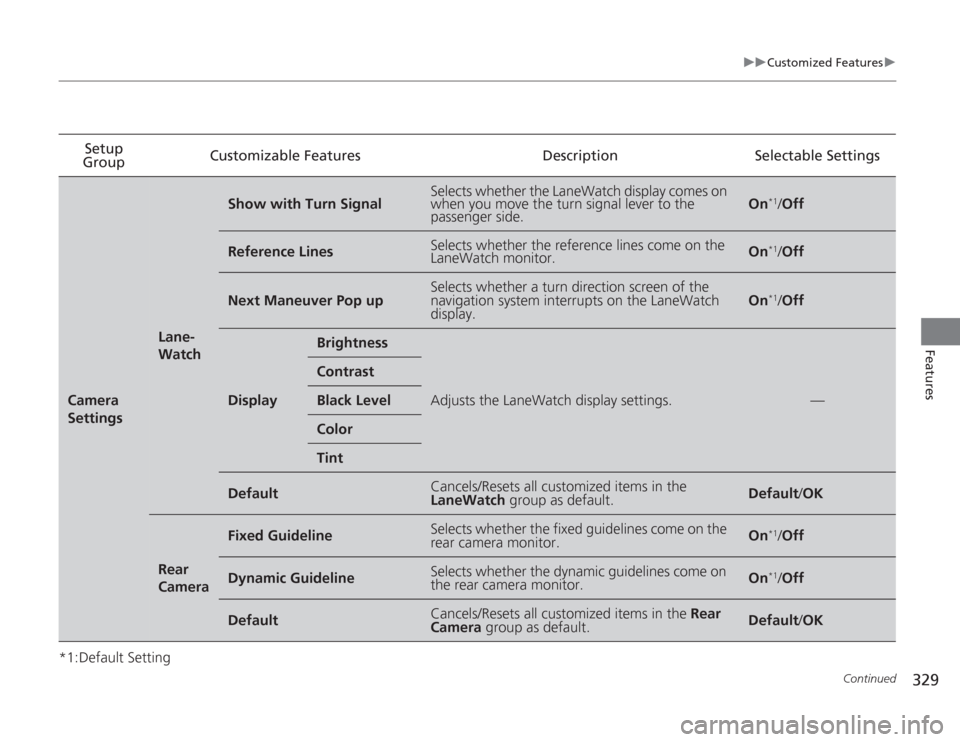
329
uuCustomized Features u
Continued
Features
*1:Default SettingSetup
Group Customizable Features
DescriptionSelectable SettingsCamera
Settings
Lane-
Watch
Show with Turn Signal
Selects whether the LaneWatch display comes on
when you move the turn signal lever to the
passenger side.
On
*1/Off
Reference Lines
Selects whether the reference lines come on the
LaneWatch monitor.
On
*1/Off
Next Maneuver Pop up
Selects whether a turn direction screen of the
navigation system interrupts on the LaneWatch
display.
On
*1/Off
Display
Brightness
Adjusts the LaneWatch display settings.
—
ContrastBlack LevelColorTint
Default
Cancels/Resets all customized items in the
LaneWatch group as default.
Default/OK
Rear
Camera
Fixed Guideline
Selects whether the fixed guidelines come on the
rear camera monitor.
On
*1/Off
Dynamic Guideline
Selects whether the dynamic guidelines come on
the rear camera monitor.
On
*1/Off
Default
Cancels/Resets all customized items in the Rear
Camera group as default.
Default /OK
Page 331 of 595
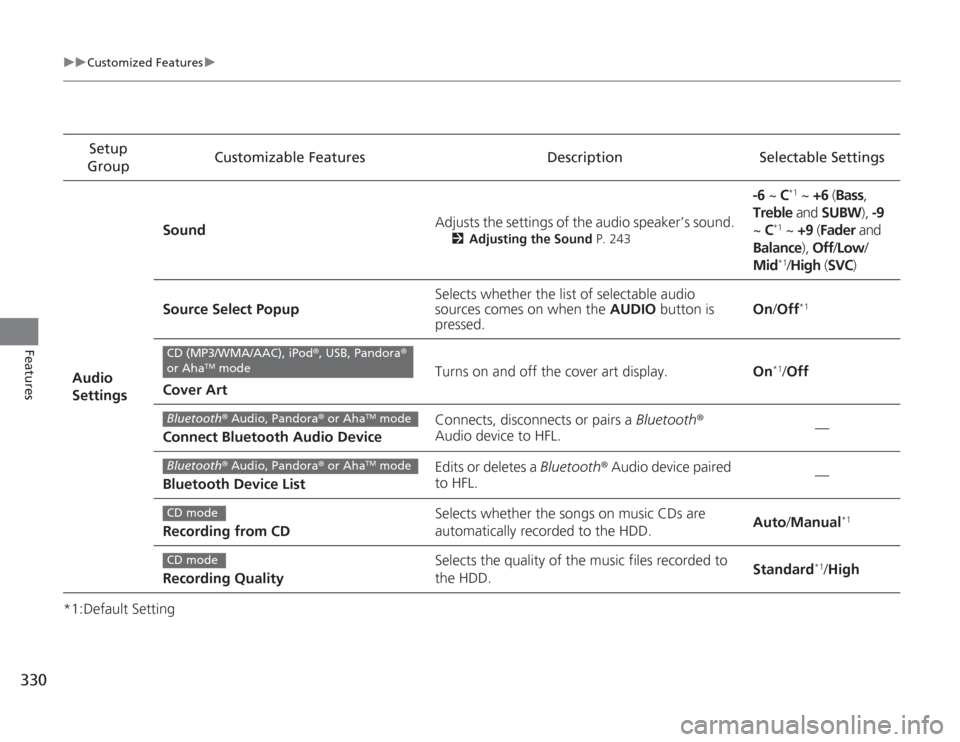
330
uuCustomized Features u
Features
*1:Default SettingSetup
Group Customizable Features Description Selectable Settings
Audio
Settings Sound
Adjusts the settings of the audio speaker’s sound.
2
Adjusting the Sound P. 243
-6 ~ C
*1 ~ +6 (Bass ,
Treble and SUBW ), -9
~ C
*1 ~ +9 (Fader and
Balance ), Off/Low /
Mid*1/ High (SVC)
Source Select Popup Selects whether the list of selectable audio
sources comes on when the
AUDIO button is
pressed. On
/Off
*1
Cover Art Turns on and off the cover art display.
On
*1/Off
Connect Bluetooth Audio Device Connects, disconnects or pairs a
Bluetooth®
Audio device to HFL. —
Bluetooth Device List Edits or deletes a
Bluetooth® Audio device paired
to HFL. —
Recording from CD Selects whether the songs on music CDs are
automatically recorded to the HDD.
Auto
/Manual
*1
Recording Quality Selects the quality of the music files recorded to
the HDD.
Standard
*1/
High
CD (MP3/WMA/AAC), iPod ®, USB, Pandora ®
or Aha
TM mode
Bluetooth ® Audio, Pandora® or Aha
TM mode
Bluetooth® Audio, Pandora® or Aha
TM mode
CD modeCD mode
Page 332 of 595
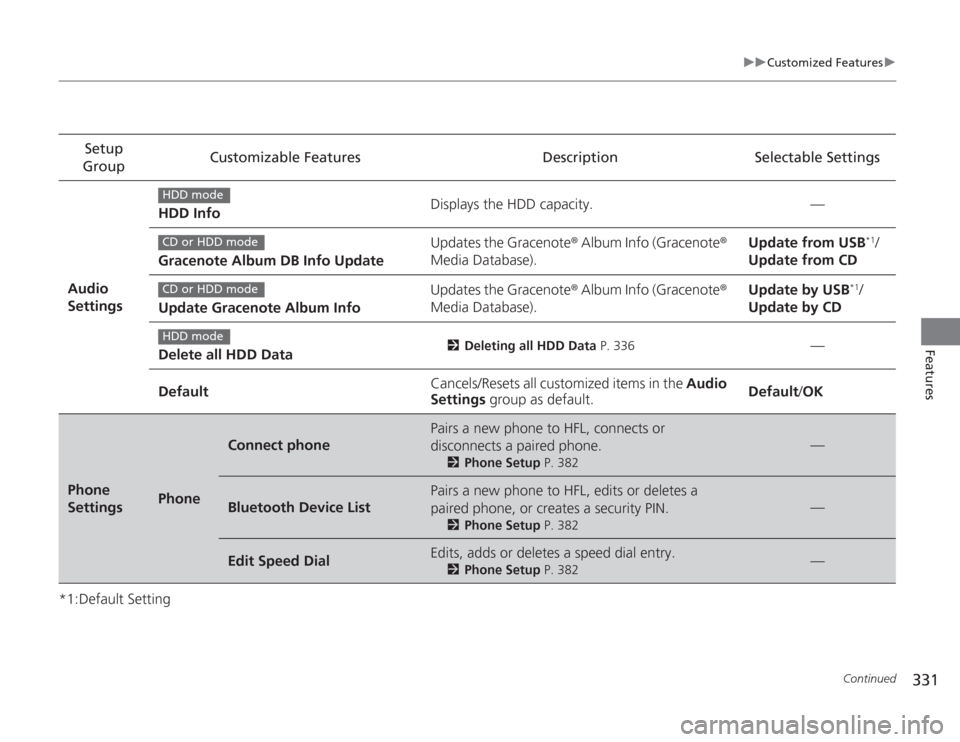
331
uuCustomized Features u
Continued
Features
*1:Default SettingSetup
Group Customizable Features Description Selectable Settings
Audio
Settings HDD Info
Displays the HDD capacity. —
Gracenote Album DB Info Update Updates the Gracenote
® Album Info (Gracenote ®
Media Database). Update from USB
*1/
Update from CD
Update Gracenote Album Info Updates the Gracenote
® Album Info (Gracenote ®
Media Database). Update by USB
*1/
Update by CD
Delete all HDD Data
2 Deleting all HDD Data P. 336
—
Default Cancels/Resets all customized items in the
Audio
Settings group as default. Default
/OK
Phone
Settings
Phone
Connect phone
Pairs a new phone to HFL, connects or
disconnects a paired phone.
2 Phone Setup P. 382
—
Bluetooth Device List
Pairs a new phone to HFL, edits or deletes a
paired phone, or creates a security PIN.
2Phone Setup P. 382
—
Edit Speed Dial
Edits, adds or deletes a speed dial entry.
2Phone Setup P. 382
—
HDD modeCD or HDD modeCD or HDD modeHDD mode
Page 333 of 595
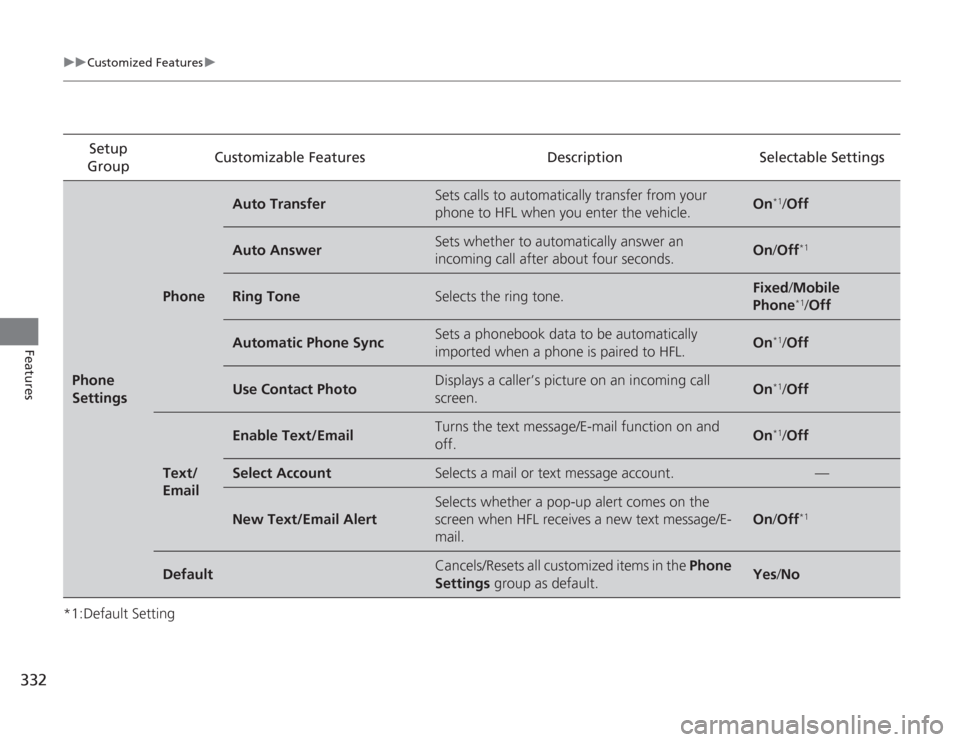
332
uuCustomized Features u
Features
*1:Default SettingSetup
Group Customizable Features Description Selectable SettingsPhone
Settings
Phone
Auto Transfer
Sets calls to automatically transfer from your
phone to HFL when you enter the vehicle.
On
*1/
Off
Auto Answer
Sets whether to automatically answer an
incoming call after about four seconds.
On /Off
*1
Ring Tone
Selects the ring tone.
Fixed /Mobile
Phone
*1/ Off
Automatic Phone Sync
Sets a phonebook data to be automatically
imported when a phone is paired to HFL.
On
*1/Off
Use Contact Photo
Displays a caller’s picture on an incoming call
screen.
On
*1/Off
Text/
Email
Enable Text/Email
Turns the text message/E-mail function on and
off.
On
*1/Off
Select Account
Selects a mail or text message account.
—
New Text/Email Alert
Selects whether a pop-up alert comes on the
screen when HFL receives a new text message/E-
mail.
On /Off
*1
Default
Cancels/Resets all customized items in the Phone
Settings group as default.
Yes/No
Page 334 of 595
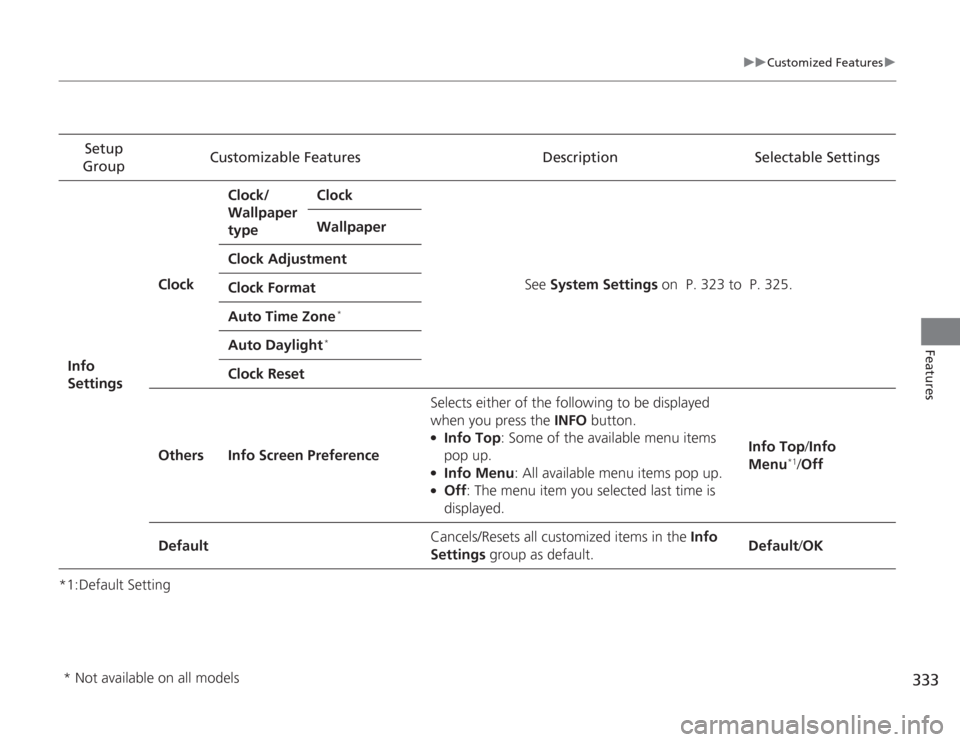
333
uuCustomized Features u
Features
*1:Default SettingSetup
Group Customizable Features Description Selectable Settings
Info
Settings Clock
Clock/
Wallpaper
type
Clock
See System Settings on P. 323 to P. 325.
Wallpaper
Clock Adjustment
Clock Format
Auto Time Zone
*
Auto Daylight
*
Clock Reset
Others Info Screen Preference Selects either of the following to be displayed
when you press the INFO
button.
●
Info Top: Some of the available menu items
pop up.
●
Info Menu : All available menu items pop up.
●
Off: The menu item you selected last time is
displayed. Info Top
/Info
Menu
*1/ Off
Default Cancels/Resets all customized items in the
Info
Settings group as default. Default
/OK
* Not available on all models