ECO mode HONDA ACCORD 2014 9.G Owner's Manual
[x] Cancel search | Manufacturer: HONDA, Model Year: 2014, Model line: ACCORD, Model: HONDA ACCORD 2014 9.GPages: 595
Page 79 of 595
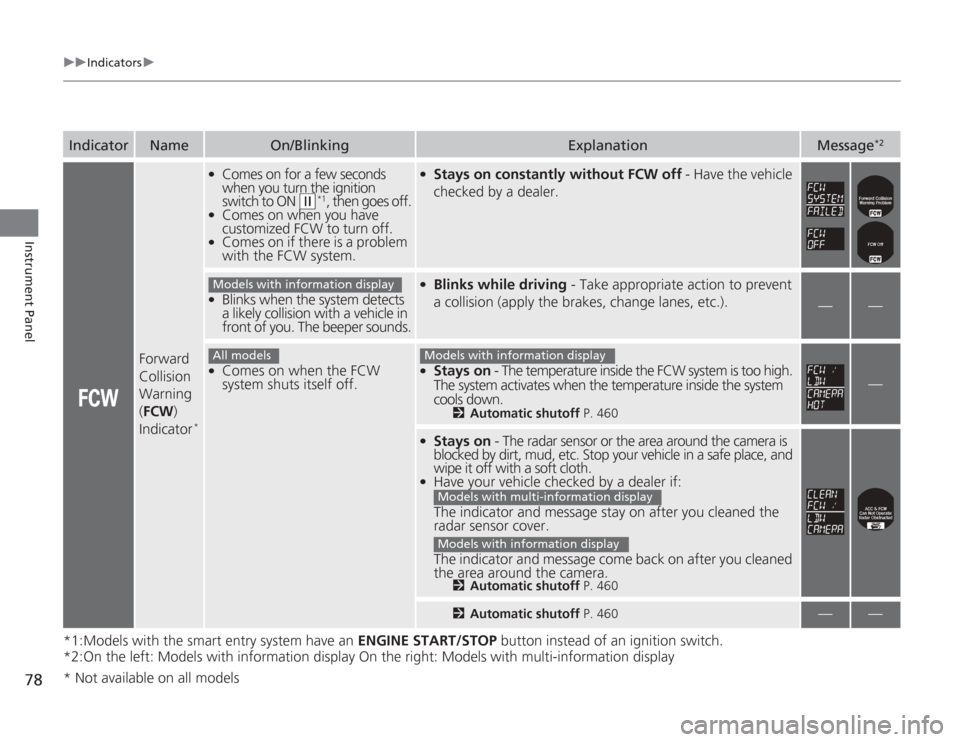
78
uuIndicators u
Instrument Panel
*1:Models with the smart entry system have an ENGINE START/STOP button instead of an ignition switch.
*2:On the left: Models with information display On the right: Models with multi-information displayIndicator
Name
On/Blinking
Explanation
Message
*2
Forward
Collision
Warning
( FCW )
Indicator
*
●
Comes on for a few seconds
when you turn the ignition
switch to ON
(w
*1, then goes off.
●
Comes on when you have
customized FCW to turn off.
●
Comes on if there is a problem
with the FCW system.
●
Stays on constantly without FCW off - Have the vehicle
checked by a dealer.
●
Blinks when the system detects
a likely collision with a vehicle in
front of you. The beeper sounds.
●
Blinks while driving - Take appropriate action to prevent
a collision (apply the brakes, change lanes, etc.).
—
—
●
Comes on when the FCW
system shuts itself off.
●
Stays on - The temperature inside the FCW system is too high.
The system activates when the temperature inside the system
cools down.
2 Automatic shutoff P. 460
—
●
Stays on - The radar sensor or the area around the camera is
blocked by dirt, mud, etc. Stop your vehicle in a safe place, and
wipe it off with a soft cloth.
●
Have your vehicle checked by a dealer if:
The indicator and message stay on after you cleaned the
radar sensor cover.
The indicator and message come back on after you cleaned
the area around the camera.
2 Automatic shutoff P. 4602Automatic shutoff P. 460
—
—
Models with information displayAll models
Models with information display
Models with multi-information displayModels with information display
* Not available on all models
Page 80 of 595
79
uuIndicators u
Continued
Instrument Panel
*1:Models with the smart entry system have an ENGINE START/STOP button instead of an ignition switch.
*2:On the left: Models with information display
On the right: Models with multi-information displayIndicator
Name
On/Blinking
Explanation
Message
*2
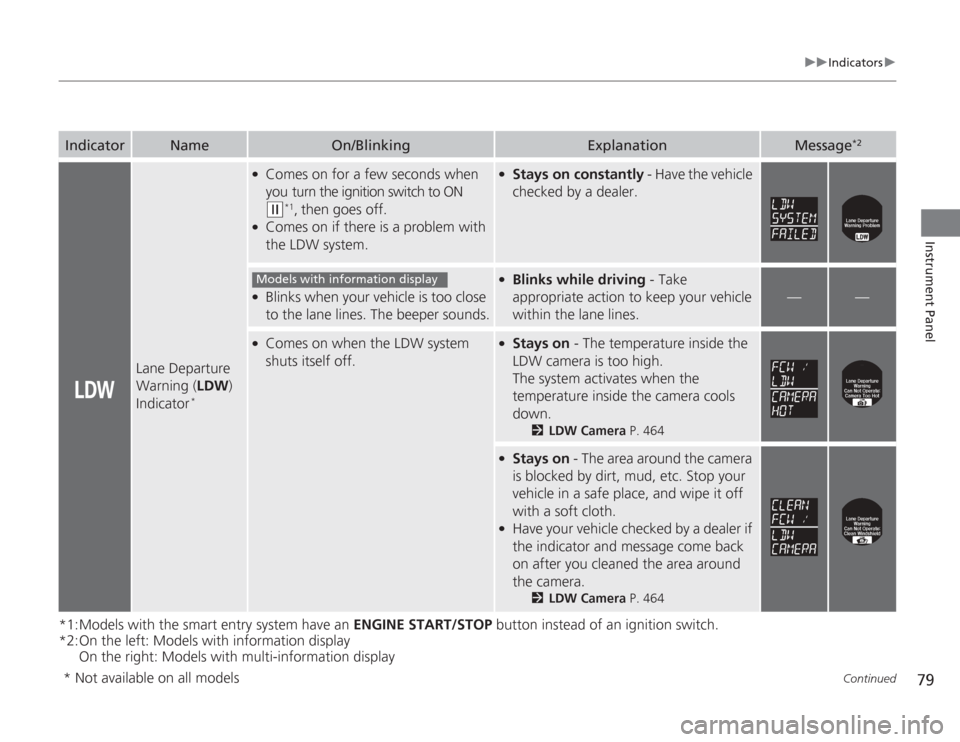
Lane Departure
Warning ( LDW)
Indicator
*
●
Comes on for a few seconds when
you turn the ignition switch to ON (w
*1, then goes off.
●
Comes on if there is a problem with
the LDW system.
●
Stays on constantly - Have the vehicle
checked by a dealer.
●
Blinks when your vehicle is too close
to the lane lines. The beeper sounds.
●
Blinks while driving - Take
appropriate action to keep your vehicle
within the lane lines.
—
—
●
Comes on when the LDW system
shuts itself off.
●
Stays on - The temperature inside the
LDW camera is too high.
The system activates when the
temperature inside the camera cools
down.
2 LDW Camera P. 464
●
Stays on - The area around the camera
is blocked by dirt, mud, etc. Stop your
vehicle in a safe place, and wipe it off
with a soft cloth.
●
Have your vehicle checked by a dealer if
the indicator and message come back
on after you cleaned the area around
the camera.
2 LDW Camera P. 464
Models with information display
* Not available on all models
Page 81 of 595
80
uuIndicators u
Instrument Panel
*1:Models with the smart entry system have an ENGINE START/STOP button instead of an ignition switch.Indicator
Name
On/Blinking
Explanation
Message
*
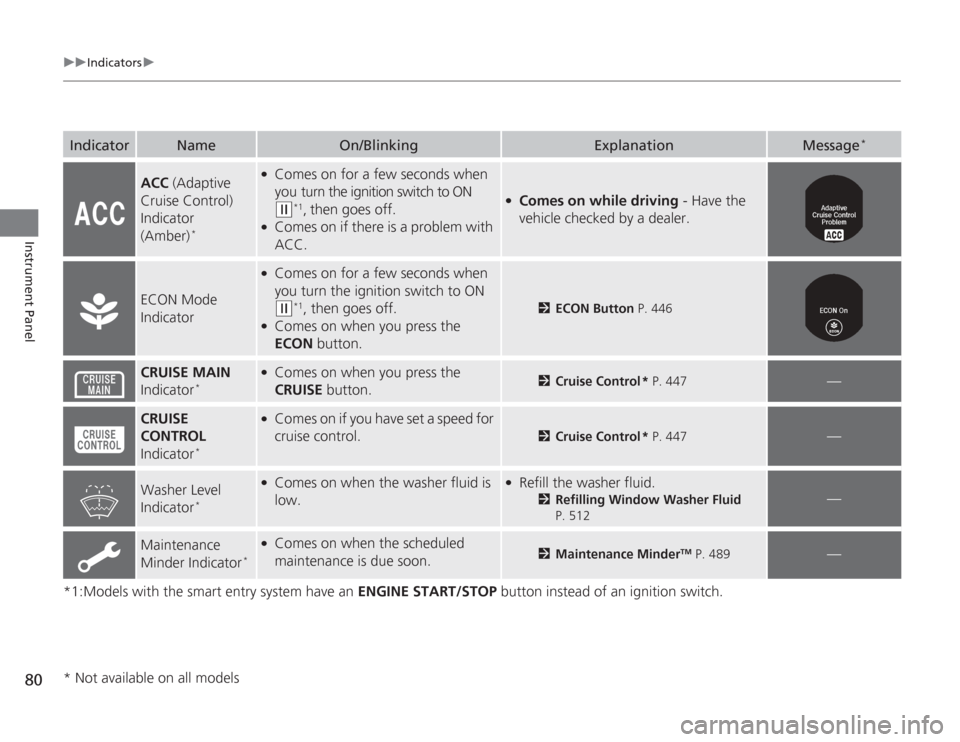
ACC (Adaptive
Cruise Control)
Indicator
(Amber)
*
●
Comes on for a few seconds when
you turn the ignition switch to ON (w
*1, then goes off.
●
Comes on if there is a problem with
ACC.
●
Comes on while driving - Have the
vehicle checked by a dealer.
ECON Mode
Indicator
●
Comes on for a few seconds when
you turn the ignition switch to ON (w
*1, then goes off.
●
Comes on when you press the
ECON button.
2ECON Button P. 446
CRUISE MAIN
Indicator
*
●
Comes on when you press the
CRUISE button.
2Cruise Control * P. 447
—
CRUISE
CONTROL
Indicator
*
●
Comes on if you have set a speed for
cruise control.
2 Cruise Control * P. 447
—
Washer Level
Indicator
*
●
Comes on when the washer fluid is
low.
●
Refill the washer fluid.
2Refilling Window Washer Fluid
P. 512
—
Maintenance
Minder Indicator
*
●
Comes on when the scheduled
maintenance is due soon.
2 Maintenance Minder
TM P. 489
—
* Not available on all models
Page 82 of 595
81
uuIndicators u
Instrument Panel
*1:Models with the smart entry system have an ENGINE START/STOP button instead of an ignition switch.Indicator
Name
On/Blinking
Explanation
Message
*
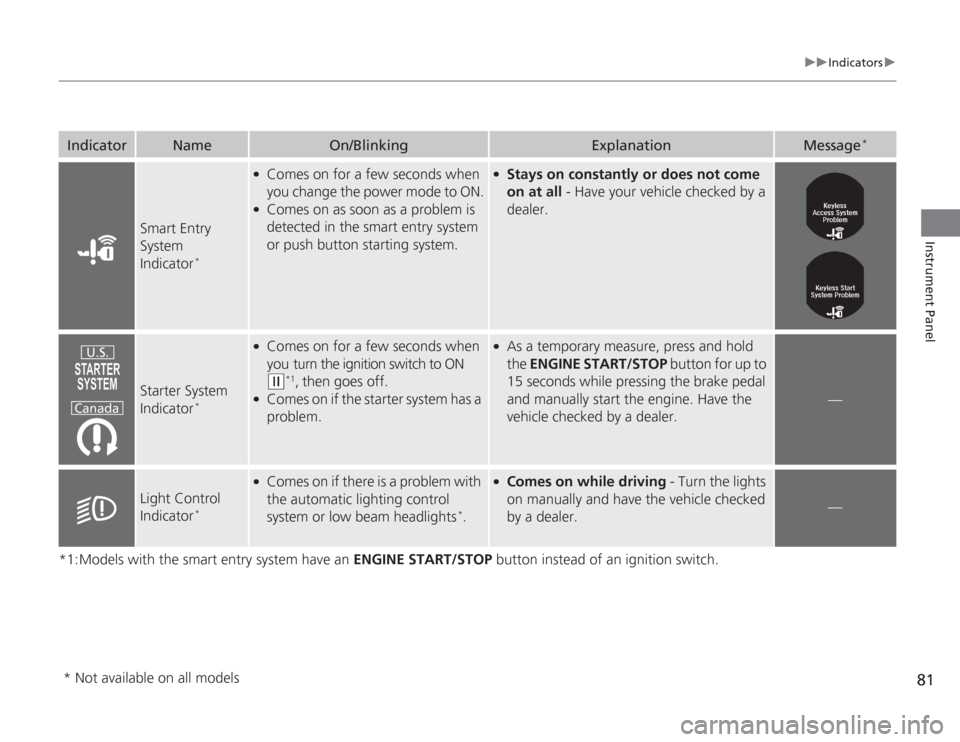
Smart Entry
System
Indicator
*
●
Comes on for a few seconds when
you change the power mode to ON.
●
Comes on as soon as a problem is
detected in the smart entry system
or push button starting system.
●
Stays on constantly or does not come
on at all - Have your vehicle checked by a
dealer.
Starter System
Indicator
*
●
Comes on for a few seconds when
you turn the ignition switch to ON (w
*1, then goes off.
●
Comes on if the starter system has a
problem.
●
As a temporary measure, press and hold
the ENGINE START/STOP button for up to
15 seconds while pressing the brake pedal
and manually start the engine. Have the
vehicle checked by a dealer.
—
Light Control
Indicator
*
●
Comes on if there is a problem with
the automatic lighting control
system or low beam headlights
*.
●
Comes on while driving - Turn the lights
on manually and have the vehicle checked
by a dealer.
—
U.S.
Canada
* Not available on all models
Page 84 of 595
83
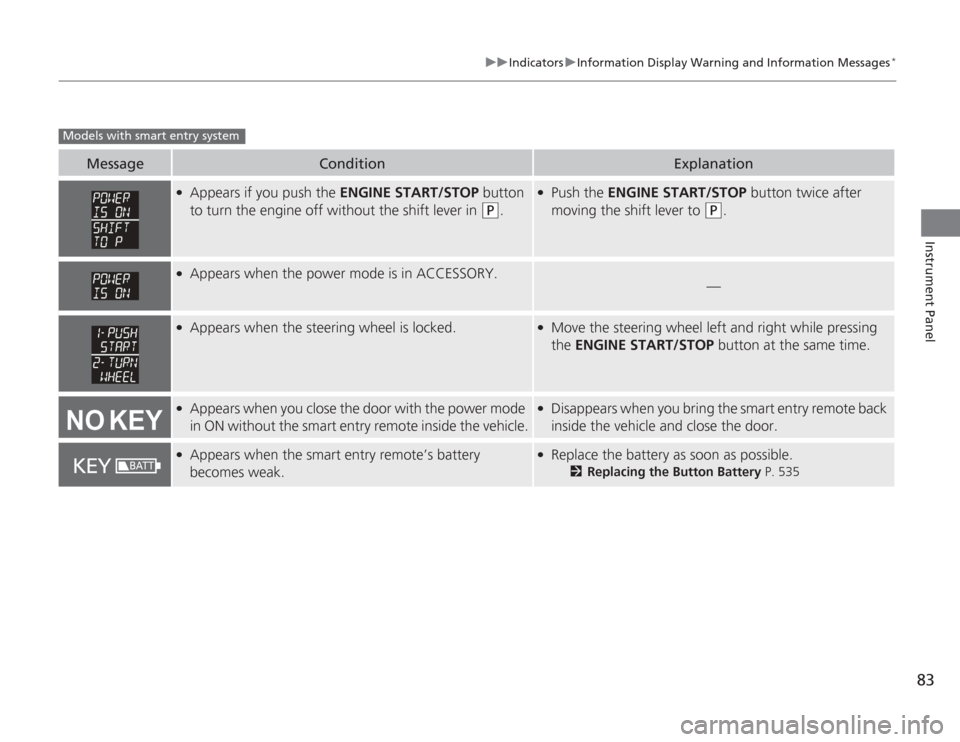
uuIndicators uInformation Display Warning and Information Messages
*
Instrument Panel
Message
Condition
Explanation
●
Appears if you push the ENGINE START/STOP button
to turn the engine off without the shift lever in
(P
.
●
Push the ENGINE START/STOP button twice after
moving the shift lever to
(P
.
●
Appears when the power mode is in ACCESSORY.
—
●
Appears when the steering wheel is locked.
●
Move the steering wheel left and right while pressing
the ENGINE START/STOP button at the same time.
●
Appears when you close the door with the power mode
in ON without the smart entry remote inside the vehicle.
●
Disappears when you bring the smart entry remote back
inside the vehicle and close the door.
●
Appears when the smart entry remote’s battery
becomes weak.
●
Replace the battery as soon as possible.
2Replacing the Button Battery P. 535
Models with smart entry system
Page 87 of 595
86
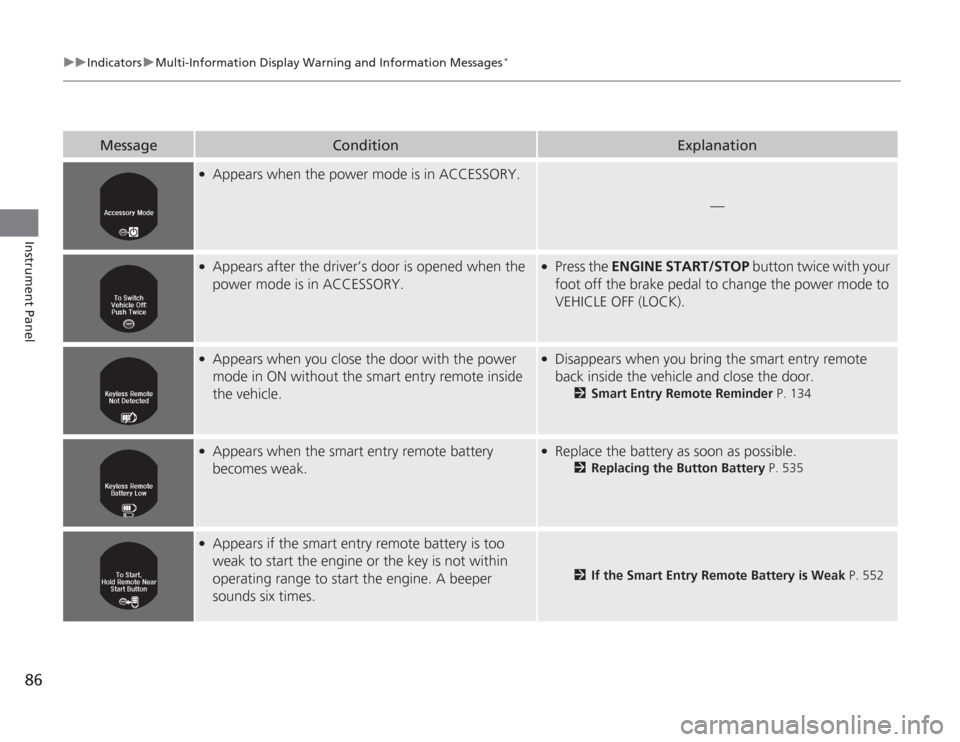
uuIndicators uMulti-Information Display Warn ing and Information Messages
*
Instrument Panel
Message
Condition
Explanation
●
Appears when the power mode is in ACCESSORY.
—
●
Appears after the driver’s door is opened when the
power mode is in ACCESSORY.
●
Press the ENGINE START/STOP button twice with your
foot off the brake pedal to change the power mode to
VEHICLE OFF (LOCK).
●
Appears when you close the door with the power
mode in ON without the smart entry remote inside
the vehicle.
●
Disappears when you bring the smart entry remote
back inside the vehicle and close the door.
2 Smart Entry Remote Reminder P. 134
●
Appears when the smart entry remote battery
becomes weak.
●
Replace the battery as soon as possible.
2Replacing the Button Battery P. 535
●
Appears if the smart entry remote battery is too
weak to start the engine or the key is not within
operating range to start the engine. A beeper
sounds six times.
2If the Smart Entry Remote Battery is Weak P. 552
Page 88 of 595
87
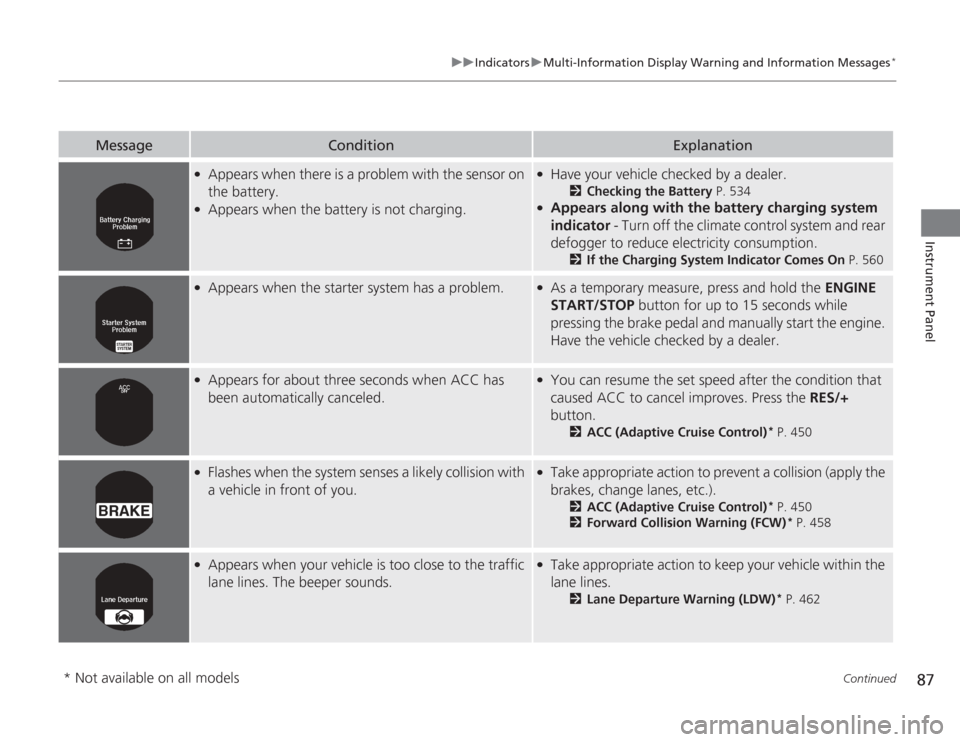
uuIndicators uMulti-Information Display Wa rning and Information Messages
*
Continued
Instrument Panel
Message
Condition
Explanation
●
Appears when there is a problem with the sensor on
the battery.
●
Appears when the battery is not charging.
●
Have your vehicle checked by a dealer.
2Checking the Battery P. 534
●
Appears along with the battery charging system
indicator - Turn off the climate control system and rear
defogger to reduce electricity consumption.
2 If the Charging System Indicator Comes On P. 560
●
Appears when the starter system has a problem.
●
As a temporary measure, press and hold the ENGINE
START/STOP button for up to 15 seconds while
pressing the brake pedal and manually start the engine.
Have the vehicle checked by a dealer.
●
Appears for about three seconds when ACC has
been automatically canceled.
●
You can resume the set speed after the condition that
caused ACC to cancel improves. Press the RES/+
button.
2 ACC (Adaptive Cruise Control)
* P. 450
●
Flashes when the system senses a likely collision with
a vehicle in front of you.
●
Take appropriate action to prevent a collision (apply the
brakes, change lanes, etc.).
2ACC (Adaptive Cruise Control)
* P. 450
2 Forward Collision Warning (FCW)
* P. 458
●
Appears when your vehicle is too close to the traffic
lane lines. The beeper sounds.
●
Take appropriate action to keep your vehicle within the
lane lines.
2Lane Departure Warning (LDW)
* P. 462
* Not available on all models
Page 91 of 595
90
uuGauges and Displays uInformation Display
*
Instrument Panel
Information Display
*
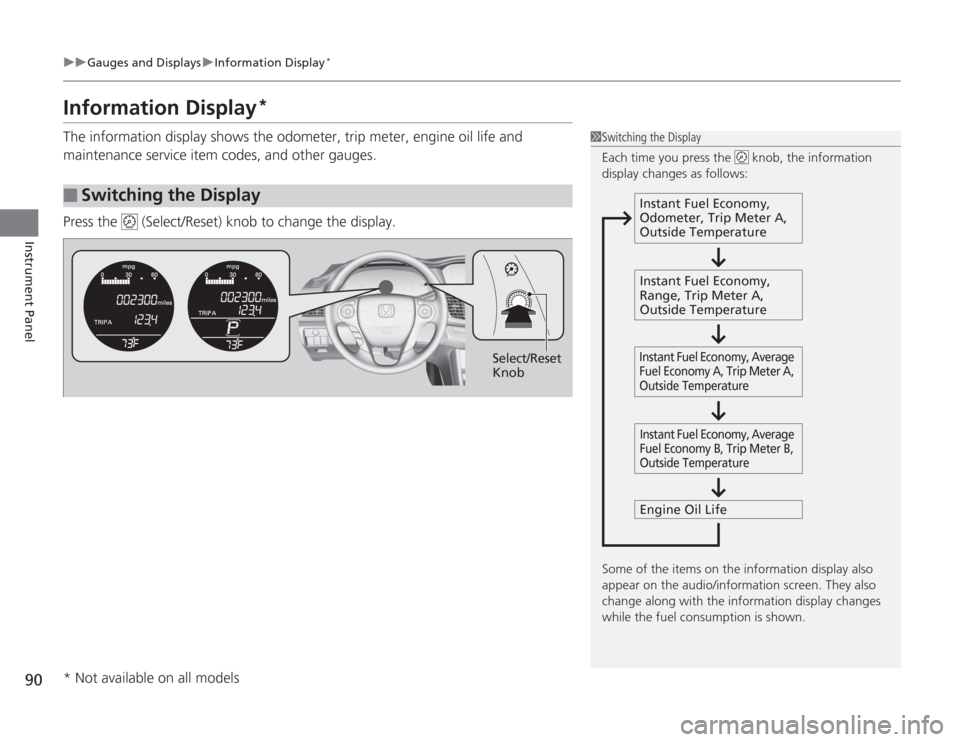
The information display shows the odometer, trip meter, engine oil life and
maintenance service item codes, and other gauges.
Press the (Select/Reset) knob to change the display.■
Switching the Display
1Switching the Display
Each time you press the knob, the information
display changes as follows:
Some of the items on the information display also
appear on the audio/information screen. They also
change along with the information display changes
while the fuel consumption is shown.
Instant Fuel Economy,
Odometer, Trip Meter A,
Outside Temperature
Instant Fuel Economy,
Range, Trip Meter A,
Outside Temperature
Engine Oil LifeInstant Fuel Economy, Average
Fuel Economy A, Trip Meter A,
Outside Temperature Instant Fuel Economy, Average
Fuel Economy B, Trip Meter B,
Outside Temperature
Select/Reset
Knob
* Not available on all models
Page 93 of 595
uuGauges and Displays uInformation Display
*
92Instrument Panel
Shows the outside temperature in Fahrenheit (U.S.) or Celsius (Canada).■
Adjusting the outside temperature indicator
Adjust the temperature reading up to ± 5°F or ± 3°C if the temperature reading
seems incorrect.
1. Turn the ignition switch to ON
(w
*1.
2. Press and hold the (Select/Reset) knob for 10 seconds or more while the
outside temperature is shown on the information display.
u The information display goes into temperature adjustment mode. The display
starts showing from -5°F to +5°F (U.S.) or -3°C to +3°C (Canada).
3. Release the knob when the righ t adjustment amount is shown.
u The adjustment is complete.
Shows the estimated distance you can travel on the remaining fuel. This distance is
estimated from the fuel economy of your previous trips.
*1: Models with the smart entry system have an ENGINE START/STOP button instead of an
ignition switch.■
Outside Temperature
*
■
Range
1 Outside Temperature
*
The temperature sensor is in the front bumper.
Road heat and exhaust from another vehicle can
affect the temperature reading when your vehicle
speed is less than 19 mph (30 km/h).
It may take several mi nutes for the display to be
updated after the temperature reading has stabilized.1 Adjusting the outside temperature indicator
Adjust the temp erature reading up to ± 5°F or ± 3°C.
* Not available on all models
Page 94 of 595
93
uuGauges and Displays uMulti-Information Display
*
Continued
Instrument Panel
Multi-Information Display
*
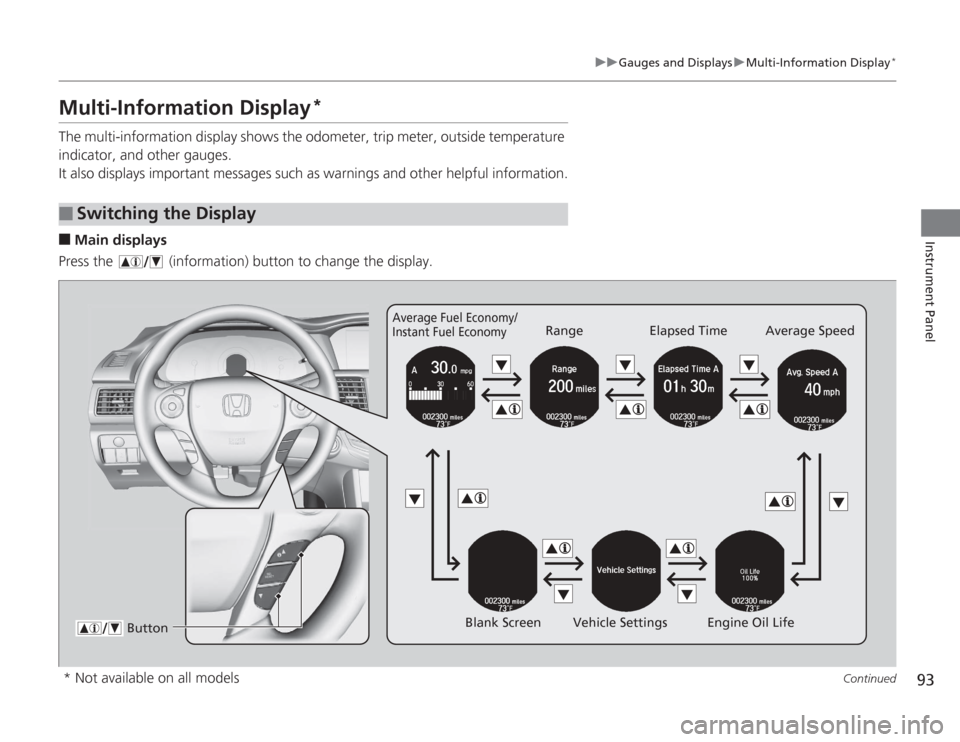
The multi-information display shows the odometer, trip meter, outside temperature
indicator, and other gauges.
It also displays important messages such as warnings and other helpful information.■
Main displays
Press the (information) button to change the display.
■
Switching the Display
Average Fuel Economy/
Instant Fuel Economy
Range Elapsed Time Average Speed
Blank Screen Vehicle Settings Engine Oil Life
Button
* Not available on all models