ECO mode HONDA ACCORD 2014 9.G Repair Manual
[x] Cancel search | Manufacturer: HONDA, Model Year: 2014, Model line: ACCORD, Model: HONDA ACCORD 2014 9.GPages: 595
Page 232 of 595
231
uuAudio System Basic Operation uPlaying a USB Flash Drive
Continued
Features
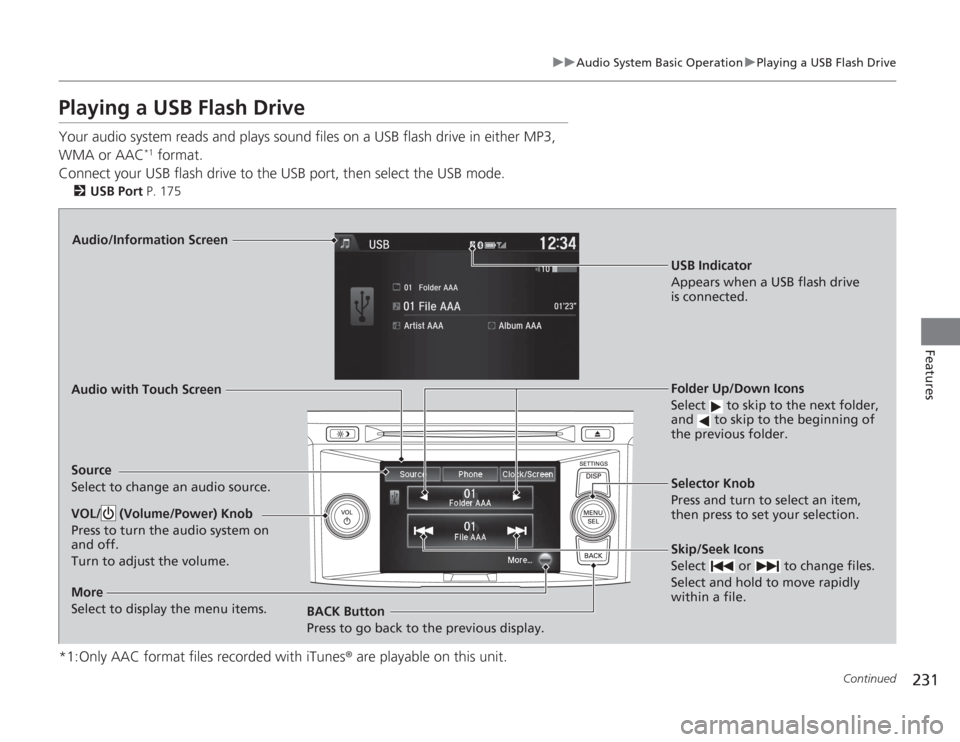
Playing a USB Flash DriveYour audio system reads and plays sound files on a USB flash drive in either MP3,
WMA or AAC
*1 format.
Connect your USB flash drive to the USB port, then select the USB mode.
2 USB Port P. 175
*1:Only AAC format files recorded with iTunes ® are playable on this unit.
Audio/Information Screen
Audio with Touch Screen
BACK Button
Press to go back to the previous display. Selector Knob
Press and turn to select an item,
then press to set your selection.VOL/ (Volume/Power) Knob
Press to turn the audio system on
and off.
Turn to adjust the volume.
Skip/Seek Icons
Select or to change files.
Select and hold to move rapidly
within a file.
More
Select to display the menu items.Source
Select to change an audio source.
USB Indicator
Appears when a USB flash drive
is connected.Folder Up/Down Icons
Select to skip to the next folder,
and to skip to the beginning of
the previous folder.
Page 234 of 595
233
uuAudio System Basic Operation uPlaying a USB Flash Drive
Features
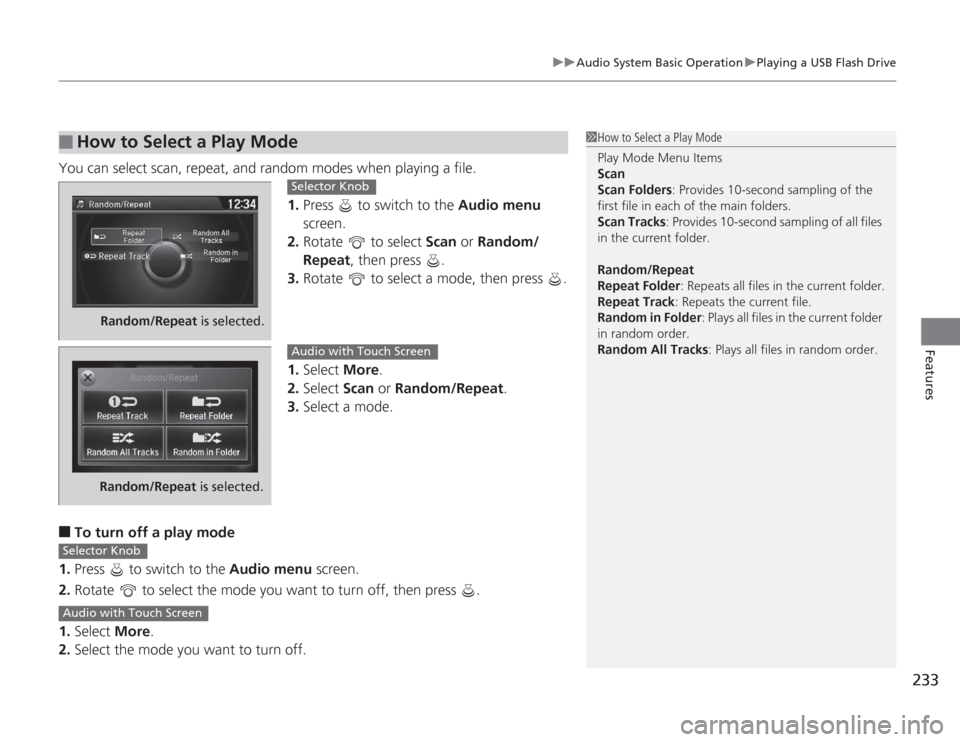
You can select scan, repeat, and random modes when playing a file.
1.Press to switch to the Audio menu
screen.
2. Rotate to select Scan or Random/
Repeat , then press .
3. Rotate to select a mode, then press .
1. Select More.
2. Select Scan or Random/Repeat .
3. Select a mode.■
To turn off a play mode
1. Press to switch to the Audio menu screen.
2. Rotate to select the mode you want to turn off, then press .
1. Select More.
2. Select the mode you want to turn off.
■
How to Select a Play Mode
1How to Select a Play Mode
Play Mode Menu Items
Scan
Scan Folders: Provides 10-second sampling of the
first file in each of the main folders.
Scan Tracks: Provides 10-second sampling of all files
in the current folder.
Random/Repeat
Repeat Folder : Repeats all files in the current folder.
Repeat Track: Repeats the current file.
Random in Folder : Plays all files in the current folder
in random order.
Random All Tracks : Plays all files in random order.
Random/Repeat is selected.
Selector Knob
Random/Repeat is selected.
Audio with Touch Screen
Selector KnobAudio with Touch Screen
Page 236 of 595
235
uuAudio System Basic Operation uPlaying Bluetooth ® Audio
Features
1. Make sure that your phone is paired and
connected to HFL.
2. Select the Bluetooth® Audio mode.
If the phone is not recognized, another HFL-
compatible phone, which is not compatible
for Bluetooth ® Audio, may already be
connected.
■
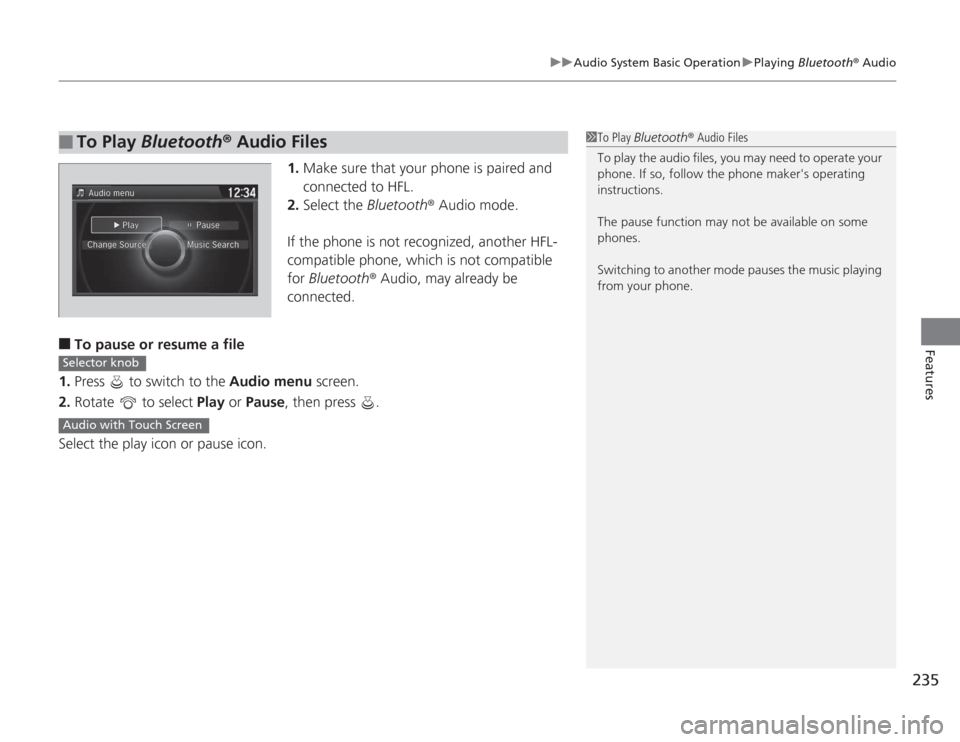
To pause or resume a file
1. Press to switch to the Audio menu screen.
2. Rotate to select Play or Pause , then press .
Select the play icon or pause icon.
■
To Play Bluetooth ® Audio Files
1 To Play Bluetooth ® Audio Files
To play the audio files, you may need to operate your
phone. If so, follow the phone maker's operating
instructions.
The pause function may not be available on some
phones.
Switching to another mode pauses the music playing
from your phone.
Selector knobAudio with Touch Screen
Page 237 of 595
236Features
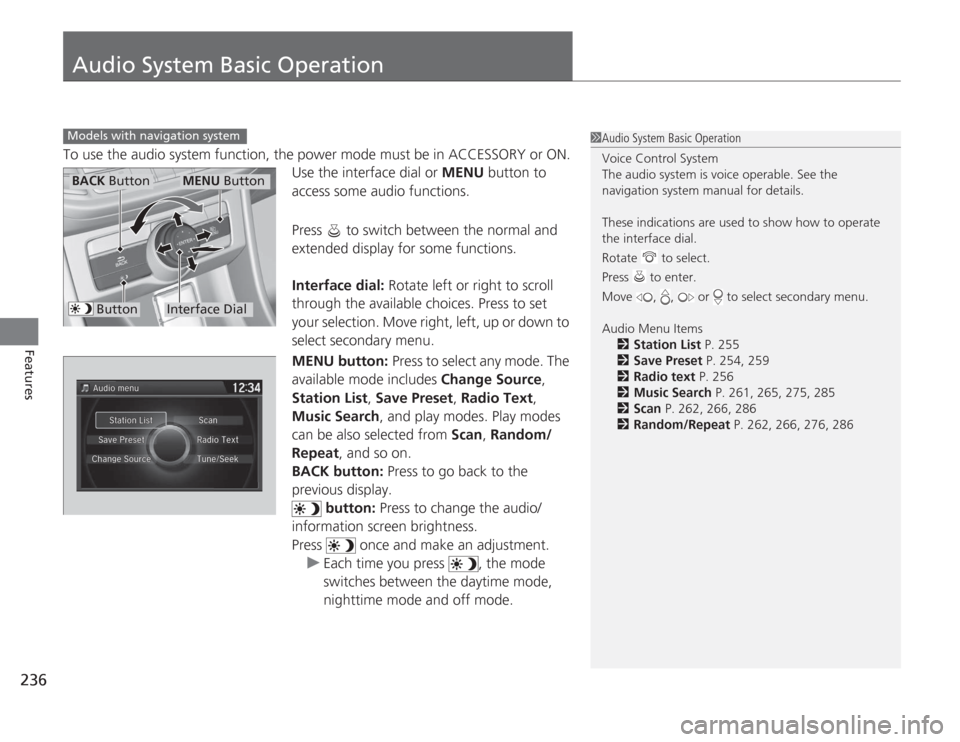
Audio System Basic OperationTo use the audio system function, the power mode must be in ACCESSORY or ON.Use the interface dial or MENU button to
access some audio functions.
Press to switch between the normal and
extended display for some functions.
Interface dial: Rotate left or right to scroll
through the available choices. Press to set
your selection. Move right, left, up or down to
select secondary menu.
MENU button: Press to select any mode. The
available mode includes Change Source,
Station List , Save Preset , Radio Text,
Music Search, and play modes. Play modes
can be also selected from Scan, Random/
Repeat , and so on.
BACK button: Press to go back to the
previous display. button: Press to change the audio/
information screen brightness.
Press once and make an adjustment.
u Each time you press , the mode
switches between the daytime mode,
nighttime mode and off mode.Models with navigation system
1Audio System Basic Operation
Voice Control System
The audio system is voice operable. See the
navigation system manual for details.
These indications are used to show how to operate
the interface dial.
Rotate to select.
Press to enter.
Move , , or to select secondary menu.
Audio Menu Items
2 Station List P. 255
2 Save Preset P. 254, 259
2 Radio text P. 256
2 Music Search P. 261, 265, 275, 285
2 Scan P. 262, 266, 286
2 Random/Repeat P. 262, 266, 276, 286
Interface Dial
MENU Button
BACK Button
Button
Page 258 of 595
257
uuAudio System Basic Operation uPlaying XM ® Radio
Continued
Features
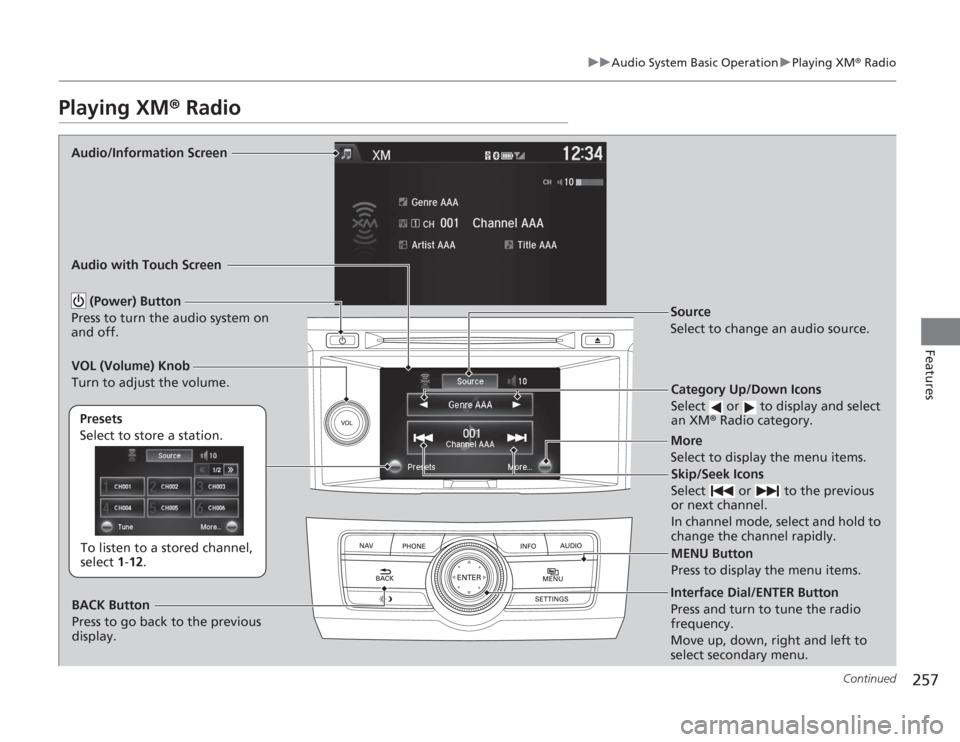
Playing XM ® Radio
Audio/Information Screen
Audio with Touch Screen
Category Up/Down Icons
Select or to display and select
an XM® Radio category.
MENU Button
Press to display the menu items.
(Power) Button
Press to turn the audio system on
and off.
Source
Select to change an audio source.
To listen to a stored channel,
select 1-12.
Presets
Select to store a station.
Skip/Seek Icons
Select or to the previous
or next channel.
In channel mode, select and hold to
change the channel rapidly.More
Select to display the menu items.
BACK Button
Press to go back to the previous
display.
VOL (Volume) Knob
Turn to adjust the volume.Interface Dial/ENTER Button
Press and turn to tune the radio
frequency.
Move up, down, right and left to
select secondary menu.
Page 261 of 595
260
uuAudio System Basic Operation uPlaying a CD
Features
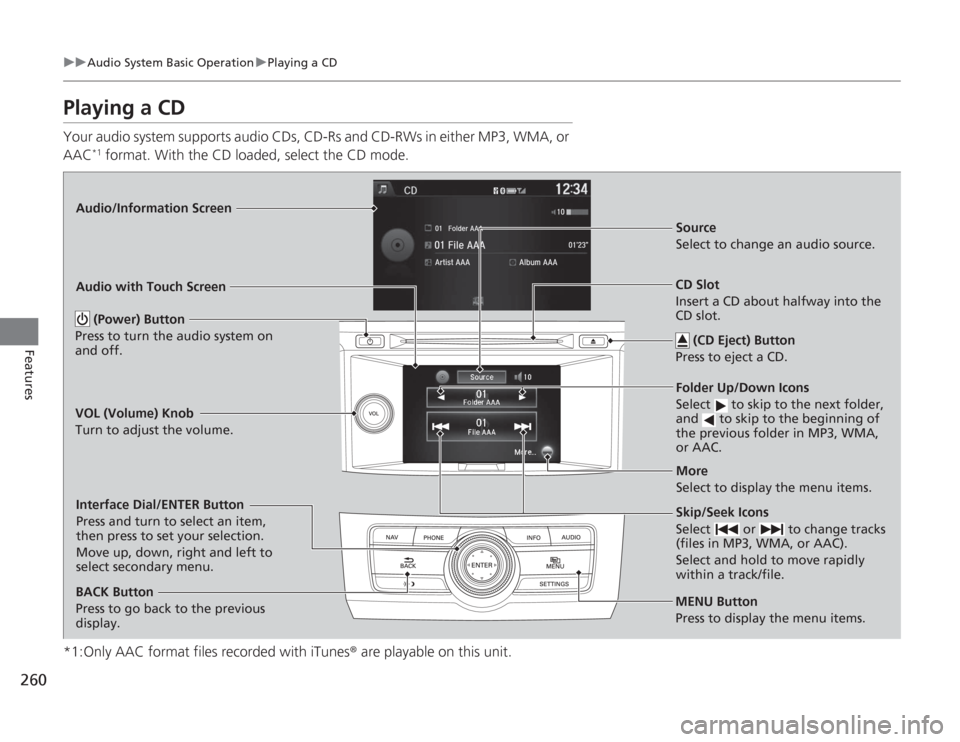
Playing a CDYour audio system supports audio CDs, CD-Rs and CD-RWs in either MP3, WMA, or
AAC
*1 format. With the CD loaded, select the CD mode.
*1:Only AAC format files recorded with iTunes ® are playable on this unit.
Audio/Information Screen
Audio with Touch Screen
MENU Button
Press to display the menu items.
CD Slot
Insert a CD about halfway into the
CD slot. (CD Eject) Button
Press to eject a CD.Folder Up/Down Icons
Select to skip to the next folder,
and to skip to the beginning of
the previous folder in MP3, WMA,
or AAC.Source
Select to change an audio source.
Skip/Seek Icons
Select or to change tracks
(files in MP3, WMA, or AAC).
Select and hold to move rapidly
within a track/file.More
Select to display the menu items.
(Power) Button
Press to turn the audio system on
and off.
BACK Button
Press to go back to the previous
display.
VOL (Volume) Knob
Turn to adjust the volume.Interface Dial/ENTER Button
Press and turn to select an item,
then press to set your selection.
Move up, down, right and left to
select secondary menu.
Page 262 of 595
Continued
261
uuAudio System Basic Operation uPlaying a CD
Features
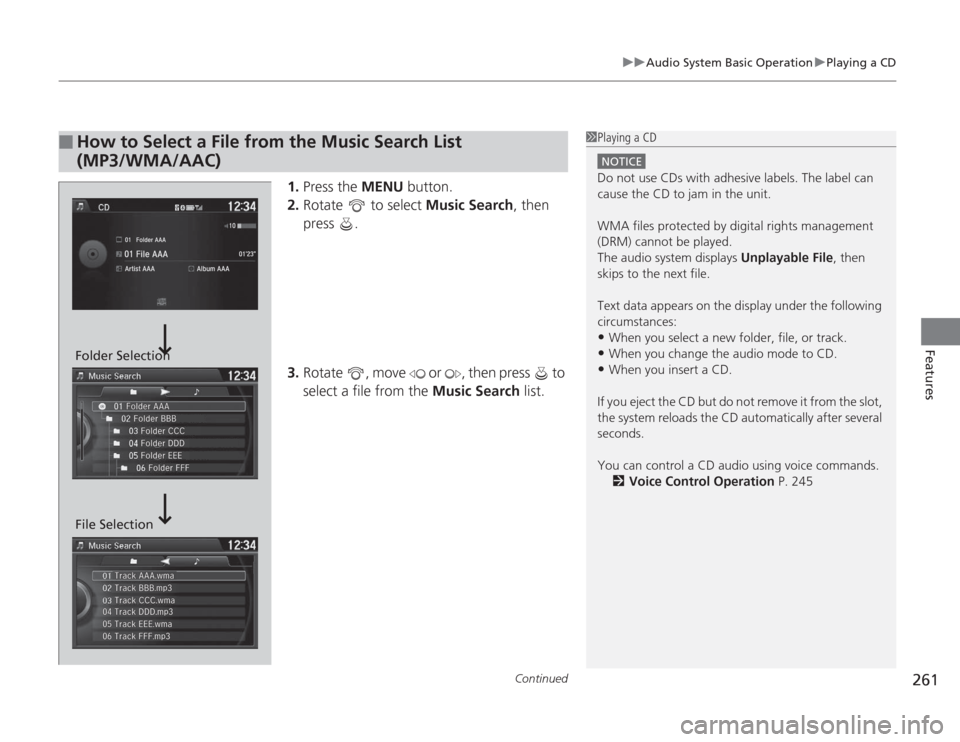
1. Press the MENU button.
2. Rotate to select Music Search, then
press .
3. Rotate , move or , then press to
select a file from the Music Search list.
■
How to Select a File from the Music Search List
(MP3/WMA/AAC)
1Playing a CD
NOTICEDo not use CDs with adhesive labels. The label can
cause the CD to jam in the unit.
WMA files protected by digital rights management
(DRM) cannot be played.
The audio system displays Unplayable File, then
skips to the next file.
Text data appears on the display under the following
circumstances:•When you select a new folder, file, or track.•When you change the audio mode to CD.•When you insert a CD.
If you eject the CD but do not remove it from the slot,
the system reloads the CD automatically after several
seconds.
You can control a CD audio using voice commands. 2 Voice Control Operation P. 245
Folder Selection
File Selection
Page 263 of 595
uuAudio System Basic Operation uPlaying a CD
262Features
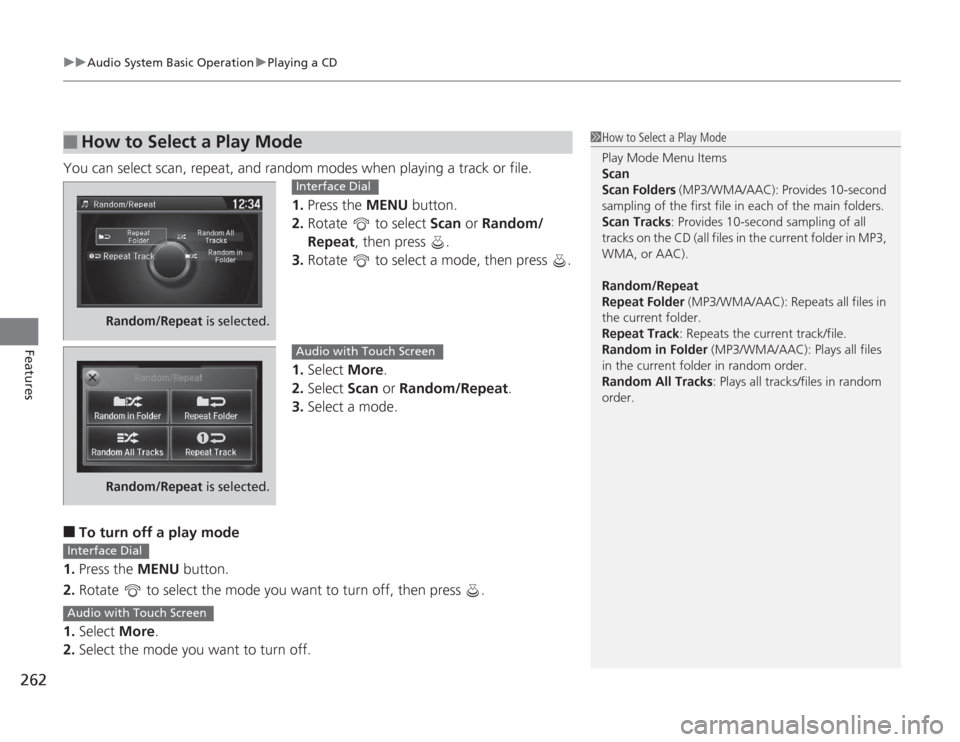
You can select scan, repeat, and random modes when playing a track or file.
1.Press the MENU button.
2. Rotate to select Scan or Random/
Repeat, then press .
3. Rotate to select a mode, then press .
1. Select More.
2. Select Scan or Random/Repeat .
3. Select a mode.■
To turn off a play mode
1. Press the MENU button.
2. Rotate to select the mode you want to turn off, then press .
1. Select More.
2. Select the mode you want to turn off.
■
How to Select a Play Mode
1How to Select a Play Mode
Play Mode Menu Items
Scan
Scan Folders (MP3/WMA/AAC): Provides 10-second
sampling of the first file in each of the main folders.
Scan Tracks: Provides 10-second sampling of all
tracks on the CD (all files in the current folder in MP3,
WMA, or AAC).
Random/Repeat
Repeat Folder (MP3/WMA/AAC): Repeats all files in
the current folder.
Repeat Track: Repeats the current track/file.
Random in Folder (MP3/WMA/AAC): Plays all files
in the current folder in random order.
Random All Tracks : Plays all tracks/files in random
order.
Random/Repeat is selected.
Interface Dial
Random/Repeat is selected.
Audio with Touch Screen
Interface DialAudio with Touch Screen
Page 267 of 595
uuAudio System Basic Operation uPlaying Hard Disc Drive (HDD) Audio
266Features
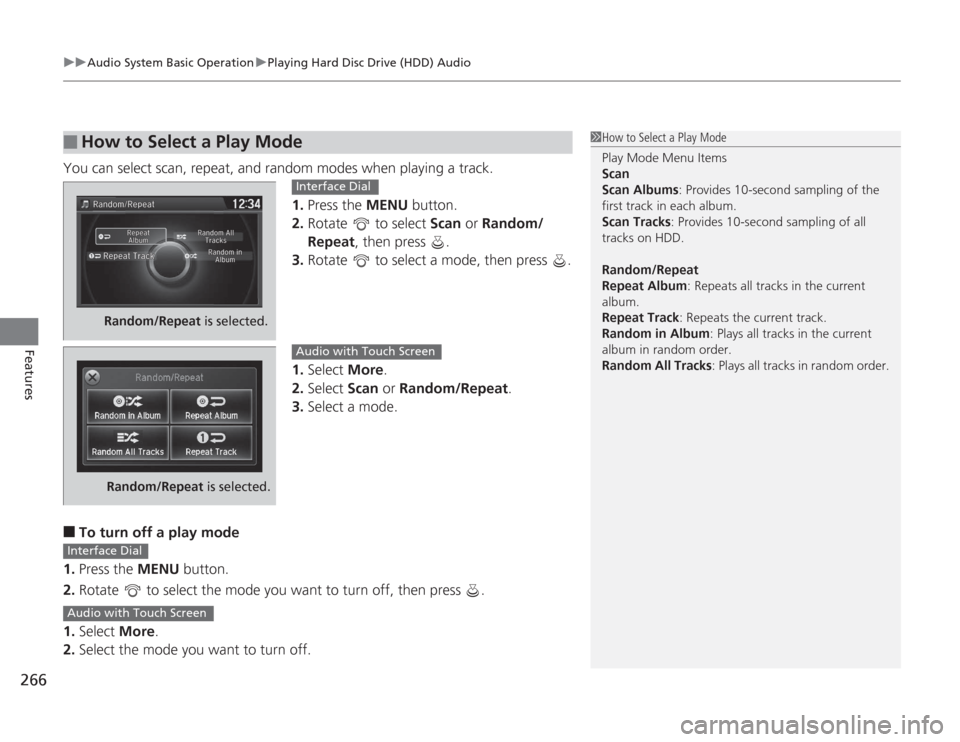
You can select scan, repeat, and random modes when playing a track.
1.Press the MENU button.
2. Rotate to select Scan or Random/
Repeat, then press .
3. Rotate to select a mode, then press .
1. Select More.
2. Select Scan or Random/Repeat .
3. Select a mode.■
To turn off a play mode
1. Press the MENU button.
2. Rotate to select the mode you want to turn off, then press .
1. Select More.
2. Select the mode you want to turn off.
■
How to Select a Play Mode
1How to Select a Play Mode
Play Mode Menu Items
Scan
Scan Albums : Provides 10-second sampling of the
first track in each album.
Scan Tracks: Provides 10-second sampling of all
tracks on HDD.
Random/Repeat
Repeat Album : Repeats all tracks in the current
album.
Repeat Track: Repeats the current track.
Random in Album : Plays all tracks in the current
album in random order.
Random All Tracks : Plays all tracks in random order.
Random/Repeat is selected.
Interface Dial
Random/Repeat is selected.
Audio with Touch Screen
Interface DialAudio with Touch Screen
Page 274 of 595
273
uuAudio System Basic Operation uPlaying an iPod ®
Continued
Features
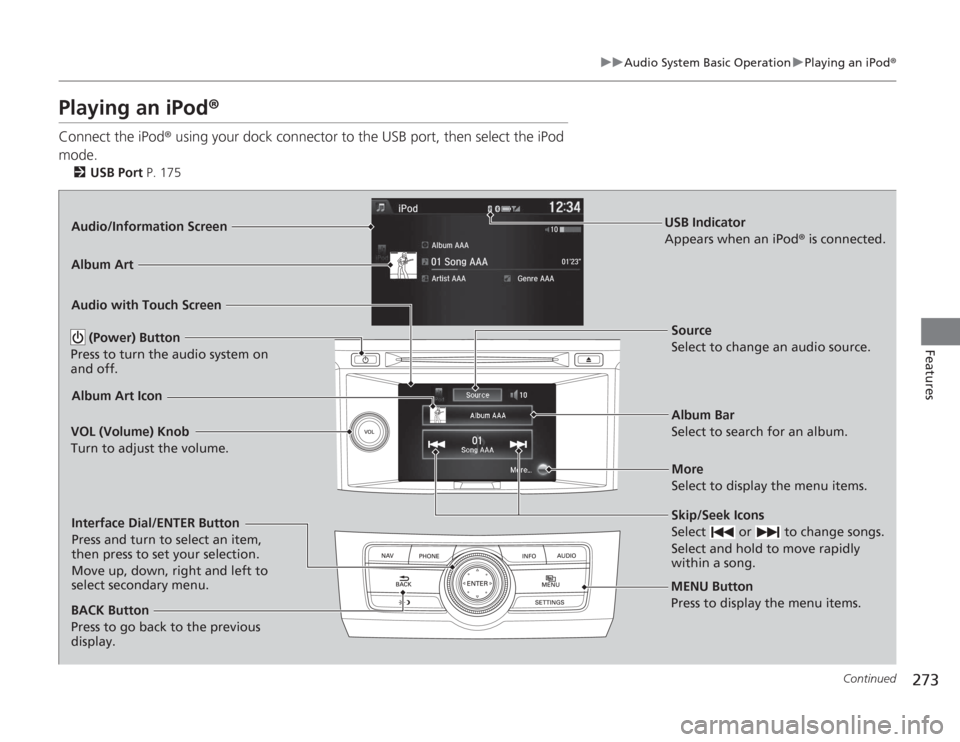
Playing an iPod ®Connect the iPod ® using your dock connector to the USB port, then select the iPod
mode.
2 USB Port P. 175Audio/Information Screen
Audio with Touch Screen
MENU Button
Press to display the menu items.
Album Bar
Select to search for an album. Source
Select to change an audio source.
Skip/Seek Icons
Select or to change songs.
Select and hold to move rapidly
within a song.More
Select to display the menu items.
(Power) Button
Press to turn the audio system on
and off.
BACK Button
Press to go back to the previous
display.
VOL (Volume) Knob
Turn to adjust the volume.Interface Dial/ENTER Button
Press and turn to select an item,
then press to set your selection.
Move up, down, right and left to
select secondary menu.
USB Indicator
Appears when an iPod
® is connected.
Album ArtAlbum Art Icon