Lash HONDA ACCORD 2014 9.G Service Manual
[x] Cancel search | Manufacturer: HONDA, Model Year: 2014, Model line: ACCORD, Model: HONDA ACCORD 2014 9.GPages: 595
Page 328 of 595
327
uuCustomized Features u
Continued
Features
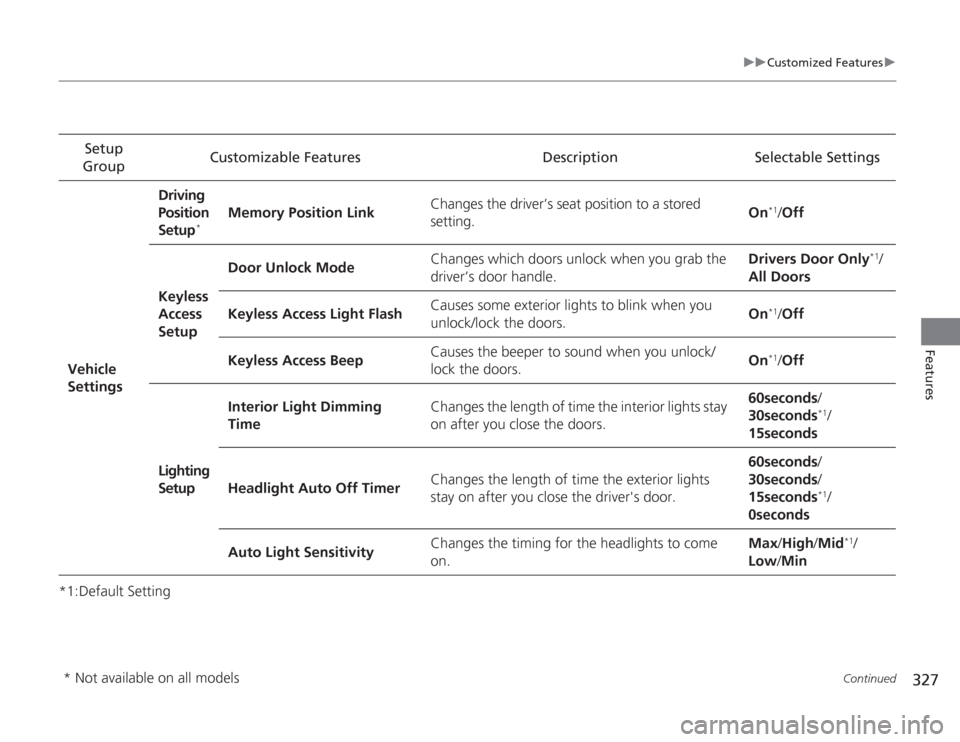
*1:Default SettingSetup
Group Customizable Features Description Selectable Settings
Vehicle
Settings Driving
Position
Setup
*
Memory Position Link
Changes the driver’s seat position to a stored
setting. On
*1/
Off
Keyless
Access
Setup Door Unlock Mode
Changes which doors unlock when you grab the
driver’s door handle. Drivers Door Only
*1/
All Doors
Keyless Access Light Flash Causes some exterior lights to blink when you
unlock/lock the doors. On
*1/
Off
Keyless Access Beep Causes the beeper to sound when you unlock/
lock the doors.
On*1/
Off
Lighting
Setup Interior Light Dimming
Time
Changes the length of time the interior lights stay
on after you close the doors. 60seconds
/
30seconds
*1/
15seconds
Headlight Auto Off Timer Changes the length of time the exterior lights
stay on after you close the driver's door. 60seconds
/
30seconds /
15seconds*1/
0seconds
Auto Light Sensitivity Changes the timing for the headlights to come
on. Max
/High /Mid
*1/
Low /Min
* Not available on all models
Page 329 of 595
328
uuCustomized Features u
Features
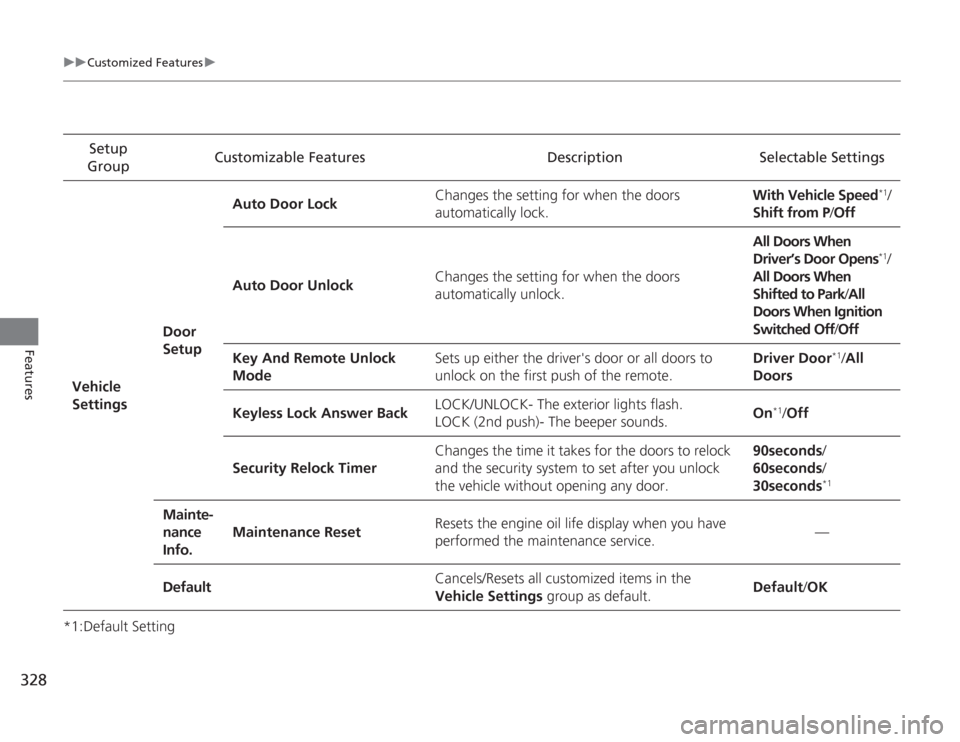
*1:Default SettingSetup
Group Customizable Features Description Selectable Settings
Vehicle
Settings Door
SetupAuto Door Lock
Changes the setting for when the doors
automatically lock. With Vehicle Speed
*1/
Shift from P/ Off
Auto Door Unlock Changes the setting for when the doors
automatically unlock. All Doors When
Driver’s Door Opens*1/
All Doors When
Shifted to Park /All
Doors When Ignition
Switched Off /Off
Key And Remote Unlock
Mode Sets up either the driver's door or all doors to
unlock on the first push of the remote. Driver Door
*1/
All
Doors
Keyless Lock Answer Back LOCK/UNLOCK- The exterior lights flash.
LOCK (2nd push)- The beeper sounds.
On
*1/
Off
Security Relock Timer Changes the time it takes for the doors to relock
and the security system to set after you unlock
the vehicle without opening any door. 90seconds/
60seconds/
30seconds
*1
Mainte-
nance
Info.
Maintenance Reset
Resets the engine oil life display when you have
performed the maintenance service. —
Default Cancels/Resets all customized items in the
Vehicle Settings
group as default. Default
/OK
Page 459 of 595
458
uuWhen Driving uForward Collision Warning (FCW)
*
Driving
Forward Collision Warning (FCW)
*
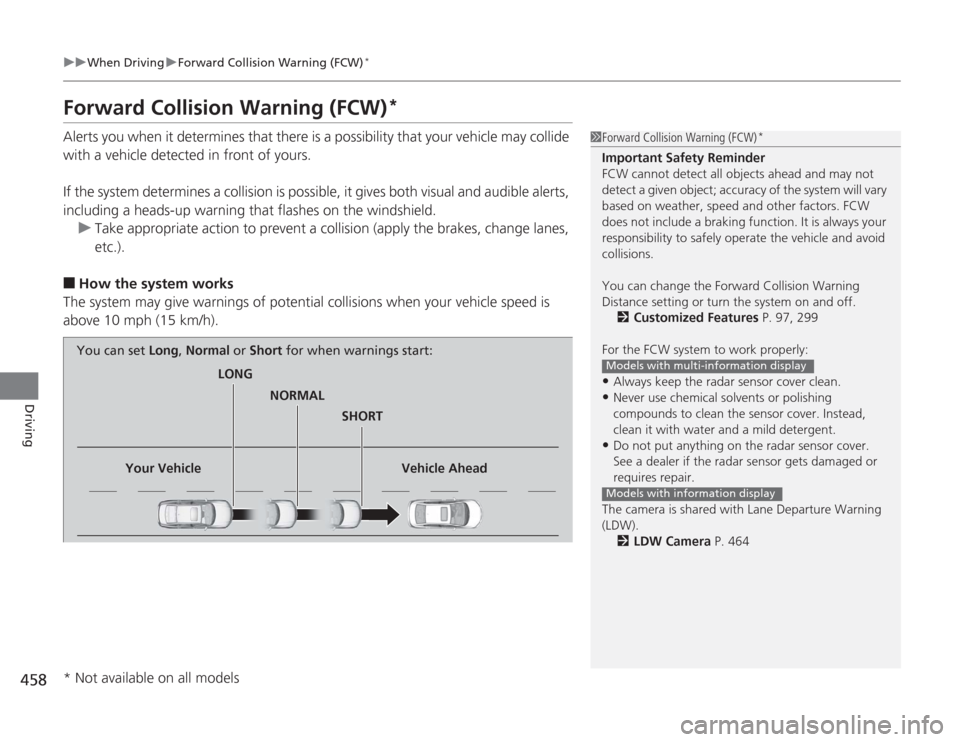
Alerts you when it determines that there is a possibility that your vehicle may collide
with a vehicle detected in front of yours.
If the system determines a collision is possible, it gives both visual and audible alerts,
including a heads-up warning that flashes on the windshield.
u Take appropriate action to prevent a collision (apply the brakes, change lanes,
etc.).■
How the system works
The system may give warnings of potential collisions when your vehicle speed is
above 10 mph (15 km/h).
1 Forward Collision Warning (FCW)
*
Important Safety Reminder
FCW cannot detect all objects ahead and may not
detect a given object; accuracy of the system will vary
based on weather, speed and other factors. FCW
does not include a braking function. It is always your
responsibility to safely operate the vehicle and avoid
collisions.
You can change the Forward Collision Warning
Distance setting or turn the system on and off.
2 Customized Features P. 97, 299
For the FCW system to work properly:•Always keep the radar sensor cover clean.•Never use chemical solvents or polishing
compounds to clean the sensor cover. Instead,
clean it with water and a mild detergent.•Do not put anything on the radar sensor cover.
See a dealer if the radar sensor gets damaged or
requires repair.
The camera is shared wi th Lane Departure Warning
(LDW).
2 LDW Camera P. 464Models with multi-information displayModels with information display
LONG
NORMAL SHORT
Your Vehicle Vehicle Ahead
You can set
Long, Normal or Short for when warnings start:
* Not available on all models
Page 460 of 595
Continued
459
uuWhen Driving uForward Collision Warning (FCW)
*
Driving
1Forward Collision Warning (FCW)
*
Never apply a film or attach any objects to the
windshield that could obstruct the FCW camera's
field of vision.
Scratches, nicks, and other damage to the windshield
within the FCW camera's field of vision can cause the
system to operate abnormally. If this occurs, we
recommend that you replace the windshield with a
genuine Honda replacement windshield. Making
even minor repairs within the camera's field of vision
or installing an aftermarket replacement windshield
may also cause the system to operate abnormally.
After replacing the windshield, have a dealer
recalibrate the camera. Proper calibration of the FCW
camera is necessary for the system to operate
properly.Models with information display
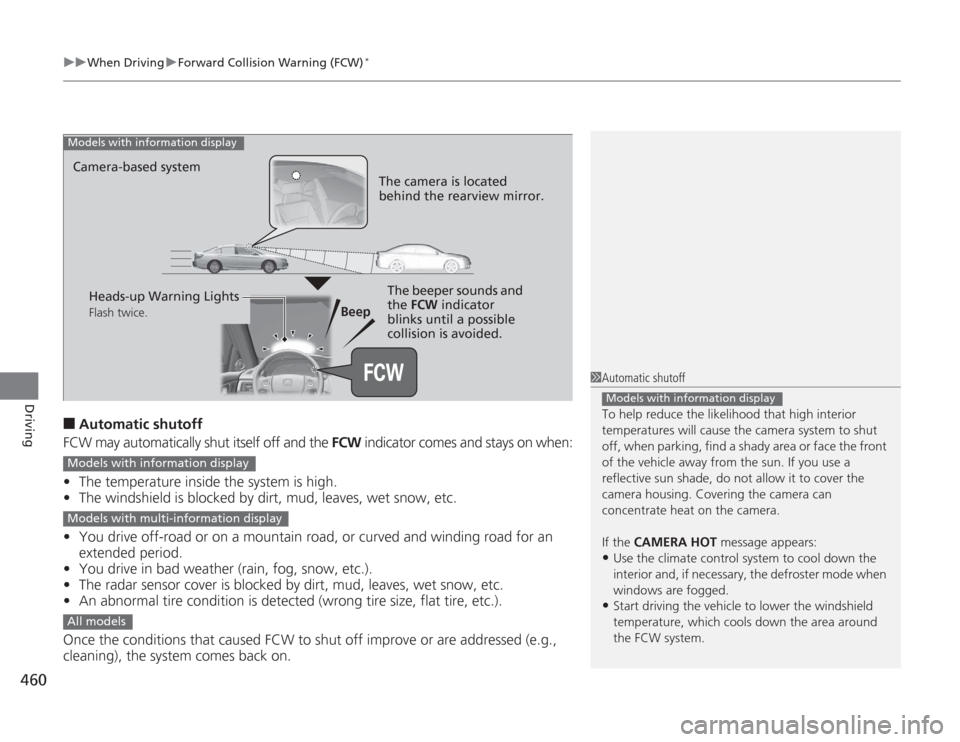
1 How the system works
The heads-up warning uses a lens located at the front
end of the dashboard.
Do not cover the lens or spill any liquid on it.
Lens
*2
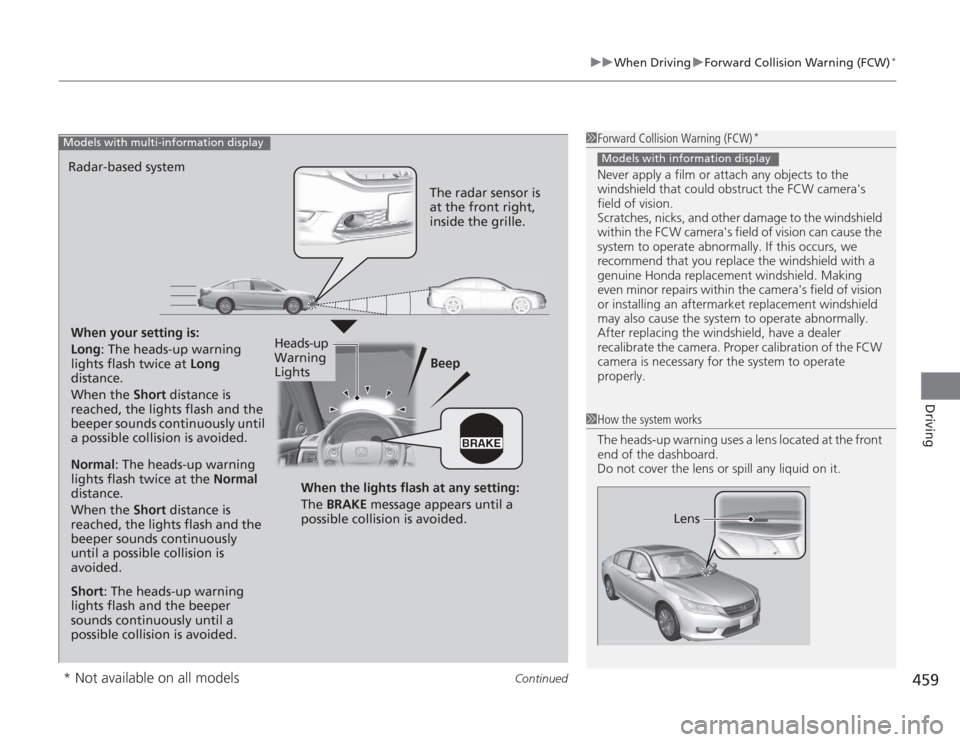
When your setting is:
Long : The heads-up warning
lights flash twice at Long
distance.
When the Short distance is
reached, the lights flash and the
beeper sounds continuously until
a possible collision is avoided. Beep
Radar-based systemModels with multi-information display
The radar sensor is
at the front right,
inside the grille.
Normal
: The heads-up warning
lights flash twice at the Normal
distance.
When the Short distance is
reached, the lights flash and the
beeper sounds continuously
until a possible collision is
avoided.
Short : The heads-up warning
lights flash and the beeper
sounds continuously until a
possible collision is avoided. When the lights flash at any setting:
The BRAKE
message appears until a
possible collision is avoided.
Heads-up
Warning
Lights
* Not available on all models
Page 461 of 595
uuWhen Driving uForward Collision Warning (FCW)
*
460Driving
■
Automatic shutoff
FCW may automatically shut itself off and the FCW indicator comes and stays on when:
• The temperature inside the system is high.
• The windshield is blocked by dirt, mud, leaves, wet snow, etc.
• You drive off-road or on a mountain road, or curved and winding road for an
extended period.
• You drive in bad weather (rain, fog, snow, etc.).
• The radar sensor cover is blocked by dirt, mud, leaves, wet snow, etc.
• An abnormal tire condition is detected (wrong tire size, flat tire, etc.).
Once the conditions that caused FCW to shut off improve or are addressed (e.g.,
cleaning), the system comes back on.
1 Automatic shutoff
To help reduce the likelihood that high interior
temperatures will cause the camera system to shut
off, when parking, find a shady area or face the front
of the vehicle away from the sun. If you use a
reflective sun shade, do not allow it to cover the
camera housing. Covering the camera can
concentrate heat on the camera.
If the CAMERA HOT message appears:•Use the climate control system to cool down the
interior and, if necessary, the defroster mode when
windows are fogged.•Start driving the vehicle to lower the windshield
temperature, which cools down the area around
the FCW system.Models with information display
Beep
Camera-based system
Models with information display
The camera is located
behind the rearview mirror.The beeper sounds and
the FCW
indicator
blinks until a possible
collision is avoided.
Heads-up Warning LightsFlash twice.
Models with information displayModels with multi-information displayAll models
Page 474 of 595
473
uuWhen Driving uTire Pressure Monitoring System (TPMS) - Required Federal Explanation
Driving
Please note that the TPMS is not a substitute for proper tire
maintenance, and it is the driver's responsibility to maintain
correct tire pressure, even if under-inflation has not reached the
level to trigger illumination of the TPMS low tire pressure telltale.
Your vehicle has also been equipped with a TPMS malfunction
indicator to indicate when the system is not operating properly.
The TPMS malfunction indicator is combined with the low tire
pressure telltale. When the system detects a malfunction, the
telltale will flash for approximately one minute and then remain
continuously illuminated. This sequen ce will continue upon
subsequent vehicle start-ups as long as the malfunction exists.
When the malfunction indicator is illuminated, the system may
not be able to detect or signal low tire pressure as intended.
TPMS malfunctions may occur for a variety of reasons, including
the installation of replacement or alterna te tires or wheels on the
vehicle that prevent the TPMS from functioning properly.
Always check the TPMS malfunction telltale after replacing one or
more tires or wheels on your vehicle to ensure that the
replacement or alternate tires and wheels allow the TPMS to
continue to function properly.
Page 539 of 595
538Maintenance
CleaningInterior CareUse a damp cloth with a mixture of mild detergent and warm water to remove dirt.
Use a clean cloth to remove detergent residue.
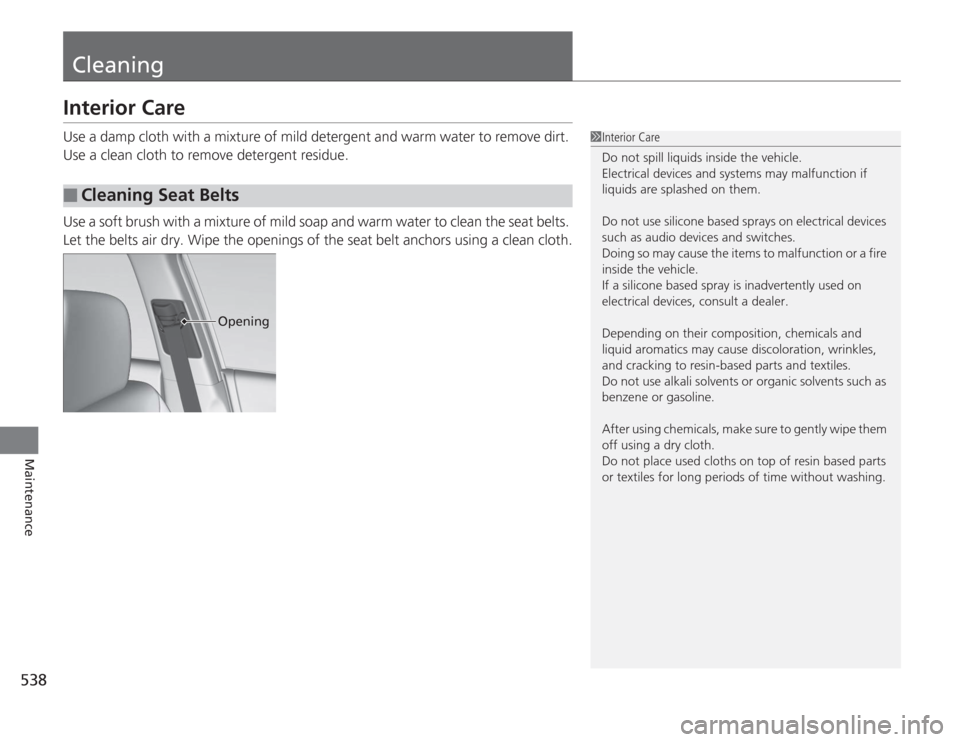
Use a soft brush with a mixture of mild soap and warm water to clean the seat belts.
Let the belts air dry. Wipe the openings of the seat belt anchors using a clean cloth.■
Cleaning Seat Belts
1Interior Care
Do not spill liquids inside the vehicle.
Electrical devices and systems may malfunction if
liquids are splashed on them.
Do not use silicone based sprays on electrical devices
such as audio devices and switches.
Doing so may cause the items to malfunction or a fire
inside the vehicle.
If a silicone based spray is inadvertently used on
electrical devices, consult a dealer.
Depending on their composition, chemicals and
liquid aromatics may cause discoloration, wrinkles,
and cracking to resin-based parts and textiles.
Do not use alkali solvents or organic solvents such as
benzene or gasoline.
After using chemicals, make sure to gently wipe them
off using a dry cloth.
Do not place used cloths on top of resin based parts
or textiles for long periods of time without washing.
Opening
Page 553 of 595
552
uuEngine Does Not Start uIf the Smart Entry Remote Battery is Weak
Handling the Unexpected
If the Smart Entry Remote Battery is WeakIf the beeper sounds, the indicator on the ENGINE START/STOP button flashes,
and the engine won’t start.
The To Start, Hold Remote Near Start Button message appears on the multi-
information display.
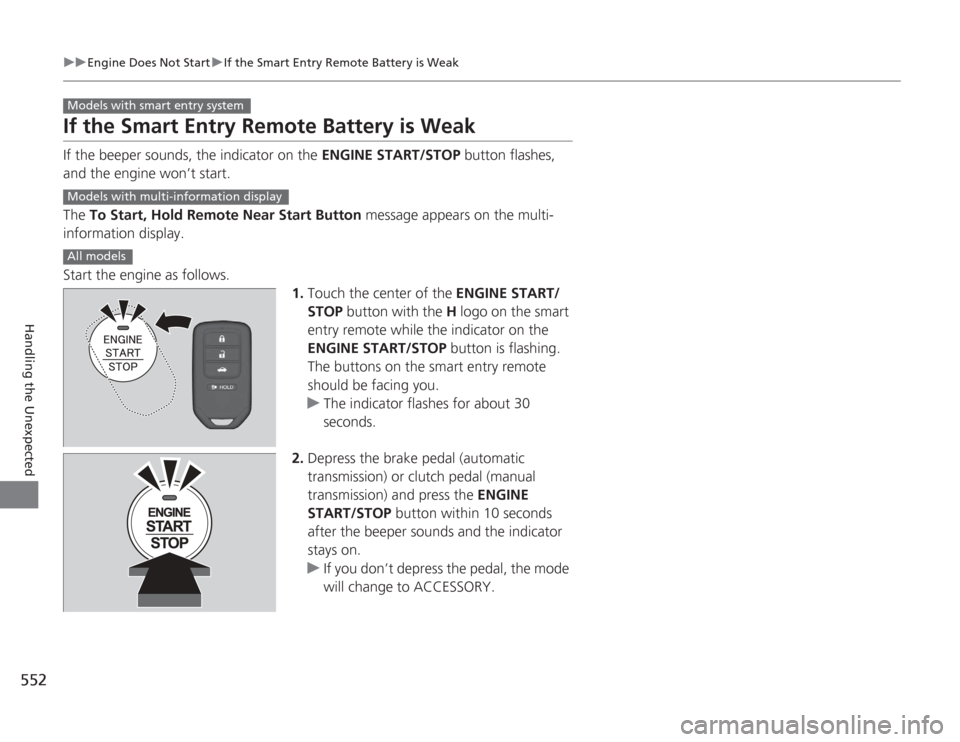
Start the engine as follows. 1.Touch the center of the ENGINE START/
STOP button with the H logo on the smart
entry remote while the indicator on the
ENGINE START/STOP button is flashing.
The buttons on the smart entry remote
should be facing you.
u The indicator flashes for about 30
seconds.
2. Depress the brake pedal (automatic
transmission) or clutch pedal (manual
transmission) and press the ENGINE
START/STOP button within 10 seconds
after the beeper sounds and the indicator
stays on.
u If you don’t depress the pedal, the mode
will change to ACCESSORY.Models with smart entry systemModels with multi-information displayAll models
Page 587 of 595
Index
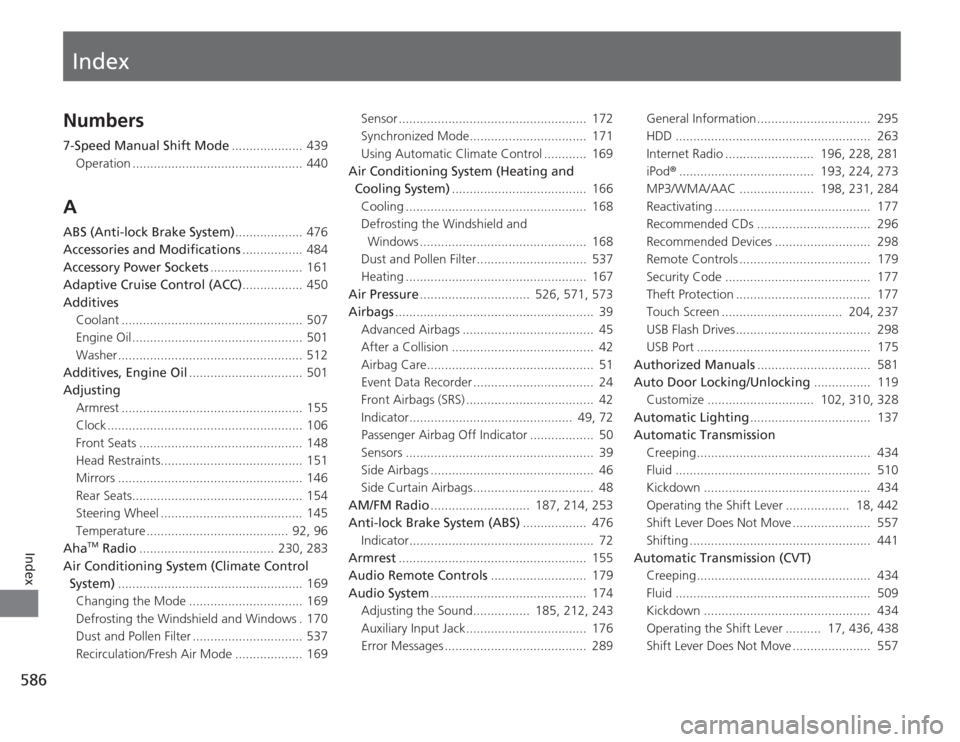
586Index
Index
Numbers7-Speed Manual Shift Mode.................... 439
Operation ................................................ 440AABS (Anti-lock Brake System) ................... 476
Accessories and Modifications ................. 484
Accessory Power Sockets .......................... 161
Adaptive Cruise Control (ACC) ................. 450
Additives Coolant ................................................... 507
Engine Oil ................................................ 501
Washer .................................................... 512
Additives, Engine Oil ................................ 501
Adjusting
Armrest ................................................... 155
Clock ....................................................... 106
Front Seats .............................................. 148
Head Restraints........................................ 151
Mirrors .................................................... 146
Rear Seats................................................ 154
Steering Wheel ........................................ 145
Temperature ........................................ 92, 96
Aha
TM Radio ...................................... 230, 283
Air Conditioning System (Climate Control System) .................................................... 169
Changing the Mode ................................ 169
Defrosting the Windshield and Windows . 170
Dust and Pollen Filter ............................... 537
Recirculation/Fresh Air Mode ................... 169 Sensor ..................................................... 172
Synchronized Mode................................. 171
Using Automatic Climate Control ............ 169
Air Conditioning System (Heating and Cooling System) ...................................... 166
Cooling ................................................... 168
Defrosting the Windshield and Windows ............................................... 168
Dust and Pollen Filter............................... 537
Heating ................................................... 167
Air Pressure ............................... 526, 571, 573
Airbags ........................................................ 39
Advanced Airbags ..................................... 45
After a Collision ........................................ 42
Airbag Care............................................... 51
Event Data Recorder .................................. 24
Front Airbags (SRS) .................................... 42
Indicator.............................................. 49, 72
Passenger Airbag Off Indicator .................. 50
Sensors ..................................................... 39
Side Airbags .............................................. 46
Side Curtain Airbags.................................. 48
AM/FM Radio ............................ 187, 214, 253
Anti-lock Brake System (ABS) .................. 476
Indicator.................................................... 72
Armrest ..................................................... 155
Audio Remote Controls ........................... 179
Audio System ............................................ 174
Adjusting the Sound................ 185, 212, 243
Auxiliary Input Jack.................................. 176
Error Messages ........................................ 289 General Information................................ 295
HDD ....................................................... 263
Internet Radio ......................... 196, 228, 281
iPod
®...................................... 193, 224, 273
MP3/WMA/AAC ..................... 198, 231, 284
Reactivating ............................................ 177
Recommended CDs ................................ 296
Recommended Devices ........................... 298
Remote Controls ..................................... 179
Security Code ......................................... 177
Theft Protection ...................................... 177
Touch Screen .................................. 204, 237
USB Flash Drives...................................... 298
USB Port ................................................. 175
Authorized Manuals ................................ 581
Auto Door Locking/Unlocking ................ 119
Customize .............................. 102, 310, 328
Automatic Lighting .................................. 137
Automatic Transmission
Creeping................................................. 434
Fluid ....................................................... 510
Kickdown ............................................... 434
Operating the Shift Lever .................. 18, 442
Shift Lever Does Not Move ...................... 557
Shifting ................................................... 441
Automatic Transmission (CVT) Creeping................................................. 434
Fluid ....................................................... 509
Kickdown ............................................... 434
Operating the Shift Lever .......... 17, 436, 438
Shift Lever Does Not Move ...................... 557
Page 594 of 595
593
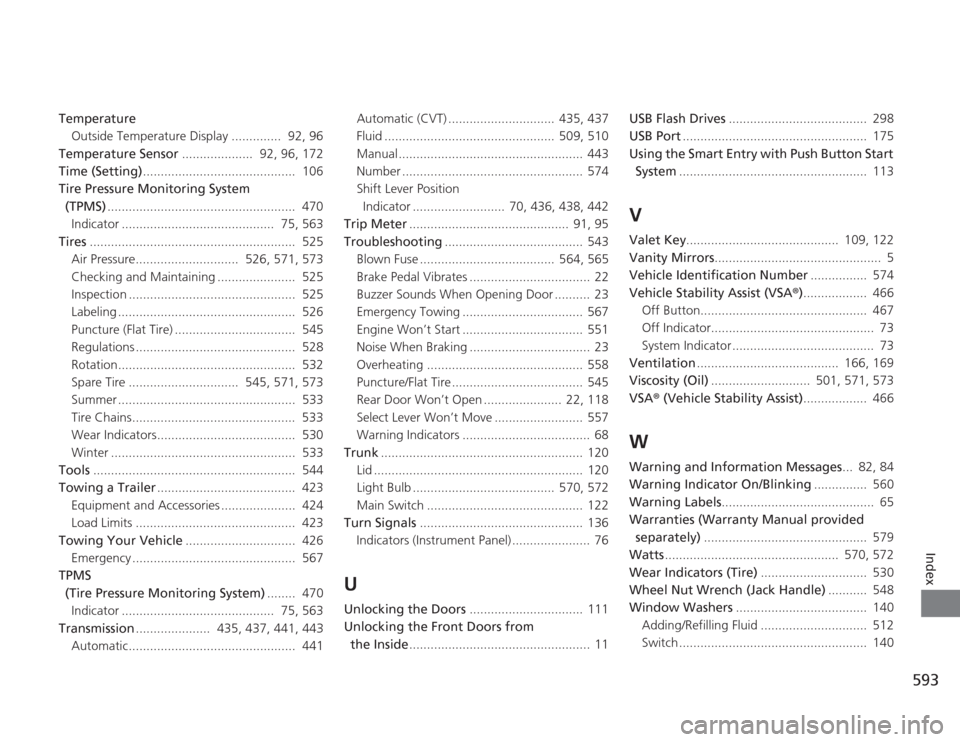
Index
TemperatureOutside Temperature Display .............. 92, 96
Temperature Sensor .................... 92, 96, 172
Time (Setting) ........................................... 106
Tire Pressure Monitoring System
(TPMS) ..................................................... 470
Indicator ........................................... 75, 563
Tires .......................................................... 525
Air Pressure............................. 526, 571, 573
Checking and Maintaining ...................... 525
Inspection ............................................... 525
Labeling .................................................. 526
Puncture (Flat Tire) .................................. 545
Regulations ............................................. 528
Rotation.................................................. 532
Spare Tire ............................... 545, 571, 573
Summer .................................................. 533
Tire Chains.............................................. 533
Wear Indicators....................................... 530
Winter .................................................... 533
Tools ......................................................... 544
Towing a Trailer ....................................... 423
Equipment and Accessories ..................... 424
Load Limits ............................................. 423
Towing Your Vehicle ............................... 426
Emergency .............................................. 567
TPMS (Tire Pressure Monitoring System) ........ 470
Indicator ........................................... 75, 563
Transmission ..................... 435, 437, 441, 443
Automatic............................................... 441 Automatic (CVT) .............................. 435, 437
Fluid ................................................ 509, 510
Manual .................................................... 443
Number ................................................... 574
Shift Lever Position
Indicator .......................... 70, 436, 438, 442
Trip Meter ............................................. 91, 95
Troubleshooting ....................................... 543
Blown Fuse ...................................... 564, 565
Brake Pedal Vibrates .................................. 22
Buzzer Sounds When Opening Door .......... 23
Emergency Towing .................................. 567
Engine Won’t Start .................................. 551
Noise When Braking .................................. 23
Overheating ............................................ 558
Puncture/Flat Tire ..................................... 545
Rear Door Won’t Open ...................... 22, 118
Select Lever Won’t Move ......................... 557
Warning Indicators .................................... 68
Trunk ......................................................... 120
Lid ........................................................... 120
Light Bulb ........................................ 570, 572
Main Switch ............................................ 122
Turn Signals .............................................. 136
Indicators (Instrument Panel) ...................... 76
UUnlocking the Doors ................................ 111
Unlocking the Front Doors from
the Inside ................................................... 11 USB Flash Drives
....................................... 298
USB Port .................................................... 175
Using the Smart Entry with Push Button Start System ..................................................... 113
VValet Key ........................................... 109, 122
Vanity Mirrors ............................................... 5
Vehicle Identification Number ................ 574
Vehicle Stability Assist (VSA ®).................. 466
Off Button............................................... 467
Off Indicator.............................................. 73
System Indicator ........................................ 73
Ventilation ........................................ 166, 169
Viscosity (Oil) ............................ 501, 571, 573
VSA ® (Vehicle Stability Assist) .................. 466WWarning and Information Messages ... 82, 84
Warning Indicator On/Blinking ............... 560
Warning Labels ........................................... 65
Warranties (Warranty Manual provided separately) .............................................. 579
Watts ................................................. 570, 572
Wear Indicators (Tire) .............................. 530
Wheel Nut Wrench (Jack Handle) ........... 548
Window Washers ..................................... 140
Adding/Refilling Fluid .............................. 512
Switch ..................................................... 140