can HONDA ACCORD 2017 9.G Owners Manual
[x] Cancel search | Manufacturer: HONDA, Model Year: 2017, Model line: ACCORD, Model: HONDA ACCORD 2017 9.GPages: 613
Page 444 of 613
443
uuWhen Driving uCruise Control*
Continued
Driving
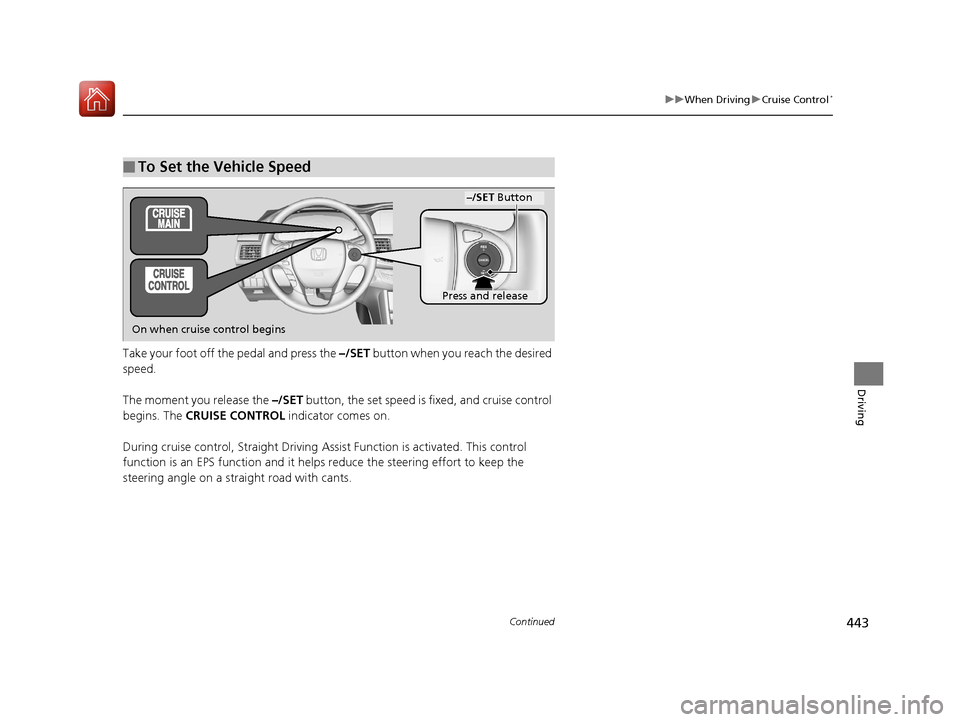
Take your foot off the pedal and press the –/SET button when you reach the desired
speed.
The moment you release the –/SET button, the set speed is fixed, and cruise control
begins. The CRUISE CONTROL indicator comes on.
During cruise control, Straight Driving Assist Function is activated. This control
function is an EPS function and it helps reduce the steering effort to keep the
steering angle on a straight road with cants.
■To Set the Vehicle Speed
–/SET Button
On when cruise control begins
Press and release
17 ACCORD 4D GAS-31T2A6400.book 443 ページ 2016年6月7日 火曜日 午後5時6分
Page 445 of 613
uuWhen Driving uCruise Control*
444
Driving
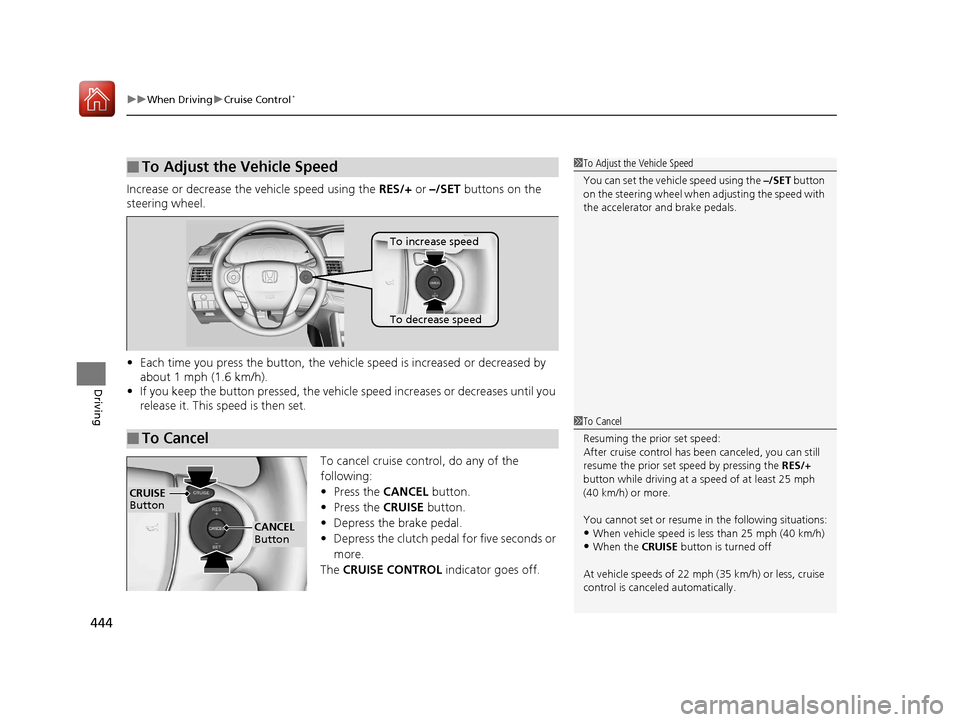
Increase or decrease the vehicle speed using the RES/+ or –/SET buttons on the
steering wheel.
• Each time you press the button, the vehicl e speed is increased or decreased by
about 1 mph (1.6 km/h).
• If you keep the button pressed, the vehicl e speed increases or decreases until you
release it. This speed is then set.
To cancel cruise control, do any of the
following:
• Press the CANCEL button.
• Press the CRUISE button.
• Depress the brake pedal.
• Depress the clutch pedal for five seconds or
more.
The CRUISE CONTROL indicator goes off.
■To Adjust the Vehicle Speed1To Adjust the Vehicle Speed
You can set the vehicle speed using the –/SET button
on the steering wheel when adjusting the speed with
the accelerator and brake pedals.
■To Cancel
To decrease speed
To increase speed
1 To Cancel
Resuming the prior set speed:
After cruise control has be en canceled, you can still
resume the prior set speed by pressing the RES/+
button while driving at a speed of at least 25 mph
(40 km/h) or more.
You cannot set or resume in the following situations:
•When vehicle speed is less than 25 mph (40 km/h)•When the CRUISE button is turned off
At vehicle speeds of 22 m ph (35 km/h) or less, cruise
control is canceled automatically.
CRUISE
Button
CANCEL
Button
17 ACCORD 4D GAS-31T2A6400.book 444 ページ 2016年6月7日 火曜日 午後5時6分
Page 446 of 613
445
uuWhen Driving uFront Sensor Camera*
Continued
Driving
Front Sensor Camera*
The camera, used in systems su ch as LKAS, RDM, ACC, and CMBSTM, is designed to
detect an object that triggers any of the systems to operate its functions.
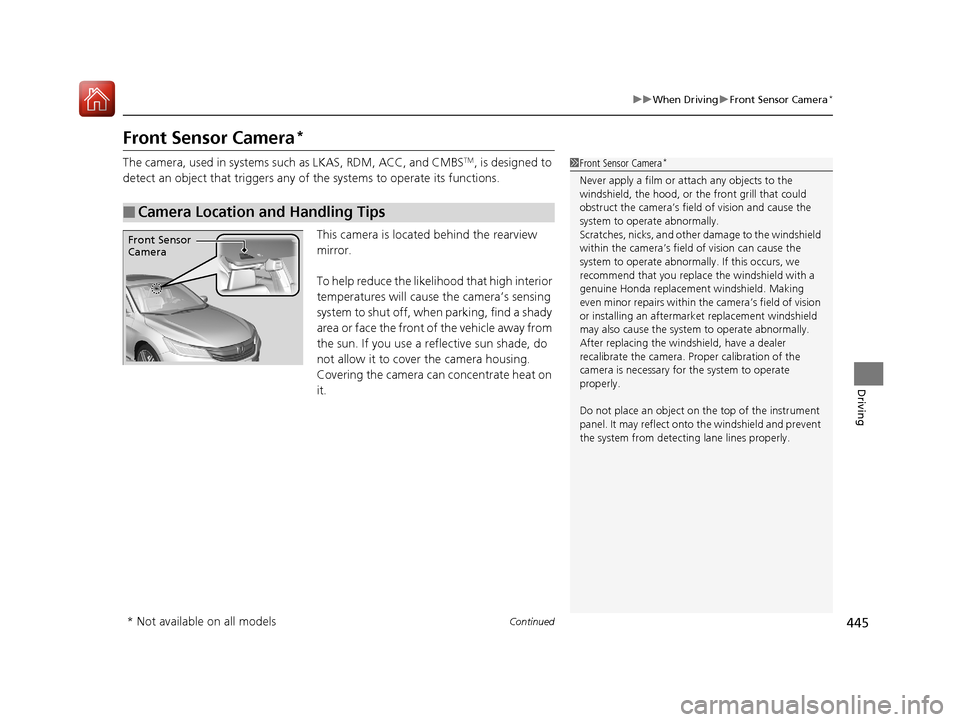
This camera is located behind the rearview
mirror.
To help reduce the likelihood that high interior
temperatures will cause the camera’s sensing
s y s t e m t o s h u t o f f , w h e n p a r k i n g , f i n d a s h a d y
area or face the front of the vehicle away from
the sun. If you use a reflective sun shade, do
not allow it to cover the camera housing.
Covering the camera can concentrate heat on
it.
■Camera Location and Handling Tips
1 Front Sensor Camera*
Never apply a film or attach any objects to the
windshield, the hood, or the front grill that could
obstruct the camera’s fiel d of vision and cause the
system to operate abnormally.
Scratches, nicks, and othe r damage to the windshield
within the camera’s fiel d of vision can cause the
system to operate abnormall y. If this occurs, we
recommend that you replac e the windshield with a
genuine Honda replacem ent windshield. Making
even minor repairs within th e camera’s field of vision
or installing an aftermarket replacement windshield
may also cause the system to operate abnormally.
After replacing the winds hield, have a dealer
recalibrate the camera. Pr oper calibration of the
camera is necessary for the system to operate
properly.
Do not place an object on the top of the instrument
panel. It may reflect onto the windshield and prevent
the system from detecting lane lines properly.
Front Sensor
Camera
* Not available on all models
17 ACCORD 4D GAS-31T2A6400.book 445 ページ 2016年6月7日 火曜日 午後5時6分
Page 447 of 613
uuWhen Driving uFront Sensor Camera*
446
Driving
1Front Sensor Camera*
If the Some Driver Assist Systems Cannot
Operate: Camera Temperature Too High message
appears:
•Use the climate control system to cool down the
interior and, if necessary, also use defroster mode
with the airflow directed towards the camera.
•Start driving the vehicle to lower the windshield
temperature, which cool s down the area around
the camera.
If the Some Driver Assist Systems Cannot
Operate: Clean Front Windshield message
appears:
•Park your vehicle in a sa fe place, and clean the
windshield. If the message does not disappear after
you have cleaned the winds hield and driven for a
while, have your vehicle checked by a dealer.
* Not available on all models
17 ACCORD 4D GAS-31T2A6400.book 446 ページ 2016年6月7日 火曜日 午後5時6分
Page 448 of 613
447
uuWhen Driving uAdaptive Cruise Control (ACC)*
Continued
Driving
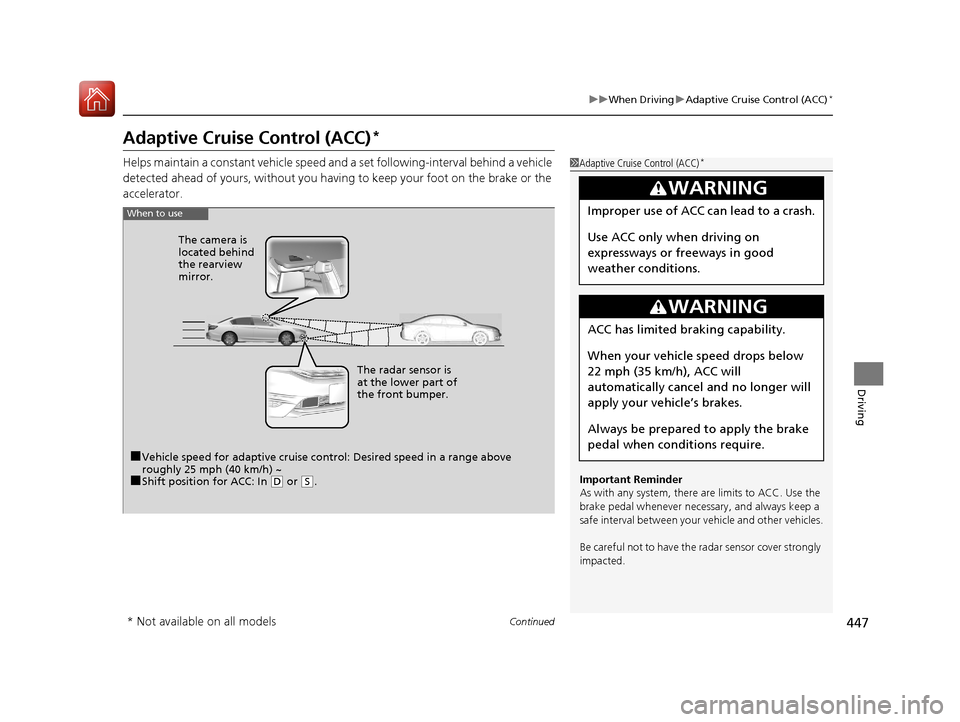
Adaptive Cruise Control (ACC)*
Helps maintain a constant vehicle speed an d a set following-interval behind a vehicle
detected ahead of yours, without you having to keep your foot on the brake or the
accelerator.1 Adaptive Cruise Control (ACC)*
Important Reminder
As with any system, there are limits to ACC. Use the
brake pedal whenever necessary, and always keep a
safe interval betw een your vehicle and other vehicles.
Be careful not to have the radar sensor cover strongly
impacted.
3WARNING
Improper use of ACC can lead to a crash.
Use ACC only when driving on
expressways or freeways in good
weather conditions.
3WARNING
ACC has limited braking capability.
When your vehicle speed drops below
22 mph (35 km/h), ACC will
automatically cancel and no longer will
apply your ve hicle’s brakes.
Always be prepared to apply the brake
pedal when conditions require.
When to use
■Vehicle speed for adaptive cruise c ontrol: Desired speed in a range above
roughly 25 mph (40 km/h) ~
■Shift position for ACC: In ( D or (S. The radar sensor is
at the lower part of
the front bumper.
The camera is
located behind
the rearview
mirror.
* Not available on all models
17 ACCORD 4D GAS-31T2A6400.book 447 ページ 2016年6月7日 火曜日 午後5時6分
Page 449 of 613
uuWhen Driving uAdaptive Cruise Control (ACC)*
448
Driving
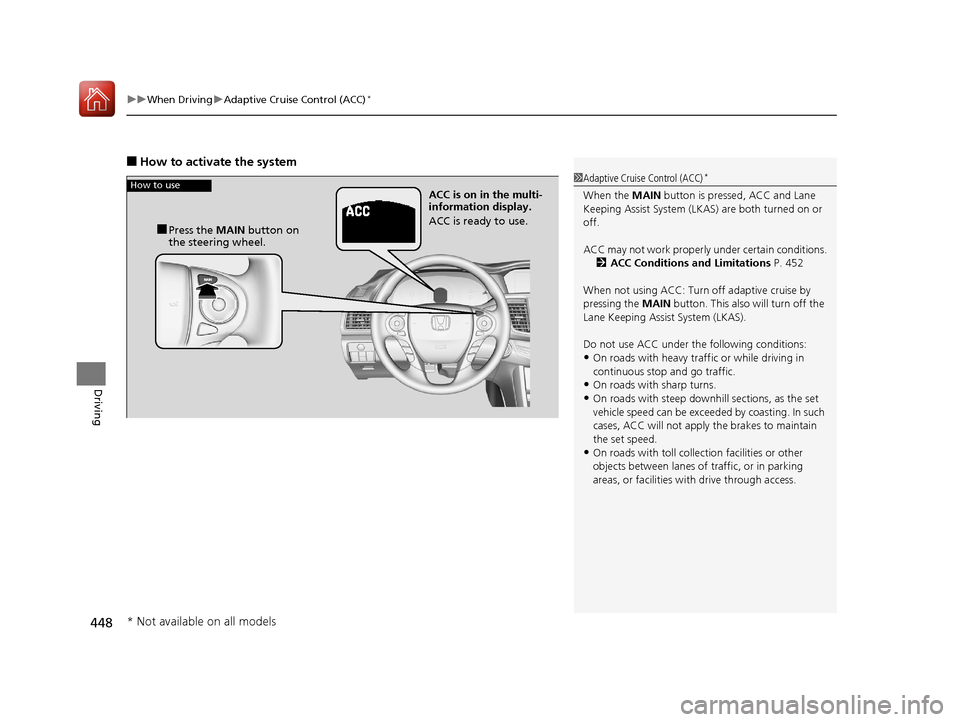
■How to activate the system
1Adaptive Cruise Control (ACC)*
When the MAIN button is pressed, ACC and Lane
Keeping Assist System (LKAS) are both turned on or
off.
ACC may not work properly under certai n conditions.
2 ACC Conditions and Limitations P. 452
When not using ACC: Turn off adaptive cruise by
pressing the MAIN button. This also will turn off the
Lane Keeping Assist System (LKAS).
Do not use ACC under the following conditions:
•On roads with heavy traf fic or while driving in
continuous stop and go traffic.
•On roads with sharp turns.•On roads with steep downhill sections, as the set
vehicle speed can be exceeded by coasting. In such
cases, ACC will not apply the brakes to maintain
the set speed.
•On roads with toll collection facilities or other
objects between lanes of traffic, or in parking
areas, or faci lities with driv e through access.
How to use
■Press the MAIN button on
the steering wheel. ACC is on in the multi-
information display.
ACC is ready to use.
* Not available on all models
17 ACCORD 4D GAS-31T2A6400.book 448 ページ 2016年6月7日 火曜日 午後5時6分
Page 450 of 613
Continued449
uuWhen Driving uAdaptive Cruise Control (ACC)*
Driving
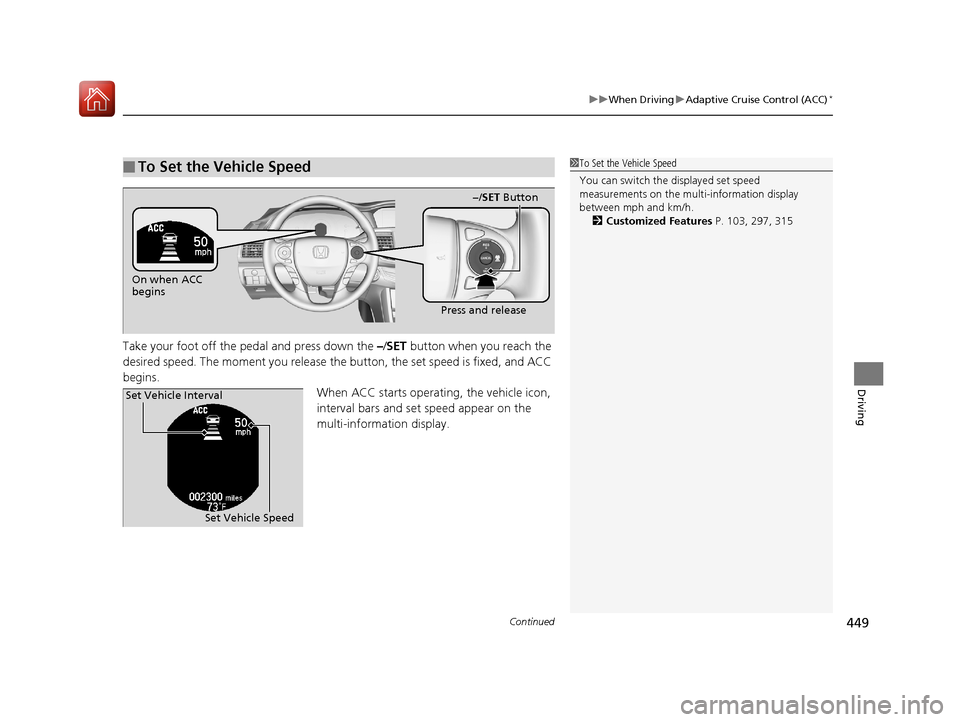
Take your foot off the pedal and press down the –/ SET button when you reach the
desired speed. The moment you release the button, the set speed is fixed, and ACC
begins. When ACC starts operating, the vehicle icon,
interval bars and set speed appear on the
multi-information display.
■To Set the Vehicle Speed1To Set the Vehicle Speed
You can switch the displayed set speed
measurements on the mult i-information display
between mph and km/h. 2 Customized Features P. 103, 297, 315
On when ACC
begins
Press and release
−/SET Button
Set Vehicle Speed
Set Vehicle Interval
17 ACCORD 4D GAS-31T2A6400.book 449 ページ 2016年6月7日 火曜日 午後5時6分
Page 451 of 613
uuWhen Driving uAdaptive Cruise Control (ACC)*
450
Driving
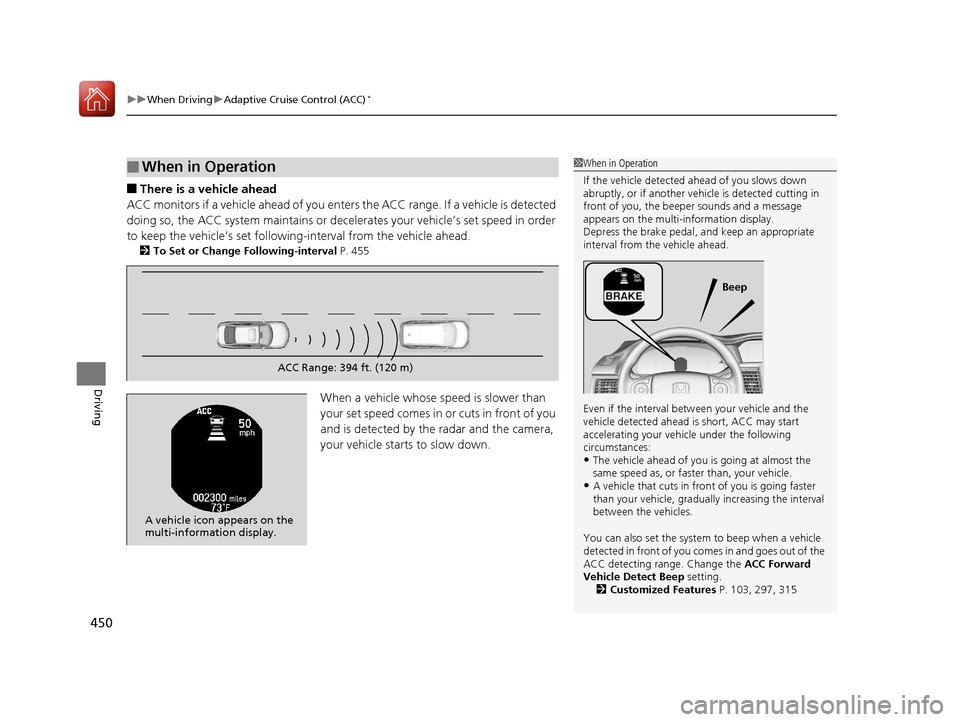
■There is a vehicle ahead
ACC monitors if a vehicle ahead of you enters the ACC range. If a vehicle is detected
doing so, the ACC system maintains or decele rates your vehicle’s set speed in order
to keep the vehicle’s se t following-interval from the vehicle ahead.
2To Set or Change Following-interval P. 455
When a vehicle whose speed is slower than
yo ur se t spe e d com e s i n or c ut s in fr o nt of y ou
and is detected by the radar and the camera,
your vehicle starts to slow down.
■When in Operation1 When in Operation
If the vehicle detected ahead of you slows down
abruptly, or if a nother vehicle is de tected cutting in
front of you, the beep er sounds and a message
appears on the multi-information display.
Depress the brake pedal, and keep an appropriate
interval from the vehicle ahead.
Even if the interval betw een your vehicle and the
vehicle detected ahead is short, ACC may start
accelerating your vehi cle under the following
circumstances:
•The vehicle ahead of you is going at almost the
same speed as, or faster than, your vehicle.
•A vehicle that cuts in front of you is going faster
than your vehicle, gradua lly increasing the interval
between the vehicles.
You can also set the system to beep when a vehicle
detected in front of you co mes in and goes out of the
ACC detecting range. Change the ACC Forward
Vehicle Detect Beep setting. 2 Customized Features P. 103, 297, 315
Beep
ACC Range: 394 ft. (120 m)
A vehicle icon appears on the
multi-information display.
17 ACCORD 4D GAS-31T2A6400.book 450 ページ 2016年6月7日 火曜日 午後5時6分
Page 452 of 613
Continued451
uuWhen Driving uAdaptive Cruise Control (ACC)*
Driving
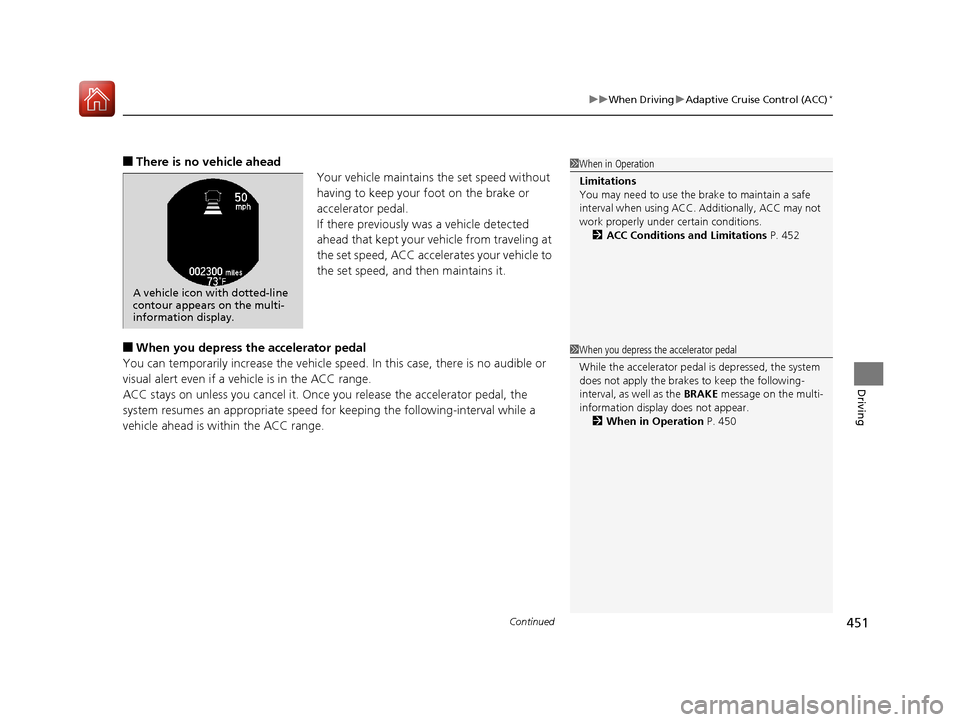
■There is no vehicle ahead
Your vehicle maintains the set speed without
having to keep your foot on the brake or
accelerator pedal.
If there previously was a vehicle detected
ahead that kept your vehicle from traveling at
the set speed, ACC accelerates your vehicle to
the set speed, and then maintains it.
■When you depress the accelerator pedal
You can temporarily increase the vehicle speed . In this case, there is no audible or
visual alert even if a vehicle is in the ACC range.
ACC stays on unless you cancel it. Once you release the accelerator pedal, the
system resumes an appropriate speed fo r keeping the following-interval while a
vehicle ahead is within the ACC range.
1 When in Operation
Limitations
You may need to use the brake to maintain a safe
interval when using ACC. Additionally, ACC may not
work properly under certain conditions.
2 ACC Conditions and Limitations P. 452
A vehicle icon with dotted-line
contour appears on the multi-
information display.
1When you depress the accelerator pedal
While the accelerator pedal is depressed, the system
does not apply the brakes to keep the following-
interval, as well as the BRAKE message on the multi-
information display does not appear. 2 When in Operation P. 450
17 ACCORD 4D GAS-31T2A6400.book 451 ページ 2016年6月7日 火曜日 午後5時6分
Page 453 of 613
uuWhen Driving uAdaptive Cruise Control (ACC)*
452
Driving
The system may automatically shut off and the ACC indicator will come on under
certain conditions. Some examples of th ese conditions are listed below. Other
conditions may reduce some of the ACC functions.
2 Front Sensor Camera* P. 445
■Environmental conditions
• Driving in bad weather (rain, fog, snow, etc.).
■Roadway conditions
• Driving on a snowy or wet roadway (obscured lane marking, vehicle tracks,
reflected lights, road spray, high contrast).
■Vehicle conditions
• The outside of the windshie ld is blocked by dirt, mud, leaves, wet snow, etc.
• An abnormal tire or wheel condition (Wrong sized, varied size or construction,
improperly inflated, comp act spare tire, etc.).
• The camera temperature gets too high.
• The parking brake is applied.
• When the radar sensor cover is dirty.
• When the front of the vehicle tilts up due to heavy cargo in the trunk or rear seats.
• When tire chains are installed.
■ACC Conditions and Limitations1ACC Conditions and Limitations
The radar sensor for ACC is shared with the collision
mitigation braking system
TM (CMBSTM).
2 Collision Mitigation Braking SystemTM
(CMBSTM)* P. 484
Always keep the radar sensor cover clean.
Never use chemical solvents or polishing powder for
cleaning the sensor cover. Clean it with water or a
mild detergent.
Do not put a sticker on the radar sensor cover or
replace the radar sensor cover.
If you need the radar sensor to be repaired, or
removed, or the radar se nsor cover is strongly
impacted, turn off the system by pressing the MAIN
button and take your vehicle to a dealer.
Have your vehicle checked by a dealer if you find any
unusual behavior of the system (e.g., the warning
message appears too frequently).
If the front of the vehicle is impacted in any of the
following situations, the ra dar sensor may not work
properly. Have your vehi cle checked by a dealer:
•The vehicle mounted onto a bump, curb, chock,
embankment, etc.
•You drive the vehicle where the water is deep.•Your vehicle has a frontal collision.
You can read about handling information for the
camera equipped with this system. 2 Front Sensor Camera
* P. 445
* Not available on all models
17 ACCORD 4D GAS-31T2A6400.book 452 ページ 2016年6月7日 火曜日 午後5時6分