can HONDA ACCORD 2017 9.G Owners Manual
[x] Cancel search | Manufacturer: HONDA, Model Year: 2017, Model line: ACCORD, Model: HONDA ACCORD 2017 9.GPages: 613
Page 380 of 613
379
uuBluetooth ® HandsFreeLink ®u HFL Menus
Continued
Features
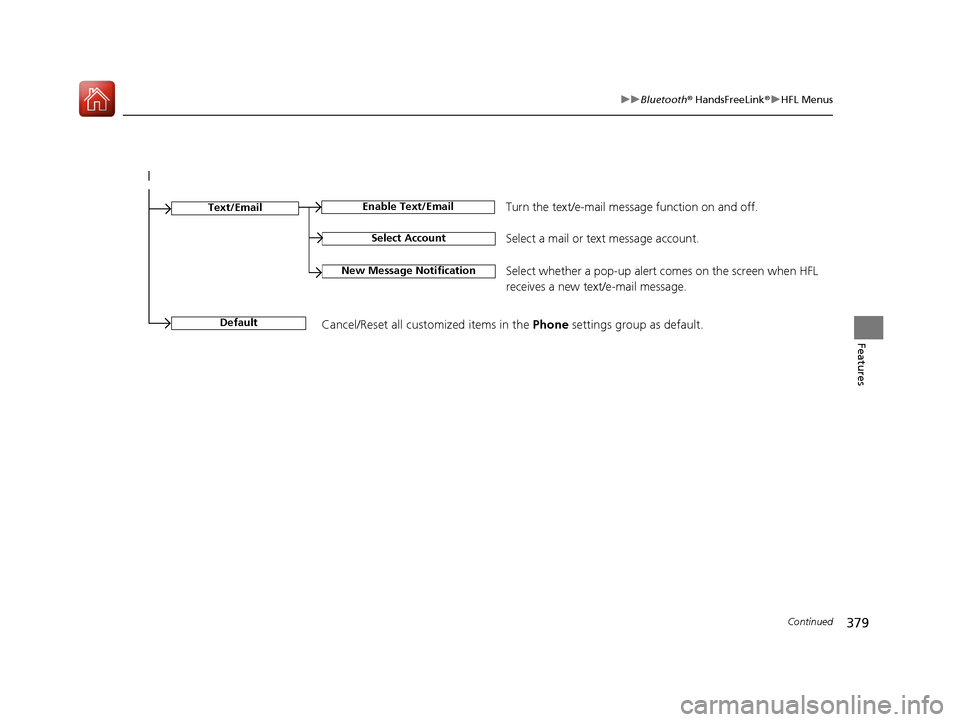
Select Account
Enable Text/EmailText/Email
New Message NotificationSelect whether a pop-up alert comes on the screen when HFL
receives a new text/e-mail message.
Turn the text/e-mail message function on and off.
Select a mail or te xt message account.
DefaultCancel/Reset all customized items in the Phone settings group as default.
17 ACCORD 4D GAS-31T2A6400.book 379 ページ 2016年6月7日 火曜日 午後5時6分
Page 383 of 613
uuBluetooth ® HandsFreeLink ®u HFL Menus
382
Features
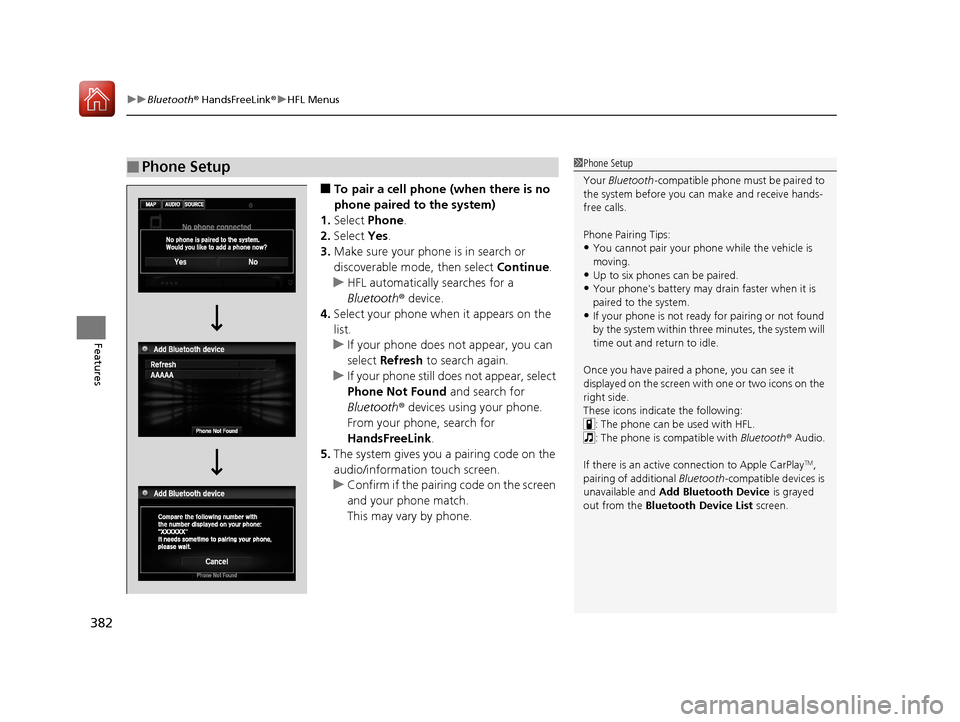
■To pair a cell phone (when there is no
phone paired to the system)
1. Select Phone .
2. Select Yes.
3. Make sure your phone is in search or
discoverable mode, then select Continue.
u HFL automatically searches for a
Bluetooth ® device.
4. Select your phone when it appears on the
list.
u If your phone does not appear, you can
select Refresh to search again.
u If your phone still does not appear, select
Phone Not Found and search for
Bluetooth ® devices using your phone.
From your phone, search for
HandsFreeLink .
5. The system gives you a pairing code on the
audio/information touch screen.
u Confirm if the pairing code on the screen
and your phone match.
This may vary by phone.
■Phone Setup1Phone Setup
Your Bluetooth -compatible phone must be paired to
the system before you ca n make and receive hands-
free calls.
Phone Pairing Tips:
•You cannot pair your phone while the vehicle is
moving.
•Up to six phones can be paired.
•Your phone's battery may dr ain faster when it is
paired to the system.
•If your phone is not ready for pairing or not found
by the system within three minutes, the system will
time out and return to idle.
Once you have paired a phone, you can see it
displayed on the screen with one or two icons on the
right side.
These icons indicate the following: : The phone can be used with HFL.
: The phone is compatible with Bluetooth ® Audio.
If there is an active c onnection to Apple CarPlay
TM,
pairing of additional Bluetooth -compatible devices is
unavailable and Add Bluetooth Device is grayed
out from the Bluetooth Device List screen.
17 ACCORD 4D GAS-31T2A6400.book 382 ページ 2016年6月7日 火曜日 午後5時6分
Page 387 of 613
uuBluetooth ® HandsFreeLink ®u HFL Menus
386
Features
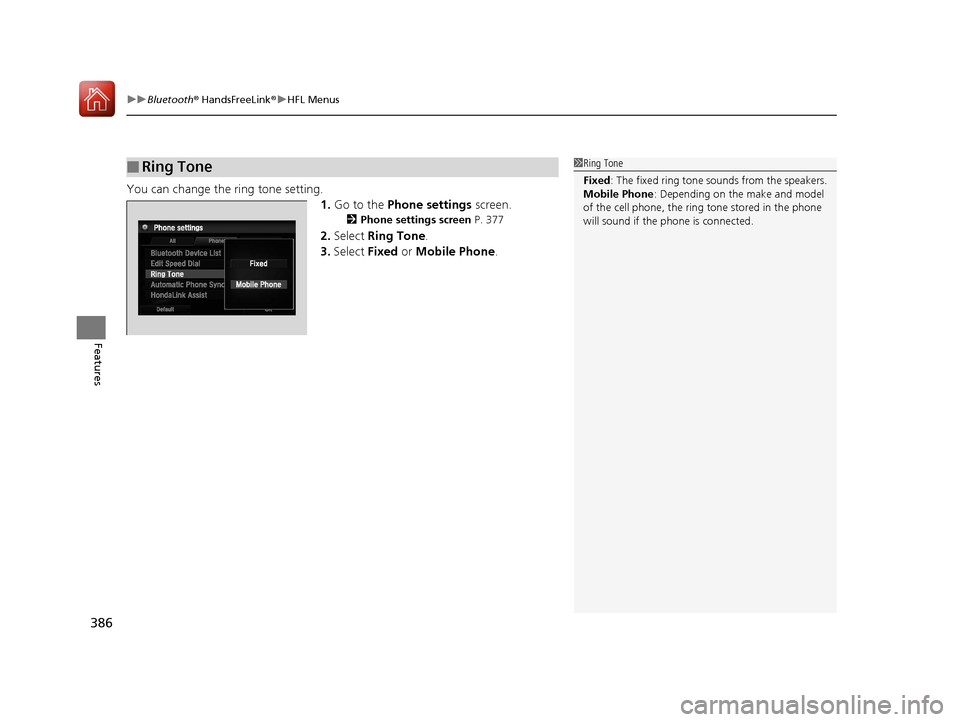
You can change the ring tone setting.
1.Go to the Phone settings screen.
2Phone settings screen P. 377
2.Select Ring Tone.
3. Select Fixed or Mobile Phone .
■Ring Tone1Ring Tone
Fixed: The fixed ring tone sounds from the speakers.
Mobile Phone : Depending on the make and model
of the cell phone, the ring tone stored in the phone
will sound if the phone is connected.
17 ACCORD 4D GAS-31T2A6400.book 386 ページ 2016年6月7日 火曜日 午後5時6分
Page 388 of 613
Continued387
uuBluetooth ® HandsFreeLink ®u HFL Menus
Features
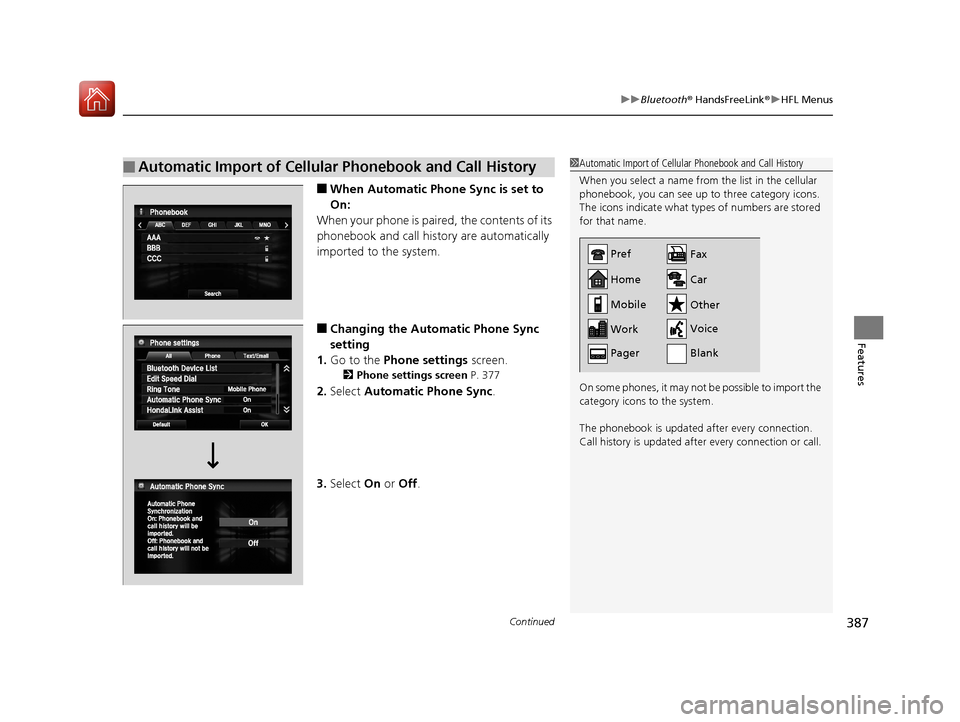
■When Automatic Phone Sync is set to
On:
When your phone is paired, the contents of its
phonebook and call history are automatically
imported to the system.
■Changing the Automatic Phone Sync
setting
1. Go to the Phone settings screen.
2Phone settings screen P. 377
2.Select Automatic Phone Sync .
3. Select On or Off .
■Automatic Import of Cellular Phonebook and Call History1Automatic Import of Cellular Phonebook and Call History
When you select a name from the list in the cellular
phonebook, you can see up to three category icons.
The icons indicate what types of numbers are stored
for that name.
On some phones, it may not be possible to import the
category icons to the system.
The phonebook is updated after every connection.
Call history is updated after every connection or call.
Home
Mobile
Work
PagerFax
Car
Other
Voice
Pref
Blank
17 ACCORD 4D GAS-31T2A6400.book 387 ページ 2016年6月7日 火曜日 午後5時6分
Page 389 of 613
uuBluetooth ® HandsFreeLink ®u HFL Menus
388
Features
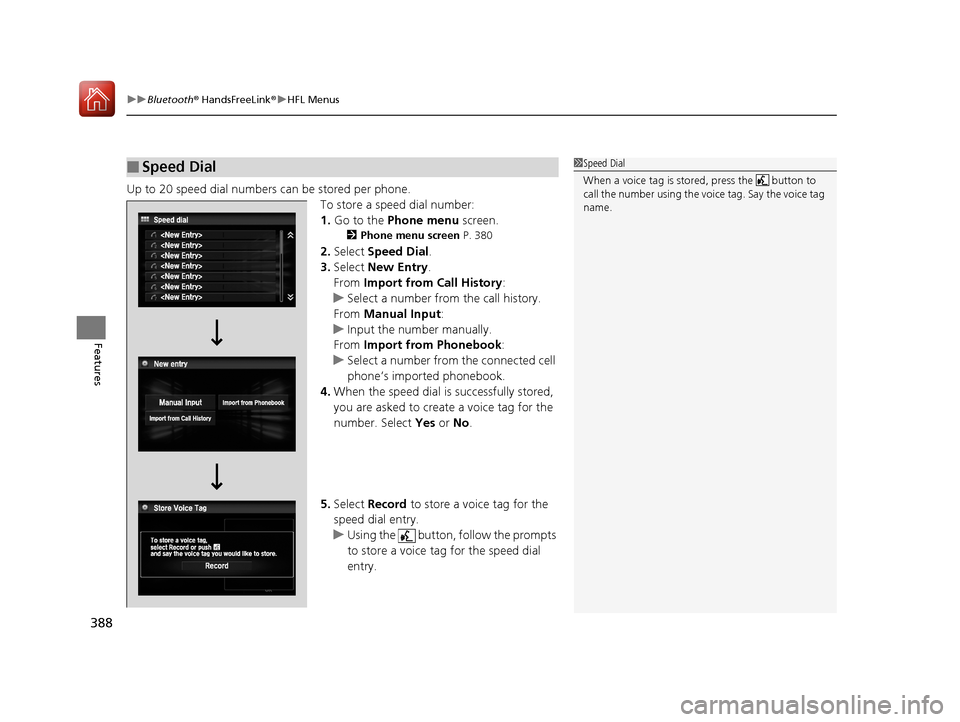
Up to 20 speed dial numbers can be stored per phone.
To store a speed dial number:
1.Go to the Phone menu screen.
2Phone menu screen P. 380
2.Select Speed Dial .
3. Select New Entry.
From Import from Call History:
u Select a number from the call history.
From Manual Input :
u Input the number manually.
From Import from Phonebook :
u Select a number from the connected cell
phone’s imported phonebook.
4. When the speed dial is successfully stored,
you are asked to create a voice tag for the
number. Select Yes or No.
5. Select Record to store a voice tag for the
speed dial entry.
u Using the button, follow the prompts
to store a voice tag for the speed dial
entry.
■Speed Dial1 Speed Dial
When a voice tag is stored, press the button to
call the number using the voice tag. Say the voice tag
name.
17 ACCORD 4D GAS-31T2A6400.book 388 ページ 2016年6月7日 火曜日 午後5時6分
Page 392 of 613
Continued391
uuBluetooth ® HandsFreeLink ®u HFL Menus
Features
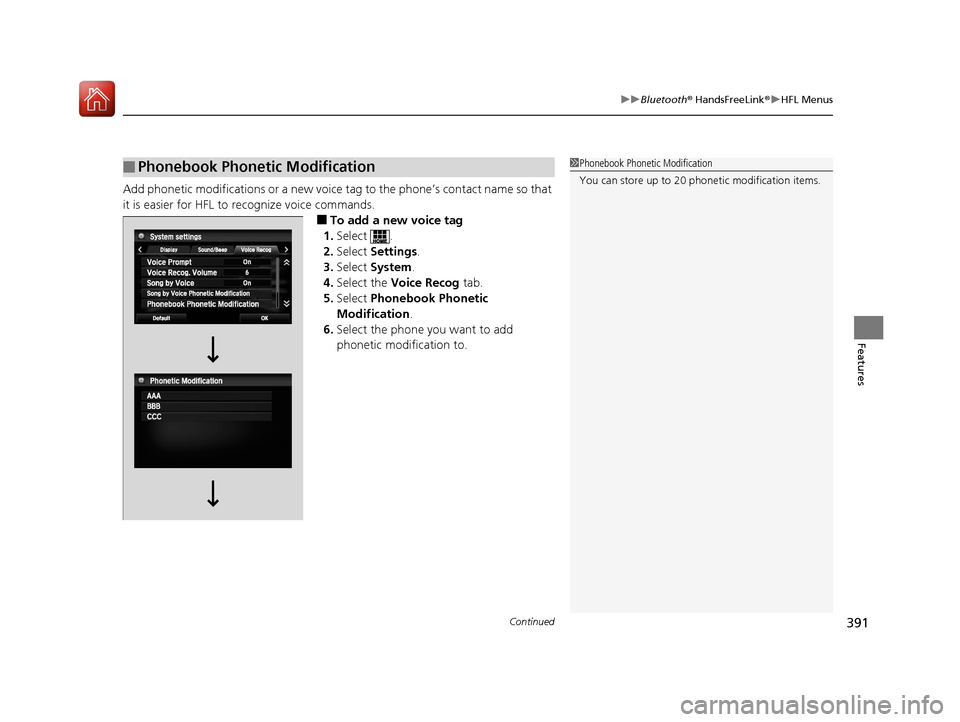
Add phonetic modifications or a new voice tag to the phone’s contact name so that
it is easier for HFL to recognize voice commands.
■To add a new voice tag
1. Select .
2. Select Settings .
3. Select System .
4. Select the Voice Recog tab.
5. Select Phonebook Phonetic
Modification .
6. Select the phone you want to add
phonetic modification to.
■Phonebook Phonetic Modification1Phonebook Phonetic Modification
You can store up to 20 phone tic modification items.
17 ACCORD 4D GAS-31T2A6400.book 391 ページ 2016年6月7日 火曜日 午後5時6分
Page 394 of 613
Continued393
uuBluetooth ® HandsFreeLink ®u HFL Menus
Features
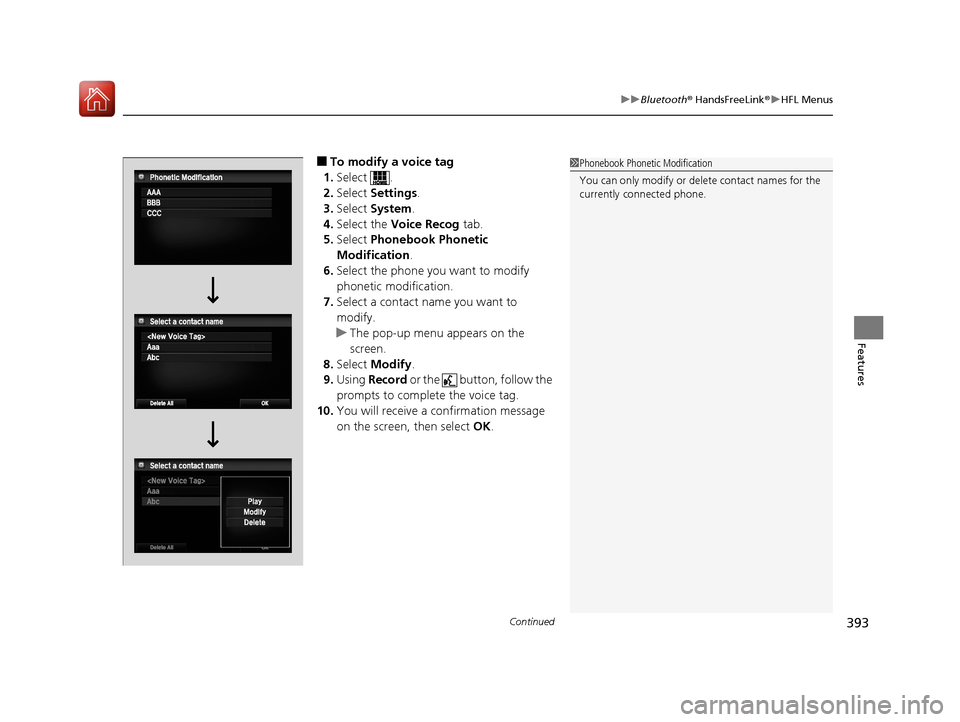
■To modify a voice tag
1. Select .
2. Select Settings .
3. Select System .
4. Select the Voice Recog tab.
5. Select Phonebook Phonetic
Modification .
6. Select the phone you want to modify
phonetic modification.
7. Select a contact name you want to
modify.
u The pop-up menu appears on the
screen.
8. Select Modify .
9. Using Record or the button, follow the
prompts to complete the voice tag.
10. You will receive a confirmation message
on the screen, then select OK.1Phonebook Phonetic Modification
You can only modify or de lete contact names for the
currently connected phone.
17 ACCORD 4D GAS-31T2A6400.book 393 ページ 2016年6月7日 火曜日 午後5時6分
Page 396 of 613
Continued395
uuBluetooth ® HandsFreeLink ®u HFL Menus
Features
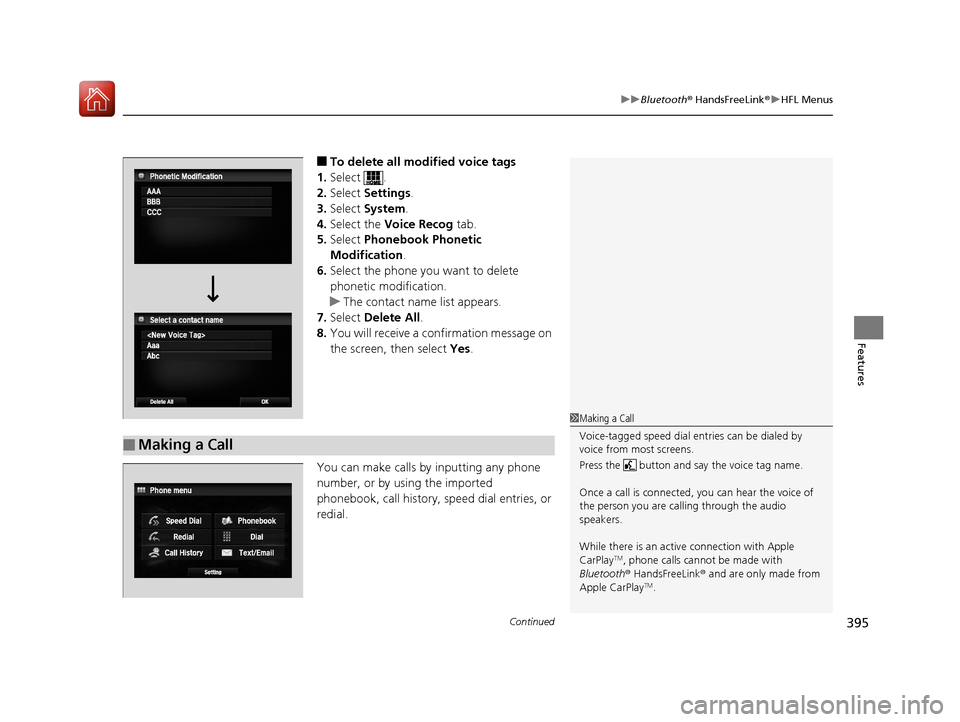
■To delete all modified voice tags
1. Select .
2. Select Settings .
3. Select System.
4. Select the Voice Recog tab.
5. Select Phonebook Phonetic
Modification .
6. Select the phone you want to delete
phonetic modification.
u The contact name list appears.
7. Select Delete All.
8. You will receive a confirmation message on
the screen, then select Yes.
You can make calls by inputting any phone
number, or by using the imported
phonebook, call history, speed dial entries, or
redial.
■Making a Call
1 Making a Call
Voice-tagged speed dial en tries can be dialed by
voice from most screens.
Press the button and say the voice tag name.
Once a call is connected, you can hear the voice of
the person you are call ing through the audio
speakers.
While there is an active connection with Apple
CarPlay
TM, phone calls cannot be made with
Bluetooth ® HandsFreeLink ® and are only made from
Apple CarPlay
TM.
17 ACCORD 4D GAS-31T2A6400.book 395 ページ 2016年6月7日 火曜日 午後5時6分
Page 397 of 613
396
uuBluetooth ® HandsFreeLink ®u HFL Menus
Features
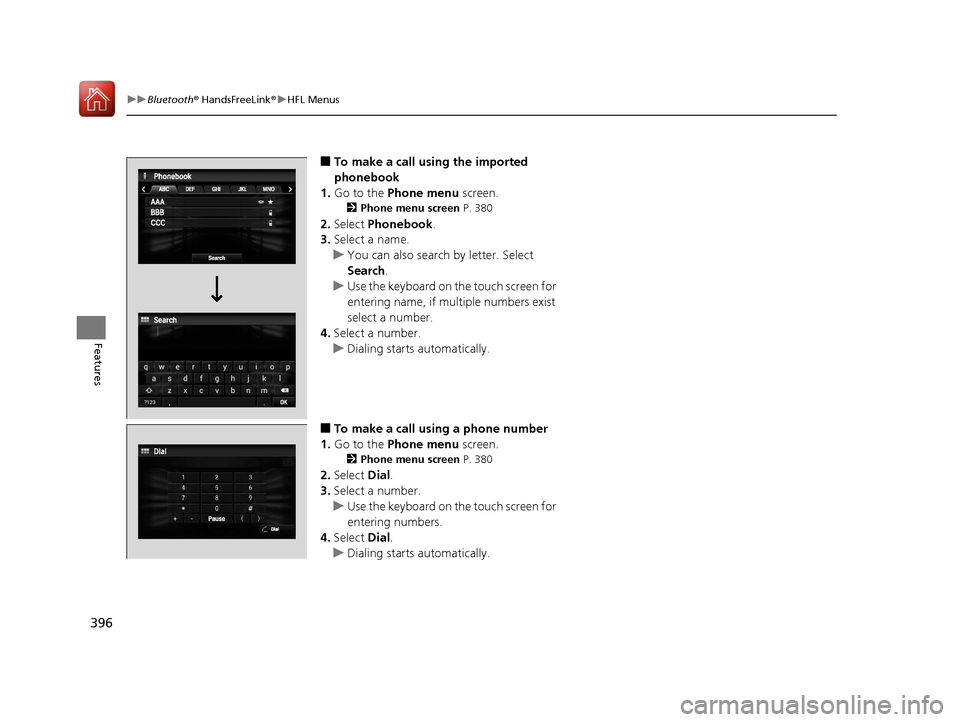
■To make a call using the imported
phonebook
1. Go to the Phone menu screen.
2Phone menu screen P. 380
2.Select Phonebook .
3. Select a name.
u You can also search by letter. Select
Search .
u Use the keyboard on the touch screen for
entering name, if multiple numbers exist
select a number.
4. Select a number.
u Dialing starts automatically.
■To make a call using a phone number
1. Go to the Phone menu screen.
2Phone menu screen P. 380
2.Select Dial.
3. Select a number.
u Use the keyboard on the touch screen for
entering numbers.
4. Select Dial.
u Dialing starts automatically.
17 ACCORD 4D GAS-31T2A6400.book 396 ページ 2016年6月7日 火曜日 午後5時6分
Page 398 of 613
Continued397
uuBluetooth ® HandsFreeLink ®u HFL Menus
Features
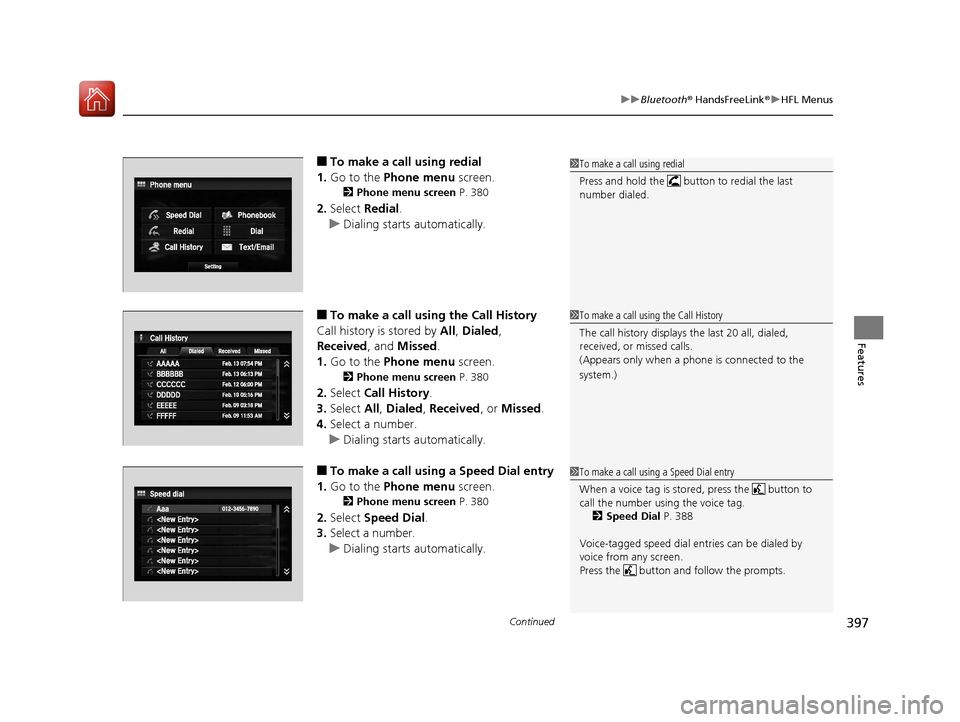
■To make a call using redial
1. Go to the Phone menu screen.
2Phone menu screen P. 380
2.Select Redial .
u Dialing starts automatically.
■To make a call usin g the Call History
Call history is stored by All, Dialed ,
Received , and Missed .
1. Go to the Phone menu screen.
2Phone menu screen P. 380
2.Select Call History .
3. Select All, Dialed , Received , or Missed .
4. Select a number.
u Dialing starts automatically.
■To make a call usin g a Speed Dial entry
1. Go to the Phone menu screen.
2Phone menu screen P. 380
2.Select Speed Dial .
3. Select a number.
u Dialing starts automatically.
1To make a call using redial
Press and hold the butt on to redial the last
number dialed.
1 To make a call using the Call History
The call history displays the last 20 all, dialed,
received, or missed calls.
(Appears only when a phone is connected to the
system.)
1 To make a call using a Speed Dial entry
When a voice tag is stored, press the button to
call the number using the voice tag.
2 Speed Dial P. 388
Voice-tagged speed dial en tries can be dialed by
voice from any screen.
Press the button and follow the prompts.
17 ACCORD 4D GAS-31T2A6400.book 397 ページ 2016年6月7日 火曜日 午後5時6分