can HONDA ACCORD 2017 9.G Repair Manual
[x] Cancel search | Manufacturer: HONDA, Model Year: 2017, Model line: ACCORD, Model: HONDA ACCORD 2017 9.GPages: 613
Page 99 of 613
uuGauges and Displays uInformation Display*
98
Instrument Panel
Shows the outside temperature in Fahr enheit (U.S.) or Celsius (Canada).
■Adjusting the outside temperature indicator
Adjust the temperature reading up to ± 5° F or ± 3°C if the temperature reading
seems incorrect.
1. Turn the ignition switch to ON
(w*1.
2. Press and hold the (Select/Reset) kn ob for 10 seconds or more while the
outside temperature is shown on the information display.
u The information display goes into temp erature adjustment mode. The display
starts showing from -5°F to +5°F (U.S.) or -3°C to +3°C (Canada).
3. Release the knob when the righ t adjustment amount is shown.
u The adjustment is complete.
Shows the estimated distance you can travel on the remaining fuel. This distance is
estimated from the fuel economy of your previous trips.
*1: Models with the smart entry system have an ENGINE START/STOP button instead of an
ignition switch.
■Outside Temperature
■Range
1 Outside Temperature
The temperature sensor is in the front bumper.
Road heat and exhaust fr om another vehicle can
affect the temperature reading when your vehicle
speed is less than 19 mph (30 km/h).
It may take several minutes for the display to be
updated after the temperature reading has stabilized.
17 ACCORD 4D GAS-31T2A6400.book 98 ページ 2016年6月7日 火曜日 午後5時6分
Page 102 of 613
Continued101
uuGauges and Displays uMulti-Information Display*
Instrument Panel
Shows the total number of miles (U.S.) or kilometers (Canada) that your vehicle has
accumulated.
Shows the total number of miles (U.S.) or k ilometers (Canada) driven since the last
reset. Meters A and B can be used to measure two separate trips.
■Resetting a trip meter
To reset a trip meter, display it, then press and hold the SEL/RESET button. The trip
meter is reset to 0.0.
Shows the estimated average fuel economy of each trip meter in mpg (U.S.) or l/100
km (Canada). The display is updated at set intervals. When a trip meter is reset, the
average fuel economy is also reset.
Shows the estimated distance you can travel on the remaining fuel. This distance is
estimated from the fuel economy of your previous trips.
Shows the time elapsed since Trip A or Trip B was reset.
■Odometer
■Trip Meter
■Average Fuel Economy
■Range
■Elapsed Time
1 Trip Meter
Switch between trip meter A and trip meter B by
pressing the SEL/RESET button.
1Average Fuel Economy
You can change when to reset the average fuel
economy.
2 Customized Features P. 103, 297, 315
1Elapsed Time
You can change when to reset the elapsed time.
2 Customized Features P. 103, 297, 315
17 ACCORD 4D GAS-31T2A6400.book 101 ページ 2016年6月7日 火曜日 午後5時6分
Page 103 of 613
uuGauges and Displays uMulti-Information Display*
102
Instrument Panel
Shows the average speed in m ph (U.S.) or km/h (Canada) since Trip A or Trip B was
reset.
Shows the instant fuel economy as a bar gr aph in mpg (U.S.) or l/100 km (Canada).
Shows the remaining oil life and Maintenance Minder
TM.
2 Maintenance MinderTM P. 507
Shows the outside temperature in Fahr enheit (U.S.) or Celsius (Canada).
■Adjusting the outside temperature display
Adjust the temperature reading up to ±5°F or ±3°C if the temperature reading
seems incorrect.
■Average Speed
■Instant Fuel Economy
■Engine Oil Life
■Outside Temperature
1 Average Speed
You can change when to reset the average speed.
2 Customized Features P. 103, 297, 315
1Outside Temperature
The temperature sensor is in the front bumper.
Road heat and exhaust fr om another vehicle can
affect the temperature reading when your vehicle
speed is less than 19 mph (30 km/h).
It may take several minutes for the display to be
updated after the temperature reading has stabilized.
Use the multi-information display's customized
features to correct the temperature. 2 Customized Features P. 103, 297, 315
17 ACCORD 4D GAS-31T2A6400.book 102 ページ 2016年6月7日 火曜日 午後5時6分
Page 107 of 613
106
uuGauges and Displays uMulti-Information Display*
Instrument Panel
■List of customizable options
*1:Default Setting Setup Group Customizable Features Description Selectable Settings
TPMS
Calibration—Calibrates the TPMS.Cancel
/Calibrate
Driver Assist
System
Setup
Forward Collision
Warning DistanceChanges at which distance the CMBSTM alerts.Long /Normal*1/Short
ACC Pre-Running Car
Detect BeepCauses the system to beep when the system detects a
vehicle, or when the vehicle goes out of ACC range.On /Off*1
ACC Display Speed UnitChanges the ACC display speed unit.
mph*1/km/h
(U.S.)
mph /km /h
*1
(Canada)
Road Departure
Mitigation Setting Changes the setting for the road departure
mitigation system. Normal
*1/
Wide /Warning
Only
Lane Keep Assist
Suspend Beep Causes the system to beep when the LKAS is
suspended.
On
/Off
*1
17 ACCORD 4D GAS-31T2A6400.book 106 ページ 2016年6月7日 火曜日 午後5時6分
Page 108 of 613
107
uuGauges and Displays uMulti-Information Display*
Continued
Instrument Panel
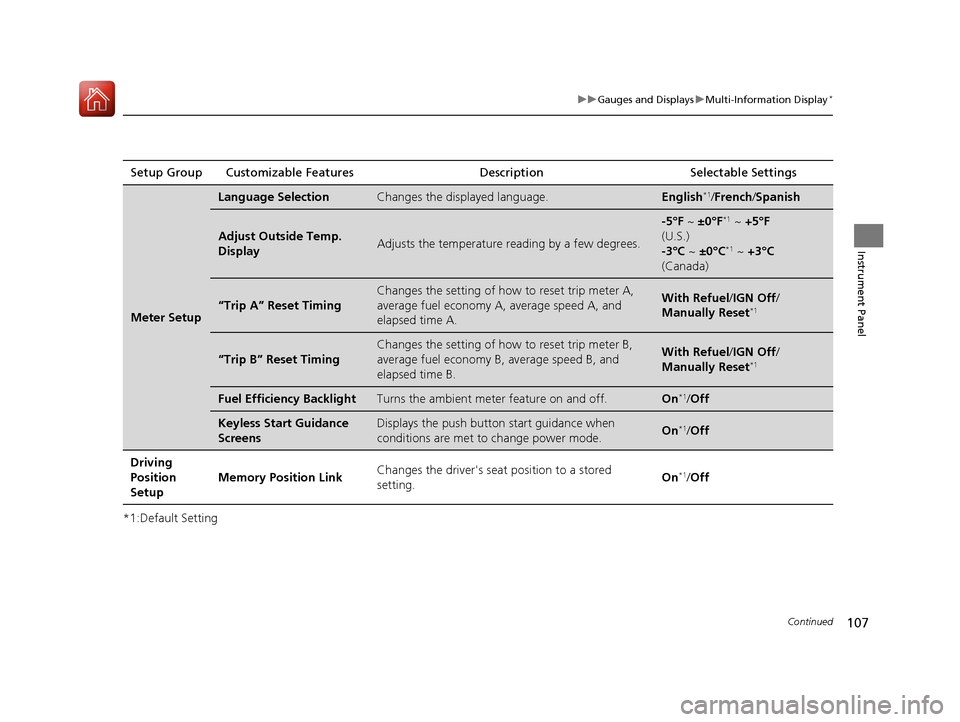
*1:Default SettingSetup Group Customizable Features
Description Selectable Settings
Meter Setup
Language SelectionChanges the displayed language.English*1/French /Spanish
Adjust Outside Temp.
DisplayAdjusts the temperature r eading by a few degrees.
-5°F ~ ±0°F*1 ~ +5°F
(U.S.)
-3°C ~ ±0°C
*1 ~ +3°C
(Canada)
“Trip A” Reset Timing
Changes the setting of how to reset trip meter A,
average fuel economy A, average speed A, and
elapsed time A.With Refuel /IGN Off /
Manually Reset*1
“Trip B” Reset Timing
Changes the setting of ho w to reset trip meter B,
average fuel economy B, average speed B, and
elapsed time B.With Refuel /IGN Off /
Manually Reset*1
Fuel Efficiency BacklightTurns the ambient meter feature on and off.On*1/ Off
Keyless Start Guidance
ScreensDisplays the push button start guidance when
conditions are met to change power mode.On*1/Off
Driving
Position
Setup Memory Position Link
Changes the driver's seat
position to a stored
setting. On
*1/
Off
17 ACCORD 4D GAS-31T2A6400.book 107 ページ 2016年6月7日 火曜日 午後5時6分
Page 110 of 613
109
uuGauges and Displays uMulti-Information Display*
Continued
Instrument Panel
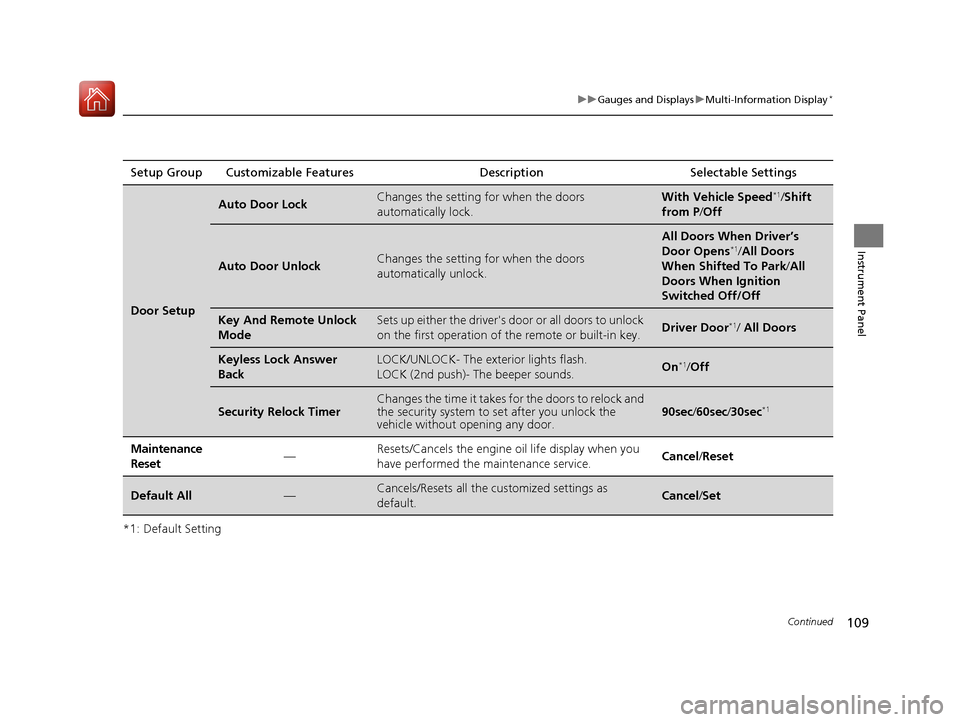
*1: Default SettingSetup Group Customizable Features
Description Selectable Settings
Door Setup
Auto Door LockChanges the setting for when the doors
automatically lock.With Vehicle Speed*1/Shift
from P /Off
Auto Door UnlockChanges the setting for when the doors
automatically unlock.
All Doors When Driver’s
Door Opens*1/All Doors
When Shifted To Park /All
Doors When Ignition
Switched Off/Off
Key And Remote Unlock
ModeSets up either the driver's door or all doors to unlock
on the first operation of the remote or built-in key.Driver Door*1/ All Doors
Keyless Lock Answer
BackLOCK/UNLOCK- The exterior lights flash.
LOCK (2nd push)- The beeper sounds.On*1/Off
Security Relock TimerChanges the time it takes for the doors to relock and
the security system to set after you unlock the
vehicle without op ening any door.90sec/60sec /30sec*1
Maintenance
Reset—Resets/Cancels the engine oil life display when you
have performed the maintenance service. Cancel /Reset
Default All—Cancels/Resets all the customized settings as
default.Cancel /Set
17 ACCORD 4D GAS-31T2A6400.book 109 ページ 2016年6月7日 火曜日 午後5時6分
Page 112 of 613
111
uuGauges and Displays uMulti-Information Display*
Instrument Panel
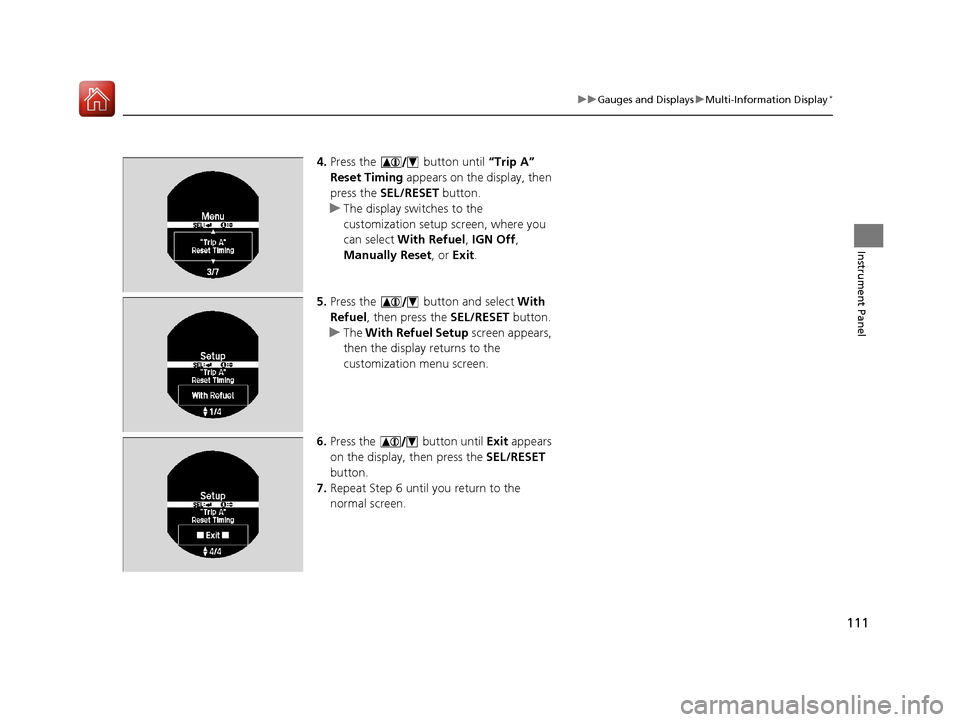
4. Press the button until “Trip A”
Reset Timing appears on the display, then
press the SEL/RESET button.
u The display swit ches to the
customization setup screen, where you
can select With Refuel , IGN Off,
Manually Reset , or Exit .
5. Press the button and select With
Refuel , then press the SEL/RESET button.
u The With Refuel Setup screen appears,
then the display returns to the
customization menu screen.
6. Press the button until Exit appears
on the display, then press the SEL/RESET
button.
7. Repeat Step 6 until you return to the
normal screen.
17 ACCORD 4D GAS-31T2A6400.book 111 ページ 2016年6月7日 火曜日 午後5時6分
Page 115 of 613
114
Controls
Clock
Adjusting the Clock
You can adjust the time in the clock display with the ignition switch is in ON (w *1.
■Using the Settings menu on the audio/information screen
1. Press the SETTINGS button.
2. Rotate to select System Settings, then
press .
u Repeat the procedure to select Clock,
then Clock Adjustment .
3. Rotate to change hour, then press .
4. Rotate to change minute, then press .
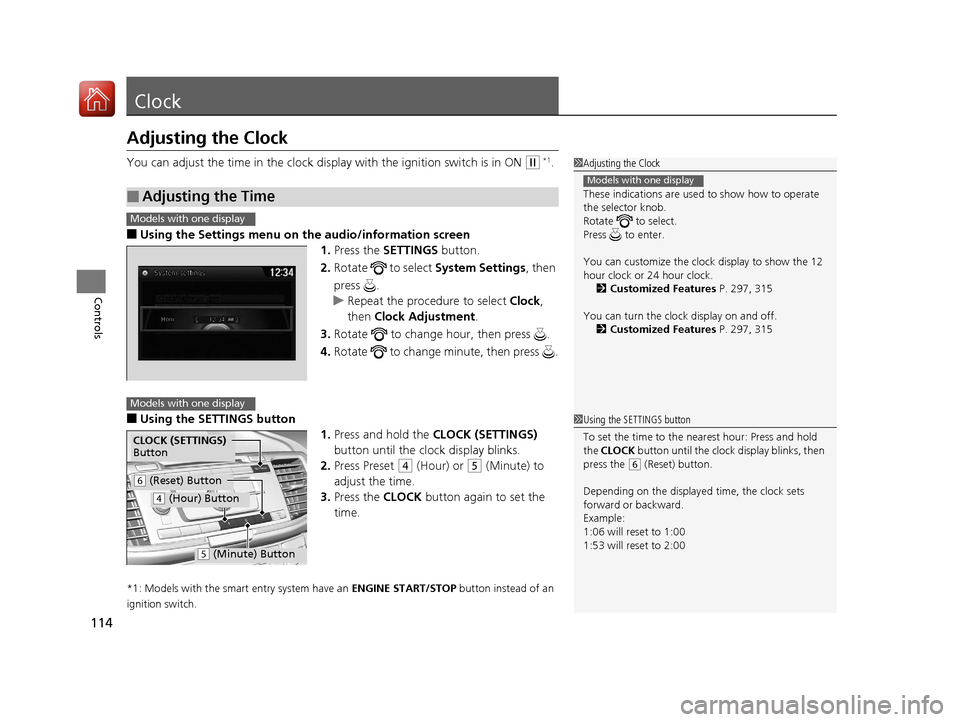
■Using the SETTINGS button
1.Press and hold the CLOCK (SETTINGS)
button until the clock display blinks.
2. Press Preset
(4 (Hour) or (5 (Minute) to
adjust the time.
3. Press the CLOCK button again to set the
time.
*1: Models with the smart entry system have an ENGINE START/STOP button instead of an
ignition switch.
■Adjusting the Time
1 Adjusting the Clock
These indications are used to show how to operate
the selector knob.
Rotate to select.
Press to enter.
You can customize the clock display to show the 12
hour clock or 24 hour clock. 2 Customized Features P. 297, 315
You can turn the clock display on and off. 2 Customized Features P. 297, 315
Models with one display
1Using the SETTINGS button
To set the time to the nearest hour: Press and hold
the CLOCK button until the clock display blinks, then
press the
( 6 (Reset) button.
Depending on the displayed time, the clock sets
forward or backward.
Example:
1:06 will reset to 1:00
1:53 will reset to 2:00
Models with one display
Models with one display
CLOCK (SETTINGS)
Button
( 6 (Reset) Button
(4 (Hour) Button
(5 (Minute) Button
17 ACCORD 4D GAS-31T2A6400.book 114 ページ 2016年6月7日 火曜日 午後5時6分
Page 117 of 613
116
Controls
Locking and Unlocking the Doors
Key Types and Functions
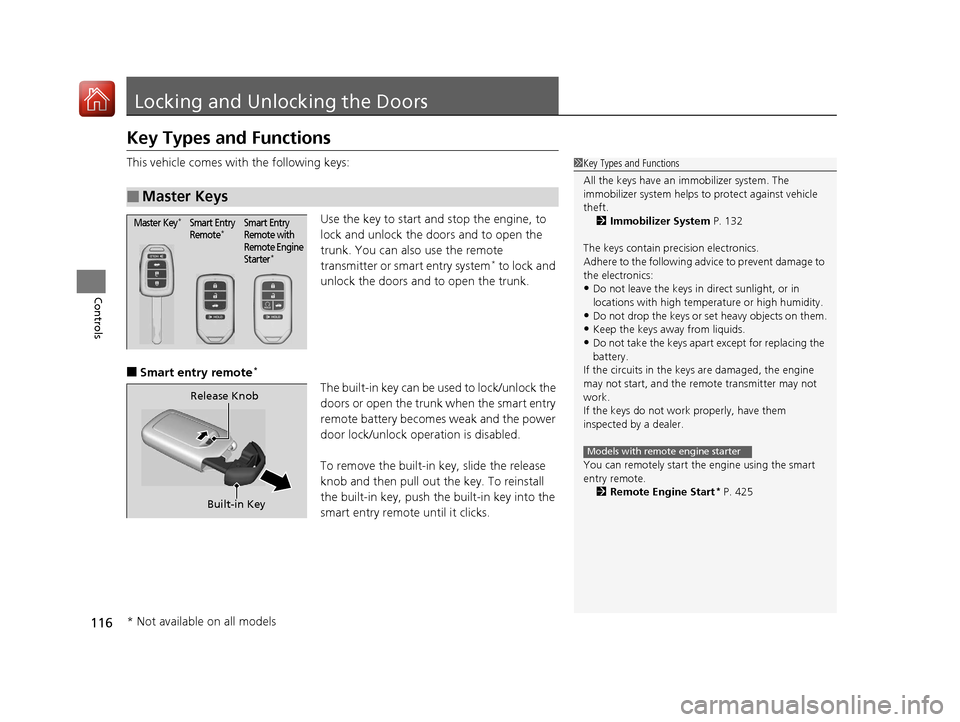
This vehicle comes with the following keys:Use the key to start and stop the engine, to
lock and unlock the doors and to open the
trunk. You can also use the remote
transmitter or smart entry system
* to lock and
unlock the doors and to open the trunk.
■Smart entry remote*
The built-in key can be us ed to lock/unlock the
doors or open the trunk when the smart entry
remote battery becomes weak and the power
door lock/unlock operation is disabled.
To remove the built-in key, slide the release
knob and then pull out the key. To reinstall
the built-in key, push th e built-in key into the
smart entry remote until it clicks.
■Master Keys
1 Key Types and Functions
All the keys have an immobilizer system. The
immobilizer system helps to protect against vehicle
theft. 2 Immobilizer System P. 132
The keys contain precision electronics.
Adhere to the following advi ce to prevent damage to
the electronics:
•Do not leave the keys in direct sunlight, or in
locations with high temperature or high humidity.
•Do not drop the keys or set heavy objects on them.
•Keep the keys away from liquids.
•Do not take the keys apart except for replacing the
battery.
If the circuits in the keys are damaged, the engine
may not start, and the remote transmitter may not
work.
If the keys do not work properly, have them
inspected by a dealer.
You can remotely start th e engine using the smart
entry remote.
2 Remote Engine Start
* P. 425
Models with remote engine starter
Master Key*Smart Entry
Remote*Smart Entry
Remote with
Remote Engine
Starter
*
Built-in Key
Release Knob
* Not available on all models
17 ACCORD 4D GAS-31T2A6400.book 116 ページ 2016年6月7日 火曜日 午後5時6分
Page 118 of 613
117
uuLocking and Unlocking the Doors uKey Types and Functions
Controls
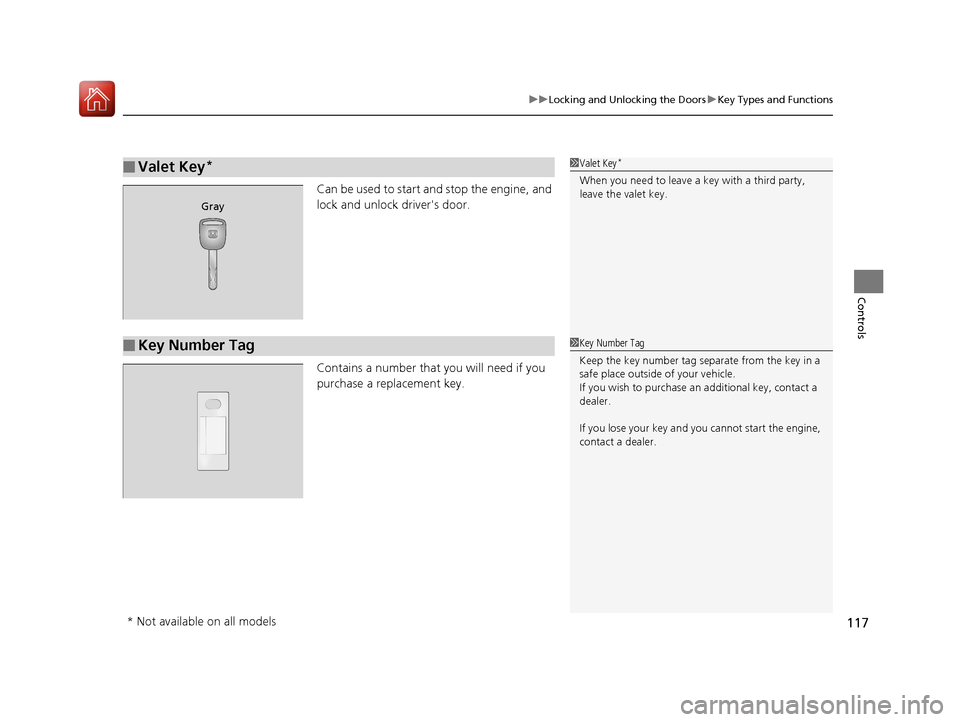
Can be used to start an d stop the engine, and
lock and unlock driver's door.
Contains a number that you will need if you
purchase a replacement key.
■Valet Key*1 Valet Key*
When you need to leave a key with a third party,
leave the valet key.
Gray
■Key Number Tag1Key Number Tag
Keep the key number tag separate from the key in a
safe place outside of your vehicle.
If you wish to purchase an additional key, contact a
dealer.
If you lose your key and you cannot start the engine,
contact a dealer.
* Not available on all models
17 ACCORD 4D GAS-31T2A6400.book 117 ページ 2016年6月7日 火曜日 午後5時6分