transmission HONDA ACCORD 2022 User Guide
[x] Cancel search | Manufacturer: HONDA, Model Year: 2022, Model line: ACCORD, Model: HONDA ACCORD 2022Pages: 657, PDF Size: 11.42 MB
Page 84 of 657
82
Instrument Panel
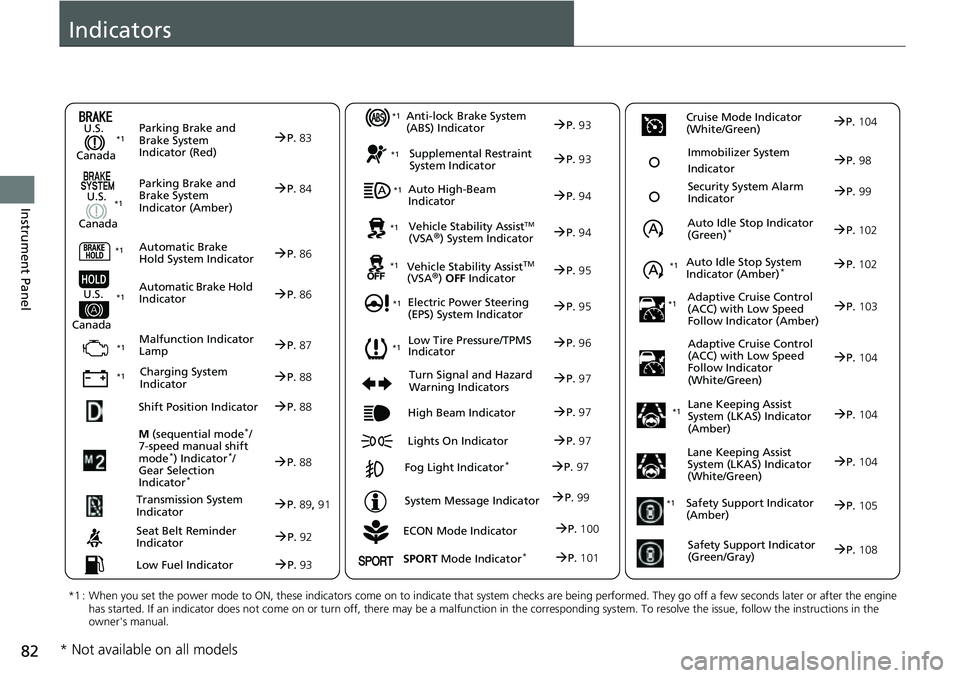
Indicators
ECON Mode Indicator
M
(sequential mode
*/
7-speed manual shift
mode
*) Indicator*/
Gear Selection
Indicator
*
P. 88
Parking Brake and
Brake System
Indicator (Red)
Parking Brake and
Brake System
Indicator (Amber)
U.S.
Canada
U.S.
Canada Automatic Brake
Hold System Indicator
Automatic Brake Hold
IndicatorU.S.
Canada
*1 : When you set the power mode to ON, these indicators come on to indicate that system checks are being performed. They go off a few seconds later or after the engine
has started. If an indicator does not come on or turn off, ther e may be a malfunction in the corresponding system. To resolve the issue, follow the instructions in the
owner's manual.
P. 83*1
Malfunction Indicator
Lamp
Charging System
Indicator
Anti-lock Brake System
(ABS) Indicator
Seat Belt Reminder
Indicator
Low Fuel Indicator
Vehicle Stability AssistTM (VSA®) System Indicator
Vehicle Stability Assist
TM (VSA®) OFF Indicator
Supplemental Restraint
System Indicator
Auto High-Beam
Indicator
Low Tire Pressure/TPMS
Indicator
Electric Power Steering
(EPS) System Indicator
Turn Signal and Hazard
Warning Indicators
Lights On Indicator High Beam Indicator
Fog Light Indicator*
System Message Indicator Auto Idle Stop Indicator
(Green)
*
Lane Keeping Assist
System (LKAS) Indicator
(Amber)
Safety Support Indicator
(Amber)
Safety Support Indicator
(Green/Gray)
P. 84
P.86
P.86
P.87
P.88
*1
*1 *1 *1
P.
96*1
*1
Shift Position IndicatorP. 88
Transmission System
Indic a
torP.89, 91
P.92
P.93
P.93
P.93
P.94
P.94
*1
*1
*1
*1
P. 95
*1P.95
P.97
P.102
*1
P.97
P.97
P.97 Security System Alarm
Indica
to
r P.99
P.99
P. 104
P.105
P.108
*1Auto Idle Stop System
Indicator (Amber)*P.102
*1
Lane Keeping Assist
System (LKAS) Indicator
(White/Green)P.104
*1
Immobilizer System
IndicatorP.98
SPORT Mode Indicator*P.101
P.100
Cruise Mode Indicator
(White/Green)P. 104
Adaptive Cruise Control
(A C
C) with Low Speed
Follow Indicator (Amber)P. 103*1
Adaptive Cruise Control
(ACC) with Low Speed
Follow Indicator
(White/Green)P.104
* Not available on all models
Page 91 of 657
89
uuIndicators u
Continued
Instrument Panel
IndicatorNameOn/BlinkingExplanationMessage
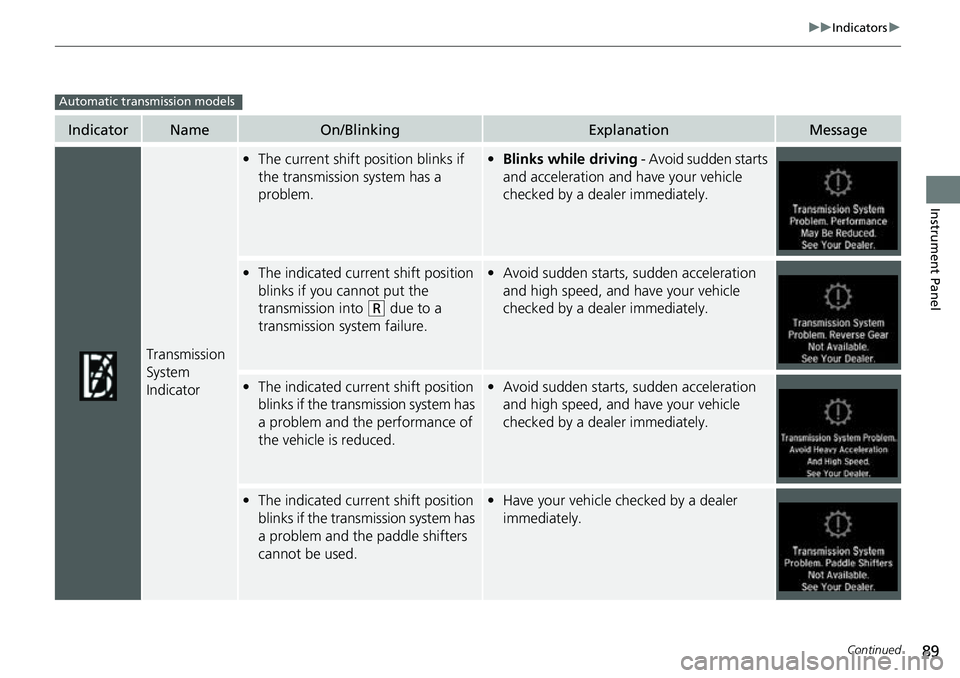
Transmission
System
Indicator
•The current shift position blinks if
the transmission system has a
problem.• Blinks while driving - Avoid sudden starts
and acceleration and have your vehicle
checked by a dealer immediately.
• The indicated current shift position
blinks if you cannot put the
transmission into
(R due to a
transmission system failure.
• Avoid sudden starts, sudden acceleration
and high speed, and have your vehicle
checked by a dealer immediately.
•The indicated current shift position
blinks if the trans mission system has
a problem and the performance of
the vehicle is reduced.• Avoid sudden starts, sudden acceleration
and high speed, and have your vehicle
checked by a dealer immediately.
•The indicated current shift position
blinks if the trans mission system has
a problem and the paddle shifters
cannot be used.• Have your vehicle checked by a dealer
immediately.
Automatic transmission models
Page 92 of 657
90
uuIndicators u
Instrument Panel
IndicatorNameOn/BlinkingExplanationMessage
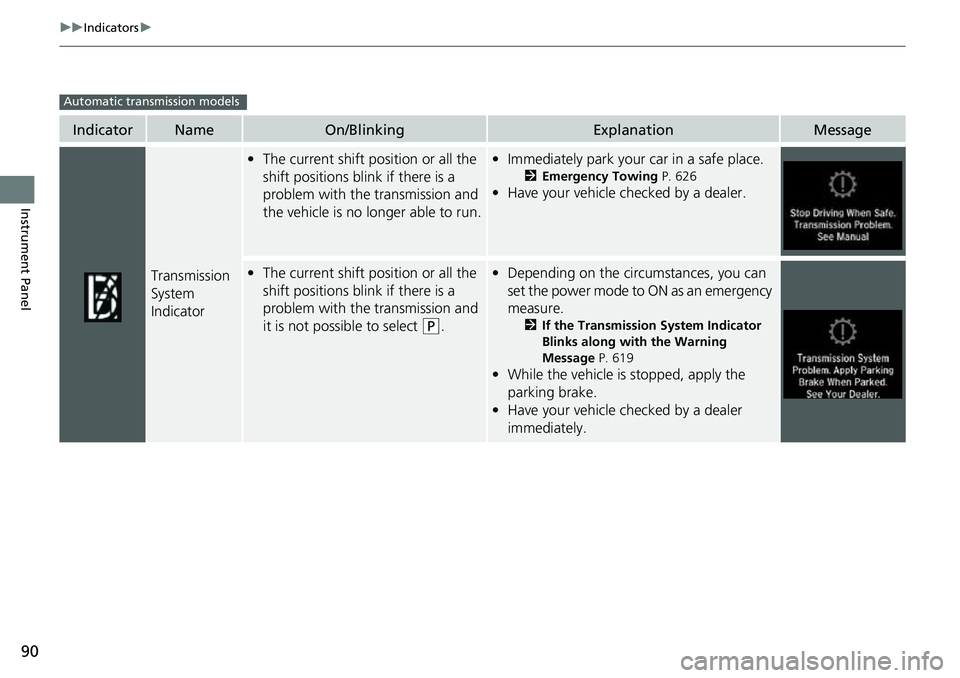
Transmission
System
Indicator
•The current shift position or all the
shift positions blink if there is a
problem with the transmission and
the vehicle is no longer able to run.•Immediately park your car in a safe place.
2 Emergency Towing P. 626
•Have your vehicle checked by a dealer.
•The current shift position or all the
shift positions blink if there is a
problem with the transmission and
it is not possible to select
(P.
•Depending on the circumstances, you can
set the power mode to ON as an emergency
measure.
2 If the Transmission System Indicator
Blinks along with the Warning
Message P. 619
•While the vehicle is stopped, apply the
parking brake.
• Have your vehicle checked by a dealer
immediately.
Automatic transmission models
Page 93 of 657
91
uuIndicators u
Continued
Instrument Panel
IndicatorNameOn/BlinkingExplanationMessage
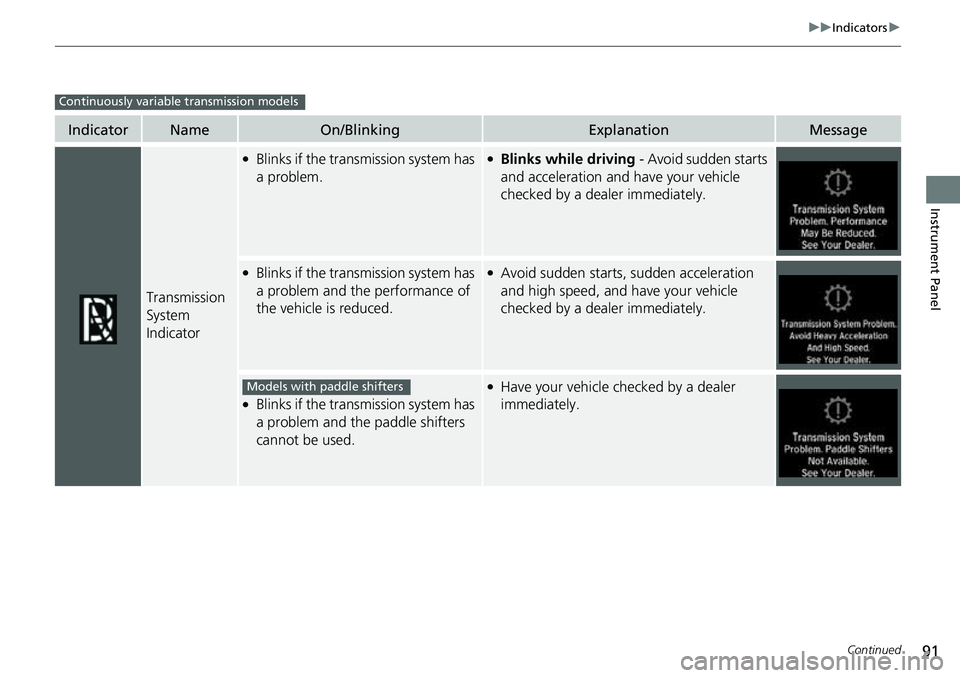
Transmission
System
Indicator
●Blinks if the transmission system has
a problem.●Blinks while driving - Avoid sudden starts
and acceleration and have your vehicle
checked by a dealer immediately.
●Blinks if the transmission system has
a problem and the performance of
the vehicle is reduced.●Avoid sudden starts, sudden acceleration
and high speed, and have your vehicle
checked by a dealer immediately.
●Blinks if the transmission system has
a problem and the paddle shifters
cannot be used.
●Have your vehicle checked by a dealer
immediately.
Continuously variable transmission models
Models with paddle shifters
Page 111 of 657
109
uuIndicators uDriver Information Interface Wa rning and Information Messages
Continued
Instrument Panel
Driver Information Interface Warning and Information Messages
The following messages appear only on the driver info rmation interface. Press the (home) button, select Warnings, then press the left
selector wheel to see the message agai n with the system message indicator on.
MessageConditionExplanation
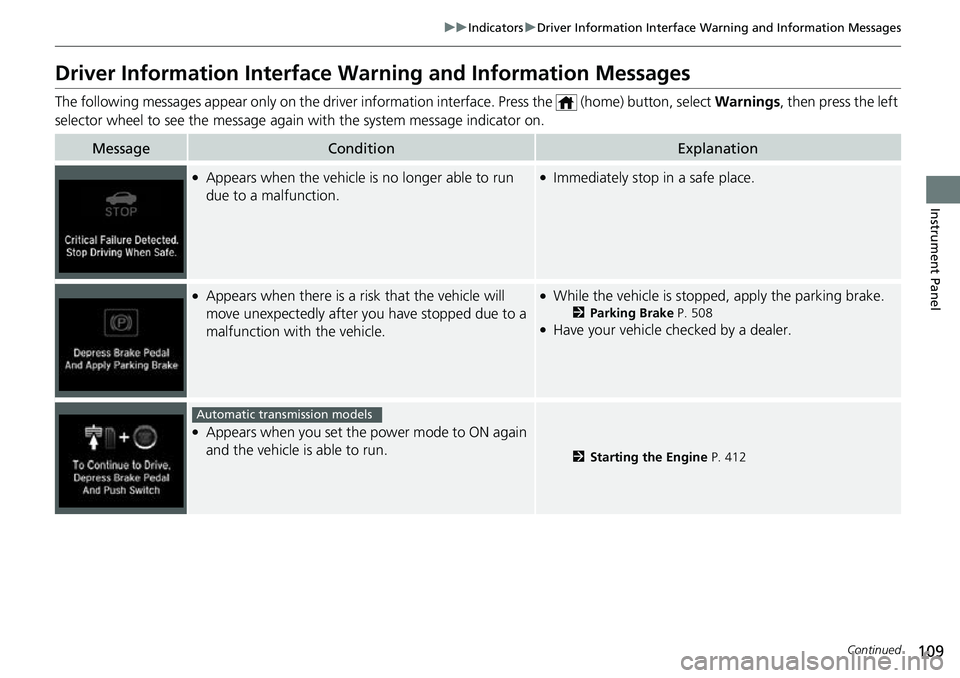
●Appears when the vehicle is no longer able to run
due to a malfunction.●Immediately stop in a safe place.
●Appears when there is a ri sk that the vehicle will
move unexpectedly after you have stopped due to a
malfunction with the vehicle.●While the vehicle is stopped, apply the parking brake.
2 Parking Brake P. 508●Have your vehicle checked by a dealer.
●Appears when you set the power mode to ON again
and the vehicle is able to run.
2Starting the Engine P. 412
Automatic transmission models
Page 116 of 657
114
uuIndicators uDriver Information Interface Wa rning and Information Messages
Instrument Panel
MessageConditionExplanation
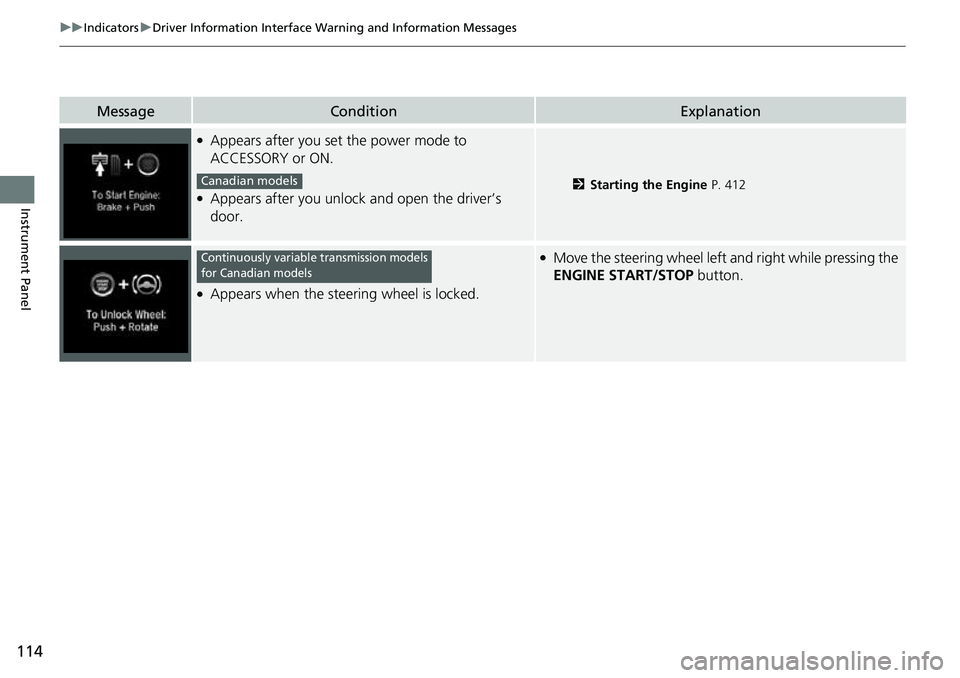
●Appears after you set the power mode to
ACCESSORY or ON.
●Appears after you unlock and open the driver’s
door.2Starting the Engine P. 412
●Appears when the steering wheel is locked.
●Move the steering wheel left and right while pressing the
ENGINE START/STOP button.
Canadian models
Continuously variable transmission models
for Canadian models
Page 120 of 657
118
uuIndicators uDriver Information Interface Wa rning and Information Messages
Instrument Panel
MessageConditionExplanation
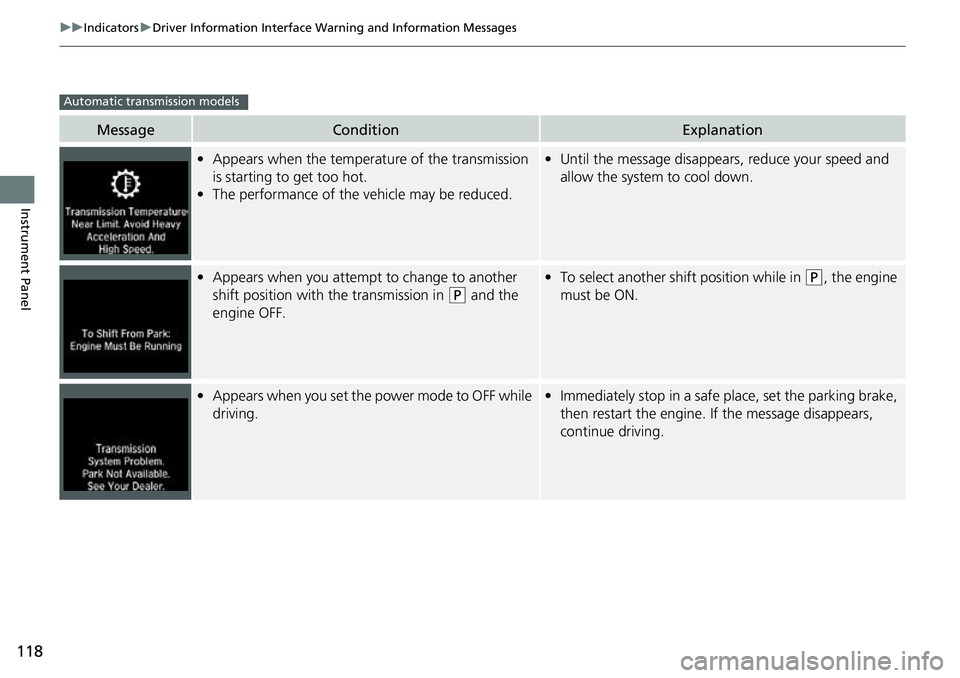
•Appears when the temperature of the transmission
is starting to get too hot.
• The performance of the vehicle may be reduced.•Until the message disappears, reduce your speed and
allow the system to cool down.
•Appears when you attempt to change to another
shift position with the transmission in
(P and the
engine OFF.
• To select another shift position while in (P, the engine
must be ON.
• Appears when you set the power mode to OFF while
driving.•Immediately stop in a safe place, set the parking brake,
then restart the engine. If the message disappears,
continue driving.
Automatic transmission models
Page 121 of 657
119
uuIndicators uDriver Information Interface Wa rning and Information Messages
Continued
Instrument Panel
MessageConditionExplanation
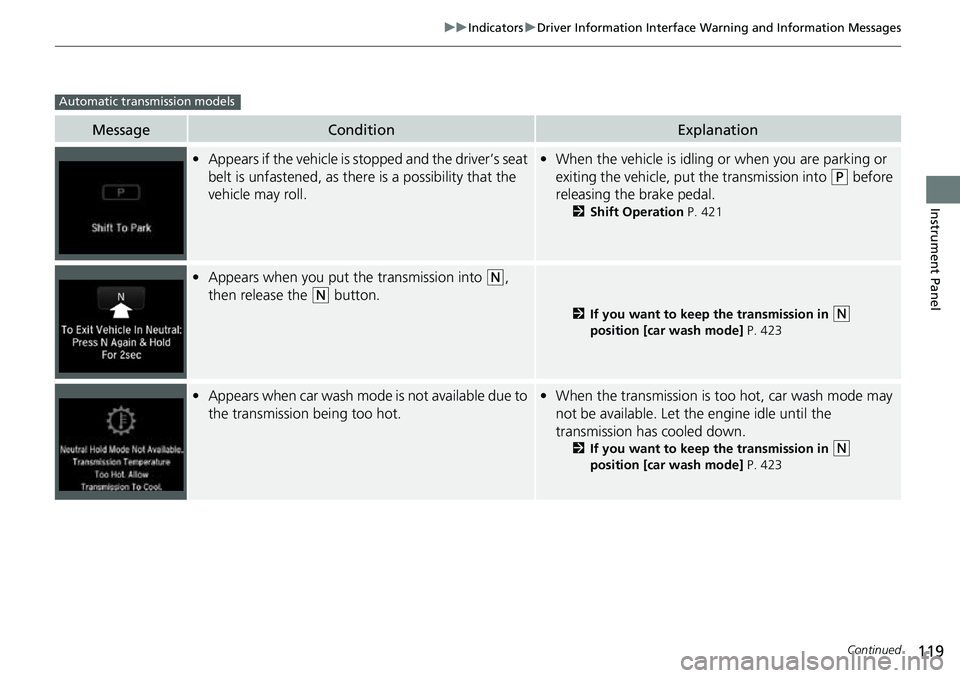
•Appears if the vehicle is st opped and the driver’s seat
belt is unfastened, as there is a possibility that the
vehicle may roll.• When the vehicle is idling or when you are parking or
exiting the vehicle, put the transmission into
(P before
releasing the brake pedal.
2 Shift Operation P. 421
•Appears when you put the transmission into (N,
then release the
(N button.
2 If you want to keep the transmission in (N
position [car wash mode] P. 423
•Appears when car wash mode is not available due to
the transmission being too hot.•When the transmission is too hot, car wash mode may
not be available. Let the engine idle until the
transmission has cooled down.
2 If you want to keep the transmission in (N
position [car wash mode] P. 423
Automatic transmission models
Page 122 of 657
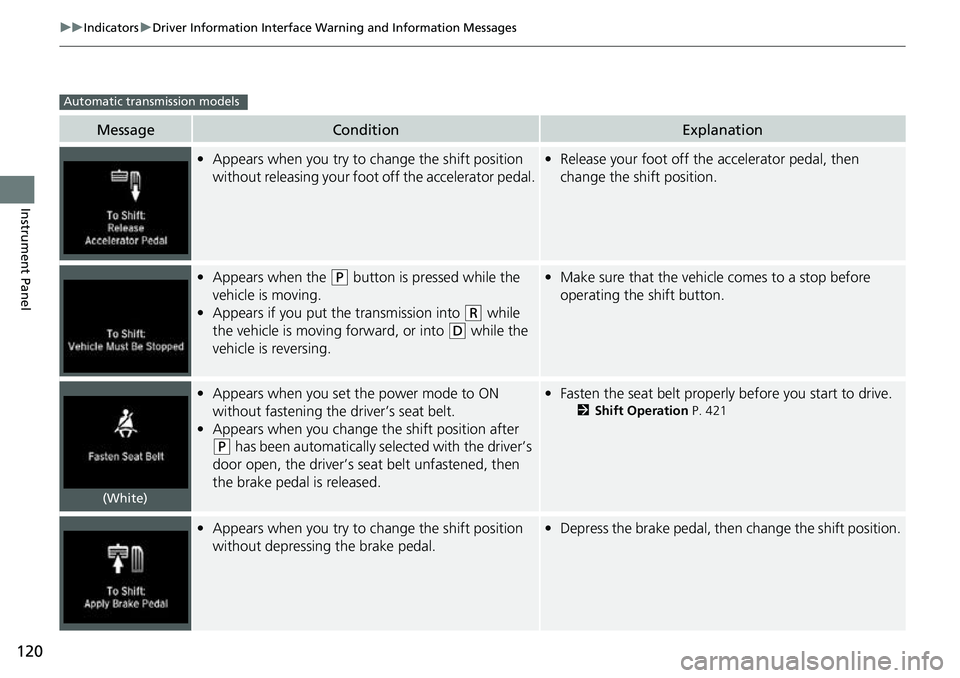
120
uuIndicators uDriver Information Interface Wa rning and Information Messages
Instrument Panel
MessageConditionExplanation
•Appears when you try to ch ange the shift position
without releasing your foot off the accelerator pedal.• Release your foot off the accelerator pedal, then
change the shift position.
• Appears when the (P button is pressed while the
vehicle is moving.
• Appears if you put the transmission into
(R while
the vehicle is moving forward, or into
(D while the
vehicle is reversing.
• Make sure that the vehicl e comes to a stop before
operating the shift button.
• Appears when you set the power mode to ON
without fastening the driver’s seat belt.
• Appears when you change the shift position after
(P has been automatically selected with the driver’s
door open, the driver’s se at belt unfastened, then
the brake pedal is released.
• Fasten the seat belt properly before you start to drive.
2 Shift Operation P. 421
•Appears when you try to ch ange the shift position
without depressing the brake pedal.• Depress the brake pedal, then change the shift position.
Automatic transmission models
(White)
Page 123 of 657

121
uuIndicators uDriver Information Interface Wa rning and Information Messages
Continued
Instrument Panel
MessageConditionExplanation
•Appears when you depress the accelerator pedal
while the transmission is in
(N.
•Remove your foot off the accelerator pedal. When
driving, depress the brake pedal and operate the shift
position.
●Appears when you repeatedly change the shift
position between
(P and other positions in short
period.
●Take some time before changing the shift position.
• Appears when you try to take the transmission out
of
(P immediately after you start engine.
•Try to take the transmission out of (P again.
• Appears when you press the (P button but it is not
engaged due to low ATF temperature.• Depress the brake pedal until this message disappear.
• Appears when you press and hold (N button for
more than two seconds.• Disappears when you set the shift position to a shift
other than
(N.
2 If you want to keep the transmission in (N
position [car wash mode] P. 423
Automatic transmission models