Refueling HONDA ACCORD 2022 Owners Manual
[x] Cancel search | Manufacturer: HONDA, Model Year: 2022, Model line: ACCORD, Model: HONDA ACCORD 2022Pages: 657, PDF Size: 11.42 MB
Page 6 of 657
Contents
This owner’s manual should be considered a permanent part of the
vehicle and should remain with the vehicle when it is sold.
The Navigation Manual is available online at owners.honda.com
(U.S.) or honda.ca (Canada). If you are the first registered owner
of your vehicle, you may request a complimentary printed
copy of the Navigation Manual within the first six months of
vehicle purchase.
To request a copy, visit owners.honda.com. In Canada, please
request a copy from your Honda dealer.
This owner’s manual covers all models of your vehicle. You may find
descriptions of equipment and features that are not on your
particular model.
Images throughout this owner’s ma nual (including the front cover)
represent features and equipment that are available on some, but
not all, models. Your particular mo del may not have some of these
features.
This owner’s manual is for vehicles sold in the United States and
Canada.
The information and specifications in cluded in this publication were
in effect at the time of approval for printing. Honda Motor Co., Ltd.
reserves the right, however, to discontinue or change specifications
or design at any time without notice and without incurring any
obligation.2 Safe Driving P. 33
For Safe Driving P. 34 Seat Belts P. 38 Airbags P. 46
2Instrument Panel P. 81
Indicators P. 82 Gauges and Displays P. 139
2Controls P. 165
Clock P. 166 Locking and Unlocking the Doors P. 167
Moonroof* P. 190
Seats P. 212
2 Features P. 245
Audio System P. 246 Audio System Basic Operation P. 253
Customized Features P. 351 HomeLink ® Universal Transceiver* P. 371
2 Driving P. 401
Before Driving P. 402 Towing a Trailer P. 407
Multi-View Rear Camera P. 529 Refueling P. 531
2Maintenance P. 537
Before Performing Maintenance P. 538 Maintenance MinderTM P. 541
Checking and Maintaining Wiper Blades P. 572
Climate Control System Maintenance P. 587
2Handling the Unexpected P. 595
Tools P. 596 If a Tire Goes Flat P. 597
Overheating P. 611 Indicator, Coming On/Blinking P. 613
If You Cannot Open the Trunk P. 628
2Information P. 631
Specifications P. 632 Identification Numbers P. 636
Emissions Testing P. 639 Warranty Coverages P. 641
Page 7 of 657
Contents
Child Safety P. 64Exhaust Gas Hazard P. 78Safety Labels P. 79
Opening and Closing the Trunk P. 181 Security System P. 184 Windows P. 187
Operating the Switches Around the Steering Wheel P. 191 Mirrors P. 210
Interior Convenience Items P. 223 Climate Control System P. 240
Audio Error Messages P. 327General Information on the Audio System P. 329
Bluetooth ® HandsFreeLink ® P. 374 Refuel Recommend P. 400
When Driving P. 412 Honda Sensing ® P. 453 Braking P. 508 Parki ng Your Vehicle P. 518
Fuel Economy and CO
2 Emissions P. 534 Turbo Engine Vehicle P. 535
Maintenance Under the Hood P. 548 Replacing Light Bulbs P. 564
Checking and Maintaining Tires P. 575 Battery P. 584 Remote Transmitter Care P. 586
Cleaning P. 588 Accessories and Modifications P. 593
Engine Does Not Start P. 603 If the Battery Is Dead P. 606 Shift Lever Does Not Move P. 609
Fuses P. 620 Emergency Towing P. 626 If You Cannot Unlock the Fuel Fill Door P. 627
Refueling P. 630
Devices that Emit Radio Waves P. 637 Reporting Safety Defects P. 638
Authorized Manuals P. 644 Customer Service Information P. 645
Quick Reference GuideP. 6
Safe DrivingP. 33
Instrument PanelP. 81
ControlsP. 165
FeaturesP. 245
DrivingP. 401
MaintenanceP. 537
Handling the UnexpectedP. 595
InformationP. 631
IndexP. 646
Page 27 of 657
25
Quick Reference Guide
VSA® On and Off (P 442)
●The Vehicle Stability AssistTM (VSA® )
system helps stabilize the vehicle during
cornering and helps maintain traction
while accelerating on loose or slippery
road surfaces.
●VSA ® comes on automatically every time
you start the engine.
●To partially disable or fully restore VSA®
function, press and ho ld the button until
you hear a beep.
CMBSTM On and Off
(P 459)
●When a possible frontal collision is likely
unavoidable, the CMBSTM can help you to
reduce the vehicle speed and the severity
of the collision.
●The CMBSTM is turned on every time you
start the engine.
●To turn the CMBSTM on or off, use the
safety support switch.
Tire Pressure Monitoring
System (TPMS)
(P 444)
●Detects a change in tire conditions and
overall dimensions due to decrease in tire
pressures.
●The TPMS is turned on automatically
every time you start the engine.
●A calibration procedure must be
performed when certain conditions arise.
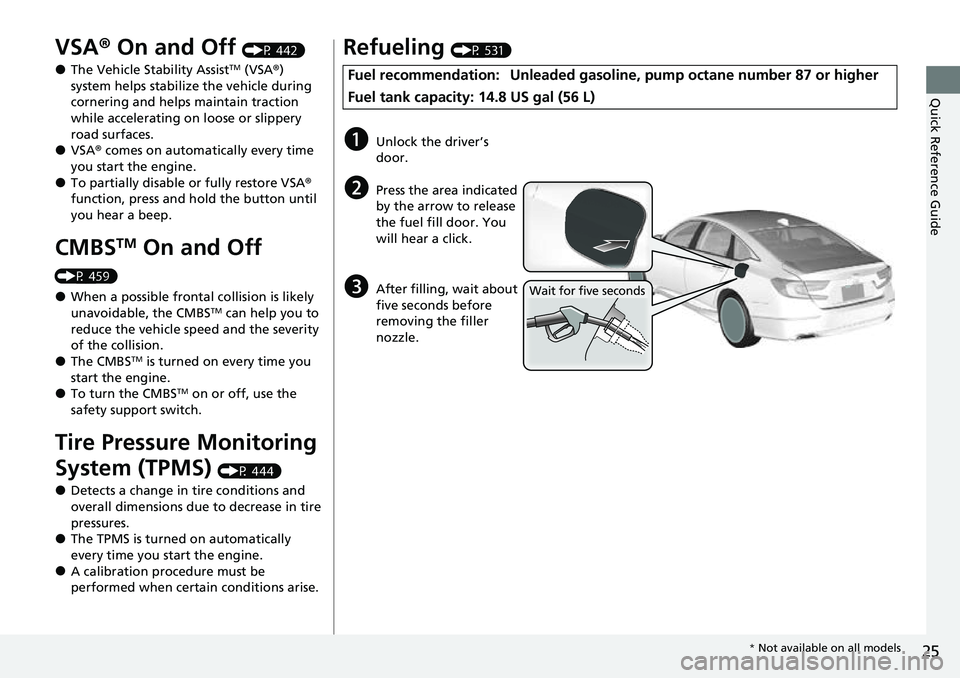
Refueling (P 531)
Fuel recommendation: Unlead ed gasoline, pump octane number 87 or higher
Fuel tank capacity: 14.8 US gal (56 L)
aUnlock the driver’s
door.
bPress the area indicated
by the arrow to release
the fuel fill door. You
will hear a click.
cAfter filling, wait about
five seconds before
removing the filler
nozzle.Wait for five seconds
* Not available on all models
Page 402 of 657
400
Features
Refuel Recommend
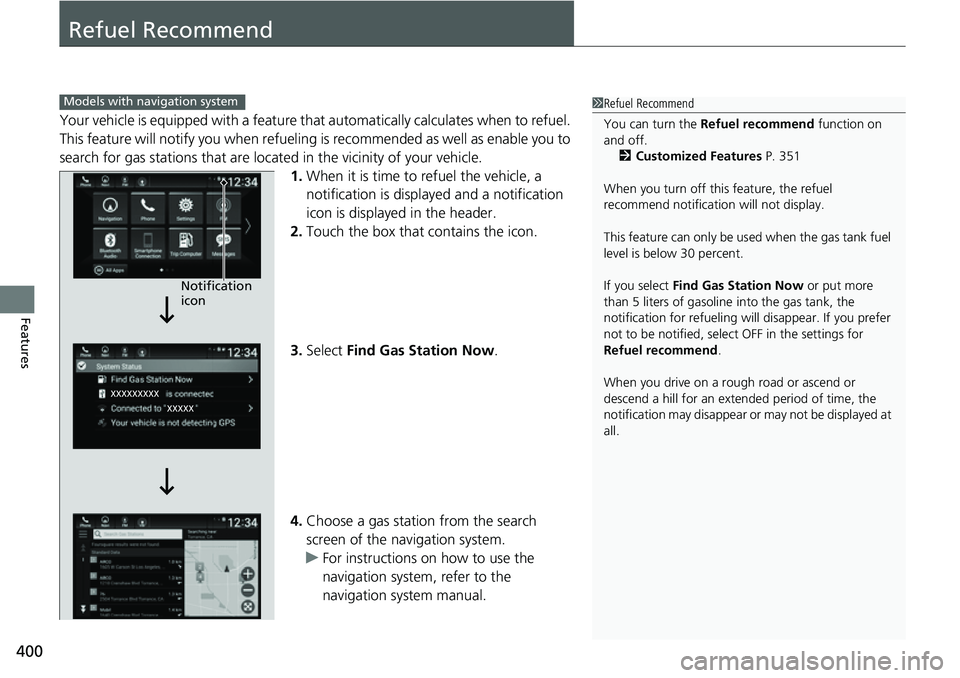
Your vehicle is equipped with a feature that automatically calculates when to refuel.
This feature will notify you when refueling is recommended as well as enable you to
search for gas stations that are loca ted in the vicinity of your vehicle.
1. When it is time to refuel the vehicle, a
notification is displayed and a notification
icon is displayed in the header.
2. Touch the box that contains the icon.
3. Select Find Gas Station Now .
4. Choose a gas station from the search
screen of the navigation system.
u For instructions on how to use the
navigation system, refer to the
navigation system manual.
1Refuel Recommend
You can turn the Refuel recommend function on
and off.
2 Customized Features P. 351
When you turn off this feature, the refuel
recommend notification will not display.
This feature can only be us ed when the gas tank fuel
level is below 30 percent.
If you select Find Gas Station Now or put more
than 5 liters of gasoline into the gas tank, the
notification for refueling will disappear. If you prefer
not to be notified, select OFF in the settings for
Refuel recommend .
When you drive on a rough road or ascend or
descend a hill for an ex tended period of time, the
notification may disappear or may not be displayed at
all.Models with navigation system
Notification
icon
Page 403 of 657
401
Driving
This chapter discusses driving and refueling.
Before Driving................................... 402
Towing a Trailer ................................ 407
When Driving Starting the Engine .......................... 412
Precautions While Driving................. 418
Transmission .................................... 419
Shifting ............................ 420, 427, 429
SPORT Mode
*.................................. 433
ECON Mode .................................... 434
Auto Idle Stop
*................................ 435
Adaptive Damper System*............... 440Vehicle Stability AssistTM (VSA ®), aka Electronic
Stability Control (ESC), System ..............441
Agile Handling Assist ..............................443
Tire Pressure Monitoring System (TPMS) .... 444Tire Pressure Monitoring System (TPMS) - Required Federal Explanation ......... 448
Blind spot information System
*........... 450
Honda Sensing ®................................ 453
Collision Mitigati on Braking System
TM
(CMBSTM) ....................................... 456
Low Speed Braking Control*............ 465
Adaptive Cruise Control (ACC) with Low
Speed Follow ................................. 470
Lane Keeping Assist System (LKAS).... 486
Road Departure Mitigation (RDM) System ....................................... 494
Traffic Sign Recognition System ....... 498 Front Sensor Camera ....................... 504
Radar Sensor ................................... 506
Sonar Sensors
*................................ 507
Braking
Brake System ................................... 508
Anti-lock Brake System (ABS) ........... 516
Brake Assist System ......................... 517
Parking Your Vehicle ........................ 518
Multi-View Rear Camera .................. 529
Refueling ........................................... 531
Fuel Economy and CO
2 Emissions .... 534
Turbo Engine Vehicle ....................... 535
* Not available on all models
Page 533 of 657
531
Driving
Refueling
Fuel Information
■Fuel recommendation
Use of a lower octane gasoline can cause a persistent, heavy metallic knocking noise
that can lead to engine damage.
■Top tier detergent gasoline
Because the level of detergency and additive s in gasoline vary in the market, Honda
endorses the use of “TOP TIER Detergent Gasoline” where available to help
maintain the performance and reliability of your vehicle. TOP TIER Detergent
Gasoline meets a new gasoline standard jointly established by leading automotive
manufacturers to meet the needs of today’s advanced engines.
Qualifying gasoline retailers will, in most cases, identify their gasoline as having met
“TOP TIER Detergent Gasoline” standards at the retail location. This fuel is
guaranteed to contain the proper level of de tergent additives and be free of metallic
additives. The proper level of detergent additives, and absence of harmful metallic
additives in gasoline, help avoid buildup of deposits in your engine and emission
control system.
For further important fuel-related informati on for your vehicle, or on information on
gasoline that does not contain MMT, visit www.hondacars.com. In Canada, visit
www.honda.ca for additional information on gaso line. For more information on top
tier gasoline, visit www.toptiergas.com .
■Fuel tank capacity: 14.8 US gal (56 L)
Unleaded gasoline, pump octane number 87 or higher
1Fuel Information
NOTICE
We recommend quality ga soline containing
detergent additives that help prevent fuel system and
engine deposits. In addition, in order to maintain
good performance, fuel economy, and emissions
control, we strongly reco mmend the use of gasoline
that does NOT contain harmful manganese-based
fuel additives such as MMT, if such gasoline is
available.
Use of gasoline with these additives may adversely
affect performance, a nd cause the malfunction
indicator lamp on your inst rument panel to come on.
If this happens, contact a dealer for service.
Some gasoline today is blended with oxygenates such
as ethanol. Your vehicle is designed to operate on
oxygenated gasoline containing up to 15% ethanol
by volume. Do not use ga soline containing methanol.
If you notice any undesira ble operating symptoms, try
another service station or sw itch to another brand of
gasoline.
Page 534 of 657
532
uuRefueling uHow to Refuel
Driving
How to Refuel
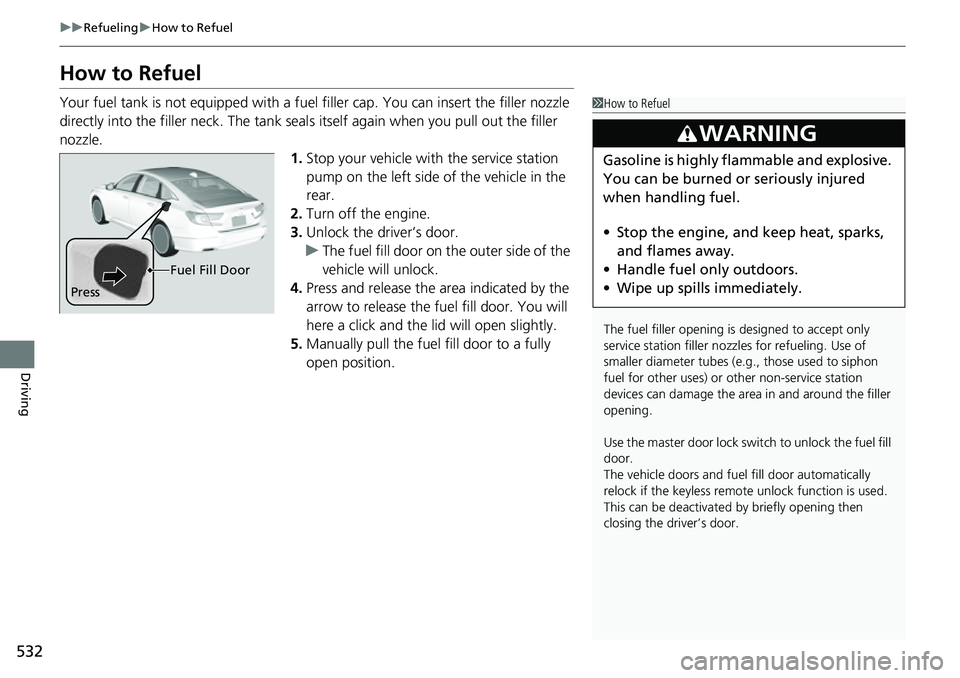
Your fuel tank is not equipped with a fuel filler cap. You can insert the filler nozzle
directly into the filler neck. The tank seal s itself again when you pull out the filler
nozzle.
1.Stop your vehicle with the service station
pump on the left side of the vehicle in the
rear.
2. Turn off the engine.
3. Unlock the driver’s door.
u The fuel fill door on the outer side of the
vehicle will unlock.
4. Press and release the area indicated by the
arrow to release the fu el fill door. You will
here a click and the lid will open slightly.
5. Manually pull the fuel fill door to a fully
open position.1How to Refuel
The fuel filler opening is designed to accept only
service station filler nozzles for refueling. Use of
smaller diamet er tubes (e.g., those used to siphon
fuel for other uses) or other non-service station
devices can damage the area in and around the filler
opening.
Use the master door lock switch to unlock the fuel fill
door.
The vehicle doors and fuel fill door automatically
relock if the keyless remo te unlock function is used.
This can be deactivated by briefly opening then
closing the driver’s door.
3WARNING
Gasoline is highly flammable and explosive.
You can be burned or seriously injured
when handling fuel.
• Stop the engine, and keep heat, sparks,
and flames away.
• Handle fuel only outdoors.
• Wipe up spills immediately.
Press Fuel Fill Door
Page 535 of 657
533
uuRefueling uHow to Refuel
Driving
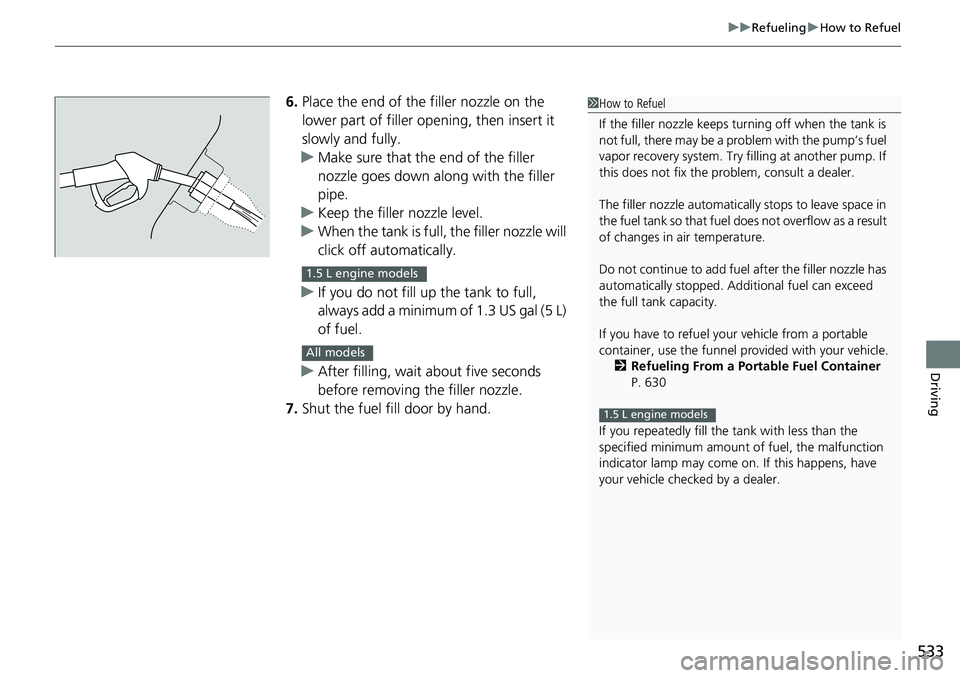
6. Place the end of the filler nozzle on the
lower part of filler opening, then insert it
slowly and fully.
u Make sure that the end of the filler
nozzle goes down along with the filler
pipe.
u Keep the filler nozzle level.
u When the tank is full, the filler nozzle will
click off automatically.
u If you do not fill up the tank to full,
always add a minimum of 1.3 US gal (5 L)
of fuel.
u After filling, wait about five seconds
before removing the filler nozzle.
7. Shut the fuel fill door by hand.1How to Refuel
If the filler nozzle keeps tu rning off when the tank is
not full, there may be a pr oblem with the pump’s fuel
vapor recovery system. Try fi lling at another pump. If
this does not fix the problem, consult a dealer.
The filler nozzle automatically stops to leave space in
the fuel tank so that fuel does not overflow as a result
of changes in air temperature.
Do not continue to add fuel after the filler nozzle has
automatically stopped. Addi tional fuel can exceed
the full tank capacity.
If you have to refuel y our vehicle from a portable
container, use the funnel pr ovided with your vehicle.
2 Refueling From a Portable Fuel Container
P. 630
If you repeatedly fill the tank with less than the
specified minimum amount of fuel, the malfunction
indicator lamp may come on. If this happens, have
your vehicle checked by a dealer.
1.5 L engine models
1.5 L engine models
All models
Page 540 of 657
538
Maintenance
Before Performing Maintenance
Inspection and Maintenance
For your safety, perform all listed inspections and maintenance to keep your vehicle
in good condition. If you become aware of an y abnormality (noise, smell, insufficient
brake fluid, oil residue on the ground, etc.), have your vehicle inspected by a dealer.
(Note, however, that service at a dealer is not mandatory to keep your warranties in
effect.)
■Routine inspections
Perform inspections before long distance tri ps, when washing the vehicle, or when
refueling.
2 Maintenance P. 28
■Periodic inspections
• Check the brake fluid level monthly.
2 Brake Fluid P. 562
•Check the tire pressure monthly. Examin e the tread for wear and foreign objects.
2Checking and Maintaining Tires P. 575
•Check the operation of the exterior lights monthly.
2 Replacing Light Bulbs P. 564
•Check the condition of the wiper bl ades at least every six months.
2Checking and Maintaining Wiper Blades P. 572
■Types of Inspection and Maintenance
1Inspection and Maintenance
Maintenance, replacement, or repair of
emissions control devices and systems may be
done by any automotive repair establishment or
individuals using parts that are “certified” to
EPA standards.
According to state and fede ral regulations, failure to
perform maintenance on the maintenance main
items marked with # will not void your emissions
warranties. However, all ma intenance services should
be performed in accordan ce with the intervals
indicated by the driver information interface.
2 Maintenance Service Items P. 545
If you want to perform complex maintenance tasks
that require more skills a nd tools, you can purchase a
subscription to the Service Express website at
www.techinfo.honda.com .
2 Authorized Manuals P. 644
If you want to perform ma intenance yourself, make
sure that you have the necessary tools and skills first.
After performing maintenanc e, update the records in
the separate maintenance booklet.
U.S. models
Page 597 of 657
595
Handling the Unexpected
This chapter explains how to handle unexpected troubles.
ToolsTypes of Tools .................................. 596
If a Tire Goes Flat
Changing a Flat Tire ......................... 597
Engine Does Not Start Checking the Engine ........................ 603
If the Keyless Remote Battery is Weak ....604Emergency Engine Stop ................... 605
If the Battery Is Dead ....................... 606
Shift Lever Does Not Move .............. 609
Overheating How to Handle Overheating ............. 611 Indicator, Coming On/Blinking
If the Low Oil Pressure Warning Appears ... 613If the Charging System Indicator Comes
On ................................................. 613
If the Malfunction Indicator Lamp Comes On or Blinks ................................... 614
If the Brake System Indicator (Red) Comes
On or Blinks ................................... 615
If the Brake System Indicator (Red) Comes On
or Blinks at the Same Time When the Brake
System Indicator (Amber) Comes On.... 616
If the Electric Power Steering (EPS) System Indicator Comes On ....................... 617 If the Low Tire Pressure/TPMS Indicator
Comes On or Blinks ....................... 618
If the Transmission System Indicator Blinks along with the Warning Message... 619
Fuses Fuse Locations ................................. 620
Inspecting and Changing Fuses ........ 625
Emergency Towing ........................... 626
If You Cannot Unlock the Fuel Fill Door....627
If You Cannot Open the Trunk ........... 628
Refueling ........................................... 630