tow HONDA ACCORD 2022 Owners Manual
[x] Cancel search | Manufacturer: HONDA, Model Year: 2022, Model line: ACCORD, Model: HONDA ACCORD 2022Pages: 657, PDF Size: 11.42 MB
Page 6 of 657
Contents
This owner’s manual should be considered a permanent part of the
vehicle and should remain with the vehicle when it is sold.
The Navigation Manual is available online at owners.honda.com
(U.S.) or honda.ca (Canada). If you are the first registered owner
of your vehicle, you may request a complimentary printed
copy of the Navigation Manual within the first six months of
vehicle purchase.
To request a copy, visit owners.honda.com. In Canada, please
request a copy from your Honda dealer.
This owner’s manual covers all models of your vehicle. You may find
descriptions of equipment and features that are not on your
particular model.
Images throughout this owner’s ma nual (including the front cover)
represent features and equipment that are available on some, but
not all, models. Your particular mo del may not have some of these
features.
This owner’s manual is for vehicles sold in the United States and
Canada.
The information and specifications in cluded in this publication were
in effect at the time of approval for printing. Honda Motor Co., Ltd.
reserves the right, however, to discontinue or change specifications
or design at any time without notice and without incurring any
obligation.2 Safe Driving P. 33
For Safe Driving P. 34 Seat Belts P. 38 Airbags P. 46
2Instrument Panel P. 81
Indicators P. 82 Gauges and Displays P. 139
2Controls P. 165
Clock P. 166 Locking and Unlocking the Doors P. 167
Moonroof* P. 190
Seats P. 212
2 Features P. 245
Audio System P. 246 Audio System Basic Operation P. 253
Customized Features P. 351 HomeLink ® Universal Transceiver* P. 371
2 Driving P. 401
Before Driving P. 402 Towing a Trailer P. 407
Multi-View Rear Camera P. 529 Refueling P. 531
2Maintenance P. 537
Before Performing Maintenance P. 538 Maintenance MinderTM P. 541
Checking and Maintaining Wiper Blades P. 572
Climate Control System Maintenance P. 587
2Handling the Unexpected P. 595
Tools P. 596 If a Tire Goes Flat P. 597
Overheating P. 611 Indicator, Coming On/Blinking P. 613
If You Cannot Open the Trunk P. 628
2Information P. 631
Specifications P. 632 Identification Numbers P. 636
Emissions Testing P. 639 Warranty Coverages P. 641
Page 7 of 657
Contents
Child Safety P. 64Exhaust Gas Hazard P. 78Safety Labels P. 79
Opening and Closing the Trunk P. 181 Security System P. 184 Windows P. 187
Operating the Switches Around the Steering Wheel P. 191 Mirrors P. 210
Interior Convenience Items P. 223 Climate Control System P. 240
Audio Error Messages P. 327General Information on the Audio System P. 329
Bluetooth ® HandsFreeLink ® P. 374 Refuel Recommend P. 400
When Driving P. 412 Honda Sensing ® P. 453 Braking P. 508 Parki ng Your Vehicle P. 518
Fuel Economy and CO
2 Emissions P. 534 Turbo Engine Vehicle P. 535
Maintenance Under the Hood P. 548 Replacing Light Bulbs P. 564
Checking and Maintaining Tires P. 575 Battery P. 584 Remote Transmitter Care P. 586
Cleaning P. 588 Accessories and Modifications P. 593
Engine Does Not Start P. 603 If the Battery Is Dead P. 606 Shift Lever Does Not Move P. 609
Fuses P. 620 Emergency Towing P. 626 If You Cannot Unlock the Fuel Fill Door P. 627
Refueling P. 630
Devices that Emit Radio Waves P. 637 Reporting Safety Defects P. 638
Authorized Manuals P. 644 Customer Service Information P. 645
Quick Reference GuideP. 6
Safe DrivingP. 33
Instrument PanelP. 81
ControlsP. 165
FeaturesP. 245
DrivingP. 401
MaintenanceP. 537
Handling the UnexpectedP. 595
InformationP. 631
IndexP. 646
Page 18 of 657
16
Quick Reference Guide
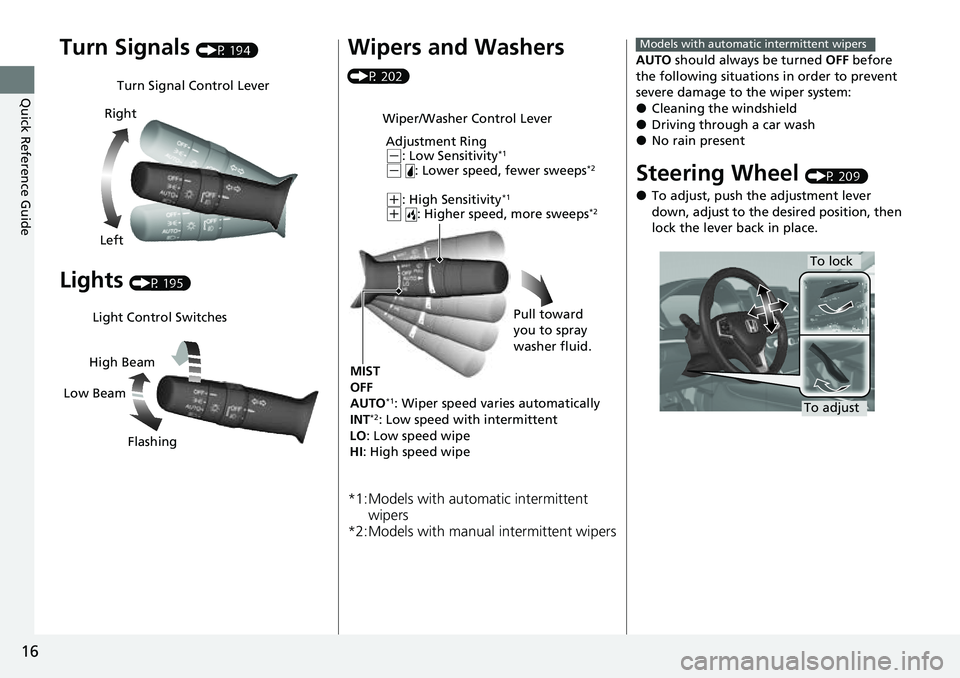
Turn Signals (P 194)
Lights (P 195)
Turn Signal Control Lever
Right
Left
Light Control Switches
Low Beam High Beam
Flashing
Wipers and Washers
(P 202)
*1:Models with automatic intermittent wipers
*2:Models with manual intermittent wipers
Wiper/Washer Control Lever
Adjustment Ring
(-: Low Sensitivity*1
(- : Lower speed, fewer sweeps*2
(+: High Sensitivity*1
(+ : Higher speed, more sweeps*2
MIST
OFF
AUTO
*1: Wiper speed varies automatically
INT*2: Low speed with intermittent
LO : Low speed wipe
HI : High speed wipe Pull toward
you to spray
washer fluid.
AUTO
should always be turned OFF before
the following situations in order to prevent
severe damage to the wiper system:
●Cleaning the windshield●Driving through a car wash●No rain present
Steering Wheel (P 209)
●To adjust, push the adjustment lever
down, adjust to the desired position, then
lock the lever back in place.
Models with automatic intermittent wipers
To lock
To adjust
Page 31 of 657
Quick Reference Guide
29
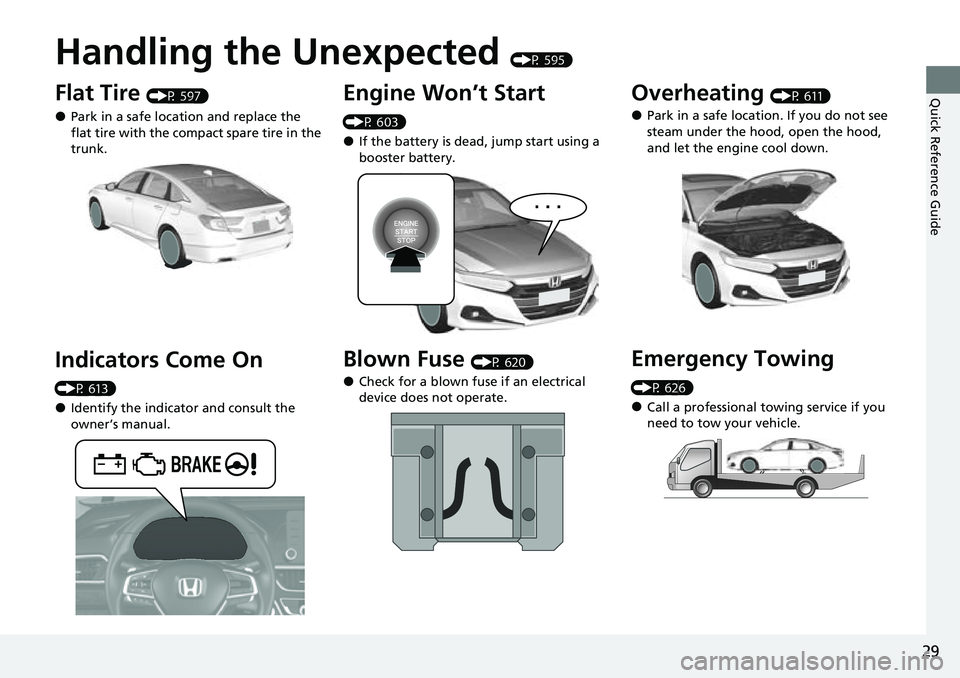
Handling the Unexpected (P 595)
Flat Tire (P 597)
●Park in a safe location and replace the
flat tire with the compact spare tire in the
trunk.
Indicators Come On
(P 613)
●Identify the indicator and consult the
owner’s manual.
Engine Won’t Start
(P 603)
●If the battery is dead, jump start using a
booster battery.
Blown Fuse (P 620)
●Check for a blown fuse if an electrical
device does not operate.
Overheating (P 611)
●Park in a safe location. If you do not see
steam under the hood, open the hood,
and let the engine cool down.
Emergency Towing
(P 626)
●Call a professional towing service if you
need to tow your vehicle.
Page 45 of 657
Continued43
uuSeat Belts uFastening a Seat Belt
Safe Driving
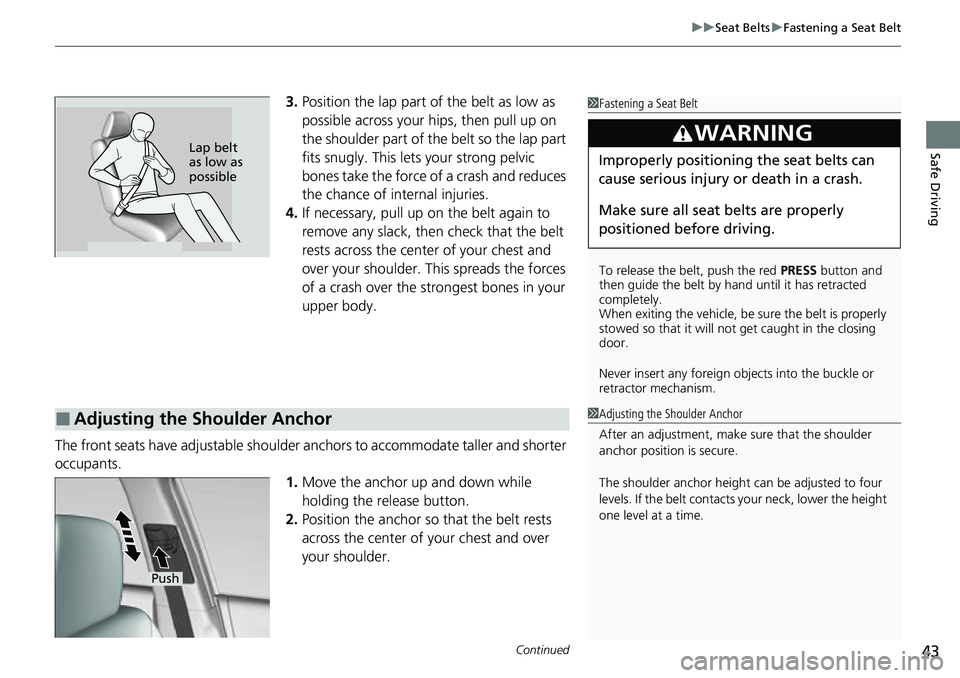
3. Position the lap part of the belt as low as
possible across your hips, then pull up on
the shoulder part of the belt so the lap part
fits snugly. This lets your strong pelvic
bones take the force of a crash and reduces
the chance of internal injuries.
4. If necessary, pull up on the belt again to
remove any slack, then check that the belt
rests across the center of your chest and
over your shoulder. This spreads the forces
of a crash over the strongest bones in your
upper body.
The front seats have adjustab le shoulder anchors to accommodate taller and shorter
occupants.
1.Move the anchor up and down while
holding the release button.
2. Position the anchor so that the belt rests
across the center of your chest and over
your shoulder.1 Fastening a Seat Belt
To release the belt, push the red PRESS button and
then guide the belt by hand until it has retracted
completely.
When exiting the vehicle, be sure the belt is properly
stowed so that it will not get caught in the closing
door.
Never insert any foreign obj ects into the buckle or
retractor mechanism.
3WARNING
Improperly positioning the seat belts can
cause serious injury or death in a crash.
Make sure all seat belts are properly
positioned be fore driving.Lap belt
as low as
possible
■Adjusting the Shoulder Anchor1Adjusting the Shoulder Anchor
After an adjustment, make sure that the shoulder
anchor position is secure.
The shoulder anchor height can be adjusted to four
levels. If the belt contacts your neck, lower the height
one level at a time.
Push
Page 53 of 657
51
uuAirbags uFront Airbags (SRS)
Continued
Safe Driving
■When front airbags should not deploy
Minor frontal crashes: Front airbags were designed to supplement seat belts and
help save lives, not to prevent minor scra pes, or even broken bones that might occur
during a less than moderate-to-severe frontal crash.
Side impacts: Front airbags can provide protection when a sudden deceleration
causes a driver or front passenger to move toward the front of the vehicle. Side
airbags and side curtain airbags have been specifically designed to help reduce the
severity of injuries that can occur during a moderate-to-severe side impact which
can cause the driver or passenger to move toward the side of the vehicle.
Rear impacts: Head restraints and seat belts ar e your best protection during a rear
impact. Front airbags cannot provide any significant protection and are not designed
to deploy in such collisions.
Rollovers: In a rollover, your best form of protection is a seat belt or, if your vehicle
is equipped with a rollover sensor, both a seat belt and a side curtain airbag. Front
airbags, however, are not designed to depl oy in a rollover as they would provide
little if any protection.
■When front airbags deploy with little or no visible damage
Because the airbag system senses sudden deceleration, a strong impact to the
vehicle framework or suspension might caus e one or more of the airbags to deploy.
Examples include running into a curb, the edge of a hole, or other low fixed object
that causes a sudden deceleration in th e vehicle chassis. Since the impact is
underneath the vehicle, damage may not be readily apparent.
■When front airbags may not depl oy, even though exterior damage
appears severe
Since crushable body parts absorb crash energy during an impact, the amount of
visible damage does not always indicate proper airbag operation. In fact, some
collisions can result in severe damage but no airbag deployment because the airbags
would not have been needed or would not have provided protection even if they
had deployed.
Page 60 of 657
58
uuAirbags uSide Airbags
Safe Driving
■When a side airbag deploys with little or no visible damage
Because the airbag system senses sudden acceleration, a strong impact to the side
of the vehicle’s framework can cause a side airbag to deploy. In such cases, there
may be little or no damage, but the side impact sensors detected a severe enough
impact to deploy the airbag.
■When a side airbag may not deploy, even though visible damage appears
severe
It is possible for a side airbag not to deploy during an impact that results in
apparently severe damage. This can occur when the point of impact was toward the
far front or rear of the vehicle, or when the vehicle’s crushable body parts absorbed
most of the crash energy. In either case , the side airbag would not have been
needed nor provided protection even if it had deployed.
Page 92 of 657
90
uuIndicators u
Instrument Panel
IndicatorNameOn/BlinkingExplanationMessage
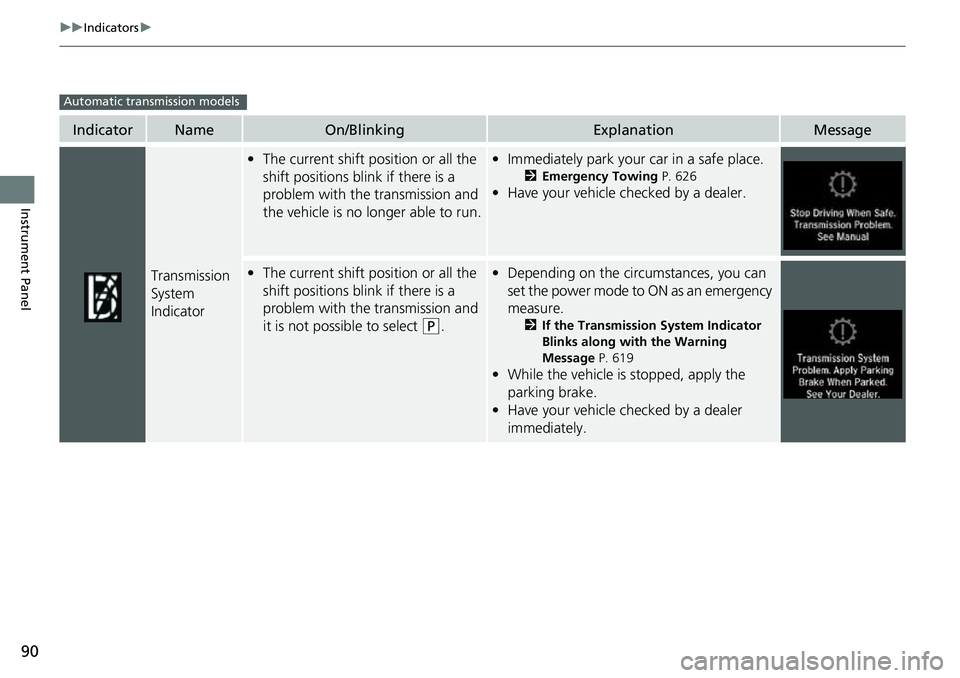
Transmission
System
Indicator
•The current shift position or all the
shift positions blink if there is a
problem with the transmission and
the vehicle is no longer able to run.•Immediately park your car in a safe place.
2 Emergency Towing P. 626
•Have your vehicle checked by a dealer.
•The current shift position or all the
shift positions blink if there is a
problem with the transmission and
it is not possible to select
(P.
•Depending on the circumstances, you can
set the power mode to ON as an emergency
measure.
2 If the Transmission System Indicator
Blinks along with the Warning
Message P. 619
•While the vehicle is stopped, apply the
parking brake.
• Have your vehicle checked by a dealer
immediately.
Automatic transmission models
Page 201 of 657
199
uuOperating the Switches Around the Steering Wheel uAuto High-Beam
Continued
Controls
Auto High-Beam
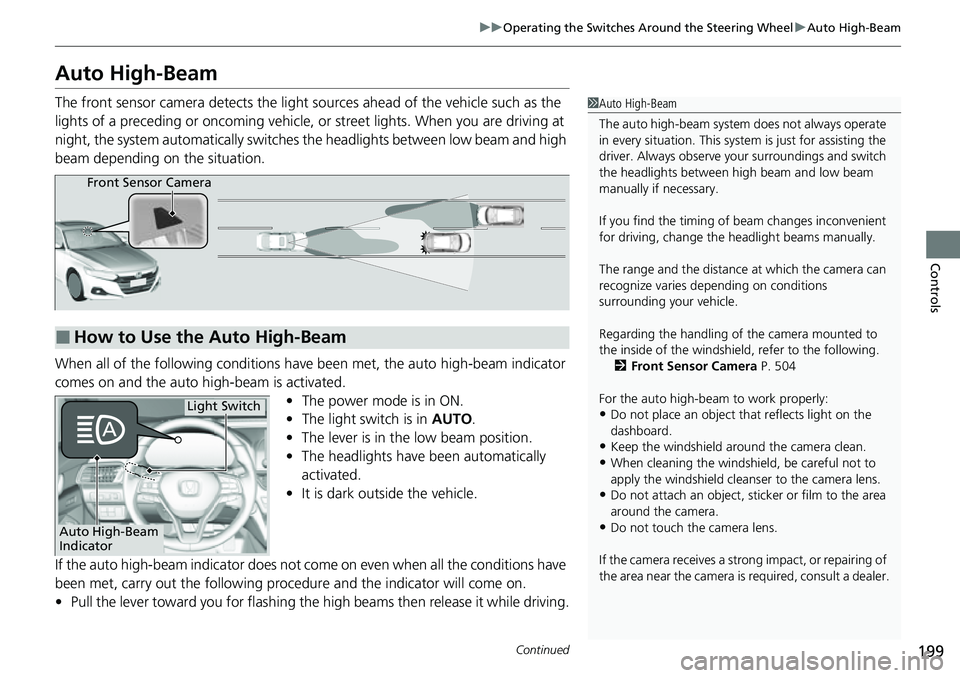
The front sensor camera detects the light sources ahead of the vehicle such as the
lights of a preceding or oncoming vehicle, or street lights. When you are driving at
night, the system automatically switches the headlights between low beam and high
beam depending on the situation.
When all of the following conditions have been met, the auto high-beam indicator
comes on and the auto high-beam is activated. •The power mode is in ON.
• The light switch is in AUTO.
• The lever is in the low beam position.
• The headlights have been automatically
activated.
• It is dark outside the vehicle.
If the auto high-beam indica tor does not come on even when all the conditions have
been met, carry out the following procedure and the indicator will come on.
• Pull the lever toward you for flashing the high beams then release it while driving.1Auto High-Beam
The auto high-beam system does not always operate
in every situation. This syst em is just for assisting the
driver. Always observe your surroundings and switch
the headlights between high beam and low beam
manually if necessary.
If you find the timing of beam changes inconvenient
for driving, change the headlight beams manually.
The range and the distance at which the camera can
recognize varies de pending on conditions
surrounding your vehicle.
Regarding the handling of the camera mounted to
the inside of the windshiel d, refer to the following.
2 Front Sensor Camera P. 504
For the auto high-beam to work properly:
•Do not place an object that reflects light on the
dashboard.
•Keep the windshield around the camera clean.
•When cleaning the windshield, be careful not to
apply the windshield cleans er to the camera lens.
•Do not attach an object, sticker or film to the area
around the camera.
•Do not touch the camera lens.
If the camera receives a st rong impact, or repairing of
the area near the camera is required, consult a dealer.
■How to Use the Auto High-Beam
Front Sensor Camera
Auto High-Beam
Indicator
Light Switch
Page 202 of 657
uuOperating the Switches Around the Steering Wheel uAuto High-Beam
200
Controls
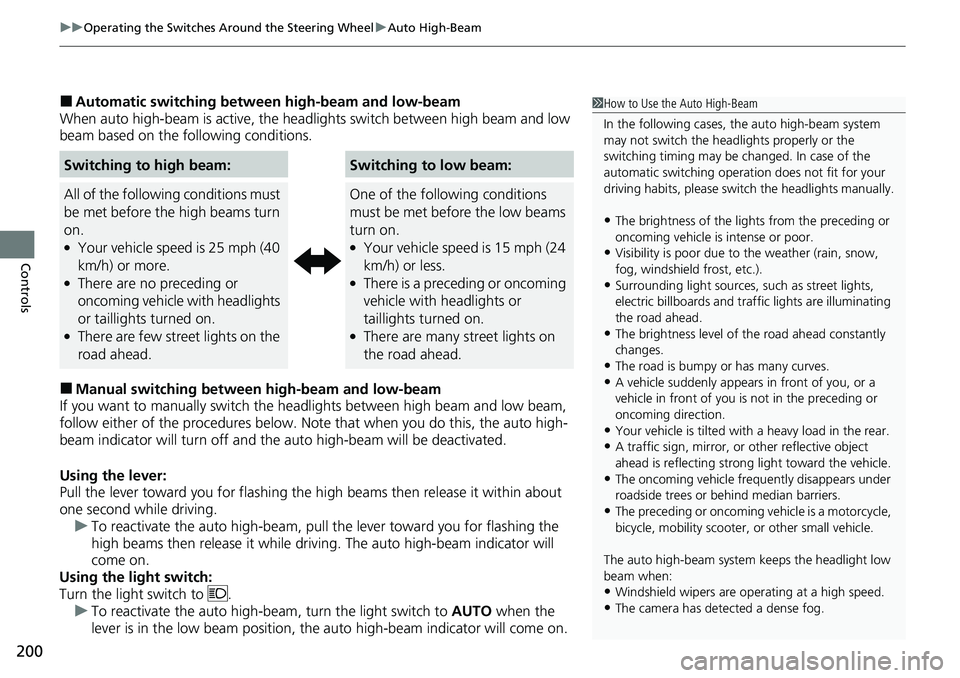
■Automatic switching between high-beam and low-beam
When auto high-beam is ac tive, the headlights switch between high beam and low
beam based on the following conditions.
■Manual switching between high-beam and low-beam
If you want to manually switch the headlights between high beam and low beam,
follow either of the proced ures below. Note that when you do this, the auto high-
beam indicator will turn off and the auto high-beam will be deactivated.
Using the lever:
Pull the lever toward you fo r flashing the high beams then release it within about
one second while driving. u To reactivate the auto high-beam, pull the lever toward you for flashing the
high beams then release it while driving. The auto high-beam indicator will
come on.
Using the light switch:
Turn the light switch to . u To reactivate the auto high-be am, turn the light switch to AUTO when the
lever is in the low beam position, the auto high-beam indicator will come on.
Switching to high beam:Switching to low beam:
All of the following conditions must
be met before the high beams turn
on.
●Your vehicle speed is 25 mph (40
km/h) or more.
●There are no preceding or
oncoming vehicle with headlights
or taillights turned on.
●There are few street lights on the
road ahead.
One of the following conditions
must be met before the low beams
turn on.
●Your vehicle speed is 15 mph (24
km/h) or less.
●There is a preceding or oncoming
vehicle with headlights or
taillights turned on.
●There are many street lights on
the road ahead.
1 How to Use the Auto High-Beam
In the following cases, th e auto high-beam system
may not switch the head lights properly or the
switching timing may be ch anged. In case of the
automatic switching operati on does not fit for your
driving habits, please swit ch the headlights manually.
•The brightness of the lights from the preceding or
oncoming vehicle is intense or poor.
•Visibility is poor due to the weather (rain, snow,
fog, windshield frost, etc.).
•Surrounding light sources, such as street lights,
electric billboards and traf fic lights are illuminating
the road ahead.
•The brightness level of th e road ahead constantly
changes.
•The road is bumpy or has many curves.•A vehicle suddenly appears in front of you, or a
vehicle in front of you is not in the preceding or
oncoming direction.
•Your vehicle is tilted with a heavy load in the rear.•A traffic sign, mirror, or other reflective object
ahead is reflecting strong light toward the vehicle.
•The oncoming vehicle freq uently disappears under
roadside trees or be hind median barriers.
•The preceding or oncoming vehicle is a motorcycle,
bicycle, mobility scooter, or other small vehicle.
The auto high-beam system keeps the headlight low
beam when:
•Windshield wipers are op erating at a high speed.
•The camera has detected a dense fog.