display HONDA ACCORD COUPE 2000 CF / 6.G User Guide
[x] Cancel search | Manufacturer: HONDA, Model Year: 2000, Model line: ACCORD COUPE, Model: HONDA ACCORD COUPE 2000 CF / 6.GPages: 338, PDF Size: 4.82 MB
Page 137 of 338
Audi
o Syste m
T o operat e th e C D change r o r player ,
th e ignitio n mus t b e in ACCESSOR Y
(I ) o r O N (II ) an d th e audi o syste m
mus t b e on .
Pres s th e C D butto n unti l "CD "
appear s i n th e display . Th e syste m
wil l star t t o pla y th e firs t trac k o f th e
firs t dis c i n th e magazine . Pla y onl y
standar d roun d discs .
Whe n tha t dis c ends , th e nex t dis c i n
th e magazin e is loade d an d played .
Afte r th e las t dis c finishes , th e
syste m return s t o dis c 1 .
T o selec t a differen t disc , pres s th e
appropriat e prese t butto n (1 — 6). I f
yo u selec t a n empt y slo t i n th e
magazine , th e change r will , afte r
findin g tha t slo t empty , tr y t o loa d
th e C D in th e nex t slot . Thi s
continue s unti l i t find s a C D to loa d
an d play . Yo
u ca n us e th e SKI P switc h to
selec t track s withi n a disc . I f yo u
pus h an d releas e th e SKI P switch ,
th e syste m wil l mov e t o th e
beginnin g o f a track . Pus h th e switc h
u p t o mov e t o th e beginnin g o f th e
nex t track , an d pus h th e switc h
dow n to mov e to th e beginnin g o f
th e curren t track .
I f yo u pus h an d hol d th e SKI P switch ,
yo u wil l hea r a bee p an d th e syste m
wil l continu e t o mov e acros s tracks .
Releas e th e switc h whe n yo u thin k i t
ha s reache d th e desire d plac e o n th e
disc .
REPEA
T — Whe n yo u activat e th e
Repea t featur e b y pressin g th e RP T
button , th e syste m continuousl y
replay s th e curren t track . Yo u wil l
se e RP T in th e displa y a s a reminder .
Pres s th e RP T butto n agai n to tur n it
off .
RANDO M PLA Y — Thi s feature ,
whe n activated , play s th e track s o n a
C D in rando m order , rathe r tha n in
th e orde r the y ar e recorde d o n th e
CD . T o activat e Rando m Play , pres s
an d hol d th e RP T butto n unti l yo u
se e RD M in th e display . Th e syste m
wil l the n selec t an d pla y track s
randoml y o n th e curren t disc . Whe n
al l track s o n tha t dis c hav e bee n
played , th e nex t dis c is loaded and
playe d randomly . Thi s continue s
unti l yo u deactivat e Rando m Pla y b y
pressin g RP T again .
Comfor t an d Convenienc e Feature s
Page 138 of 338

Audi
o Syste m
I f th e syste m is i n Repea t mode , yo u
mus t tur n it of f b y pressing RPT
befor e yo u ca n selec t Rando m Play .
The n pres s th e butto n agai n unti l
yo u se e RD M displayed .
T o tak e th e syste m ou t o f C D mode ,
pres s th e AM/F M butto n o r inser t a
cassett e in th e player . I f a tap e is
alread y in th e cassett e player , pres s
th e TAP E button . Whe n yo u retur n
t o C D mode , pla y wil l continu e a t th e
sam e dis c an d track .
I f yo u tur n th e syste m of f whil e a C D
i s playing , eithe r wit h th e PWR/VO L
kno b o r th e ignitio n switch , pla y wil l
continu e a t th e sam e dis c an d trac k
whe n yo u tur n it bac k on .
Protectin g Compac t Disc s
Fo r informatio n o n ho w to handl e
an d protec t compac t discs , se e pag e
148 .
Comfort an d Convenienc e Feature s
AM/F
M BUTTO N
TAPE/C D BUTTO N RANDO
M INDICATO R
REPEA T INDICATO R
PRESE T BUTTON S
SKI P SWITC H
RP T BUTTO N
PWR/VO L KNO B
Page 141 of 338
Audi
o Syste m
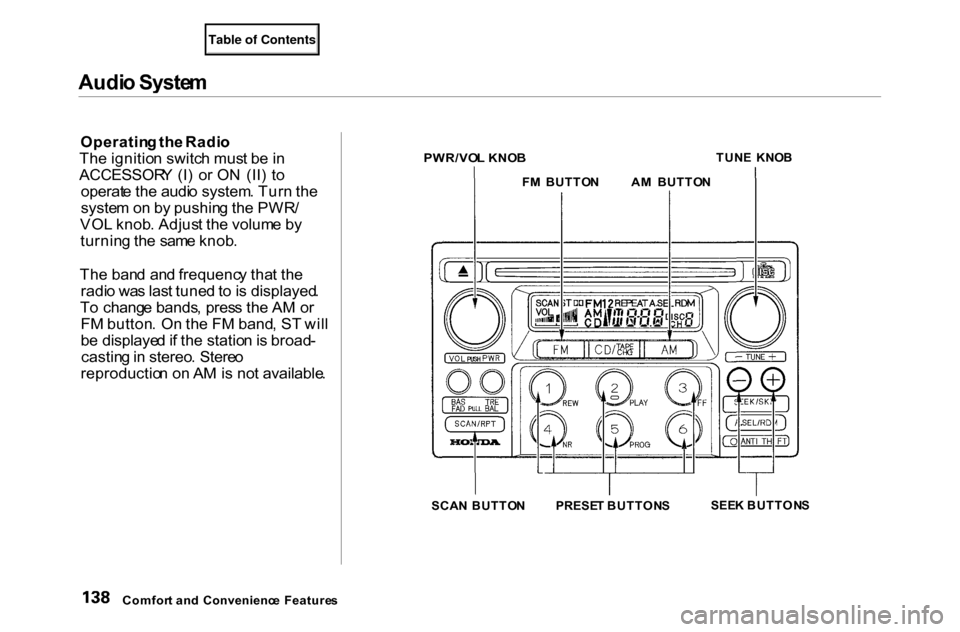
Operatin g th e Radi o
Th e ignitio n switc h mus t b e in
ACCESSOR Y (I ) o r O N (II ) t o
operat e th e audi o system . Tur n th e
syste m o n b y pushin g th e PWR /
VO L knob . Adjus t th e volum e b y
turnin g th e sam e knob .
Th e ban d an d frequenc y tha t th e
radi o wa s las t tune d to is displayed .
T o chang e bands , pres s th e A M o r
F M button . O n th e F M band , S T wil l
b e displaye d if th e statio n is broad -
castin g in stereo . Stere o
reproductio n o n A M is no t available .
SEEK BUTTON S
Comfor t an d Convenienc e Feature s SCA
N BUTTO NPRESE T BUTTON S
A
M BUTTO N
F M BUTTO N
PWR/VO
L KNO B
TUN
E KNO B
Page 143 of 338
Audi
o Syste m
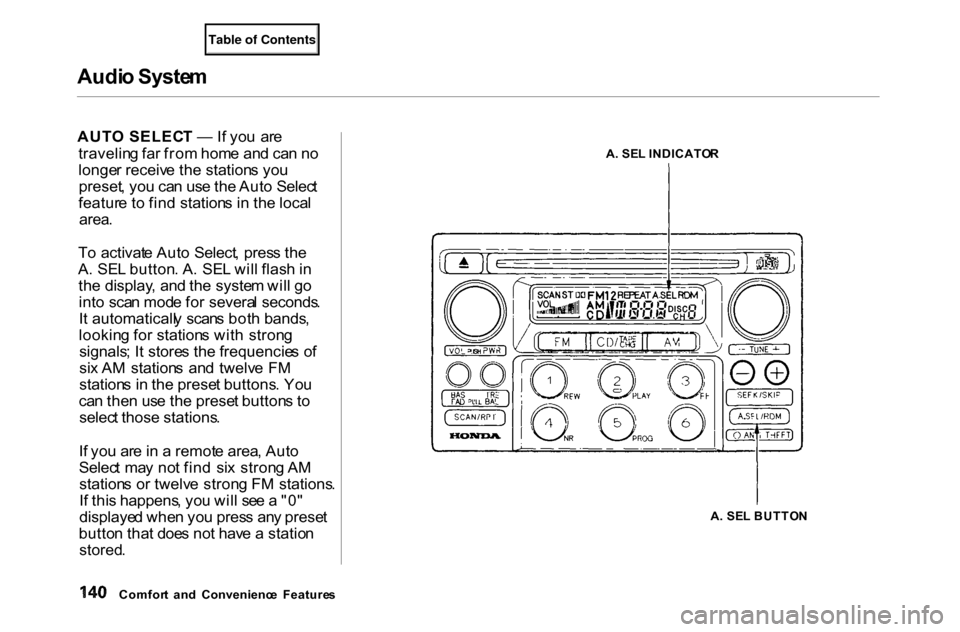
AUT O SELEC T — If yo u ar e
travelin g fa r fro m hom e an d ca n n o
longe r receiv e th e station s yo u
preset , yo u ca n us e th e Aut o Selec t
featur e t o fin d station s i n th e loca l
area .
T o activat e Aut o Select , pres s th e
A . SE L button . A . SE L wil l flas h in
th e display , an d th e syste m wil l g o
int o sca n mod e fo r severa l seconds .
I t automaticall y scan s bot h bands ,
lookin g fo r station s wit h stron g
signals ; I t store s th e frequencie s o f
si x A M station s an d twelv e F M
station s i n th e prese t buttons . Yo u
ca n the n us e th e prese t button s t o
selec t those stations .
I f yo u ar e in a remot e area , Aut o
Selec t ma y no t fin d si x stron g A M
station s o r twelv e stron g F M stations .
I f thi s happens , yo u wil l se e a "0 "
displaye d whe n yo u pres s an y prese t
butto n tha t doe s no t hav e a statio n
stored .
Comfor t an d Convenienc e Feature s A
. SE L INDICATO R
A . SE L BUTTO N
Page 148 of 338
Audi
o Syste m
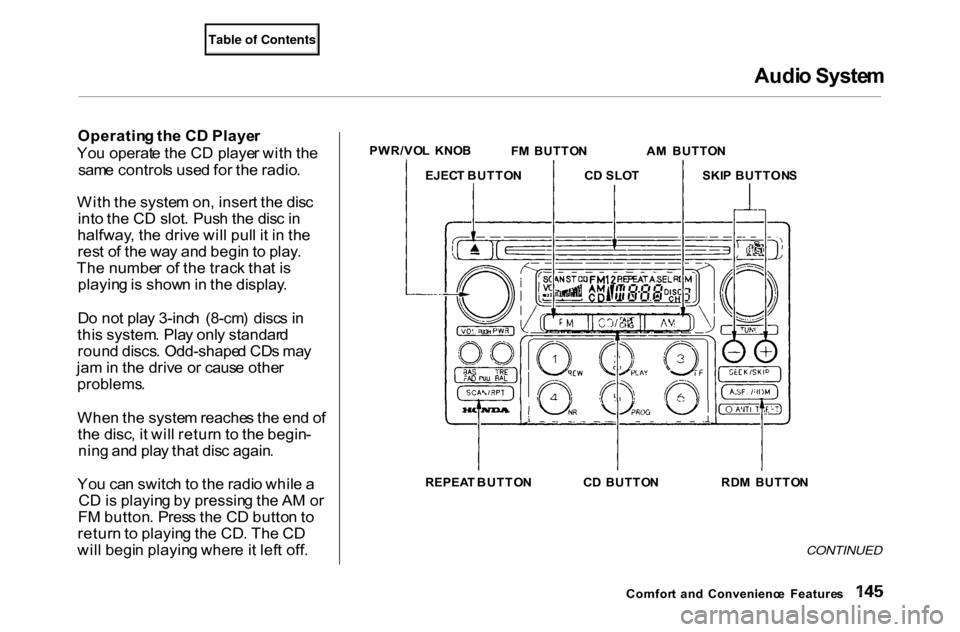
Operatin g th e C D Playe r
Yo u operat e th e C D playe r wit h th e
sam e control s use d fo r th e radio .
Wit h th e syste m on , inser t th e dis c
int o th e C D slot . Pus h th e dis c in
halfway , th e driv e wil l pul l i t i n th e
res t o f th e wa y an d begi n to play .
Th e numbe r o f th e trac k tha t i s
playin g is show n in th e display .
D o no t pla y 3-inc h (8-cm ) disc s i n
thi s system . Pla y onl y standar d
roun d discs . Odd-shape d CD s ma y
ja m in th e driv e o r caus e othe r
problems .
Whe n th e syste m reache s th e en d o f
th e disc , i t wil l retur n t o th e begin -
nin g an d pla y tha t dis c again .
Yo u ca n switc h to th e radi o whil e a
C D is playin g b y pressin g th e A M o r
F M button . Pres s th e C D butto n to
retur n to playin g th e CD . Th e C D
wil l begi n playin g wher e it lef t off .
CONTINUED
Comfor t an d Convenienc e Feature s
PWR/VO
L KNO B
FM BUTTO N AM BUTTO N
EJEC T BUTTO N CD SLO T SKIP BUTTON S
REPEA T BUTTO N CD BUTTO N RDM BUTTO N
Page 149 of 338
Audi
o Syste m
I f yo u tur n th e syste m of f whil e a C D
i s playing , eithe r wit h th e PWR/VO L
kno b o r b y turnin g of f th e ignition ,
th e dis c wil l sta y in th e drive . Whe n
yo u tur n th e syste m bac k on , th e C D
wil l begi n playin g wher e i t lef t off .
Pres s th e ejec t butto n to remov e th e
dis c fro m th e drive .
I f yo u ejec t th e disc , bu t d o no t
remov e it fro m th e slot , th e syste m
wil l automaticall y reloa d th e dis c
afte r 1 5 second s an d pu t th e C D
playe r i n paus e mode . T o begi n
playin g th e disc , pres s th e C D button .Yo
u ca n us e th e SKI P button s whil e
a dis c is playin g to selec t passage s
an d chang e tracks .
T o mov e rapidl y withi n a track , pres s
an d hol d a n appropriat e SKI P button .
Pres
s th e
butto n to mov e forward , o
r th e butto n to mov e backward .
Releas e th e butto n whe n th e syste m
reache s th e poin t yo u want . Eac
h tim e yo u pres s th e butto n
an d releas e it , th e syste m skip s
forwar d to th e beginnin g o f th e nex t track
. Pres s an d releas e th e
butto n to ski p backwar d to th e
beginnin g o f th e curren t track . Pres s
an d releas e it agai n to ski p to th e
beginnin g o f th e previou s track . REPEA
T — To activat e th e Repea t
feature , pres s an d releas e th e Repea t
button . Yo u wil l se e REPEA T in th e
display . Th e syste m continuousl y
replay s th e curren t track . Pres s th e
Repea t butto n agai n t o tur n it off .
RANDO M PLA Y — Thi s feature ,
whe n activated , play s th e track s o n
th e C D in rando m order , rathe r tha n
i n th e orde r the y ar e recorde d o n th e
CD . T o activat e Rando m Play , pres s
th e RD M button . Yo u wil l se e RD M
i n th e display . Th e syste m wil l the n
selec t an d pla y track s randomly .
Thi s continue s unti l yo u deactivat e
Rando m Pla y b y pressin g th e RD M
butto n again .
Comfor t an d Convenienc e Feature s
Page 150 of 338
Audi
o Syste m
Operatin g th e C D Change r
(Optional )
A Compac t Dis c change r i s availabl e
fo r you r car . I t hold s u p to si x discs ,
providin g severa l hour s o f
continuou s entertainment . Yo u
operat e thi s C D change r wit h th e
sam e control s use d fo r th e in-das h
C D player .
Loa d th e desire d CD s in th e
magazin e an d loa d th e magazin e in
th e change r accordin g to th e
instruction s tha t cam e wit h th e unit .
Pla y onl y standar d roun d discs . Odd -
shape d CD s ma y ja m in th e driv e o r
caus e othe r problems .
T o selec t th e C D changer , pres s th e
C D button . Th e dis c an d trac k
number s wil l b e displayed .
T
o selec t a differen t disc , pres s th e
appropriat e prese t butto n (1 — 6). I f
yo u selec t a n empt y slo t i n th e
magazine , th e change r will , afte r
findin g tha t slo t empty , tr y t o loa d
th e C D in th e nex t slot . Thi s
continue s unti l i t find s a C D to loa d
an d play .
I f yo u loa d a C D in th e in-das h playe r
whil e th e change r i s playin g a CD ,
th e syste m wil l sto p th e change r an d
begi n playin g th e in-das h CD . T o
selec t th e change r again , pres s th e
C D button . Pla y wil l begi n wher e it
lef t off . Us e th e C D butto n to switc h
betwee n th e playe r an d th e changer .
I f yo u ejec t th e in-das h C D whil e it i s
playing , th e syste m wil l automaticall y
switc h to th e C D change r an d begi n
pla y wher e it lef t off . I f ther e ar e n o
CD s in th e changer , th e displa y wil l
flash . Yo u wil l hav e to selec t anothe r
mod e (A M o r FM ) wit h th e F M o r
A M button . Whe
n yo u switc h bac k to C D mode ,
th e syste m select s th e sam e uni t (in -
das h o r changer ) tha t wa s playin g
whe n yo u switche d ou t o f C D mode .
T o us e th e SKIP , REPEAT , an d
RANDO M functions , refe r t o th e in -
das h playe r operatin g instructions .
Comfor t an d Convenienc e Feature s
Page 155 of 338
Audi
o Syste m
Th e tap e directio n indicato r wil l ligh t
t o sho w yo u whic h sid e o f th e cassett
e is playing . Th e indicate s
th e sid e yo u inserte d facin g upwar d
i s no w playing . I f yo u wan t t o pla y
th e othe r side , pres s th e PRO G
button .
Dolb y B nois e reductio n turn s o n
whe n yo u inser t a cassette . I f th e
tap e wa s no t recorde d wit h Dolb y B
nois e reduction , tur n it of f b y
pressin g th e N R button .
Whe n th e syste m reache s th e en d o f
th e tape , i t wil l automaticall y revers e
directio n an d pla y th e othe r side . I f
yo u wan t t o remov e th e cassett e
fro m th e drive , pres s th e EJEC T
butto n o n th e cassett e player . I
f yo u tur n th e syste m of f whil e a
tap e is playing , eithe r wit h th e PWR /
VO L kno b o r b y turnin g of f th e
ignition , th e cassett e wil l remai n in
th e drive . Whe n yo u tur n th e syste m
bac k on , th e tap e wil l begi n playin g
wher e i t lef t off.
T o switc h to th e radi o o r C D playe r
whil e a tap e is playing, press th e AM ,
FM , o r CD/TAP E CH G button . T o
chang e bac k t o th e cassett e player ,
pus h th e CD/TAP E CH G button .
Tap
e Searc h Function s
Wit h a cassett e playing , yo u ca n us e
th e FF , REW , SKIP , o r REPEA T
functio n to fin d a desire d program .
FF/RE W — Fas t Forwar d an d Re -
win d mov e th e tap e rapidly . T o re -
win d th e tape , pus h th e RE W button .
Yo u wil l se e RE W in th e display . T o
fas t forwar d th e tape , pus h th e F F
button . Yo u wil l se e F F displayed .
Pres s th e PLA Y butto n to tak e th e
syste m ou t o f rewin d o r fas t forward .
I f th e syste m reache s th e en d o f th e
tap e whil e in fas t forwar d o r rewind ,
i t automaticall y stop s tha t function ,
reverse s direction , an d begin s to play .
Comfor t an d Convenienc e Feature s
Page 156 of 338
Audi
o Syste m
SKI P — Th e ski p functio n allow s
yo u to fin d th e beginin g o f a son g o r
passage . T o ski p to th e beginnin g o f
a son g o r passag e currentl y playing , pus
h th e button . Yo u wil l se e
RE W flashin g in th e displa y a s th e
tap e rewinds . T o ski p t o th e begin - nin
g o f th e nex t song , pus h th e
button . Yo u wil l se e F F flashin g in
th e displa y a s th e tap e fas t forwards .
Whe n th e syste m find s th e begin -
nin g o f a son g o r passage , i t goe s
bac k t o PLAY . REPEA
T — Th e Repea t functio n
continuousl y replay s th e curren t
son g o r passage . Pres s th e REPEA T
butto n to activat e it ; yo u wil l se e
REPEA T displaye d a s a reminder .
Whe n th e syste m reache s th e en d o f
th e son g o r passag e currentl y
playing , i t wil l automaticall y g o int o
rewind .
Whe n it sense s th e beginnin g o f th e
sam e son g o r passage , th e syste m
return s t o PLA Y mode . I t wil l
continu e t o repea t thi s sam e
progra m unti l yo u deactivat e
REPEA T b y pressin g th e butto n
again .
Th
e SKI P an d REPEA T function s
us e silen t period s o n th e tap e t o fin d
th e en d o f a son g o r passage . Thes e
feature s ma y no t wor k t o you r
satisfactio n if ther e is almost no ga p
betwee n selections , a hig h nois e
leve l betwee n selections , o r a silen t
perio d in th e middl e o f selection .
Comfor t an d Convenienc e Feature s
Page 157 of 338
Audi
o Syste m
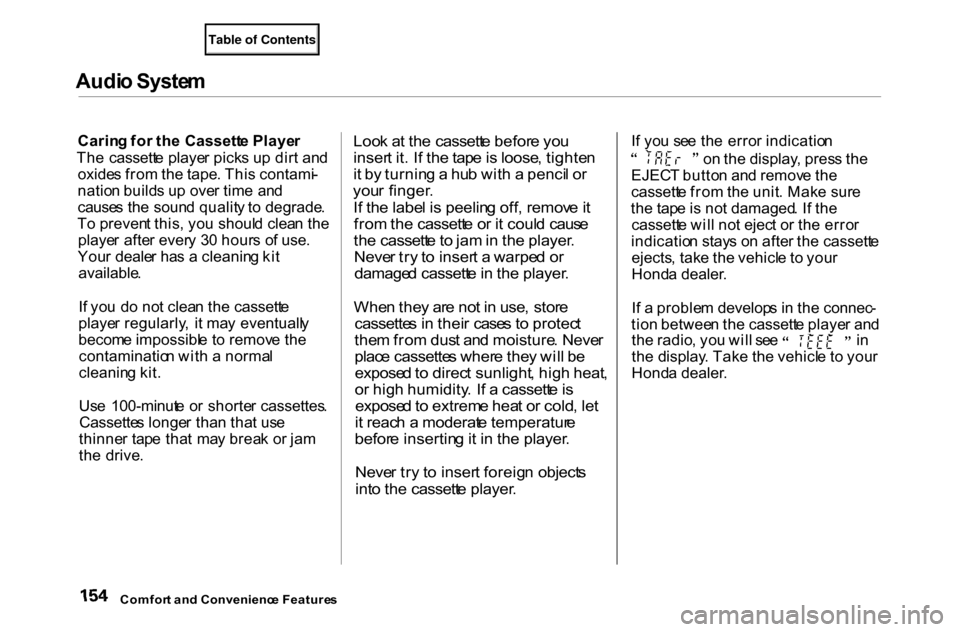
Carin g fo r th e Cassett e Playe r
Th e cassett e playe r pick s u p dir t an d
oxide s fro m th e tape . Thi s contami -
natio n build s u p ove r tim e an d
cause s th e soun d qualit y t o degrade .
T o preven t this , yo u shoul d clea n th e
playe r afte r ever y 3 0 hour s o f use .
You r deale r ha s a cleanin g ki t
available .
I f yo u d o no t clea n th e cassett e
playe r regularly , i t ma y eventuall y
becom e impossibl e t o remov e th e
contaminatio n wit h a norma l
cleanin g kit .
Us e 100-minut e o r shorte r cassettes .
Cassette s longe r tha n tha t us e
thinne r tap e tha t ma y brea k o r ja m
th e drive .
Loo
k a t th e cassett e befor e yo u
inser t it . I f th e tap e is loose , tighte n
i t b y turnin g a hu b wit h a penci l o r
you r finger .
I f th e labe l i s peelin g off , remov e it
fro m th e cassett e o r i t coul d caus e
th e cassett e to ja m in th e player .
Neve r tr y t o inser t a warpe d o r
damage d cassett e in th e player .
Whe n the y ar e no t i n use , stor e
cassette s i n thei r case s t o protec t
the m fro m dus t an d moisture . Neve r
plac e cassette s wher e the y wil l b e
expose d to direc t sunlight , hig h heat ,
o r hig h humidity . I f a cassett e is
expose d to extrem e hea t o r cold , le t
i t reac h a moderat e temperatur e
befor e insertin g it i n th e player .
Neve r tr y t o inser t foreig n object s
int o th e cassett e player .
I
f yo u se e th e erro r indicatio n o
n th e display , pres s th e
EJEC T butto n an d remov e th e
cassett e fro m th e unit . Mak e sur e
th e tap e is no t damaged . I f th e
cassett e wil l no t ejec t o r th e erro r
indicatio n stay s o n afte r th e cassett e
ejects , tak e th e vehicl e t o you r
Hond a dealer .
I f a proble m develop s i n th e connec -
tio n betwee n th e cassett e playe r an d th
e radio , yo u wil l se e i n
th e display . Tak e th e vehicl e t o you r
Hond a dealer .
Comfor t an d Convenienc e Feature s