lkas HONDA ACCORD HYBRID 2017 9.G Owners Manual
[x] Cancel search | Manufacturer: HONDA, Model Year: 2017, Model line: ACCORD HYBRID, Model: HONDA ACCORD HYBRID 2017 9.GPages: 584
Page 6 of 584
5
Quick Reference Guide
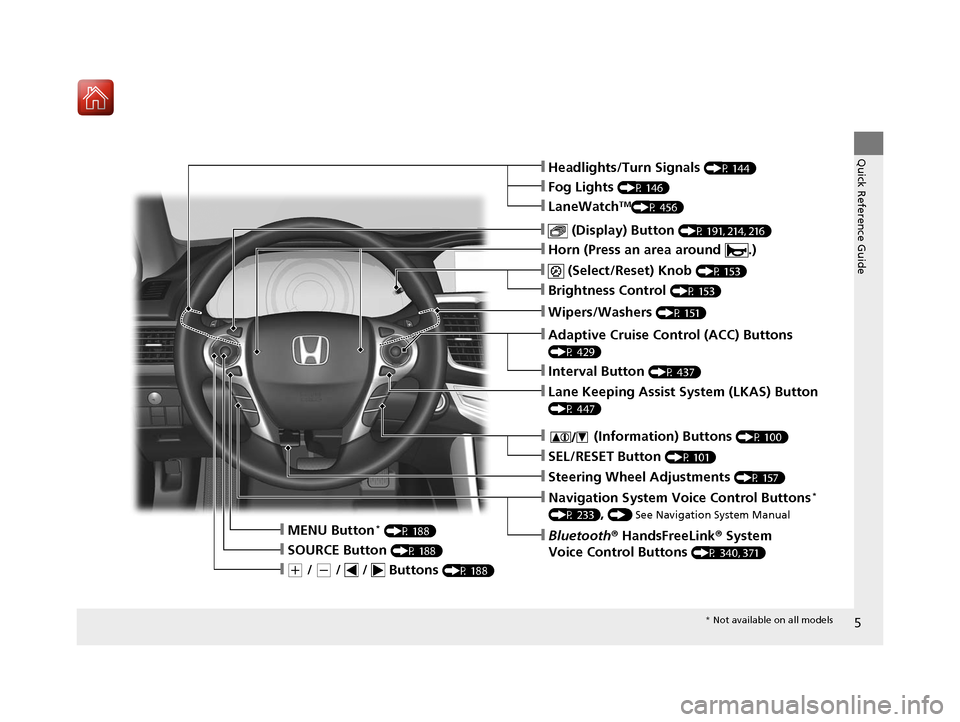
❙(+ / (- / / Buttons (P 188)
❙SOURCE Button (P 188)
❙Bluetooth® HandsFreeLink ® System
Voice Control Buttons
(P 340, 371)
❙Navigation System Voice Control Buttons*
(P 233), () See Navigation System Manual
❙Steering Wheel Adjustments (P 157)
❙SEL/RESET Button (P 101)
❙ (Information) Buttons (P 100)
❙Wipers/Washers (P 151)
❙Brightness Control (P 153)
❙ (Select/Reset) Knob (P 153)
❙Horn (Press an area around .)
❙ (Display) Button (P 191, 214, 216)
❙LaneWatchTM(P 456)
❙Headlights/Turn Signals (P 144)
❙Fog Lights (P 146)
❙Adaptive Cruise Control (ACC) Buttons
(P 429)
❙Interval Button (P 437)
❙Lane Keeping Assist System (LKAS) Button
(P 447)
❙MENU Button* (P 188)
* Not available on all models
17 ACCORD FHEV-31T3W6200.book 5 ページ 2016年4月11日 月曜日 午後2時40分
Page 20 of 584
19
Quick Reference Guide
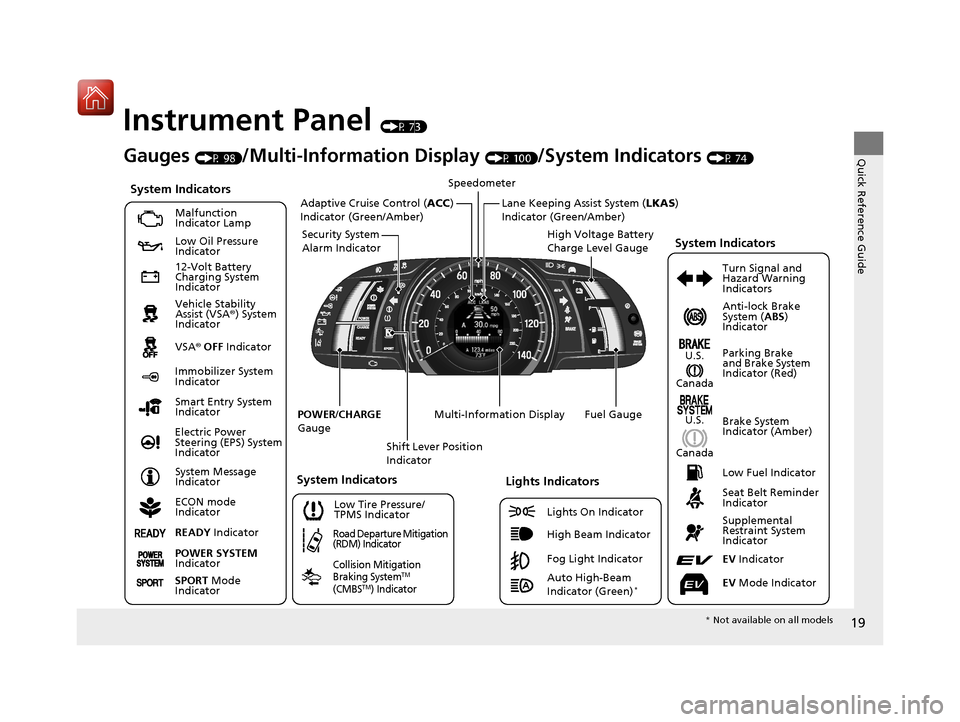
Instrument Panel (P 73)
CanadaU.S.
Low Fuel Indicator
Anti-lock Brake
System ( ABS)
Indicator
Parking Brake
and Brake System
Indicator (Red)
Canada U.S.
READY Indicator
System Indicators
Malfunction
Indicator Lamp
Low Oil Pressure
Indicator
12-Volt Battery
Charging System
Indicator
Vehicle Stability
Assist (VSA ®) System
Indicator
VSA ® OFF Indicator
Low Tire Pressure/
TPMS Indicator
Electric Power
Steering (EPS) System
Indicator
Lights Indicators
Lights On Indicator
High Beam Indicator
Immobilizer System
Indicator
Seat Belt Reminder
Indicator
EV Indicator
POWER
/CHARGE
Gauge Speedometer
Fuel Gauge
Security System
Alarm Indicator
Shift Lever Position
Indicator
Gauges (P 98)/Multi-Information Display (P 100)/System Indicators (P 74)Turn Signal and
Hazard Warning
Indicators
System Indicators
High Voltage Battery
Charge Level Gauge
POWER SYSTEM
Indicator
Smart Entry System
Indicator
System Message
Indicator
ECON mode
Indicator
Road Departure Mitigation
(RDM) Indicator
Collision Mitigation
Braking System
TM
(CMBSTM) Indicator
Brake System
Indicator (Amber)
Supplemental
Restraint System
Indicator
EV Mode Indicator
System Indicators
Multi-Information Display
Adaptive Cruise Control ( ACC)
Indicator (Green/Amber)Lane Keeping Assist System ( LKAS)
Indicator (Green/Amber)
SPORT Mode
Indicator
Fog Light Indicator
Auto High-Beam
Indicator (Green)*
* Not available on all models
17 ACCORD FHEV-31T3W6200.book 19 ページ 2016年4月11日 月曜日 午後2時40分
Page 87 of 584
86
uuIndicators u
Instrument Panel
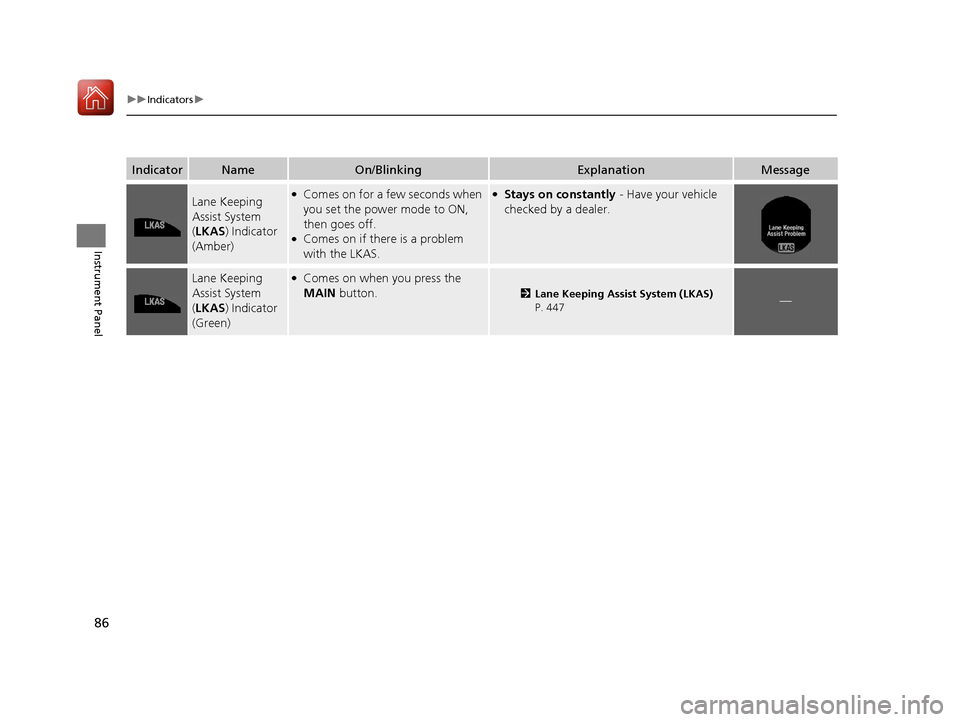
IndicatorNameOn/BlinkingExplanationMessage
Lane Keeping
Assist System
(LKAS ) Indicator
(Amber)●Comes on for a few seconds when
you set the power mode to ON,
then goes off.
●Comes on if there is a problem
with the LKAS.
●Stays on constantly - Have your vehicle
checked by a dealer.
Lane Keeping
Assist System
( LKAS ) Indicator
(Green)●Comes on when you press the
MAIN button.
2Lane Keeping Assist System (LKAS)
P. 447—
17 ACCORD FHEV-31T3W6200.book 86 ページ 2016年4月11日 月曜日 午後2時40分
Page 95 of 584
94
uuIndicators uMulti-Information Display Warn ing and Information Messages
Instrument Panel
MessageConditionExplanation
●Appears when the area around the camera is
blocked by dirt, mud, etc. Stop your vehicle in a safe
place, and wipe it off with a soft cloth.
●May appear when driving in bad weather (rain,
snow, fog, etc.).
●Have your vehicle checked by a dealer if the message
appears again after you cl eaned the area around the
camera.
●Appears if the temperature inside the camera is too
high.
●ACC/LKAS has been automatically canceled.
●Use the climate control system to cool down the camera.●Goes off - The camera has been cooled down. Pressing
the MAIN/LKAS button can resume the system.
2Front Sensor Camera P. 427
2 Adaptive Cruise Control (ACC) P. 429
2 Lane Keeping Assist System (LKAS) P. 447
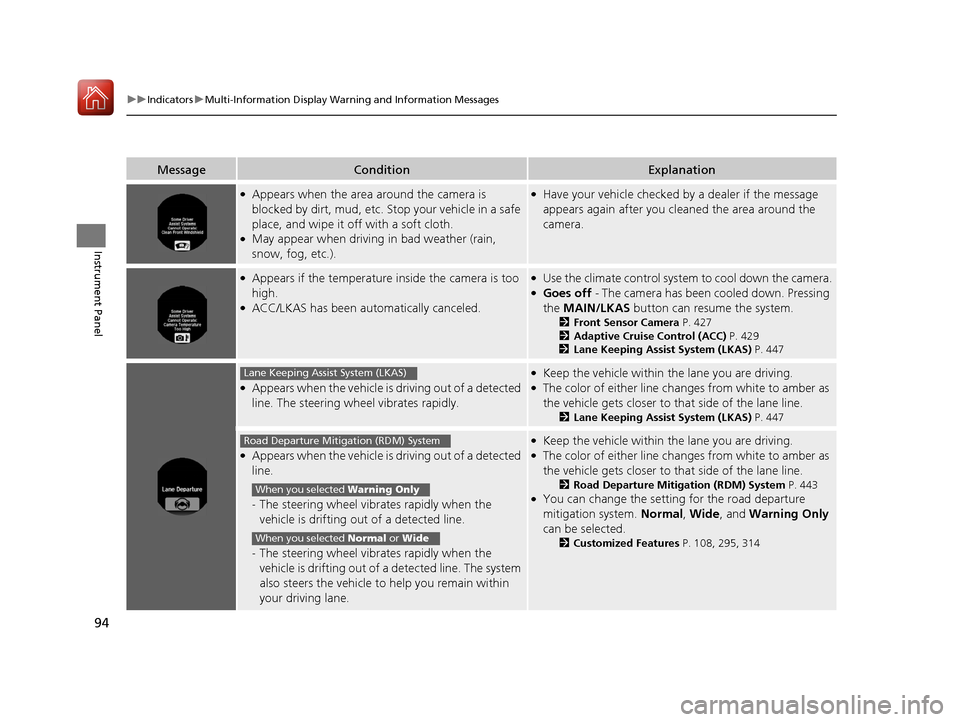
●Appears when the vehicle is driving out of a detected
line. The steering wheel vibrates rapidly.
●Keep the vehicle within the lane you are driving.●The color of either line ch anges from white to amber as
the vehicle gets closer to that side of the lane line.
2 Lane Keeping Assist System (LKAS) P. 447
●Appears when the vehicle is driving out of a detected
line.
-The steering wheel vibrat es rapidly when the
vehicle is drifting out of a detected line.
- The steering wheel vibrat es rapidly when the
vehicle is drifting out of a detected line. The system
also steers the vehicle to help you remain within
your driving lane.
●Keep the vehicle within the lane you are driving.●The color of either line ch anges from white to amber as
the vehicle gets closer to that side of the lane line.
2 Road Departure Mitigation (RDM) System P. 443●You can change the setting for the road departure
mitigation system. Normal, Wide , and Warning Only
can be selected.
2 Customized Features P. 108, 295, 314
Lane Keeping Assist System (LKAS)
Road Departure Mitigation (RDM) System
When you selected Warning Only
When you selected Normal or Wide
17 ACCORD FHEV-31T3W6200.book 94 ページ 2016年4月11日 月曜日 午後2時40分
Page 96 of 584
95
uuIndicators uMulti-Information Display Warning and Information Messages
Continued
Instrument Panel
MessageConditionExplanation
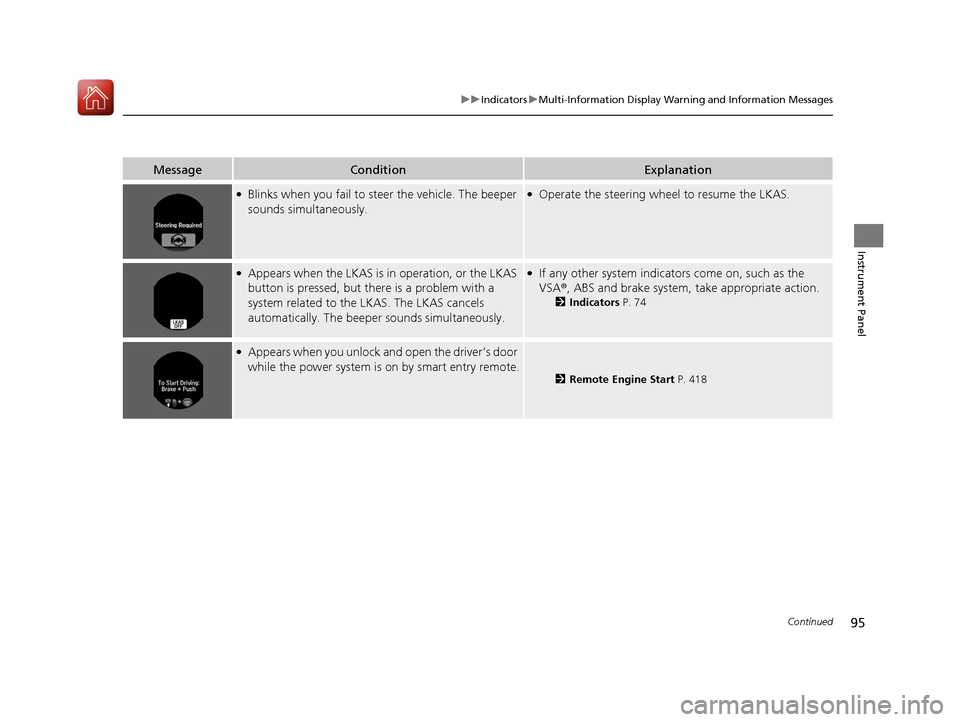
●Blinks when you fail to st eer the vehicle. The beeper
sounds simultaneously.●Operate the steering wheel to resume the LKAS.
●Appears when the LKAS is in operation, or the LKAS
button is pressed, but there is a problem with a
system related to the LKAS. The LKAS cancels
automatically. The beeper sounds simultaneously.●If any other system indicato rs come on, such as the
VSA ®, ABS and brake system, take appropriate action.
2 Indicators P. 74
●Appears when you unlock an d open the driver’s door
while the power system is on by smart entry remote.
2Remote Engine Start P. 418
17 ACCORD FHEV-31T3W6200.book 95 ページ 2016年4月11日 月曜日 午後2時40分
Page 112 of 584
111
uuGauges and Multi-Information Display uMulti-Information Display
Continued
Instrument Panel
■List of customizable options
*1:Default Setting Setup Group Customizable Features
Description Selectable Settings
TPMS
Calibration—Calibrates the TPMS.Cancel/Calibrate
Driver Assist
System
Setup
Forward Collision
Warning DistanceChanges at which distance the CMBSTM alerts.Long /Normal*1/ Short
Head-up WarningTurns the head-up wa rning lights on to flash or off.On*1/Off
ACC Pre-Running Car
Detect BeepCauses the system to beep when the system detects
a vehicle, or when the vehicle goes out of ACC
range.
On /Off*1
ACC Display Speed UnitChanges the ACC display speed unit.mph*1/km/h (U.S.)
mph /km/h*1 (Canada)
Road Departure
Mitigation SettingChanges the setting fo r the road departure
mitigation system.Normal*1/ Wide /Warning
Only
Lane Keeping Assist
Suspend BeepCauses the system to b eep when the LKAS is
suspended.On /Off*1
17 ACCORD FHEV-31T3W6200.book 111 ページ 2016年4月11日 月曜日 午後2時40分
Page 305 of 584
304
uuCustomized Features u
Features
*1:Default SettingSetup
Group Customizable Features Descri
ption Selectable Settings
Vehicle
Settings TPMS Calibration
Cancels/Calibrates the TPMS. Cancel
*1/Calibrate
Driver
Assist
System
Setup Forward Collision Warning
Distance
Changes at which distance the CMBS
TM alerts.
Long/Normal*1/ Short
ACC Forward Vehicle
Detect Beep Causes the system to
beep when the system
detects a vehicle, or when the vehicle goes out of
the ACC range. On
/Off
*1
ACC Display Speed Unit Changes the speed unit for ACC on the multi-
information display. mph
*1/
km/h
(U.S.)
mph /km/h
*1
(Canada)
Road Departure Mitigation
Setting Changes the setting for the road departure
mitigation system. Normal
*1/
Wide /
Warning Only
Lane Keeping Assist
Suspend Beep Causes the system to b
eep when the LKAS is
suspended. On
/Off
*1
17 ACCORD FHEV-31T3W6200.book 304 ページ 2016年4月11日 月曜日 午後2時40分
Page 328 of 584
327
uuCustomized Features u
Continued
Features
*1:Default SettingSetup
Group Customizable Features Descri
ption Selectable Settings
Vehicle
Settings TPMS Calibration
Cancels/Calibrates the TPMS. Cancel
*1/Calibrate
Driver
Assist
System
Setup
Forward Collision
Warning Distance Changes distance the CMBSTM alerts.
Long
/Normal*1/
Short
Head-up Warning Turns the head-up warning lights on to flash or off. On
*1/Off
ACC Pre-Running Car
Detect Beep Causes the system to beep when the system detects a
vehicle, or when the vehicle goes out of the ACC
range.
On
/Off
*1
ACC Display Speed Unit Changes the speed unit for ACC on the multi-
information display. mph
*1/
km/h
(U.S.)
mph /km/h
*1
(Canada)
Road Departure
Mitigation Setting Changes the setting for the road departure mitigation
system. Normal
*1/
Wide /
Warning Only
Lane Keeping Assist
Suspend Beep Causes the system to b
eep when the LKAS is
suspended. On
/Off
*1
17 ACCORD FHEV-31T3W6200.book 327 ページ 2016年4月11日 月曜日 午後2時40分
Page 410 of 584
409
Driving
This chapter discusses driving, refueling, and information on items such as accessories.
Before Driving
Driving Preparation .......................... 410
Maximum Load Limit........................ 413
Towing a Trailer
Towing Your Vehicle ........................ 415
When Driving
Turning on the Power ...................... 416
Precautions While Driving................. 421
Transmission .................................... 421
Shifting ............................................ 422
ECON Button ................................... 424
SPORT Mode.................................... 425
Acoustic Vehicle Al erting System ...... 426
Front Sensor Camera ....................... 427 Adaptive Cruise Control (ACC)......... 429Road Departure Mitigation (RDM)
System ....................................... 443
Lane Keeping Assist System (LKAS).... 447
Vehicle Stability Assist (VSA ®), aka Electronic
Stability Control (ESC), System ........... 454
LaneWatch
TM................................... 456
Tire Pressure Monitori ng System (TPMS) ... 458
Tire Pressure Monitoring System (TPMS) - Required Federal Explanation ......... 460
High Voltage Battery ........................ 462
Braking Brake System ................................... 463
Anti-lock Brake System (ABS) ........... 465 Brake Assist System ......................... 466
Collision Mitigation Braking System
TM
(CMBSTM) ....................................... 467
Parking Your Vehicle
When Stopped ................................ 475
Parking Sensor System
*................... 476
Multi-View Rear Camera .................. 480
Refueling
Fuel Information .............................. 482
How to Refuel ................................. 483
Fuel Economy and CO
2 Emissions
Improving Fuel Economy and Reducing CO
2 Emissions ................................ 484
* Not available on all models
17 ACCORD FHEV-31T3W6200.book 409 ページ 2016年4月11日 月曜日 午後2時40分
Page 428 of 584
427
uuWhen Driving uFront Sensor Camera
Continued
Driving
Front Sensor Camera
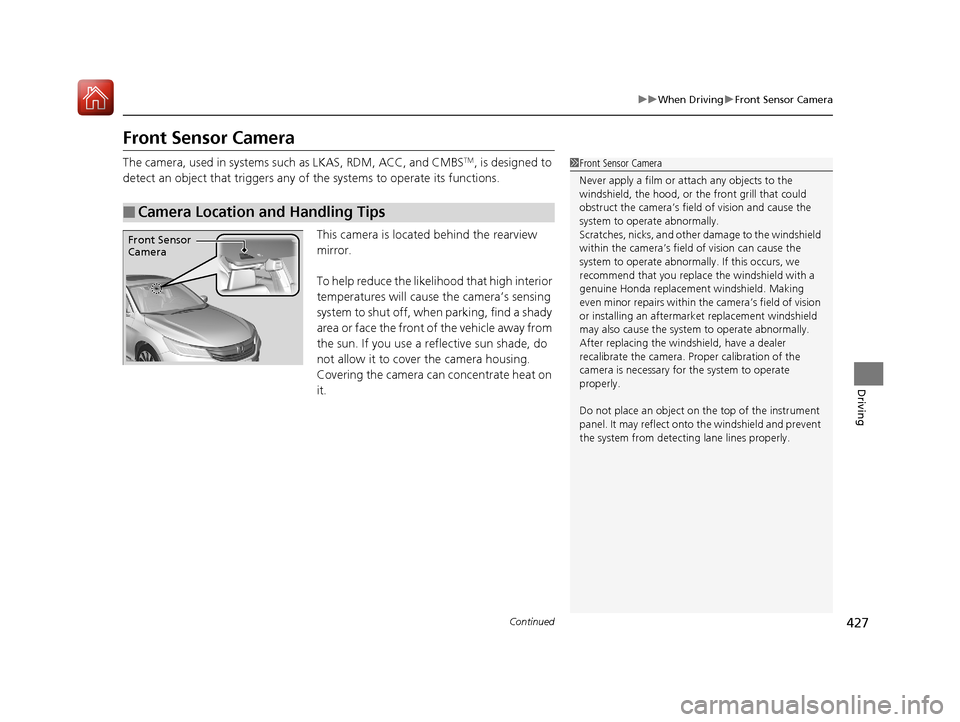
The camera, used in systems su ch as LKAS, RDM, ACC, and CMBSTM, is designed to
detect an object that triggers any of the systems to operate its functions.
This camera is located behind the rearview
mirror.
To help reduce the likelihood that high interior
temperatures will cause the camera’s sensing
s y s t e m t o s h u t o f f , w h e n p a r k i n g , f i n d a s h a d y
area or face the front of the vehicle away from
the sun. If you use a reflective sun shade, do
not allow it to cover the camera housing.
Covering the camera can concentrate heat on
it.
■Camera Location and Handling Tips
1 Front Sensor Camera
Never apply a film or attach any objects to the
windshield, the hood, or the front grill that could
obstruct the camera’s fiel d of vision and cause the
system to operate abnormally.
Scratches, nicks, and othe r damage to the windshield
within the camera’s fiel d of vision can cause the
system to operate abnormall y. If this occurs, we
recommend that you replac e the windshield with a
genuine Honda replacem ent windshield. Making
even minor repairs within th e camera’s field of vision
or installing an aftermarket replacement windshield
may also cause the system to operate abnormally.
After replacing the winds hield, have a dealer
recalibrate the camera. Pr oper calibration of the
camera is necessary for the system to operate
properly.
Do not place an object on the top of the instrument
panel. It may reflect onto the windshield and prevent
the system from detecting lane lines properly.
Front Sensor
Camera
17 ACCORD FHEV-31T3W6200.book 427 ページ 2016年4月11日 月曜日 午後2時40分