audio HONDA ACCORD HYBRID 2017 9.G Quick Guide
[x] Cancel search | Manufacturer: HONDA, Model Year: 2017, Model line: ACCORD HYBRID, Model: HONDA ACCORD HYBRID 2017 9.GPages: 80, PDF Size: 10.35 MB
Page 47 of 80

86 || 87
Models with touchscreen
HondaLink® Assist
Automatically attempts to connect and talk to an operator who can locate\
your
vehicle and send emergency help in the event of a collision.
visit www
.hondalink.
com (U.S.) or honda.ca/hondalinkassist (Canada) for more information.
1.
Make sure your phone is on and paired to
Bluetooth® HandsFreeLink® (see page 82).
2.
Select Call Now, or the system automatically
connects after 10 seconds. The vehicle information
and its position are sent to the operator.
3.
Select Talk Now to immediately talk to the operator.
4.
When the call is complete, select Hang Up or press
the Hang Up/Back button on the steering wheel.
For vehicles equipped with HondaLink Assist, owner activation constitute\
s authorization for Honda to
collect information from your vehicle needed to provide the service, and\
agreement to the Terms of
Use at www.hondalink.com/TermsAndConditions. In a crash, HondaLink Assist will attempt to notify
emergency services but NEITHER Honda NOR ITS SERVICE PROVIDERS GUARANTEE\
THAT SUCH
NOTIFICATION WILL OCCUR.
Models with touchscreen
Siri® Eyes Free
Activate Siri through your vehicle when an iPhone is paired to the syste\
m.
visit handsfreelink.honda.com
(U.S.) or honda.ca/siri (Canada) to check phone
compatibility.
(Talk) Button
Press and hold until the display changes as shown.
Press again to cancel Siri.
Appears
when Siri
Eyes Free is
activated.
Here are some examples of Siri commands:
“Call John Smith”
“Read my new text message”
“Find a nearby sushi restaurant”
Notes:
•
Any requests that include visual feedback from Siri on your phone are no\
t
displayed in the vehicle.
•
Certain commands rely on the iPhone’s features and existing apps.
•
To hear turn-by-turn directions or songs through the vehicle, set the aud\
io source
to Bluetooth
Audio.
Siri and iPhone are trademarks of Apple, Inc.
“Remind me to pick up dinner”
“Set up a meeting today at 3 p.m.”
“Play song XYZ”
BLUETOOTH® HANDSFreeLINK®BLUETOOTH® HANDSFreeLINK®
Page 62 of 80
116 || 117
HANDLING THE UNEXPECTED
HANDLING THE UNEXPECTED
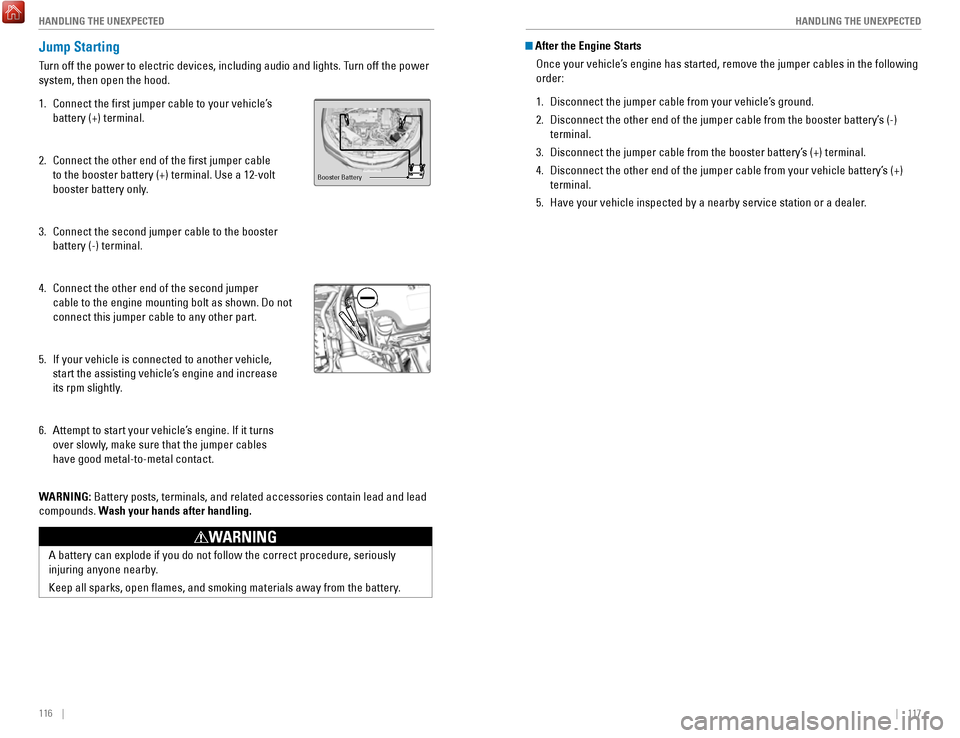
Jump Starting
Turn off the power to electric devices, including audio and lights. Turn off the power
system, then open the hood.
1.
Connect the first jumper cable to your vehicle’s
battery (+) terminal.
2.
Connect the other end of the first jumper cable
to the booster battery (+) terminal. Use a 12-volt
booster battery only.
3.
Connect the second jumper cable to the booster
battery (-) terminal.
4.
Connect the other end of the second jumper
cable to the engine mounting bolt as shown. Do not
connect this jumper cable to any other part.
5.
If your vehicle is connected to another vehicle,
start the assisting vehicle’s engine and increase
its rpm slightly
.
6.
Attempt to start your vehicle’s engine. If it turns
over slowly, make sure that the jumper cables
have good metal-to-metal contact.
W
ARNING: Battery posts, terminals, and related accessories contain lead and lead\
compounds. Wash your hands after handling.
Booster Battery
A battery can explode if you do not follow the correct procedure, seriou\
sly
injuring anyone nearby.
Keep all sparks, open flames, and smoking materials away from the batt\
ery.
WARNING
After the Engine Starts
once your vehicle’s engine has started, remove the jumper cables in the following
order:
1.
Disconnect the jumper cable from your vehicle’s ground.
2.
Disconnect the other end of the jumper cable from the booster battery’\
s (-)
terminal.
3.
Disconnect the jumper cable from the booster battery’s (+) terminal.
4.
Disconnect the other end of the jumper cable from your vehicle battery’\
s (+)
terminal.
5.
Have your vehicle inspected by a nearby service station or a dealer.
Page 65 of 80

122 || 123
HANDLING THE UNEXPECTED
HANDLING THE UNEXPECTED
Tire Repair Kit
If a tire has a small puncture, you can use the tire repair kit to tempo\
rarily repair it.
The puncture must be smaller than 3/16-inch (4 mm) and not in the tire\
sidewall. Go
to a dealer to have the full-size tire permanently repaired or replaced.\
This vehicle is
not equipped with a spare tire.
Before Repairing the Tire
1.
Park the vehicle on a firm, level, and non-slippery surface.
2.
Move the shift lever to Park (P).
3.
Turn on the hazard warning lights and set the power mode to veHICLe oFF
(L
oCK).
Getting Ready to Repair the Tire
1.
open the trunk floor lid and take the kit out of the
case.
2.
Place the kit upright on flat ground near the
punctured tire and away from traffic. Do not place
the kit on its side.
3.
Follow the instructions in the kit to repair the tire.
If the required air pressure is not reached within 10 minutes, the tire \
may be too
severely damaged for the kit to provide the necessary seal and your vehi\
cle will need to be towed.
Do not operate the temporary tire repair kit compressor for more than 15\
minut
es.
The accessory power socket and compressor can overheat and become
permanently damaged.
NOTICE
running the engine with the vehicle in an enclosed or even partly enclose\
d
area can cause a rapid build-up of toxic carbon monoxide.
Breathing this colorless, odorless gas can cause unconsciousness and even
death.
only run the engine to power the air compressor with the vehicle
outdoors.
WARNING
Trunk Floor Lid
Tire repair Kit
Fuse Locations
If any electrical devices are not working, turn the vehicle off and chec\
k to see if any
applicable fuse is blown. Fuse locations are shown on the fuse box cover\
. Locate the
fuse in question by the fuse number and box cover number.
Engine Compartment Fuse Box
Located under the hood near the 12-volt battery. Push the tabs to open the box.
*if equipped
Circuit ProtectedAmps
1Battery15 0A
2ePS70 A
eS B40 Aright ePB*(30A )40 A
Fuse Box option 1Shift By Wire*(30A )
rF C4 0A
IG Main 1
3 0A
3
Headlight Low Beam Main 30Aengine electric Water Pump3 0AIG Main 230AWiper Moto r
4 3
0A
FI Main15 A5 PCU electric Water Pump
6 7.
5A
ev TC20 A
710 A
815 A
915 A
1010 A
11
12
10 A rear Defogger
60
A
Fuse Box Main 1 50 A
ABS/vSA FSr 60
A
IG Hol d
DBW
IG Coi l
Stop Light vBU Fuse Box Main 2
40A
Fuse Box
ABS/vSA Motor 3
0A
3 0A
Heater Motor 40A
Left ePB
*
Small Light (3
0A )
20 A40 A
13(40 A)
14(4 0A )
15
16 (1
0A )10A
1715 A
AmpsCircuit Protected
Fuse Box option 2
A/C PTC 4
A/CPTC 2
Front Fog Light + Dr L
Horn
IG Hold 3-L/r
18 Interior Light7. 5A
19−−
20 (20 A)Premium Amp*
21Back Up
22 10
A
Audio15 A
23P-ACT Drive*(7.5 A)
10 A
25 Left Headlight Low Beam26
24 right Headlight Low Bea m10 A
IGPS LAF10 A
Page 76 of 80
144 || 145
CUSTOMER INFORMATION
SPECIFICATIONS
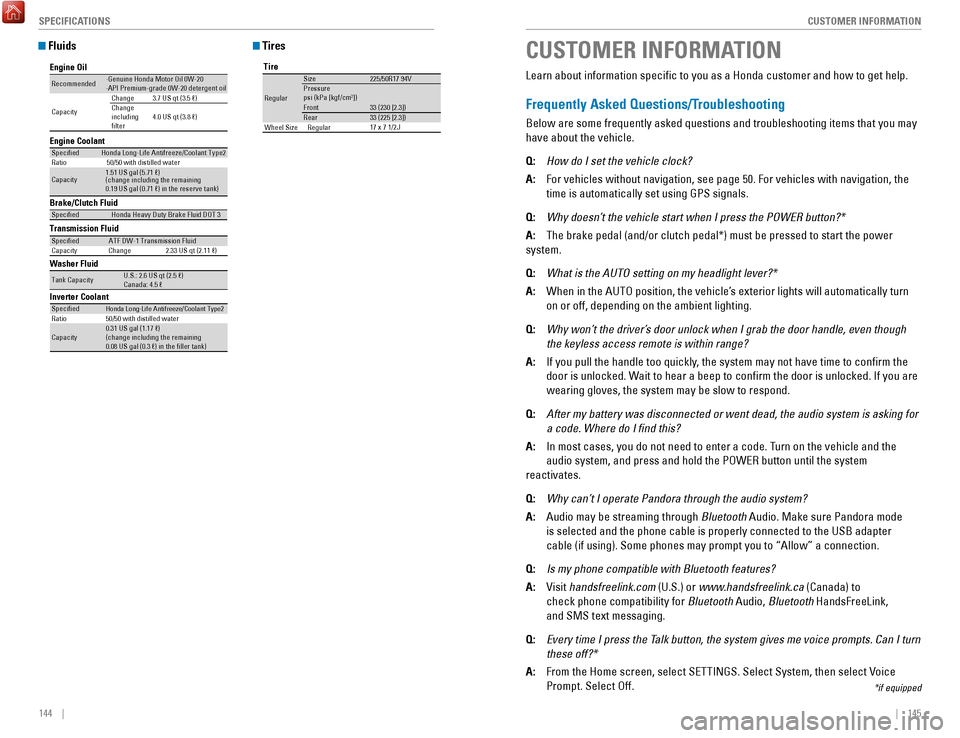
Fluids
Brake/Clutch Fluid
Transmission Fluid
Specie dHonda Heavy Duty Brake Fluid DOT 3
SpeciedATF DW-1 Transmission Fluid
Capacity Change 2.33 US qt (2.11 )
Engine Oil
Engine Coolan
t
Recommended·Genuine Honda Motor Oil 0W-2 0
·API Premium-grade 0W-20 detergent oi l
Capacity Change
3.7 US qt (3.5 )
Change
including
lter 4.0 US qt (3.8 )
Specie
dHonda Long-Life Anti freeze/Coolant Type 2
Ratio 50/50 with distilled wate r
Capacity1.51 US gal (5.71 )
(change including the remaining
0.19 US gal (0.71 ) in the reserve tank )
Washer Fluid
Tank CapacityU.S.: 2.6 US qt (2.5 )
Canada: 4.5
Inverter CoolantSpecie d
Ratio
Capacity
Honda Long-Life Anti freeze/Coolant Type 250/50 with distilled wate r
0.31 US gal (1.17 )
(change including the remaining
0.08 US gal (0.3 ) in the ller tank)
Tires
Tire
re gular
Size 225/50r17 94vPressure
Front psi (kPa [kgf/c m2])
33 (230 [2.3])
rear 33 (225 [2.3])
17 x 7 1/2 JWheel Size regular
CUSTOMER INFORMATION
*if equipped
Learn about information specific to you as a Honda customer and how to\
get help.
Frequently Asked Questions/Troubleshooting
Below are some frequently asked questions and troubleshooting items that\
you may
have about the vehicle.
Q:
How do I set the vehicle clock?
A:
For vehicles without navigation, see page 50. For vehicles with navigati\
on, the
time is automatically set using GPS signals.
Q:
Why doesn’t the vehicle start when I press the POWER button?*
A:
The brake pedal (and/or clutch pedal*) must be pressed to start the po\
wer
system.
Q:
What is the AUTO setting on my headlight lever?*
A:
When in the AUTo position, the vehicle’s exterior lights will automatically turn
on or off, depending on the ambient lighting.
Q:
Why won’t the driver’s door unlock when I grab the door handle, even though
the keyless access remote is within range?
A:
If you pull the handle too quickly, the system may not have time to confirm the
door is unlocked. Wait to hear a beep to confirm the door is unlocked. If you are
wearing gloves, the system may be slow to respond.
Q:
After my battery was disconnected or went dead, the audio system is aski\
ng for
a code. Where do I find this?
A:
In most cases, you do not need to enter a code. Turn on the vehicle and the
audio system, and press and hold the PoWer button until the system
reactivates.
Q:
Why can’t I operate Pandora through the audio system?
A:
Audio may be streaming through Bluetooth Audio. Make sure Pandora mode
is selected and the phone cable is properly connected to the USB adapter\
cable (if using). Some phones may prompt you to “Allow” a connec\
tion.
Q:
Is my phone compatible with Bluetooth features?
A:
visit handsfreelink.com (U.S.) or
www.handsfreelink.ca (Canada) to
check phone compatibility for Bluetooth Audio,
Bluetooth HandsFreeLink,
and SMS text messaging.
Q:
Every time I press the Talk button, the system gives me voice prompts. Can I turn
these off?*
A:
From the Home screen, select SeTTINGS. Select System, then select voice
Prompt. Select off.
Page 78 of 80
148 || 149
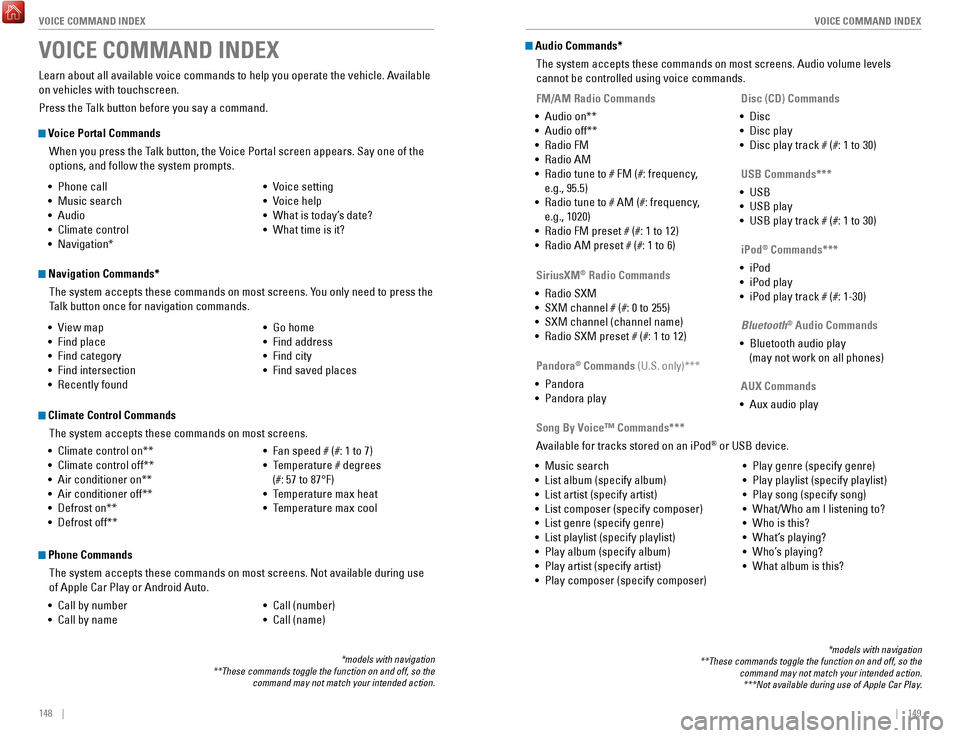
VOICE COMMAND INDEX
VOICE COMMAND INDEX
Voice Portal Commands
When you press the Talk button, the
voice Portal screen appears. Say one of the
options, and follow the system prompts.
Navigation Commands*
The system accepts these commands on most screens. You only need to press the
Talk button once for navigation commands.
Learn about all available voice commands to help you operate the vehicle\
. Available
on vehicles with touchscreen.
Press the Talk button before you say a command.
VOICE COMMAND INDEX
• Phone call
•
Music search
•
Audio
•
Climate control
•
Navigation* •
voice setting
•
voice help
•
What is today’s date?
•
What time is it?
•
view map
•
Find place
•
Find category
•
Find intersection
•
recently found •
Go home
•
Find address
•
Find city
•
Find saved places
*models with navigation
**These commands toggle the function on and off, so the command may not match your intended action.
Climate Control Commands
The system accepts these commands on most screens.
•
Climate control on**
•
Climate control off**
•
Air conditioner on**
•
Air conditioner off**
•
Defrost on**
•
Defrost off** •
Fan speed # (#: 1 to 7)
•
Temperature # degrees
(#: 57 to 87°F)
•
Temperature max heat
•
Temperature max cool
Phone Commands
The system accepts these commands on most screens. Not available during \
use
of Apple Car Play or Android Auto.
•
Call by number
•
Call by name •
Call (number)
•
Call (name)
Audio Commands*
The system accepts these commands on most screens. Audio volume levels
cannot be controlled using voice commands.
FM/AM Radio Commands
•
Audio on**
•
Audio off**
•
radio FM
•
radio AM
•
radio tune to # FM (#: frequency,
e.g., 95.5)
•
radio tune to # AM (#: frequency,
e.g., 1020)
•
radio FM preset # (#: 1 to 12)
•
radio AM preset # (#: 1 to 6)
SiriusXM
® Radio Commands
•
radio SXM
•
SXM channel # (#: 0 to 255)
•
SXM channel (channel name)
•
radio SXM preset # (#: 1 to 12) Disc (CD) Commands
•
Disc
•
Disc play
•
Disc play track # (#: 1 to 30)
USB Commands***
•
USB
•
USB play
•
USB play track # (#: 1 to 30)
Pandora
® Commands (U.S. only)***
•
Pandora
•
Pandora play iPod
® Commands***
•
iPod
•
iPod play
•
iPod play track # (#: 1-30)
Bluetooth
® Audio Commands
•
Bluetooth audio play
(may not work on all phones)
AUX Commands
•
Aux audio play
•
Music search
•
List album (specify album)
•
List artist (specify artist)
•
List composer (specify composer)
•
List genre (specify genre)
•
List playlist (specify playlist)
•
Play album (specify album)
•
Play artist (specify artist)
•
Play composer (specify composer) •
Play genre (specify genre)
•
Play playlist (specify playlist)
•
Play song (specify song)
•
What/Who am I listening to?
•
Who is this?
•
What’s playing?
•
Who’s playing?
•
What album is this?
Song By Voice™ Commands***
Available for tracks stored on an iPod
® or USB device.
*models with navigation
**These commands toggle the function on and off, so the command may not match your intended action.***Not available during use of Apple Car Play.
Page 79 of 80

150 || 151
INDEX
INDEX
INDEX
ABS........................................................................\
.. 26
ACC .................................................................... 26,
28
Accessory Power Socket
.................................... 51
Acoustic vehicle Alerting .................................. 102
Adaptive Cruise Control (ACC) .................... 26,
105
Address................................................................... 90
Advanced Airbags
................................................ 10
Aha radio ............................................................... 65
Airbags....................................................................
10
Airbag Care
......................................................... 15
Airbag System Components ............................. 14
Airbag System Indicators ................................. 12
Ambient Meter.....................................................
103
Android Auto
.......................................................... 67
Anti-lock Brake System (ABS) .................... 26,
102
Apple CarPlay
........................................................ 66
Apps ........................................................................\
63
Audio Commands ................................................ 149
Audio operation .................................................... 51
Aha radio ............................................................ 65
Android Auto ....................................................... 67
Apple CarPlay ..................................................... 66
Auxiliary Input Jack ........................................... 51
Bluetooth Audio ............................................ 60,
73
Compact Disc (CD)
....................................... 57, 70
FM/AM radio ................................................ 56,
68
HondaLink
............................................................ 64
iPod ................................................................. 58,
71
one Display Audio operation ...........................55
Pandora .......................................................... 61,
74
SiriusXM
radio ................................................... 69
Sound ................................................................... 54
Steering Wheel Controls ................................... 53
Touchscreen operation ..................................... 62
USB Flash Drive ............................................ 59,
72
USB Port
.............................................................. 51
Wi-Fi Connection ................................................ 65
Wireless Charger ............................................... 52
Auto High-Beam System................................
28, 37
Automatic (AUT
o) rain-Sensing Wipers .......... 40
Automatic Dimming rearview Mirror ................ 45
AUX Commands...................................................
149
Auxiliary Input Jack
.............................................. 51
Battery .................................................................. 134
Bluetooth Audio...............................................
60, 73
Bluetooth Audio Commands.............................. 149
Bluetooth Handsfreelink (HFL)
............................ 75
Call History .................................................... 78,
84
Dialing a Number
.......................................... 77,
83
e-Mail ...................................................................85
HFL Controls .................................................. 75,
80
HondaLink Assist
................................................ 86
Making a Call ................................................ 77,
83Pairing a Phone ............................................
76, 82
Phonebook ..................................................... 78,
84
Siri
eyes Free ...................................................... 87
SMS Text Messaging ................................... 79, 85
Speed Dial ..................................................... 77,
83
Talk Button Tips
.................................................. 81
Brake Assist System...........................................
102
Brake Fluid
........................................................... 133
Brake system ................................................... 25,
26
Braking.................................................................. 102
Brightness Control
................................................ 36
Call History ....................................................... 78,
84
Carbon Monoxide Gas............................................ 5
Changing Settings
................................................. 49
Charging system....................................................
25
Childproof Door Locks
.......................................... 33
Child Safety ............................................................ 16
Child Seat ............................................................... 18
Adding Security with a Tether .......................... 21
LATCH-Compatible Child Seat .......................... 19
Climate Control Commands ............................... 148
Climate Control System ........................................ 47
Clock........................................................................\
50
CMBS
...................................................................... 28
Collision .................................................................... 6
Collision Mitigation Braking System .......... 26,
110
Compact Disc (CD)
.......................................... 57,
70
Compact Disc (CD) Commands
......................... 149
Condition Indicators ............................................. 27
Contact Us ............................................................ 146
Continuously variable Transmission (CvT) ..... 101
CUSToMer Information.....................................
145
Customized Features
............................................ 49
Dashboard and other Controls ............................. 2
Destination ............................................................. 90
Dialing a Number ............................................ 77,
83
Door Mirrors
.......................................................... 45
Door open ............................................................... 27
Door operation ...................................................... 33
Doors ....................................................................... 32
DoT Tire Quality Grading ................................... 140
Driver’s Seat ........................................................... 41
Driving ..................................................................... 95
Accessory Mode .............................................. 101
Acoustic vehicle Alerting ............................... 102
Adaptive Cruise Control (ACC) ....................... 105
Braking ............................................................... 102
Collision Mitigation Braking System ............. 110
Continuously variable Transmission (CvT) .. 101eco Assist System ............................................ 103
PoWer button .................................................. 101ev Mode ............................................................. 104
Lane Keeping Assist System (LKAS) ............. 108 LaneWatch™
..................................................... 109
Maximum Load Limit
.......................................... 97
Multi-view rear Camera ................................. 112
Parking Sensor System ................................... 111
Power Mode ...................................................... 101refueling ............................................................ 113remote engine Start ..........................................99road Departure Mitigation (rDM).................
107
Shifting
............................................................... 101
SPorT Mode ..................................................... 104
Towing a T
railer
..................................................98vehicle Stability Assist (vSA®) .....................103
Wiper Blades .................................................... 135
Driving Position Memory System ....................... 44eco Assist System...............................................
103
eCoN Button ........................................................103eCoN mode ............................................................ 28electric Power Steering (ePS) ............................26electronic Stability Control (eSC) .....................103e-Mail ...................................................................... 85emergency engine Stop .....................................119emergency Towing ............................................. 119engine and Fuel ................................................... 143engine Coolant.....................................................
132
engine oil..............................................................
130
P
oWer button ..................................................... 101ev indicator ............................................................ 27ev mode ..........................................................28,
104
exterior lights ...................................................28,
36
Fastening a Seat Belt
............................................. 9
Floor Mats .............................................................. 42
Fluids ..................................................................... 144
FM/AM radio ................................................... 56,
68
FM/AM
radio Commands .................................. 149
Foot Brake ............................................................ 102
Frequently Asked Questions ............................. 145
Front Airbags (SrS) .............................................. 10
Front Door Inner Handle ...................................... 33
Fuel Information .................................................. 113
Fuse Locations.....................................................
123
Garage
opener ...................................................... 46
Hazards ................................................................... 28
Headlight-Wiper Integration ......................... 38,
39
Head
restraints ..................................................... 43
High beams ............................................................ 28
High-voltage System Precautions ....................... 6
Home Address ....................................................... 90
HomeLink Garage opener ................................... 46
HondaLink...............................................................
64
HondaLink Assist................................................... 86 Honda
roadside Assistance ............................. 146
Hood ...................................................................... 129
Immobilizer ............................................................. 27
Instrument Panel ................................................... 25
Interior Lights.........................................................
36Intermittent Wipers............................................... 39
Inverter Coolant................................................... 133
iPod.................................................................... 58, 71
iPod Commands................................................... 149
Jump Starting
......................................................
116
Key ........................................................................\
... 31
Lane Keeping Assist System (LKAS)..........
26, 108
LaneWatch
........................................................... 109
Lap/Shoulder Seat Belts ........................................ 7
LATCH-Compatible Child Seat ............................. 19
Light Bulbs............................................................
143
Lights ................................................................. 28, 36
LKAS .................................................................. 26,
28
Lock Tab
.................................................................. 33
Low fuel .................................................................. 27
Low oil pressure .................................................... 25
Low tire pressure .................................................. 27
Maintenance........................................................
126
Battery
................................................................ 134
Brake Fluid ......................................................... 133engine Coolant ..................................................132engine oil ........................................................... 130
Inverter Coolant ................................................ 133
Maintenance Minder ....................................... 127
Service Codes ................................................... 128
Under the Hood ................................................. 129
Window Washer Fluid ..................................... 134
Making a Call ................................................... 77,
83
Malfunction indicator lamp
................................. 26
Malfunction Indicators.........................................
25
Map Legend
........................................................... 93
Master Door Lock Switch .................................... 33
Maximum Load Limit............................................. 97
Mirrors
.................................................................... 45
Moonroof ................................................................ 35
Multi-Information Display (MID).........................
29
Multi-
view rear Camera ................................... 112
Music search ....................................................... 149
Navigation .............................................................. 88
Display and Controls .......................................... 89entering a Destination .......................................90
Home Address .................................................... 90
Map Legend ........................................................ 93
Place Category ................................................... 91recent Places ..................................................... 91routing ................................................................. 93
Saved Places ...................................................... 92
Steering Wheel Controls ................................... 88
Street Address .................................................... 90
System Guidance volume ................................. 88
Talk Button T
ips
..................................................88
Traffic ................................................................... 94
Turn-by-turn directions ..................................... 93
Navigation Commands ....................................... 148one Display Audio operation ..............................55