warning HONDA ACCORD HYBRID 2017 9.G Quick Guide
[x] Cancel search | Manufacturer: HONDA, Model Year: 2017, Model line: ACCORD HYBRID, Model: HONDA ACCORD HYBRID 2017 9.GPages: 80, PDF Size: 10.35 MB
Page 59 of 80

Can assist you when there is a possibility of your vehicle colliding wit\
h a vehicle or a
pedestrian detected")
110 || 111
DRIVING
DRIVING
Collision Mitigation Braking System™ (CMBS™)
Can assist you when there is a possibility of your vehicle colliding wit\
h a vehicle or a
pedestrian detected in front of yours.
The system can give you visual, audible, and tactile alerts when a poten\
tial collision
is determined, and reduce your vehicle speed to help minimize collision \
severity
when a collision is deemed unavoidable.
When a potential collision with a detected oncoming vehicle is determine\
d, a B
rAKe
message appears in the multi-information display, the head-up warning lights flash,
a beep sounds, and the steering wheel vibrates.
The system activates when:
•
The speed difference between your vehicle and a vehicle or pedestrian de\
tected
in front of you is about 3 mph (5 km/h) and over with a chance of a co\
llision.
•
Your vehicle speed is about 62 mph (100 km/h) or less and there is a ch\
ance of a
collision with an oncoming detected vehicle or a pedestrian in front of \
you.
Alert Stages
The system has three alert stages for a possible collision. Depending on\
the
circumstances or CMBS settings, CMBS may not go through all of the stage\
s
before initiating the last stage.
Stage 1:
visual and audible warning, steering wheel vibrations
Stage 2:
visual and audible warning, light brake application
Stage 3:
visual and audible warning, strong brake application
Beep Head-up
warning lights Steering vibrations
Important Safety Reminder
CMBS is designed to reduce the severity of an unavoidable collision. It \
does not
prevent collisions nor stop the vehicle automatically. It is still your responsibility to
operate the brake pedal and steering wheel appropriately according to th\
e driving
conditions.
Turning CMBS On or Off
Press and hold the CMBS
oFF button. A beep sounds
and a message appears in the multi-information display.
The CMBS indicator appears when the system is off.CMBS oFF
button
Changing Settings
Determine the warning timing. The vehicle must be in Park (P).
1.
From the HoMe screen, select Settings.
2.
Select vehicle Settings.
3.
Select Driver Assist System Setup.
4.
Select Forward Collision Warning Distance.
5.
Select Long, Normal, or Short.
6.
Press BACK to exit the menu.
Parking Sensor System*
When the system senses an object when you are parking or backing up, ind\
icators
appear on the upper display and a series of beeps will sound.
Turning the System On or Off Press the parking sensor button to turn the system
on or off. A green indicator light appears on the
button when the system is on.
Screen indicators
Page 61 of 80
114 || 115
HANDLING THE UNEXPECTED
DRIVING
HANDLING THE UNEXPECTED
Learn about what to do in critical or emergency situations.
Smart Entry Remote Battery Strength
If the battery life in your remote transmitter is weak, a beep sounds an\
d the PoWer
button indicator flashes. A message appears in the multi-information d\
isplay with
information on how to start the power system.
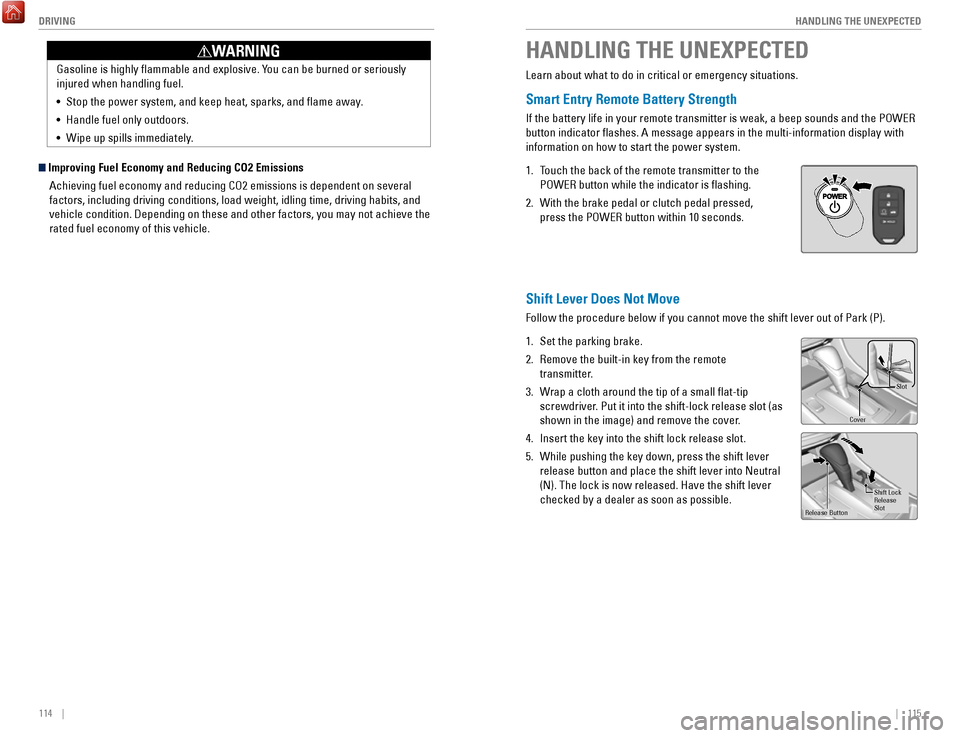
1.
Touch the back of the remote transmitter to the
P
oWer button while the indicator is flashing.
2.
With the brake pedal or clutch pedal pressed,
press the P
oWer button within 10 seconds.
Shift Lever Does Not Move
Follow the procedure below if you cannot move the shift lever out of Par\
k (P).
1.
Set the parking brake.
2.
remove the built-in key from the remote
transmitter.
3.
Wrap a cloth around the tip of a small flat-tip
screwdriver. Put it into the shift-lock release slot (as
shown in the image) and remove the cover
.
4.
Insert the key into the shift lock release slot.
5.
While pushing the key down, press the shift lever
release button and place the shift lever into Neutral
(N). The lock is now released. Have the shift lever
checked by a dealer as soon as possible.
Slot
Cove r
release Button Shift
Lock
release Slot
FPO
Improving Fuel Economy and Reducing CO2 Emissions
Achieving fuel economy and reducing C
o2 emissions is dependent on several
factors, including driving conditions, load weight, idling time, driving\
habits, and
vehicle condition. Depending on these and other factors, you may not ach\
ieve the
rated fuel economy of this vehicle. Gasoline is highly flammable and explosive. Y
ou can be burned or seriously
injured when handling fuel.
•
Stop the power system, and keep heat, sparks, and flame away.
•
Handle fuel only outdoors.
•
Wipe up spills immediately.
WARNING
Page 62 of 80
116 || 117
HANDLING THE UNEXPECTED
HANDLING THE UNEXPECTED
Jump Starting
Turn off the power to electric devices, including audio and lights. Turn off the power
system, then open the hood.
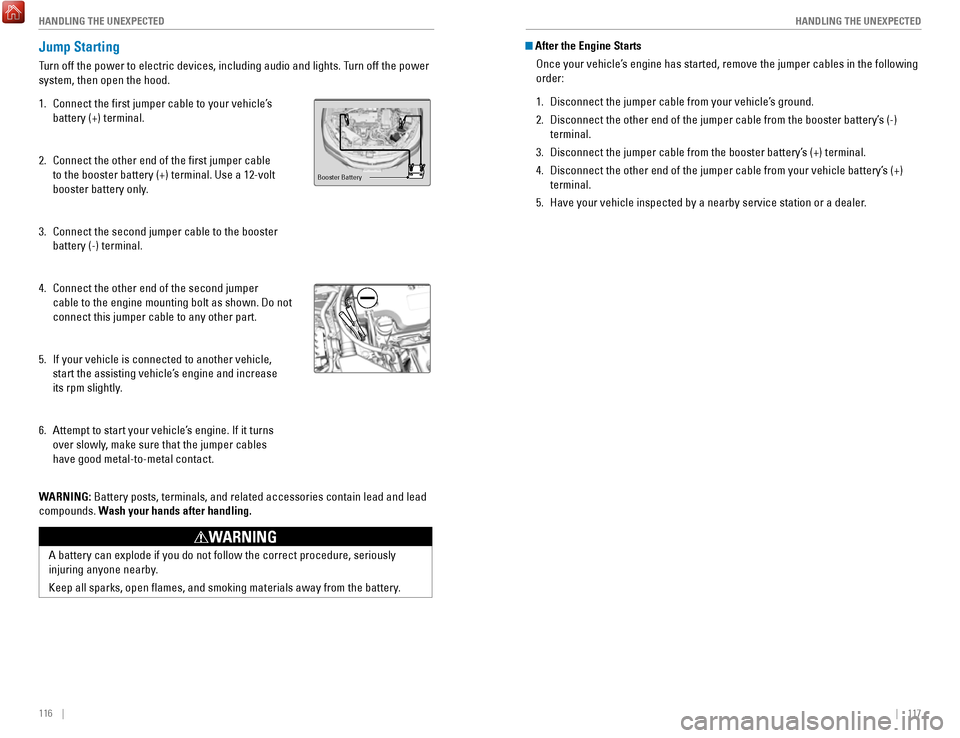
1.
Connect the first jumper cable to your vehicle’s
battery (+) terminal.
2.
Connect the other end of the first jumper cable
to the booster battery (+) terminal. Use a 12-volt
booster battery only.
3.
Connect the second jumper cable to the booster
battery (-) terminal.
4.
Connect the other end of the second jumper
cable to the engine mounting bolt as shown. Do not
connect this jumper cable to any other part.
5.
If your vehicle is connected to another vehicle,
start the assisting vehicle’s engine and increase
its rpm slightly
.
6.
Attempt to start your vehicle’s engine. If it turns
over slowly, make sure that the jumper cables
have good metal-to-metal contact.
W
ARNING: Battery posts, terminals, and related accessories contain lead and lead\
compounds. Wash your hands after handling.
Booster Battery
A battery can explode if you do not follow the correct procedure, seriou\
sly
injuring anyone nearby.
Keep all sparks, open flames, and smoking materials away from the batt\
ery.
WARNING
After the Engine Starts
once your vehicle’s engine has started, remove the jumper cables in the following
order:
1.
Disconnect the jumper cable from your vehicle’s ground.
2.
Disconnect the other end of the jumper cable from the booster battery’\
s (-)
terminal.
3.
Disconnect the jumper cable from the booster battery’s (+) terminal.
4.
Disconnect the other end of the jumper cable from your vehicle battery’\
s (+)
terminal.
5.
Have your vehicle inspected by a nearby service station or a dealer.
Page 63 of 80
118 || 119
HANDLING THE UNEXPECTED
HANDLING THE UNEXPECTED
Overheating
If your engine is overheating, one of two messages will appear on the multi-
information display. Immediately park the vehicle in a safe place. Move the shift
lever to (P) and set the parking brake. Turn off all accessories and turn on the hazard
warning lights.
High Temperature. Power Reduced.
Keep the power mode on and wait until the message disappears. Have your \
vehicle checked by a dealer if the message remains on.
Engine Temperature Too Hot.
•
If steam or spray is present: Turn off the power system and wait until the steam
or spray stops. Then, open the hood.
•
No steam or spray present: Keep the power system on and open the hood.
Check that the cooling fan is operating and stop the power system once t\
he
engine Temperature T
oo Hot message disappears. If the cooling fan is not
operating, immediately turn off the vehicle.
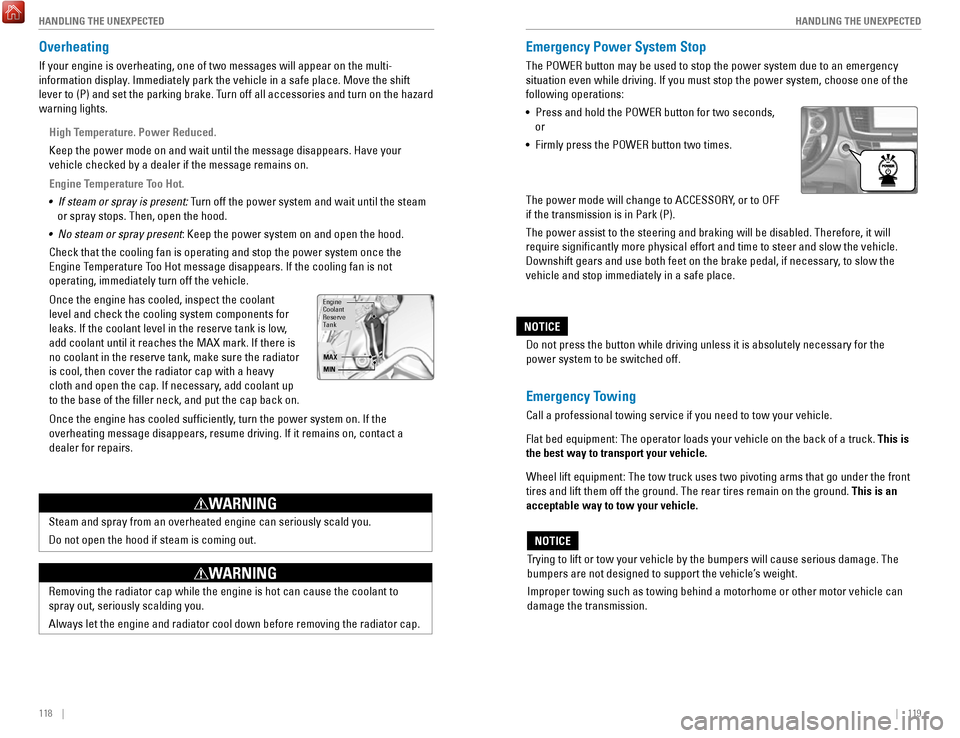
once the engine has cooled, inspect the coolant
level and check the cooling system components for
leaks. If the coolant level in the reserve tank is low,
add coolant until it reaches the MAX mark. If there is
no coolant in the reserve tank, make sure the radiator
is cool, then cover the radiator cap with a heavy
cloth and open the cap. If necessary
, add coolant up
to the base of the filler neck, and put the cap back on.
once the engine has cooled sufficiently, turn the power system on. If the
overheating message disappears, resume driving. If it remains on, contac\
t
a
dealer for repairs.
engine
reserve Coolant
Tank
MAX
MIN
Steam and spray from an overheated engine can seriously scald you.
Do not open the hood if steam is coming out.
WARNING
removing the radiator cap while the engine is hot can cause the coolant t\
o
spray out, seriously scalding you.
Always let the engine and radiator cool down before removing the radiato\
r cap.
WARNING
Emergency Power System Stop
The PoWer button may be used to stop the power system due to an emergency
situation even while driving. If you must stop the power system, choose \
one of the
following operations:
•
Press and hold the PoWer button for two seconds,
or
•
Firmly press the PoWer button two times.
The power mode will change to ACC
eSSorY, or to oFF
if the transmission is in Park (P).
The power assist to the steering and braking will be disabled. Therefore\
, it will
require significantly more physical effort and time to steer and slow \
the
vehicle.
Downshift gears and use both feet on the brake pedal, if necessary, to slow the
vehicle and stop immediately in a safe place.
Trying to lift or tow your vehicle by the bumpers will cause serious dama\
ge. The
bumpers are not designed to support the vehicle’s weight.
Improper towing such as towing behind a motorhome or other motor vehicle\
can
damage the transmission.
NOTICE
Emergency Towing
Call a professional towing service if you need to tow your vehicle.
Flat bed equipment: The operator loads your vehicle on the back of a tru\
ck. This is
the best way to transport your vehicle.
Wheel lift equipment: The tow truck uses two pivoting arms that go under the front
tires and lift them off the ground. The rear tires remain on the ground.\
This is an
acceptable way to tow your vehicle. Do not press the button while driving unless it is absolutely necessary \
for the
power system to be switched off.
NOTICE
Page 65 of 80

122 || 123
HANDLING THE UNEXPECTED
HANDLING THE UNEXPECTED
Tire Repair Kit
If a tire has a small puncture, you can use the tire repair kit to tempo\
rarily repair it.
The puncture must be smaller than 3/16-inch (4 mm) and not in the tire\
sidewall. Go
to a dealer to have the full-size tire permanently repaired or replaced.\
This vehicle is
not equipped with a spare tire.
Before Repairing the Tire
1.
Park the vehicle on a firm, level, and non-slippery surface.
2.
Move the shift lever to Park (P).
3.
Turn on the hazard warning lights and set the power mode to veHICLe oFF
(L
oCK).
Getting Ready to Repair the Tire
1.
open the trunk floor lid and take the kit out of the
case.
2.
Place the kit upright on flat ground near the
punctured tire and away from traffic. Do not place
the kit on its side.
3.
Follow the instructions in the kit to repair the tire.
If the required air pressure is not reached within 10 minutes, the tire \
may be too
severely damaged for the kit to provide the necessary seal and your vehi\
cle will need to be towed.
Do not operate the temporary tire repair kit compressor for more than 15\
minut
es.
The accessory power socket and compressor can overheat and become
permanently damaged.
NOTICE
running the engine with the vehicle in an enclosed or even partly enclose\
d
area can cause a rapid build-up of toxic carbon monoxide.
Breathing this colorless, odorless gas can cause unconsciousness and even
death.
only run the engine to power the air compressor with the vehicle
outdoors.
WARNING
Trunk Floor Lid
Tire repair Kit
Fuse Locations
If any electrical devices are not working, turn the vehicle off and chec\
k to see if any
applicable fuse is blown. Fuse locations are shown on the fuse box cover\
. Locate the
fuse in question by the fuse number and box cover number.
Engine Compartment Fuse Box
Located under the hood near the 12-volt battery. Push the tabs to open the box.
*if equipped
Circuit ProtectedAmps
1Battery15 0A
2ePS70 A
eS B40 Aright ePB*(30A )40 A
Fuse Box option 1Shift By Wire*(30A )
rF C4 0A
IG Main 1
3 0A
3
Headlight Low Beam Main 30Aengine electric Water Pump3 0AIG Main 230AWiper Moto r
4 3
0A
FI Main15 A5 PCU electric Water Pump
6 7.
5A
ev TC20 A
710 A
815 A
915 A
1010 A
11
12
10 A rear Defogger
60
A
Fuse Box Main 1 50 A
ABS/vSA FSr 60
A
IG Hol d
DBW
IG Coi l
Stop Light vBU Fuse Box Main 2
40A
Fuse Box
ABS/vSA Motor 3
0A
3 0A
Heater Motor 40A
Left ePB
*
Small Light (3
0A )
20 A40 A
13(40 A)
14(4 0A )
15
16 (1
0A )10A
1715 A
AmpsCircuit Protected
Fuse Box option 2
A/C PTC 4
A/CPTC 2
Front Fog Light + Dr L
Horn
IG Hold 3-L/r
18 Interior Light7. 5A
19−−
20 (20 A)Premium Amp*
21Back Up
22 10
A
Audio15 A
23P-ACT Drive*(7.5 A)
10 A
25 Left Headlight Low Beam26
24 right Headlight Low Bea m10 A
IGPS LAF10 A
Page 67 of 80

126 || 127
M
AINTENANCEMAINTENANCE
MAINTENANCE
Learn about basic maintenance that you can perform on the vehicle yourse\
lf, as well
as information about how to best maintain the vehicle.
Safety Precautions
Some of the most important safety precautions are listed below; however, we cannot
warn you of every conceivable hazard that can arise in performing mainte\
nance.
only you can decide whether or not you should perform a given task.
Maintenance Safety
•
To reduce the possibility of fire or explosion, keep cigarettes, sparks\
, and flames
away from the 12-volt battery and all fuel-related parts.
•
Never leave rags, towels, or other flammable objects under the hood. H\
eat from
the engine and exhaust can ignite them, causing a fire.
•
To clean parts, use a commercially available degreaser or parts cleaner, not
gasoline.
•
Wear eye protection and protective clothing when working with the 12-volt\
battery or compressed air.
•
Do not run the engine in confined spaces where carbon monoxide gas can\
accumulate.
Vehicle Safety
•
The vehicle must be stationary, and parked on level ground with the parking
brake set and the power system off.
•
Be aware that hot parts can burn you.
•
Be aware that moving parts can injure you.
Improperly maintaining this vehicle or failing to correct a problem befo\
re driving can cause a crash in which you can be seriously hurt or killed. \
Always follow the inspection and maintenance recommendations according
to the schedules in this guide.
WARNING
Failure to properly follow maintenance instructions and precautions can \
cause you to be seriously hurt or killed.
Always follow the procedures and precautions in this guide.
WARNING
Maintenance Minder™
reminds you when indicated maintenance service is due.
When maintenance is due, the system message indicator comes on and a mes\
sage
appears on the multi-information display every time you turn the vehicle\
on. Press either Info (p
/q) button on the steering wheel to change displays.
•
Independent of the Maintenance Minder information, replace the brake fl\
uid every
3 years.
•
Inspect idle speed every 160,000 miles (256,000 km).
•
Adjust the valves during services A, B, 1, 2, or 3 if they are noisy.
Maintenance Minder
messag e
System message
indicator
Sub items
Main item
U.S. models
Maintenance, replacement, or repair of emissions control devices and sys\
tems
may be done by any automotive repair establishment or individuals using \
parts
that are certified to EPA standards.
According to state and federal regulations, failure to perform maintenan\
ce on the
maintenance main items marked with # will not void your emissions warranties.
However, all maintenance services should be performed in accordance with the
intervals indicated by the multi-information display.
Page 70 of 80

132 || 133
M
AINTENANCEMAINTENANCE
Engine Coolant
Park the vehicle on level ground. Check the reserve tank and the coolant\
level in the
radiator. We recommend Honda Long Life Antifreeze/Coolant Type 2.
Checking the Reserve Tank
1.
Check the amount of coolant in the reserve tank.
2.
If the coolant level is below the MIN mark, add
the specified coolant until it reaches the MAX
mark.
3.
Inspect the cooling system for leaks.
Adding Coolant 1.
Make sure the engine and radiator are cool.
2.
Turn the radiator cap counterclockwise and
relieve any pressure in the cooling system. Do
not push the cap down when turning.
3.
Push down and turn the radiator cap
counterclockwise to remove it.
4.
The coolant level should be up to the base of the
filler neck. Add coolant if it is low.
5.
Put the radiator cap back on, and tighten it fully.
6.
Pour coolant into the reserve tank until it reaches
the MAX mark. Put the cap back on the reserve
tank.
engine
reserve Coolant
Tank
MAX
MIN
If temperatures consistently below −22°F (−30°C) are expec\
ted, the coolant
mixture should be changed to a higher concentration. Consult a dealer fo\
r details
for more information.
NOTICE
Tank
MAX
reserve
MIN
removing the radiator cap while the engine is hot can cause the coolant t\
o
spray out, seriously scalding you.
Always let the engine and radiator cool down before removing the radiato\
r
cap.
WARNING
Pour the fluid slowly and carefully so you do not spill any. Clean up any spills
immediately; they can damage components in the engine compartment.
NOTICE
Brake Fluid
The fluid level should be between the MIN and MAX marks on the side of\
the
reservoir. We recommend Honda Heavy Duty Brake Fluid DOT 3.
Pour the fluid carefully.
If the fluid level is at or below the MIN mark, have a
dealer inspect for leaks or worn brake pads as soon as
possible.
MIN
Brake reservoir
MAX
Brake fluid marked DoT 5 is not compatible with your vehicle’s braking system and
can cause extensive damage.
NOTICE
*if equipped
Inverter Coolant
The fluid level should be between the MIN and MAX marks on the side of\
the
reservoir. We recommend Honda Long Life Antifreeze/Coolant Type 2.
1.
When the inverter is cool, check the amount of
coolant in the filler tank.
2.
If the coolant level is below the MIN mark, add
the specified coolant until it reaches the MAX
mark.
3.
Inspect the cooling system for leaks.
MAXMIN
Filler
Tank
Page 71 of 80
134 || 135
M
AINTENANCEMAINTENANCE
Checking the 12-volt Battery
Check the battery terminals for corrosion monthly.
The battery condition is monitored by a sensor on the
negative terminal. If there is a problem with the sensor,
a message on the information multi-information display
appears. Have your vehicle checked by a dealer.
WARNING: Battery posts, terminals, and related accessories contain lead and lead\
compounds. Wash your hands after handling.
The battery gives off explosive hydrogen gas during normal operation.
A spark or flame can cause the battery to explode with enough force to\
kill or
seriously hurt you.
When conducting any battery maintenance, wear protective clothing and a \
face shield, or have a skilled technician do it.
WARNING
Window Washer Fluid
If the washer fluid level is low, fill the washer reservoir.
Pour the washer fluid carefully. Do not overflow the
reservoir.
Canadian models
If the washer fluid level is low, the washer level
indicator or a message appears on the multi-
information display.
Do not use engine antifreeze or a vinegar/water solution in the windshie\
ld washer
reservoir. Antifreeze can damage your vehicle’s paint. A vinegar/water solution
can damage the windshield washer pump.
NOTICE
Changing Wiper Blades
If the wiper blades leave streaks across the windshield, try cleaning th\
em first with a
paper towel or soft cloth and wiper fluid. If the wiper blade rubber h\
as deteriorated,
you should change the wiper blades.
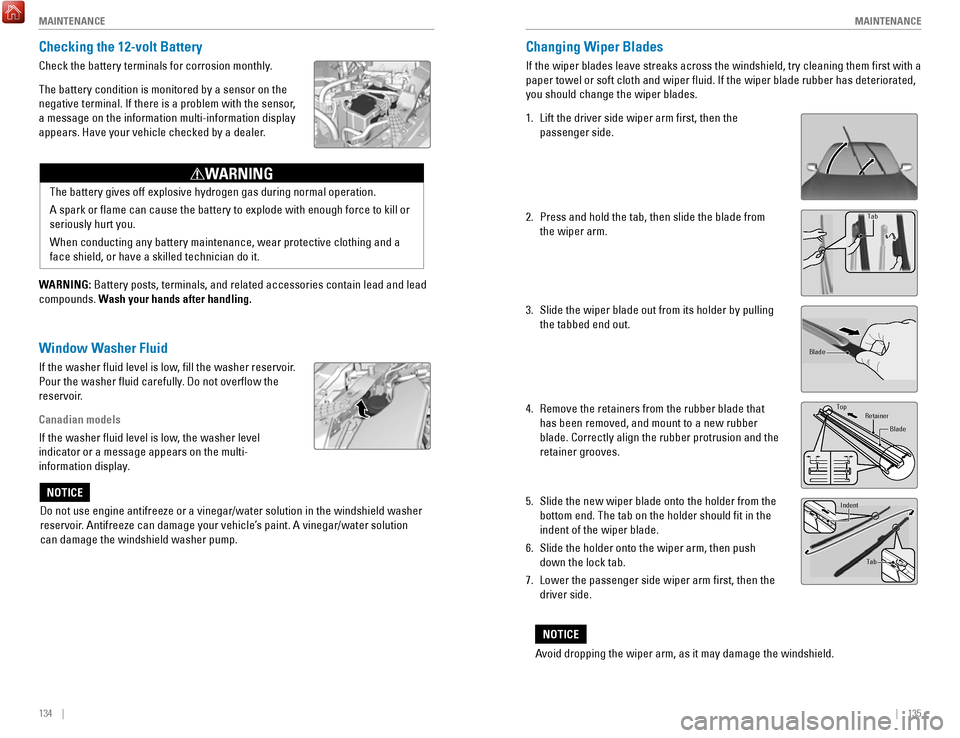
1.
Lift the driver side wiper arm first, then the
passenger side.
2.
Press and hold the tab, then slide the blade from
the wiper arm.
3.
Slide the wiper blade out from its holder by pulling
the tabbed end out.
4.
remove the retainers from the rubber blade that
has been removed, and mount to a new rubber
blade. Correctly align the rubber protrusion and the
retainer grooves.
5.
Slide the new wiper blade onto the holder from the
bottom end. The tab on the holder should fit in the
indent of the wiper blade.
6.
Slide the holder onto the wiper arm, then push
down the lock tab.
7.
Lower the passenger side wiper arm first, then the
driver side.
end cap at
the bottom
Holder
Holder Cap
Tab
Blade
TopRetainer
Blade
Tab
Indent
Avoid dropping the wiper arm, as it may damage the windshield.
NOTICE
Page 72 of 80

136 || 137
M
AINTENANCEMAINTENANCE
Tire Information
To safely operate your vehicle, your tires must be of the proper type and\
size, in good
condition with adequate tread, and properly inflated.
Inflation Guidelines
•
Properly inflated tires provide the best combination of handling, trea\
d life, and
comfort.
refer to the driver’s doorjamb label or the specifications (see page
143) for the specified pressure.
•
Underinflated tires wear unevenly, adversely affect handling and fuel economy,
and are more likely to fail from overheating.
•
overinflated tires make your vehicle ride harshly, are more prone to road
hazards, and wear unevenly
.
•
every day before you drive, look at each of the tires. If one looks lower\
than the
others, check the pressure with a tire gauge.
•
Measure the air pressure when tires are cold. This means the vehicle has been
parked for at least 3 hours, or driven less than 1 mile (1.6 km). If n\
ecessary
, add
or release air until the specified pressure is reached, and then calib\
rate the
system (see page 120). If checked when hot, tire pressure can be as mu\
ch as
4–6 psi (30–40 kPa, 0.3–0.5 kgf/cm
2) higher than checked when cold.
•
At least once a month or before long trips, use a gauge to measure the p\
ressure
in all tires, including the spare.
even tires in good condition can lose 1–2 psi
(10–20 kPa, 0.1–0.2 kgf/cm2) per month.
Inspection Guidelines
every time you inflate the tires, check for the following:
•
Any damage to tires, including bumps, bulges, cuts, splits, or cracks in\
the side
or tread.
remove any foreign objects and inspect for air leaks. replace tires if
you see fabric or cord.
•
Uneven or excessive tread wear. Have a dealer check the wheel alignment.
•
Cracks or other damage around the valve stems.
Wear Indicators The groove where the wear indicator is located is
1/16 inch (1.6 mm) shallower than elsewhere on the
tire. If the tread has worn so low that the indicator is
exposed, replace the tire. Worn out tires have poor
traction on wet roads.
Examples of
wear indicator
marks
Tire and Loading Information Label
The label attached to the driver’s doorjamb provides necessary tire and
loading information. Using tires that are excessively worn or improperly inflated can cause\
a crash in which you can be seriously hurt or killed.
Follow all instructions in this owner’s manual regarding tire inflation
and maintenance
.
WARNING
Tire and Wheel Replacement
replace your tires with radials of the same size, load range, speed ratin\
g, and
maximum cold tire pressure rating (as shown on the tire’
s sidewall). Using tires
of a different size or construction can cause certain vehicle systems to\
work
incorrectly. It is best to replace all four tires at the same time. If that isn’\
t possible,
replace the front or rear tires in pairs.
If you change or replace a wheel, make sure that the wheel’s specifications match
those of the original wheels.
only use TPMS-specified wheels approved for your
vehicle.
Original
tire sizes Number of
people your
vehicle can
carry Proper cold
tire pressure
Total weight
your vehicle
can carry
(do not exceed)
Installing improper tires on your vehicle can affect handling and stabil\
ity.
This can cause a crash in which you can be seriously hurt or killed.
Always use the size and type of tires recommended in the
owner’s Manual.
WARNING
Page 73 of 80

138 || 139
M
AINTENANCEMAINTENANCE
Tire Service Life
The life of your tires is dependent on many factors, including driving h\
abits, road
conditions, vehicle loading, inflation pressure, maintenance history, speed, and
environmental conditions (even when the tires are not in use).
In addition to regular inspections and inflation pressure maintenance,\
it is
recommended that you have annual inspections performed once the tires re\
ach
five years old. All tires, including the spare, should be removed from\
service after
10 years from the date of manufacture, regardless of their condition or \
state of
wear.
Winter TiresIf driving on snowy or frozen roads, mount all season tires marked “M\
+S”, snow
tires, or tire chains; reduce speed; and maintain sufficient distance \
between
vehicles when driving. For winter tires, select the size and load ranges\
that are the
same as the original tires, and mount them to all four wheels.
Tire ChainsInstall tire chains on the front tires only. Because your vehicle has limited tire
clearance, we strongly recommend using the following chains:
Cable-type: SCC Radial Chain SC1036
Mount chains as tightly as you can, and make sure that they do not touch\
the
brake lines or suspension.
Traction devices that are the wrong size or improperly installed can dama\
ge your
vehicle’s brake lines, suspension, body, and wheels. Stop driving if they are hitting
any part of the vehicle.
NOTICE Using the wrong chains, or not properly installing chains, can damage th\
e
brake lines and cause a crash in which you can be seriously injured or k\
illed.
Follow all instructions in this guide regarding the selection and use of\
tire
chains.
WARNING
Tire Labeling
The tires that came on your vehicle have a number of markings. Those you\
should be aware of are described below.
Here is an example of what each marking means:
215/50R17 94V
•
215: tire width in millimeters
•
50: aspect ratio (tire section height as a
percentage of its width)
•
r: tire construction code (radial)
•
17: rim diameter in inches
•
94: load index (code indicating maximum
load tire can carry)
•
v: speed symbol (code indicating maximum
speed rating)
Tire Identification Number (TIN)
The tire identification number
(TIN) is a group of numbers
and letters that look like the
example below. TIN is located
on the sidewall of the tire.
Glossary of Tire TerminologyCold Tire Pressure – The tire air pressure when the vehicle has been
parked for at least three hours or driven less than 1 mile (1.6 km).
Load
rating – The maximum load that a tire is rated to carry for a given
inflation pressure.
Maximum Inflation Pressure – The maximum tire air pressure that the\
tire
can hold.
Maximum Load
rating – The load rating for a tire at the maximum
permissible inflation pressure for that tire.
recommended Inflation Pressure – The cold tire inflation pressure \
recommended by the manufacturer.
T
readwear Indicators (TWI) – The projections within the principal gr\
ooves
designed to give a visual indication of the degrees of wear of the tread\
.
Tire size
Tire
identication
number (TIN)
Maximum
tire load
Maximu m
tire pressure
Tire siz e
DOT B97R FW6X 2209
DOT: This indicates that the tire meets all
requirements of the U.S. Department of
Transportation.
B97R: Manufacturer’s identication mark
FW6X: Tire type code
22 09: Date of Transportation
Year
Week