warning HONDA ACCORD HYBRID 2019 Service Manual
[x] Cancel search | Manufacturer: HONDA, Model Year: 2019, Model line: ACCORD HYBRID, Model: HONDA ACCORD HYBRID 2019Pages: 727, PDF Size: 24.78 MB
Page 238 of 727
uu Interior Lights/Interior Convenience Items u Interior Convenience Items
236
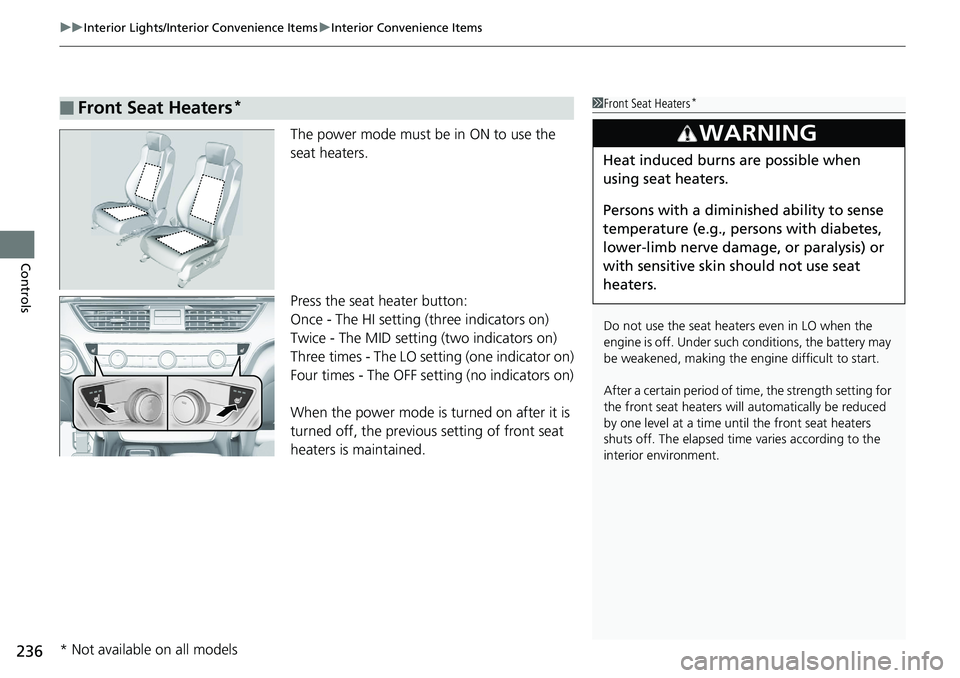
Controls The power mode must be in ON to use the
seat heaters.
Press the seat heater button:
Once - The HI setting (three indicators on)
Twice - The MID setting (two indicators on)
Three times - The LO setting (one indicator on)
Four times - The OFF se tting (no indicators on)
When the power mode is turned on after it is
turned off, the previous setting of front seat
heaters is maintained.■ Front Seat Heaters * 1 Front Seat Heaters *
Do not use the seat heaters even in LO when the
engine is off. Under such conditions, the battery may
be weakened, making the engine difficult to start.
After a certain period of time, the strength setting for
the front seat heaters will automatically be reduced
by one level at a time unt il the front seat heaters
shuts off. The elapsed time varies according to the
interior environment.3
WARNING Heat induced burns are possible when
using seat heaters.
Persons with a diminished ability to sense
temperature (e.g., persons with diabetes,
lower-limb nerve damage, or paralysis) or
with sensitive skin should not use seat
heaters.
* Not available on all models
Page 239 of 727
Continued
237uu Interior Lights/Interior Convenience Items u Interior Convenience Items
Controls
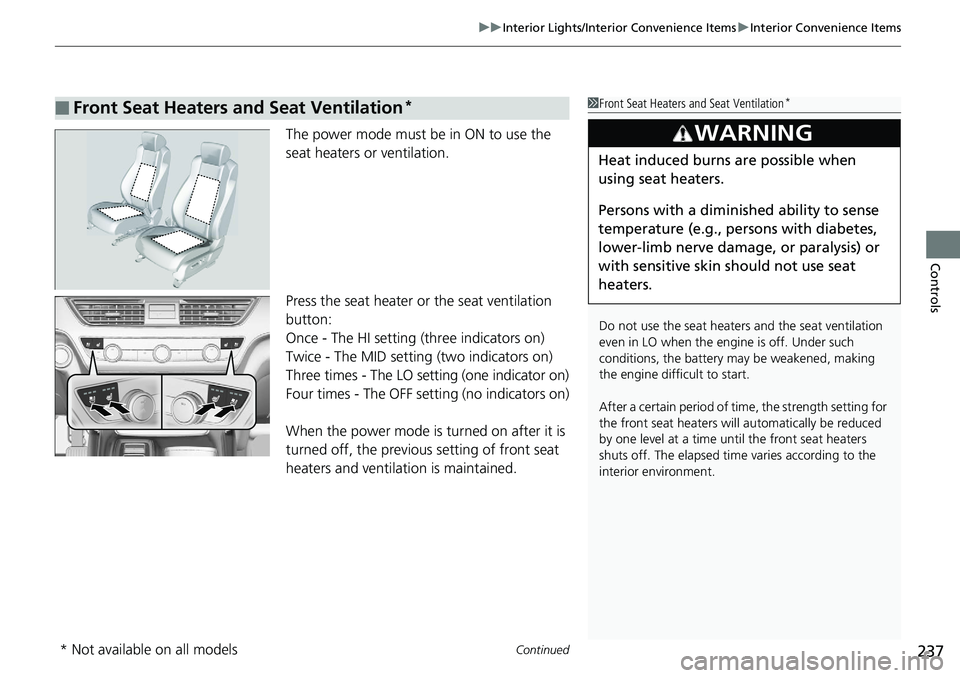
The power mode must be in ON to use the
seat heaters or ventilation.
Press the seat heater or the seat ventilation
button:
Once - The HI setting (three indicators on)
Twice - The MID setting (two indicators on)
Three times - The LO setting (one indicator on)
Four times - The OFF setting (no indicators on)
When the power mode is turned on after it is
turned off, the previous setting of front seat
heaters and ventilation is maintained.■ Front Seat Heaters and Seat Ventilation * 1 Front Seat Heaters and Seat Ventilation *
Do not use the seat heater s and the seat ventilation
even in LO when the engine is off. Under such
conditions, the battery ma y be weakened, making
the engine difficult to start.
After a certain period of time, the strength setting for
the front seat heaters will automatically be reduced
by one level at a time unt il the front seat heaters
shuts off. The elapsed time varies according to the
interior environment.3
WARNING Heat induced burns are possible when
using seat heaters.
Persons with a diminished ability to sense
temperature (e.g., persons with diabetes,
lower-limb nerve damage, or paralysis) or
with sensitive skin should not use seat
heaters.
* Not available on all models
Page 240 of 727
uu Interior Lights/Interior Convenience Items u Interior Convenience Items
238
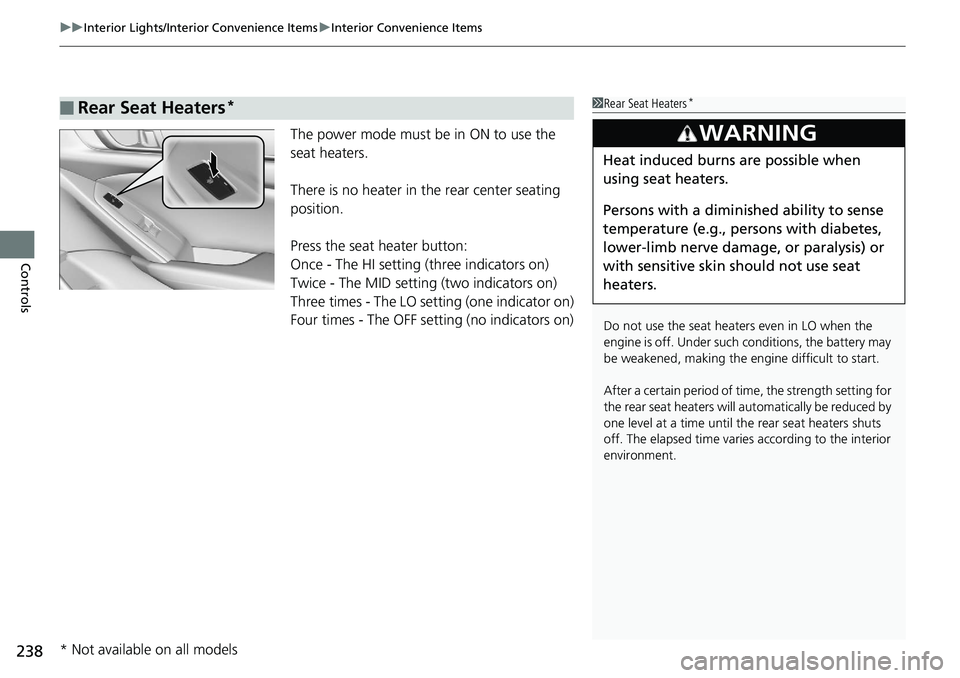
Controls The power mode must be in ON to use the
seat heaters.
There is no heater in the rear center seating
position.
Press the seat heater button:
Once - The HI setting (three indicators on)
Twice - The MID setting (two indicators on)
Three times - The LO setting (one indicator on)
Four times - The OFF se tting (no indicators on)■ Rear Seat Heaters * 1 Rear Seat Heaters *
Do not use the seat heaters even in LO when the
engine is off. Under such conditions, the battery may
be weakened, making the engine difficult to start.
After a certain period of time, the strength setting for
the rear seat heaters will automatically be reduced by
one level at a time until the rear seat heaters shuts
off. The elapsed time varies according to the interior
environment.3
WARNING Heat induced burns are possible when
using seat heaters.
Persons with a diminished ability to sense
temperature (e.g., persons with diabetes,
lower-limb nerve damage, or paralysis) or
with sensitive skin should not use seat
heaters.
* Not available on all models
Page 356 of 727
354 uu General Information on the Audio System u Honda App License Agreement
Features 5. Unauthorized Use and Abuse. You are responsible for ensuring your (and any authorized third parties’) use of the SOFTWARE and
SERVICES remains in compliance with this AGREEMENT and all other applicable HONDA TERMS and PROVIDER TERMS. You acknowledge
and agree that any use of the SOFTWARE or SERVICES occurring th rough your VEHICLE will be deemed your actions and that HONDA an d
PROVIDERS may rely upon such actions. You ag ree to immediately notify us if you susp ect fraudulent or abusive activity involvin g the
SOFTWARE or SERVICES. If you so notify us or if we otherwise suspect fraudulent or abusive acti vity, you agree to cooperate wit h us in any
fraud investigation and to use any fraud prevention measures we pres cribe. Your failure to immediat ely notify us or cooperate t o use such
measures will result in your liability for all fraudulent us age or abusive activity asso ciated with your VEHICLE.
6. SOFTWARE Updates.
The SOFTWARE and SERVICES may be updated when your VEHICLE is serviced by a DEALER or remotely, over-the-
air, by HONDA from time to time; such update s may occur with or without further notice or your future consent. The SOFTWARE may be
updated at HONDA’s discretion and for any pu rpose including, without limit ation, to patch or otherwis e improve the SOFTWARE or
SERVICES functionality, se curity, or stability. All updates to the SOFTWARE and SERVICES are su bject to this AGREEMENT and any other
applicable HONDA TERMS and PROVIDER TERMS.
7. Uninstalling, Removing, and Replacing the SOFTWARE.
Replacing SOFTWARE or HONDA SERVICES with software or firmware not
provided and installed by HONDA or a DEALER will render all representations and warranties for the SOFTWARE, HONDA SERVICES, an d
VEHICLE functionality reliant upon the SOFTWARE or HONDA SERVICES null and void.
D. SOFTWARE Operationa l Notices and Warnings
1. Vehicle Geolocation Information.
You acknowledge that your VEHICLE may be equi pped with certain traffic and map features. The
traffic feature will automatically collect an d transmit, through GPS technology, your Ve hicle’s current location (longitude and latitude),
travel direction and speed (“VEHICLE GEOLOCATION INFORMAT ION”) to HONDA and PROVIDERS. The VEHICLE GEOLOCATION
INFORMATION is used by HONDA and PROVIDERS to provide traffic and navigation-related info rmation to you, but may also be used t o
provide other SERVICES or offers to you. HONDA will not use such VEHICLE GEOLOCATION INFORMATION for its own marketing efforts,
or provide such information to unaffiliated third parties for their own purp oses, without your express consent.
Page 358 of 727
356 uu General Information on the Audio System u Honda App License Agreement
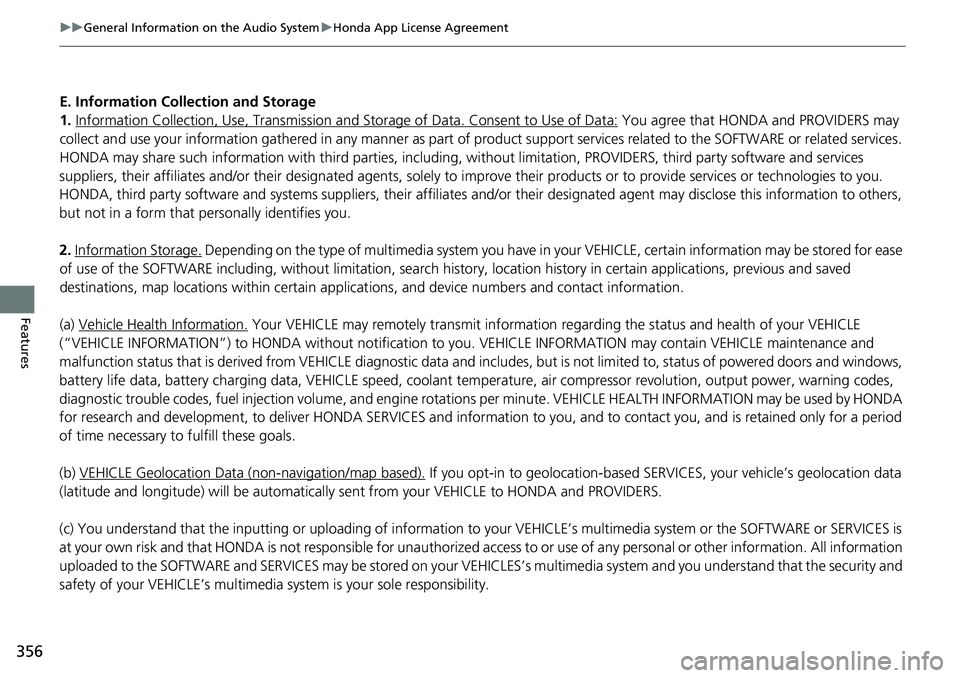
Features E. Information Collection and Storage
1. Information Collection , Use, Transmission and Storage of Data. Consent to Use of Data: You agree that HONDA and PROVIDERS may
collect and use your information gathered in any manner as part of product support services rela ted to the SOFTWARE or related services.
HONDA may share such information with third parties, including, wi thout limitation, PROVIDERS, th ird party software and service s
suppliers, their affiliates and/or their desi gnated agents, solely to im prove their products or to provide services or technolo gies to you.
HONDA, third party software and systems supp liers, their affiliates and/or their designat ed agent may disclose this information to others,
but not in a form that pe rsonally identifies you.
2. Information Storage.
Depending on the type of multimedia system you have in your VEHICLE, certain inform ation may be stored for ease
of use of the SOFTWARE including, without limitation, search hi story, location history in certain applications, previous and sa ved
destinations, map locations within certain applicat ions, and device numbers and contact information.
(a) Vehicle Health Information.
Your VEHICLE may remotely trans mit information regarding the stat us and health of your VEHICLE
(“VEHICLE INFORMATION”) to HONDA without notification to you. VEHICLE INFORMATIO N may contain VEHICLE maintenance and
malfunction status that is derived from VEHICLE diagnostic data and includes, but is not limited to, status of powered doors an d windows,
battery life data, battery charging data, VEHICLE speed, coolant temperat ure, air compressor revolution, output power, warning codes,
diagnostic trouble codes, fuel injection volume, and engine rotati ons per minute. VEHICLE HEALTH IN FORMATION may be used by HON DA
for research and development, to deliver HO NDA SERVICES and information to you, and to contact you, and is retained only for a period
of time necessary to fulfill these goals.
(b) VEHICLE Geolocation Data (non-navigation/map based).
If you opt-in to geolocation-based SERVICES, your vehicle’s geolocation data
(latitude and longitude) will be automatically se nt from your VEHICLE to HONDA and PROVIDERS.
(c) You understand that the inputting or uploading of information to your VEHICLE’s multimedia sy stem or the SOFTWARE or SERVIC ES is
at your own risk and that HONDA is not responsible for unauthorized access to or use of any personal or other information. All information
uploaded to the SOFTWARE and SERVICES may be stored on your VEHI CLES’s multimedia system and you understand that the security a nd
safety of your VEHICLE’s multimedia system is your sole responsibility.
Page 378 of 727
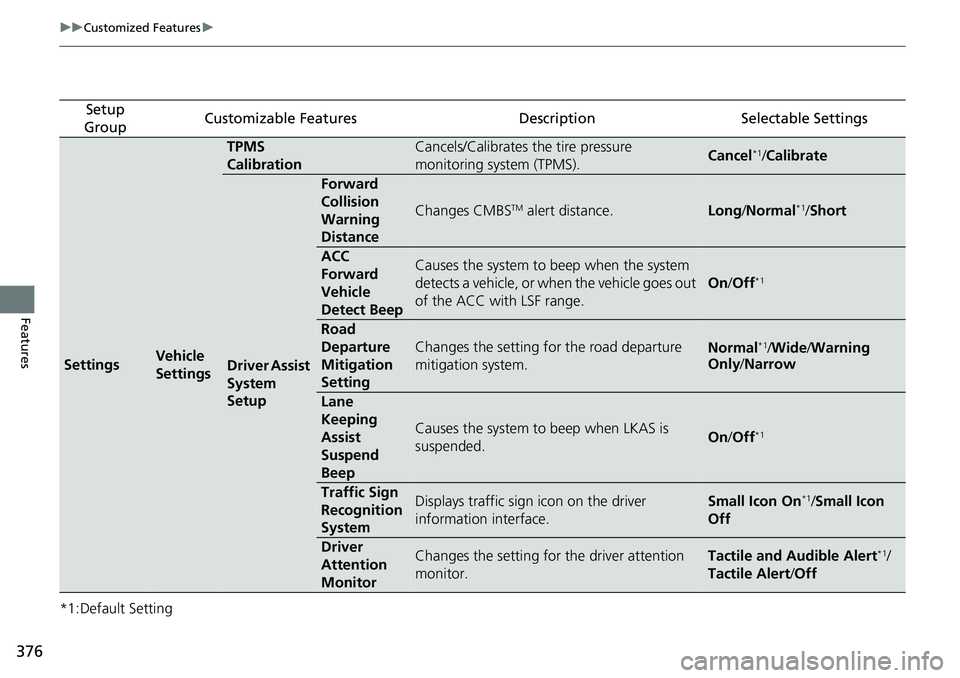
376 uu Customized Features u
Features *1:Default Setting Setup
Group Customizable Features Description Selectable Settings
Settings Vehicle
Settings TPMS
Calibration Cancels/Calibrates the tire pressure
monitoring system (TPMS). Cancel *1
/ Calibrate
Driver Assist
System
Setup Forward
Collision
Warning
Distance Changes CMBS TM
alert distance. Long / Normal *1
/ Short
ACC
Forward
Vehicle
Detect Beep Causes the system to beep when the system
detects a vehicle, or when the vehicle goes out
of the ACC with LSF range. On / Off *1
Road
Departure
Mitigation
Setting Changes the setting fo r the road departure
mitigation system. Normal *1
/ Wide / Warning
Only / Narrow
Lane
Keeping
Assist
Suspend
Beep Causes the system to beep when LKAS is
suspended. On / Off *1
Traffic Sign
Recognition
System Displays traffic sign icon on the driver
information interface. Small Icon On *1
/ Small Icon
Off
Driver
Attention
Monitor Changes the setting for the driver attention
monitor. Tactile and Audible Alert *1
/
Tactile Alert / Off
Page 379 of 727
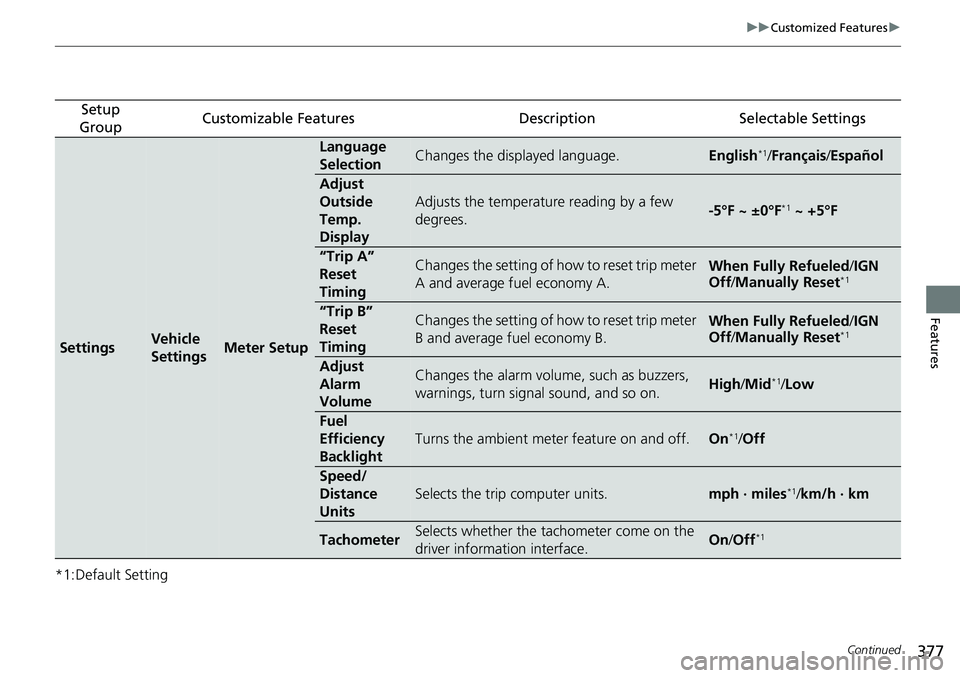
377 uu Customized Features u
Continued
Features
*1:Default Setting Setup
Group Customizable Features Description Selectable Settings
Settings Vehicle
Settings Meter Setup Language
Selection Changes the displayed language. English *1
/ Français / Español
Adjust
Outside
Temp.
Display Adjusts the temperature reading by a few
degrees. -5°F ~ ±0°F *1
~ +5°F
“Trip A”
Reset
Timing Changes the setting of how to reset trip meter
A and average fuel economy A. When Fully Refueled / IGN
Off / Manually Reset *1
“Trip B”
Reset
Timing Changes the setting of how to reset trip meter
B and average fuel economy B. When Fully Refueled / IGN
Off / Manually Reset *1
Adjust
Alarm
Volume Changes the alarm volume, such as buzzers,
warnings, turn signal sound, and so on. High / Mid *1
/ Low
Fuel
Efficiency
Backlight Turns the ambient meter feature on and off. On *1
/ Off
Speed/
Distance
Units Selects the trip computer units. mph · miles *1
/ km/h · km
Tachometer Selects whether the tachometer come on the
driver information interface. On / Off *1
Page 384 of 727
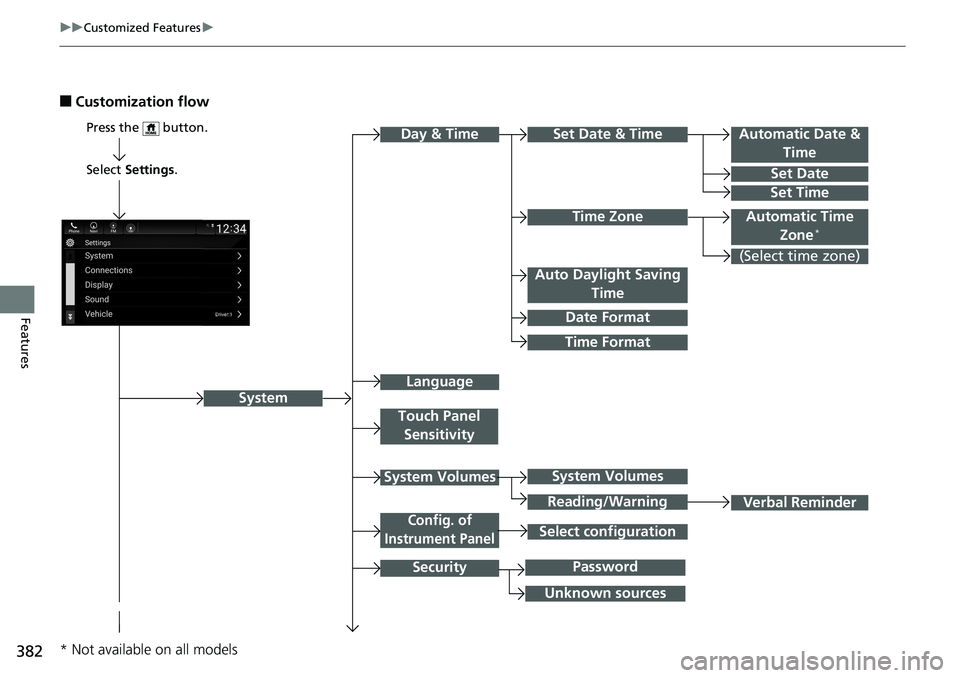
382 uu Customized Features u
Features ■ Customization flow
Select Settings .
Automatic Date &
Time
Set Date
Set Time
SystemPress the button.
Automatic Time
Zone *
Time Format Time ZoneSet Date & Time
Touch Panel
Sensitivity
System Volumes
Config. of
Instrument Panel
SecurityDay & Time
(Select time zone)
Language Auto Daylight Saving
Time
Date Format
Verbal ReminderSystem Volumes
Reading/Warning
Unknown sources PasswordSelect configuration
* Not available on all models
Page 387 of 727
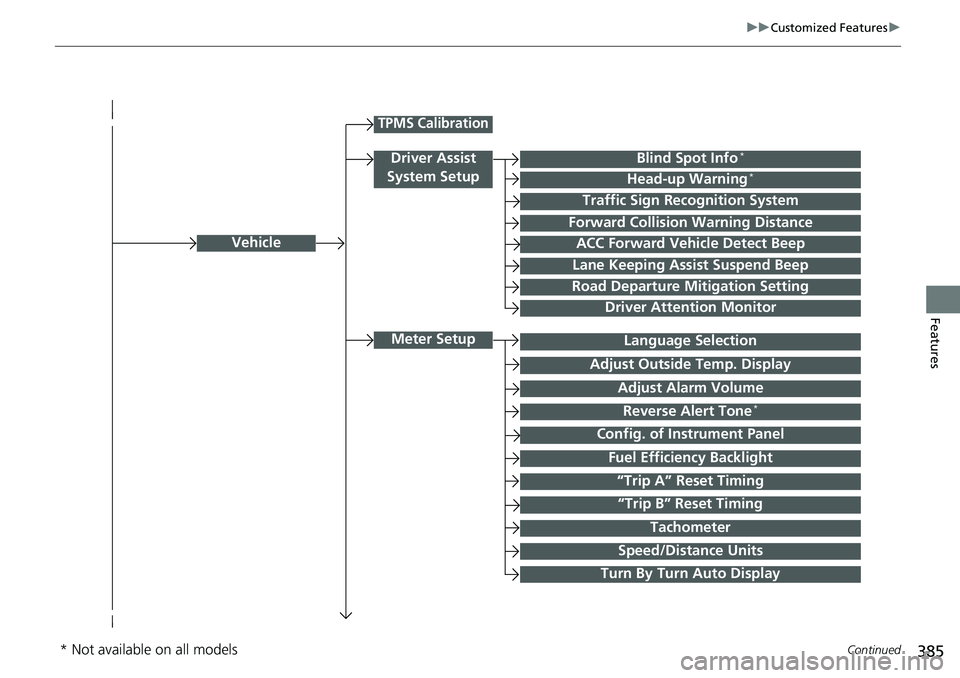
385 uu Customized Features u
Continued
Features
Vehicle
Meter Setup
Adjust Outside Temp. Display
“Trip A” Reset Timing
“Trip B” Reset Timing Reverse Alert Tone *
Config. of Instrument Panel Adjust Alarm Volume
Turn By Turn Auto Display Fuel Efficiency BacklightTPMS Calibration
Driver Assist
System Setup Blind Spot Info *
Head-up Warning *
Traffic Sign Recognition System
Forward Collision Warning Distance
ACC Forward Vehicle Detect Beep
Lane Keeping Assist Suspend Beep
Road Departure Mitigation Setting
Driver Attention Monitor
Speed/Distance Units TachometerLanguage Selection
* Not available on all models
Page 391 of 727
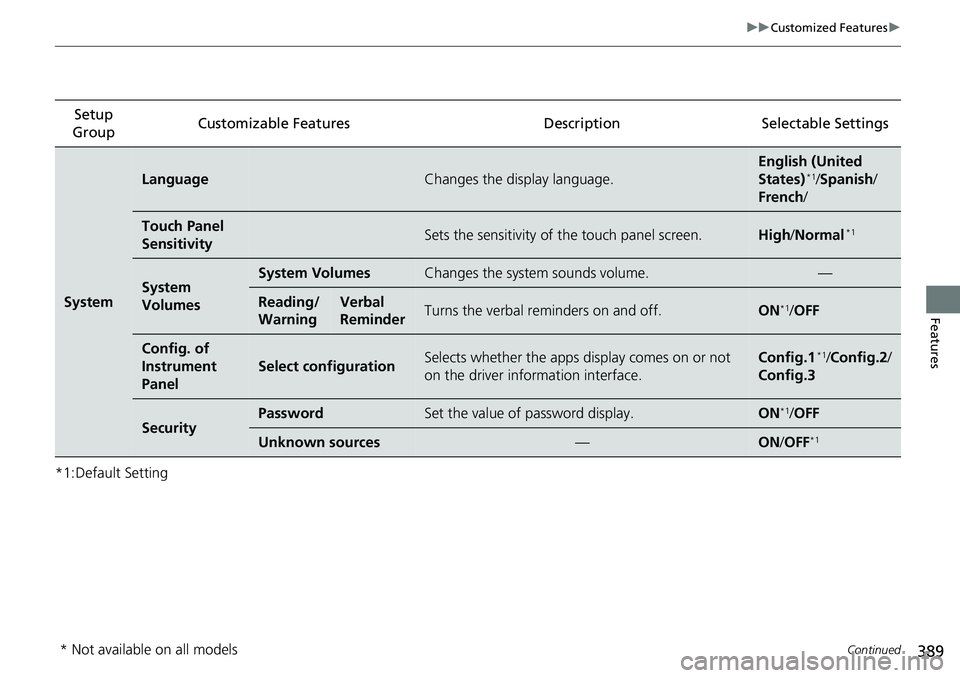
389 uu Customized Features u
Continued
Features
*1:Default Setting Setup
Group Customizable Features Descri ption Selectable Settings
System Language Changes the display language. English (United
States) *1
/ Spanish /
French /
Touch Panel
Sensitivity Sets the sensitivity of the touch panel screen. High / Normal *1
System
Volumes System Volumes Changes the system sounds volume. —
Reading/
Warning Verbal
Reminder Turns the verbal re minders on and off. ON *1
/ OFF
Config. of
Instrument
Panel Select configuration Selects whether the apps display comes on or not
on the driver information interface. Config.1 *1
/ Config.2 /
Config.3
Security Password Set the value of password display. ON *1
/ OFF
Unknown sources — ON / OFF *1
* Not available on all models