climate control HONDA ACCORD HYBRID 2019 Owners Manual
[x] Cancel search | Manufacturer: HONDA, Model Year: 2019, Model line: ACCORD HYBRID, Model: HONDA ACCORD HYBRID 2019Pages: 727, PDF Size: 24.78 MB
Page 4 of 727
Contents
This owner’s manual should be considered a permanent part of the
vehicle and should remain with the vehicle when it is sold.
This owner’s manual covers all models of your vehicle. You may find
descriptions of equipment and features that are not on your
particular model.
Images throughout this owner’s ma nual (including the front cover)
represent features and equipment that are available on some, but
not all, models. Your particular mo del may not have some of these
features.
This owner’s manual is for vehicles sold in the United States and
Canada.
The information and specifications in cluded in this publication were
in effect at the time of approval for printing. Honda Motor Co., Ltd.
reserves the right, however, to discontinue or change specifications
or design at any time without notice and without incurring any
obligation. 2 Safe Driving P. 33For Safe Driving P. 34 Seat Belts P. 38 Airbags P. 45
2 Instrument Panel P. 77Indicators P. 78 Gauges and Displays P. 137
2 Controls P. 163 Clock P. 164 Locking and Unlocking the Doors P. 166
Opening and Closing the Moonroof *
P. 189
Adjusting the Seats P. 210
2 Features P. 243 Audio System P. 244 Audio System Basic Operation P. 252, 273
Customized Features P. 370, 381 HomeLink ® Universal Transceiver *
P. 400
2 Driving P. 453 Before Driving P. 454 Towing a Trailer P. 459
Multi-View Rear Camera P. 594 Refueling P. 597
2 Maintenance P. 603Before Performing Maintenance P. 604 Maintenance Minder TM
P. 607
Checking and Maintaining Wiper Blades P. 639
Climate Control System Maintenance P. 654
2 Handling the Unexpected P. 663Tools P. 664 If a Tire Goes Flat P. 665
Overheating P. 679 Indicator, Coming On/Blinking P. 681
When You Cannot Op en the Trunk P. 695
2 Information P. 699Specifications P. 700 Identi fication Numbers P. 704
Emissions Testing P. 707 Warranty Coverages P. 709
Page 5 of 727
ContentsChild Safety P. 61 Exhaust Gas Hazard P. 75 Safety Labels P. 76
Opening and Closing the Trunk P. 180 Security System P. 183 Opening and Closing the Windows P. 186
Operating the Switches Around the Steering Wheel P. 190 Adjusting the Mirrors P. 208
Interior Lights/Interior Convenience It ems P. 221 Climate Control System P. 239
Audio Error Messages P. 343 General Information on the Audio System P. 348
Bluetooth ® HandsFreeLink ® P. 403, 427 Refuel Recommend P. 452
When Driving P. 465 Braking P. 571 Parking Your Vehicle P. 583
Fuel Economy and CO 2
Emissions P. 600 Turbo Engine Vehicle P. 601
Maintenance Under the Hood P. 614 Replacing Light Bulbs P. 631
Checking and Maintaining Tires P. 642 Battery P. 651 Remote Transmitter Care P. 653
Cleaning P. 655 Accessories and Modifications P. 660
Engine Does Not Start P. 671 Jump Starti ng P. 674 Shift Lever Does Not Move P. 677
Fuses P. 688 Emergency Towing P. 693 When You Cannot Unlock the Fuel Fill Door P. 694
Refueling P. 697
Devices that Emit Radio Waves P. 705 Reporting Safety Defects P. 706
Authorized Manuals P. 711 Customer Service Information P. 712 Quick Reference Guide
P. 4 Safe Driving
P. 33 Instrument Panel
P. 77 Controls
P. 163 Features
P. 243 Driving
P. 453 Maintenance
P. 603 Handling the Unexpected
P. 663
Information
P. 699
Index
P. 713
Page 6 of 727
4
Quick Reference Guide Quick Reference Guide
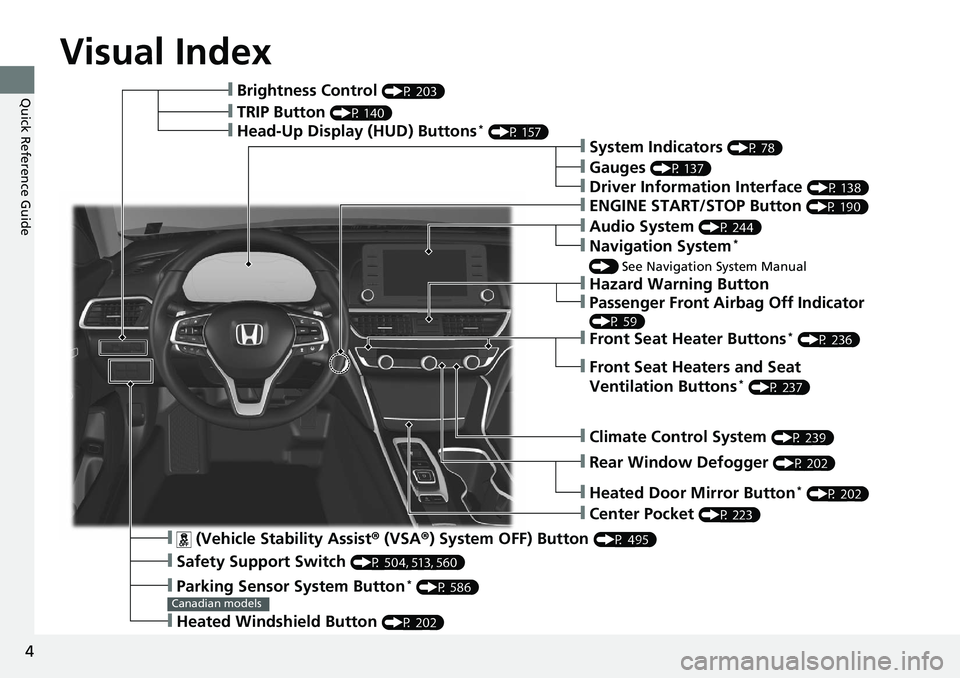
Visual Index
❙ (Vehicle Stability Assist ® (VSA ® ) System OFF) Button (P 495)
❙ Safety Support Switch (P 504, 513, 560)
❙ Parking Sensor System Button *
(P 586)
❙ Heated Windshield Button (P 202)Canadian models❙ Brightness Control (P 203)
❙ Head-Up Display (HUD) Buttons *
(P 157)
❙ System Indicators (P 78)
❙ Gauges (P 137)
❙ Driver Information Interface (P 138)
❙ ENGINE START/STOP Button (P 190)
❙ Climate Control System (P 239)
❙ Rear Window Defogger (P 202)
❙ Heated Door Mirror Button *
(P 202)
❙ Center Pocket (P 223)
❙ Hazard Warning Button❙ TRIP Button (P 140)
❙ Audio System (P 244)
❙ Navigation System *
() See Navigation System Manual
❙ Front Seat Heater Buttons *
(P 236)
❙ Front Seat Heaters and Seat
Ventilation Buttons *
(P 237)
❙ Passenger Front Airbag Off Indicator (P 59)
Page 17 of 727
15
Quick Reference Guide
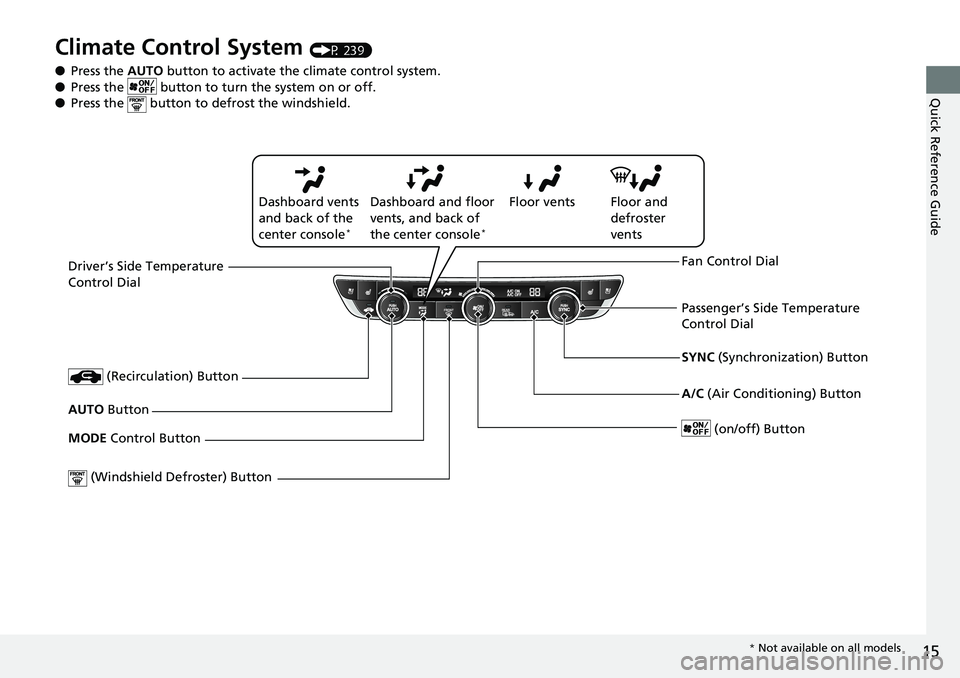
Climate Control System (P 239)
● Press the AUTO button to activate th e climate control system.
● Press the button to tu rn the system on or off.
● Press the button to defrost the windshield.
Driver’s Side Temperature
Control Dial
(Windshield De froster) Button SYNC (Synchronization) Button
AUTO Button
(on/off) Button (Recirculation) Button
MODE Control Button Fan Control Dial
A/C (Air Conditioning) ButtonPassenger’s Side Temperature
Control DialFloor ventsDashboard vents
and back of the
center console *
Dashboard and floor
vents, and back of
the center console *
Floor and
defroster
vents
* Not available on all models
Page 37 of 727
35uu For Safe Driving u Important Safety Precautions
Safe Driving
■ Pay appropriate attention to the task of driving safely
Engaging in cell phone conversation or other activities that keep you from paying
close attention to the road, other vehicles , and pedestrians could lead to a crash.
Remember, situations can change quickly, and only you can decide when it is safe to
divert some attention away from driving.
■ Control your speed
Excessive speed is a major factor in crash injuries and deaths. Generally, the higher
the speed, the greater the risk, but serious injuries can also occur at lower speeds.
Never drive faster than is safe for curr ent conditions, regardless of the maximum
speed posted.
■ Keep your vehicle in safe condition
Having a tire blowout or a mechanical failure can be extremely hazardous.
To reduce the possibility of such problems, check your tire pressures and condition
frequently, and perform all regularly scheduled maintenance.
■ Do not leave children unattended in the vehicle
Children, pets and people needing assistan ce left unattended in the vehicle may be
injured if they activate one or more of the vehicle controls. They may also cause the
vehicle to move, resulting in a crash in wh ich they and/or another person(s) can be
injured or killed. Also, depending on the am bient temperature, the temperature of
the interior may reach extreme levels, which can result in harm or death.
Even if the climate control system is on, never leave them in the vehicle unattended
as the climate control system can shut off at any time.
Page 77 of 727
75
Safe Driving
Exhaust Gas HazardCarbon Monoxide Gas The engine exhaust from this vehicle contains carbon monoxide, a colorless,
odorless, and highly toxic gas. As long as you properly maintain your vehicle, carbon
monoxide gas will not get into the interior.
■ Have the exhaust system in spected for leaks whenever
• The exhaust system is ma king an unusual noise.
• The exhaust system may have been damaged.
• The vehicle is raised for an oil change.
When you operate a vehicle with the trunk open, airflow can pull exhaust gas into
the interior and create a hazardous condition. If you must drive with the trunk open,
open all the windows and set the climate control system as shown below.
1. Select the fresh air mode.
2. Select the mode.
3. Set the fan speed to high.
4. Set the temperature control to a comfortable setting.
Adjust the climate control system in the same manner if you sit in your parked
vehicle with the engine running. 1 Carbon Monoxide Gas
An enclosed area such as a garage can quickly fill up
with carbon monoxide gas.
Do not run the engine with the garage door closed.
Even when the garage door is open, drive out of the
garage immediately afte r starting the engine.3
WARNING Carbon monoxide gas is toxic.
Breathing it can cause unconsciousness and
even kill you.
Avoid any enclosed areas or activities that
expose you to carbon monoxide.
Page 104 of 727
102 uu Indicators u
Instrument Panel Indicator Name On/Blinking Explanation Message
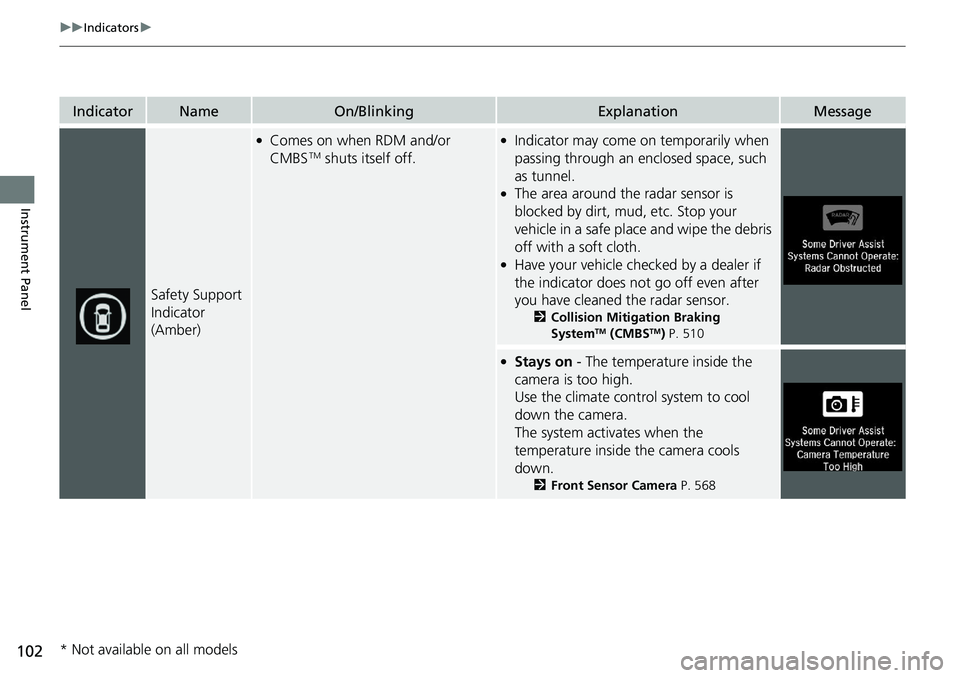
Safety Support
Indicator
(Amber) ●
Comes on when RDM and/or
CMBS TM
shuts itself off. ●
Indicator may come on temporarily when
passing through an en closed space, such
as tunnel. ●
The area around the radar sensor is
blocked by dirt, mud, etc. Stop your
vehicle in a safe place and wipe the debris
off with a soft cloth. ●
Have your vehicle checked by a dealer if
the indicator does not go off even after
you have cleaned the radar sensor. 2 Collision Mitigation Braking
System TM
(CMBS TM
) P. 510 ●
Stays on - The temperature inside the
camera is too high.
Use the climate control system to cool
down the camera.
The system activates when the
temperature inside the camera cools
down. 2 Front Sensor Camera P. 568
* Not available on all models
Page 109 of 727
107uu Indicators u Driver Information Interface Wa rning and Information Messages
Continued
Instrument Panel
Message Condition Explanation
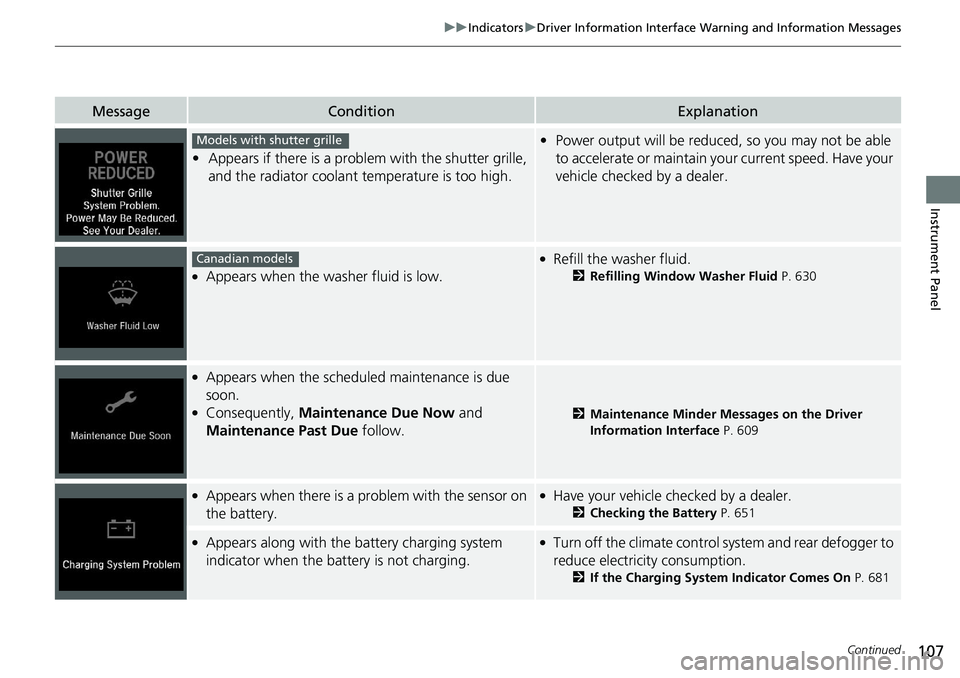
• Appears if there is a problem with the shutter grille,
and the radiator coolant temperature is too high. • Power output will be reduced, so you may not be able
to accelerate or maintain yo ur current speed. Have your
vehicle checked by a dealer.●
Appears when the washer fluid is low. ●
Refill the washer fluid. 2 Refilling Window Washer Fluid P. 630●
Appears when the schedul ed maintenance is due
soon. ●
Consequently, Maintenance Due Now and
Maintenance Past Due follow. 2 Maintenance Minder Messages on the Driver
Information Interface P. 609●
Appears when there is a pr oblem with the sensor on
the battery. ●
Have your vehicle checked by a dealer. 2 Checking the Battery P. 651●
Appears along with the ba ttery charging system
indicator when the battery is not charging. ●
Turn off the climate control system and rear defogger to
reduce electricity consumption.
2 If the Charging System Indicator Comes On P. 681Models with shutter grille
Canadian models
Page 135 of 727
133uu Indicators u Driver Information Interface Wa rning and Information Messages
Continued
Instrument Panel
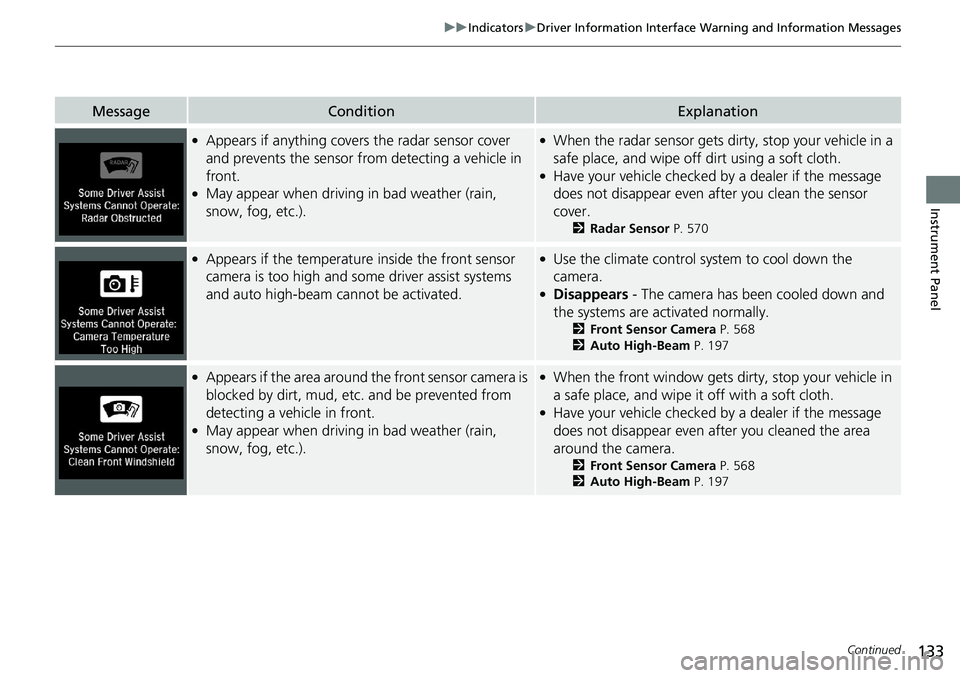
Message Condition Explanation●
Appears if anything covers the radar sensor cover
and prevents the sensor fro m detecting a vehicle in
front. ●
May appear when driving in bad weather (rain,
snow, fog, etc.). ●
When the radar sensor gets dirty, stop your vehicle in a
safe place, and wipe off dirt using a soft cloth. ●
Have your vehicle checked by a dealer if the message
does not disappear even after you clean the sensor
cover. 2 Radar Sensor P. 570●
Appears if the temperature inside the front sensor
camera is too high and some driver assist systems
and auto high-beam cannot be activated. ●
Use the climate control sy stem to cool down the
camera. ●
Disappears - The camera has been cooled down and
the systems are activated normally. 2 Front Sensor Camera P. 568
2 Auto High-Beam P. 197●
Appears if the area around the front sensor camera is
blocked by dirt, mud, etc. and be prevented from
detecting a vehicle in front. ●
May appear when driving in bad weather (rain,
snow, fog, etc.). ●
When the front window gets dirty, stop your vehicle in
a safe place, and wipe it off with a soft cloth. ●
Have your vehicle checked by a dealer if the message
does not disappear even a fter you cleaned the area
around the camera. 2 Front Sensor Camera P. 568
2 Auto High-Beam P. 197
Page 165 of 727
163Controls This chapter explains how to operate th e various controls necessary for driving.
Clock .................................................. 164
Locking and Unlocking the Doors
Key Types and Functions .................. 166
Low Remote Signal Strength ............ 168
Locking/Unlocking the Doors from the
Outside .......................................... 169
Locking/Unlocking the Doors from the
Inside ............................................. 176
Childproof Door Locks ..................... 178
Auto Door Locking/Unlocking .......... 179
Opening and Closing the Trunk ....... 180
Security System
Immobilizer System .......................... 183
Security System Alarm ...................... 184
Opening and Closing the Windows ..... 186 Opening and Closing the Moonroof *
..... 189
Operating the Switches Around the
Steering Wheel
ENGINE START/STOP Button............. 190
Turn Signals ..................................... 193
Light Switches.................................. 193
Fog Lights *
...................................... 195
Daytime Running Lights ................... 196
Auto High-Beam .............................. 197
Wipers and Washers ........................ 200
Rear Defogger/Heat ed Door Mirror *
Button ........................................... 202 Heated Windshield Button ............... 202
Brightness Control ........................... 203
Driving Position Memory System *
.... 205
Adjusting the Steering Wheel .......... 207
Adjusting the Mirrors
Interior Rearview Mirror ................... 208
Power Door Mirrors ......................... 209
Adjusting the Seats .......................... 210
Interior Lights/Interior Convenience
Items ................................................ 221
Climate Control System
Using Automatic Climate Control .... 239
Automatic Climate Control Sensors ... 242 Canadian models
* Not available on all models