turn signal HONDA ACCORD HYBRID 2019 Owners Manual
[x] Cancel search | Manufacturer: HONDA, Model Year: 2019, Model line: ACCORD HYBRID, Model: HONDA ACCORD HYBRID 2019Pages: 727, PDF Size: 24.78 MB
Page 7 of 727
5
Quick Reference Guide
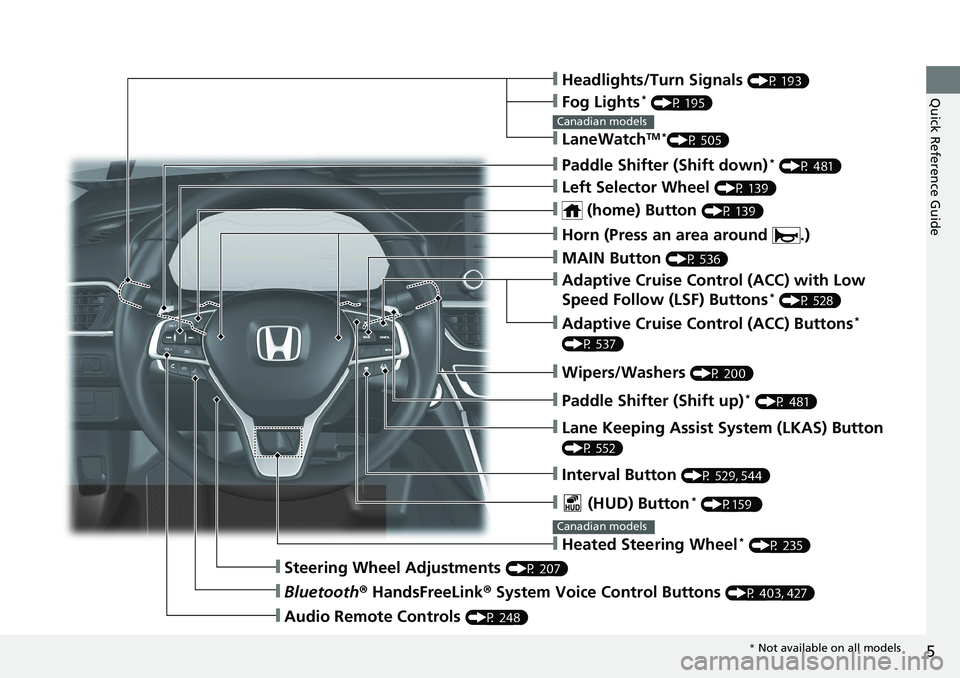
❙ Headlights/Turn Signals (P 193)
❙ Fog Lights *
(P 195)
❙ LaneWatch TM *
(P 505)Canadian models
❙ Paddle Shifter (Shift down) *
(P 481)
❙ Left Selector Wheel (P 139)
❙ (home) Button (P 139)
❙ MAIN Button (P 536)
❙ Adaptive Cruise Control (ACC) with Low
Speed Follow (LSF) Buttons *
(P 528)
❙ Adaptive Cruise Control (ACC) Buttons *
(P 537)
❙ Wipers/Washers (P 200)
❙ Paddle Shifter (Shift up) *
(P 481)
❙ Lane Keeping Assist System (LKAS) Button (P 552)
❙ Interval Button (P 529, 544)
❙ Steering Wheel Adjustments (P 207)
❙ Bluetooth ® HandsFreeLink ® System Voice Control Buttons (P 403, 427)
❙ Audio Remote Controls (P 248)❙ Horn (Press an area around .)
❙ (HUD) Button *
(P159 )
❙ Heated Steering Wheel *
(P 235)Canadian models
* Not available on all models
Page 10 of 727
Visual Index
8
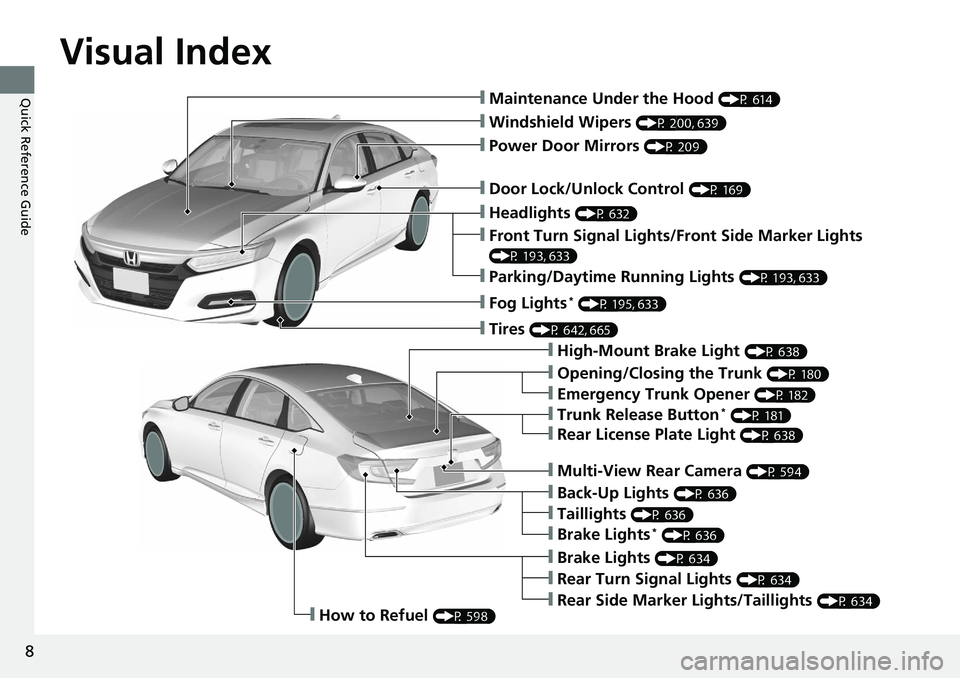
Quick Reference Guide ❙ Maintenance Under the Hood (P 614)
❙ Windshield Wipers (P 200, 639)
❙ Door Lock/Unlock Control (P 169)
❙ Power Door Mirrors (P 209)
❙ Headlights (P 632)
❙ High-Mount Brake Light (P 638)
❙ Emergency Trunk Opener (P 182)
❙ Opening/Closing the Trunk (P 180)
❙ Parking/Daytime Running Lights (P 193, 633)
❙ Front Turn Signal Lights/Front Side Marker Lights (P 193, 633)
❙ Fog Lights *
(P 195, 633)
❙ Trunk Release Button *
(P 181)
❙ Brake Lights (P 634)
❙ Rear Side Marker Lights/Taillights (P 634)
❙ Rear Turn Signal Lights (P 634)❙ Back-Up Lights (P 636)
❙ How to Refuel (P 598)❙ Tires (P 642, 665)
❙ Brake Lights *
(P 636)
❙ Taillights (P 636)
❙ Multi-View Rear Camera (P 594)
❙ Rear License Plate Light (P 638)
Page 15 of 727
13
Quick Reference Guide
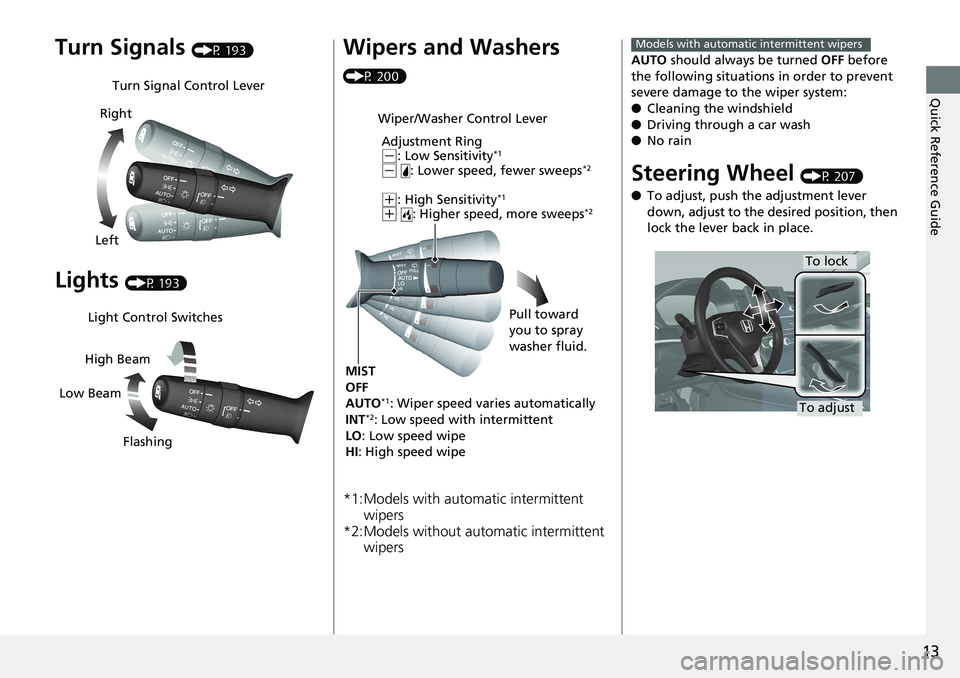
Turn Signals (P 193)
Lights (P 193)Turn Signal Control Lever
Right
Left
Light Control Switches
Low Beam High Beam
Flashing Wipers and Washers (P 200)
*1:Models with automatic intermittent
wipers
*2:Models without automatic intermittent
wipers Wiper/Washer Control Lever
Adjustment Ring ( -
: Low Sensitivity *1
( -
: Lower speed, fewer sweeps *2
( +
: High Sensitivity *1
( +
: Higher speed, more sweeps *2
MIST
OFF
AUTO *1
: Wiper speed varies automatically
INT *2
: Low speed with intermittent
LO : Low speed wipe
HI : High speed wipe Pull toward
you to spray
washer fluid. AUTO should always be turned OFF before
the following situations in order to prevent
severe damage to the wiper system:
● Cleaning the windshield
● Driving through a car wash
● No rain
Steering Wheel (P 207)
● To adjust, push the adjustment lever
down, adjust to the de sired position, then
lock the lever back in place. Models with automatic intermittent wipers
To lock
To adjust
Page 48 of 727
46 uu Airbags u Airbag System Components
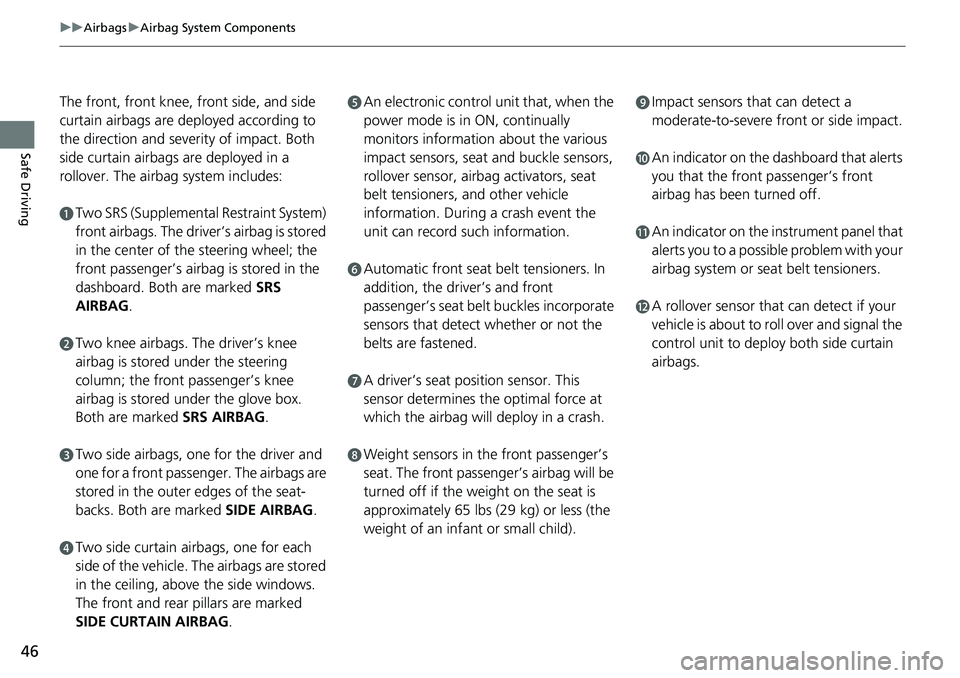
Safe Driving The front, front knee, front side, and side
curtain airbags are deployed according to
the direction and severity of impact. Both
side curtain airbags are deployed in a
rollover. The airbag system includes: a
Two SRS (Supplemental Restraint System)
front airbags. The driver’s airbag is stored
in the center of the steering wheel; the
front passenger’s airbag is stored in the
dashboard. Both are marked SRS
AIRBAG .b
Two knee airbags. Th e driver’s knee
airbag is stored under the steering
column; the front passenger’s knee
airbag is stored under the glove box.
Both are marked SRS AIRBAG .c
Two side airbags, one for the driver and
one for a front passenger. The airbags are
stored in the outer edges of the seat-
backs. Both are marked SIDE AIRBAG .
d
Two side curtain airbags, one for each
side of the vehicle. The airbags are stored
in the ceiling, above the side windows.
The front and rear pillars are marked
SIDE CURTAIN AIRBAG . e
An electronic control unit that, when the
power mode is in ON, continually
monitors information about the various
impact sensors, seat and buckle sensors,
rollover sensor, airbag activators, seat
belt tensioners, and other vehicle
information. During a crash event the
unit can record such information. f
Automatic front seat belt tensioners. In
addition, the driver’s and front
passenger’s seat belt buckles incorporate
sensors that detect whether or not the
belts are fastened. g
A driver’s seat position sensor. This
sensor determines the optimal force at
which the airbag will deploy in a crash. h
Weight sensors in the front passenger’s
seat. The front passenger’s airbag will be
turned off if the weight on the seat is
approximately 65 lbs (29 kg) or less (the
weight of an infant or small child). i
Impact sensors that can detect a
moderate-to-severe front or side impact. j
An indicator on the dashboard that alerts
you that the front passenger’s front
airbag has been turned off. k
An indicator on the instrument panel that
alerts you to a possible problem with your
airbag system or seat belt tensioners. l
A rollover sensor that can detect if your
vehicle is about to roll over and signal the
control unit to deploy both side curtain
airbags.
Page 80 of 727
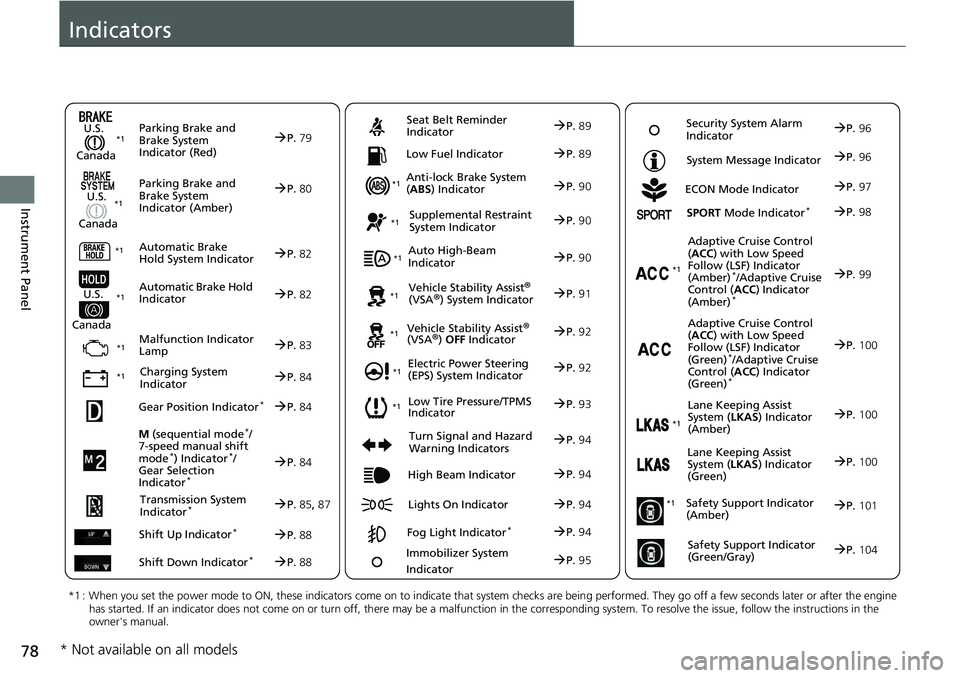
78
Instrument Panel Indicators
M (sequential mode *
/
7-speed manual shift
mode *
) Indicator *
/
Gear Selection
Indicator *
P. 84Parking Brake and
Brake System
Indicator (Red)
Parking Brake and
Brake System
Indicator (Amber)U.S.
Canada
U.S.
Canada
Automatic Brake
Hold System Indicator
Automatic Brake Hold
IndicatorU.S.
Canada
*1 : When you set the power mode to ON, these indicators come on to indicate that system checks are being perf ormed. They go off a few seconds later or after the engine
has started. If an indicator does not come on or turn off, th ere may be a malfunction in the co rresponding system. To resolve t he issue, follow the instructions in the
owner's manual. P. 79*1
Malfunction Indicator
Lamp
Charging System
Indicator Anti-lock Brake System
( ABS ) IndicatorSeat Belt Reminder
Indicator
Low Fuel Indicator
Vehicle Stability Assist
® (VSA
® ) System Indicator
Vehicle Stability Assist
® (VSA
® ) OFF IndicatorSupplemental Restraint
System Indicator
Auto High-Beam
Indicator
Low Tire Pressure/TPMS
IndicatorElectric Power Steering
(EPS) System Indicator
Turn Signal and Hazard
Warning Indicators
Lights On IndicatorHigh Beam Indicator
Fog Light Indicator *ECON Mode Indicator System Message Indicator
SPORT Mode Indicator *
Adaptive Cruise Control
( ACC ) with Low Speed
Follow (LSF) Indicator
(Amber) *
/Adaptive Cruise
Control ( ACC ) Indicator
(Amber) *
Lane Keeping Assist
System ( LKAS ) Indicator
(Amber)
Safety Support Indicator
(Amber)
Safety Support Indicator
(Green/Gray) P. 80
P. 82
P. 82
P. 83
P. 84*1
*1
*1 *1
P. 93*1
*1
Gear Position Indicator *
P. 84
Transmission System
Indicator *
P. 85 , 87
Shift Up Indicator *
P. 88
Shift Down Indicator *
P. 88 P. 89
P. 89
P. 90
P. 90
P. 90
P. 91*1
*1
*1
*1
P. 92*1
P. 92
P. 94 P. 99
*1
P. 94
P. 94 P. 97
P. 94
Immobilizer System
Indicator
P. 95 Security System Alarm
Indicator
P. 96
P. 96
P. 98
P. 100
P. 101
P. 104 *1
Adaptive Cruise Control
( ACC ) with Low Speed
Follow (LSF) Indicator
(Green) *
/Adaptive Cruise
Control ( ACC ) Indicator
(Green) *
P. 100 *1
Lane Keeping Assist
System ( LKAS ) Indicator
(Green)
P. 100 *1
* Not available on all models
Page 96 of 727
94 uu Indicators u
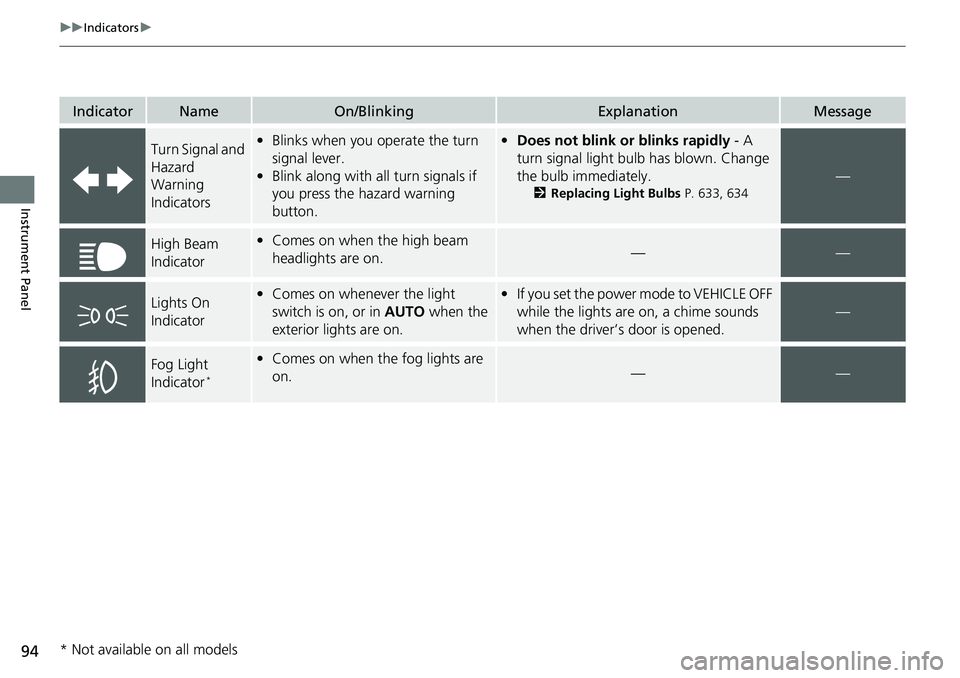
Instrument Panel Indicator Name On/Blinking Explanation Message
Turn Signal and
Hazard
Warning
Indicators • Blinks when you operate the turn
signal lever.
• Blink along with al l turn signals if
you press the hazard warning
button. • Does not blink or blinks rapidly - A
turn signal light bulb has blown. Change
the bulb immediately. 2 Replacing Light Bulbs P. 633, 634
—
High Beam
Indicator • Comes on when the high beam
headlights are on. — —
Lights On
Indicator • Comes on whenever the light
switch is on, or in AUTO when the
exterior lights are on. • If you set the power mode to VEHICLE OFF
while the lights are on, a chime sounds
when the driver’s door is opened. —
Fog Light
Indicator *
• Comes on when the fog lights are
on. — —
* Not available on all models
Page 165 of 727
163Controls This chapter explains how to operate th e various controls necessary for driving.
Clock .................................................. 164
Locking and Unlocking the Doors
Key Types and Functions .................. 166
Low Remote Signal Strength ............ 168
Locking/Unlocking the Doors from the
Outside .......................................... 169
Locking/Unlocking the Doors from the
Inside ............................................. 176
Childproof Door Locks ..................... 178
Auto Door Locking/Unlocking .......... 179
Opening and Closing the Trunk ....... 180
Security System
Immobilizer System .......................... 183
Security System Alarm ...................... 184
Opening and Closing the Windows ..... 186 Opening and Closing the Moonroof *
..... 189
Operating the Switches Around the
Steering Wheel
ENGINE START/STOP Button............. 190
Turn Signals ..................................... 193
Light Switches.................................. 193
Fog Lights *
...................................... 195
Daytime Running Lights ................... 196
Auto High-Beam .............................. 197
Wipers and Washers ........................ 200
Rear Defogger/Heat ed Door Mirror *
Button ........................................... 202 Heated Windshield Button ............... 202
Brightness Control ........................... 203
Driving Position Memory System *
.... 205
Adjusting the Steering Wheel .......... 207
Adjusting the Mirrors
Interior Rearview Mirror ................... 208
Power Door Mirrors ......................... 209
Adjusting the Seats .......................... 210
Interior Lights/Interior Convenience
Items ................................................ 221
Climate Control System
Using Automatic Climate Control .... 239
Automatic Climate Control Sensors ... 242 Canadian models
* Not available on all models
Page 185 of 727
183
Controls
Security SystemImmobilizer System The immobilizer system prevents a key th at has not been pre-registered from
starting the engine. Each key contains electronic transmitters that use electronic
signals to verify the key.
Pay attention to the follo wing when pressing the ENGINE START/STOP button:
• Do not allow objects that emit strong radio waves near the ENGINE START/
STOP button.
• Make sure the key is not covered by or touching a metal object.
• Do not bring a key from another vehicle’s immobilizer system near the ENGINE
START/STOP button.
• Do not put the key near magnetic items. El ectronic device, such as televisions and
audio systems emit strong magnetic fiel ds. Note that even a key chain can
become magnetic. 1 Immobilizer System NOTICE
Leaving the key in the vehicl e can result in theft or
accidental movement of the vehicle.
Always take the key with you whenever you leave the
vehicle unattended.
Do not alter the system or add other devices to it.
Doing so may damage the system and make your
vehicle inoperable.
Apply and hold the brake pedal before turning the
vehicle on the first time after the battery has been
disconnected. Canadian models
Page 195 of 727
193uu Operating the Switches Around the Steering Wheel u Turn Signals
Continued
Controls
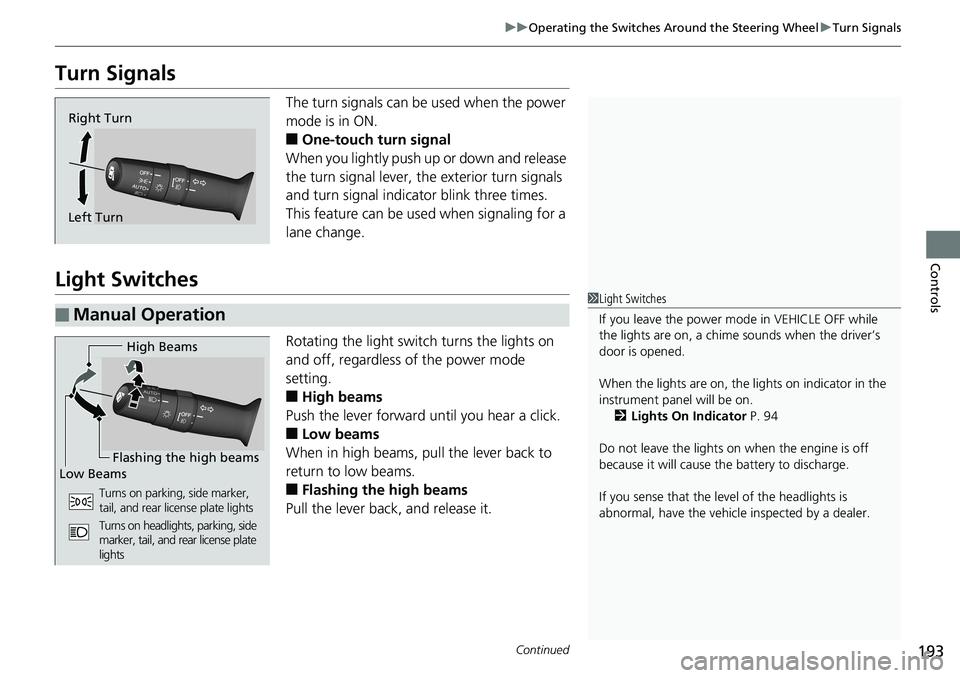
Turn Signals The turn signals can be used when the power
mode is in ON.
■ One-touch turn signal
When you lightly push up or down and release
the turn signal lever, th e exterior turn signals
and turn signal indicator blink three times.
This feature can be used when signaling for a
lane change.
Light Switches Rotating the light switch turns the lights on
and off, regardless of the power mode
setting.
■ High beams
Push the lever forward until you hear a click.
■ Low beams
When in high beams, pull the lever back to
return to low beams.
■ Flashing the high beams
Pull the lever back, and release it.Right Turn
Left Turn
■ Manual Operation 1 Light Switches
If you leave the power mode in VEHICLE OFF while
the lights are on, a chime sounds when the driver’s
door is opened.
When the lights are on, the lights on indicator in the
instrument pane l will be on.
2 Lights On Indicator P. 94
Do not leave the lights on when the engine is off
because it will cause the battery to discharge.
If you sense that the le vel of the headlights is
abnormal, have the vehicl e inspected by a dealer.High Beams
Flashing the high beams
Low Beams
Turns on parking, side marker,
tail, and rear license plate lights
Turns on headlights, parking, side
marker, tail, and rear license plate
lights
Page 261 of 727
259uu Audio System Basic Operation u Playing AM/FM Radio
Continued
Features
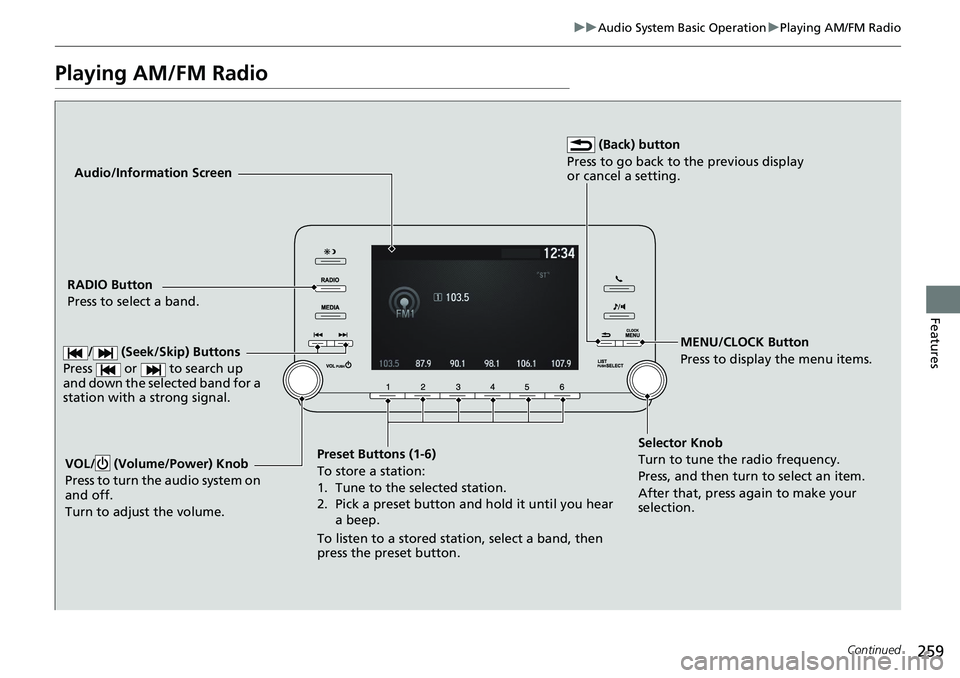
Playing AM/FM Radio Audio/Information Screen
RADIO Button
Press to select a band.
Preset Buttons (1-6)
To store a station:
1. Tune to the selected station.
2. Pick a preset button and hold it until you hear
a beep.
To listen to a stored station, select a band, then
press the preset button. MENU/CLOCK Button
Press to display the menu items.
Selector Knob
Turn to tune the radio frequency.
Press, and then turn to select an item.
After that, press again to make your
selection.VOL/ (Volume/Power) Knob
Press to turn the audio system on
and off.
Turn to adjust the volume. (Back) button
Press to go back to the previous display
or cancel a setting.
/ (Seek/Skip) Buttons
Press or to search up
and down the selected band for a
station with a strong signal.