battery HONDA ACCORD SEDAN 2020 (in English) User Guide
[x] Cancel search | Manufacturer: HONDA, Model Year: 2020, Model line: ACCORD SEDAN, Model: HONDA ACCORD SEDAN 2020Pages: 728, PDF Size: 34.06 MB
Page 115 of 728
113
uuIndicators uDriver Information Interface Wa rning and Information Messages
Continued
Instrument Panel
MessageConditionExplanation
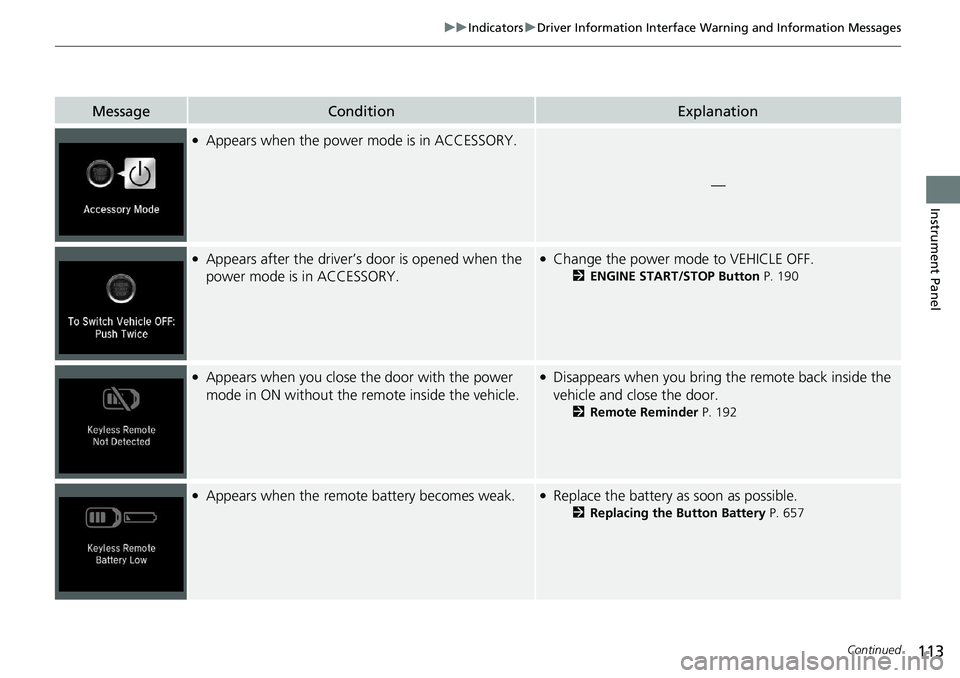
●Appears when the power mode is in ACCESSORY.
—
●Appears after the driver’s door is opened when the
power mode is in ACCESSORY.●Change the power mode to VEHICLE OFF.
2ENGINE START/STOP Button P. 190
●Appears when you close the door with the power
mode in ON without the remote inside the vehicle.●Disappears when you bring the remote back inside the
vehicle and close the door.
2 Remote Reminder P. 192
●Appears when the remote battery becomes weak.●Replace the battery as soon as possible.
2Replacing the Button Battery P. 657
Page 116 of 728
114
uuIndicators uDriver Information Interface Wa rning and Information Messages
Instrument Panel
MessageConditionExplanation
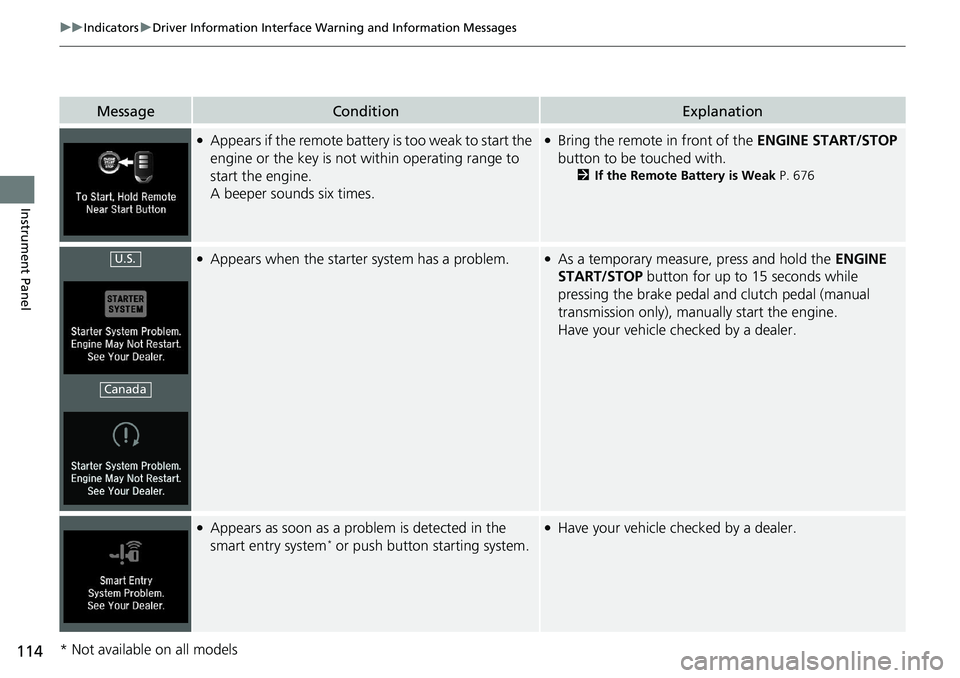
●Appears if the remote battery is too weak to start the
engine or the key is not within operating range to
start the engine.
A beeper sounds six times.●Bring the remote in front of the ENGINE START/STOP
button to be touched with.
2 If the Remote Battery is Weak P. 676
●Appears when the starter system has a problem.●As a temporary measure, press and hold the ENGINE
START/STOP button for up to 15 seconds while
pressing the brake pedal and clutch pedal (manual
transmission only), manu ally start the engine.
Have your vehicle checked by a dealer.
●Appears as soon as a problem is detected in the
smart entry system* or push button starting system.
●Have your vehicle checked by a dealer.
U.S.
Canada
* Not available on all models
Page 168 of 728
166
Controls
Locking and Unlocking the Doors
Key Types and Functions
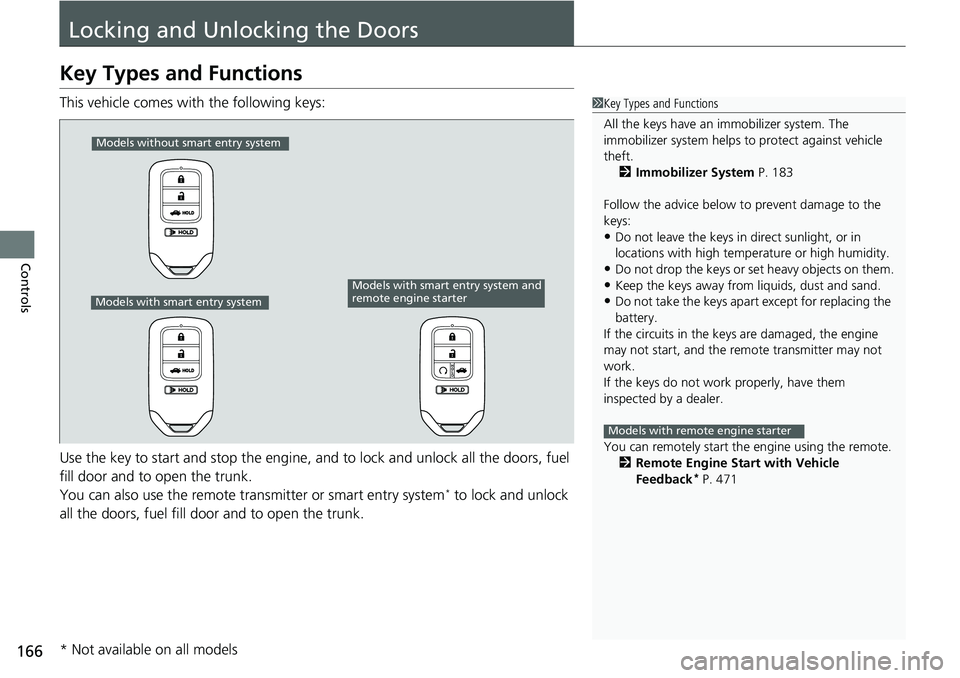
This vehicle comes with the following keys:
Use the key to start and stop the engine, and to lock and unlock all the doors, fuel
fill door and to open the trunk.
You can also use the remote transmitter or smart entry system
* to lock and unlock
all the doors, fuel fill door and to open the trunk.
1 Key Types and Functions
All the keys have an immobilizer system. The
immobilizer system helps to protect against vehicle
theft. 2 Immobilizer System P. 183
Follow the advice below to prevent damage to the
keys:
•Do not leave the keys in direct sunlight, or in
locations with high temperature or high humidity.
•Do not drop the keys or set heavy objects on them.•Keep the keys away from liquids, dust and sand.
•Do not take the keys apart except for replacing the
battery.
If the circuits in the keys are damaged, the engine
may not start, and the remote transmitter may not
work.
If the keys do not work properly, have them
inspected by a dealer.
You can remotely start the engine using the remote.
2 Remote Engine Start with Vehicle
Feedback
* P. 471
Models with remote engine starter
Models without smart entry system
Models with smart entry system
Models with smart entry system and
remote engine starter
* Not available on all models
Page 169 of 728
167
uuLocking and Unlocking the Doors uKey Types and Functions
Controls
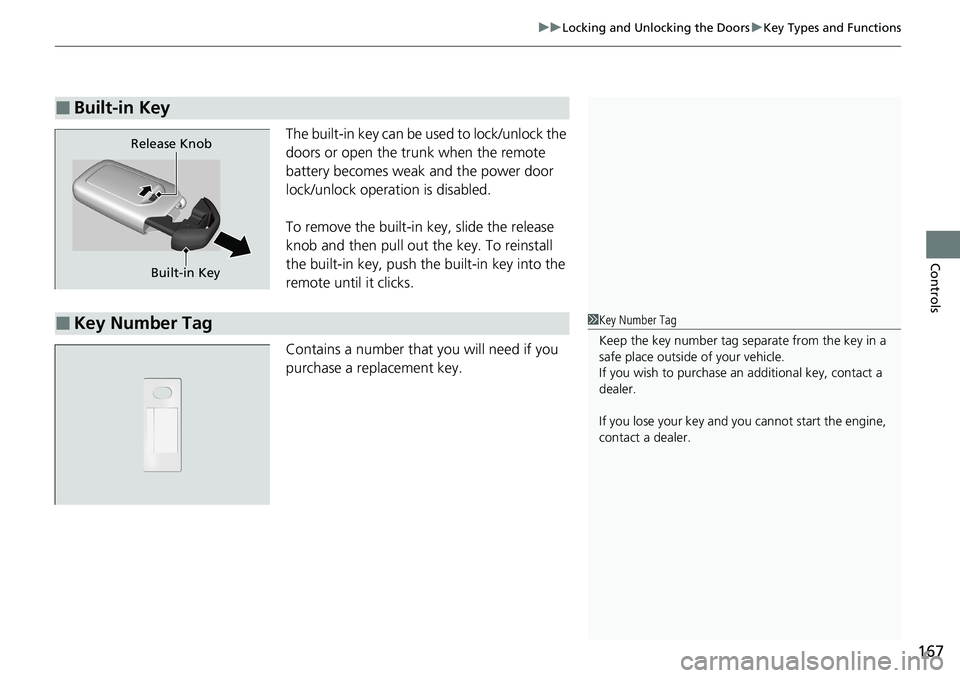
The built-in key can be used to lock/unlock the
doors or open the trunk when the remote
battery becomes weak and the power door
lock/unlock operation is disabled.
To remove the built-in key, slide the release
knob and then pull out the key. To reinstall
the built-in key, push the built-in key into the
remote until it clicks.
Contains a number that you will need if you
purchase a replacement key.
■Built-in Key
Built-in Key
Release Knob
■Key Number Tag1
Key Number Tag
Keep the key number tag separate from the key in a
safe place outside of your vehicle.
If you wish to purchase an additional key, contact a
dealer.
If you lose your key and you cannot start the engine,
contact a dealer.
Page 170 of 728
168
uuLocking and Unlocking the Doors uLow Remote Signal Strength
Controls
Low Remote Signal Strength
The vehicle transmits radio waves to locate the remote when locking/unlocking the
doors*, and fuel fill door*, opening the trunk*, or to start the engine.
In the following cases, locking/unlocking the doors
*, and fuel fill door*, opening the
trunk*, or to start the engine may be inhi bited or operation may be unstable:
• Strong radio waves are being tra nsmitted by nearby equipment.
• You are carrying the remote together with telecommunications equipment,
laptop computers, cell phone s, or wireless devices.
• A metallic object is touchi ng or covering the remote.
1Low Remote Signal Strength
Communication between the remote and the vehicle
consumes the remote’s battery.
Battery life is about two years, but this varies
depending on re gularity of use.
The battery is consumed whenever the remote is
receiving strong radio waves. Avoid placing it near
electrical appliances such as televisions and personal
computers.
* Not available on all models
Page 175 of 728
Continued173
uuLocking and Unlocking the Doors uLocking/Unlocking the Doors from the Outside
Controls
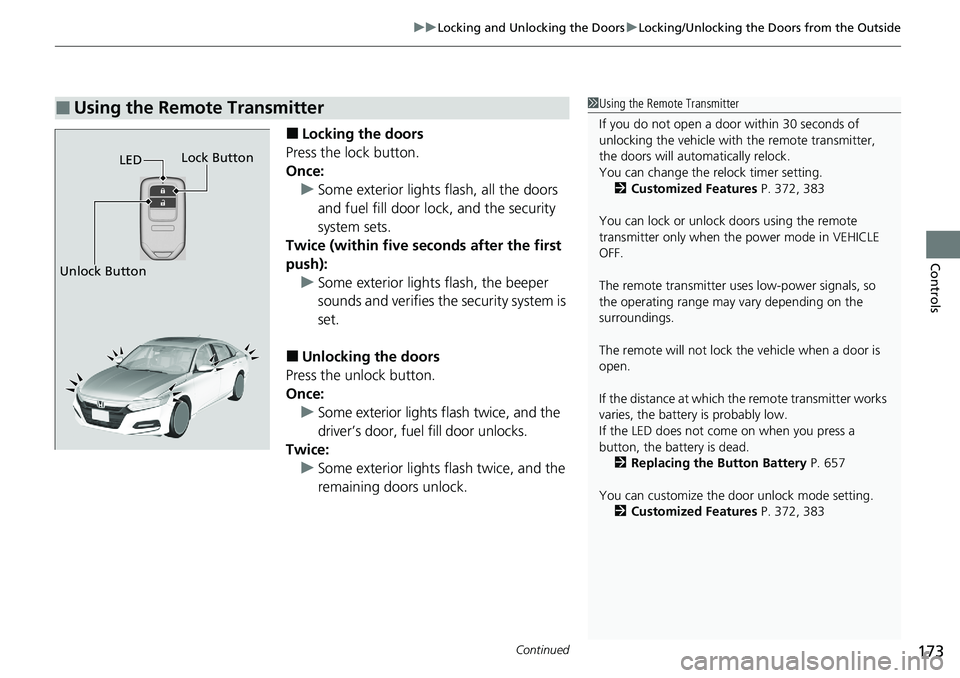
■Locking the doors
Press the lock button.
Once: u Some exterior lights flash, all the doors
and fuel fill door lock , and the security
system sets.
Twice (within five se conds after the first
push): u Some exterior lights flash, the beeper
sounds and verifies the security system is
set.
■Unlocking the doors
Press the unlock button.
Once: u Some exterior lights flash twice, and the
driver’s door, fuel fill door unlocks.
Twice: u Some exterior lights flash twice, and the
remaining doors unlock.
■Using the Remote Transmitter1Using the Remote Transmitter
If you do not open a door within 30 seconds of
unlocking the vehicle with the remote transmitter,
the doors will automatically relock.
You can change the relock timer setting. 2 Customized Features P. 372, 383
You can lock or unlock doors using the remote
transmitter only when the power mode in VEHICLE
OFF.
The remote transmitter us es low-power signals, so
the operating range may vary depending on the
surroundings.
The remote will not lock th e vehicle when a door is
open.
If the distance at which the remote transmitter works
varies, the batter y is probably low.
If the LED does not come on when you press a
button, the battery is dead. 2 Replacing the Button Battery P. 657
You can customize the door unlock mode setting. 2 Customized Features P. 372, 383
LED
Unlock Button Lock Button
Page 185 of 728
183
Controls
Security System
Immobilizer System
The immobilizer system prevents a key that has not been pre-registered from
starting the engine. Each key contains electronic transmitters that use electronic
signals to verify the key.
Pay attention to the follo wing when pressing the ENGINE START/STOP button:
• Do not allow objects that emit strong radio waves near the ENGINE START/
STOP button.
• Make sure the key is not covered by or touching a metal object.
• Do not bring a key from another vehicle’s immobilizer system near the ENGINE
START/STOP button.
• Do not put the key near magnetic items. El ectronic device, such as televisions and
audio systems emit strong magnetic fiel ds. Note that even a key chain can
become magnetic.1 Immobilizer System
NOTICE
Leaving the key in the vehicl e can result in theft or
accidental movement of the vehicle.
Always take the key with you whenever you leave the
vehicle unattended.
Do not alter the system or add other devices to it.
Doing so may damage the system and make your
vehicle inoperable.
Apply and hold the brake pedal before turning the
vehicle on the first time after the battery has been
disconnected.
Canadian models
Page 186 of 728
184
uuSecurity System uSecurity System Alarm
Controls
Security System Alarm
The security system alarm activates wh en the trunk, hood or doors are forcibly
opened. The alarm does not activate if th e trunk or doors are opened with the key,
remote transmitter, or smart entr y with push button start system
*.
However, the alarm activates if a door is opened with the key and then the
transmission is taken out of
(P (continuously variable transmission models) or the
hood is opened before the power mode is in ON.
■When the security sy stem alarm activates
The horn sounds intermittently, and some the exterior lights flash.
■To deactivate the security system alarm
Unlock the vehicle using the key, remote transmitter or smart entry with push
button start system
*. The system, along with the horn and flashing lights, is
deactivated.
■Setting the security system alarm
The security system alarm automatically sets when the following conditions have
been met:
• The power mode is set to VEHICLE OFF (LOCK).
• The hood is closed.
• All doors and trunk are locked from outsid e with the key, remote transmitter, or
smart entry with push button start system
*.
■When the security system alarm sets
The security system alarm indicator in the instrument panel blinks and the blinking
interval changes after about 15 seconds.
■To cancel the security system alarm
The security system alarm is canceled when the vehicle is unlocked using the key*,
remote transmitter or smart entry with push button start system*, or when the power
mode is set to ON. The security system alarm indicator goes off at the same time.
1 Security System Alarm
Do not alter the system or add other devices to it.
Doing so may damage the system and make your
vehicle inoperable.
The security alarm continues for a maximum of two
minutes until the security system alarm deactivates.
Do not set the security system alarm when someone
is in the vehicle or a window is open. The system can
accidentally activate when:
•Unlocking the door with the lock tab.
•Opening the trunk with the trunk opener or the
emergency trunk opener.
•Opening the hood with the hood release.
•Taking the transmission out of ( P.
If the battery goes dead after you have set the
security system alarm, the security alarm may go off
once the battery is re charged or replaced.
If this occurs, deactivate the security system alarm by
unlocking a door using the ke y, remote transmitter,
or smart entry with push button start system
*.
Continuously variable transmission models
* Not available on all models
Page 192 of 728
190
Controls
Operating the Switches Around the Steering Wheel
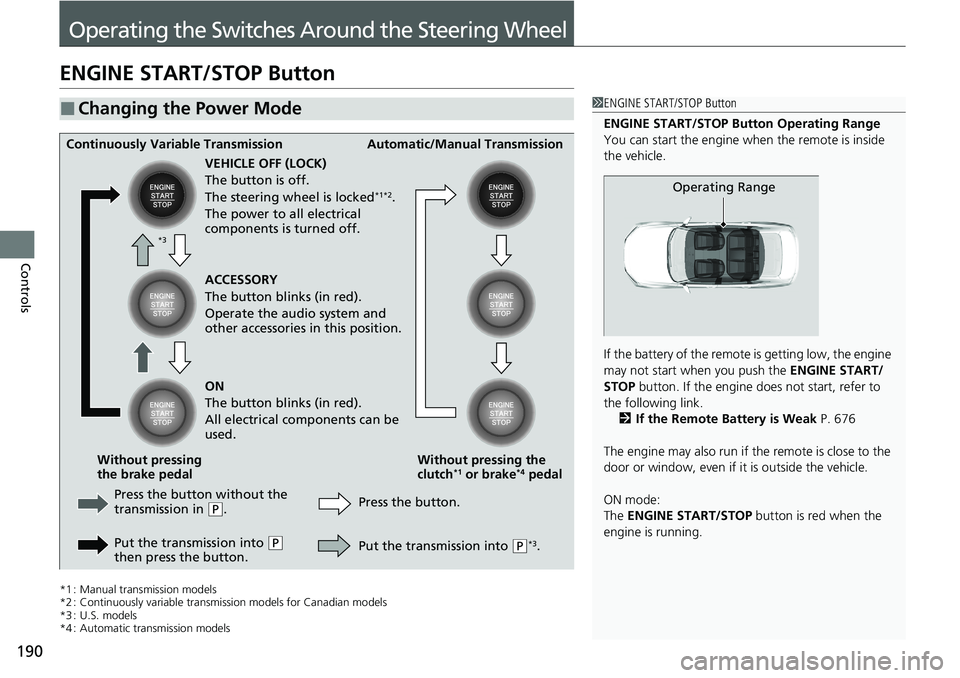
ENGINE START/STOP Button
*1 : Manual transmission models
*2 : Continuously variable transmission models for Canadian models
*3 : U.S. models
*4 : Automatic transmission models
■Changing the Power Mode1 ENGINE START/STOP Button
ENGINE START/STOP Button Operating Range
You can start the engine wh en the remote is inside
the vehicle.
If the battery of the remote is getting low, the engine
may not start when you push the ENGINE START/
STOP button. If the engine do es not start, refer to
the following link. 2 If the Remote Battery is Weak P. 676
The engine may also run if the remote is close to the
door or window, even if it is outside the vehicle.
ON mode:
The ENGINE START/STOP button is red when the
engine is running.
Operating Range
Continuously Variable Transmission Automatic/Manual Transmission
VEHICLE OFF (LOCK)
The button is off.
The steering wheel is locked
*1*2.
The power to all electrical
components is turned off.
Press the button without the
transmission in
( P.
Put the transmission into
( P
then press the button. Press the button.
Without pressing the
clutch
*1 or brake*4 pedal
Without pressing
the brake pedal ACCESSORY
The button blinks (in red).
Operate the audio system and
other accessories in this position.
ON
The button blinks (in red).
All electrical components can be
used.
Put the transmission into
(P*3.
*3
Page 193 of 728
Continued191
uuOperating the Switches Around the Steering Wheel uENGINE START/STOP Button
Controls
If you leave the vehicle for 30 to 60 minutes with the transmission in (P*1 and the
power mode in ACCESSORY, the vehicle automa tically goes into the mode similar to
VEHICLE OFF (LOCK) to avoid draining the battery.
When in this mode:
The steering wheel does not lock.
You cannot lock or unlock doors with the remo te transmitter or the smart entry with
push button start system
*.
Press the ENGINE START/STOP button twice to switch the mode to VEHICLE OFF
(LOCK).
If you open the driver’s door when the pow er mode is set to ACCESSORY, a warning
buzzer sounds.
*1 : Automatic transmission/Continuously variable transmission models
■Automatic Power Off
■Power Mode Reminder
1 Changing the Power Mode
If the power mode does not change from VEHICLE
OFF to ACCESSORY, press the ENGINE START/STOP
button while moving the st eering wheel left and
right. The steering wheel will unlock, allowing the
mode to change.
Do not leave the power mode in ACCESSORY or ON
when you get out.
Manual transmission modelsContinuously variable transmission models
for Canadian models
Manual transmission models
Continuously variable transmission models
for Canadian models
* Not available on all models