battery HONDA ACCORD SEDAN 2020 (in English) Workshop Manual
[x] Cancel search | Manufacturer: HONDA, Model Year: 2020, Model line: ACCORD SEDAN, Model: HONDA ACCORD SEDAN 2020Pages: 728, PDF Size: 34.06 MB
Page 609 of 728
607
Maintenance
This chapter discusses basic maintenance.
Before Performing MaintenanceInspection and Maintenance ............ 608
Safety When Performing Maintenance..... 609Parts and Fluids Used in Maintenance Service ........................................... 610
Maintenance Minder
TM..................... 611
Maintenance Under the Hood
Maintenance Items Under the Hood ..... 618Opening the Hood ........................... 620
Recommended Engine Oil ................ 621
Oil Check ......................................... 622
Adding Engine Oil ............................ 624
Changing the Engine Oil and Oil Filter ..... 625
Engine Coolant ................................ 629
Transmission Fluid ............................ 631
Brake/Clutch
* Fluid .......................... 633
Refilling Window Wa sher Fluid......... 634
Replacing Light Bulbs ....................... 635
Checking and Maintaining Wiper
Blades .......................................... 643
Checking and Maintaining Tires
Checking Tires ................................. 646
Tire and Loading Information Label ...... 647Tire Labeling .................................... 647DOT Tire Quality Grading (U.S. Vehicles)....... 649Wear Indicators................................ 651 Tire Service Life ................................ 651
Tire and Wheel Replacement ........... 652
Tire Rotation .................................... 653
Winter Tires ..................................... 654
Battery ............................................... 655
Remote Transmitter Care
Replacing the Button Battery ........... 657
Climate Control System Maintenance.... 658Cleaning
Interior Care .................................... 659
Exterior Care.................................... 661
Accessories and Modifications ........ 664
* Not available on all models
Page 611 of 728
609
uuBefore Performing Maintenance uSafety When Performing Maintenance
Maintenance
Safety When Performing Maintenance
Some of the most important safe ty precautions are given here.
However, we cannot warn you of every conceivable hazard that can arise in
performing maintenance. Only you can decide whether you should perform a given
task.
• To reduce the possibility of fire or explos ion, keep cigarettes, sparks, and flames
away from the battery and all fuel related parts.
• Never leave rags, towels, or other flammable objects under the hood.
u Heat from the engine and exhaust can ignite them, causing a fire.
• To clean parts, use a co mmercially available degreas er or parts cleaner, not
gasoline.
• Wear eye protection and protective clothi ng when working with the battery or
compressed air.
• Engine exhaust contains carbon monoxide, which is poisonous and can kill you.
u Only operate the engine if th ere is sufficient ventilation.
• The vehicle must be in a stationary condition.
u Make sure your vehicle is parked on le vel ground, the parking brake is set, and
the engine is off.
• Be aware that hot parts can burn you.
u Make sure to let the engine and exhaust system cool thoroughly before
touching vehicle parts.
• Be aware that moving parts can injure you.
u Do not start the engine unless instruct ed, and keep your hands and limbs away
from moving parts.
■Maintenance Safety
■Vehicle Safety
1 Safety When Performing Maintenance
3WARNING
Improperly maintaining this vehicle or
failing to correct a pr oblem before driving
can cause a crash in which you can be
seriously hurt or killed.
Always follow the inspection and
maintenance recommendations according
to the schedules in this owner’s manual.
3WARNING
Failure to properly follow maintenance
instructions and precautions can cause you
to be seriously hurt or killed.
Always follow the procedures and
precautions in this owner’s manual.
Page 620 of 728
618
Maintenance
Maintenance Under the Hood
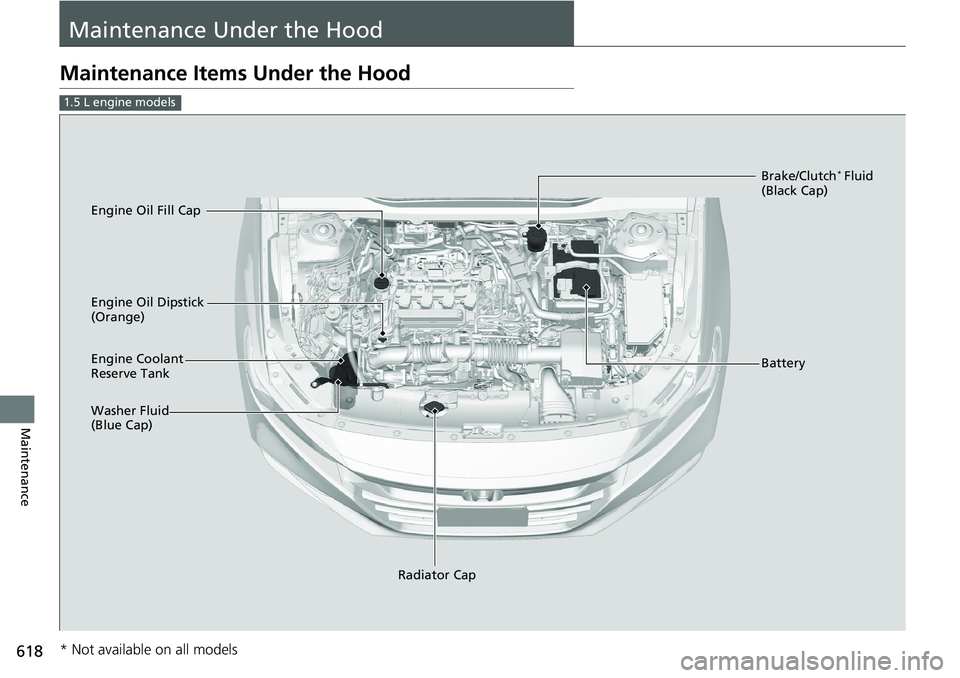
Maintenance Items Under the Hood
1.5 L engine models
Brake/Clutch* Fluid
(Black Cap)
Engine Coolant
Reserve Tank
Radiator Cap
Washer Fluid
(Blue Cap) Engine Oil Dipstick
(Orange) Engine Oil Fill Cap
Battery
* Not available on all models
Page 621 of 728
619
uuMaintenance Under the Hood uMaintenance Items Under the Hood
Maintenance
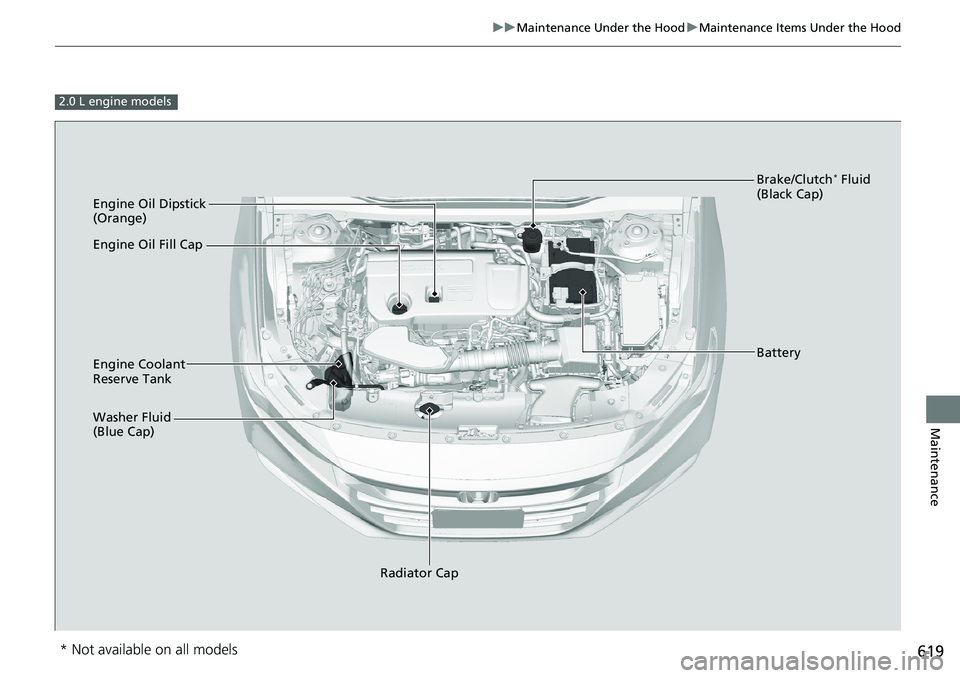
2.0 L engine models
Engine Oil Dipstick
(Orange)
Washer Fluid
(Blue Cap) Engine Coolant
Reserve Tank
Radiator Cap Brake/Clutch
* Fluid
(Black Cap)
Engine Oil Fill Cap
Battery
* Not available on all models
Page 657 of 728
655
Maintenance
Battery
Checking the Battery
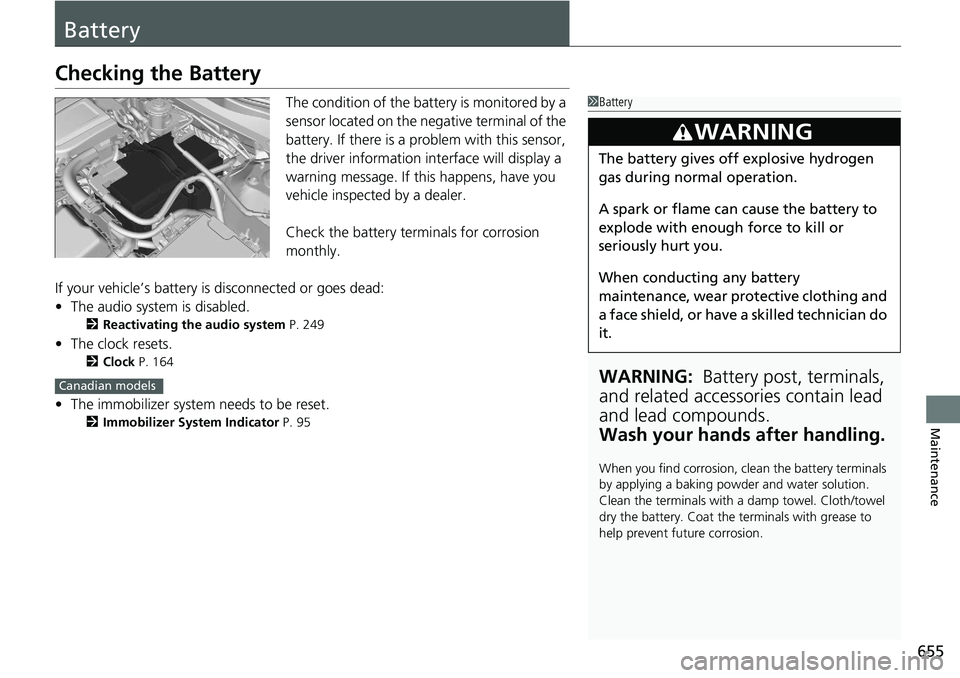
The condition of the battery is monitored by a
sensor located on the negative terminal of the
battery. If there is a problem with this sensor,
the driver information interface will display a
warning message. If this happens, have you
vehicle inspected by a dealer.
Check the battery terminals for corrosion
monthly.
If your vehicle’s battery is disconnected or goes dead:
• The audio system is disabled.
2 Reactivating the audio system P. 249
•The clock resets.
2 Clock P. 164
•The immobilizer system needs to be reset.
2 Immobilizer System Indicator P. 95
1Battery
WARNING: Battery post, terminals,
and related accessories contain lead
and lead compounds.
Wash your hands after handling.
When you find corrosion, cl ean the battery terminals
by applying a baking powder and water solution.
Clean the terminals with a damp towel. Cloth/towel
dry the battery. Coat the terminals with grease to
help prevent future corrosion.
3WARNING
The battery gives off explosive hydrogen
gas during normal operation.
A spark or flame can cause the battery to
explode with enough force to kill or
seriously hurt you.
When conducting any battery
maintenance, wear prot ective clothing and
a face shield, or have a skilled technician do
it.
Canadian models
Page 658 of 728
656
uuBattery uCharging the Battery
Maintenance
Charging the Battery
Disconnect both battery cables to prevent da maging your vehicle’s electrical system.
Always disconnect the negative (–) cable first, and reconnect it last.1 Charging the Battery
When replacing the battery, the replacement must be
of the same specifications.
Consult a dealer for more information.
The Vehicle Stability Assist
TM (VSA ®) system, Vehicle
Stability AssistTM (VSA ®) OFF, adaptive cruise control
(ACC) with Low Speed Follow*, adaptive cruise
control (ACC)*, safety support and low tire pressure/
TPMS indicators may come on in amber along with a
message in the driver info rmation interface when you
set the power mode to ON after reconnecting the
battery.
Drive a short distance at more than 12 mph (20 km/
h). Each indicator should go off. If any do not, have
your vehicle checked by a dealer.
* Not available on all models
Page 659 of 728
657
Maintenance
Remote Transmitter Care
Replacing the Button Battery
If the indicator does not come on when the button is pressed, replace the battery.
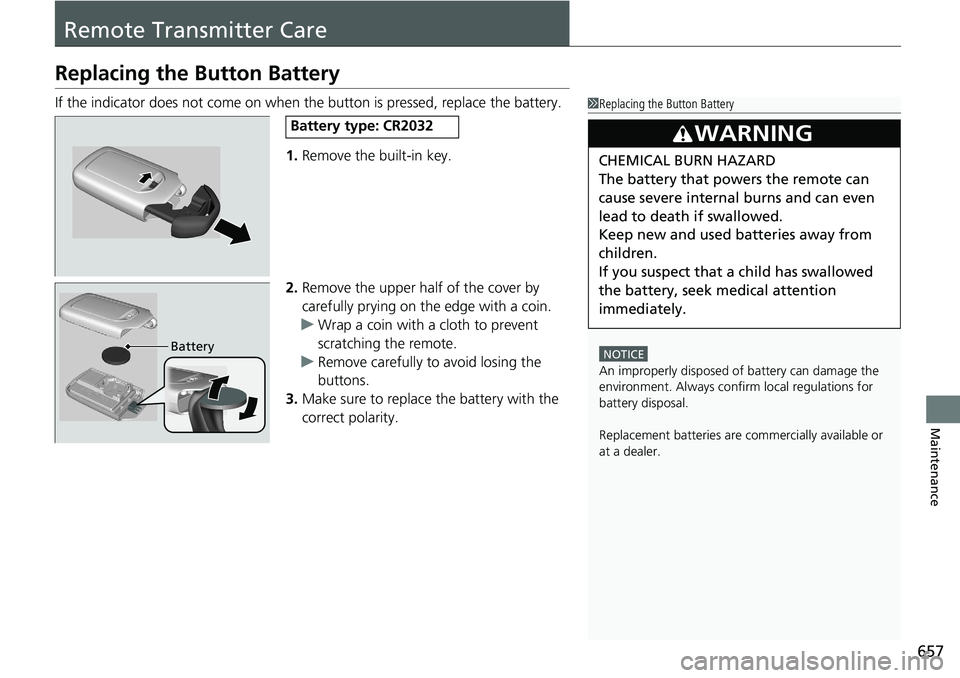
1. Remove the built-in key.
2. Remove the upper half of the cover by
carefully prying on the edge with a coin.
u Wrap a coin with a cloth to prevent
scratching the remote.
u Remove carefully to avoid losing the
buttons.
3. Make sure to replace the battery with the
correct polarity.1Replacing the Button Battery
NOTICE
An improperly disposed of battery can damage the
environment. Always conf irm local regulations for
battery disposal.
Replacement batteries are commercially available or
at a dealer.
3WARNING
CHEMICAL BURN HAZARD
The battery that powers the remote can
cause severe internal burns and can even
lead to death if swallowed.
Keep new and used batteries away from
children.
If you suspect that a child has swallowed
the battery, seek medical attention
immediately.
Battery type: CR2032
Battery
Page 664 of 728
uuCleaning uExterior Care
662
Maintenance
A good coat of automotive body wax helps protect your vehicle’s paint from the
elements. Wax will wear off over time and expose your vehicle’s paint to the
elements, so reapply as necessary.
If you get gasoline, oil, engine coolant, or battery fluid on resin coated parts, they
may be stained or the coating may peel. Prom ptly wipe it away using a soft cloth and
clean water.
Wipe using a glass cleaner.
Aluminum is susceptible to deterioration caused by salt and other road
contaminants. When necessary, as early as possible use a sponge and mild detergent
to wipe away these contaminants. Do no t use a stiff brush or harsh chemicals
(including some commercial wheel cleaners). These can damage the protective finish
on aluminum alloy wheels, resulting in corrosion. Depending on the type of finish,
the wheels also may lose their luster or appear burnished. To avoid water stains,
wipe the wheels dry with a cloth while they are still wet.
■Applying Wax
■Maintaining the Bumpers and Other Resin Coated Parts
■Cleaning the Window
■Maintaining Aluminum Wheels
1 Applying Wax
NOTICE
Chemical solvents and st rong cleaners can damage
the paint, metal, and plasti c on your vehicle. Wipe
away spills immediately.
1 Maintaining the Bumpers an d Other Resin Coated Parts
Ask a dealer about the corr ect coating material when
you want to repair the painted surface of the parts
made of resin.
Page 667 of 728
665
uuAccessories and Modifications uModifications
Maintenance
Modifications
Do not modify your vehicle in a manner that may affect its handling, stability, or
reliability, or install non-genuine Honda pa rts or accessories that may have a similar
effect.
Even minor modifications to vehicle systems can affect overall vehicle performance.
Always make sure all equipment is properly installed and maintained, and do not
make any modification to your vehicle or its systems that might cause your vehicle
to no longer meet federal, state, pr ovince, territory, and local regulations.
The on-board diagnostic port (OBD-II/SAE J1 962 connector) installed on this vehicle
is intended to be used with automobile system diagnostic devices or with other
devices that Honda has approved. Use of any other type of device may adversely
affect the vehicle’s electronic systems or allow them to be compromised, possibly
resulting in a system malfunction, drained battery, or other unexpected problems.
Do not modify or attempt to repair any of the electrical components.
Page 669 of 728
667
Handling the Unexpected
This chapter explains how to handle unexpected troubles.
ToolsTypes of Tools .................................. 668
If a Tire Goes Flat
Changing a Flat Tire ......................... 669
Engine Does Not Start Checking the Engine ........................ 675
If the Remote Battery is Weak ....... 676Emergency Engine Stop ................... 677
Jump Starting .................................... 678
Shift Lever Does Not Move .............. 681
Overheating How to Handle Overheating ............. 683 Indicator, Coming On/Blinking
If the Low Oil Pressure Warning Appears ... 685If the Charging System Indicator Comes
On ................................................. 685
If the Malfunction Indicator Lamp Comes On or Blinks ................................... 686
If the Brake System Indicator (Red) Comes
On or Blinks ................................... 687
If the Brake System Indicator (Red) Comes On
or Blinks at the Same Time When the Brake
System Indicator (Amber) Comes On.... 688
If the Electric Power Steering (EPS) System Indicator Comes On ....................... 689 If the Low Tire Pressure/TPMS Indicator
Comes On or Blinks ....................... 690
If the Transmission I ndicator Blinks along
with the Warning Message ............ 691
Fuses Fuse Locations ................................. 692
Inspecting and Changing Fuses ........ 696
Emergency Towing ........................... 697
When You Cannot Unlock the Fuel Fill Door ................................................. 698
When You Cannot Open the Trunk ... 699
Refueling ........................................... 701