ECO mode HONDA ACCORD SEDAN 2020 (in English) Service Manual
[x] Cancel search | Manufacturer: HONDA, Model Year: 2020, Model line: ACCORD SEDAN, Model: HONDA ACCORD SEDAN 2020Pages: 728, PDF Size: 34.06 MB
Page 134 of 728
132
uuIndicators uDriver Information Interface Wa rning and Information Messages
Instrument Panel
MessageConditionExplanation
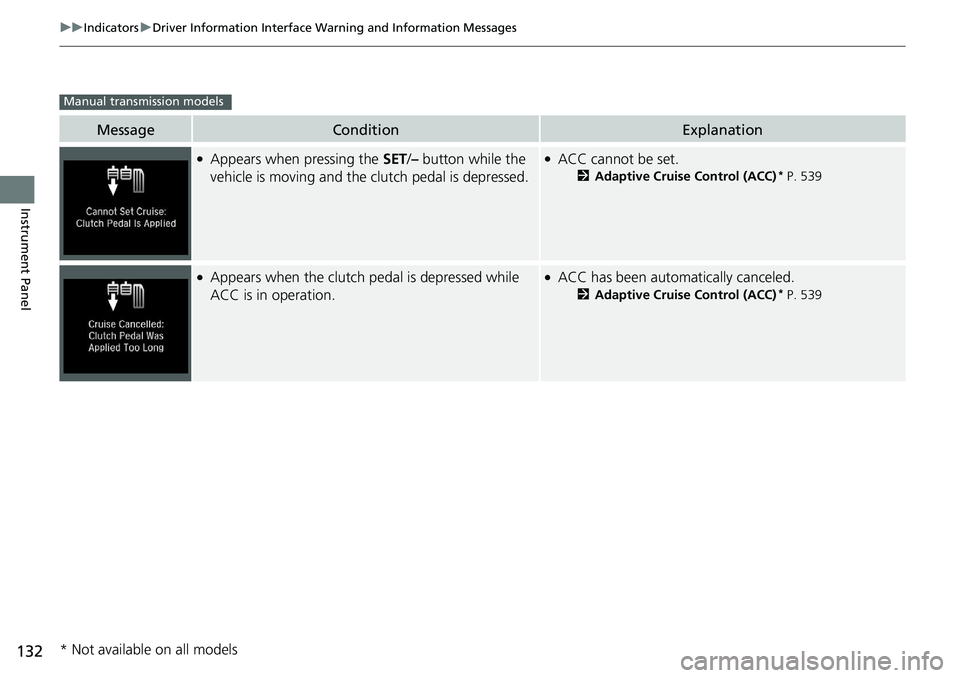
●Appears when pressing the SET/– button while the
vehicle is moving and the clutch pedal is depressed.●ACC cannot be set.
2 Adaptive Cruise Control (ACC)* P. 539
●Appears when the clutch pedal is depressed while
ACC is in operation.●ACC has been automatically canceled.
2 Adaptive Cruise Control (ACC)* P. 539
Manual transmission models
* Not available on all models
Page 137 of 728
135
uuIndicators uDriver Information Interface Wa rning and Information Messages
Continued
Instrument Panel
MessageConditionExplanation
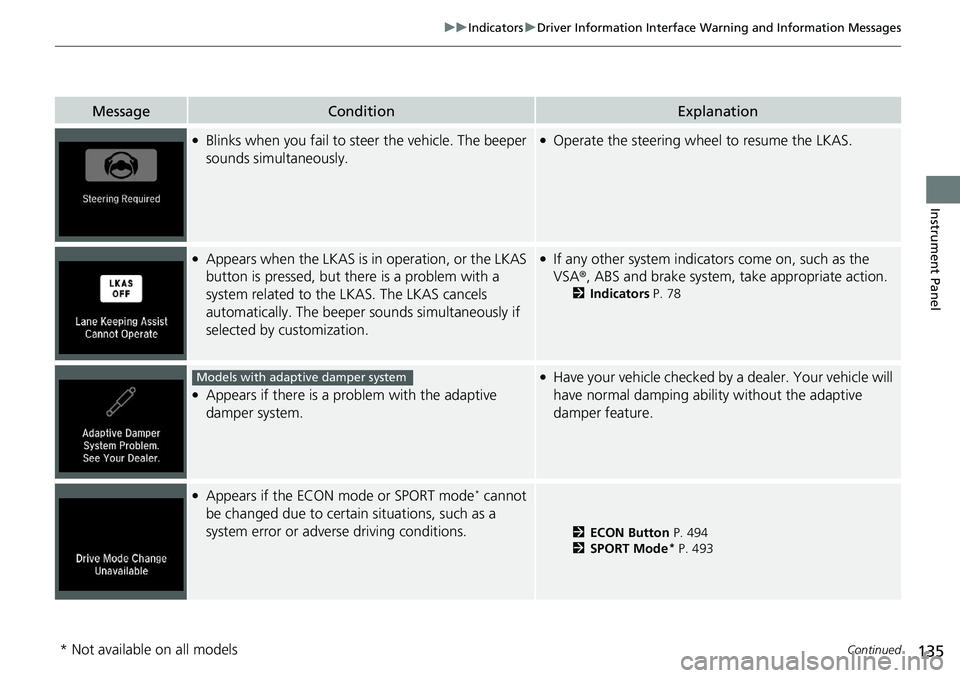
●Blinks when you fail to steer the vehicle. The beeper
sounds simultaneously.●Operate the steering wheel to resume the LKAS.
●Appears when the LKAS is in operation, or the LKAS
button is pressed, but there is a problem with a
system related to the LKAS. The LKAS cancels
automatically. The beeper s ounds simultaneously if
selected by customization.●If any other system indicato rs come on, such as the
VSA ®, ABS and brake system, take appropriate action.
2Indicators P. 78
●Appears if there is a pr oblem with the adaptive
damper system.
●Have your vehicle checked by a dealer. Your vehicle will
have normal damping ability without the adaptive
damper feature.
●Appears if the ECON mode or SPORT mode* cannot
be changed due to certain situations, such as a
system error or adverse driving conditions.
2 ECON Button P. 494
2 SPORT Mode* P. 493
Models with adaptive damper system
* Not available on all models
Page 138 of 728
136
uuIndicators uDriver Information Interface Wa rning and Information Messages
Instrument Panel
MessageConditionExplanation
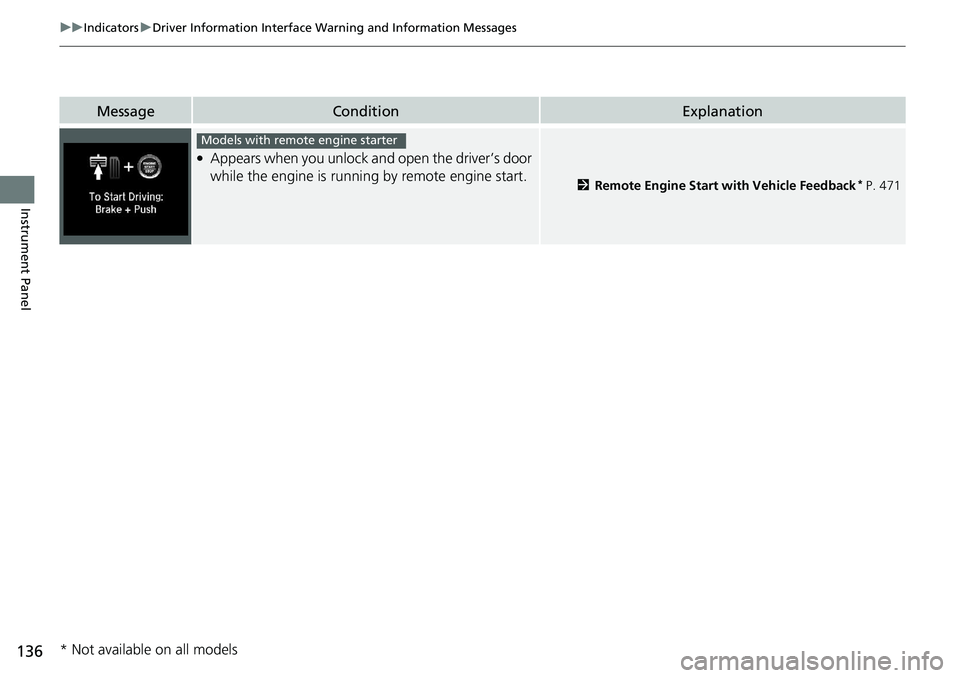
●Appears when you unlock and open the driver’s door
while the engine is running by remote engine start.
2Remote Engine Start with Vehicle Feedback* P. 471
Models with remote engine starter
* Not available on all models
Page 157 of 728
Continued155
uuGauges and Displays uDriver Information Interface
Instrument Panel
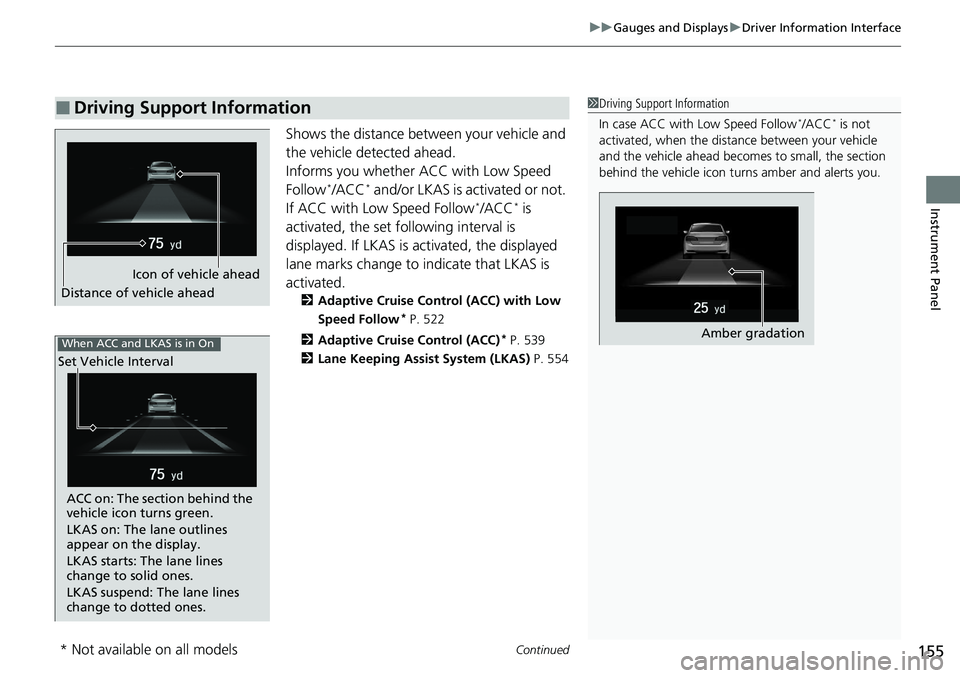
Shows the distance between your vehicle and
the vehicle detected ahead.
Informs you whether ACC with Low Speed
Follow
*/ACC* and/or LKAS is activated or not.
If ACC with Low Speed Follow*/ACC* is
activated, the set fo llowing interval is
displayed. If LKAS is activated, the displayed
lane marks change to indicate that LKAS is
activated.
2 Adaptive Cruise Control (ACC) with Low
Speed Follow
* P. 522
2 Adaptive Cruise Control (ACC)
* P. 539
2 Lane Keeping Assist System (LKAS) P. 554
■Driving Support Information1Driving Support Information
In case ACC with Low Speed Follow
*/ACC* is not
activated, when the distan ce between your vehicle
and the vehicle ahead becomes to small, the section
behind the vehicle icon turns amber and alerts you.
Amber gradation
Icon of vehicle ahead
Distance of vehicle ahead
When ACC and LKAS is in On
Set Vehicle Interval
ACC on: The section behind the
vehicle icon turns green.
LKAS on: The lane outlines
appear on the display.
LKAS starts: The lane lines
change to solid ones.
LKAS suspend: The lane lines
change to dotted ones.
* Not available on all models
Page 159 of 728
157
uuGauges and Displays uHead-Up Display*
Continued
Instrument Panel
Head-Up Display*
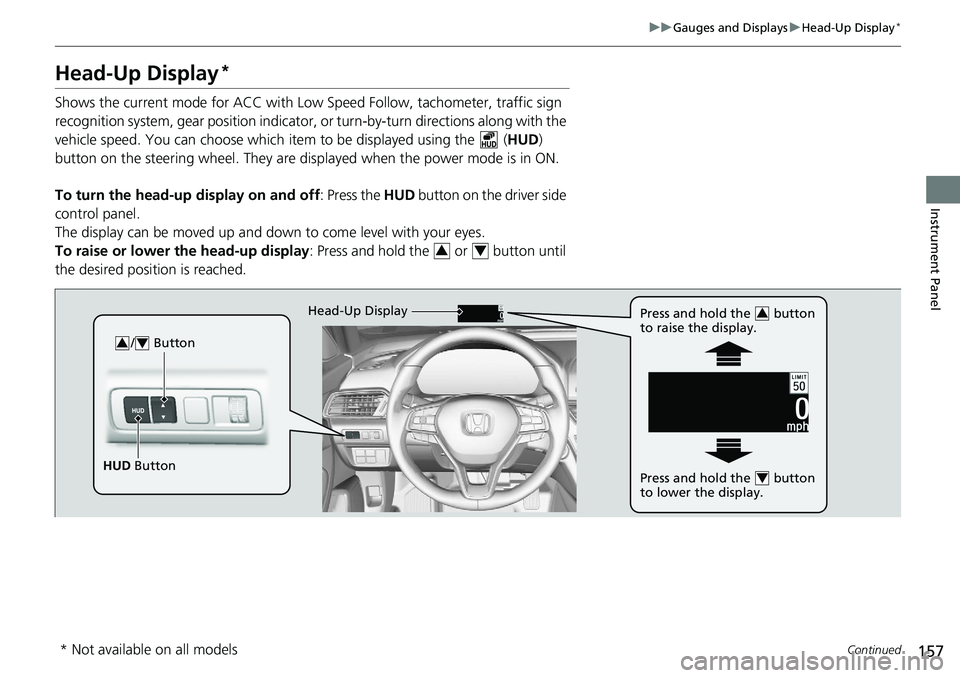
Shows the current mode for ACC with Low Speed Follow, tachometer, traffic sign
recognition system, gear position indicator, or turn-by-turn directions along with the
vehicle speed. You can choose which item to be displayed using the ( HUD)
button on the steering wheel. They are disp layed when the power mode is in ON.
To turn the head-up display on and off: Press the HUD button on the driver side
control panel.
The display can be moved up and down to come level with your eyes.
To raise or lower the head-up display : Press and hold the or button until
the desired position is reached.
34
/ Button34
HUD Button Head-Up Display
Press and hold the button
to raise the display.
3
Press and hold the button
to lower the display.4
* Not available on all models
Page 161 of 728
159
uuGauges and Displays uHead-Up Display*
Continued
Instrument Panel
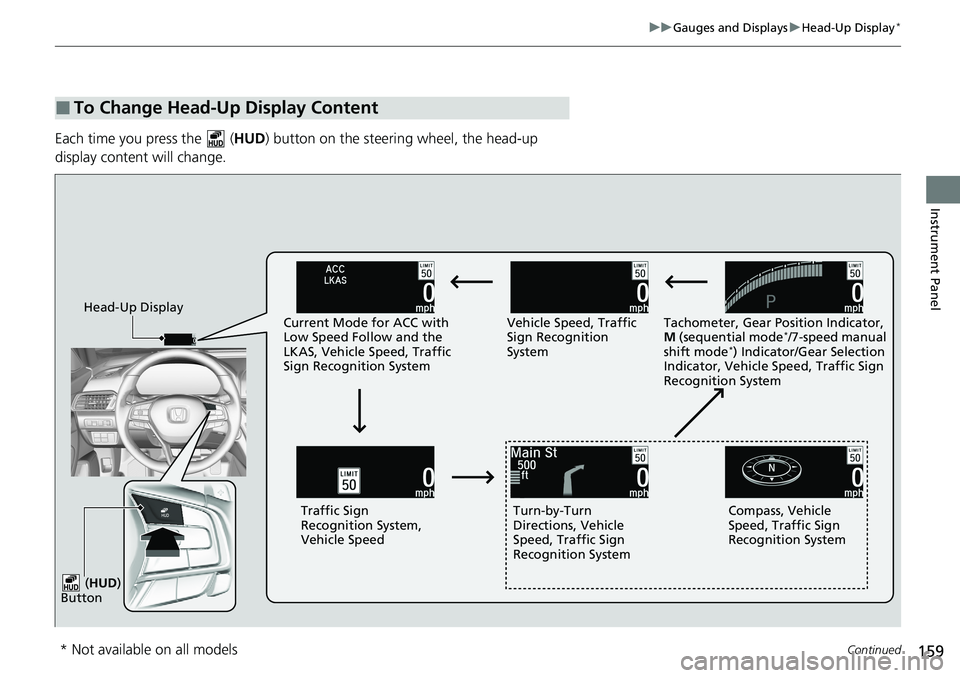
Each time you press the ( HUD) button on the steering wheel, the head-up
display content will change.
■To Change Head-Up Display Content
Head-Up Display Current Mode for ACC with
Low Speed Follow and the
LKAS, Vehicle Speed, Traffic
Sign Recognition System Vehicle Speed, Traffic
Sign Recognition
System
Tachometer, Gear Position Indicator,
M
(sequential mode
*/7-speed manual
shift mode*) Indicator/Gear Selection
Indicator, Vehicle Speed, Traffic Sign
Recognition System
Traffic Sign
Recognition System,
Vehicle Speed Turn-by-Turn
Directions, Vehicle
Speed, Traffic Sign
Recognition System Compass, Vehicle
Speed, Traffic Sign
Recognition System
( HUD )
Button
* Not available on all models
Page 170 of 728
168
uuLocking and Unlocking the Doors uLow Remote Signal Strength
Controls
Low Remote Signal Strength
The vehicle transmits radio waves to locate the remote when locking/unlocking the
doors*, and fuel fill door*, opening the trunk*, or to start the engine.
In the following cases, locking/unlocking the doors
*, and fuel fill door*, opening the
trunk*, or to start the engine may be inhi bited or operation may be unstable:
• Strong radio waves are being tra nsmitted by nearby equipment.
• You are carrying the remote together with telecommunications equipment,
laptop computers, cell phone s, or wireless devices.
• A metallic object is touchi ng or covering the remote.
1Low Remote Signal Strength
Communication between the remote and the vehicle
consumes the remote’s battery.
Battery life is about two years, but this varies
depending on re gularity of use.
The battery is consumed whenever the remote is
receiving strong radio waves. Avoid placing it near
electrical appliances such as televisions and personal
computers.
* Not available on all models
Page 171 of 728
169
uuLocking and Unlocking the Doors uLocking/Unlocking the Doors from the Outside
Continued
Controls
Locking/Unlocking the Doors from the Outside
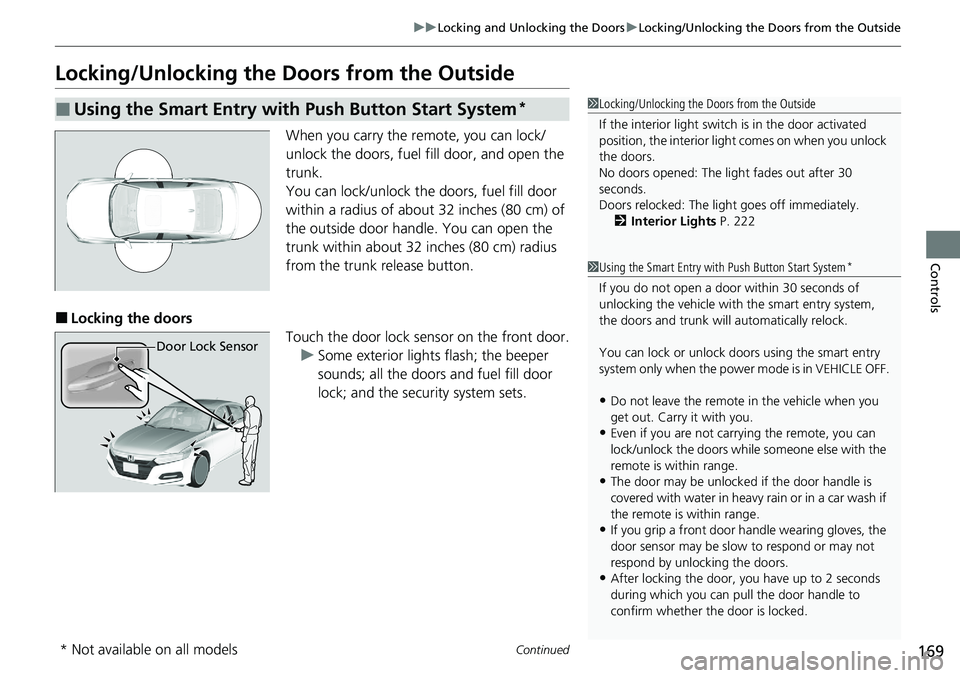
When you carry the re mote, you can lock/
unlock the doors, fuel fill door, and open the
trunk.
You can lock/unlock the doors, fuel fill door
within a radius of about 32 inches (80 cm) of
the outside door handle. You can open the
trunk within about 32 inches (80 cm) radius
from the trunk release button.
■Locking the doors Touch the door lock sensor on the front door.u Some exterior lights flash; the beeper
sounds; all the doors and fuel fill door
lock; and the security system sets.
■Using the Smart Entry with Push Button Start System*1Locking/Unlocking the Doors from the Outside
If the interior light switch is in the door activated
position, the interior light comes on when you unlock
the doors.
No doors opened: The li ght fades out after 30
seconds.
Doors relocked: The light goes off immediately.
2 Interior Lights P. 222
Door Lock Sensor
1Using the Smart Entry with Push Button Start System*
If you do not open a door within 30 seconds of
unlocking the vehicle with the smart entry system,
the doors and trunk will automatically relock.
You can lock or unlock doors using the smart entry
system only when the power mode is in VEHICLE OFF.
•Do not leave the remote in the vehicle when you
get out. Carry it with you.
•Even if you are not carr ying the remote, you can
lock/unlock the doors whil e someone else with the
remote is within range.
•The door may be unlocked if the door handle is
covered with water in heavy rain or in a car wash if
the remote is within range.
•If you grip a front door handle wearing gloves, the
door sensor may be slow to respond or may not
respond by unlocking the doors.
•After locking the door, you have up to 2 seconds
during which you can pull the door handle to
confirm whether the door is locked.
* Not available on all models
Page 172 of 728
uuLocking and Unlocking the Doors uLocking/Unlocking the Doors from the Outside
170
Controls
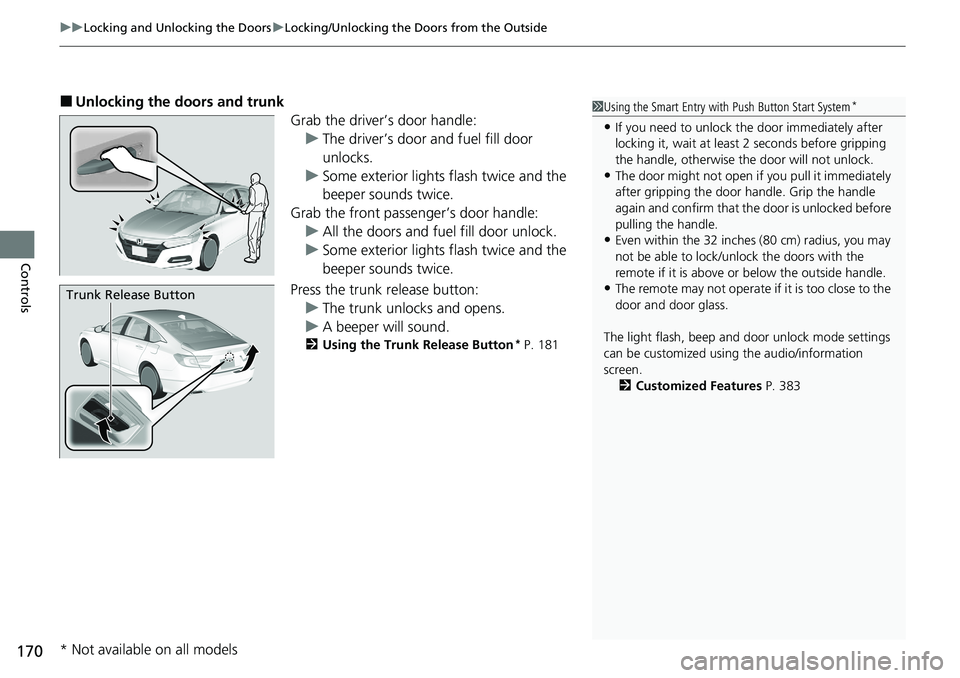
■Unlocking the doors and trunk
Grab the driver’s door handle:u The driver’s door and fuel fill door
unlocks.
u Some exterior lights flash twice and the
beeper sounds twice.
Grab the front passenger’s door handle: u All the doors and fuel fill door unlock.
u Some exterior lights flash twice and the
beeper sounds twice.
Press the trunk release button: u The trunk unlocks and opens.
u A beeper will sound.
2 Using the Trunk Release Button* P. 181
Trunk Release Button
1Using the Smart Entry with Push Button Start System*
•If you need to unlock the door immediately after
locking it, wait at least 2 seconds before gripping
the handle, otherwise th e door will not unlock.
•The door might not open if you pull it immediately
after gripping the door handle. Grip the handle
again and confirm that th e door is unlocked before
pulling the handle.
•Even within the 32 inches (80 cm) radius, you may
not be able to lock/unl ock the doors with the
remote if it is above or below the outside handle.
•The remote may not operate if it is too close to the
door and door glass.
The light flash, beep and door unlock mode settings
can be customized using the audio/information
screen. 2 Customized Features P. 383
* Not available on all models
Page 174 of 728
uuLocking and Unlocking the Doors uLocking/Unlocking the Doors from the Outside
172
Controls
To temporarily deactivate the function:
1. Set the power mode to OFF.
2. Open the driver’s door.
3. Using the master door lock switch, operate
the lock as follows:
Lock Unlock Lock Unlock.
u The beeper sounds and the function is
deactivated.
To restore the function:
• Set the power mode to ON.
• Lock the vehicle without using the auto lock
function.
• Walk away at least more than about 5 feet
(1.5 m) away from the vehicle while
carrying the remote.
• Open any door.1Locking the vehicle (Walk away auto lock® )
The auto lock function does not operate when any of
the following conditions are met.
•The remote is inside the vehicle.
•A door or the hood is not closed.•The power mode is set to any mode other than
OFF.
•The remote is not located within a radius of about
5 feet (1.5 m) from the vehicle when you get out of
the vehicle and close the doors.
Auto lock function operation stop beeper
After the auto lock function has been activated, the
auto lock operation stop beeper sounds for
approximately two seconds in the following cases.
•The remote is put inside the vehicle through a
window.
•You are located too close to the vehicle.
•The remote is put inside the trunk.
If the warning beeper sounds, check that you are
carrying the remote. Then, open/close a door and
confirm the auto lock ac tivation beeper sounds once.
In the case that the remote is out of operating range
when you close a door or the trunk, a beeper will
sound to indicate that the auto lock function has
been canceled.