lock HONDA CIVIC 1991 User Guide
[x] Cancel search | Manufacturer: HONDA, Model Year: 1991, Model line: CIVIC, Model: HONDA CIVIC 1991Pages: 136, PDF Size: 1.33 MB
Page 21 of 136
Seat Belts (cont'd)
3. To release the seat belt, push the "PRESS" button in the buckle;
the belt
should retract automatically when released. If the belt
does not fully retract, pull it out and check for kinks or twists.
CAUTION:
Make sure both rear shoulder belts are positioned in front of the rear seat-backs whenever the seat-backs are in their upright
position.
Rear Center Seat Belt
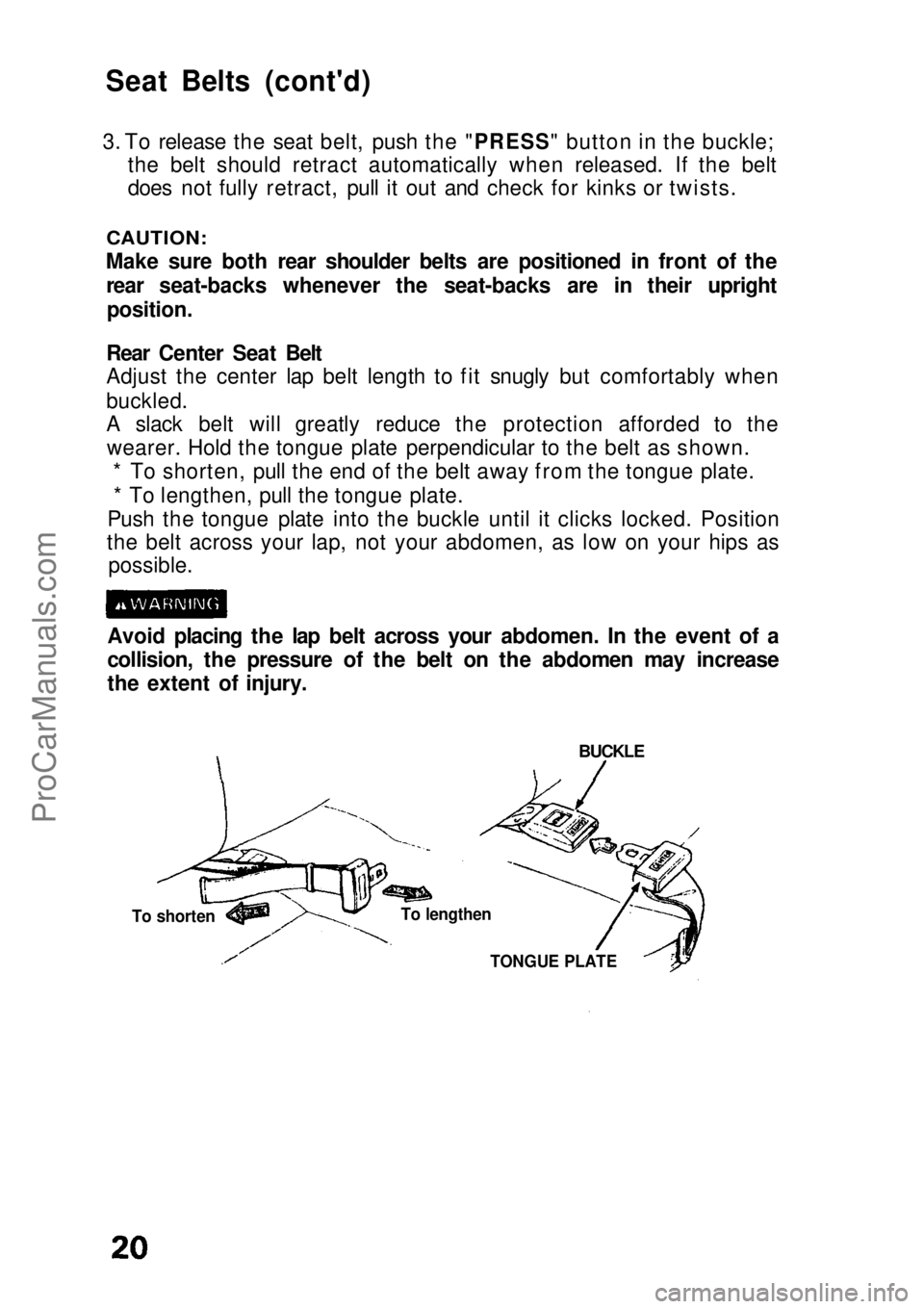
Adjust the center lap belt length to fit snugly but comfortably when
buckled.
A slack belt will greatly reduce the protection afforded to the wearer. Hold the tongue plate perpendicular to the belt as shown. * To shorten, pull the end of the belt away from the tongue plate.
* To lengthen, pull the tongue plate.
Push the tongue plate into the buckle until it clicks locked. Position
the belt across your lap, not your abdomen, as low on your hips as possible.
Avoid placing the lap belt across your abdomen. In the event of a
collision, the pressure of the belt on the abdomen may increase
the extent of injury.
BUCKLE
To lengthen
To shorten
TONGUE PLATEProCarManuals.comMain Menu s t
Page 27 of 136
Instrument Panel
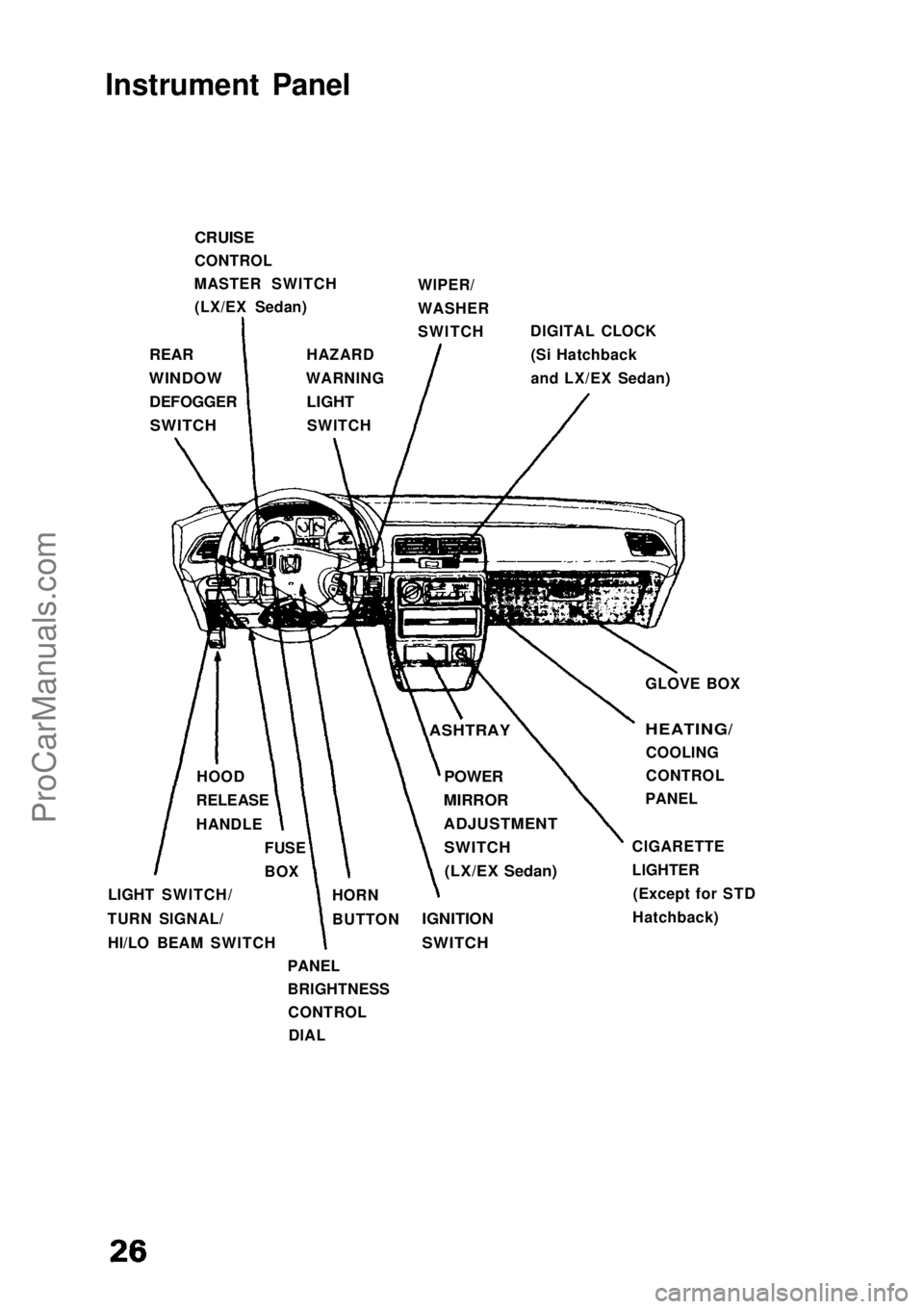
CRUISE
CONTROL
MASTER SWITCH (LX/EX Sedan) WIPER/
WASHER
SWITCH
DIGITAL CLOCK
(Si Hatchback
and LX/EX Sedan)
REAR
WINDOW
DEFOGGER
SWITCH
HAZARD
WARNING
LIGHT
SWITCH
GLOVE BOX
ASHTRAY
HEATING/
COOLING
CONTROL
PANEL
CIGARETTE
LIGHTER (Except for STD
Hatchback)
POWER
MIRROR
ADJUSTMENT
SWITCH
(LX/EX Sedan)
IGNITION
SWITCH
HORN
BUTTON
PANEL
BRIGHTNESS CONTROLDIAL
LIGHT SWITCH/
TURN SIGNAL/ HI/LO BEAM SWITCH FUSE
BOX
HOOD
RELEASE
HANDLEProCarManuals.comMain Menu s t
Page 33 of 136
Tilt Steering
Tilt Steering (DX/Si Hatchback and Sedan)
The steering wheel position can be adjusted to suit the driver
preference.
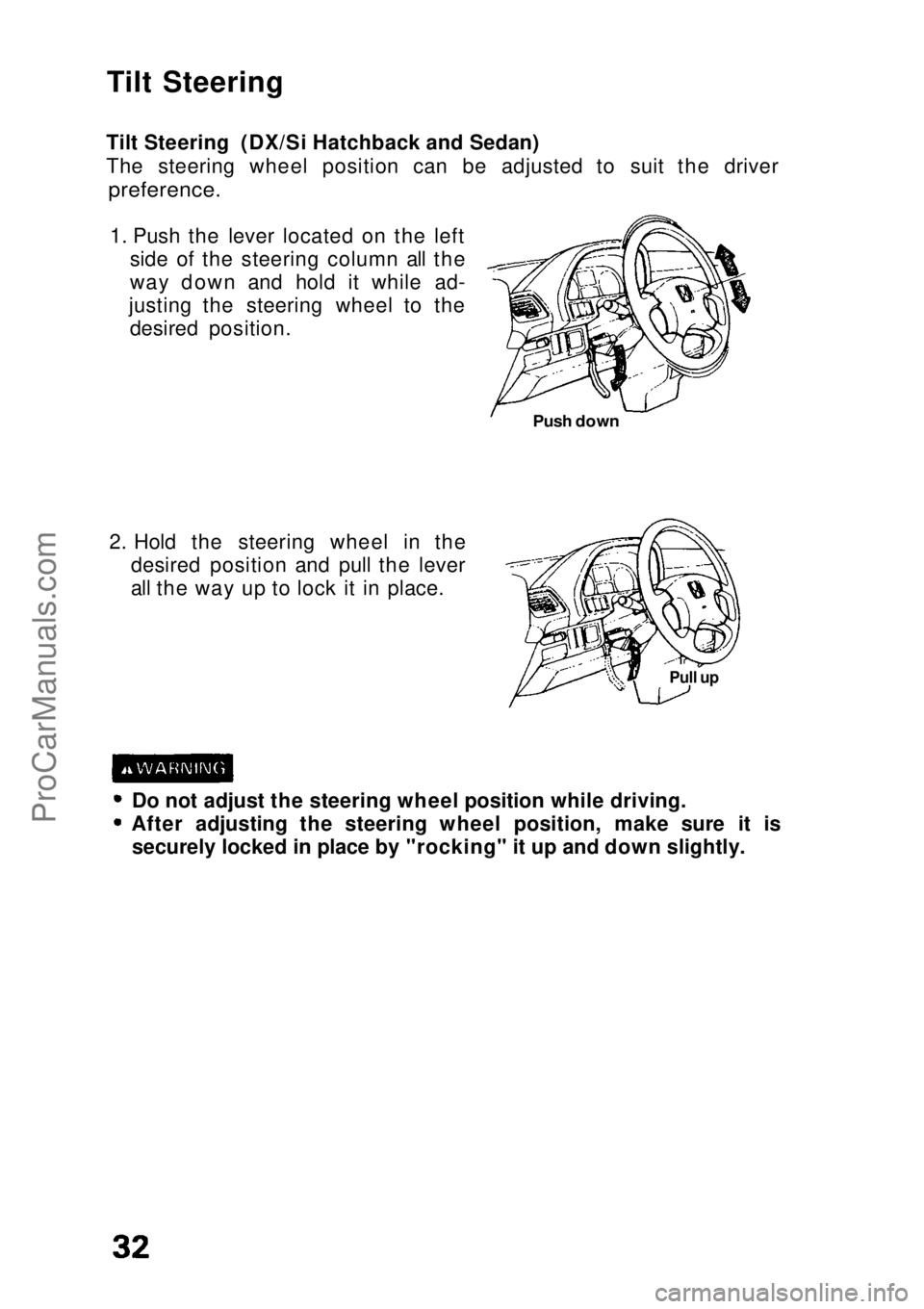
1. Push the lever located on the left side of the steering column all the
way down and hold it while ad-
justing the steering wheel to the desired position.
2. Hold the steering wheel in the desired position and pull the lever
all the way up to lock it in place.
Do not adjust the steering wheel position while driving. After adjusting the steering wheel position, make sure it is
securely locked in place by "rocking" it up and down slightly.
Pull up
Push downProCarManuals.comMain Menu s t
Page 35 of 136
Windshield Wipers/Washer/Defogger (cont'd)
CAUTION:
Do not use radiator antifreeze in the windshield washer; it will
damage the paint.
Do not use a vinegar/water combination in the windshield
washer; it will damage the pump. Prolonged operation of the washer without fluid may damage
the pump.
In freezing weather, warm the windshield with the defrosters
before using the washer. This will help prevent icing which could
seriously impair visibility.
Rear Window Wiper/Washer (DX/Si Hatchback)
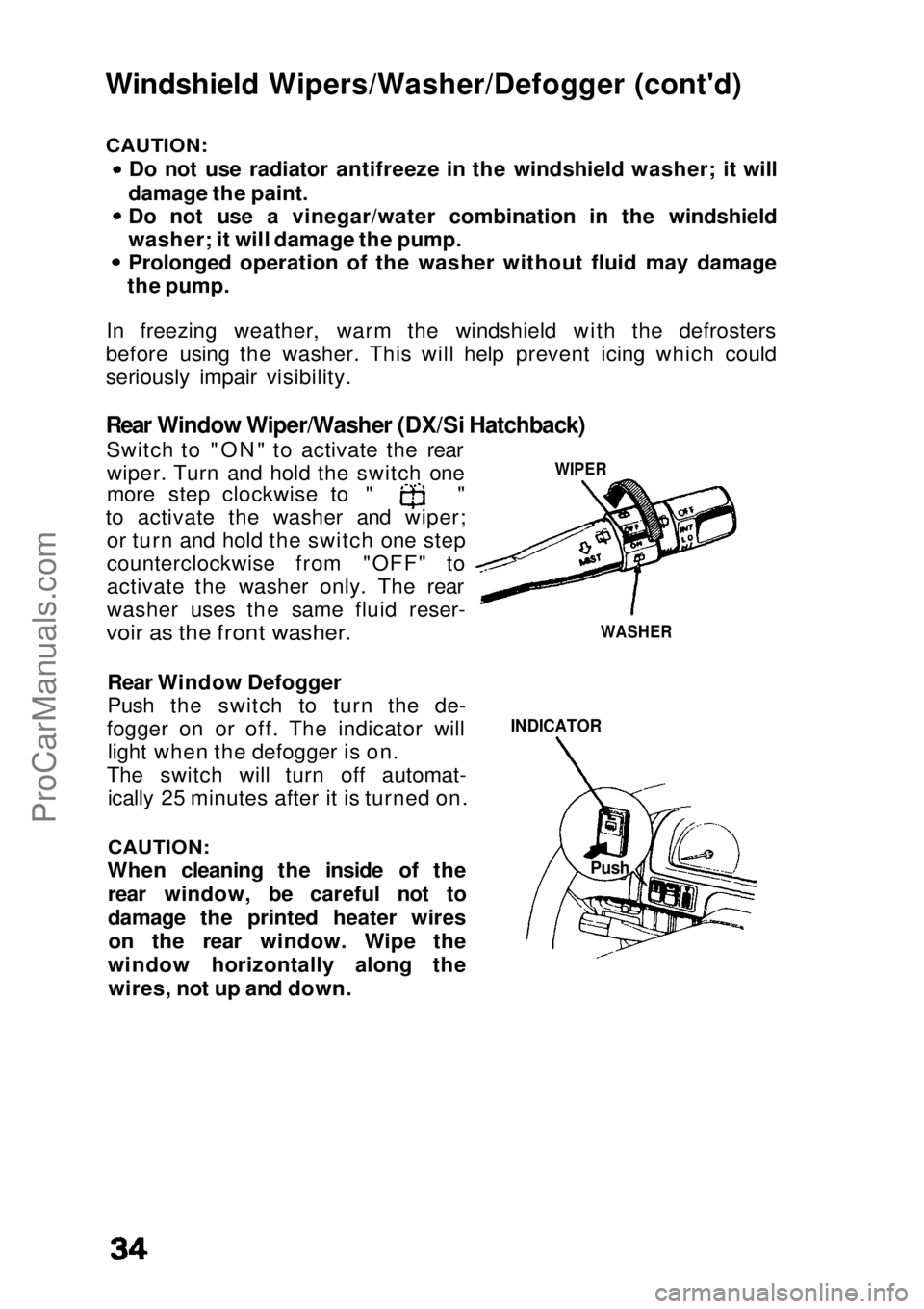
Switch to "ON" to activate the rearwiper. Turn and hold the switch one more step clockwise to " "
to activate the washer and wiper; or turn and hold the switch one step
counterclockwise from "OFF" to
activate the washer only. The rear
washer uses the same fluid reser-
voir as the front washer.
Rear Window Defogger
Push the switch to turn the de-
fogger on or off. The indicator will light when the defogger is on.
The switch will turn off automat- ically 25 minutes after it is turned on.
CAUTION:
When cleaning the inside of the rear window, be careful not to
damage the printed heater wireson the rear window. Wipe the
window horizontally along the wires, not up and down.
INDICATOR
WIPER
WASHER
PushProCarManuals.comMain Menu s t
Page 43 of 136
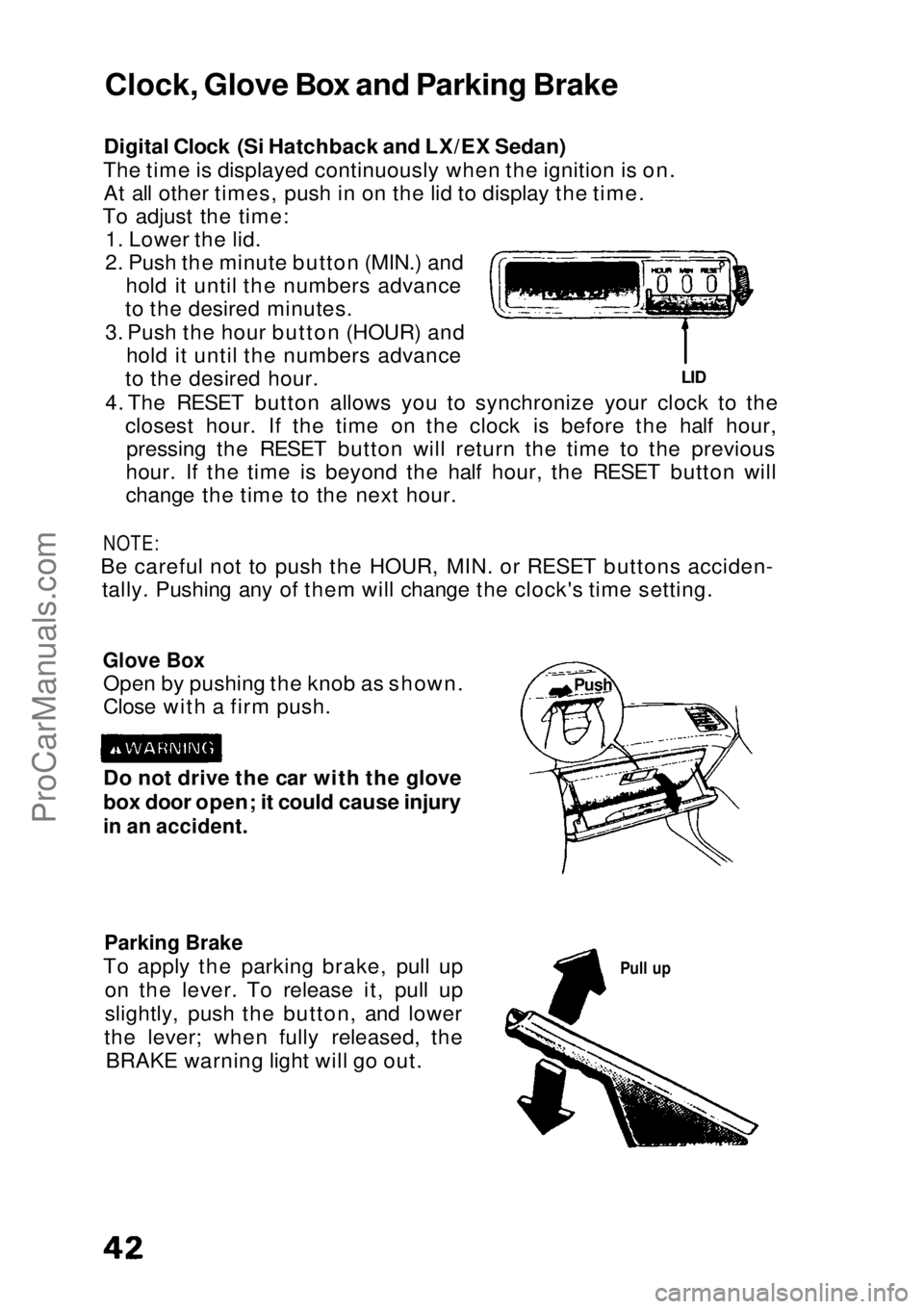
Digital Clock (Si Hatchback and LX/EX Sedan)
The time is displayed continuously when the ignition is on. At all other times, push in on the lid to display the time.
To adjust the time: 1. Lower the lid.
2. Push the minute button (MIN.) and hold it until the numbers advance
to the desired minutes.
3. Push the hour button (HOUR) and hold it until the numbers advance
to the desired hour.
4. The RESET button allows you to synchronize your clock to the closest hour. If the time on the clock is before the half hour,pressing the RESET button will return the time to the previous
hour. If the time is beyond the half hour, the RESET button will
change the time to the next hour.
NOTE:
Be careful not to push the HOUR, MIN. or RESET buttons acciden- tally. Pushing any of them will change the clock's time setting.
Glove Box
Open by pushing the knob as shown.
Close with a firm push.
Parking Brake
To apply the parking brake, pull up on the lever. To release it, pull up
slightly, push the button, and lower
the lever; when fully released, the BRAKE warning light will go out.
Pull up
Do not drive the car with the glove
box door open; it could cause injury
in an accident.
LID
Clock, Glove Box and Parking Brake
PushProCarManuals.comMain Menu s t
Page 48 of 136
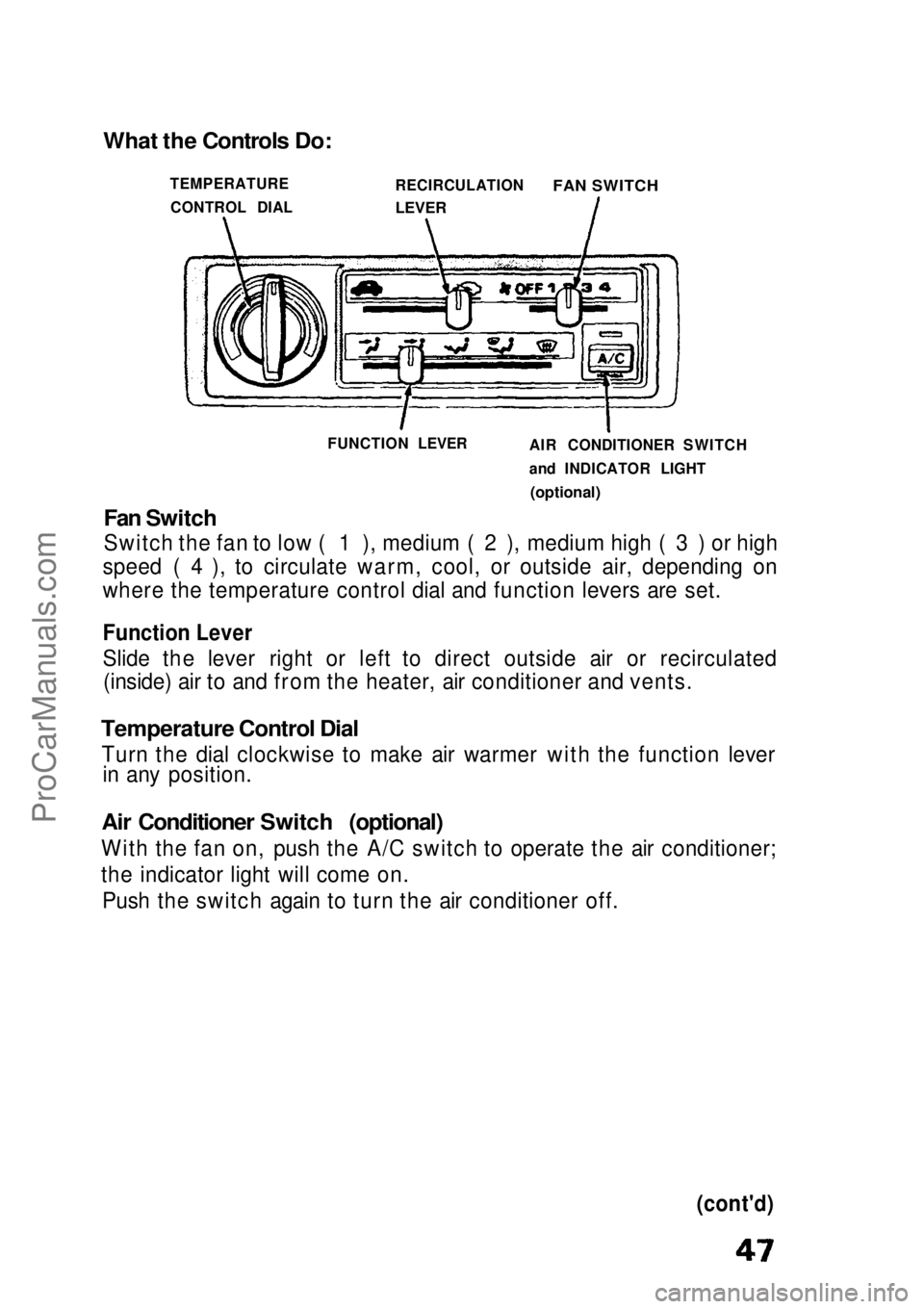
Fan Switch
Switch the fan to low ( 1 ), medium ( 2 ), medium high ( 3 ) or high
speed ( 4 ), to circulate warm, cool, or outside air, depending on
where the temperature control dial and function levers are set.
Function Lever
Slide the lever right or left to direct outside air or recirculated (inside) air to and from the heater, air conditioner and vents.
Temperature Control Dial
Turn the dial clockwise to make air warmer with the function lever in any position.
Air Conditioner Switch (optional)
With the fan on, push the A/C switch to operate the air conditioner;
the indicator light will come on. Push the switch again to turn the air conditioner off.
(cont'd)
What the Controls Do:
TEMPERATURECONTROL DIAL RECIRCULATION
LEVER
FAN SWITCH
FUNCTION LEVER AIR CONDITIONER SWITCH
and INDICATOR LIGHT
(optional)ProCarManuals.comMain Menu s t
Page 49 of 136
Heating and Cooling (cont'd)
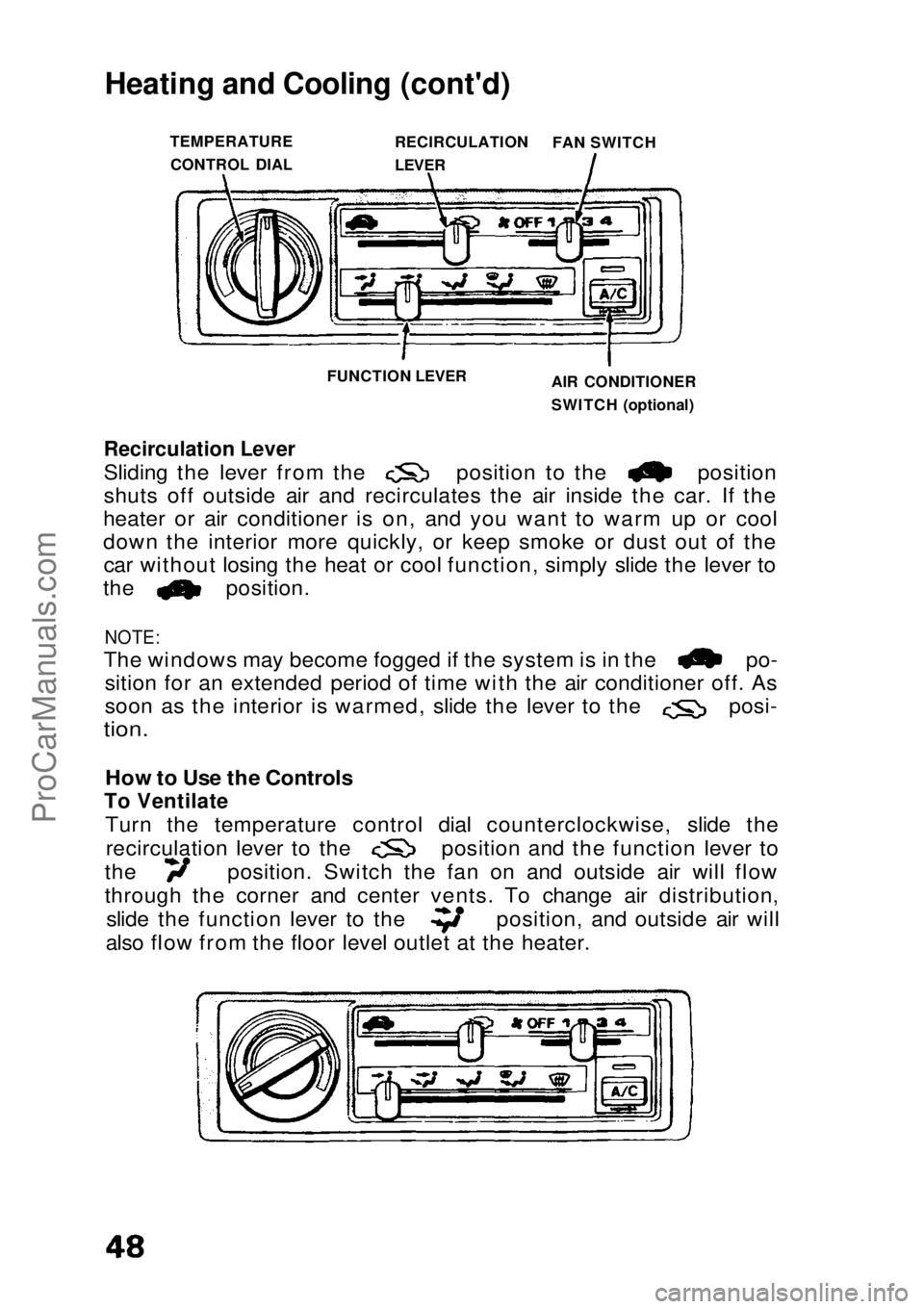
Recirculation Lever
Sliding the lever from the position to the position
shuts off outside air and recirculates the air inside the car. If the
heater or air conditioner is on, and you want to warm up or cool
down the interior more quickly, or keep smoke or dust out of the car without losing the heat or cool function, simply slide the lever to the position.
NOTE:
The windows may become fogged if the system is in the po-
sition for an extended period of time with the air conditioner off. As soon as the interior is warmed, slide the lever to the posi-
tion.
How to Use the Controls
To Ventilate
Turn the temperature control dial counterclockwise, slide the recirculation lever to the position and the function lever to
the position. Switch the fan on and outside air will flow
through the corner and center vents. To change air distribution,
slide the function lever to the position, and outside air will
also flow from the floor level outlet at the heater.
TEMPERATURE
CONTROL DIAL RECIRCULATION
LEVER
FAN SWITCH
FUNCTION LEVER AIR CONDITIONER
SWITCH (optional)ProCarManuals.comMain Menu s t
Page 50 of 136
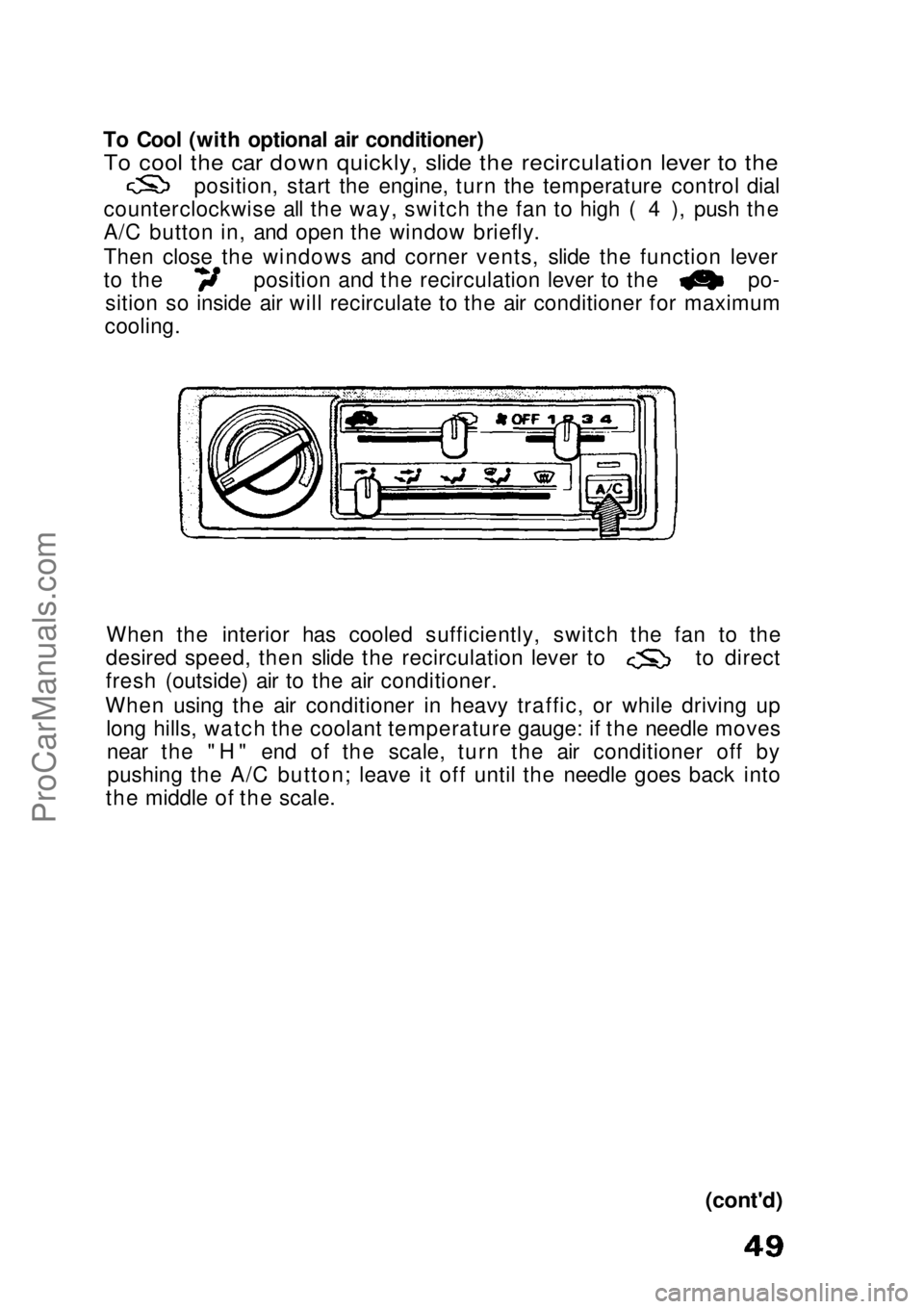
To Cool (with optional air conditioner)
To cool the car down quickly, slide the recirculation lever to the
position, start the engine, turn the temperature control dial
counterclockwise all the way, switch the fan to high ( 4 ), push the
A/C button in, and open the window briefly.
Then close the windows and corner vents, slide the function lever to the position and the recirculation lever to the po-
sition so inside air will recirculate to the air conditioner for maximum
cooling.
When the interior has cooled sufficiently, switch the fan to the desired speed, then slide the recirculation lever to to direct
fresh (outside) air to the air conditioner.
When using the air conditioner in heavy traffic, or while driving up long hills, watch the coolant temperature gauge: if the needle movesnear the "H" end of the scale, turn the air conditioner off bypushing the A/C button; leave it off until the needle goes back into
the middle of the scale.
(cont'd)ProCarManuals.comMain Menu s t
Page 51 of 136
Heating and Cooling (cont'd)
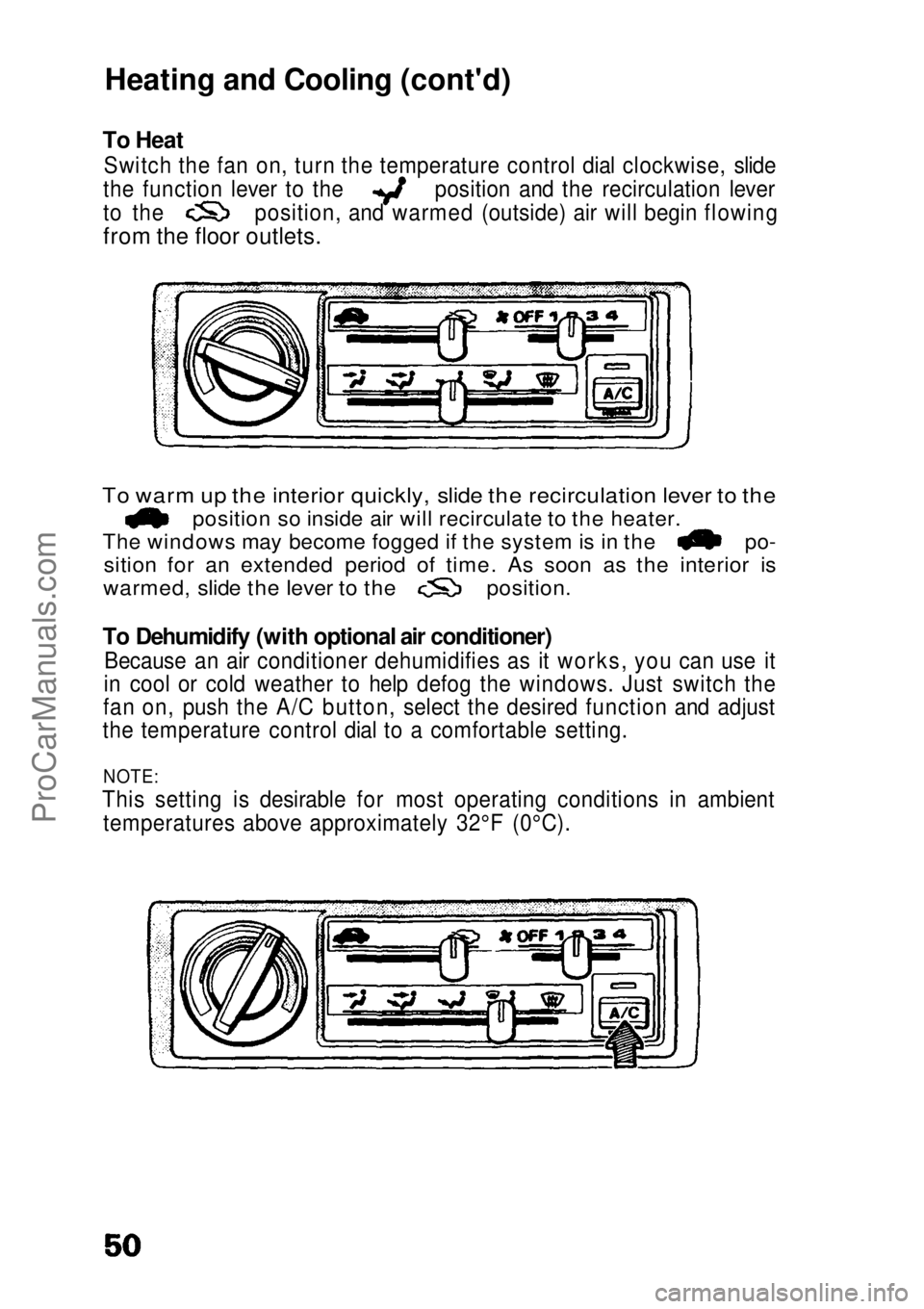
To Heat
Switch the fan on, turn the temperature control dial clockwise, slide the function lever to the position and the recirculation lever
to the position, and warmed (outside) air will begin flowing
from the floor outlets.
To warm up the interior quickly, slide the recirculation lever to the
position so inside air will recirculate to the heater.
The windows may become fogged if the system is in the po-
sition for an extended period of time. As soon as the interior is
warmed, slide the lever to the position.
To Dehumidify (with optional air conditioner)
Because an air conditioner dehumidifies as it works, you can use it
in cool or cold weather to help defog the windows. Just switch the
fan on, push the A/C button, select the desired function and adjust
the temperature control dial to a comfortable setting.
NOTE:
This setting is desirable for most operating conditions in ambient temperatures above approximately 32°F (0°C).ProCarManuals.comMain Menu s t
Page 52 of 136
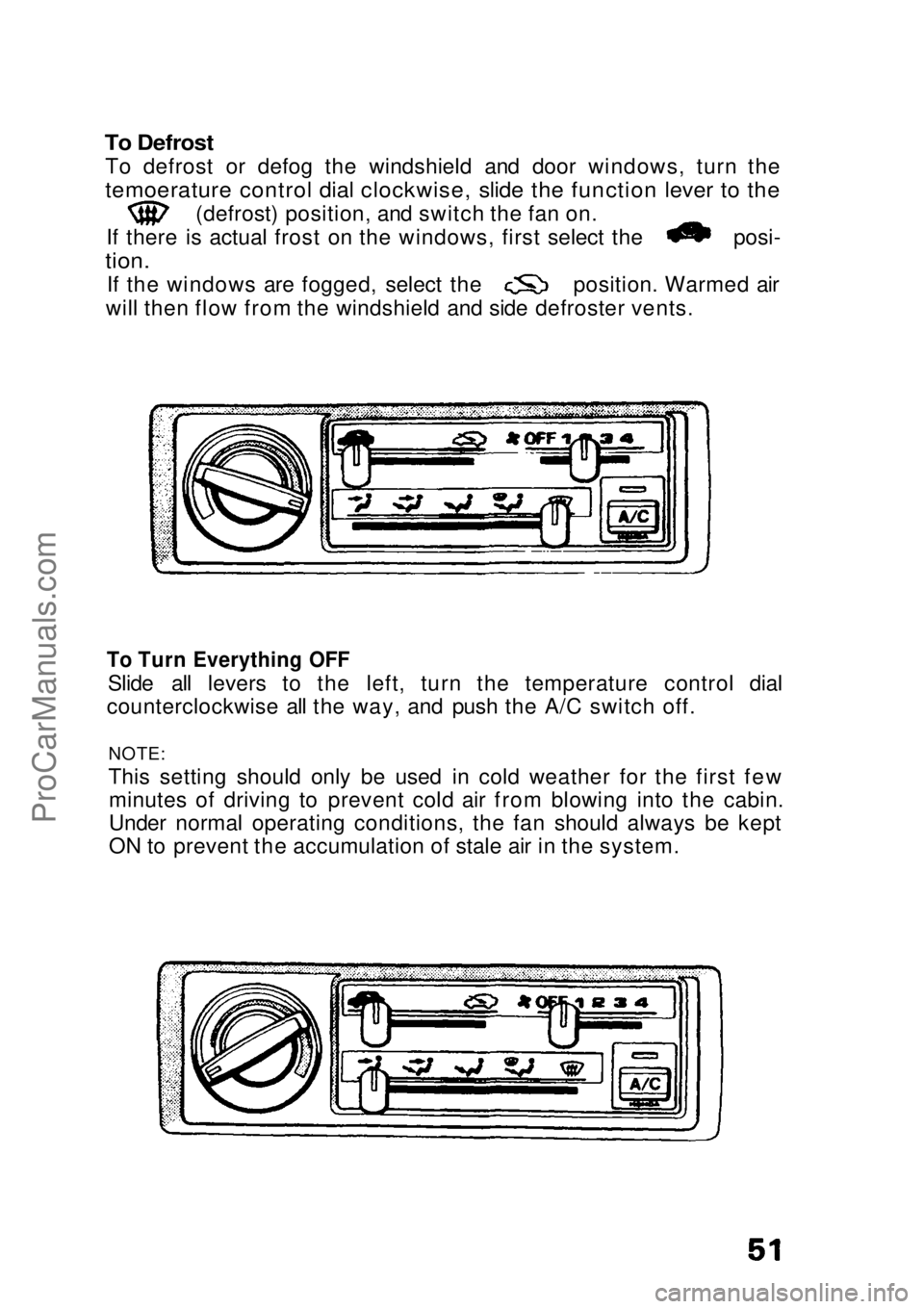
To Defrost
To defrost or defog the windshield and door windows, turn the
temoerature control dial clockwise, slide the function lever to the
(defrost) position, and switch the fan on.
If there is actual frost on the windows, first select the posi-
tion.
If the windows are fogged, select the position. Warmed air
will then flow from the windshield and side defroster vents.
To Turn Everything OFF
Slide all levers to the left, turn the temperature control dial
counterclockwise all the way, and push the A/C switch off.
NOTE:
This setting should only be used in cold weather for the first fewminutes of driving to prevent cold air from blowing into the cabin.
Under normal operating conditions, the fan should always be kept
ON to prevent the accumulation of stale air in the system.ProCarManuals.comMain Menu s t