Motor HONDA CIVIC 2002 7.G Repair Manual
[x] Cancel search | Manufacturer: HONDA, Model Year: 2002, Model line: CIVIC, Model: HONDA CIVIC 2002 7.GPages: 1139, PDF Size: 28.19 MB
Page 699 of 1139
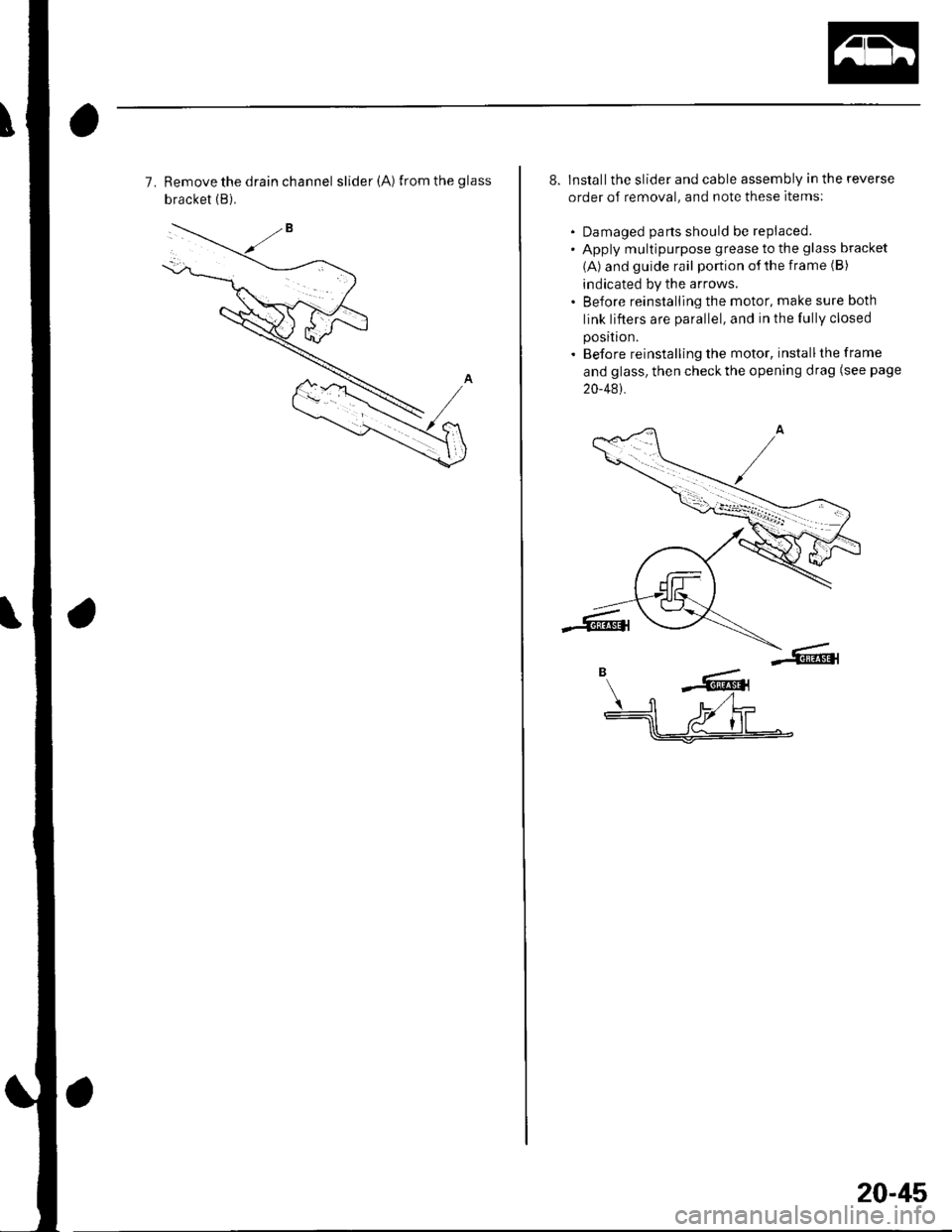
7. Remove the drain channel slider(A) fromtheglass
bracket (B).
8. Installthe slider and cable assembly in the reverse
order of removal, and note these items;
. Damaged parts should be replaced.' Apply multipurpose grease to the glass bracket
(A) and guide rail portion of the frame (B)
indicated by the arrows.. Before reinstalling the motor, make sure both
link lifters are parallel, and in the fully closed
position.
. Before reinstalling the motor, installthe frame
and glass, then check the opening drag (see page
20-481.
B ---
-':rdrt'Irrt
fl u,t L-----lll a/J' I lll$=-r:-
20-45
Page 702 of 1139
.
2. Closing force check:
. With a shop towel {A) on the leading edge of theglass (B), aftach a spring scale (C)")
Moonroof
\
Closing Force and Opening Drag Check
1. Remove the headliner (see page 20-54).
2. Closing force check:
. With a shop towel {A) on the leading edge of theglass (B), aftach a spring scale (C) as shown.. Have an assistant hold the switch to close theglass while you measure the force required to
stop it.. Read the force as soon as the glass stops moving,
then immediately release the switch and spring
scale.
Closing Force; 200 290 N (20 30 kgf,44 66 tbl)
lf the force in not within specification, remove themoonroof motor (see page 20-41), then check:
. The gear portion and the inner cable for breakageand damage. lf the gear portion is broken,
replace the motor. lf the inner cable is damaged,
remove the frame (see page 20-42), and replace
the cable assembly (see page 20-44).' The moonroof motor (see page 22-112). Ifthe
motor fails to run or doesn't tu rn smoothlv.
replace it (see page 20-41),. The opening drag. Go to step 4.
20-48
4. Opening drag check: Protect the leading edge of theglass with a shop towel (A). Measure the effortrequired to open the glass using a spring scale (B)
as shown.
5.lf the load is over 40 N (4 kgf, 9 lbf), check;
. The side clearance and glass height adjustment(see page 20'37),. For broken or damaged sliding parts. lf any
sliding parts are damaged, replace them.
Page 764 of 1139
Openers
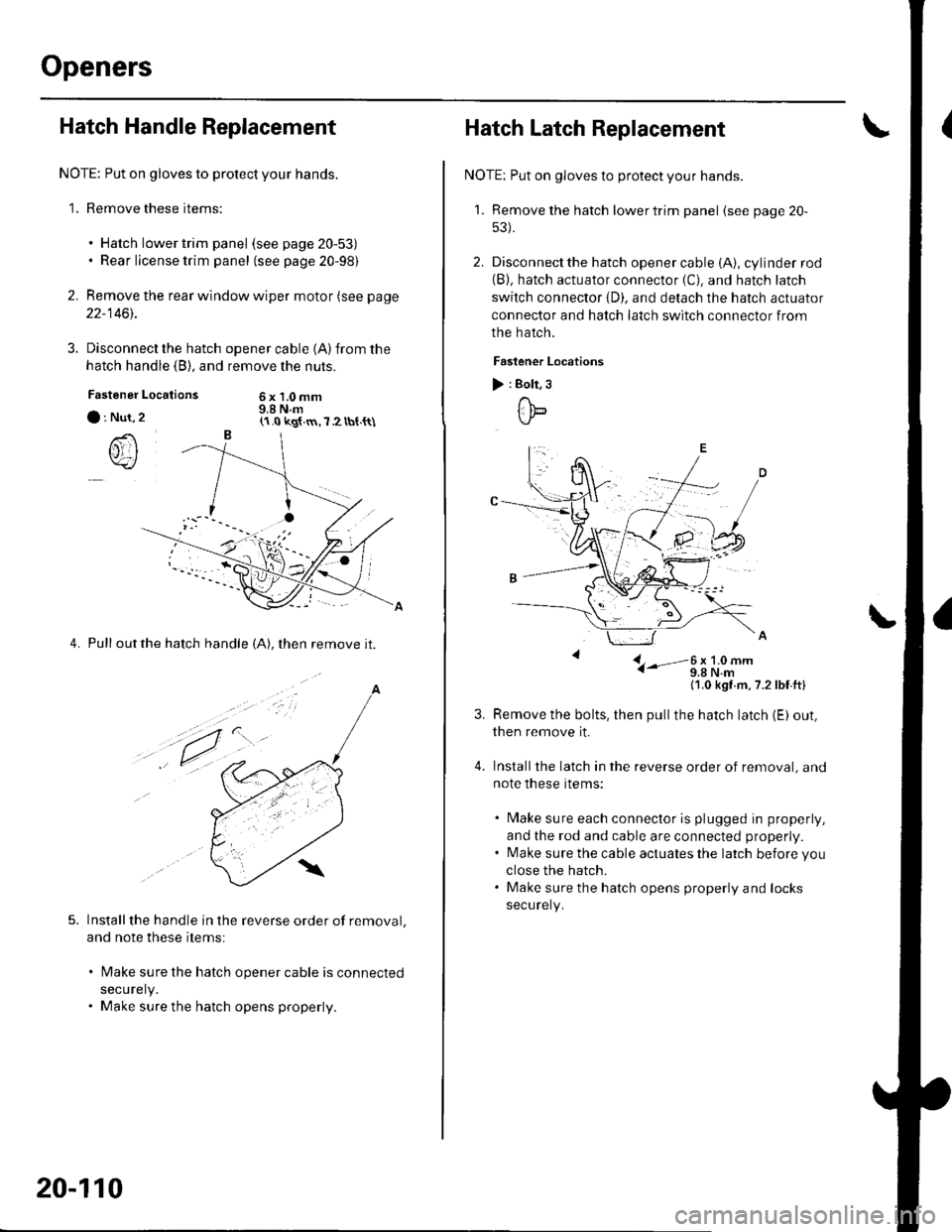
Hatch Handle Replacement
NOTE: Put on gloves to protect your hands.
1. Remove these items:
. Hatch lower trim panel (see page 20-53). Rear license trim panel (see page 20-98)
2. Remove the rear window wiper motor (see page
22-1461.
3. Disconnect the hatch
hatch handle (B), and
Locations
opener cable 1A)from the
remove the nuts.
6x1.0mm9.8 N.mFastener
a : Nut,
()rI
4. Pull outthe hatch handle (A), then remove it.
Installthe handle in the reverse order of removal.
and note these items:
lMake sure the hatch opener cable is connected
securely.
Make sure the hatch opens properly.
(1.0 kg{.m,7 2 tbt.{t\
a
,t.
20-110
Hatch Latch Replacement
NOTE: Put on gloves to protect your hands.
'1. Remove the hatch lowertrim panel (see page 20-
53).
2. Disconnect the hatch opener cable (A), cylinder rod(B). hatch actuator connector (C). and hatch latch
switch connector {D). and detach the hatch actuator
connector and hatch latch switch connector from
the hatch.
Faslener Locations
) : Bolt, 3
ttb
L- i-'-3;li9#-
11,0 kgt m,7.2lbf ftl
Remove the bolts, then pullthe hatch latch (E) out,
then remove it.
Installthe latch in the reverse order of removal, and
note these items:
. Make sure each connector is plugged in properly,
and the rod and cable are connected properly.. l\4ake sure the cable actuates the latch before you
close the hatch.. Make sure the hatch opens properly and locks
securely.
Page 773 of 1139
21-2
z t-'5
z t-o
z t-o
21-8
21-9
21-10
21-11
21-14
z t- to
HVAC (Heating, Ventilation, and Air Gonditioningl
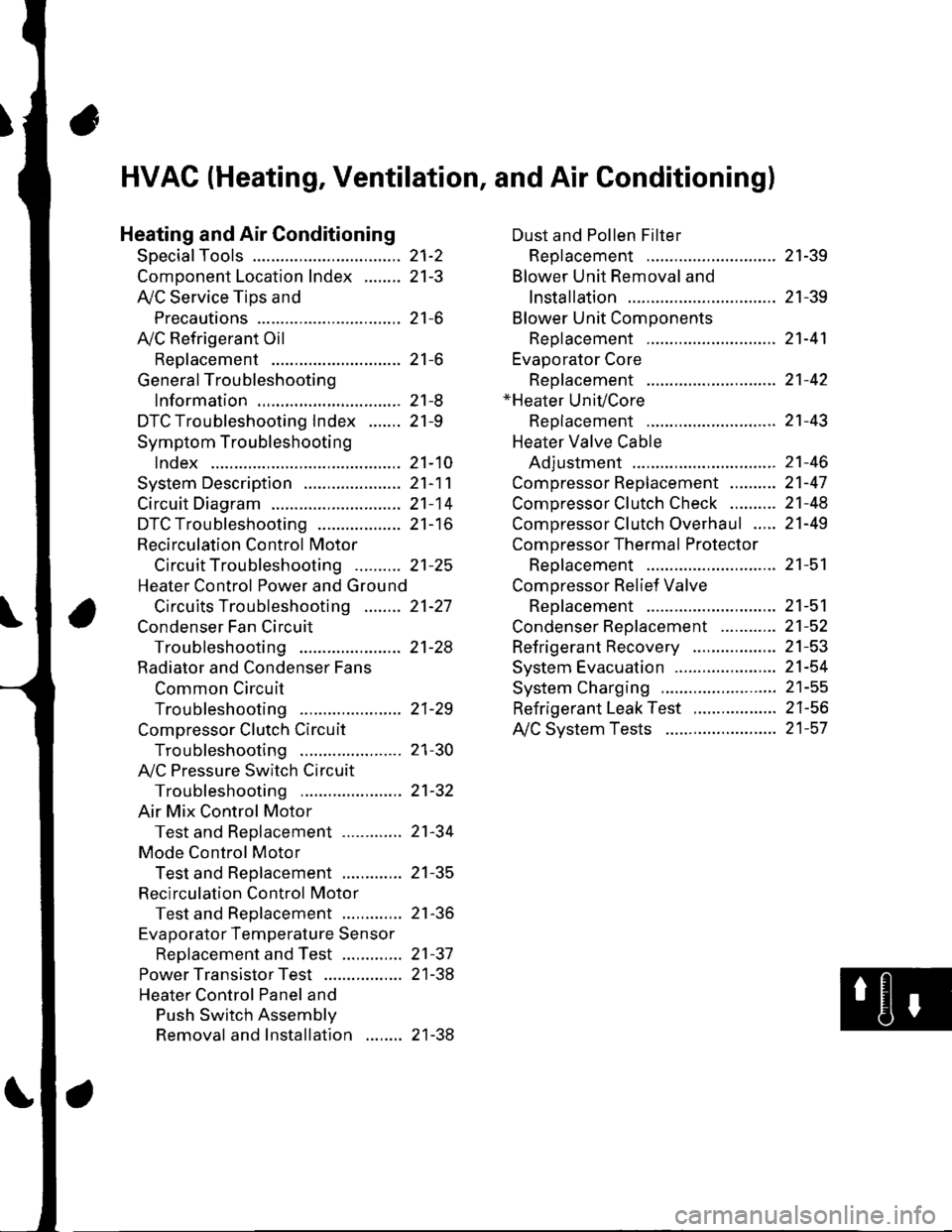
Heating and Air Conditioning
SpecialTools
Comoonent Location lndex ........
A/C Service Tios and
Precautions
A,/C Refrigerant Oil
ReDlacement
General Troubleshooting
lnformation
DTC Troubleshooting Index .......
Symptom Troubleshooting
1ndex..............
System Description .....................
Circuit Diagram
DTC Troubleshooting ..................
Recirculation Control Motor
CircuitTroubleshooting .......... 21-25
Heater Control Power and Ground
Circuits Troubleshooting ........ 21-27
Condenser Fan Circuit
Troubleshooting ...................... 21-28
Radiator and Condenser Fans
Common Circuit
Troubfeshooting ...................... 21-29
Compressor Clutch Circuit
Troubleshooting ...................... 21-30
A,/C Pressure Switch Circuit
Troubleshooting ...................... 21-32
Air Mix Control Motor
Test and Reolacement ............. 21-34
Mode Control Motor
Test and Replacement ............. 21-35
Recirculation Control Motor
Test and Reolacement ............. 21-36
Evaporator Temperature Sensor
Reolacement and Test ............. 21-31
Power Transistor Test ................. 21 -38
Heater Control Panel and
Push Switch Assemblv
Removal and Installation ........ 21-38
Dust and Pollen Filter
Reolacement ..21-39
Blower Unit Removal and
lnstallation ...... 21-39
Blower Unit Comoonents
ReDlacement ............................ 21-41
Evaporator Core
Reolacement ..21-42*Heater Unit/Core
ReDlacement ..21-43
Heater Valve Cable
Adjustment .....21-46
CompressorReplacement .......... 21-47
Comoressor Clutch Check .......... 21-48
Comoressor Clutch Overhaul ..... 21-49
Compressor Thermal Protector
Reo1acement ............................ 21-51
Comoressor Relief Valve
Reolacement ............................ 21-51
Condenser Reolacement ............ 21-52
Refrigerant Recovery .................. 21-53
System Evacuation ...................... 21-54
System CharginS ......................... 21-55
Refrigerant LeakTest .................. 21-56
A,/C Svstem Tests ........................ 21-57
Page 776 of 1139
Heating and Air Conditioning
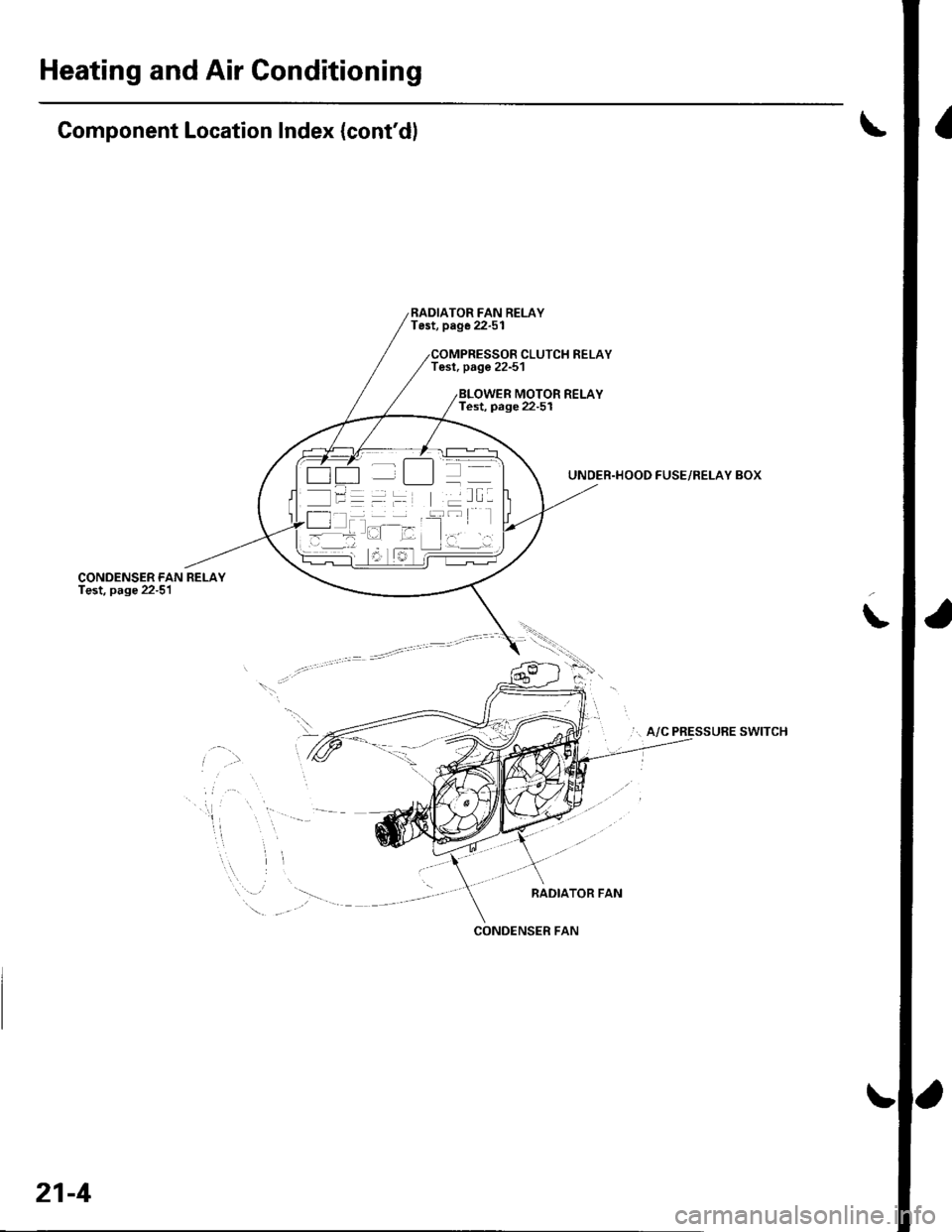
Component Location Index (cont'dl
CONDENSER FANTest, page 22-51
RADIATOR FAN RELAYTest, page 22-51
Tesl, page 22-51CLUTCH RELAY
MOTOR RELAYTest, page 22-5I
UNDER.HOOD FUSE/RELAY BOX
... A/C PRESSURE SWITCH
RADIATOR FAN
\
.\
-
'-t t_]]l
/l I T I --::--
l- -l -
CONOENSER FAN
21-4
Page 777 of 1139
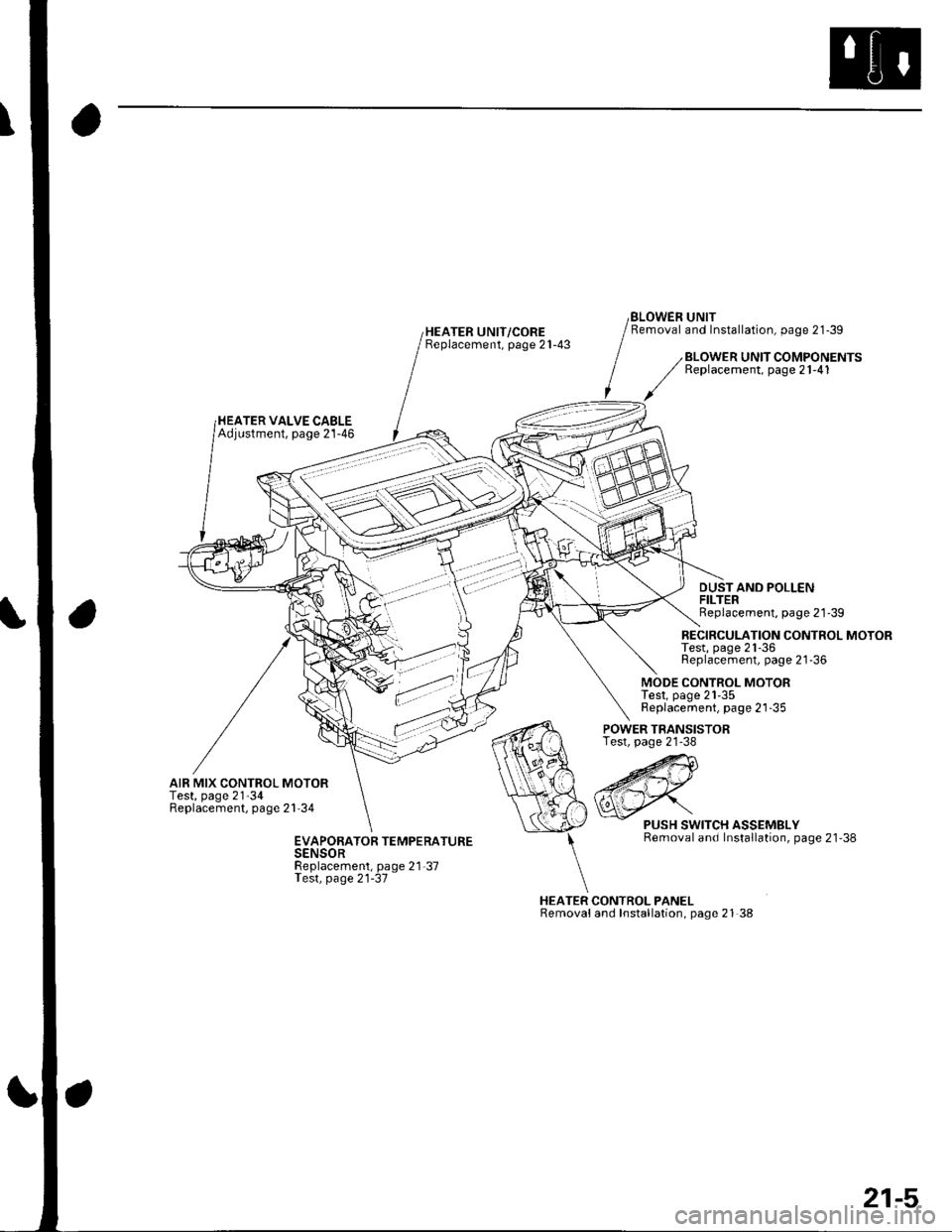
HEATER UNIT/COREBeplacement, page 21-43
BLOWEN UNITRemoval and Installation, page 21-39
HEATER VALVE CABLEAdjustment, page 21-46
BLOWER UNIT COMPONENTSReplacement, page 21-41
DUSTAND POLLENFILTERReplacement, page 21'39
RECIRCULATION CONTROL MOTORTest, page 21-36Replacement, page 21-36
MODE CONTROL MOTORTest, page 21-35Replacement, page 21-35
AIR MIX CONTROL MOTORTest, page 21'34Replacement, page 21'34
POWER TRANSISTORTest, page 21-38
HEATER CONTROL PANELRemovaland Installation, page 21 38
PUSH SWITCH ASSEMBLYRemoval and Installation, page 21'38EVAPORATOR TEMPERATURESENSORReplacement, page 21-37Test, page 21-37
21-5
Page 781 of 1139
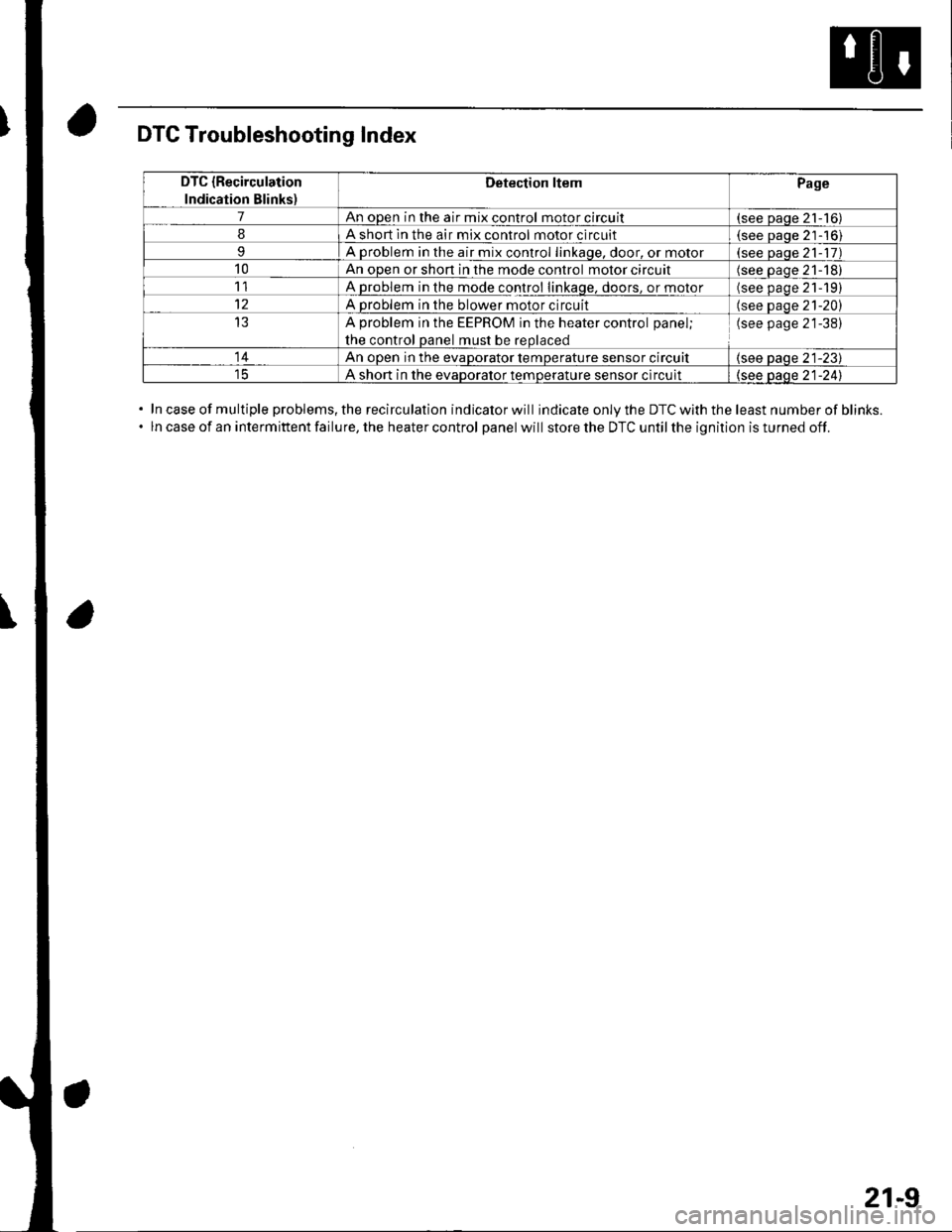
DTC Troubleshooting Index
In case of multiple problems, the recirculation indicator will indicate only the DTC with the least number of blinks.
ln case of an intermittent failure, the heater control panel will store the DTC until the ignition is turned off.
DTC {Recirculation
Indication Blinks)
Detection ltemPage
7An open in the air mix control motor circuit(see paqe 21-16)
8A short ln the air mix control motor circuit(see Daoe 21-'16)
9A problem in the air mix control linkaqe, door, or motor(see paqe 21- 17)
10An open or shon in the mode control motor circuit(see oaqe 21-18)
11A problem in the mode control linkage, doors, or motor(see paqe 21191
12A problem in the blower motor circuit(see paqe 21-20)
13A problem in the EEPROM in the heater control panel;
the control oanel must be reolaced
(see page 21-38)
14An ooen in the evaDorator temDerature sensor circuit(see paqe 21-23)
A short in the evaDoralor temoerature sensor circuit(see oaqe 21-241
21-9
Page 782 of 1139
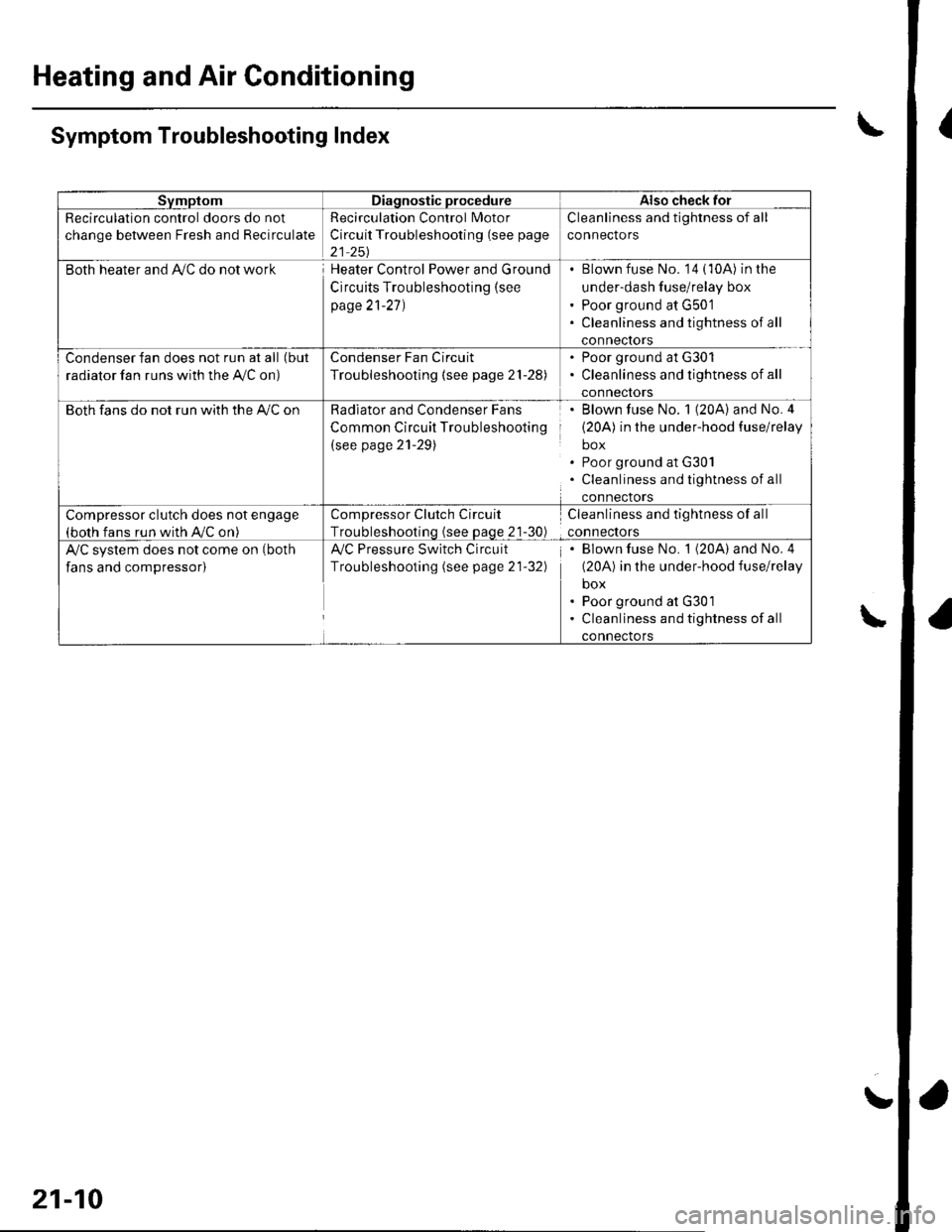
Heating and Air Conditioning
{
a
a
SvmptomDiagnostic procedureAlso check for
Recirculation control doors do not
change between Fresh and Recirculate
Recirculation Control Motor
Circuit Troubleshooting (see page
21 251
Cleanliness and tightness of all
connectors
Both heater and Ay'C do not workHeater Control Power and Ground
Circuits Troubleshooting (see
page 21-27)
Blown fuse No. '14 (10A) in the
under-dash fuse/relay box
Poor ground at G501
Cleanliness and tightness of all
conneclors
Condenser fan does not run at all (but
radiator fan runs with the Ay'C on)
Condenser Fan Circuit
Troubleshooting {see page 21-28)
. Poor ground at G301. Cleanliness and tightness of all
connectors
Both fans do not run with the A,/C onRadiator and Condenser Fans
Common Circuit Troubleshooting
(see page 21-29)
Blown fuse No. 1 (20A) and No.4
(20A) in the under-hood fuse/relay
box
Poor ground at G30l
Cleanliness and tightness of all
connectors
Compressor clutch does not engage(both fans run with A,/C on)
Compressor Clutch Circuit
Troubleshootinq (see Daqe 21-30)
Cleanliness and tightness of all
connectors
A/C system does not come on (both
fans and compressor)
Ay'C Pressure Switch Circuit
Troubleshooting (see page 21-32)
Blown fuse No. 1 (20A) and No. 4
(20A) in the under-hood fuse/relay
box
Poor ground at G301
Cleanliness and tightness of all
connectors
\Symptom Troubleshooting Index
\
21-10
!
Page 787 of 1139
Heating and Air Conditioning
DTC Troubleshooting
DTC 7: An Open in the Air Mix Control Motor
Circuit
1. Test the air mix control motor {see page 2'l-341.
ls the air mix control motor OK?
YES-Go to step 2.
NO-Replace the air mix control motor.l
2. Disconnect the air mix control motor 5P connector.
3. Disconnect heater control panel connectors A {14P)
and B (22P).
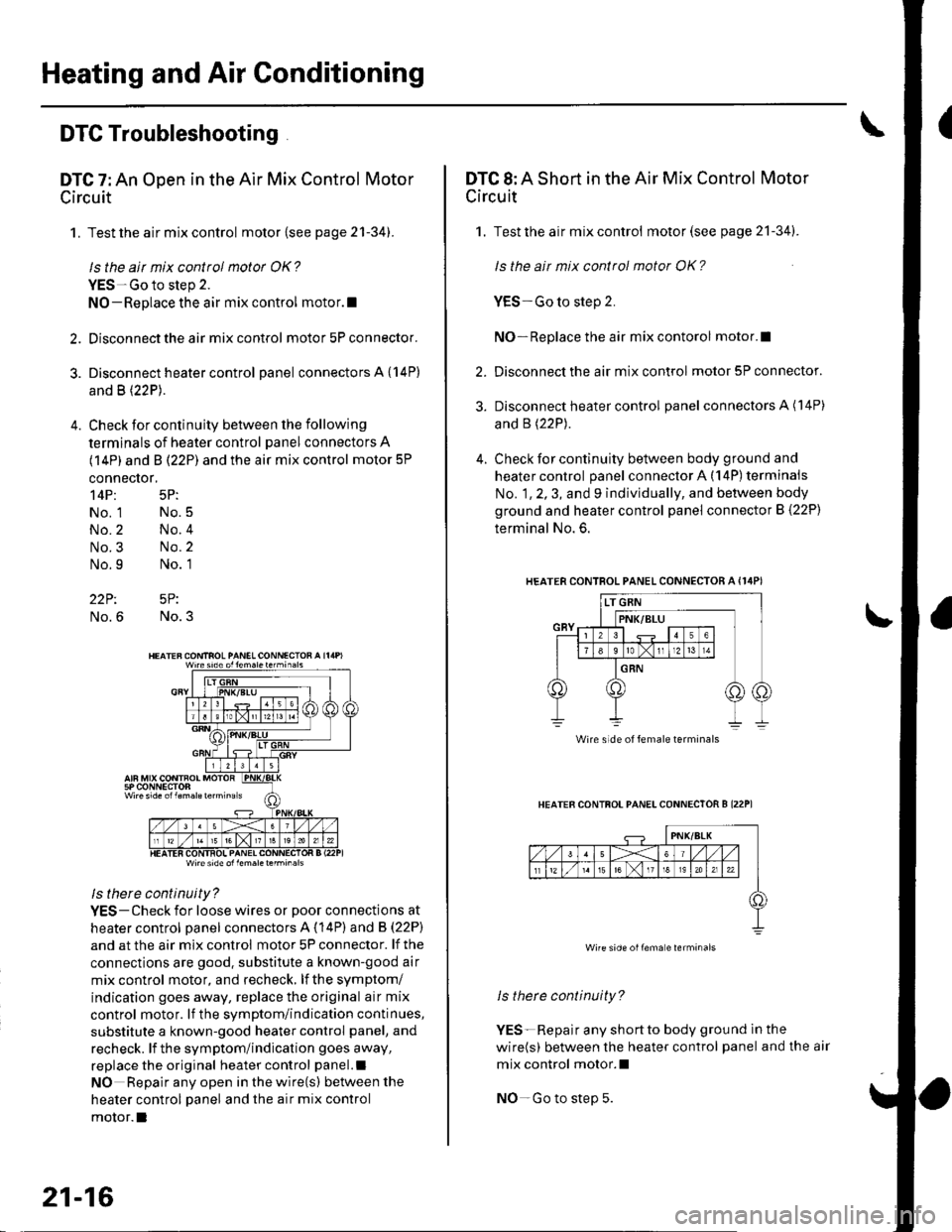
4. Check for continuity between the following
terminals of heater control panel connectors A
(14P) and B (22P) and the air mix control motor 5P
connector,
14P: 5P:
No. 1 No.5
No.2 No.4
No.3 No.2
No.9 No. 1
22P: 5P:
No.6 No.3
Wire side ol lem.letehi.6ls
ls there continuity?
YES-Check for loose wires or poor connections at
heater control oanel connectors A (14P) and B (22P)
and at the air mix control motor 5P connector. lf the
connections are good. substitute a known-good air
mix control motor, and recheck, lf the symptom/
indication goes away, replace the original air mix
control motor. lf the symptom/indication continues,
substitute a known-good heater control panel, and
recheck. lf the symptom/indication goes away,
replace the original heater control panel.l
NO Repair any open inthewire(s) ketweenthe
heater control panel and the air mix control
motor.l
21-16
DTC 8: A Short in the Air Mix Control Motor
Circuit
1. Test the air mix control motor(see page 21-341.
ls the ait mix control motor OK?
YES-Go to step 2.
NO-Replace the air mix contorol motor.I
2. Disconnect the air mix control motor 5P connector.
3. Disconnect heater control panel connectors A (14P)
and B (22P).
4. Check for continuity between body ground and
heater control panel connector A (14P) terminals
No. 1, 2, 3, and 9 individually, and between body
ground and heater control panel connector B (22P)
terminal No. 6.
HEATERCONTROL PANEL CONNECTOR A {I4PI
HEATER CONTFOL PANELCONNECTOR B I22P1
ls therc continuity?
YES-Repair any shortto body ground ln the
wire(s) between the heater control panel and the air
mix control motor.l
NO-Go to step 5.
Wire side of female terminals
Wire side oilema e lerminals
Page 788 of 1139
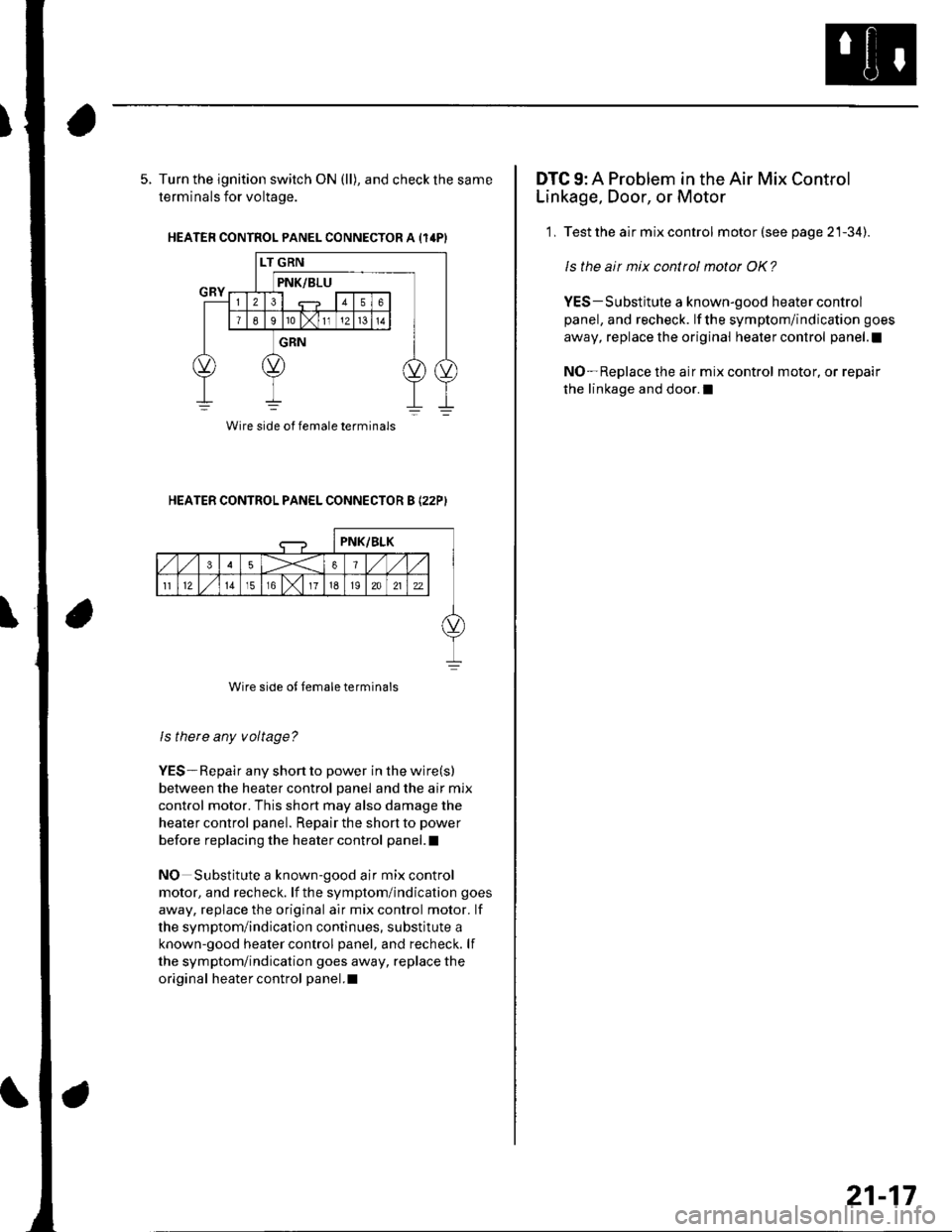
5. Turn the ignition switch ON (ll), and check the same
terminals for voltage.
HEATER CONTROL PANEL CONNECTOR A {14PI
HEATER CONTROL PANEL CONNECTOR B I22PI
Wire side of female terminals
ls there any voltage?
YES-Repair any short to power in the wire(s)
between the heater control panel and the air mix
control motor. This short may also damage the
heater control panel. Repair the short to power
before replacing the heater control panel.l
NO Substitute a known-good air mix control
motor, and recheck. lf the symptom/indication goes
away, replace the original air mix control motor. lf
the symptom/indication continues, substitute a
known-good heater control panel, and recheck. lf
the symptom/indication goes away, replace the
original heater control panel.I
Wire side of female terminals
DTC 9: A Problem in the Air Mix Control
Linkage, Door, or Motor
1, Test the air mix control motor (see page 21-34).
ls the air mix control motor OK?
YES-Substitute a known-good heater control
panel, and recheck. lf the symptom/indication goes
away, replace the original heater control panel.l
NO-Replace the air mix control motor, or repair
the linkage and door.l
21-17