AC comp HONDA CIVIC 2013 9.G Workshop Manual
[x] Cancel search | Manufacturer: HONDA, Model Year: 2013, Model line: CIVIC, Model: HONDA CIVIC 2013 9.GPages: 367, PDF Size: 8.43 MB
Page 229 of 367
uuWhen Driving uShifting
228Driving
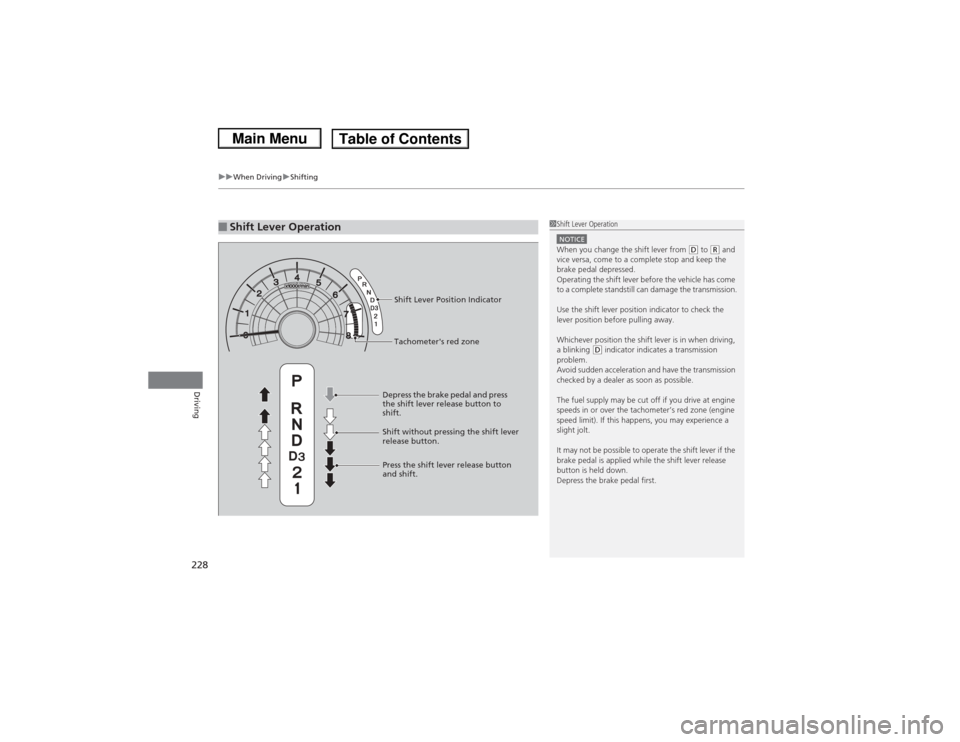
■Shift Lever Operation
1Shift Lever OperationNOTICEWhen you change the shift lever from
(D to (R and
vice versa, come to a complete stop and keep the
brake pedal depressed.
Operating the shift lever before the vehicle has come
to a complete standstill can damage the transmission.
Use the shift lever position indicator to check the
lever position before pulling away.
Whichever position the shift lever is in when driving,
a blinking
(D indicator indicates a transmission
problem.
Avoid sudden acceleration and have the transmission
checked by a dealer as soon as possible.
The fuel supply may be cut off if you drive at engine
speeds in or over the tachometer’s red zone (engine
speed limit). If this happens, you may experience a
slight jolt.
It may not be possible to operate the shift lever if the
brake pedal is applied while the shift lever release
button is held down.
Depress the brake pedal first.
Tachometer's red zone Shift Lever Position Indicator
Depress the brake pedal and press
the shift lever release button to
shift.
Shift without pressing the shift lever
release button.
Press the shift lever release button
and shift.
Page 230 of 367
229
uuWhen Driving uShifting
Continued
Driving
ShiftingFully depress the clutch pedal to operate the shift lever and change gears, then
slowly release the pedal.
Depress the clutch pedal, and pause for a few seconds before shifting into
(R, or
shift into one of the forward gears for a moment. This stops the gears so they do not
“grind.”
■Shift Lever OperationManual transmission models
1 ShiftingNOTICEDo not shift to
(R before the vehicle comes to a
complete stop.
Shifting to
( R before stopping can damage the
transmission.
NOTICEBefore downshifting, make sure the engine will not
go into the tachometer's red zone. Should this occur,
it can severely damage your engine.
There is a metallic part on the shift lever. If you leave
the vehicle parked outside for a long time on a hot
day, be careful before moving the shift lever. Because
of heat, the shift lever may be extremely hot. If the
outside temperature is low, the shift lever may feel
cold.
Page 238 of 367
237
uuWhen Driving uVSA ® (Vehicle Stability Assist), aka ESC (El ectronic Stability Control), System
Driving
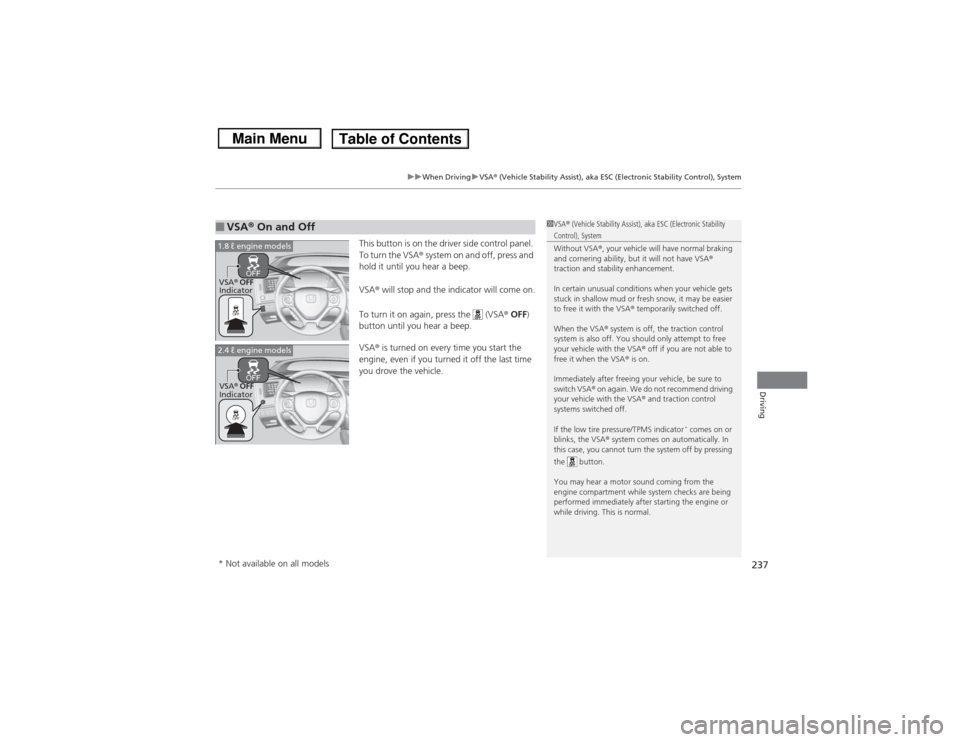
This button is on the driver side control panel.
To turn the VSA® system on and off, press and
hold it until you hear a beep.
VSA ® will stop and the indicator will come on.
To turn it on again, press the (VSA ® OFF )
button until you hear a beep.
VSA ® is turned on every time you start the
engine, even if you turned it off the last time
you drove the vehicle.
■VSA ® On and Off
1 VSA ® (Vehicle Stability Assist), aka ESC (Electronic Stability Control), System
Without VSA ®, your vehicle will have normal braking
and cornering ability, but it will not have VSA ®
traction and stability enhancement.
In certain unusual conditions when your vehicle gets
stuck in shallow mud or fresh snow, it may be easier
to free it with the VSA ® temporarily switched off.
When the VSA ® system is off, the traction control
system is also off. You should only attempt to free
your vehicle with the VSA ® off if you are not able to
free it when the VSA ® is on.
Immediately after freeing your vehicle, be sure to
switch VSA ® on again. We do not recommend driving
your vehicle with the VSA ® and traction control
systems switched off.
If the low tire pressure/TPMS indicator
* comes on or
blinks, the VSA® system comes on automatically. In
this case, you cannot turn the system off by pressing
the button.
You may hear a motor sound coming from the
engine compartment while system checks are being
performed immediately after starting the engine or
while driving. This is normal.
VSA ® OFF
Indicator
1.8 ℓ engine modelsVSA
® OFF
Indicator
2.4 ℓ engine models* Not available on all models
Page 244 of 367
243
uuBraking uABS (Anti-lock Brake System)
Driving
ABS (Anti-lock Brake System)Helps prevent the wheels from locking up, and helps you retain steering control by
pumping the brakes rapidly, much faster than you.
The electronic brake distribution (EBD) system, which is part of the ABS, also
balances the front-to-rear braking distribution according to vehicle loading.
You should never pump the brake pedal. Let the ABS work for you by always
keeping firm, steady pressure on the brake pedal. This is sometimes referred to as
“stomp and steer.”■ABS operation
The brake pedal may pulsate slightly when the ABS is working. Keep holding the
pedal firmly down. On dry pavement, you will need to press on the brake pedal very
hard before the ABS activates. However, you may feel the ABS activate immediately
if you are trying to stop on snow or ice.
When the vehicle speed goes under 6 mph (10 km/h), the ABS stops.■ABS
1 ABS (Anti-lock Brake System)NOTICEThe ABS may not function correctly if you use an
incorrect tire type and size.
When the ABS indicator comes on while driving,
there may be a problem with the system.
While normal braking is not affected, there is a
possibility of the ABS not operating. Have the vehicle
checked by a dealer immediately.
The ABS does not reduce the time or distance it takes
to stop the vehicle. It only helps with steering control
during hard braking.
In the following cases, your vehicle may need more
stopping distance than a vehicle without the ABS:•When driving on rough road surfaces, including
when driving on uneven surfaces, such as gravel or
snow.•When tire chains are installed.
You may hear a motor sound coming from the
engine compartment while system checks are being
performed immediately after starting the engine or
while driving. This is normal.
Page 246 of 367
245Driving
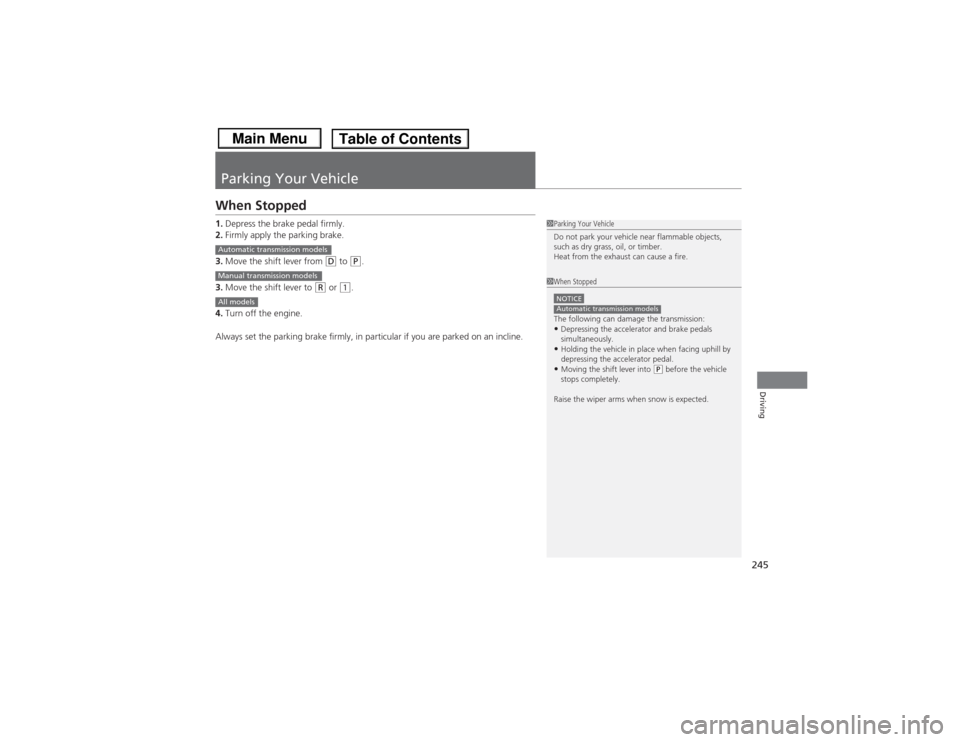
Parking Your VehicleWhen Stopped1.Depress the brake pedal firmly.
2. Firmly apply the parking brake.
3. Move the shift lever from
(D to
(P.
3. Move the shift lever to
(R or
(1.
4. Turn off the engine.
Always set the parking brake firmly, in particular if you are parked on an incline.
1 Parking Your Vehicle
Do not park your vehicle near flammable objects,
such as dry grass, oil, or timber.
Heat from the exhaust can cause a fire.1When StoppedNOTICEThe following can damage the transmission:•Depressing the accelerator and brake pedals
simultaneously.•Holding the vehicle in place when facing uphill by
depressing the accelerator pedal.•Moving the shift lever into
(P before the vehicle
stops completely.
Raise the wiper arms when snow is expected.
Automatic transmission models
Automatic transmission modelsManual transmission modelsAll models
Page 252 of 367
251Driving
Accessories and ModificationsAccessoriesWhen installing accessories, check the following:
•Do not install accessories on the windshield. They can obstruct your view and
delay your reaction to driving conditions.
• Do not install accessories on the side pillars or across the side windows.
Accessories installed in these areas may interfere with proper operation of the
side curtain airbags.
• Be sure electronic accessories do not overload electrical circuits or interfere with
proper operation of your vehicle.
2 Fuses P. 341
•Before installing any electronic accessory, have the installer contact a dealer for
assistance. If possible, have a dealer inspect the final installation.ModificationsDo not modify your vehicle or use non-Honda components that can affect its
handling, stability, and reliability.
Overall vehicle performance can be affected. Always make sure all equipment is
properly installed and maintained, and that it meets federal, state, province,
territory, and local regulations.
1Accessories and Modifications
Honda Genuine accessories are recommended to
ensure proper operation on your vehicle.
3
WARNING
Improper accessories or modifications can
affect your vehicle's handling, stability, and
performance, and cause a crash in which
you can be seriously hurt or killed.
Follow all instruction s in this owner's
manual regarding accessories and
modifications.
Page 255 of 367
254Maintenance
Before Performing MaintenanceInspection and MaintenanceFor your safety, perform all listed inspections and maintenance to keep your vehicle
in good condition. If you become aware of any abnormality (noise, smell, insufficient
brake fluid, oil residue on the ground, etc.), have your vehicle inspected by a dealer.
(Note, however, that service at a dealer is not mandatory to keep your warranties in
effect.) Refer to the separate maintenance booklet for detailed maintenance and
inspection information.■Daily inspections
Perform inspections before long distance trips , when washing the vehicle, or when
refueling.■Periodic inspections
• Check the automatic transmission fluid level monthly.2 Automatic Transmission Fluid P. 277
•Check the brake fluid level monthly.
2 Brake/Clutch Fluid P. 280
•Check the tire pressure monthly. Examine the tread for wear and foreign objects.
2 Checking and Maintaining Tires P. 297
•Check the operation of the exterior lights monthly.
2 Replacing Light Bulbs P. 282
•Check the condition of the wiper blades at least every six months.
2 Checking and Maintaining Wiper Blades P. 295
■Types of Inspection and Maintenance
1Inspection and Maintenance
Maintenance, replacement, or repair of
emissions control devices and systems may be
done by any automotive repair establishment or
individuals using parts that are “certified” to
EPA standards.
According to state and federal regulations, failure to
perform maintenance on the maintenance main
items marked with # will not void your emissions
warranties. However, all maintenance services should
be performed in accordance with the intervals
indicated by the information display
*/i-MID
*.
2 Maintenance Service Items P. 259, 263
If you want to perform complex maintenance tasks
that require more skills and tools, you can purchase a
subscription to the Service Express website at
www.techinfo.honda.com .
2 Authorized Manuals P. 357
If you want to perform maintenance yourself, make
sure that you have the necessary tools and skills first.
After performing maintenance, update the records in
the separate maintenance booklet.
U.S. models
* Not available on all models
Page 256 of 367
255
uuBefore Performing Maintenance uSafety When Performing Maintenance
Maintenance
Safety When Performing MaintenanceSome of the most important safety precautions are given here.
However, we cannot warn you of every conceivable hazard that can arise in
performing maintenance. Only you can decide whether or not you should perform
a given task.
• To reduce the possibility of fire or explosion, keep cigarettes, sparks, and flames
away from the battery and all fuel related parts.
• Never leave rags, towels, or other flammable objects under the hood.
u Heat from the engine and exhaust can ignite them causing a fire.
• To clean parts, use a commercially available degreaser or parts cleaner, not
gasoline.
• Wear eye protection and protective clothing when working with the battery or
compressed air.
• Engine exhaust contains carbon monoxide, which is poisonous and can kill you.
u Only operate the engine if there is sufficient ventilation.
• The vehicle must be in a stationary condition.
u Make sure your vehicle is parked on level ground, the parking brake is set, and
the engine is off.
• Be aware that hot parts can burn you.
u Make sure to let the engine and exhaust system cool thoroughly before
touching vehicle parts.
• Be aware that moving parts can injure you.
u Do not start the engine unless instructed, and keep your hands and limbs away
from moving parts.■Maintenance Safety■Vehicle Safety
1Safety When Performing Maintenance
3
WARNING
Improperly maintaining this vehicle or
failing to correct a problem before driving
can cause a crash in which you can be
seriously hurt or killed.
Always follow the inspection and
maintenance recommendations according
to the schedules in this owner's manual.
3
WARNING
Failure to properly follow maintenance
instructions and precautions can cause you
to be seriously hurt or killed.
Always follow the procedures and
precautions in this owner's manual.
Page 260 of 367
259
uuMaintenance Minder
TMuTo Use Maintenance Minder
TM
Continued
Maintenance
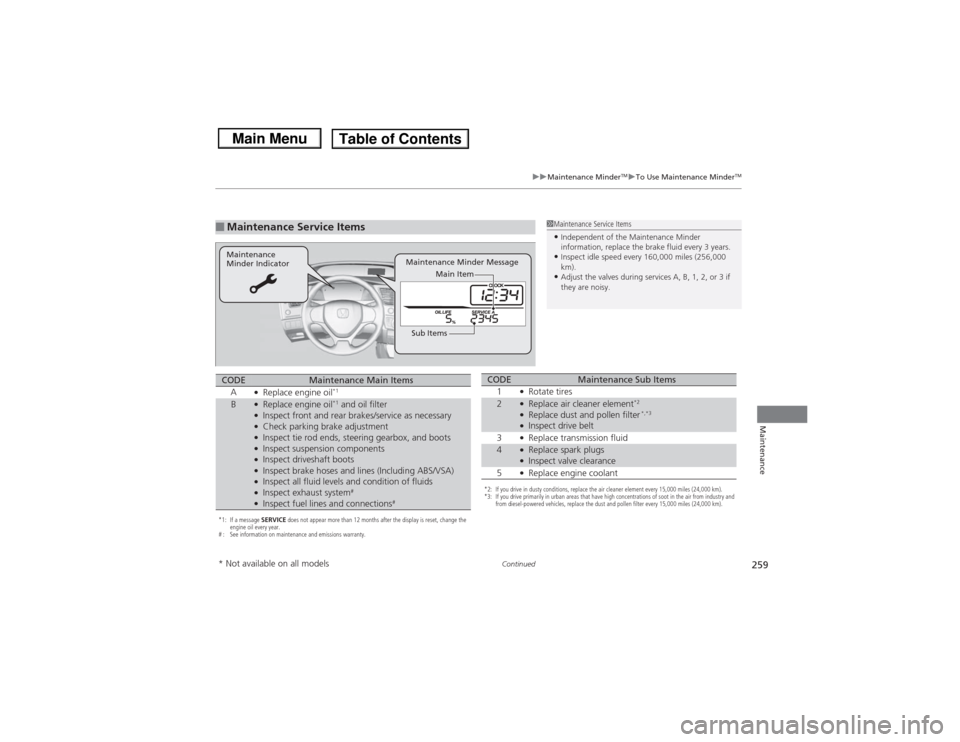
■Maintenance Service Items
1Maintenance Service Items•Independent of the Maintenance Minder
information, replace the brake fluid every 3 years.•Inspect idle speed every 160,000 miles (256,000
km).•Adjust the valves during services A, B, 1, 2, or 3 if
they are noisy.
Maintenance Minder Message
Maintenance
Minder Indicator
Sub ItemsMain Item
*1: If a message
SERVICE does not appear more than 12 months after the display is reset, change the
engine oil every year.
# : See information on maintenance and emissions warranty.CODE
Maintenance Main Items
A
●Replace engine oil
*1
B
●Replace engine oil
*1 and oil filter
●Inspect front and rear brakes/service as necessary●Check parking brake adjustment●Inspect tie rod ends, steering gearbox, and boots●Inspect suspension components●Inspect driveshaft boots●Inspect brake hoses and lines (Including ABS/VSA)●Inspect all fluid levels and condition of fluids●Inspect exhaust system
#
●Inspect fuel lines and connections
#
*2: If you drive in dusty conditions, replace the air cleaner element every 15,000 miles (24,000 km).
*3: If you drive primarily in urban areas that have high concentrations of soot in the air from industry and from diesel-powered vehicles, replace the dust and pollen filter every 15,000 miles (24,000 km).CODE
Maintenance Sub Items
1
●Rotate tires
2
●Replace air cleaner element
*2
●Replace dust and pollen filter
*,*3
●Inspect drive belt
3●Replace transmission fluid
4
●Replace spark plugs●Inspect valve clearance
5●Replace engine coolant
* Not available on all models
Page 261 of 367
uuMaintenance Minder
TMuTo Use Maintenance Minder
TM
260Maintenance
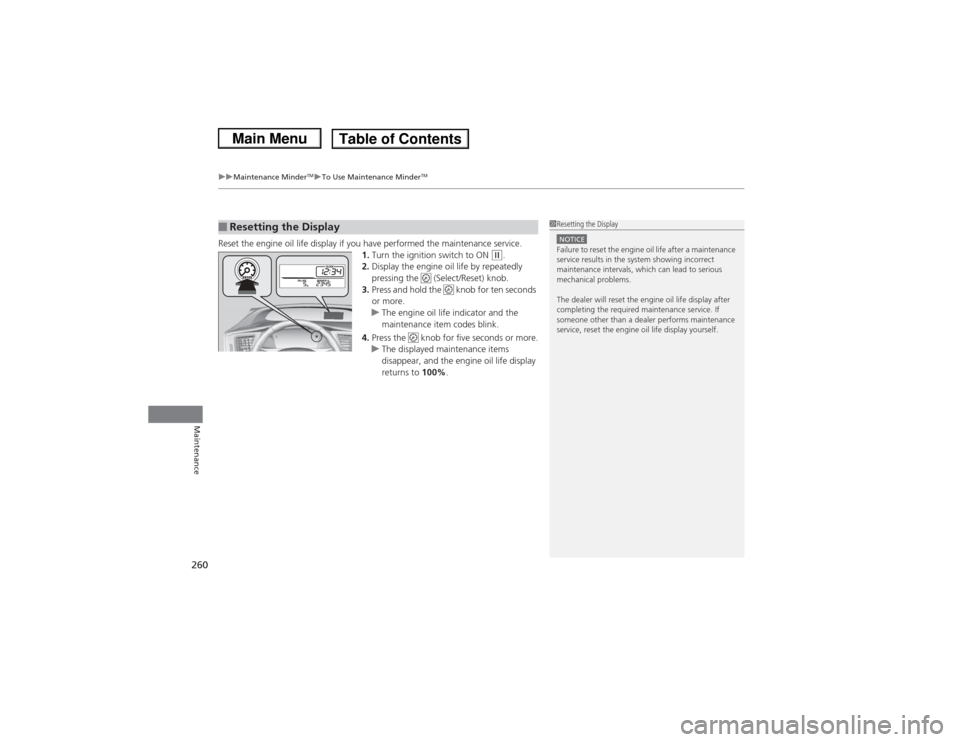
Reset the engine oil life display if you have performed the maintenance service.
1.Turn the ignition switch to ON
(w.
2. Display the engine oil life by repeatedly
pressing the (Select/Reset) knob.
3. Press and hold the knob for ten seconds
or more.
u The engine oil life indicator and the
maintenance item codes blink.
4. Press the knob for five seconds or more.
u The displayed maintenance items
disappear, and the engine oil life display
returns to 100%.
■Resetting the Display
1Resetting the DisplayNOTICEFailure to reset the engine oil life after a maintenance
service results in the system showing incorrect
maintenance intervals, which can lead to serious
mechanical problems.
The dealer will reset the engine oil life display after
completing the required maintenance service. If
someone other than a dealer performs maintenance
service, reset the engine oil life display yourself.