ECO mode HONDA CIVIC 2013 9.G Manual PDF
[x] Cancel search | Manufacturer: HONDA, Model Year: 2013, Model line: CIVIC, Model: HONDA CIVIC 2013 9.GPages: 367, PDF Size: 8.43 MB
Page 306 of 367
305
uuChecking and Maintaining Tires uWinter Tires
Maintenance
Winter TiresIf driving on snowy or frozen roads, mount all season marked M+S tires, snow tires,
or tire chains; reduce speed; and maintain sufficient distance between vehicles when
driving.
Be particularly careful when operating the steering wheel or brakes to prevent
skidding.
Use tire chains, snow tires, or all season tires when necessary or according to the law.
When mounting, refer to the following points.
For winter tires:
• Select the size and load ranges that are the same as the original tires.
• Mount the tires to all four wheels.
For tire chains:
• Install them on the front tires only.
• Because your vehicle has limited tire cl earance, we strongly recommend using the
chains listed below:
• Follow the chain manufacturer's instruction when installing. Mount them as
tightly as you can.
• Check that the chains do not touch the brake lines or suspension.
• Drive slowly.Cable-type: SCC Radial Chain SC1030Cable-type: SCC Radial Chain SC1032
1Winter TiresNOTICETraction devices that are the wrong size or improperly
installed can damage your vehicle's brake lines,
suspension, body, and wheels. Stop driving if they are
hitting any part of the vehicle.
When tire chains are mounted, follow the chain
manufacturer's instructions regarding vehicle
operational limits.
If your vehicle is equipped with summer tires, be
aware that these tires are not designed for winter
driving conditions. For more information, contact a
dealer.
3
WARNING
Using the wrong chains, or not properly
installing chains, can damage the brake
lines and cause a crash in which you can be
seriously injured or killed.
Follow all instruction s in this owner's
manual regarding the selection and use of
tire chains.
Models with P195/65R15 tiresModels with P205/55R16 tiresModels with P215/45R17 tiresModels with 215/45ZR17 tires
Page 307 of 367
306Maintenance
BatteryChecking the Battery
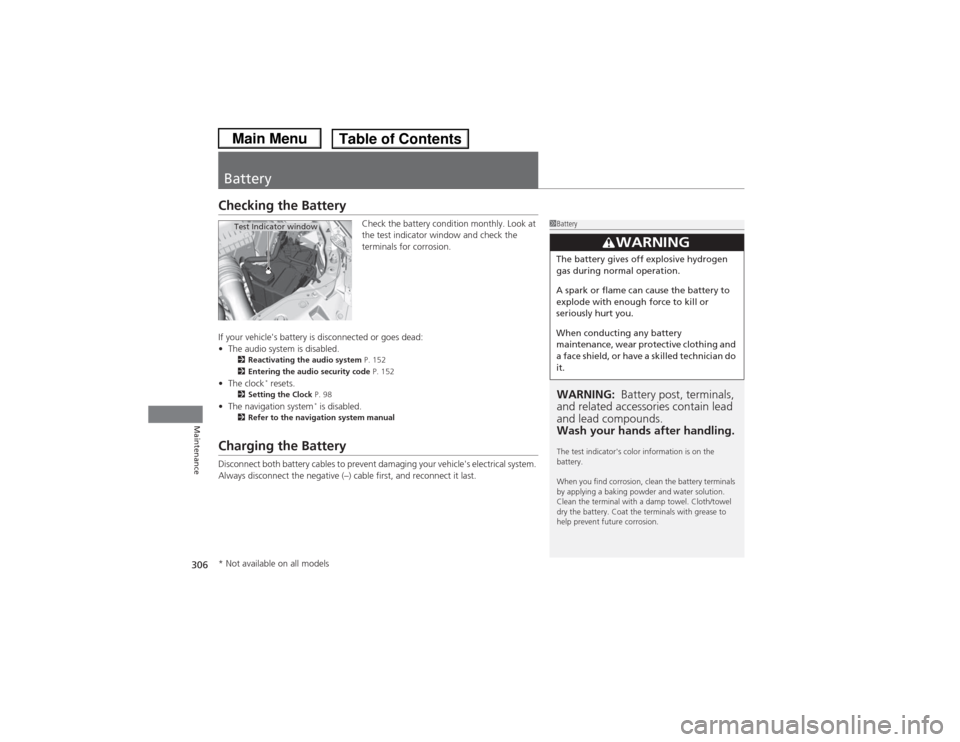
Check the battery condition monthly. Look at
the test indicator window and check the
terminals for corrosion.
If your vehicle's battery is disconnected or goes dead:
• The audio system is disabled.
2 Reactivating the audio system P. 152
2 Entering the audio security code P. 152
•The clock
* resets.
2 Setting the Clock P. 98
•The navigation system
* is disabled.
2 Refer to the navigation system manual
Charging the BatteryDisconnect both battery cables to prevent damaging your vehicle's electrical system.
Always disconnect the negative (–) cable first, and reconnect it last.
1BatteryWARNING: Battery post, terminals,
and related accessories contain lead
and lead compounds.
Wash your hands after handling.The test indicator's color information is on the
battery.
When you find corrosion, clean the battery terminals
by applying a baking powder and water solution.
Clean the terminal with a damp towel. Cloth/towel
dry the battery. Coat the terminals with grease to
help prevent future corrosion.
3
WARNING
The battery gives off explosive hydrogen
gas during normal operation.
A spark or flame can cause the battery to
explode with enough force to kill or
seriously hurt you.
When conducting any battery
maintenance, wear protective clothing and
a face shield, or have a skilled technician do
it.
Test Indicator window
* Not available on all models
Page 309 of 367
308Maintenance
Heating and Cooling System
*/Climate Control System
* Maintenance
Dust and Pollen Filter
*
The heating and cooling system
*/climate control system
* is equipped with a dust
and pollen filter that colle cts pollen, dust, and other debris in the air. The
Maintenance Minder
TM messages will let you know when to replace the filter.
We recommend that you replace the dust and pollen filter sooner when using your
vehicle in areas with high concentrations of dust.
1 Dust and Pollen Filter
*
If the airflow from the heating and cooling system
*/
climate control system
* deteriorates noticeably, and
the windows fog up easily, the filter may need to be
replaced. Please contact a dealer for replacement.
* Not available on all models
Page 332 of 367
331
Continued
Handling the Unexpected
Jump StartingTurn off the power to electric devices, such as audio and lights. Turn off the engine,
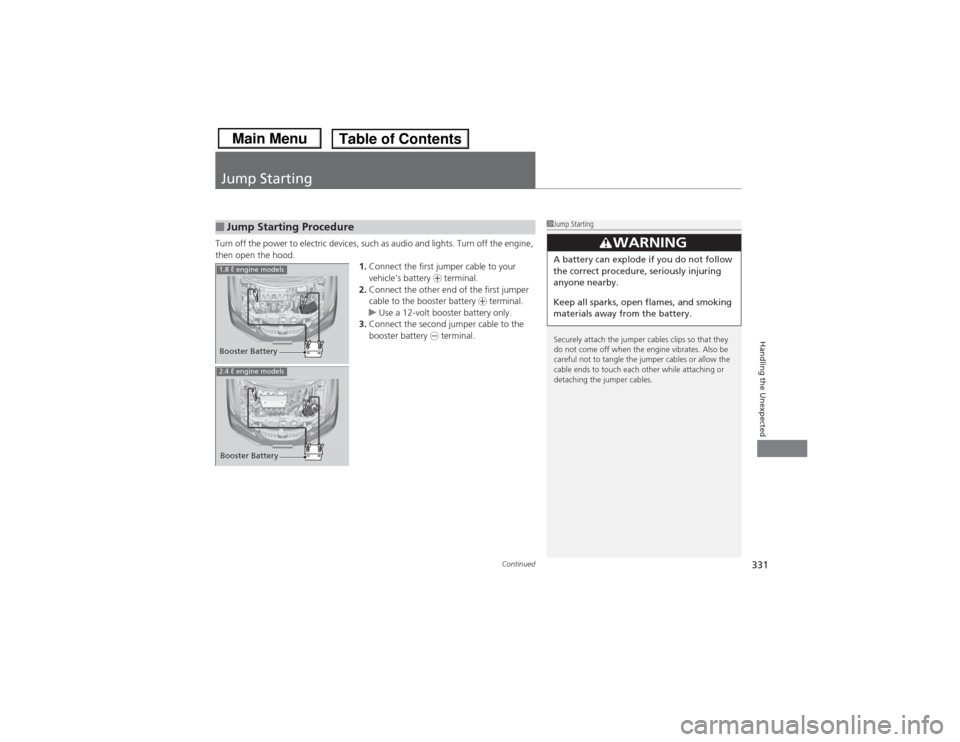
then open the hood.1.Connect the first jumper cable to your
vehicle's battery + terminal.
2. Connect the other end of the first jumper
cable to the booster battery + terminal.
u Use a 12-volt booster battery only.
3. Connect the second jumper cable to the
booster battery - terminal.■Jump Starting Procedure
1Jump Starting
Securely attach the jumper cables clips so that they
do not come off when the engine vibrates. Also be
careful not to tangle the jumper cables or allow the
cable ends to touch each other while attaching or
detaching the jumper cables.
3
WARNING
A battery can explode if you do not follow
the correct procedure, seriously injuring
anyone nearby.
Keep all sparks, open flames, and smoking
materials away from the battery.
Booster Battery1.8 ℓ engine models2.4 ℓ engine modelsBooster Battery
Page 333 of 367
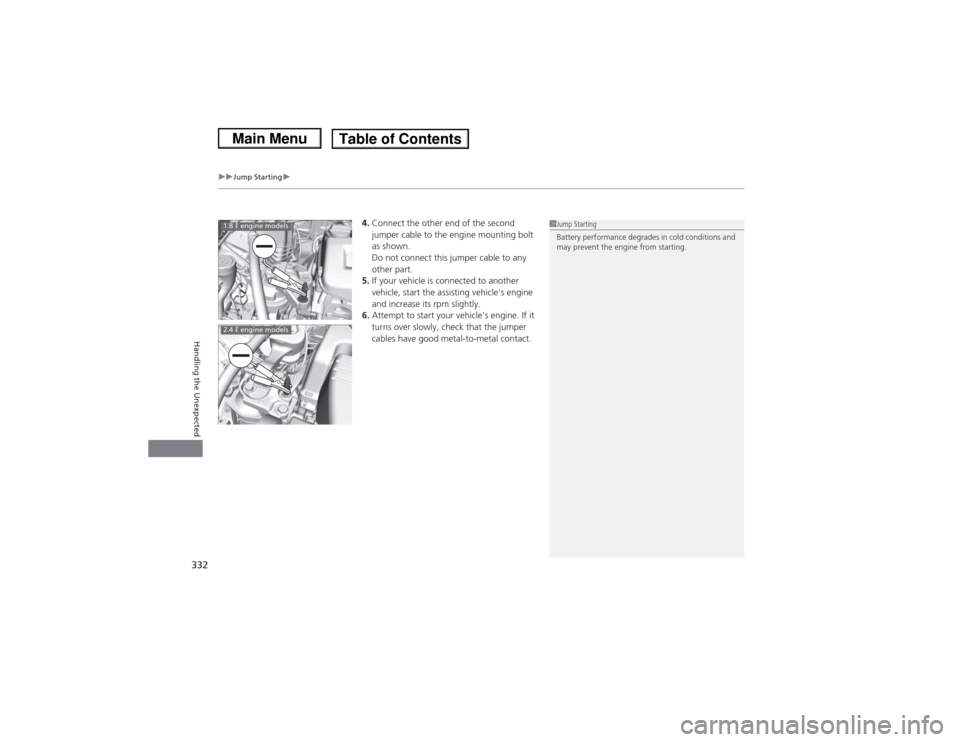
uuJump Starting u
332Handling the Unexpected
4.Connect the other end of the second
jumper cable to the engine mounting bolt
as shown.
Do not connect this jumper cable to any
other part.
5. If your vehicle is connected to another
vehicle, start the assisting vehicle's engine
and increase its rpm slightly.
6. Attempt to start your vehicle's engine. If it
turns over slowly, check that the jumper
cables have good metal-to-metal contact.
1Jump Starting
Battery performance degrades in cold conditions and
may prevent the engine from starting.
1.8 ℓ engine models2.4 ℓ engine models
Page 338 of 367
337Handling the Unexpected
Indicator, Coming On/BlinkingIf the Low Oil Pressure Indicator Comes On
■Reasons for the indicator to come on
Comes on when the engine oil pressure is low.■What to do as soon as the indicator comes on
1. Immediately park the vehicle in a safe place.
2. If necessary, turn the hazard warning lights on.■What to do after parking the vehicle
1. Stop the engine and let it sit for about one minute.
2. Open the hood and check the oil level.
u Add oil as necessary.
3. Start the engine and check the low oil pressure indicator.
u The light goes out: Start driving again.
u The light does not go out within 10 seconds: Stop the engine and
contact a dealer for repairs immediately.
If the Charging System Indicator Comes On
■Reasons for the indicator to come on
Comes on when the battery is not being charged.■What to do when the indicator comes on
Turn off the heating and cooling system
*/climate control system
*, rear
defogger, and other electrical systems, and immediately contact a dealer
for repairs.
1 If the Low Oil Pressure Indicator Comes OnNOTICERunning the engine with low oil pressure can cause
serious mechanical damage almost immediately.1If the Charging System Indicator Comes On
If you need to stop temporarily, do not turn off the
engine. Restarting the engine may rapidly discharge
the battery.
* Not available on all models
Page 340 of 367
339
uuIndicator, Coming On/Blinking uIf the Brake System Indicator Comes On
Handling the Unexpected
If the Brake System Indicator Comes On
■Reasons for the indicator to come on
• The brake fluid is low.
• There is a malfunction in the brake system.■What to do when the indicator comes on while driving
Press the brake pedal lightly to check pedal pressure.
• If normal, check the brake fluid level the next time you stop.
• If abnormal, take immediate action. If necessary, downshift the
transmission to slow the vehicle using engine braking.
If the EPS System Indicator Comes On
■Reasons for the indicator to come on
• Comes on when there is a problem with the EPS system.
• If you depress the accelerator pedal repeatedly to increase the engine
speed while the engine is idling, the indicator comes on, and
sometimes the steering wheel becomes harder to operate.■What to do when the indicator comes on
Stop the vehicle in a safe place and restart the engine.
If the indicator comes on and stays on, immediately have your vehicle
inspected by a dealer.
1 If the Brake System Indicator Comes On
Have your vehicle repaired immediately.
It is dangerous to drive with low brake fluid. If there
is no resistance from the brake pedal, stop
immediately in a safe place. If necessary downshift
the gears.
If the brake system indicator and ABS indicator come
on simultaneously, the electronic brake distribution
system is not working. This can result in vehicle
instability under sudden braking.
Have your vehicle inspected by a dealer immediately.
U.S.
Canada
1 If the EPS System Indicator Comes OnNOTICEIf you repeatedly turn the steering wheel at an
extremely low speed, or hold the steering wheel on
the full left or right position for a while, the system
heats up. The system goes into a protective mode,
and limits its performance. The steering wheel
becomes harder and harder to operate. Once the
system cools down, the EPS system is restored.
Repeated operation under these conditions can
eventually damage the system.
Page 348 of 367
347
uuSpecifications u
Continued
Information
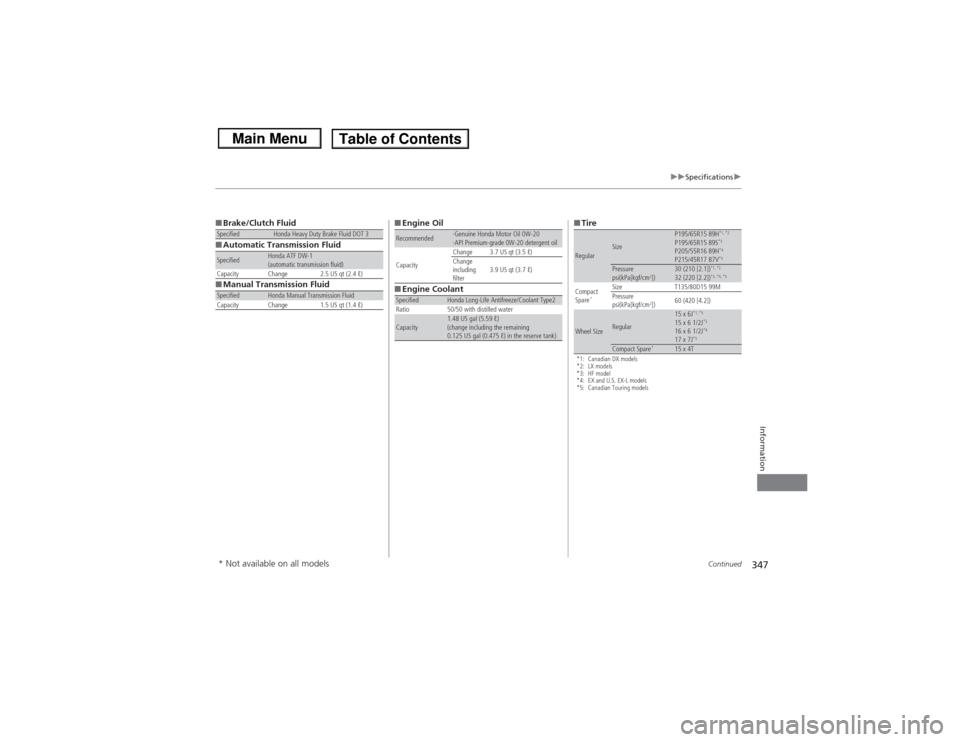
■Brake/Clutch Fluid
■ Automatic Transmission Fluid
■ Manual Transmission FluidSpecified
Honda Heavy Duty Brake Fluid DOT 3
Specified
Honda ATF DW-1
(automatic transmission fluid)
Capacity Change 2.5 US qt (2.4 ℓ)
Specified
Honda Manual Transmission Fluid
Capacity Change 1.5 US qt (1.4 ℓ)
■ Engine Oil
■ Engine CoolantRecommended
·Genuine Honda Motor Oil 0W-20
·API Premium-grade 0W-20 detergent oil
Capacity Change 3.7 US qt (3.5 ℓ)
Change
including
filter
3.9 US qt (3.7 ℓ)
Specified
Honda Long-Life Antifreeze/Coolant Type2
Ratio 50/50 with distilled water
Capacity
1.48 US gal (5.59 ℓ)
(change including the remaining
0.125 US gal (0.475 ℓ) in the reserve tank)
■ Tire*1: Canadian DX models
*2: LX models
*3: HF model
*4: EX and U.S. EX-L models
*5: Canadian Touring modelsRegular
Size
P195/65R15 89H
*1, *2
P195/65R15 89S
*3
P205/55R16 89H
*4
P215/45R17 87V
*5
Pressure
psi(kPa[kgf/cm
2])
30 (210 [2.1])
*1, *2
32 (220 [2.2])
*3, *4, *5
Compact
Spare
*
Size T135/80D15 99M
Pressure
psi(kPa[kgf/cm
2]) 60 (420 [4.2])
Wheel Size
Regular
15 x 6J
*1, *3
15 x 6 1/2J
*2
16 x 6 1/2J
*4
17 x 7J
*5
Compact Spare
*
15 x 4T
* Not available on all models
Page 350 of 367
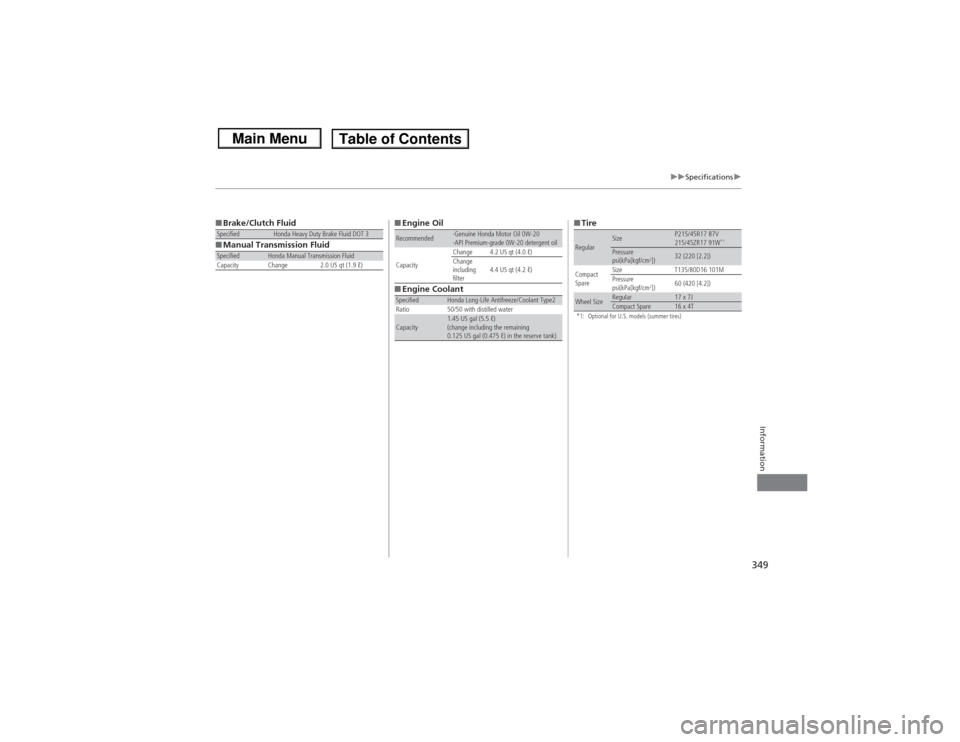
349
uuSpecifications u
Information
■Brake/Clutch Fluid
■ Manual Transmission FluidSpecified
Honda Heavy Duty Brake Fluid DOT 3
Specified
Honda Manual Transmission Fluid
Capacity Change 2.0 US qt (1.9 ℓ)
■ Engine Oil
■ Engine CoolantRecommended
·Genuine Honda Motor Oil 0W-20
·API Premium-grade 0W-20 detergent oil
Capacity Change 4.2 US qt (4.0 ℓ)
Change
including
filter
4.4 US qt (4.2 ℓ)
Specified
Honda Long-Life Antifreeze/Coolant Type2
Ratio 50/50 with distilled water
Capacity
1.45 US gal (5.5 ℓ)
(change including the remaining
0.125 US gal (0.475 ℓ) in the reserve tank)
■ Tire*1: Optional for U.S. models (summer tires)Regular
Size
P215/45R17 87V
215/45ZR17 91W
*1
Pressure
psi(kPa[kgf/cm
2])
32 (220 [2.2])
Compact
Spare Size
T135/80D16 101M
Pressure
psi(kPa[kgf/cm
2]) 60 (420 [4.2])
Wheel Size
Regular
17 x 7J
Compact Spare
16 x 4T
Page 360 of 367
Index
359Index
Index
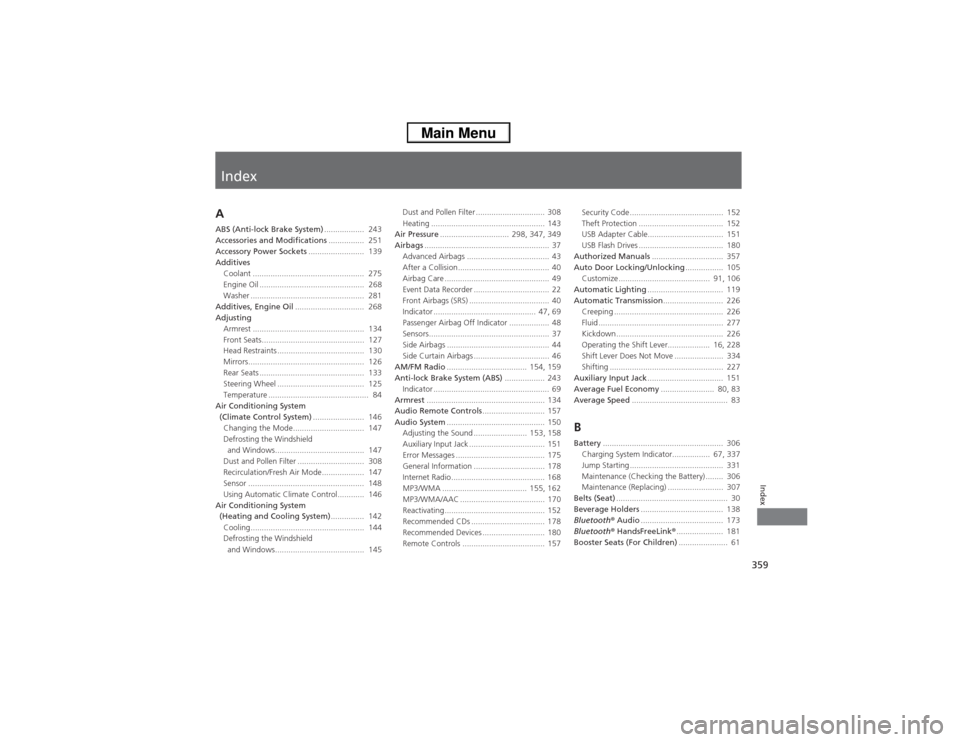
AABS (Anti-lock Brake System).................. 243
Accessories and Modifications ................ 251
Accessory Power Sockets ......................... 139
Additives Coolant .................................................. 275
Engine Oil ............................................... 268
Washer ................................................... 281
Additives, Engine Oil ............................... 268
Adjusting
Armrest .................................................. 134
Front Seats.............................................. 127
Head Restraints ....................................... 130
Mirrors.................................................... 126
Rear Seats ............................................... 133
Steering Wheel ....................................... 125
Temperature ............................................. 84
Air Conditioning System (Climate Control System) ....................... 146
Changing the Mode................................ 147
Defrosting the Windshield and Windows........................................ 147
Dust and Pollen Filter .............................. 308
Recirculation/Fresh Air Mode.... ............... 147
Sensor .................................................... 148
Using Automatic Climate Control............ 146
Air Conditioning System (Heating and Cooling System) ............... 142
Cooling................................................... 144
Defrosting the Windshield and Windows........................................ 145 Dust and Pollen Filter ............................... 308
Heating ................................................... 143
Air Pressure ............................... 298, 347, 349
Airbags ........................................................ 37
Advanced Airbags ..................................... 43
After a Collision......................................... 40
Airbag Care ............................................... 49
Event Data Recorder .................................. 22
Front Airbags (SRS) .................................... 40
Indicator .............................................. 47, 69
Passenger Airbag Off Indicator .................. 48
Sensors...................................................... 37
Side Airbags .............................................. 44
Side Curtain Airbags .................................. 46
AM/FM Radio .................................... 154, 159
Anti-lock Brake System (ABS) .................. 243
Indicator .................................................... 69
Armrest ..................................................... 134
Audio Remote Controls ............................ 157
Audio System ............................................ 150
Adjusting the Sound ........................ 153, 158
Auxiliary Input Jack .................................. 151
Error Messages ........................................ 175
General Information ................................ 178
Internet Radio.......................................... 168
MP3/WMA ...................................... 155, 162
MP3/WMA/AAC ...................................... 170
Reactivating............................................. 152
Recommended CDs ................................. 178
Recommended Devices ............................ 180
Remote Controls ..................................... 157 Security Code .......................................... 152
Theft Protection ...................................... 152
USB Adapter Cable.................................. 151
USB Flash Drives ...................................... 180
Authorized Manuals ................................ 357
Auto Door Locking/Unlocking ................. 105
Customize ......................................... 91, 106
Automatic Lighting .................................. 119
Automatic Transmission ........................... 226
Creeping ................................................. 226
Fluid ........................................................ 277
Kickdown ................................................ 226
Operating the Shift Lever................... 16, 228
Shift Lever Does Not Move ...................... 334
Shifting ................................................... 227
Auxiliary Input Jack .................................. 151
Average Fuel Economy ........................ 80, 83
Average Speed ........................................... 83
BBattery...................................................... 306
Charging System Indicator................. 67, 337
Jump Starting .......................................... 331
Maintenance (Checking the Battery) ........ 306
Maintenance (Replacing) ......................... 307
Belts (Seat) .................................................. 30
Beverage Holders ..................................... 138
Bluetooth ® Audio ..................................... 173
Bluetooth ® HandsFreeLink ®..................... 181
Booster Seats (For Children) ...................... 61