instrument panel HONDA CIVIC 2014 9.G Service Manual
[x] Cancel search | Manufacturer: HONDA, Model Year: 2014, Model line: CIVIC, Model: HONDA CIVIC 2014 9.GPages: 469, PDF Size: 17.32 MB
Page 137 of 469
136
uuOperating the Switches Around the Steering Wheel uTurn Signals
Controls
Turn Signals
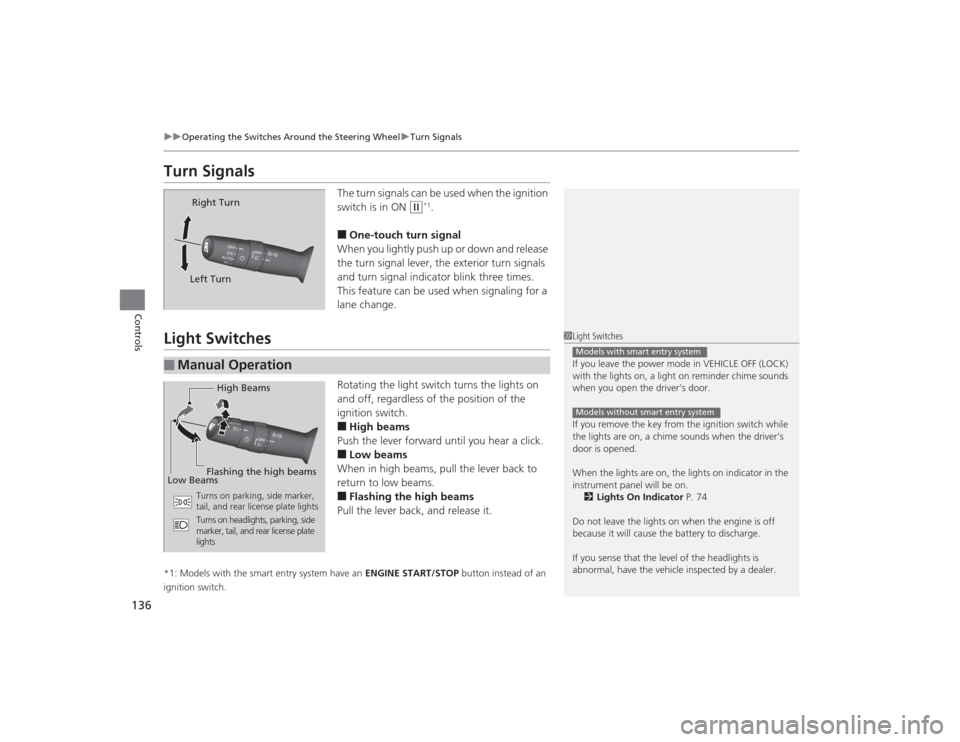
The turn signals can be used when the ignition
switch is in ON
(w
*1.
■One-touch turn signal
When you lightly push up or down and release
the turn signal lever, the exterior turn signals
and turn signal indicator blink three times.
This feature can be used when signaling for a
lane change.
Light Switches
Rotating the light switch turns the lights on
and off, regardless of the position of the
ignition switch.■High beams
Push the lever forward until you hear a click.■Low beams
When in high beams, pull the lever back to
return to low beams.■Flashing the high beams
Pull the lever back, and release it.
*1: Models with the smart entry system have an ENGINE START/STOP button instead of an
ignition switch.
Right Turn
Left Turn
■
Manual Operation
1 Light Switches
If you leave the power mode in VEHICLE OFF (LOCK)
with the lights on, a light on reminder chime sounds
when you open the driver’s door.
If you remove the key from the ignition switch while
the lights are on, a chime sounds when the driver’s
door is opened.
When the lights are on, the lights on indicator in the
instrument panel will be on. 2 Lights On Indicator P. 74
Do not leave the lights on when the engine is off
because it will cause the battery to discharge.
If you sense that the level of the headlights is
abnormal, have the vehicle inspected by a dealer.Models with smart entry systemModels without smart entry system
High Beams
Flashing the high beams
Low Beams
Turns on parking, side marker,
tail, and rear license plate lights
Turns on headlights, parking, side
marker, tail, and rear license plate
lights
Page 139 of 469
uuOperating the Switches Around the Steering Wheel uLight Switches
138Controls
The headlights automatically come on when the wipers are used several times within
a certain number of intervals with the headlight switch in AUTO.
The headlights automatically go off a few minutes later if the wipers are stopped.
The headlights, all other exterior lights, and the instrument panel lights turn off 15
seconds after you remove the key or set the power mode to VEHICLE OFF (LOCK),
take the remote with you, and close the driver's door. u You can change the headlight auto off timer setting.
2 Customized Features P. 90
If you turn the ignition switch to LOCK
(0
*1 with the headlight switch on, but do
not open the door, the lights turn off after 10 minutes (three minutes, if the switch
is in the AUTO position).
The lights turn on again when you unlock or open th e driver's door. If you unlock
the door, but do not open it within 15 seconds, the lights go off. If you open the
driver's door, you will hear a lights on reminder chime.
*1: Models with the smart entry system have an ENGINE START/STOP button instead of an
ignition switch.■
Headlight Integration with Wipers
*
■
Automatic Lighting Off Feature
1 Headlight Integration with Wipers
*
This feature activates while the headlights are off in
AUTO .
The instrument panel brightness does not change
when the headlights come on.
At dark ambient light levels, the automatic lighting
control feature turns on the headlights, regardless of
the number of wiper sweeps.
* Not available on all models
Page 140 of 469
139
uuOperating the Switches Around the Steering Wheel uFog Lights
*
Controls
Fog Lights
*
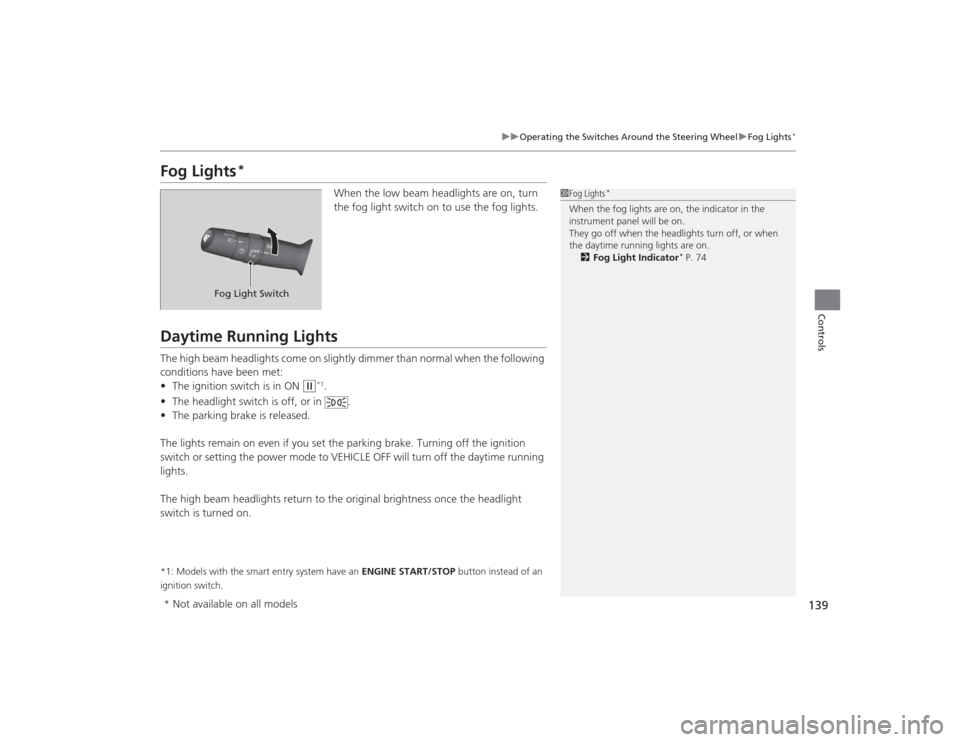
When the low beam headlights are on, turn
the fog light switch on to use the fog lights.
Daytime Running LightsThe high beam headlights come on slightly dimmer than normal when the following
conditions have been met:
• The ignition switch is in ON
(w
*1.
• The headlight switch is off, or in .
• The parking brake is released.
The lights remain on even if you set the parking brake. Turning off the ignition
switch or setting the power mode to VEHICLE OFF will turn off the daytime running
lights.
The high beam headlights return to the original brightness once the headlight
switch is turned on.
*1: Models with the smart entry system have an ENGINE START/STOP button instead of an
ignition switch.
1 Fog Lights
*
When the fog lights are on, the indicator in the
instrument panel will be on.
They go off when the headlights turn off, or when
the daytime running lights are on.
2 Fog Light Indicator
* P. 74
Fog Light Switch
* Not available on all models
Page 142 of 469
141
uuOperating the Switches Around the Steering Wheel uBrightness Control
Controls
Brightness Control
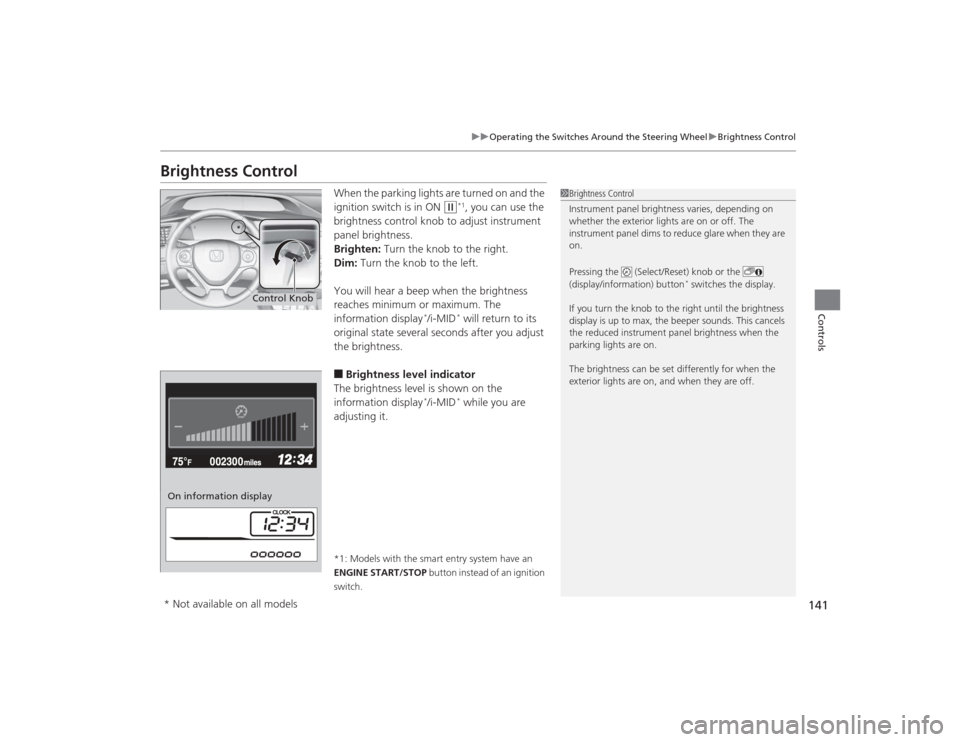
When the parking lights are turned on and the
ignition switch is in ON
(w
*1, you can use the
brightness control knob to adjust instrument
panel brightness.
Brighten: Turn the knob to the right.
Dim: Turn the knob to the left.
You will hear a beep when the brightness
reaches minimum or maximum. The
information display
*/i-MID
* will return to its
original state several seconds after you adjust
the brightness.
■Brightness level indicator
The brightness level is shown on the
information display
*/i-MID
* while you are
adjusting it.
*1: Models with the smart entry system have an
ENGINE START/STOP button instead of an ignition
switch.
1 Brightness Control
Instrument panel brightness varies, depending on
whether the exterior lights are on or off. The
instrument panel dims to reduce glare when they are
on.
Pressing the (Select/Reset) knob or the
(display/information) button
* switches the display.
If you turn the knob to the right until the brightness
display is up to max, the beeper sounds. This cancels
the reduced instrument panel brightness when the
parking lights are on.
The brightness can be set differently for when the
exterior lights are on, and when they are off.
Control Knob
On information display* Not available on all models
Page 144 of 469
143
uuOperating the Switches Around the Steering Wheel uAdjusting the Steering Wheel
Controls
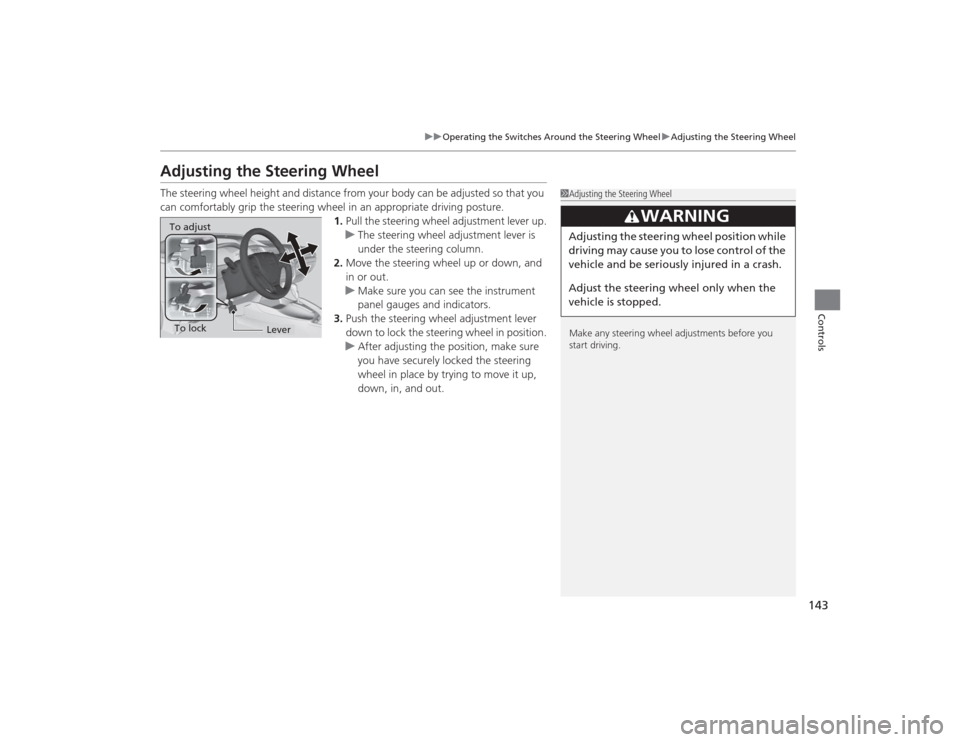
Adjusting the Steering WheelThe steering wheel height and distance from your body can be adjusted so that you
can comfortably grip the steering wheel in an appropriate driving posture.
1.Pull the steering wheel adjustment lever up.
u The steering wheel adjustment lever is
under the steering column.
2. Move the steering wheel up or down, and
in or out.
u Make sure you can see the instrument
panel gauges and indicators.
3. Push the steering wheel adjustment lever
down to lock the steering wheel in position.
u After adjusting the position, make sure
you have securely locked the steering
wheel in place by trying to move it up,
down, in, and out.
1Adjusting the Steering Wheel
Make any steering wheel adjustments before you
start driving.
3
WARNING
Adjusting the steering wheel po sition while
driving may cause you to lose control of the
vehicle and be seriously injured in a crash.
Adjust the steering wheel only when the
vehicle is stopped.
To adjustTo lock
Lever
Page 307 of 469
306
uuBefore Driving uDriving Preparation
Driving
• Be sure items placed on the floor behind the front seats cannot roll under the
seats.
u They can interfere with the driver's ability to operate the pedals, the operation
of the seats, or the operation of the sensors under the seats.
• Everyone in the vehicle must fasten their seat belt.
2 Fastening a Seat Belt P. 35
•Make sure that the indicators in the instrument panel come on when you start the
vehicle, and go off soon after.
u Always have a dealer check the vehicle if a problem is indicated.
2 Indicators P. 68
Page 327 of 469
326
uuWhen Driving uCruise Control
*
Driving
Cruise Control
*
Maintains a constant vehicle speed without having to keep your foot on the
accelerator pedal. Use cruise control on freeways or open roads where you can
travel at a constant speed with little acceleration or deceleration.
1Cruise Control
*
It may not be possible to maintain a constant speed
when driving uphill or downhill.
When not using cruise control:
Turn off cruise control by pressing the CRUISE
button.
While in the ECON mode, it may take relatively more
time to accelerate to maintain the set speed.
When the engine speed slows down, try to
downshift.
You can maintain the set speed if you change gear
within five seconds.
3
WARNING
Improper use of the cruise control can lead
to a crash.
Use the cruise control only when traveling
on open highways in good weather.1.8 ℓ engine modelsManual transmission models
When to use■Shift positions for cruise control:
In ( D or
(S Always keep sufficient distance
between you and the vehicle in
front of you.
Automatic transmission (CVT) models■Vehicle speed for cruise control:
Desired speed in a range above
roughly 25 mph (40 km/h) ~
How to use
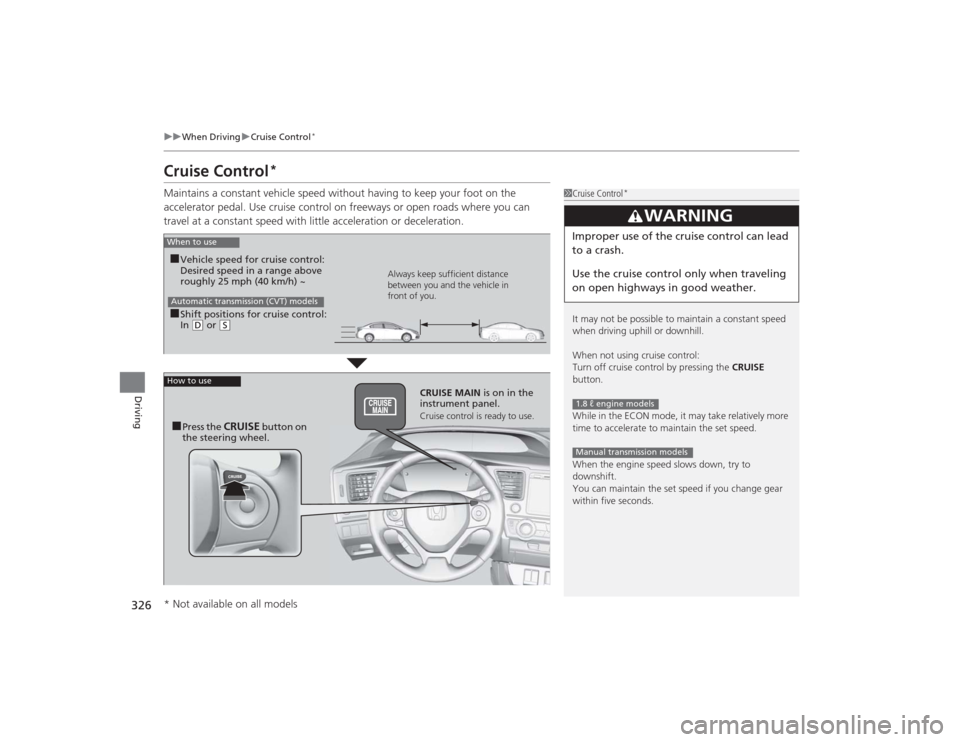
CRUISE MAIN
is on in the
instrument panel.Cruise control is ready to use.
■Press the
CRUISE
button on
the steering wheel.
* Not available on all models
Page 344 of 469
343
Continued
Driving
RefuelingFuel Information■Fuel recommendation
Use of a lower octane gasoline can cause a persistent, heavy metallic knocking noise
that can lead to engine damage.
Use of a lower octane gasoline can cause occasional metallic knocking noise in the
engine and will result in decreased engine performance.
Use of a gasoline with a pump octane less than 87 can lead to engine damage.■Top tier detergent gasoline
Because the level of detergency and additives in gasoline vary in the market, Honda
endorses the use of “TOP TIER Detergent Gasoline” where available to help
maintain the performance and reliability of your vehicle. TOP TIER Detergent
Gasoline meets a new gasoline standard jointly established by leading automotive
manufacturers to meet the needs of today’s advanced engines.Unleaded gasoline, pump octane number 87 or higherUnleaded premium gasoline, pump octane number 91 or higher
1Fuel InformationNOTICEWe recommend quality gasoline containing
detergent additives that help prevent fuel system and
engine deposits. In addition, in order to maintain
good performance, fuel economy, and emissions
control, we strongly recommend the use of gasoline
that does NOT contain harmful manganese-based
fuel additives such as MMT, if such gasoline is
available.
Use of gasoline with these additives may adversely
affect performance, and cause the malfunction
indicator lamp on your instrument panel to come on.
If this happens, contact a dealer for service.
Some gasoline today is blended with oxygenates such
as ethanol. Your vehicle is designed to operate on
oxygenated gasoline containing up to 15% ethanol
by volume. Do not use gasoline containing methanol.
If you notice any undesirable operating symptoms, try
another service station or switch to another brand of
gasoline.
1.8 ℓ engine models2.4 ℓ engine models
Page 354 of 469
353
Continued
Maintenance
Maintenance Minder
TM
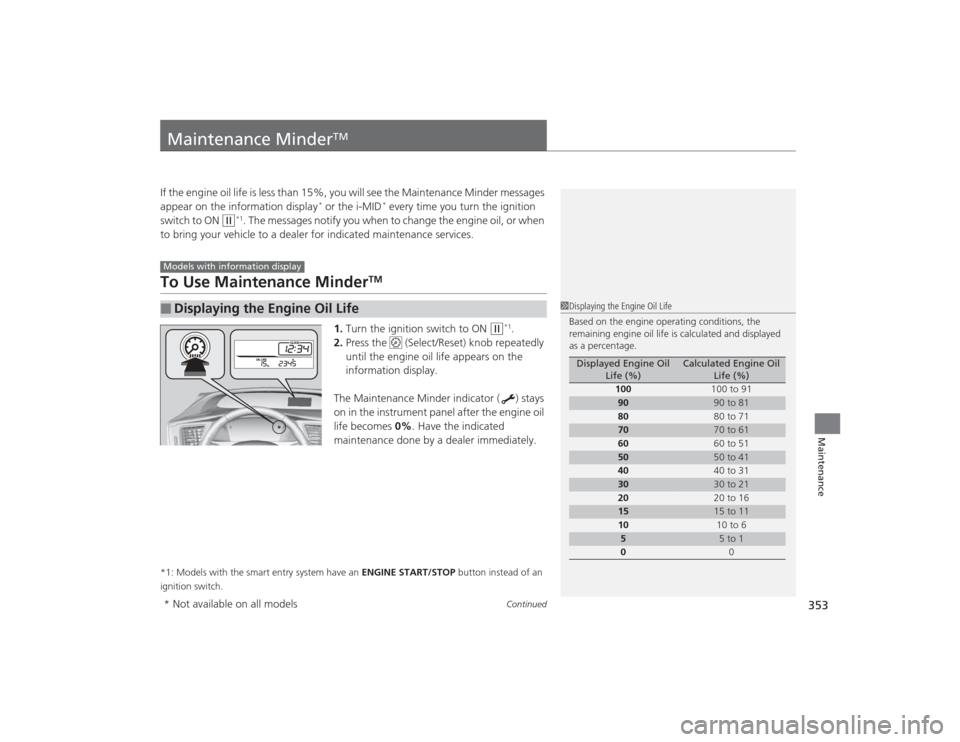
If the engine oil life is less than 15%, you will see the Maintenance Minder messages
appear on the information display
* or the i-MID
* every time you turn the ignition
switch to ON
(w
*1. The messages notify you when to change the engine oil, or when
to bring your vehicle to a dealer for indicated maintenance services.
To Use Maintenance Minder
TM
1. Turn the ignition switch to ON
(w
*1.
2. Press the (Select/Reset) knob repeatedly
until the engine oil life appears on the
information display.
The Maintenance Minder indicator ( ) stays
on in the instrument panel after the engine oil
life becomes 0% . Have the indicated
maintenance done by a dealer immediately.
*1: Models with the smart entry system have an ENGINE START/STOP button instead of an
ignition switch.■
Displaying the Engine Oil LifeModels with information display
1 Displaying the Engine Oil Life
Based on the engine operating conditions, the
remaining engine oil life is calculated and displayed
as a percentage.
Displayed Engine Oil
Life (%)
Calculated Engine Oil Life (%)
100 100 to 91
90
90 to 81
80 80 to 71
70
70 to 61
60 60 to 51
50
50 to 41
40 40 to 31
30
30 to 21
20 20 to 16
15
15 to 11
10 10 to 6
5
5 to 1
0 0
* Not available on all models
Page 459 of 469
458Index
BBattery....................................................... 400
Charging System Indicator ................. 69, 435
Jump Starting .......................................... 429
Maintenance (Checking the Battery) ........ 400
Maintenance (Replacing).......................... 401
Belts (Seat) .................................................. 32
Beverage Holders ...................................... 158
Bluetooth ® Audio ............................. 195, 218
Bluetooth ® HandsFreeLink ®............. 246, 277
Booster Seats (For Children) ....................... 63
Brake System ............................................. 337
Anti-lock Brake System (ABS) ................... 339
Brake Assist System ................................. 340
Fluid ........................................................ 374
Foot Brake ............................................... 338
Indicator (Amber)....................................... 68
Indicator (Red) ................................... 68, 437
Parking Brake .......................................... 337
Brightness Control (Instrument Panel) .... 141
Bulb Replacement ..................................... 376
Brake/Taillights, Rear Turn Signal Lights and
Rear Side Marker Lights ......................... 385
Fog Lights ................................................ 380
Front Turn Signal/Parking/Side Marker
Lights..................................................... 383
Headlights ............................................... 376
High-Mount Brake Light .......................... 388
Rear License Plate Lights .......................... 387
Taillights and Back-Up Lights ................... 386
Bulb Specifications ............................ 444, 446
CCarbon Monoxide Gas ............................... 64
Carrying Cargo ................................. 305, 307
CD Player ................................... 178, 184, 207
Center Pocket ........................................... 157
Certification Label .................................... 448
Changing Bulbs ........................................ 376
Charging System Indicator ................. 69, 435
Child Safety ................................................. 52
Childproof Door Locks............................. 116
Emergency Trunk Opener ........................ 124
Child Seat .................................................... 52
Booster Seats ............................................ 63
Child Seat for Infants................................. 54
Child Seat for Small Children ..................... 55
Installing a Child Seat with a Lap/Shoulder Seat Belt ......................................................... 59
Larger Children ......................................... 62
Rear-facing Child Seat ............................... 54
Selecting a Child Seat ................................ 56
Using a Tether ........................................... 61
Childproof Door Locks ............................. 116
Cleaning the Exterior ............................... 406
Cleaning the Interior ................................ 404
Climate Control System ............................ 165
Changing the Mode ................................ 165
Defrosting the Windshield and Windows ............................................... 166
Dust and Pollen Filter............................... 403
Recirculation/Fresh Air Mode ................... 166
Sensors ................................................... 167 Using Automatic Climate Control............ 165
Clutch Fluid .............................................. 374
Coat Hook ................................................ 159
Compact Spare Tire .................. 411, 445, 447
Console Compartment ............................. 156
Controls .................................................... 103
Coolant (Engine) ...................................... 371
Adding to the Radiator ........................... 372
Adding to the Reserve Tank .................... 371
High Temperature Indicator ...................... 72
Low Temperature Indicator ....................... 75
Overheating ............................................ 433
Creeping (Automatic Transmission) ........ 319
Cruise Control .......................................... 326
Indicator ................................................... 76
Cup Holders .............................................. 158
Customer Service Information ................ 456
Customized Features ......................... 90, 233
DDaytime Running Lights .......................... 139
Dead Battery ............................................ 429
Defrosting the Windshield and
Windows ......................................... 164, 166
Devices that Emit Radio Waves ............... 449
Dimming
Headlights .............................................. 136
Rearview Mirror ...................................... 144
Dipstick (Engine Oil) ................................ 365
Directional Signals (Turn Signal) ............. 136