steering HONDA CIVIC 2016 10.G Quick Guide
[x] Cancel search | Manufacturer: HONDA, Model Year: 2016, Model line: CIVIC, Model: HONDA CIVIC 2016 10.GPages: 82, PDF Size: 5.52 MB
Page 62 of 82

116 || 117
HANDLING THE UNEXPECTED
HANDLING THE UNEXPECTED
Overheating
If the temperature gauge pointer is at the H mark, the engine suddenly l\
oses power,
or steam or spray comes out from under the hood, your engine is overheat\
ing.
1. Immediately park the vehicle in a safe place. Turn
off all accessories and turn on the hazard warning
lights.
2. If steam or spray is not present: Keep the engine
running and open the hood.
If steam or spray is present: Turn off the engine and
wait until it subsides. Then, open the hood.
3. Check that the cooling fan is operating and stop the engine once the tem\
perature
gauge needle comes down. If the cooling fan is not operating, immediatel\
y stop
the engine.
4. once the engine has cooled down, inspect the coolant level and check the \
cooling system components for leaks. If the coolant level in the expansi\
on tank
is low, or no coolant is in the tank, check that the radiator is cool. Cover t\
he
expansion tank cap with a heavy cloth and open the cap. Add coolant unti\
l it
reaches the MAX mark, and put the cap back on.
once the engine has cooled sufficiently, restart it and check the temperature gauge.
If the temperature gauge pointer has gone down, resume driving. If it ha\
s not gone
down, contact a dealer for repairs.
MAX
Expansion tankMIN
Steam and spray from an overheated engine can seriously scald you.
Do not open the hood if steam is coming out.
WARNING
removing the radiator cap while the engine is hot can cause the coolant t\
o
spray out, seriously scalding you.
Always let the engine and radiator cool down before removing the radiato\
r cap.
WARNING
Continuing to drive with the temperature gauge pointer at the H mark may\
damage
the engine.
NOTICE
Emergency Engine Stop*
The eNGINe STArT/SToP button may be used to stop the engine due to an
emergency situation even while driving. If you must stop the engine, cho\
ose one of
the following operations:
•
Press and hold the eNGINe STArT/SToP button for
two seconds, or
•
Firmly press the eNGINe STArT/SToP button two
times.
The steering wheel will not lock. Because turning off the engine also di\
sables the
power assist the engine provides to the steering and braking systems, it\
will require
significantly more physical effort and time to steer and slow the vehi\
cle. Downshift
gears and use both feet on the brake pedal, if necessary, to slow the vehicle and
stop immediately in a safe place
Do not press the button while driving unless it is absolutely necessary \
for the engine
to be switched off.
*if equipped
Emergency Towing
Call a professional towing service if you need to tow your vehicle.
Flat bed equipment: The operator loads your vehicle on the back of a tru\
ck. This is
the best way to transport your vehicle.
Wheel lift equipment: The tow truck uses two pivoting arms that go under the front
tires and lift them off the ground. The rear tires remain on the ground.\
This is an
acceptable way to tow your vehicle.
For CvT models: If you cannot shift the transmission or turn on the engine, your
vehicle must be transported with the front wheels off the ground. Make s\
ure the
parking brake is released. If you cannot release the parking brake, your\
vehicle must
be transported by flat bed equipment.
Trying to lift or tow your vehicle by the bumpers will cause serious dama\
ge. The
bumpers are not designed to support the vehicle’s weight.
Improper towing such as towing behind a motorhome or other motor vehicle\
can
damage the transmission.
NOTICE
Page 63 of 82
118 || 119
HANDLING THE UNEXPECTED
HANDLING THE UNEXPECTED
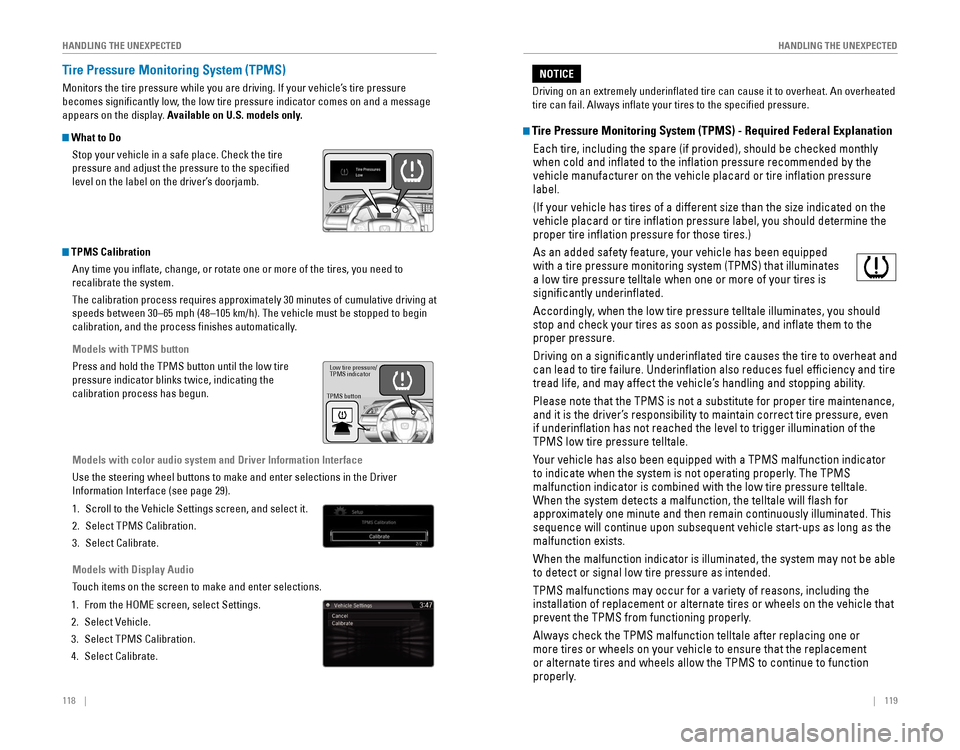
Tire Pressure Monitoring System (TPMS)
Monitors the tire pressure while you are driving. If your vehicle’s tire pressure
becomes significantly low, the low tire pressure indicator comes on and a message
appears on the display. Available on U.S. models only.
What to Do
Stop your vehicle in a safe place. Check the tire
pressure and adjust the pressure to the specified
level on the label on the driver’s doorjamb.
TPMS CalibrationAny time you inflate, change, or rotate one or more of the tires, you \
need to
recalibrate the system.
The calibration process requires approximately 30 minutes of cumulative driving at
speeds between 30–65 mph (48–105 km/h). The vehicle must be stop\
ped to begin
calibration, and the process finishes automatically.
Models with TPMS button
Press and hold the TPMS button until the low tire
pressure indicator blinks twice, indicating the
calibration process has begun.
Models with color audio system and Driver Information Interface
Use the steering wheel buttons to make and enter selections in the Drive\
r
Information Interface (see page 29).
1. Scroll to the vehicle Settings screen, and select it.
2. Select TPMS Calibration.
3. Select Calibrate.
Models with Display Audio
Touch items on the screen to make and enter selections.
1. From the HoMe screen, select Settings.
2. Select vehicle.
3. Select TPMS Calibration.
4. Select Calibrate.
TPMS button Low tire pressure/
TPMS indicator
Tire Pressure Monitoring System (TPMS) - Required Federal Explanation
each tire, including the spare (if provided), should be checked monthly\
when cold and inflated to the inflation pressure recommended by the \
vehicle manufacturer on the vehicle placard or tire inflation pressure\
label.
(If your vehicle has tires of a different size than the size indicated \
on the
vehicle placard or tire inflation pressure label, you should determine\
the
proper tire inflation pressure for those tires.)
As an added safety feature, your vehicle has been equipped
with a tire pressure monitoring system (TPMS) that illuminates
a low tire pressure telltale when one or more of your tires is
significantly underinflated.
Accordingly, when the low tire pressure telltale illuminates, you should
stop and check your tires as soon as possible, and inflate them to the\
proper pressure.
Driving on a significantly underinflated tire causes the tire to ove\
rheat and
can lead to tire failure. Underinflation also reduces fuel efficienc\
y and tire
tread life, and may affect the vehicle’s handling and stopping ability.
Please note that the TPMS is not a substitute for proper tire maintenanc\
e,
and it is the driver’s responsibility to maintain correct tire pressure, even
if underinflation has not reached the level to trigger illumination of\
the
TPMS low tire pressure telltale.
Your vehicle has also been equipped with a TPMS malfunction indicator
to indicate when the system is not operating properly. The TPMS
malfunction indicator is combined with the low tire pressure telltale.
When the system detects a malfunction, the telltale will flash for
approximately one minute and then remain continuously illuminated. This \
sequence will continue upon subsequent vehicle start-ups as long as the \
malfunction exists.
When the malfunction indicator is illuminated, the system may not be abl\
e
to detect or signal low tire pressure as intended.
TPMS malfunctions may occur for a variety of reasons, including the
installation of replacement or alternate tires or wheels on the vehicle \
that
prevent the TPMS from functioning properly.
Always check the TPMS malfunction telltale after replacing one or
more tires or wheels on your vehicle to ensure that the replacement
or alternate tires and wheels allow the TPMS to continue to function
properly.
Driving on an extremely underinflated tire can cause it to overheat. A\
n overheated
tire can fail. Always inflate your tires to the specified pressure.
NOTICE
Page 64 of 82
120 || 121
HANDLING THE UNEXPECTED
HANDLING THE UNEXPECTED
Changing a Flat Tire
If a tire goes flat while driving, grasp the steering wheel firmly, and brake gradually
to reduce speed. Then, stop in a safe place. replace the flat tire with the compact
spare tire. Go to a dealer as soon as possible to have the full-size tir\
e repaired or
replaced.
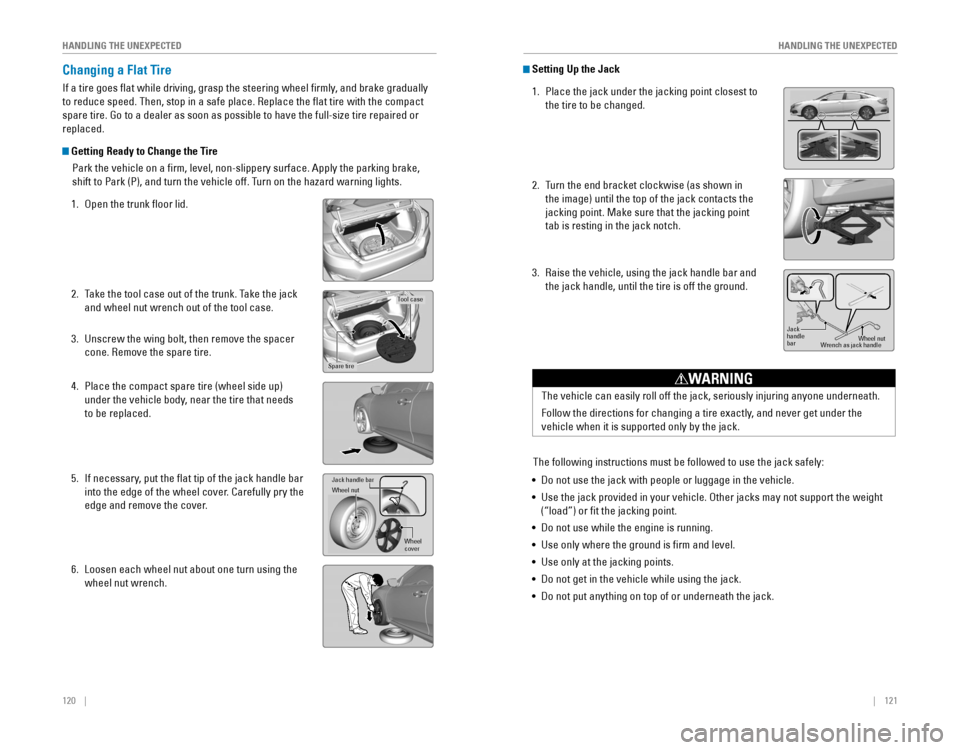
Getting Ready to Change the Tire
Park the vehicle on a firm, level, non-slippery surface. Apply the par\
king brake,
shift to Park (P), and turn the vehicle off. Turn on the hazard warning lights.
1. open the trunk floor lid.
2. Take the tool case out of the trunk. Take the jack
and wheel nut wrench out of the tool case.
3. Unscrew the wing bolt, then remove the spacer
cone. remove the spare tire.
4. Place the compact spare tire (wheel side up)
under the vehicle body, near the tire that needs
to be replaced.
5. If necessary, put the flat tip of the jack handle bar
into the edge of the wheel cover. Carefully pry the
edge and remove the cover.
6. Loosen each wheel nut about one turn using the
wheel nut wrench.
Tool case
Spare tire
Jack handle ba r
Wheel nu t
Wheel
cover
Setting Up the Jack
1. Place the jack under the jacking point closest to
the tire to be changed.
2. Turn the end bracket clockwise (as shown in
the image) until the top of the jack contacts the
jacking point. Make sure that the jacking point
tab is resting in the jack notch.
3. raise the vehicle, using the jack handle bar and
the jack handle, until the tire is off the ground.
Jack
handle
bar Wheel nut
Wrench as jack handle
The vehicle can easily roll off the jack, seriously injuring anyone unde\
rneath.
Follow the directions for changing a tire exactly, and never get under the
vehicle when it is supported only by the jack.
WARNING
The following instructions must be followed to use the jack safely:
• Do not use the jack with people or luggage in the vehicle.
•
Use the jack provided in your vehicle. other jacks may not support the weight
(“load”) or fit the jacking point.
• Do not use while the engine is running.
• Use only where the ground is firm and level.
• Use only at the jacking points.
• Do not get in the vehicle while using the jack.
• Do not put anything on top of or underneath the jack.
Page 68 of 82
128 || 129
M
AINTENANCEMAINTENANCE
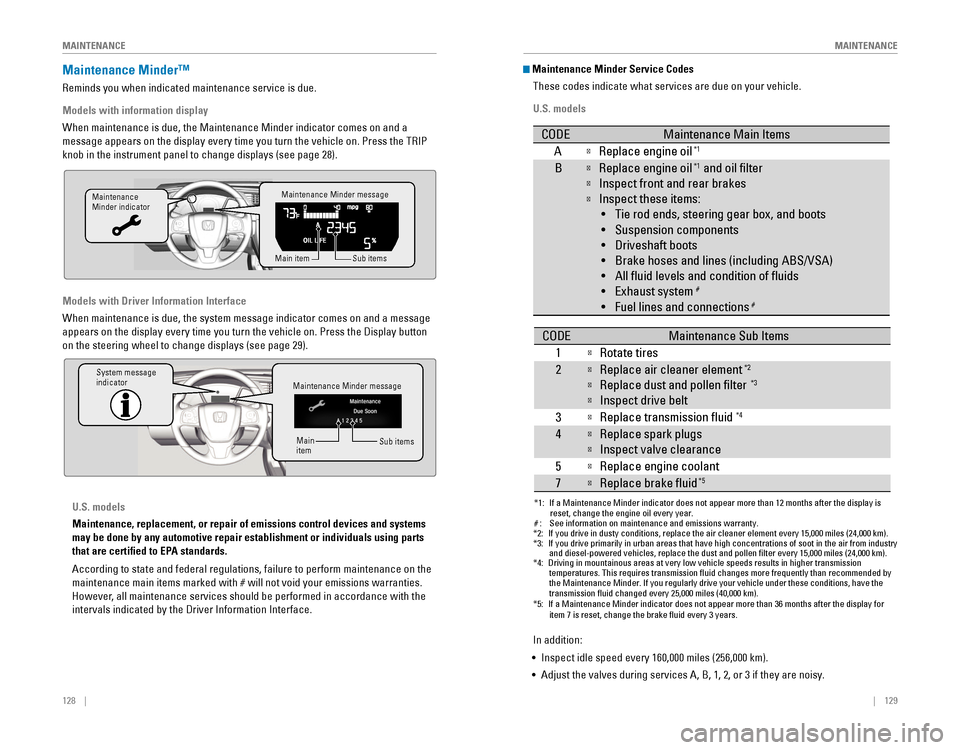
Maintenance Minder™
reminds you when indicated maintenance service is due.
Models with information display
When maintenance is due, the Maintenance Minder indicator comes on and a\
message appears on the display every time you turn the vehicle on. Press\
the TrIP
knob in the instrument panel to change displays (see page 28).
Models with Driver Information Interface
When maintenance is due, the system message indicator comes on and a mes\
sage
appears on the display every time you turn the vehicle on. Press the Dis\
play button
on the steering wheel to change displays (see page 29).
Maintenance Minder message
Maintenance
Minder indicator
Sub items
Main item
Maintenance Minder message
System message
indicator
Sub items
Main
item
U.S. models
Maintenance, replacement, or repair of emissions control devices and sys\
tems
may be done by any automotive repair establishment or individuals using \
parts
that are certified to EPA standards.
According to state and federal regulations, failure to perform maintenan\
ce on the
maintenance main items marked with # will not void your emissions warranties.
However, all maintenance services should be performed in accordance with the
intervals indicated by the Driver Information Interface.
Maintenance Minder Service Codes
These codes indicate what services are due on your vehicle.
U.S. models
*1: If a Maintenance Minder indicator does not appear more than 12 months af\
ter the display is reset, change the engine oil every year.
#: See information on maintenance and emissions warranty.
CODEMaintenance Main Items
AReplace engine oi l*1
BReplace engine oil*1 and oil lter
Inspect front and rear brakes
Inspect these items:
• Tie rod ends, steering gear box, and boots
•S uspension components
• Driveshaft boots
• Brake hoses and lines (including ABS/VSA)
• All uid levels and condition of uids
• Exhaust system
#
•F uel lines and connection s#
*2:If you drive in dusty conditions, replace the air cleaner element every \
15,000 miles (24,000 km).*3:If you drive primarily in urban areas that have high concentrations of s\
oot in the air from industryand diesel-powered vehicles, replace the dust and pollen lter every \
15,000 miles (24,000 km).*4:Driving in mountainous areas at very low vehicle speeds results in highe\
r transmission
temperatures. This requires transmission uid changes more frequently\
than recommended by
the Maintenance Minder. If you regularly drive your vehicle under these conditions, have the
transmission uid changed every 25,000 miles (40,000 km).
CODEMaintenance Sub Items
1
Rotate tires
2Replace air cleaner element*2
Replace dust and pollen lter*3
Inspect drive belt
3
Replace transmission uid*4
4Replace spark plug s
Inspect valve clearance
5
Replace engine coolant
7Replace brake uid*5
*5:If a Maintenance Minder indicator does not appear more than 36 months af\
ter the display for item 7 is reset, change the brake uid every 3 years.
In addition:
• Inspect idle speed every 160,000 miles (256,000 km).
• Adjust the valves during services A, B, 1, 2, or 3 if they are noisy.
Page 69 of 82

130 || 131
M
AINTENANCEMAINTENANCE
*1: If a Maintenance Minder message does not appear more than 12 months afte\
r the display is
reset, change the engine oil every year.
*2: If you drive in dusty conditions, replace the air cleaner element every \
24,000 km (15,000 miles).
*3:
If you drive primarily in urban areas that have high concentrations of s\
oot in the air from industryand diesel-powered vehicles, replace the dust and pollen lter every \
24,000 km (15,000 miles).
*4: Driving in mountainous areas at very low vehicle speeds results in highe\
r transmission
temperatures. This requires transmission uid changes more frequently\
than recommended by
the Maintenance Minder. If you regularly drive your vehicle under these conditions, have the
transmission uid changed every 40,000 km (25,000 miles).
*5: If a Maintenance Minder Indicator does not appear more than 36 months after the display for
item7 is reset, change the brake uid every 3 years.#: See information on maintenance and emissions warranty.
CODEMaintenance Main Items
AReplace engine oi l*1
0Replace engine oil*1 and oil lter
CODEMaintenance Sub Items
1
Rotate tires
2Replace air cleaner element*2
Replace dust and pollen lte r*3
Inspect drive belt
3
Replace transmission uid*4
4Replace spark plug s
Inspect valve clearance
5
Replace engine coolant
7Replace brake uid*5
9Inspect front and rear brakes
Inspect these items: •T ie rod ends, steering gearbox, and boots
•S uspension components
•D riveshaft boots
•B rake hoses and lines (including ABS/VSA)
•A ll uid levels and condition of uids
•E xhaust system
#
•Fuel lines and connections#
Canadian models
In addition:
• Inspect idle speed every 256,000 km (160,000 miles).
• Adjust the valves during services A, B, 1, 2, or 3 if they are noisy.Under the Hood
1.5 engine model\
s
Brake uid
(black cap)
Reserve \fank Washer uid
(blue cap)
\bngine oil dips\fick\v
(orange) \bngine oil ll cap Ba\f\fery
Reserve \fank cap
U.S. modelsWasher uid
(blue cap)Canadian models
2.0 engine model\/s
Brake/\flut\fh\b uid
(Bla\fk \fap)
Reserve tank Washer uid
(blue \fap) Engine oil dipsti\fk\/
(orange)
Engine oil ll \fap Battery
Reserve tank \fap
*if equipped
Page 71 of 82
134 || 135
M
AINTENANCEMAINTENANCE
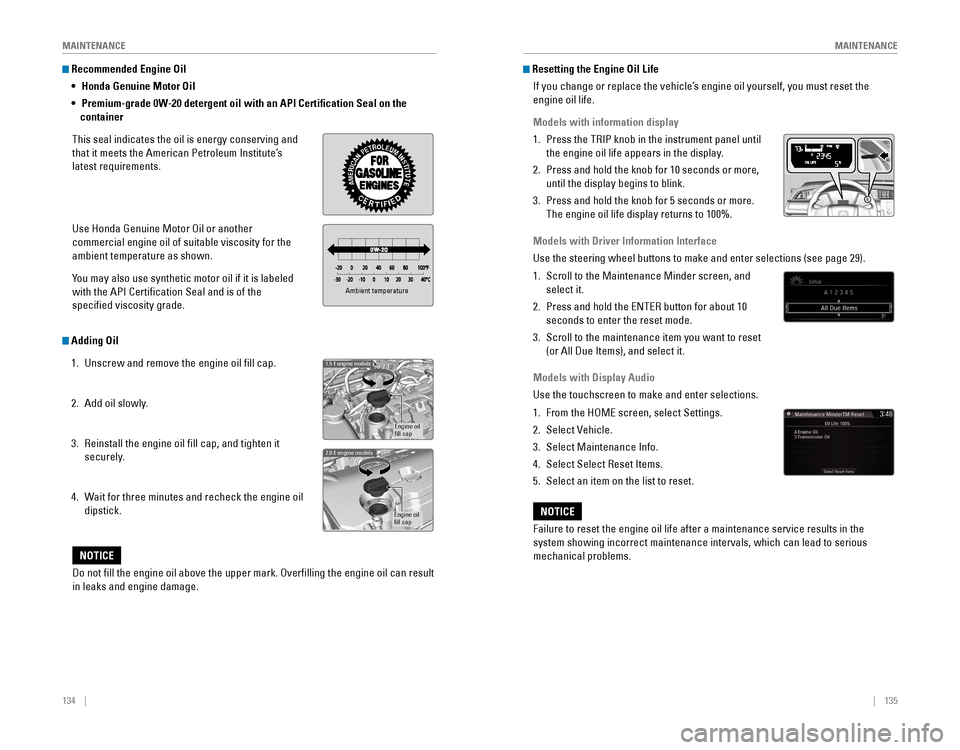
Recommended Engine Oil
•
Honda Genuine Motor Oil
• Premium-grade 0W-20 detergent oil with an API Certification Seal on the
container
This seal indicates the oil is energy conserving and
that it meets the American Petroleum Institute’s
latest requirements.
Use Honda Genuine Motor oil or another
commercial engine oil of suitable viscosity for the
ambient temperature as shown.
You may also use synthetic motor oil if it is labeled
with the API Certification Seal and is of the
specified viscosity grade.
Adding Oil
1. Unscrew and remove the engine oil fill cap.
2. Add oil slowly.
3. reinstall the engine oil fill cap, and tighten it
securely.
4. Wait for three minutes and recheck the engine oil
dipstick.
Ambient temperature
Engine oil
ll cap
1.5 engine models
Engine oil
ll ca p
2.0 engine models
Do not ll the engine oil above the upper mark. Overlling the engine oil can result
in leaks and engine damage.
NOTICE
Resetting the Engine Oil Life
If you change or replace the vehicle’s engine oil yourself, you must reset the
engine oil life.
Models with information display
1. Press the TrIP knob in the instrument panel until
the engine oil life appears in the display.
2. Press and hold the knob for 10 seconds or more,
until the display begins to blink.
3. Press and hold the knob for 5 seconds or more.
The engine oil life display returns to 100%.
Models with Driver Information Interface
Use the steering wheel buttons to make and enter selections (see page 2\
9).
1. Scroll to the Maintenance Minder screen, and
select it.
2. Press and hold the eNTer button for about 10
seconds to enter the reset mode.
3. Scroll to the maintenance item you want to reset
(or All Due Items), and select it.
Models with Display Audio
Use the touchscreen to make and enter selections.
1. From the HoMe screen, select Settings.
2. Select vehicle.
3. Select Maintenance Info.
4. Select Select reset Items.
5. Select an item on the list to reset.
Failure to reset the engine oil life after a maintenance service results\
in the
system showing incorrect maintenance intervals, which can lead to seriou\
s
mechanical problems.
NOTICE
Page 81 of 82
154 || 155
INDEX
INDEX
INDEX
ABS .............................................................25ACC .......................................................24, 27
Accessory Power Socket ...............................52Adaptive Cruise Control (ACC) with Low Speed Follow (LSF) ...................24, 102Address .............................................................85
Advanced Airbags .............................................8Aha™ radio ......................................................64Airbags ...............................................................8
Airbag System Components .......................12
Airbag System Indicators ...........................10
Ambient Meter ................................................ 100
Android Auto™
.................................................66
Anti-Lock Brake System (ABS) ................25, 98
Apple CarPlay® .................................................65
Audio Commands ...........................................153Audio operation ...............................................52Aha™ radio ..................................................64
Android Auto™ .............................................66
Apple CarPlay® .............................................65
Bluetooth® Audio ...................................61, 71
Color Audio System .....................................57
Display Audio ................................................62FM/AM radio ..........................................58, 67
HondaLink™ ..................................................63
iPod® .......................................................59, 69
Pandora® .......................................................72
SiriusXM® radio ...........................................68Sound .............................................................56
Steering Wheel Controls .............................54
USB Flash Drive ......................................60, 70
USB Port ........................................................52
Wi-Fi Connection ..........................................64
Wireless Charger .........................................53
Automatic brake hold ................................27, 99Automatic Dimming rearview Mirror ...........44Automatic rain-Sensing Wipers ...................39Battery ...........................................................138
Bluetooth® Audio .......................................61, 71
Bluetooth® Audio Commands ......................153
Bluetooth® HandsFreeLink® (HFL) .................73e-Mail .............................................................81
HFL Controls ............................................73, 76
HondaLink™ Assist ......................................80
Making a Call ..........................................75, 79
Pairing a Phone ......................................74, 78
Phonebook ..............................................75, 79
Siri® eyes Free ..............................................82
SMS Text Messaging ..................................81
Speed Dial ...............................................75, 80
Talk Button Tips ............................................77
Brake Assist System ........................................ 98
Brake/Clutch Fluid .......................................... 137Brake depress
..................................................26
Brake system ..............................................24, 25Braking .............................................................98
Brightness Control ...........................................37
Carbon Monoxide Gas .......................................4
Changing a Flat Tire
.......................................120
Changing Settings ............................................49
Charging system ............................................... 24
Childproof Door Locks
.....................................34
Child Safety .......................................................14
Child Seat ..........................................................16
Adding Security with a Tether ...................19
LATCH-Compatible Child Seat ....................17
Climate Control Commands ..........................152
Climate Control System ...................................46Clock .............................................................51
Collision Mitigation Braking System™ (CMBS™)
...................................25, 106
Color Audio System .........................................57
Condition Indicators ........................................26
Contact Us .......................................................150Continuously variable Transmission (CvT) ...96
Cruise Control ...........................................27, 101
Customer Information ....................................149
Customized Features
.......................................50Dashboard, Ceiling, and other Controls .........2
Destination ........................................................85
Dialing a Number .......................................75, 79
Display Audio ....................................................62
Door Mirrors .....................................................44Door operation .................................................34Doors .............................................................32
Door/trunk open ...............................................26DoT Tire Quality Grading ..............................144
Driver Information Interface ..........................29Driving .............................................................90Adaptive Cruise Control (ACC) with Low Speed Follow (LSF) .........................102
Braking ...........................................................98
Collision Mitigation Braking System™ (CMBS™)
.........................................106Continuously variable Transmission (CvT) ...................................................96
Cruise Control .............................................101eco Assist™ System ..................................100eNGINe STArT/SToP button .....................96
Ignition ...........................................................95
Lane Keeping Assist System (LKAS) .......104
LaneWatch™ ..............................................108
Manual Transmission ..................................97
Maximum Load Limit ....................................92Multi-view rear Camera ..........................109
Power Mode .................................................96
refueling ......................................................111remote engine Start ....................................94road Departure Mitigation (rDM) ..........105
Shifting ...........................................................96vehicle Stability Assist (vSA®) ................100
Wiper Blades ..............................................139eco Assist™ System ......................................100eCoN Button ...................................................100eCoN mode .......................................................27electric Parking Brake ....................................98electric Power Steering (ePS) .......................25electronic Stability Control (eSC) ................100e-Mail .............................................................81emergency engine Stop ................................117emergency Towing ........................................117engine and Fuel ......................................147, 148engine Coolant................................................ 136engine oil......................................................... 133eNGINe STArT/SToP button .........................96exterior lights ..............................................27, 37
Fastening a Seat Belt ........................................7Flat Tire ...........................................................120
Floor Mats .........................................................41Fluids ...................................................147, 148FM/AM radio ..............................................58, 67FM/AM radio Commands .............................153
Fog lights ...........................................................27
Foot Brake .........................................................98
Frequently Asked Questions ........................149Front Airbags (SrS) ...........................................8
Front Door Inner Handle .................................34
Fuel Information .............................................111
Fuse Locations ................................................ 124
Hang-Up/Back button ................................73, 76
Headlight-Wiper Integration
..........................38Head restraints ................................................42
Heating System ................................................45
HFL Controls ................................................73, 76
High beams .......................................................27
Home Address ..................................................85
HondaLink™ ......................................................63
HondaLink™ Assist ..........................................80Honda roadside Assistance ........................150Hood ...........................................................131Ignition .............................................................95
Immobilizer ........................................................26
Information Display .......................................... 28
Instrument Panel
..............................................23
Interior Lights .................................................... 37
Intermittent Wipers .......................................... 39
iPod
® .......................................................59, 69
iPod® Commands ...........................................153
Jump Starting .................................................114Key .............................................................31
Lane Keeping Assist System (LKAS) ....24, 104 LaneWatch™
..................................................108
Lap/Shoulder Seat Belts ...................................5
LATCH-Compatible Child Seat ........................17
Light Bulbs ............................................... 147, 148
Lights .......................................................27, 37LKAS .............................................................27
Lock Tab .............................................................34Low fuel .............................................................26
Low oil pressure ...............................................24
Low tire pressure .............................................26
Maintenance ................................................... 127
Air Conditioning
..........................................145
Battery .........................................................138
Brake/Clutch Fluid ......................................137engine Coolant ............................................136engine oil .....................................................133
Maintenance Minder™ .............................128
Service Codes .............................................129
Under the Hood ..........................................131
Window Washer Fluid ...............................137
Making a Call ..............................................75, 79
Malfunction indicator lamp ............................25
Malfunction Indicators ....................................24
Manual Seats .................................................... 41
Manual Transmission
......................................97
Map Legend ......................................................88
Master Door Lock Switch ...............................34
Maximum Load Limit ........................................ 92
Mirrors .............................................................44
Moonroof ...........................................................36Multi-view rear Camera ..............................109
Music search ..................................................153
Navigation .........................................................83
Display and Controls ....................................84entering a Destination .................................85
Home Address ..............................................85
Map Legend ..................................................88
Place Category .............................................86recent Places ...............................................86routing ...........................................................88
Saved Places ................................................87
Steering Wheel Controls .............................83
Street Address ..............................................85System Guidance volume ...........................83
Talk Button Tips ............................................83Traffic .............................................................89
Turn-by-turn directions ...............................88
Navigation Commands ..................................152one-Touch Turn Signal ....................................36on/off Indicators ..............................................27opening the Hood ..........................................132overheating..................................................... 116
Pairing a Phone ..........................................74, 78
Pandora® ...........................................................72
Pandora® Commands ....................................153
Page 82 of 82
156 || 157
INDEX
INDEX
Parking brake .............................................. 26, 98Passenger Airbag off Indicator .....................11Phone .......................................................74, 78
Phonebook ..................................................75, 79
Phone Commands ..........................................152
Place Category .................................................86
Power Door Mirrors ......................................... 44
Power Mode
.....................................................96Power Moonroof operation ...........................36
Power Seats ...................................................... 40
Power Window operation ..............................35radio .......................................................58, 67rain-Sensing Wipers.......................................39readiness Codes............................................ 146rear Camera ...................................................109rear Seats .........................................................43rearview Mirror ...............................................44recent Places................................................... 86refueling.......................................................... 111remote Battery Strength ..............................113remote engine Start ........................................94remote Transmitter .........................................31reporting Safety Defects................................22road Departure Mitigation (rDM) ........24, 105roadside Assistance .....................................150routing .............................................................88
Safety Information .............................................3
Airbags .............................................................8
Child Safety ...................................................14reporting Safety Defects ............................22
Safety Label Locations ................................21
Safety Messages ...........................................3
Seat Belts ........................................................5
Saved Places ....................................................87
Seat Belts ............................................................5
Fastening a Seat Belt ....................................7
Seat Belt Inspection ......................................6
Seat belt reminder .......................................26
Shoulder Anchor ............................................7
Seat Heaters .....................................................49Seats .............................................................40
Security system ................................................26
Service Codes ................................................. 129
Settings .......................................................30, 50
Setting the Clock ..............................................51Shifting .............................................................96
Shift Lever Does Not Move ..........................113
Shoulder Anchor ................................................7
Side Airbags ........................................................ 9
Side Curtain Airbags .......................................... 9
Siri
® eyes Free ..................................................82
SiriusXM® radio ...............................................68
SiriusXM® radio Commands ........................153Smart entry system ....................................24, 32
SMS Text Messaging ......................................81
Song By voice™ Commands ........................153Sound .............................................................56
Specifications .................................................147
Speed Dial ...................................................75, 80
Starter system ..................................................24
Steering Wheel ................................................. 43
Steering Wheel and Nearby Controls
............1
Steering Wheel Controls ...........................54, 83
Street Address .................................................. 85
Supplemental restraint System (SrS) ...10, 24System Guidance volume ...............................83
System message ..............................................26
Talk button ...................................................73, 76
Talk Button Tips ..........................................77, 83
Text Messaging ................................................81
Tire Information ..............................................140DoT Tire Quality Grading ..........................144
Inflation Guidelines ....................................140
Tire and Loading Information Label ........141Tire and Wheel replacement ...................141
Tire Chains ...................................................142
Tire Identification Number (TIN) ..............143
Tire Labeling ................................................143
Tire Service Life ..........................................142
Tire Terminology .........................................143
Wear Indicators .........................................140
Winter Tires .................................................142
Tire Pressure Monitoring System (TPMS)
.......................................25, 118Tires ...................................................147, 148Towing ...........................................................117Traffic .............................................................89
Trip Computer ...................................................29
Troubleshooting ..............................................149Trunk .............................................................32Trunk release Button ......................................34
Turn-by-turn directions ...................................88
Turn Signal ..................................................27, 36
USB Commands .............................................. 153
USB Flash Drive .......................................... 60, 70
USB Port
............................................................52vehicle ...................................................147, 148vehicle Controls ...............................................31vehicle Settings ...............................................30vehicle Stability Assist (vSA®) ........25, 27, 100visual Index......................................................... 1voice Command Index ..................................152voice Portal Commands ................................152
Walk Away Auto Lock .....................................33
Warranty Coverages .....................................151
Washer fluid level ............................................26
Wear Indicators .............................................140
Wi-Fi Connection .............................................. 64
Windows ............................................................ 35
Window Washer Fluid
...................................137 Winter Tires
.....................................................142
Wiper Blades ..................................................139Wiper operation ...............................................38
Wireless Charger .............................................53