wheel HONDA CIVIC 2022 Owners Manual
[x] Cancel search | Manufacturer: HONDA, Model Year: 2022, Model line: CIVIC, Model: HONDA CIVIC 2022Pages: 700, PDF Size: 13.98 MB
Page 466 of 700
465
uuWhen Driving uTire Pressure Monitoring System (TPMS)
Continued
Driving
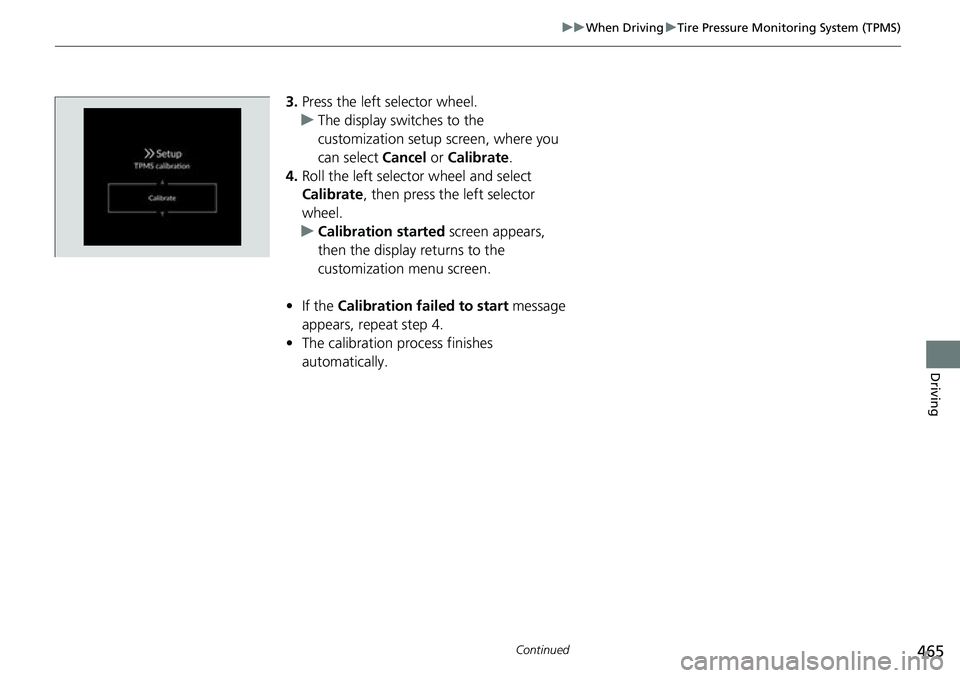
3. Press the left selector wheel.
u The display swit ches to the
customization setup screen, where you
can select Cancel or Calibrate .
4. Roll the left selector wheel and select
Calibrate , then press the left selector
wheel.
u Calibration started screen appears,
then the display returns to the
customization menu screen.
• If the Calibration failed to start message
appears, repeat step 4.
• The calibration process finishes
automatically.
Page 469 of 700
468
uuWhen Driving uTire Pressure Monitoring System (TPMS) - Required Federal Explanation
Driving
Please note that the TPMS is not a substitute for proper tire
maintenance, and it is the driver 's responsibility to maintain
correct tire pressure, even if un der-inflation has not reached the
level to trigger illumina tion of the TPMS low ti re pressure telltale.
Your vehicle has also been eq uipped with a TPMS malfunction
indicator to indicate when the sy stem is not operating properly.
The TPMS malfunction indicator is combined with the low tire
pressure telltale. When the system detects a malfunction, the
telltale will flash fo r approximately one minute and then remain
continuously illuminated. This sequence will continue upon
subsequent vehicle start-ups as long as the malfunction exists.
When the malfunction indicator is illuminated, the system may
not be able to detect or signal low tire pressure as intended.
TPMS malfunctions may occur for a variety of reasons, including
the installation of replacement or alternate tires or wheels on the
vehicle that prevent the TPMS from functioning properly.
Always check the TPMS malfunction telltale after replacing one or
more tires or wheels on your vehicle to ensure that the
replacement or alternate tires and wheels allow the TPMS to
continue to function properly.
Page 472 of 700
Continued471
uuWhen Driving uBlind Spot Information System*
Driving
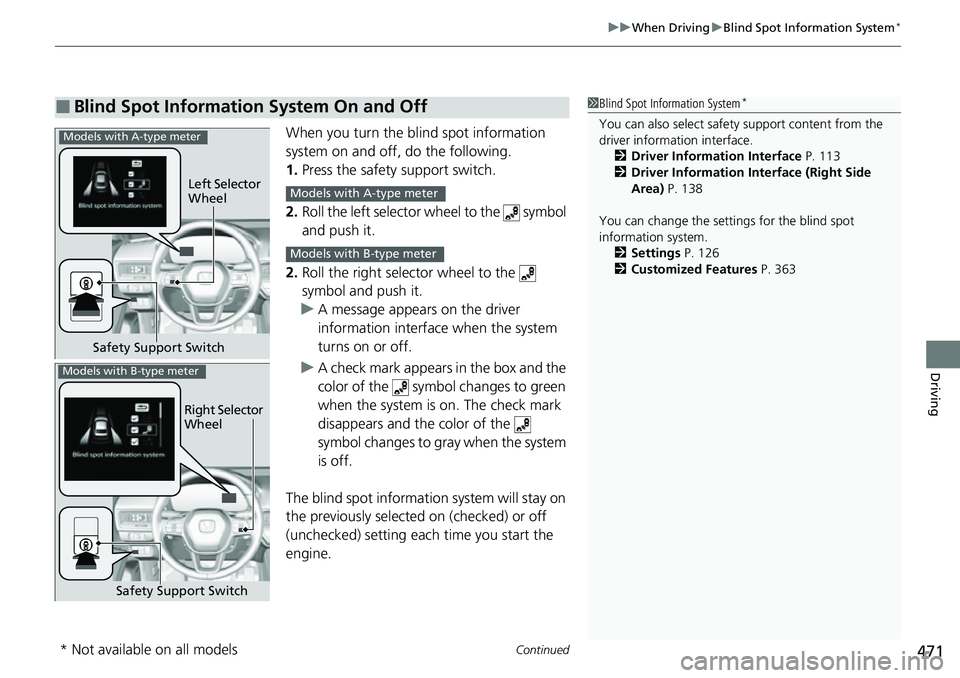
When you turn the blind spot information
system on and off, do the following.
1. Press the safety support switch.
2. Roll the left selector wheel to the symbol
and push it.
2. Roll the right selector wheel to the
symbol and push it.
u A message appears on the driver
information interface when the system
turns on or off.
u A check mark appears in the box and the
color of the symbol changes to green
when the system is on. The check mark
disappears and the color of the
symbol changes to gray when the system
is off.
The blind spot informatio n system will stay on
the previously selected on (checked) or off
(unchecked) setting eac h time you start the
engine.
■Blind Spot Information System On and Off1 Blind Spot Information System*
You can also sele ct safety support content from the
driver information interface.
2 Driver Information Interface P. 113
2 Driver Information Interface (Right Side
Area) P. 138
You can change the settings for the blind spot
information system. 2 Settings P. 126
2 Customized Features P. 363Models with A-type meter
Left Selector
Wheel
Safety Support SwitchModels with A-type meter
Models with B-type meter
Right Selector
Wheel
Safety Support Switch
Models with B-type meter
* Not available on all models
Page 477 of 700
476
uuHonda Sensing ®u Collision Mitigation Braking SystemTM (CMBSTM)
Driving
Collision Mitigati on Braking SystemTM (CMBSTM)
The system can assist you when it determine s there is a possibility of your vehicle
colliding with a vehicle ahead from behind, an oncoming vehicle in front, a
pedestrian, or someone riding a bicycle (moving bicycle).
The CMBS
TM is designed to alert you when the potential for a collision is determined,
as well as assist in reducing speed, avoiding collisions, and reducing collision
severity.
1 Collision Mitigation Braking SystemTM (CMBSTM)
Important Safety Reminder
The CMBS
TM is designed to reduce the severity of an
unavoidable collision. It does not prevent collisions
nor stop the vehicle automati cally. It is still your
responsibility to operate th e brake pedal and steering
wheel appropriately acco rding to the driving
conditions.
The CMBS
TM may not activate or may not detect a
vehicle in front of y our vehicle under certain
conditions:
2 CMBS
TM Conditions and Limitations P. 481
You can read about handling information for the
camera equipped with this system. 2 Front Wide View Camera P. 551
When the CMBS
TM is activated, it will continue to
operate even if the accele rator pedal is partially
depressed. However, it w ill be canceled if the
accelerator pedal is fully depressed.
Page 478 of 700
Continued477
uuHonda Sensing ®u Collision Mitigation Braking SystemTM (CMBSTM)
Driving
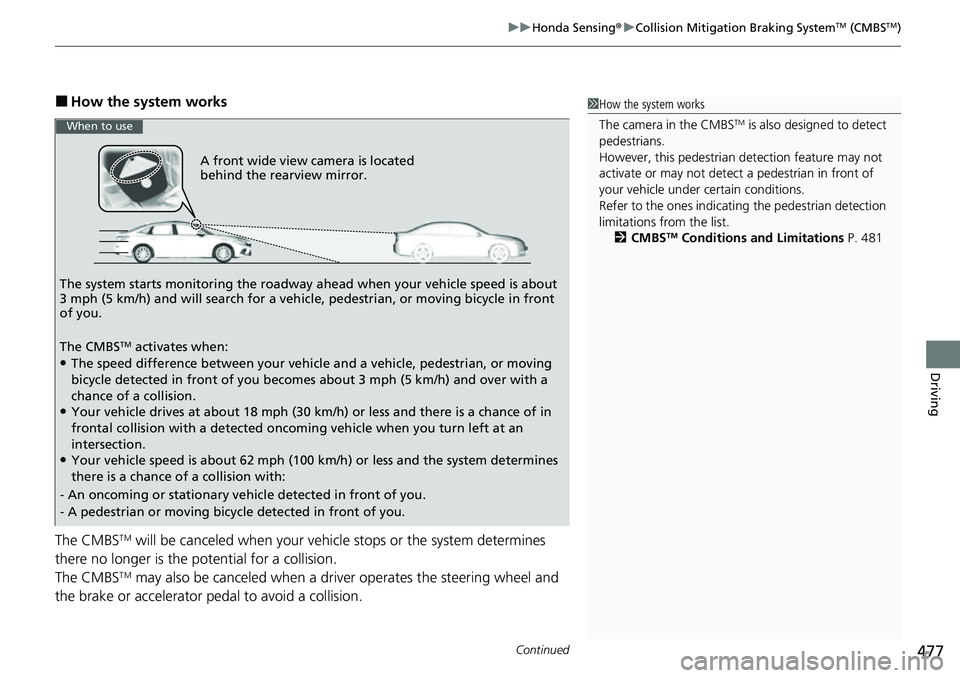
■How the system works
The CMBS
TM will be canceled when your vehicle stops or the system determines
there no longer is the potential for a collision.
The CMBS
TM may also be canceled when a dr iver operates the steering wheel and
the brake or accelerator pe dal to avoid a collision.
1How the system works
The camera in the CMBS
TM is also designed to detect
pedestrians.
However, this pedestrian detection feature may not
activate or may not detect a pedestrian in front of
your vehicle under certain conditions.
Refer to the ones indicating the pedestrian detection
limitations from the list. 2 CMBS
TM Conditions and Limitations P. 481
A front wide view camera is located
behind the rearview mirror.
The system starts monitoring the roadway ah ead when your vehicle speed is about
3 mph (5 km/h) and will search for a vehicl e, pedestrian, or moving bicycle in front
of you.
The CMBS
TM activates when:●The speed difference between your vehicle and a vehicle, pedestrian, or moving
bicycle detected in front of you becomes about 3 mph (5 km/h) and over with a
chance of a collision.
●Your vehicle drives at about 18 mph (30 km/h) or less and there is a chance of in
frontal collision with a detected oncoming vehicle when you turn left at an
intersection.
●Your vehicle speed is about 62 mph (100 km/h) or less and the system determines
there is a chance of a collision with:
- An oncoming or stationary vehicle detected in front of you.
- A pedestrian or moving bicycle detected in front of you.
When to use
Page 481 of 700
uuHonda Sensing ®u Collision Mitigation Braking SystemTM (CMBSTM)
480
Driving
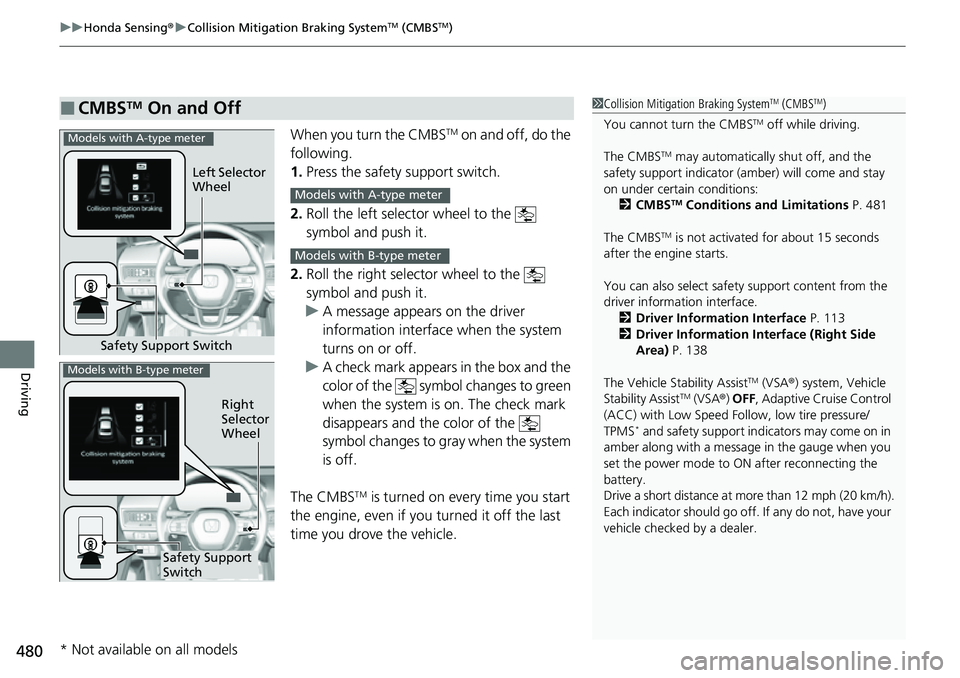
When you turn the CMBSTM on and off, do the
following.
1. Press the safety support switch.
2. Roll the left selector wheel to the
symbol and push it.
2. Roll the right selector wheel to the
symbol and push it.
u A message appears on the driver
information interface when the system
turns on or off.
u A check mark appears in the box and the
color of the symbol changes to green
when the system is on. The check mark
disappears and the color of the
symbol changes to gray when the system
is off.
The CMBS
TM is turned on every time you start
the engine, even if you turned it off the last
time you drove the vehicle.
■CMBSTM On and Off1 Collision Mitigation Braking SystemTM (CMBSTM)
You cannot turn the CMBS
TM off while driving.
The CMBS
TM may automatically shut off, and the
safety support indicator (amb er) will come and stay
on under certain conditions: 2 CMBS
TM Conditions and Limitations P. 481
The CMBS
TM is not activated for about 15 seconds
after the engine starts.
You can also sele ct safety support content from the
driver information interface.
2 Driver Information Interface P. 113
2 Driver Information Interface (Right Side
Area) P. 138
The Vehicle Stability Assist
TM (VSA ®) system, Vehicle
Stability AssistTM (VSA ®) OFF , Adaptive Cruise Control
(ACC) with Low Speed Follow, low tire pressure/
TPMS
* and safety support indicators may come on in
amber along with a message in the gauge when you
set the power mode to ON after reconnecting the
battery.
Drive a short distance at more than 12 mph (20 km/h).
Each indicator should go off. If any do not, have your
vehicle checked by a dealer.
Safety Support Switch Left Selector
Wheel
Models with A-type meter
Models with A-type meter
Models with B-type meter
Right
Selector
Wheel
Safety Support
Switch
Models with B-type meter
* Not available on all models
Page 483 of 700
482
uuHonda Sensing ®u Collision Mitigation Braking SystemTM (CMBSTM)
Driving
■Vehicle conditions
• The vehicle is tilted due to heavy load in the trunk or rear seats.
• Tire chains are installed.
• Driving at night or in a dark place (e .g., a tunnel) with the headlights off.
• The front of the camera is covered by dirt, fog, rain, mud, wet snow, seals,
accessories, stickers, or film on the windshield.
• There is residue on the windshie ld from the windshield wipers.
• When lighting is weak due to dirt covering the headlight lenses, or there is poor
visibility in a dark place due to th e headlights being improperly adjusted.
• An abnormal tire or wheel condition (incorre ct sizes, varied sizes or construction,
improperly inflated, comp act spare tire, etc.).
• The suspension has been modified.
Page 485 of 700
484
uuHonda Sensing ®u Collision Mitigation Braking SystemTM (CMBSTM)
Driving
■Examples of other limitations on detection or system operation
• When the vehicle ahead of you is a motorcycle, wheelch air, or other specially-
shaped vehicle.
• When a vehicle is lower in the rear than the front such as trucks that are not
carrying a load, or a narrow vehicle.
• When the vehicle ahead of you, oncoming vehicle, pedestrian or moving bicycle
is not in front of the vehicle.
• The speed difference between your vehi cle and the vehicle ahead of you,
oncoming vehicle, pedestrian or moving bicycle is significantly large.
• When the vehicle or moving bicycle in front of you slows suddenly.
• When the driver operates the brake pedal and steering wheel to avoid a collision.
• When you approach the vehicle ahead of you, oncoming vehicle, pedestrians or
moving bicycles while accelerating rapidl y or operating the steering wheel (except
when turning left at an intersection etc.)
*1
• When the moving bicycle is a child-sized bicycle, folding bicycle, three-wheeler or
other bicycle with small tires, or a long bicycle like a tandem bicycle.
• When the camera cannot correctly identify the shape of the vehicle ahead of you,
oncoming vehicle, pedestrian, or moving bicycle.
• When the minimum ground clearance of a vehicle ahead of you is extremely high.
*1 : When there is a possibility of a frontal collision with the oncoming vehicle while turning left, the CMBSTM
is activated. However, it may not be acti vated if you suddenly turn the steering wheel.
Page 492 of 700
Continued491
uuHonda Sensing ®u Low Speed Braking Control*
Driving
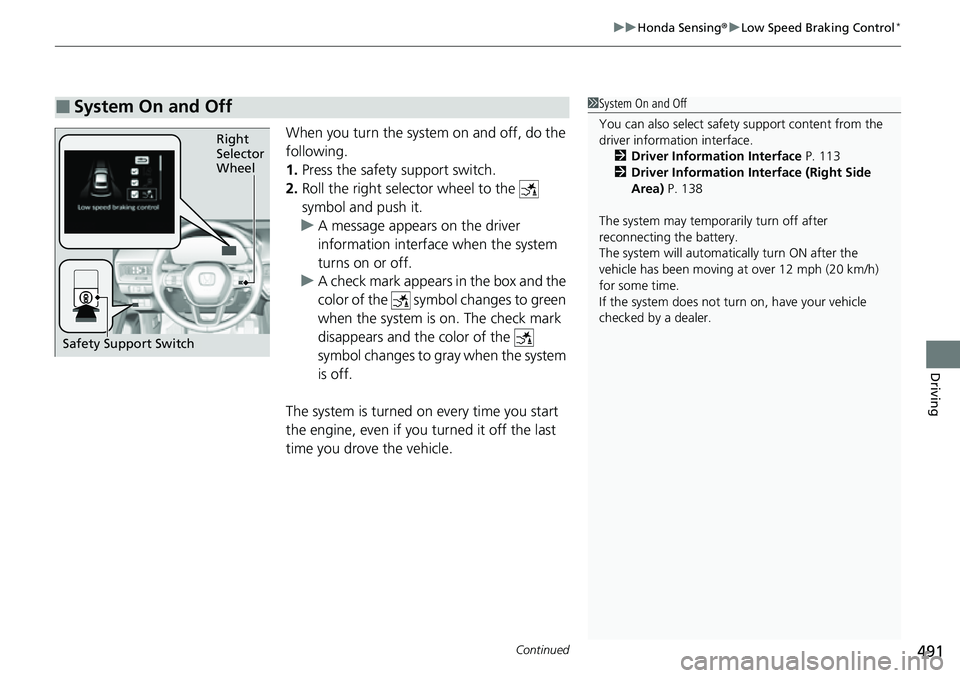
When you turn the system on and off, do the
following.
1. Press the safety support switch.
2. Roll the right selector wheel to the
symbol and push it.
u A message appears on the driver
information interface when the system
turns on or off.
u A check mark appears in the box and the
color of the symbol changes to green
when the system is on. The check mark
disappears and the color of the
symbol changes to gray when the system
is off.
The system is turned on every time you start
the engine, even if you turned it off the last
time you drove the vehicle.
■System On and Off 1 System On and Off
You can also sele ct safety support content from the
driver information interface.
2 Driver Information Interface P. 113
2 Driver Information Interface (Right Side
Area) P. 138
The system may temporarily turn off after
reconnecting the battery.
The system will automatically turn ON after the
vehicle has been moving at over 12 mph (20 km/h)
for some time.
If the system does not turn on, have your vehicle
checked by a dealer.
Right
Selector
Wheel
Safety Support Switch
Page 493 of 700
uuHonda Sensing ®u Low Speed Braking Control*
492
Driving
Conditions for assistive driving power suppression.
• When the accelerator is no longer depressed.
• When the accelerator is depressed for approximately four seconds.
• When the brake pedal is depressed.
• When the steering wheel is tu rned and a collision avoided.
Conditions for assistive braking cancellation.
• A certain amount of time ha s passed since activation.
The system may not operate correct ly in the following conditions:
■Examples of obstacles the sonar sensor cannot detect
• Obstacles that do not refl ect sound waves well, such as people, snow, cloth,
sponges, etc.
• Thin obstacles such as fences, bicycles, sign posts, etc.
• Short or small obstacles.
• Obstacles immediately in front of the bumper.
• Moving objects or obstacles that suddenly enter the road.
• Obstacles that are not pe rpendicular to the ground.
■Conditions for Cancellation
■Low Speed Braking Control System Conditions and Limitations
1Conditions for Cancellation
After Low Speed Braking Control has activated once,
it will not activate again for the same obstacle.
They can be activated again after driving for a certain
distance after last activation.
Low Speed Braking Control ac tivates separately when
moving forward and reversing. (For example, if it
activates when moving forwar d, it can be activated
again immediately if reversing.)
However, if assistive braking has been activated, in
order to activate assistiv e driving power suppression
again, it is necessary to drive for a certain distance to
reset the system.