lock HONDA CIVIC 2022 Owner's Manual
[x] Cancel search | Manufacturer: HONDA, Model Year: 2022, Model line: CIVIC, Model: HONDA CIVIC 2022Pages: 700, PDF Size: 13.98 MB
Page 89 of 700
88
Instrument Panel
Indicators
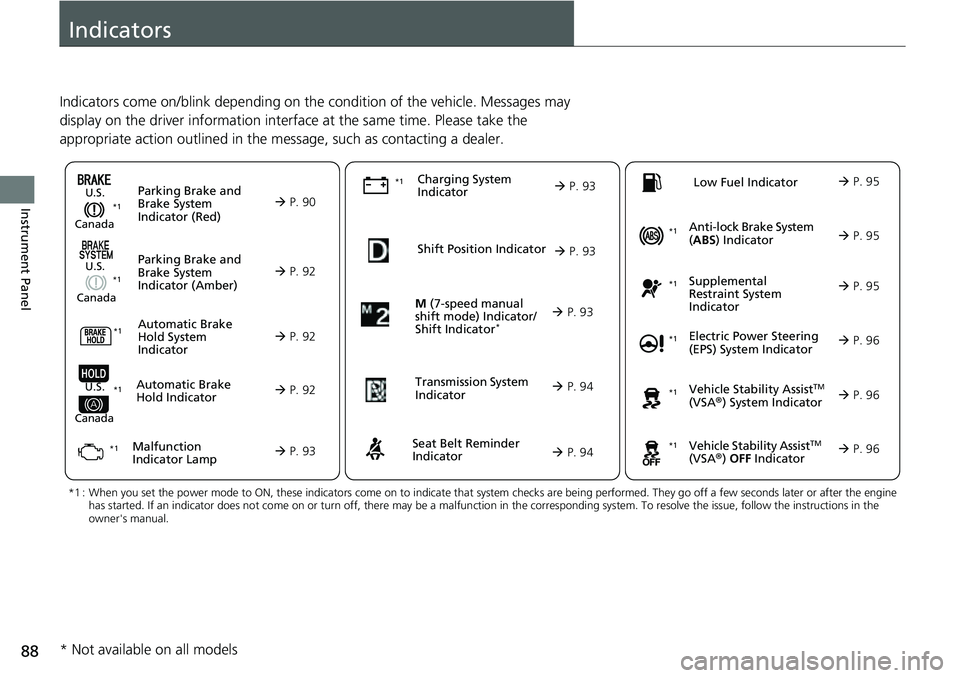
Indicators come on/blink depending on the condition of the vehicle. Messages may
display on the driver information interface at the same time. Please take the
appropriate action outlined in the message, such as contacting a dealer.
M (7-speed manual
shift mode) Indicator/
Shift Indicator
* P. 93
Parking Brake and
Brake System
Indicator (Red)
Parking Brake and
Brake System
Indicator (Amber)U.S.
Canada
U.S.
Canada
Automatic Brake
Hold System
Indicator
Automatic Brake
Hold IndicatorU.S.
Canada
*1 : When you set the power mode to ON, these indicators come on to indicate that system checks are being performed. They go off a few seconds later or after the engine
has started. If an indicator does not come on or turn off, ther e may be a malfunction in the corresponding system. To resolve the issue, follow the instructions in the
owner's manual.
P. 90*1
Malfunction
Indicator Lamp Charging System
IndicatorSeat Belt Reminder
Indicator
Low Fuel Indicator
P. 92
P. 92
P.
92
P. 93
P. 93*1
*1 *1
Shift Position Indicator
P. 93
Trans
mission System
Indicat
or
P. 94
P. 94
P. 95
*1
*1
Anti-lock Brake System
(ABS ) Indicator
Vehicle Stability AssistTM
(VSA®) System Indicator
Vehicle Stability Assist
TM
(VSA®) OFF Indicator
Supplemental
Restraint System
Indicator
Electric Power Steering
(EPS) System Indicator
*1
P. 95
P. 95
P. 96*1
*1
*1
P. 96
*1 P. 96
* Not available on all models
Page 96 of 700

95
uuIndicators u
Continued
Instrument Panel
IndicatorNameOn/BlinkingExplanation
Low Fuel Indicator
●Comes on when the fuel reserve is running
low (approximately 1.8 U.S. gal/7.0 Liter
left).●Comes on - Refuel your vehicle as soon as possible.
●Blinks if there is a problem with the fuel
gauge.●Blinks - Have your vehicle checked by a dealer.
Anti-lock Brake
System ( ABS)
Indicator
●Comes on if there is a problem with the
ABS.●Stays on constantly - Have your vehicle checked
by a dealer. With this indicator on, your vehicle still
has normal braking ability but no anti-lock
function.
2 Anti-lock Brake System (ABS) P. 560
Supplemental
Restraint System
Indicator
●Comes on if a problem with any of the
following is detected:
-Supplemental restraint system
- Side airbag system
- Side curtain airbag system
- Seat belt tensioner●Stays on constantly - Have your vehicle checked
by a dealer.
Page 108 of 700
107
uuIndicators u
Continued
Instrument Panel
IndicatorNameOn/BlinkingExplanation
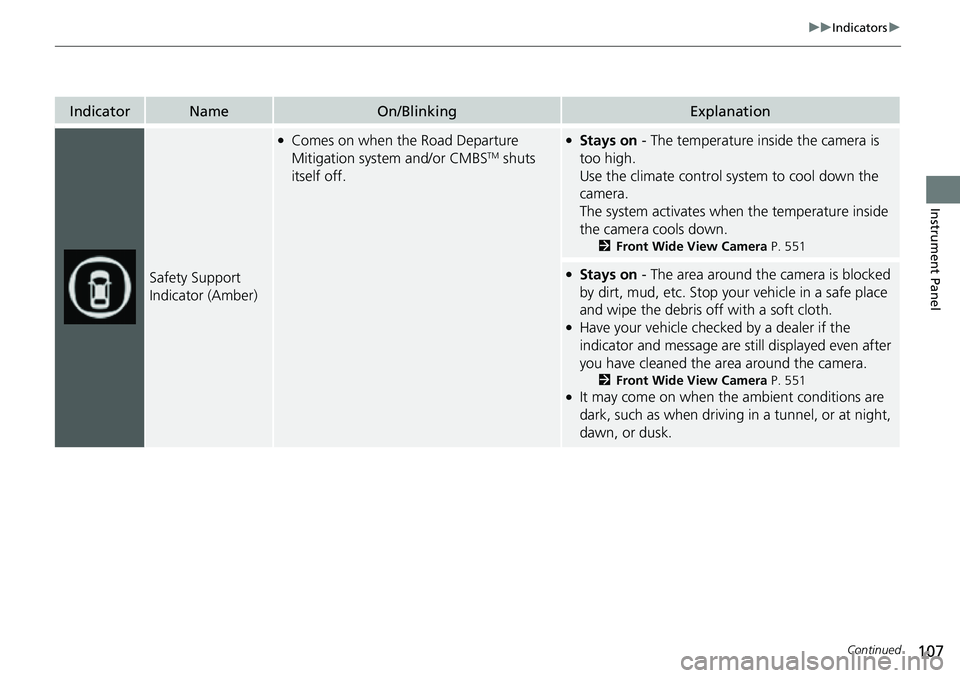
Safety Support
Indicator (Amber)
●Comes on when the Road Departure
Mitigation system and/or CMBSTM shuts
itself off.
●Stays on - The temperature inside the camera is
too high.
Use the climate control system to cool down the
camera.
The system activates when the temperature inside
the camera cools down.
2 Front Wide View Camera P. 551
●Stays on - The area around the camera is blocked
by dirt, mud, etc. Stop your vehicle in a safe place
and wipe the debris off with a soft cloth.
●Have your vehicle checked by a dealer if the
indicator and message are still displayed even after
you have cleaned the area around the camera.
2 Front Wide View Camera P. 551●It may come on when the ambient conditions are
dark, such as when driving in a tunnel, or at night,
dawn, or dusk.
Page 113 of 700
uuGauges and Driver Information Interface uGauges
112
Instrument Panel
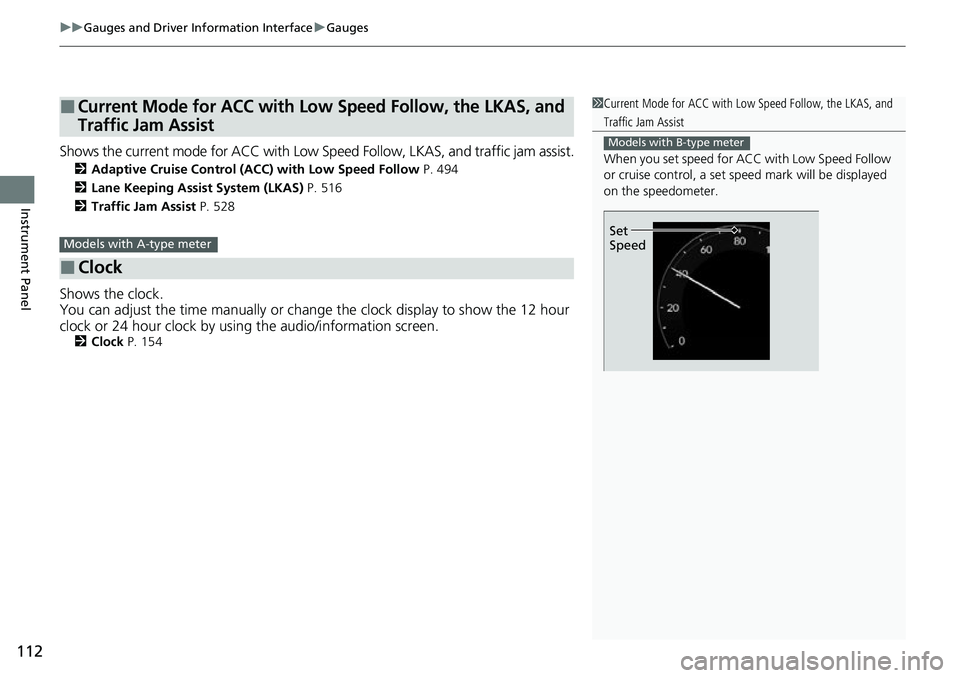
Shows the current mode for ACC with Low Sp eed Follow, LKAS, and traffic jam assist.
2Adaptive Cruise Control (ACC) with Low Speed Follow P. 494
2 Lane Keeping Assist System (LKAS) P. 516
2 Traffic Jam Assist P. 528
Shows the clock.
You can adjust the time manually or change the clock display to show the 12 hour
clock or 24 hour clock by using the audio/information screen.
2Clock P. 154
■Current Mode for ACC with Low Speed Follow, the LKAS, and
Traffic Jam Assist
■Clock
1Current Mode for ACC with Lo w Speed Follow, the LKAS, and
Traffic Jam Assist
When you set speed for ACC with Low Speed Follow
or cruise control, a set speed mark will be displayed
on the speedometer.
Models with B-type meter
Set
SpeedModels with A-type meter
Page 131 of 700
130
uuGauges and Driver Information Interface uDriver Information Interface
Instrument Panel
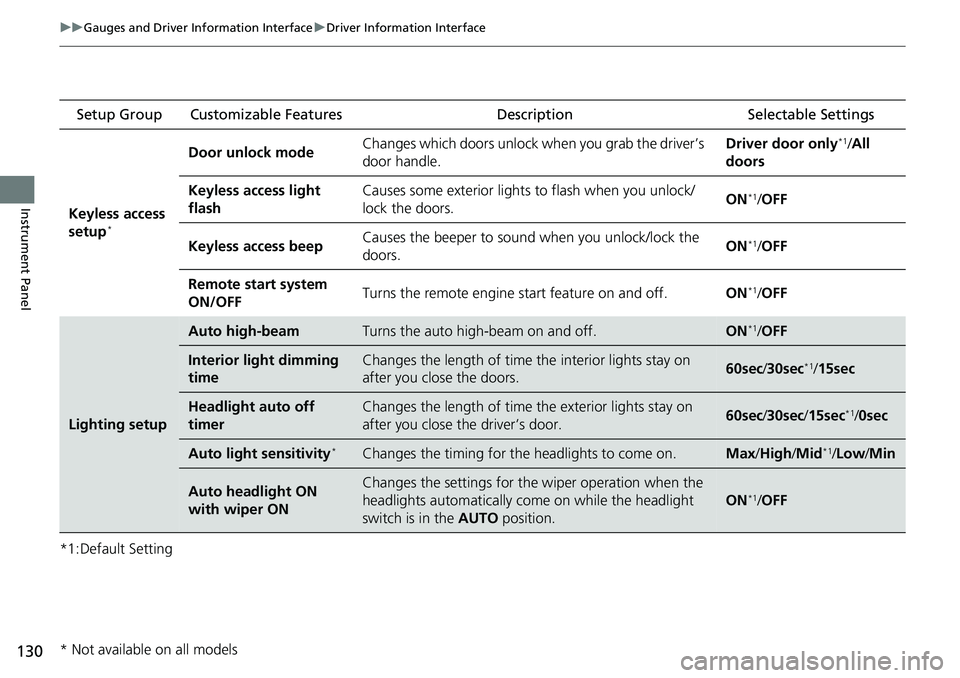
*1:Default Setting Setup Group Customizable Features
Description Selectable Settings
Keyless access
setup
*
Door unlock mode Changes which doors unlock when you grab the driver’s
door handle. Driver door only*1/
All
doors
Keyless access light
flash Causes some exterior lights to flash when you unlock/
lock the doors.
ON
*1/
OFF
Keyless access beep Causes the beeper to sound when you unlock/lock the
doors.
ON
*1/
OFF
Remote start system
ON/OFF Turns the remote engine start feature on and off.
ON
*1/OFF
Lighting setup
Auto high-beamTurns the auto high-beam on and off.ON*1/OFF
Interior light dimming
timeChanges the length of time the interior lights stay on
after you close the doors.60sec /30sec*1/15sec
Headlight auto off
timerChanges the length of time the exterior lights stay on
after you close the driver’s door.60sec /30sec /15sec*1/0sec
Auto light sensitivity*Changes the timing for the headlights to come on.Max/High/ Mid*1/Low /Min
Auto headlight ON
with wiper ONChanges the settings for th e wiper operation when the
headlights automatically come on while the headlight
switch is in the AUTO position.
ON*1/OFF
* Not available on all models
Page 132 of 700
131
uuGauges and Driver Information Interface uDriver Information Interface
Continued
Instrument Panel
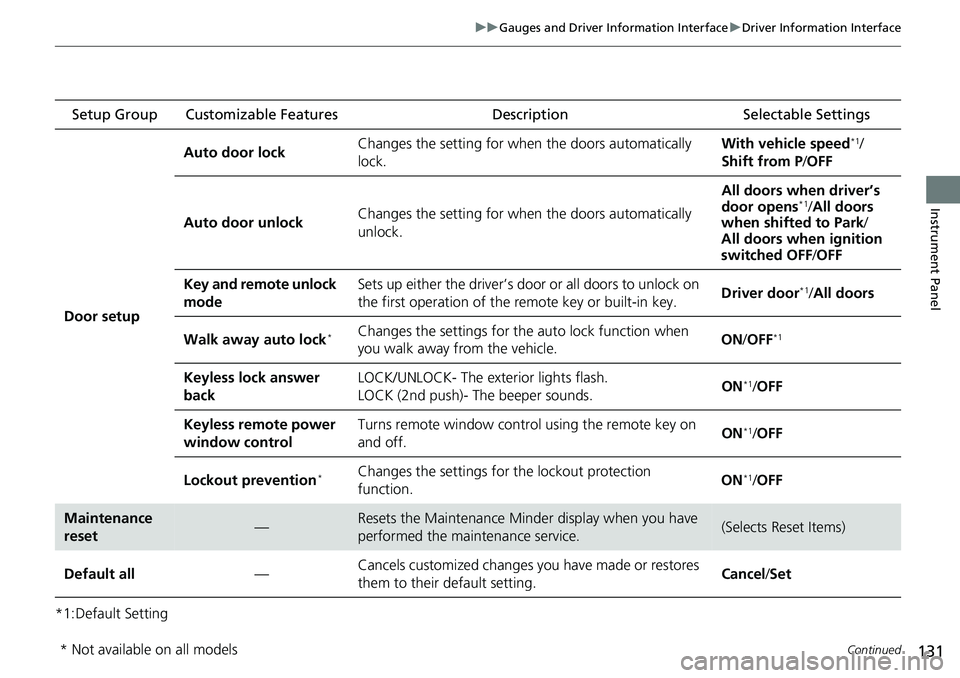
*1:Default Setting Setup Group Customizable Features
Description Selectable Settings
Door setup Auto door lock
Changes the setting for when the doors automatically
lock. With vehicle speed
*1/
Shift from P /OFF
Auto door unlock Changes the setting for when the doors automatically
unlock. All doors when driver’s
door opens
*1/
All doors
when shifted to Park /
All doors when ignition
switched OFF /OFF
Key and remote unlock
mode Sets up either the driver’s door or all doors to unlock on
the first operation of the remote key or built-in key.
Driver door
*1/
All doors
Walk away auto lock
*Changes the settings for the auto lock function when
you walk away from the vehicle. ON
/OFF*1
Keyless lock answer
back LOCK/UNLOCK- The exterior lights flash.
LOCK (2nd push)- The beeper sounds.
ON*1/
OFF
Keyless remote power
window control Turns remote window contro
l using the remote key on
and off. ON
*1/
OFF
Lockout prevention
*Changes the settings for the lockout protection
function. ON*1/
OFF
Maintenance
reset—Resets the Maintenance Minder display when you have
performed the maintenance service.(Selects Reset Items)
Default all —Cancels customized changes you have made or restores
them to their default setting. Cancel
/Set
* Not available on all models
Page 136 of 700
135
uuGauges and Driver Information Interface uDriver Information Interface (Left Side Area)
Continued
Instrument Panel
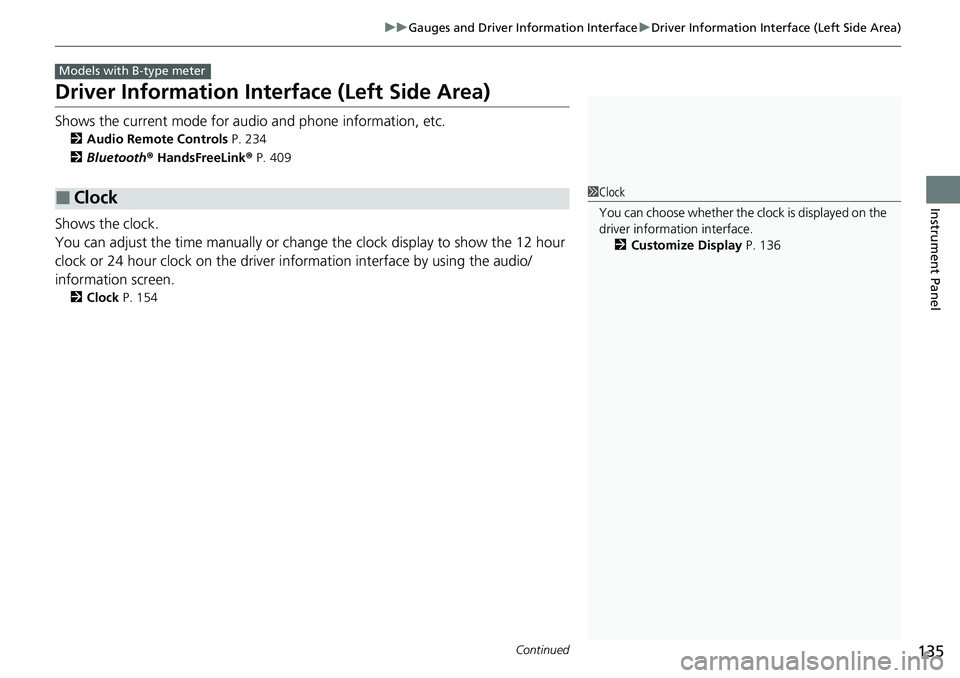
Driver Information Inte rface (Left Side Area)
Shows the current mode for audio and phone information, etc.
2Audio Remote Controls P. 234
2 Bluetooth ® HandsFreeLink ® P. 409
Shows the clock.
You can adjust the time manually or change the clock display to show the 12 hour
clock or 24 hour clock on the driver information interface by using the audio/
information screen.
2 Clock P. 154
■Clock
Models with B-type meter
1Clock
You can choose whether the clock is displayed on the
driver information interface.
2 Customize Display P. 136
Page 138 of 700
137
uuGauges and Driver Information Interface uDriver Information Interface (Left Side Area)
Instrument Panel
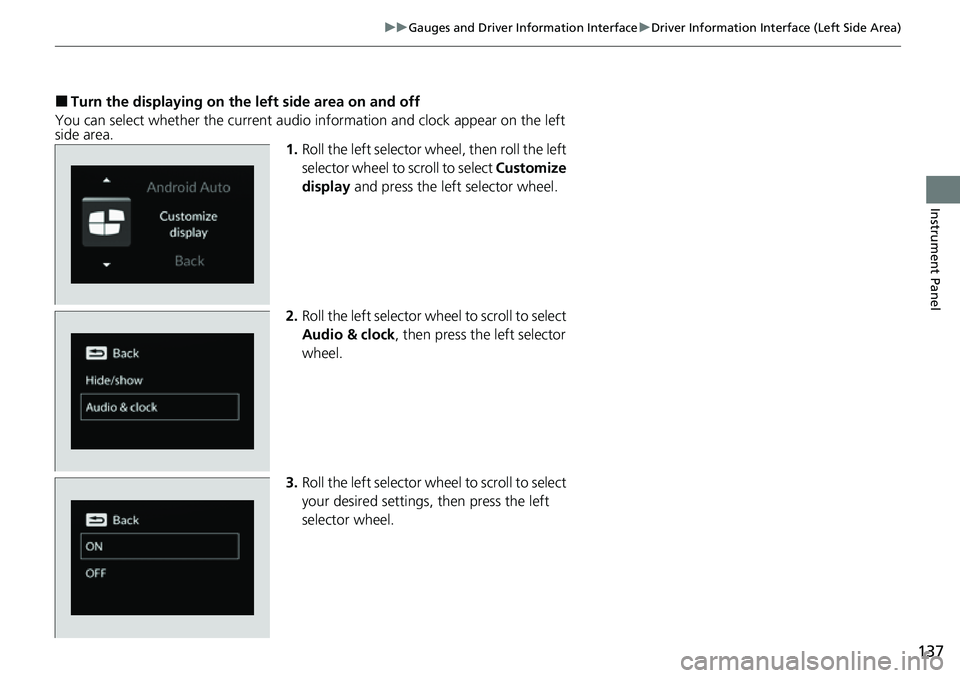
■Turn the displaying on the left side area on and off
You can select whether the current audio information and clock appear on the left
side area. 1.Roll the left selector wheel, then roll the left
selector wheel to scroll to select Customize
display and press the left selector wheel.
2. Roll the left selector wheel to scroll to select
Audio & clock, then press the left selector
wheel.
3. Roll the left selector wheel to scroll to select
your desired settings, then press the left
selector wheel.
Page 154 of 700
153
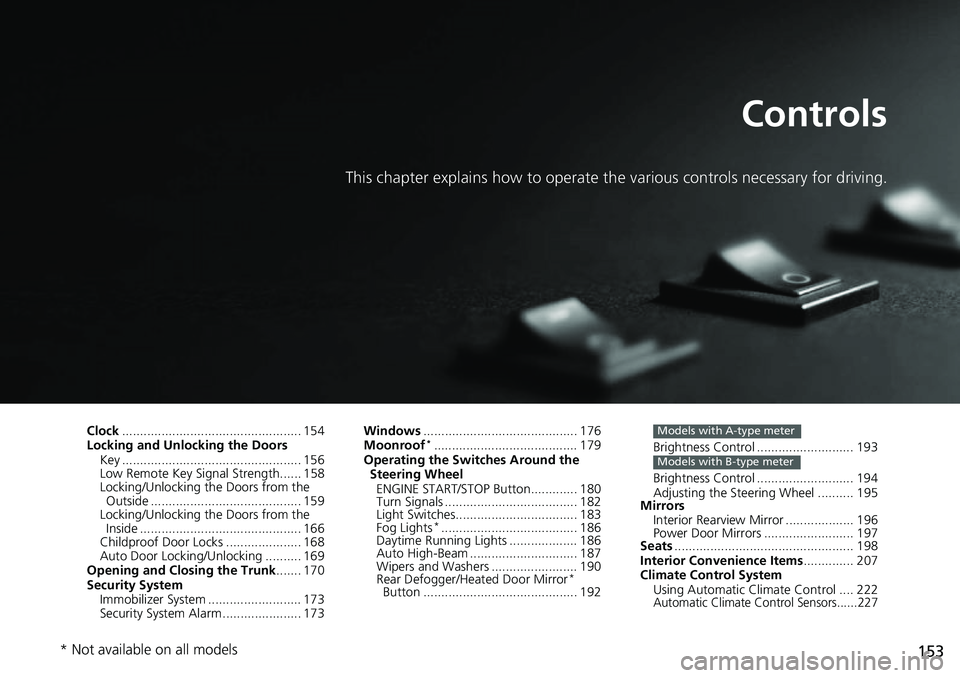
Controls
This chapter explains how to operate the various controls necessary for driving.
Clock.................................................. 154
Locking and Unlocking the Doors Key .................................................. 156
Low Remote Key Signal Strength...... 158
Locking/Unlocking the Doors from the Outside .......................................... 159
Locking/Unlocking the Doors from the
Inside ............................................. 166
Childproof Door Locks ..................... 168
Auto Door Locking/Unlocking .......... 169
Opening and Closing the Trunk ....... 170
Security System Immobilizer System .......................... 173
Security System Alarm ...................... 173 Windows
........................................... 176
Moonroof*........................................ 179
Operating the Switches Around the Steering Wheel ENGINE START/STOP Button............. 180
Turn Signals ..................................... 182
Light Switches.................................. 183
Fog Lights
*...................................... 186
Daytime Running Lights ................... 186
Auto High-Beam .............................. 187
Wipers and Washers ........................ 190
Rear Defogger/Heat ed Door Mirror
*
Button ........................................... 192 Brightness Control ........................... 193
Brightness Control ........................... 194
Adjusting the Steering Wheel .......... 195
Mirrors
Interior Rearview Mirror ................... 196
Power Door Mirrors ......................... 197
Seats .................................................. 198
Interior Convenience Items .............. 207
Climate Control System Using Automatic Climate Control .... 222
Automatic Climate Control Sensors......227
Models with A-type meter
Models with B-type meter
* Not available on all models
Page 155 of 700
154
Controls
Clock
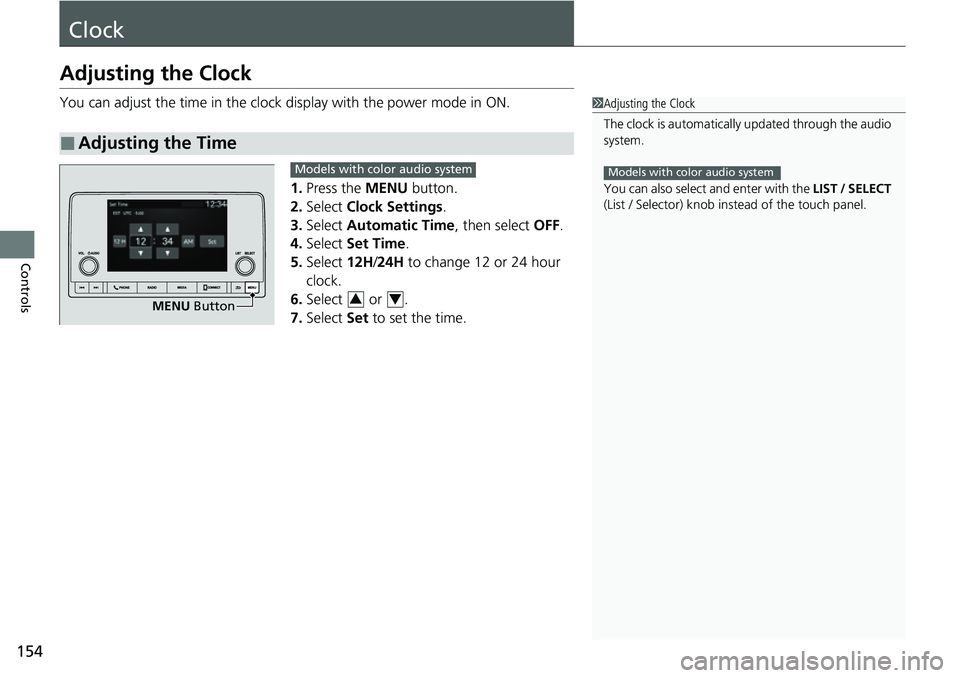
Adjusting the Clock
You can adjust the time in the clock display with the power mode in ON.
1. Press the MENU button.
2. Select Clock Settings .
3. Select Automatic Time , then select OFF.
4. Select Set Time.
5. Select 12H/24H to change 12 or 24 hour
clock.
6. Select or .
7. Select Set to set the time.
■Adjusting the Time
1Adjusting the Clock
The clock is automatically updated through the audio
system.
You can also select and enter with the LIST / SELECT
(List / Selector) knob in stead of the touch panel.
Models with color audio system
MENU Button
Models with color audio system
34