instrument panel HONDA CIVIC 2022 Service Manual
[x] Cancel search | Manufacturer: HONDA, Model Year: 2022, Model line: CIVIC, Model: HONDA CIVIC 2022Pages: 700, PDF Size: 13.98 MB
Page 123 of 700
uuGauges and Driver Information Interface uDriver Information Interface
122
Instrument Panel
Appears when any of the seat belts are latched or unlatched.
Shows the remaining oil life and Maintenance Minder
TM.
2 Maintenance MinderTM P. 585
Indicates the state of the Road Departure Mitigation system, CMBSTM, and blind spot
information system* such as On, Off, or Failure, by color and letters.
The following colors indica te the state of any of the above mentioned systems:
• Green: The system is on.
• Gray: The system is off.
• Amber: There is a probl em with the system.
■Seat Belts
■Maintenance
■Safety Support1Safety Support
If a system is indicated by the color amber, have your
vehicle checked by a dealer immediately.
To turn on or off each system, first rotate the left
selector wheel to switch displays. From the next
display you can select which system to turn on or off. 2 Road Departure Mitigation system On and
Off P. 540
2 Blind Spot Information System On and Off
P. 471
2 CMBS
TM On and Off P. 480
You can also confirm the st ate of the each function
by the color of the sa fety support indicator.
2 Safety Support Indicator (Amber) P. 106
2 Safety Support Indicator (Green/Gray)
P. 108
* Not available on all models
Page 124 of 700
123
uuGauges and Driver Information Interface uDriver Information Interface
Continued
Instrument Panel
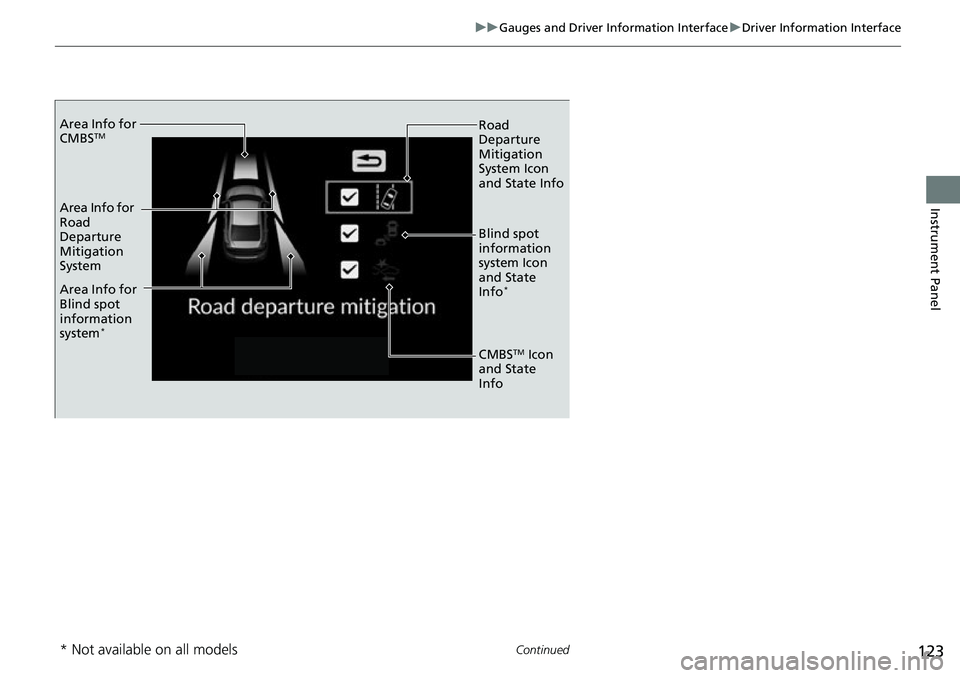
Area Info for
CMBSTM
Area Info for
Road
Departure
Mitigation
System
Area Info for
Blind spot
information
system
*
Road
Departure
Mitigation
System Icon
and State Info
Blind spot
information
system Icon
and State
Info
*
CMBSTM Icon
and State
Info
* Not available on all models
Page 125 of 700
uuGauges and Driver Information Interface uDriver Information Interface
124
Instrument Panel
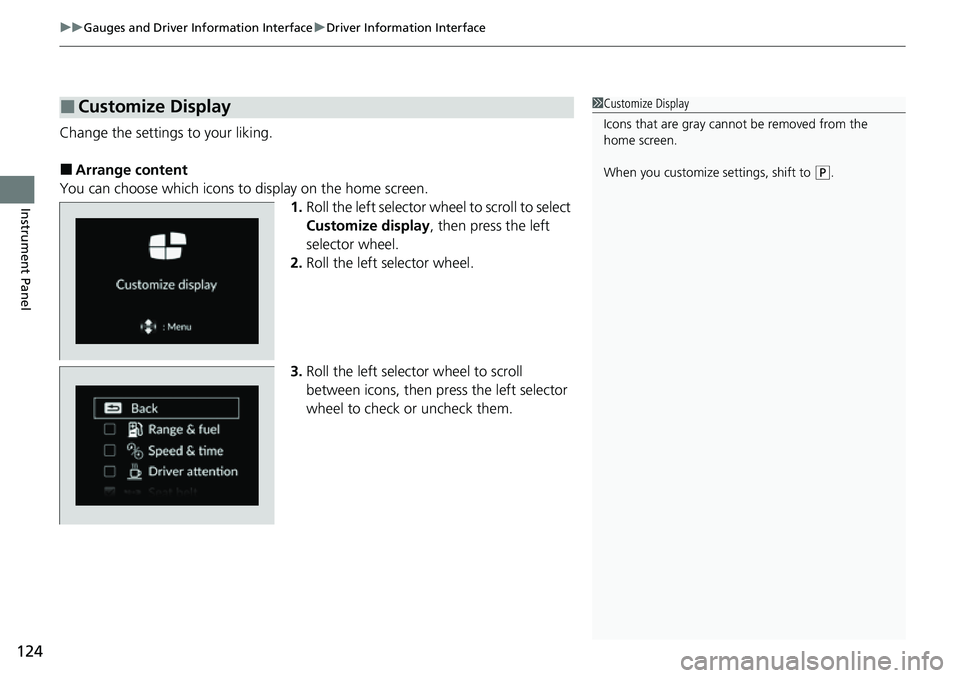
Change the settings to your liking.
■Arrange content
You can choose which icons to display on the home screen. 1.Roll the left selector wheel to scroll to select
Customize display , then press the left
selector wheel.
2. Roll the left selector wheel.
3. Roll the left selector wheel to scroll
between icons, then press the left selector
wheel to check or uncheck them.
■Customize Display1Customize Display
Icons that are gray cannot be removed from the
home screen.
When you customize settings, shift to
(P.
Page 126 of 700
Continued125
uuGauges and Driver Information Interface uDriver Information Interface
Instrument Panel
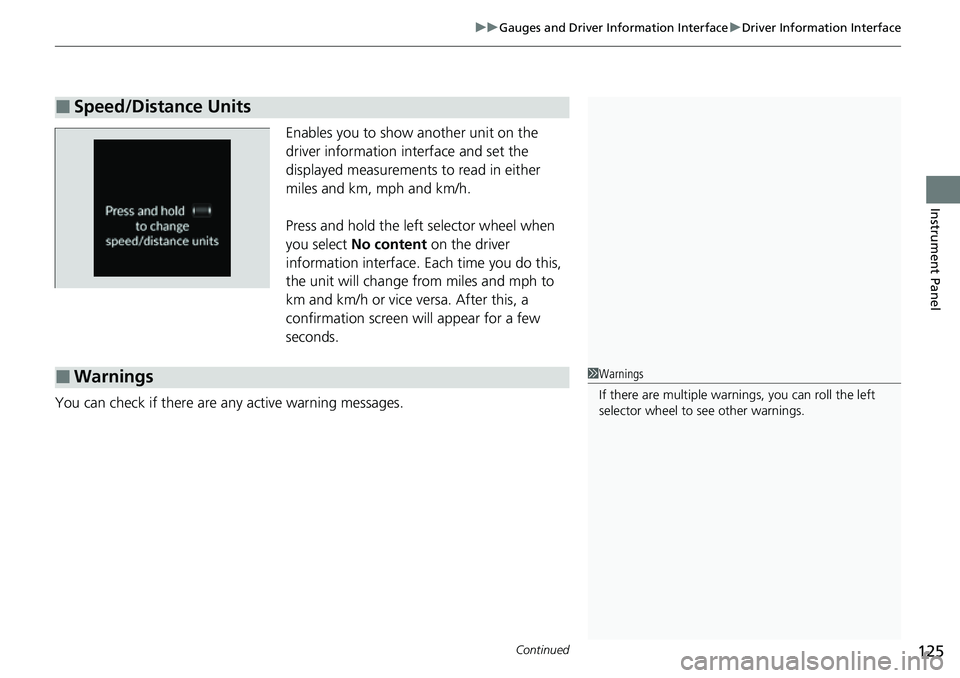
Enables you to show another unit on the
driver information interface and set the
displayed measurements to read in either
miles and km, mph and km/h.
Press and hold the left selector wheel when
you select No content on the driver
information interface. Each time you do this,
the unit will change from miles and mph to
km and km/h or vice versa. After this, a
confirmation screen will appear for a few
seconds.
You can check if there are any active warning messages.
■Speed/Distance Units
■Warnings1 Warnings
If there are multiple warnings, you can roll the left
selector wheel to see other warnings.
Page 127 of 700
uuGauges and Driver Information Interface uDriver Information Interface
126
Instrument Panel
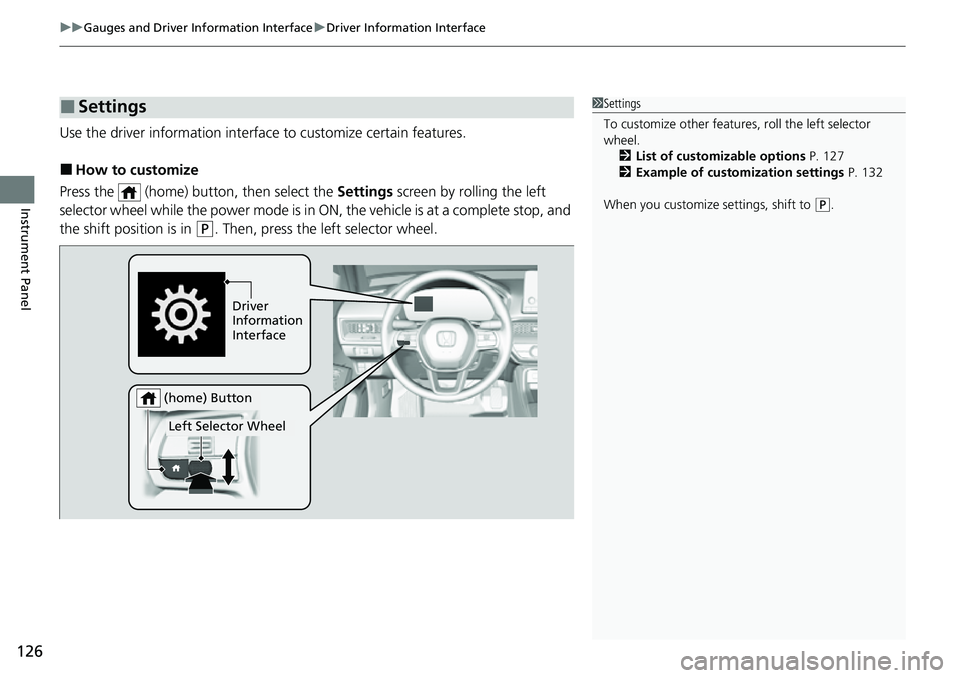
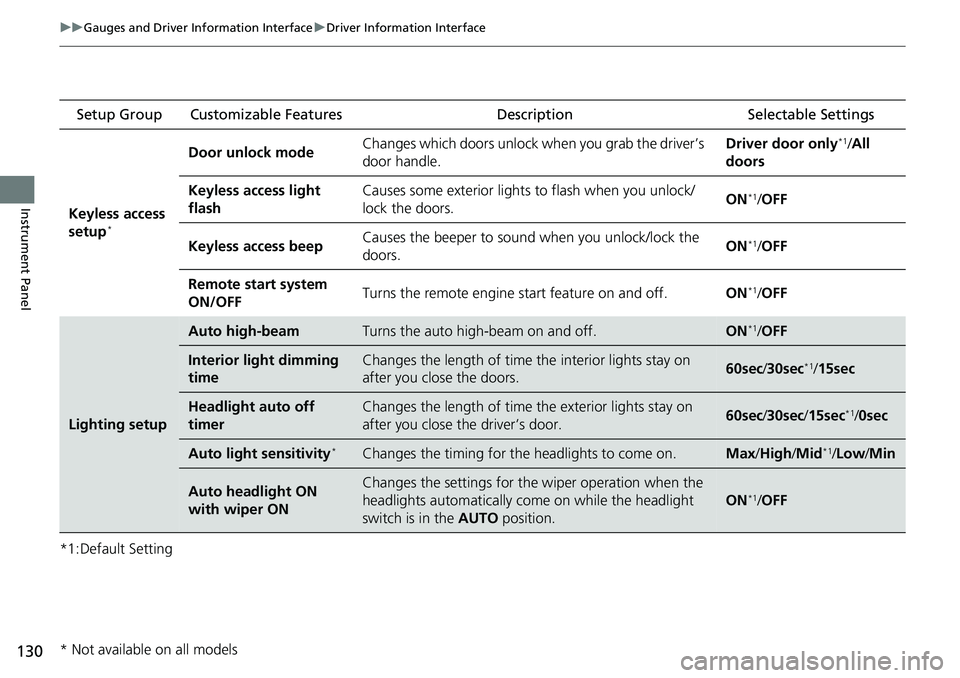
Use the driver information interfac e to customize certain features.
■How to customize
Press the (home) button, then select the Settings screen by rolling the left
selector wheel while the power mode is in ON, the vehicle is at a complete stop, and
the shift position is in
(P. Then, press the left selector wheel.
■Settings1 Settings
To customize other features , roll the left selector
wheel.
2 List of customizable options P. 127
2 Example of customization settings P. 132
When you customize settings, shift to
( P.
Driver
Information
Interface
Left Selector Wheel
(home) Button
Page 128 of 700
127
uuGauges and Driver Information Interface uDriver Information Interface
Continued
Instrument Panel
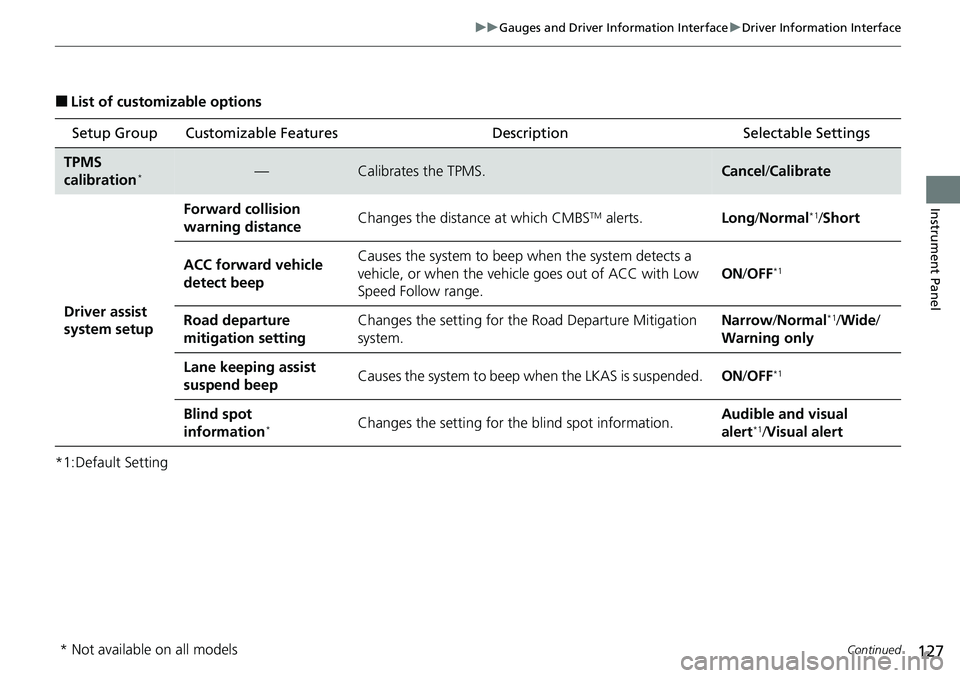
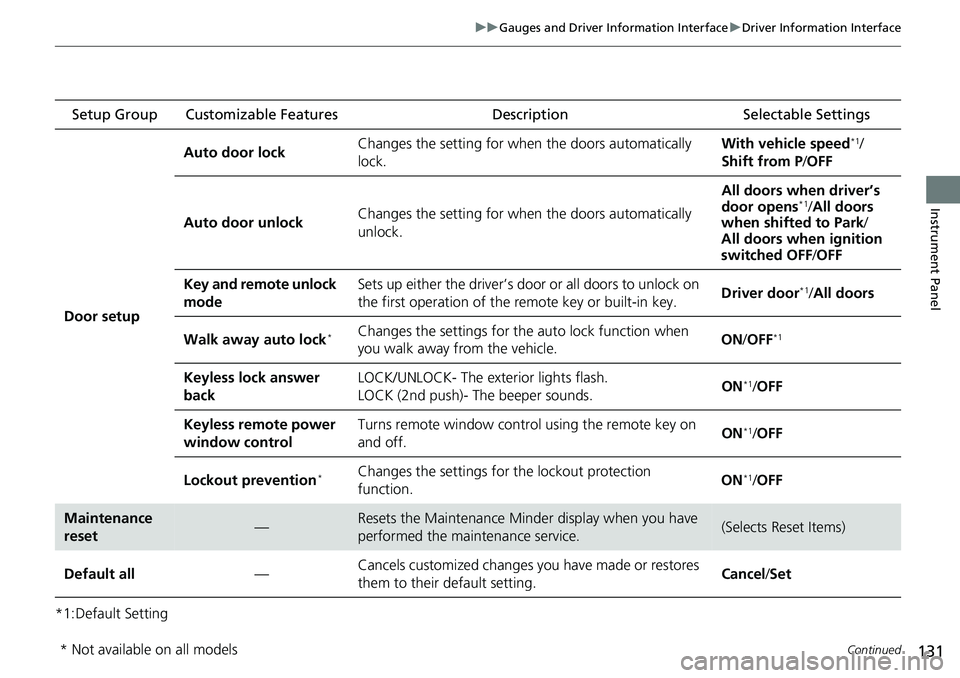
■List of customizable options
*1:Default Setting Setup Group Customizable Features
Description Selectable Settings
TPMS
calibration*—Calibrates the TPMS.Cancel/Calibrate
Driver assist
system setup
Forward collision
warning distanceChanges the distance at which CMBSTM alerts.Long /Normal*1/Short
ACC forward vehicle
detect beepCauses the system to beep when the system detects a
vehicle, or when the vehicl e goes out of ACC with Low
Speed Follow range.
ON /OFF*1
Road departure
mitigation settingChanges the setting for th e Road Departure Mitigation
system.Narrow /Normal*1/Wide /
Warning only
Lane keeping assist
suspend beepCauses the system to beep when the LKAS is suspended.ON/OFF*1
Blind spot
information*Changes the setting for th e blind spot information.Audible and visual
alert*1/ Visual alert
* Not available on all models
Page 129 of 700
128
uuGauges and Driver Information Interface uDriver Information Interface
Instrument Panel
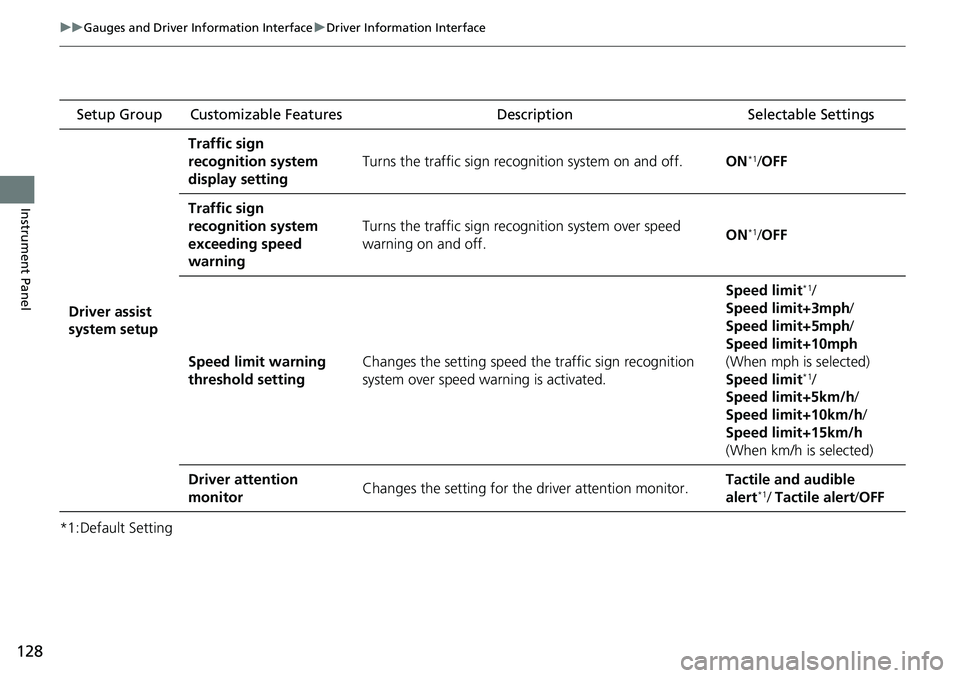
*1:Default Setting Setup Group Customizable Features
Description Selectable Settings
Driver assist
system setup
Traffic sign
recognition system
display setting
Turns the traffic sign recognition system on and off.ON*1/OFF
Traffic sign
recognition system
exceeding speed
warning
Turns the traffic sign recogn ition system over speed
warning on and off.ON*1/ OFF
Speed limit warning
threshold settingChanges the setting speed the traffic sign recognition
system over speed wa rning is activated.
Speed limit*1/
Speed limit+3mph /
Speed limit+5mph /
Speed limit+10mph
(When mph is selected)
Speed limit
*1/
Speed limit+5km/h /
Speed limit+10km/h /
Speed limit+15km/h
(When km/h is selected)
Driver attention
monitorChanges the setting for the driver attention monitor.Tactile and audible
alert*1/ Tactile alert /OFF
Page 130 of 700
129
uuGauges and Driver Information Interface uDriver Information Interface
Continued
Instrument Panel
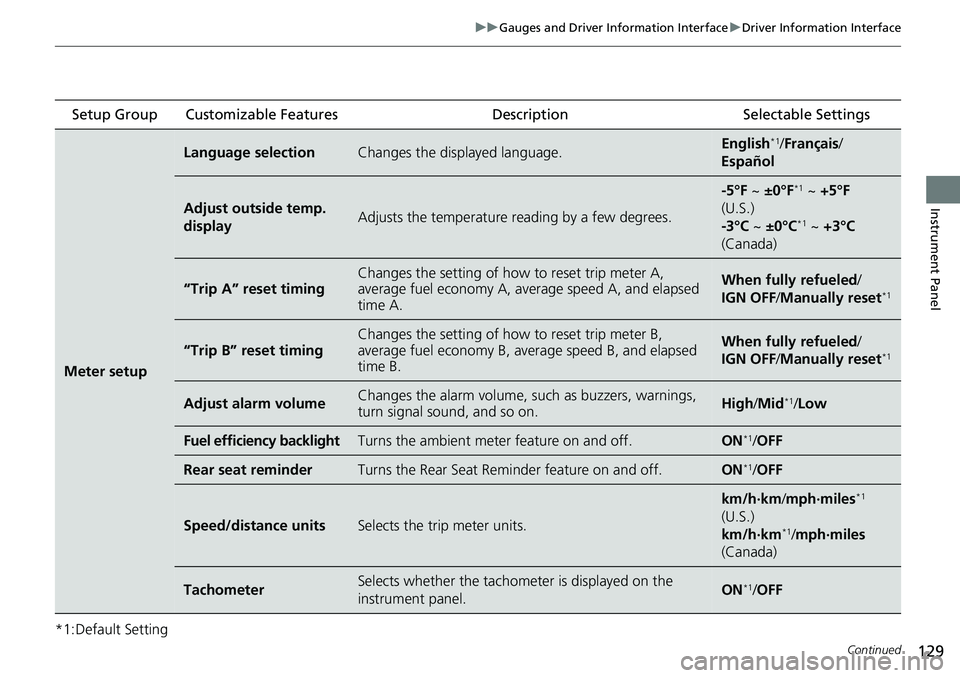
*1:Default Setting Setup Group Customizable Features
Description Selectable Settings
Meter setup
Language selectionChanges the displayed language.English*1/Français /
Español
Adjust outside temp.
displayAdjusts the temperature r eading by a few degrees.
-5°F ~ ±0°F*1 ~ +5°F
(U.S.)
-3°C ~ ±0°C
*1 ~ +3°C
(Canada)
“Trip A” reset timingChanges the setting of how to reset trip meter A,
average fuel economy A, av erage speed A, and elapsed
time A.When fully refueled /
IGN OFF /Manually reset*1
“Trip B” reset timing
Changes the setting of ho w to reset trip meter B,
average fuel economy B, av erage speed B, and elapsed
time B.When fully refueled /
IGN OFF /Manually reset*1
Adjust alarm volumeChanges the alarm volume, su ch as buzzers, warnings,
turn signal sound, and so on.High /Mid*1/Low
Fuel efficiency backlightTurns the ambient meter feature on and off.ON*1/ OFF
Rear seat reminderTurns the Rear Seat Reminder feature on and off.ON*1/OFF
Speed/distance unitsSelects the trip meter units.
km/h∙km /mph∙miles*1
(U.S.)
km/h∙km
*1/ mph∙miles
(Canada)
TachometerSelects whether the tachom eter is displayed on the
instrument panel.ON*1/ OFF
Page 131 of 700
130
uuGauges and Driver Information Interface uDriver Information Interface
Instrument Panel
*1:Default Setting Setup Group Customizable Features
Description Selectable Settings
Keyless access
setup
*
Door unlock mode Changes which doors unlock when you grab the driver’s
door handle. Driver door only*1/
All
doors
Keyless access light
flash Causes some exterior lights to flash when you unlock/
lock the doors.
ON
*1/
OFF
Keyless access beep Causes the beeper to sound when you unlock/lock the
doors.
ON
*1/
OFF
Remote start system
ON/OFF Turns the remote engine start feature on and off.
ON
*1/OFF
Lighting setup
Auto high-beamTurns the auto high-beam on and off.ON*1/OFF
Interior light dimming
timeChanges the length of time the interior lights stay on
after you close the doors.60sec /30sec*1/15sec
Headlight auto off
timerChanges the length of time the exterior lights stay on
after you close the driver’s door.60sec /30sec /15sec*1/0sec
Auto light sensitivity*Changes the timing for the headlights to come on.Max/High/ Mid*1/Low /Min
Auto headlight ON
with wiper ONChanges the settings for th e wiper operation when the
headlights automatically come on while the headlight
switch is in the AUTO position.
ON*1/OFF
* Not available on all models
Page 132 of 700
131
uuGauges and Driver Information Interface uDriver Information Interface
Continued
Instrument Panel
*1:Default Setting Setup Group Customizable Features
Description Selectable Settings
Door setup Auto door lock
Changes the setting for when the doors automatically
lock. With vehicle speed
*1/
Shift from P /OFF
Auto door unlock Changes the setting for when the doors automatically
unlock. All doors when driver’s
door opens
*1/
All doors
when shifted to Park /
All doors when ignition
switched OFF /OFF
Key and remote unlock
mode Sets up either the driver’s door or all doors to unlock on
the first operation of the remote key or built-in key.
Driver door
*1/
All doors
Walk away auto lock
*Changes the settings for the auto lock function when
you walk away from the vehicle. ON
/OFF*1
Keyless lock answer
back LOCK/UNLOCK- The exterior lights flash.
LOCK (2nd push)- The beeper sounds.
ON*1/
OFF
Keyless remote power
window control Turns remote window contro
l using the remote key on
and off. ON
*1/
OFF
Lockout prevention
*Changes the settings for the lockout protection
function. ON*1/
OFF
Maintenance
reset—Resets the Maintenance Minder display when you have
performed the maintenance service.(Selects Reset Items)
Default all —Cancels customized changes you have made or restores
them to their default setting. Cancel
/Set
* Not available on all models