HONDA CIVIC 2022 Workshop Manual
CIVIC 2022
HONDA
HONDA
https://www.carmanualsonline.info/img/13/58860/w960_58860-0.png
HONDA CIVIC 2022 Workshop Manual
Page 133 of 700
132
uuGauges and Driver Information Interface uDriver Information Interface
Instrument Panel
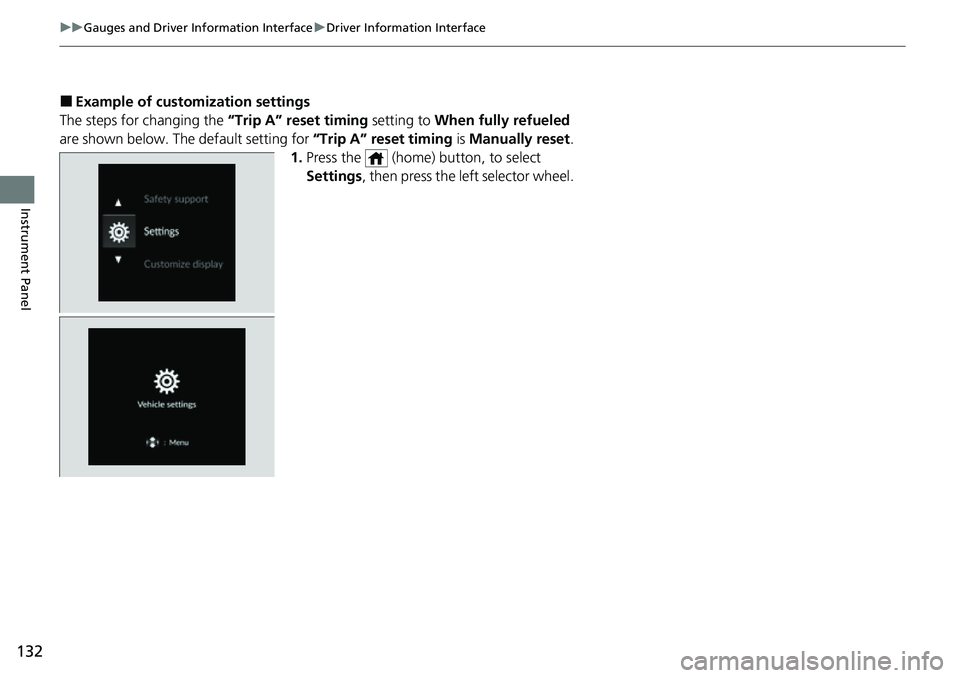
■Example of customization settings
The steps for changing the “Trip A” reset timing setting to When fully refueled
are shown below. The default setting for “Trip A” reset timing is Manually reset.
1. Press the (home) button, to select
Settings , then press the left selector wheel.
Page 134 of 700
133
uuGauges and Driver Information Interface uDriver Information Interface
Continued
Instrument Panel
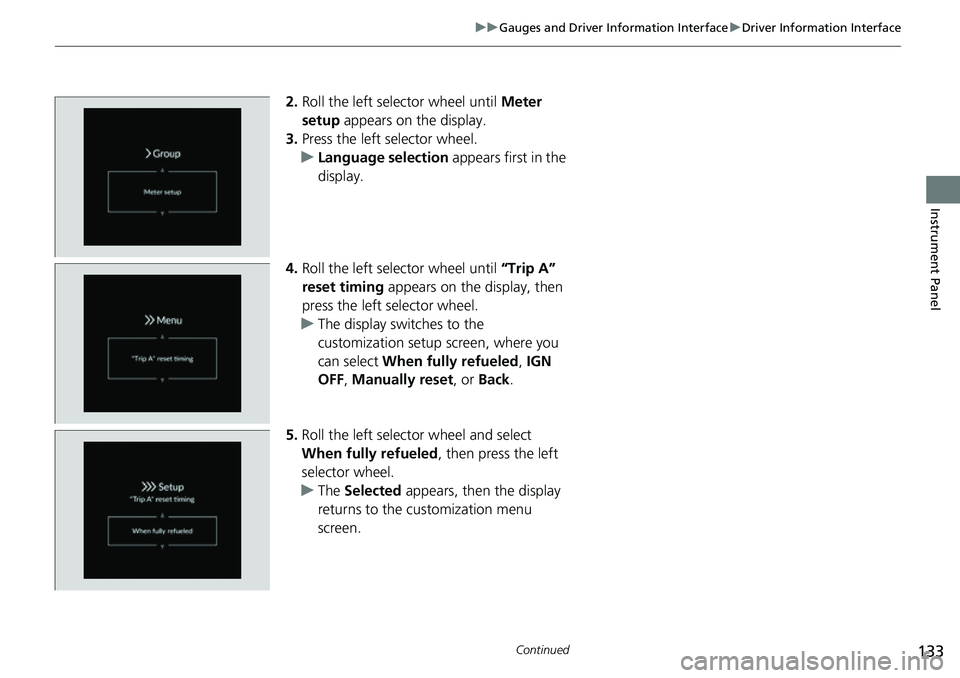
2. Roll the left selector wheel until Meter
setup appears on the display.
3. Press the left selector wheel.
u Language selection appears first in the
display.
4. Roll the left selector wheel until “Trip A”
reset timing appears on the display, then
press the left selector wheel.
u The display swit ches to the
customization setup screen, where you
can select When fully refueled , IGN
OFF , Manually reset , or Back .
5. Roll the left selector wheel and select
When fully refueled , then press the left
selector wheel.
u The Selected appears, then the display
returns to the customization menu
screen.
Page 135 of 700
134
uuGauges and Driver Information Interface uDriver Information Interface
Instrument Panel
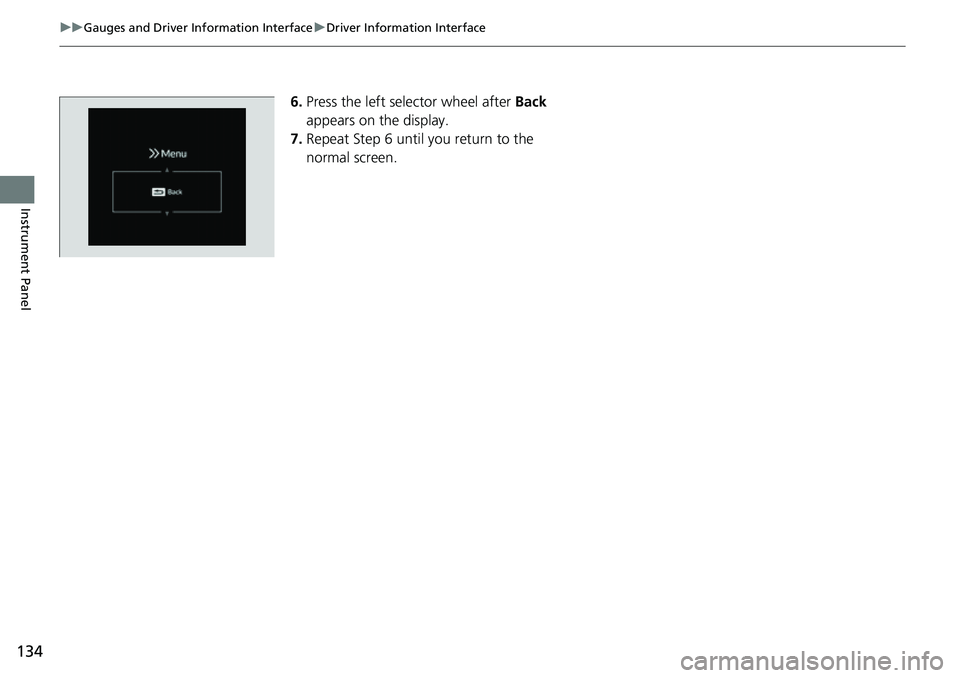
6. Press the left selector wheel after Back
appears on the display.
7. Repeat Step 6 until you return to the
normal screen.
Page 136 of 700
135
uuGauges and Driver Information Interface uDriver Information Interface (Left Side Area)
Continued
Instrument Panel
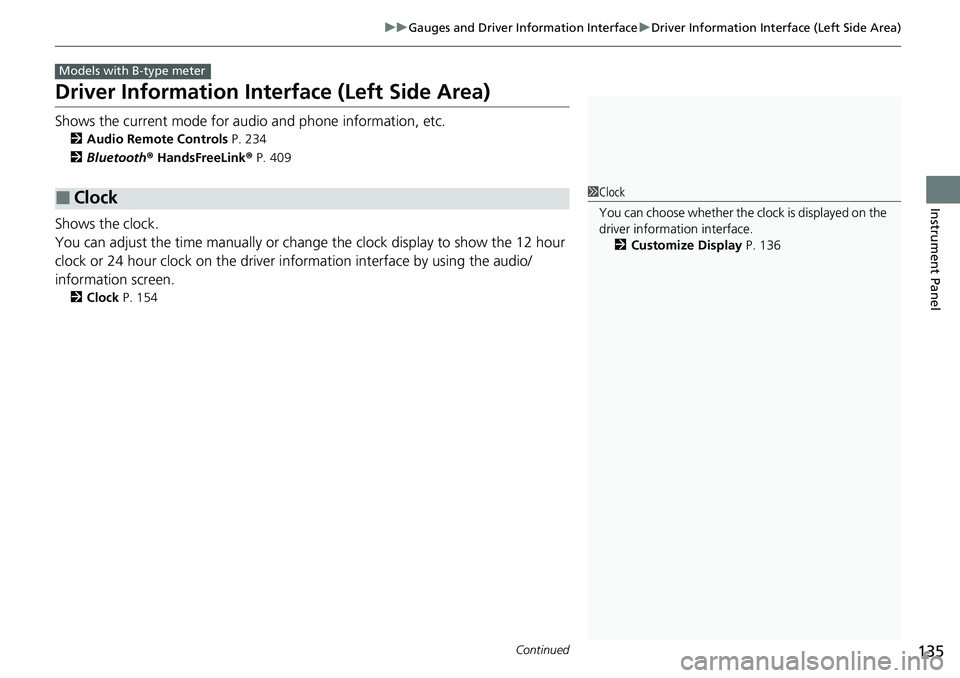
Driver Information Inte rface (Left Side Area)
Shows the current mode for audio and phone information, etc.
2Audio Remote Controls P. 234
2 Bluetooth ® HandsFreeLink ® P. 409
Shows the clock.
You can adjust the time manually or change the clock display to show the 12 hour
clock or 24 hour clock on the driver information interface by using the audio/
information screen.
2 Clock P. 154
■Clock
Models with B-type meter
1Clock
You can choose whether the clock is displayed on the
driver information interface.
2 Customize Display P. 136
Page 137 of 700
uuGauges and Driver Information Interface uDriver Information Interface (Left Side Area)
136
Instrument Panel
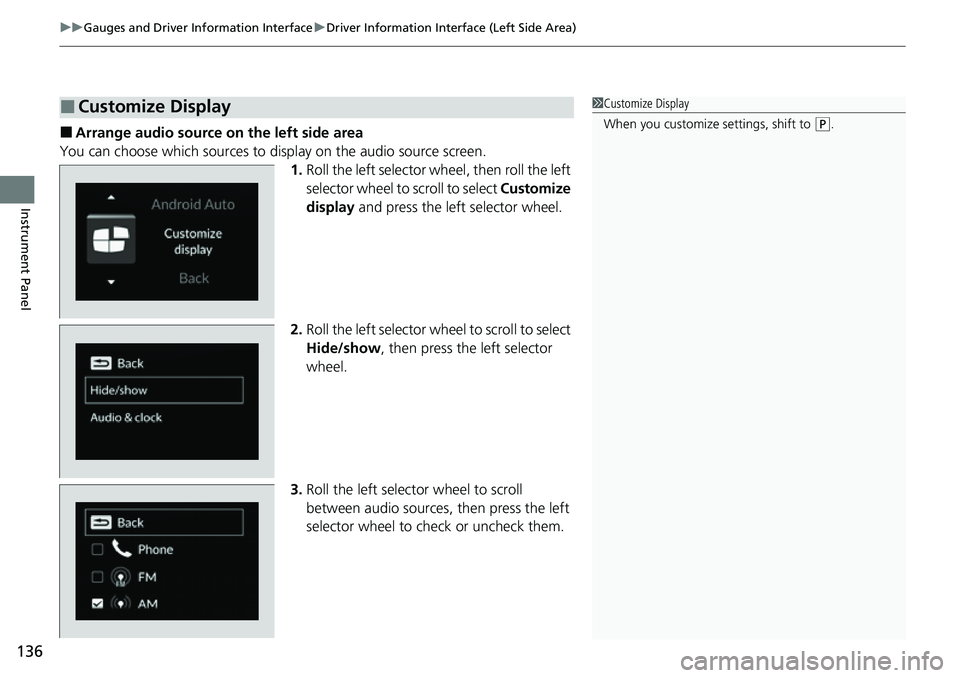
■Arrange audio source on the left side area
You can choose which sources to display on the audio source screen.
1.Roll the left selector wheel, then roll the left
selector wheel to scroll to select Customize
display and press the left selector wheel.
2. Roll the left selector wheel to scroll to select
Hide/show , then press the left selector
wheel.
3. Roll the left selector wheel to scroll
between audio sources, then press the left
selector wheel to check or uncheck them.
■Customize Display1 Customize Display
When you customize settings, shift to
(P.
Page 138 of 700
137
uuGauges and Driver Information Interface uDriver Information Interface (Left Side Area)
Instrument Panel
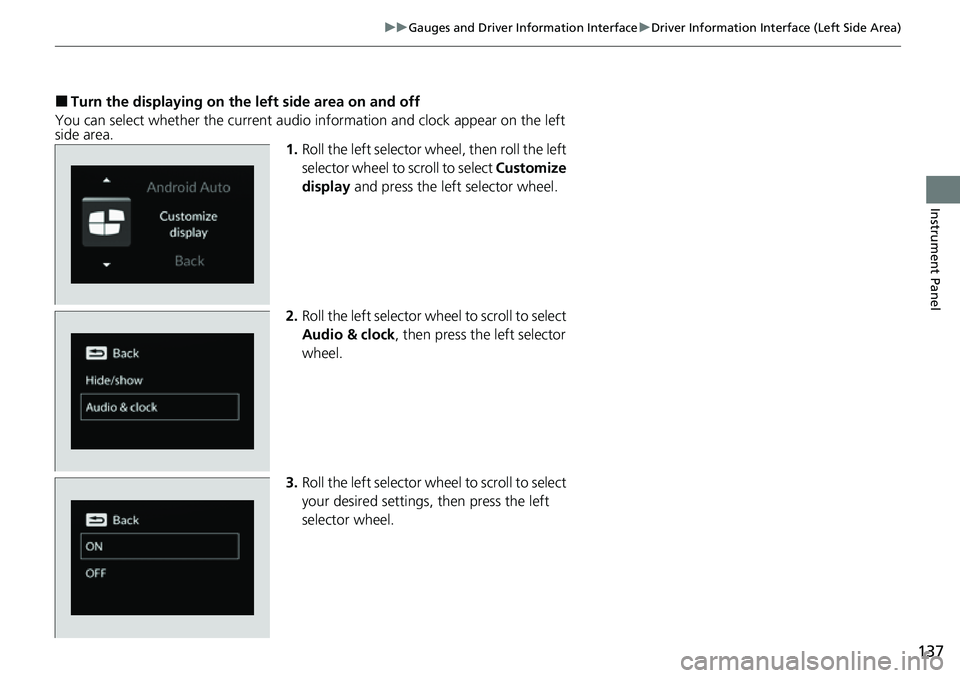
■Turn the displaying on the left side area on and off
You can select whether the current audio information and clock appear on the left
side area. 1.Roll the left selector wheel, then roll the left
selector wheel to scroll to select Customize
display and press the left selector wheel.
2. Roll the left selector wheel to scroll to select
Audio & clock, then press the left selector
wheel.
3. Roll the left selector wheel to scroll to select
your desired settings, then press the left
selector wheel.
Page 139 of 700
138
uuGauges and Driver Information Interface uDriver Information Interface (Right Side Area)
Instrument Panel
Driver Information Inte rface (Right Side Area)
The driver information interface shows in formation such as the estimated travelable
distance and fuel economy of the vehicle. It also displays messages such as warnings
and other helpful information.
When a warning message displays, please check the message and contact a dealer
and have the vehicle inspected if necessary . Please refer to the pages below if the
Engine oil pressure low. or Engine temperature too hot. message is displayed.
2If the Low Oil Pressure Warning Appears P. 658
2 Overheating P. 656
Models with B-type meter
Page 140 of 700
139
uuGauges and Driver Information Interface uDriver Information Interface (Right Side Area)
Continued
Instrument Panel
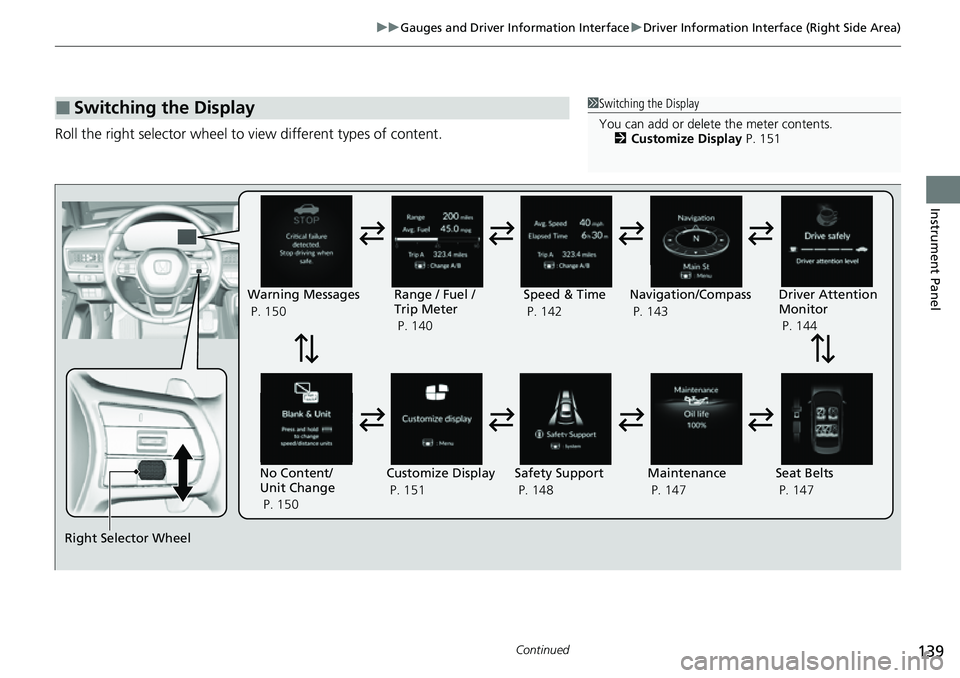
Roll the right selector wheel to view different types of content.
■Switching the Display1Switching the Display
You can add or delete the meter contents.
2 Customize Display P. 151
Right Selector Wheel Warning Messages
P. 150
Range / Fuel /
Trip Meter
P. 140
No Content/
Unit Change
P. 150 Driver Attention
Monitor
P. 144
Navigation/Compass
P. 143
Speed & Time
P. 142
Customize Display
P. 151 Maintenance
P. 147
Safety Support
P. 148 Seat Belts
P. 147
Page 141 of 700
140
uuGauges and Driver Information Interface uDriver Information Interface (Right Side Area)
Instrument Panel
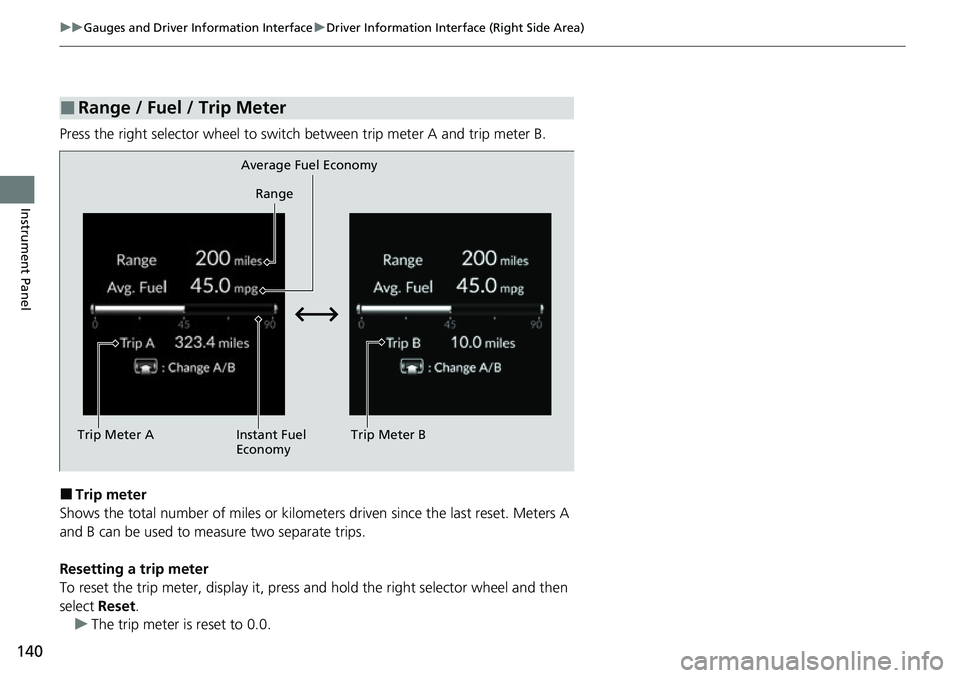
Press the right selector wheel to switch between trip meter A and trip meter B.
■Trip meter
Shows the total number of miles or kilomete rs driven since the last reset. Meters A
and B can be used to measure two separate trips.
Resetting a trip meter
To reset the trip meter, display it, press and hold the right selector wheel and then
select Reset.
u The trip meter is reset to 0.0.
■Range / Fuel / Trip Meter
Trip Meter A Range
Average Fuel Economy
Instant Fuel
Economy Trip Meter B
Page 142 of 700
Continued141
uuGauges and Driver Information Interface uDriver Information Interface (Right Side Area)
Instrument Panel
■Average fuel economy
Shows the estimated average fuel economy of each trip meter in mpg or l/100 km.
The display is updated at set intervals. Wh en a trip meter is reset, the average fuel
economy is also reset.
■Instant fuel economy
Shows the instant fuel economy as a bar graph in mpg or l/100 km.
■Range
Shows the estimated distance you can trave l on the remaining fuel. This estimated
distance is based on the vehicle’s current fuel economy.
1 Average fuel economy
You can change when to reset the average fuel
economy.
2 Customized Features P. 363
1Range
The driving range displayed is only an estimate and
may differ to the actual distance the vehicle can
travel.