reset HONDA CIVIC 2022 Service Manual
[x] Cancel search | Manufacturer: HONDA, Model Year: 2022, Model line: CIVIC, Model: HONDA CIVIC 2022Pages: 700, PDF Size: 13.98 MB
Page 379 of 700
378
uuCustomized Features u
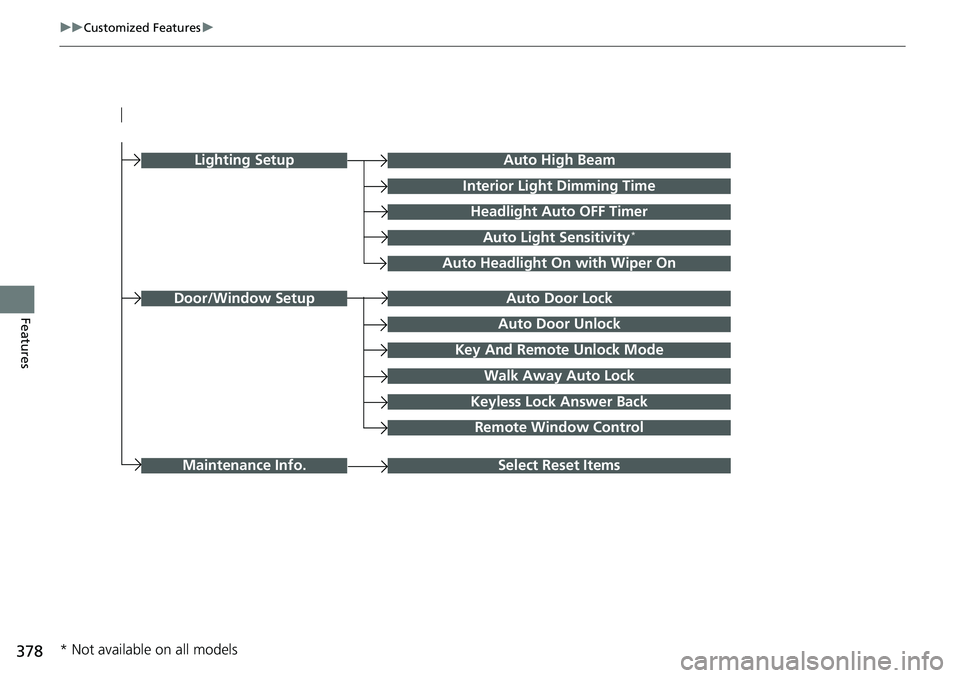
FeaturesAuto Door Unlock
Auto Door Lock
Key And Remote Unlock Mode
Walk Away Auto Lock
Keyless Lock Answer Back
Door/Window Setup
Lighting SetupAuto High Beam
Interior Light Dimming Time
Headlight Auto OFF Timer
Auto Light Sensitivity*
Auto Headlight On with Wiper On
Select Reset ItemsMaintenance Info.
Remote Window Control
* Not available on all models
Page 382 of 700
381
uuCustomized Features u
Continued
Features
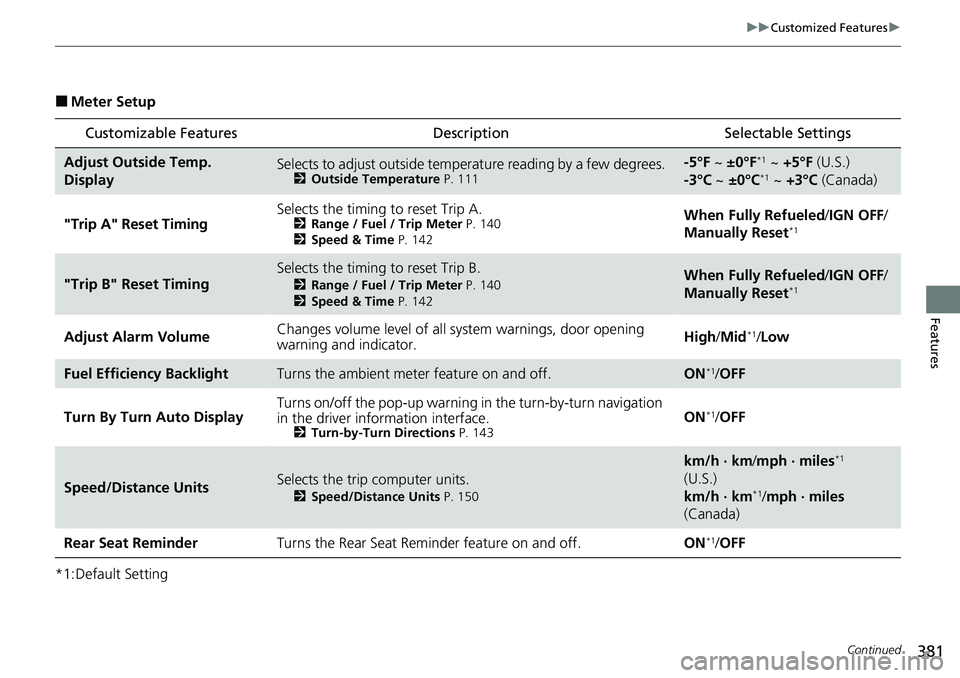
■Meter Setup
*1:Default Setting
Customizable Features DescriptionSelectable Settings
Adjust Outside Temp.
DisplaySelects to adjust outside temperature reading by a few degrees.2Outside Temperature P. 111
-5°F ~ ±0°F*1 ~ +5°F (U.S.)
-3°C ~ ±0°C*1 ~ +3°C (Canada)
"Trip A" Reset Timing Selects the timing to reset Trip A.
2
Range / Fuel / Trip Meter P. 140
2 Speed & Time P. 142When Fully Refueled /IGN OFF /
Manually Reset*1
"Trip B" Reset TimingSelects the timing to reset Trip B.
2 Range / Fuel / Trip Meter P. 140
2 Speed & Time P. 142When Fully Refueled /IGN OFF /
Manually Reset*1
Adjust Alarm Volume Changes volume level of all system warnings, door opening
warning and indicator. High
/Mid*1/Low
Fuel Efficien cy BacklightTurns the ambient meter feature on and off.ON*1/OFF
Turn By Turn Auto Display Turns on/off the pop-up warning in
the turn-by-turn navigation
in the driver information interface.
2 Turn-by-Turn Directions P. 143ON*1/OFF
Speed/Distance UnitsSelects the trip computer units.
2 Speed/Distance Units P. 150
km/h · km/mph · miles*1
(U.S.)
km/h · km
*1/ mph · miles
(Canada)
Rear Seat ReminderTurns the Rear Seat Reminder feature on and off.ON*1/ OFF
Page 385 of 700
384
uuCustomized Features u
Features
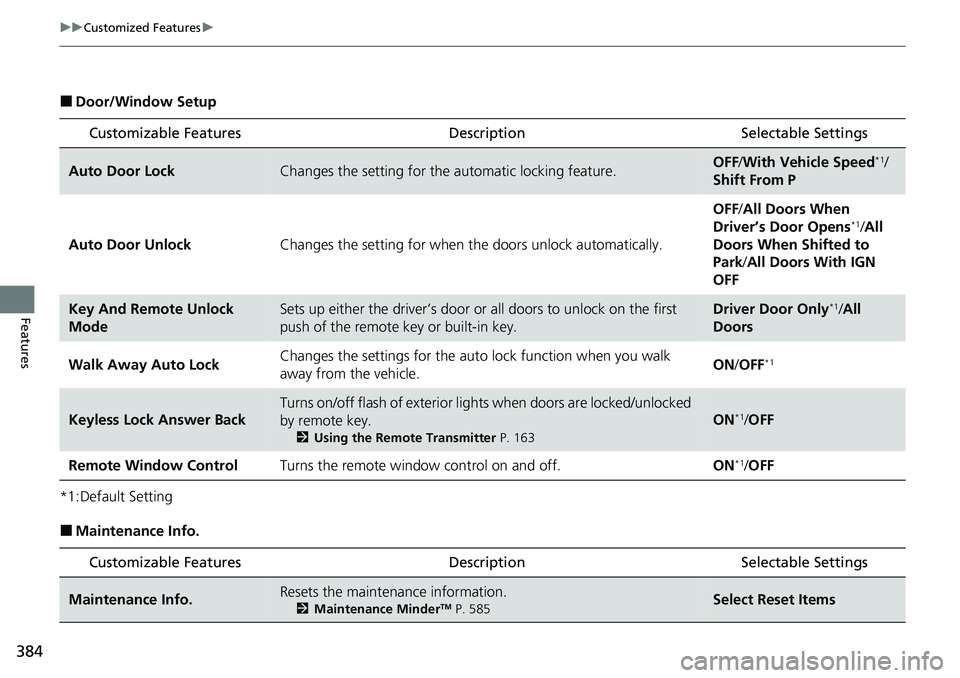
■Door/Window Setup
*1:Default Setting
■Maintenance Info.
Customizable Features DescriptionSelectable Settings
Auto Door LockChanges the setting for the automatic locking feature.OFF/With Vehicle Speed*1/
Shift From P
Auto Door Unlock Changes the setting for when the doors unlock automatically. OFF
/All Doors When
Driver’s Door Opens
*1/ All
Doors When Shifted to
Park /All Doors With IGN
OFF
Key And Remote Unlock
ModeSets up either the driver’s door or all doors to unlock on the first
push of the remote key or built-in key.Driver Door Only*1/ All
Doors
Walk Away Auto Lock Changes the settings for the auto
lock function when you walk
away from the vehicle. ON
/OFF
*1
Keyless Lock Answer Back
Turns on/off flash of exterior lights when doors are locked/unlocked
by remote key.
2 Using the Remote Transmitter P. 163
ON*1/OFF
Remote Window Control Turns the remote window control on and off. ON
*1/OFF
Customizable Features Description Selectable Settings
Maintenance Info.Resets the maintenance information.
2 Maintenance MinderTM P. 585Select Reset Items
Page 386 of 700
385
uuCustomized Features uDefaulting All the Settings
Features
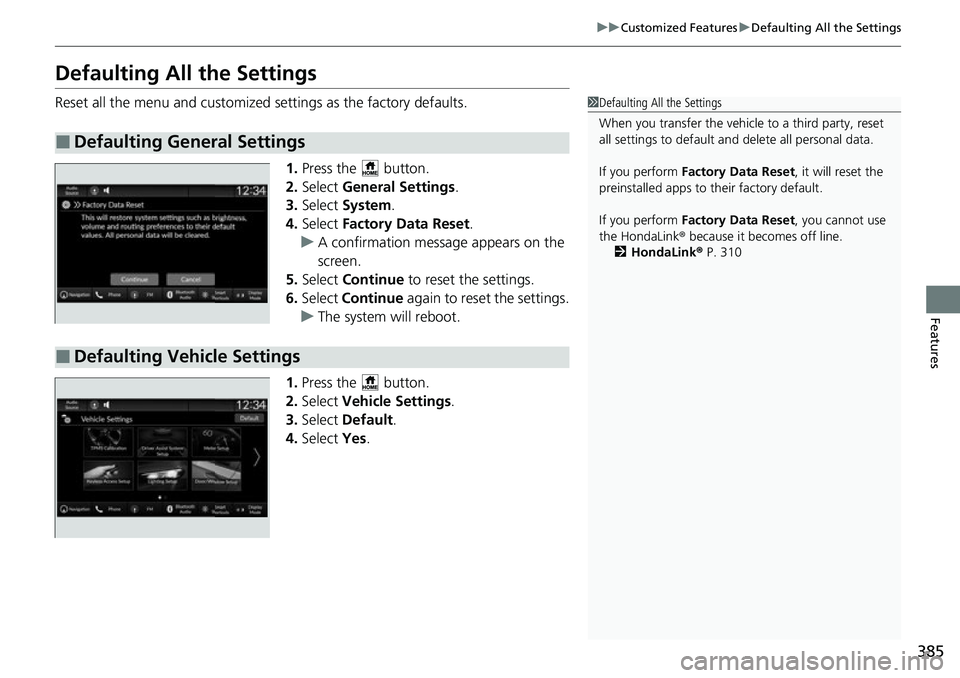
Defaulting All the Settings
Reset all the menu and customized settings as the factory defaults.
1.Press the button.
2. Select General Settings .
3. Select System.
4. Select Factory Data Reset .
u A confirmation message appears on the
screen.
5. Select Continue to reset the settings.
6. Select Continue again to reset the settings.
u The system w ill reboot.
1. Press the button.
2. Select Vehicle Settings.
3. Select Default.
4. Select Yes.
■Defaulting General Settings
1Defaulting All the Settings
When you transfer the vehicle to a third party, reset
all settings to default a nd delete all personal data.
If you perform Factory Data Reset , it will reset the
preinstalled apps to their factory default.
If you perform Factory Data Reset , you cannot use
the HondaLink ® because it becomes off line.
2 HondaLink® P. 310
■Defaulting Vehicle Settings
Page 493 of 700
uuHonda Sensing ®u Low Speed Braking Control*
492
Driving
Conditions for assistive driving power suppression.
• When the accelerator is no longer depressed.
• When the accelerator is depressed for approximately four seconds.
• When the brake pedal is depressed.
• When the steering wheel is tu rned and a collision avoided.
Conditions for assistive braking cancellation.
• A certain amount of time ha s passed since activation.
The system may not operate correct ly in the following conditions:
■Examples of obstacles the sonar sensor cannot detect
• Obstacles that do not refl ect sound waves well, such as people, snow, cloth,
sponges, etc.
• Thin obstacles such as fences, bicycles, sign posts, etc.
• Short or small obstacles.
• Obstacles immediately in front of the bumper.
• Moving objects or obstacles that suddenly enter the road.
• Obstacles that are not pe rpendicular to the ground.
■Conditions for Cancellation
■Low Speed Braking Control System Conditions and Limitations
1Conditions for Cancellation
After Low Speed Braking Control has activated once,
it will not activate again for the same obstacle.
They can be activated again after driving for a certain
distance after last activation.
Low Speed Braking Control ac tivates separately when
moving forward and reversing. (For example, if it
activates when moving forwar d, it can be activated
again immediately if reversing.)
However, if assistive braking has been activated, in
order to activate assistiv e driving power suppression
again, it is necessary to drive for a certain distance to
reset the system.
Page 592 of 700
591
uuMaintenance MinderTMuTo Use Maintenance MinderTM
Continued
Maintenance
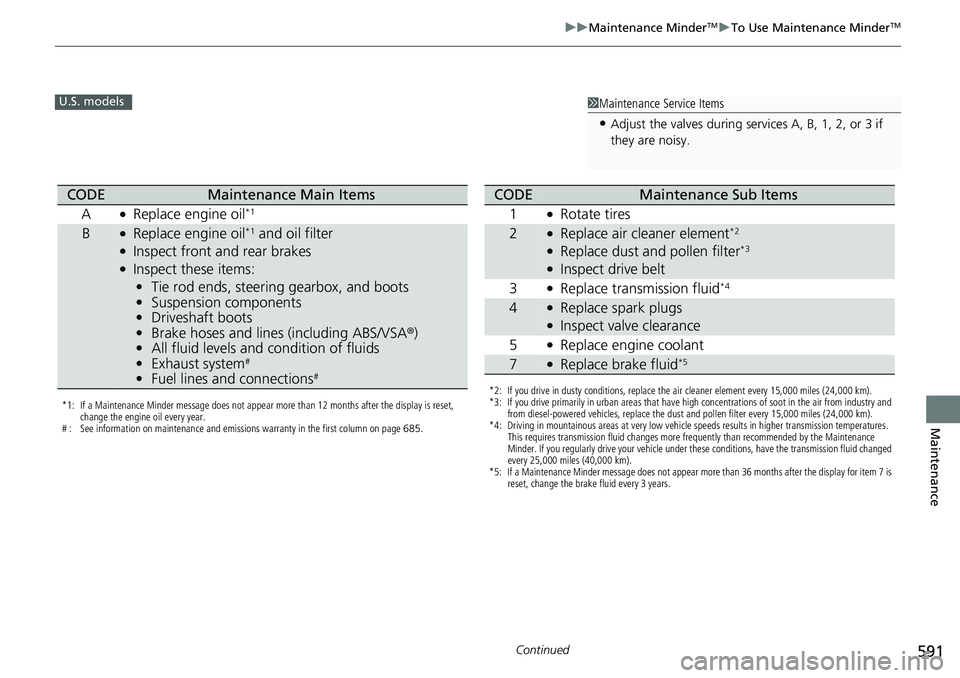
1Maintenance Service Items
•Adjust the valves during services A, B, 1, 2, or 3 if
they are noisy.
U.S. models
*1: If a Maintenance Minder message does not appear more than 12 months after the display is reset,
change the engine oil every year.
# : See information on maintenance and emissions warranty in the first column on page 685.
CODEMaintenance Main Items
A
●Replace engine oil*1
B●Replace engine oil*1 and oil filter●Inspect front and rear brakes●Inspect these items: • Tie rod ends, steering gearbox, and boots
• Suspension components
• Driveshaft boots
• Brake hoses and lines (including ABS/VSA®)
• All fluid levels and condition of fluids
• Exhaust system
#
•Fuel lines and connections#*2: If you drive in dusty conditions, replace the air cleaner element every 15,000 miles (24,000 km).
*3: If you drive primarily in urban areas that have high concentrations of soot in the air from industry and
from diesel-powered vehicles, replace the dust and pollen filter every 15,000 miles (24,000 km).
*4: Driving in mountainous areas at very low vehicle speeds results in higher transmission temperatures. This requires transmission fluid changes more frequently than recommended by the Maintenance
Minder. If you regularly drive your vehicle under these conditions, have the transmission fluid changed
every 25,000 miles (40,000 km).
*5: If a Maintenance Minder message does not appear more than 36 months after the display for item 7 is reset, change the brake fluid every 3 years.
CODEMaintenance Sub Items
1
●Rotate tires
2●Replace air cleaner element*2
●Replace dust and pollen filter*3
●Inspect drive belt
3
●Replace transmission fluid*4
4●Replace spark plugs●Inspect valve clearance
5
●Replace engine coolant
7●Replace brake fluid*5
Page 593 of 700
592
uuMaintenance MinderTMuTo Use Maintenance MinderTM
Maintenance
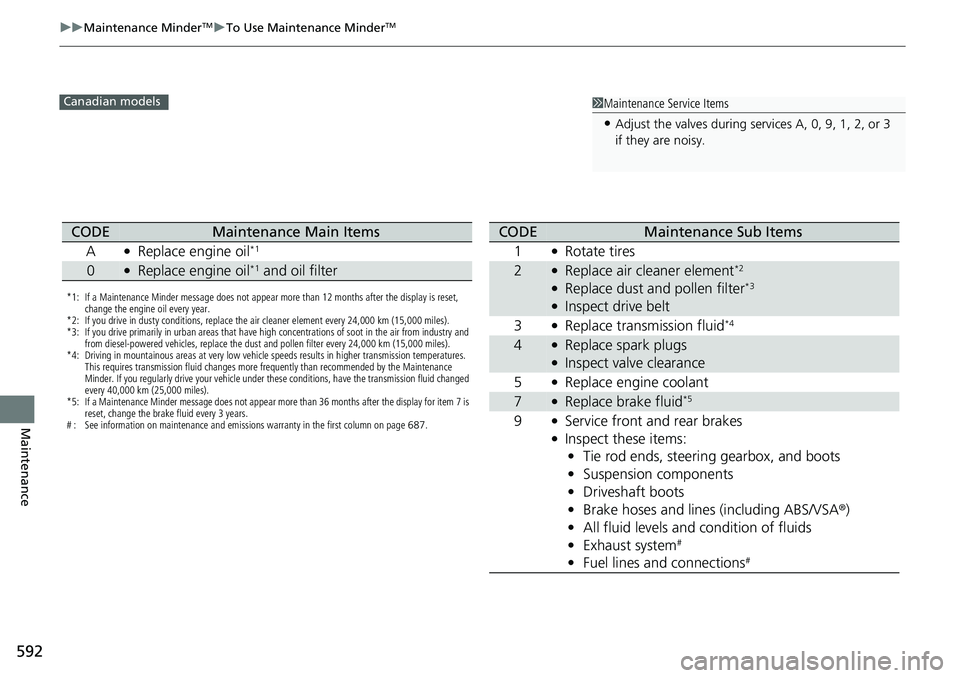
1Maintenance Service Items
•Adjust the valves during services A, 0, 9, 1, 2, or 3
if they are noisy.
Canadian models
*1: If a Maintenance Minder message does not appear more than 12 months after the display is reset,
change the engine oil every year.
*2: If you drive in dusty conditions, replace the air cleaner element every 24,000 km (15,000 miles).
*3: If you drive primarily in urban areas that have high concentrations of soot in the air from industry and from diesel-powered vehicles, replace the dust and pollen filter every 24,000 km (15,000 miles).
*4: Driving in mountainous areas at very low vehicle speeds results in higher transmission temperatures. This requires transmission fluid changes more frequently than recommended by the Maintenance
Minder. If you regularly drive your vehicle under these conditions, have the transmission fluid changed
every 40,000 km (25,000 miles).
*5: If a Maintenance Minder message does not appear more than 36 months after the display for item 7 is reset, change the brake fluid every 3 years.
# : See information on maintenance and emissions warranty in the first column on page 687.
CODEMaintenance Main Items
A
●Replace engine oil*1
0●Replace engine oil*1 and oil filter
CODEMaintenance Sub Items
1
●Rotate tires
2●Replace air cleaner element*2
●Replace dust and pollen filter*3
●Inspect drive belt
3
●Replace transmission fluid*4
4●Replace spark plugs●Inspect valve clearance
5
●Replace engine coolant
7●Replace brake fluid*5
9●Service front and rear brakes●Inspect these items: • Tie rod ends, steering gearbox, and boots
• Suspension components
• Driveshaft boots
• Brake hoses and lines (including ABS/VSA ®)
• All fluid levels and condition of fluids
• Exhaust system
#
•Fuel lines and connections#
Page 594 of 700
Continued593
uuMaintenance MinderTMuTo Use Maintenance MinderTM
Maintenance
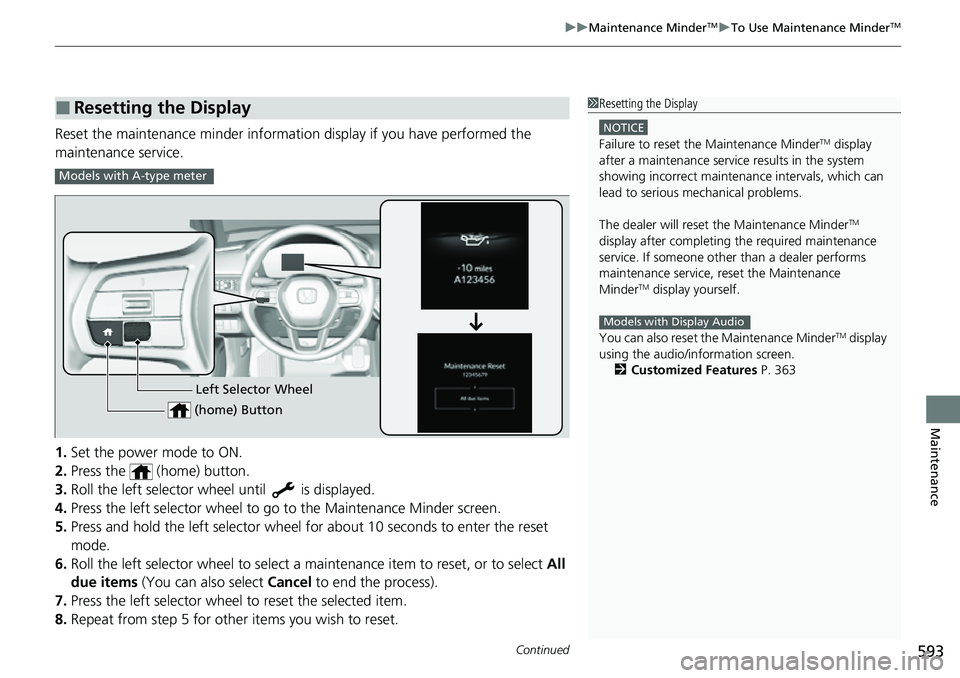
Reset the maintenance minder information display if you have performed the
maintenance service.
1. Set the power mode to ON.
2. Press the (home) button.
3. Roll the left selector wheel until is displayed.
4. Press the left selector wheel to go to the Maintenance Minder screen.
5. Press and hold the left selector wheel for about 10 seconds to enter the reset
mode.
6. Roll the left selector wheel to select a ma intenance item to reset, or to select All
due items (You can also select Cancel to end the process).
7. Press the left selector wheel to reset the selected item.
8. Repeat from step 5 for other items you wish to reset.
■Resetting the Display1Resetting the Display
NOTICE
Failure to reset the Maintenance MinderTM display
after a maintenance servic e results in the system
showing incorrect maintenance intervals, which can
lead to serious mechanical problems.
The dealer will reset the Maintenance Minder
TM
display after completing th e required maintenance
service. If someone other than a dealer performs
maintenance service, reset the Maintenance
Minder
TM display yourself.
You can also reset the Maintenance Minder
TM display
using the audio/information screen.
2 Customized Features P. 363
Models with Display Audio
Models with A-type meter
Left Selector Wheel
(home) Button
Page 595 of 700
594
uuMaintenance MinderTMuTo Use Maintenance MinderTM
Maintenance
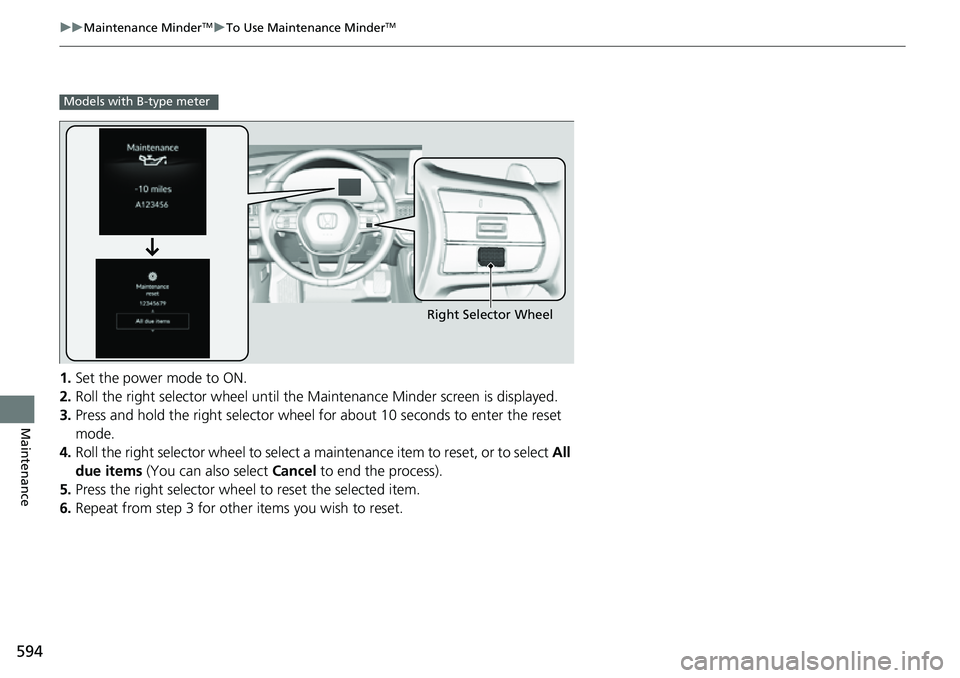
1. Set the power mode to ON.
2. Roll the right selector wheel until the Maintenance Minder screen is displayed.
3. Press and hold the right selector wheel for about 10 seconds to enter the reset
mode.
4. Roll the right selector wheel to select a maintenance item to reset, or to select All
due items (You can also select Cancel to end the process).
5. Press the right selector wheel to reset the selected item.
6. Repeat from step 3 for other items you wish to reset.
Models with B-type meter
Right Selector Wheel
Page 628 of 700
627
Maintenance
Battery
Checking the Battery
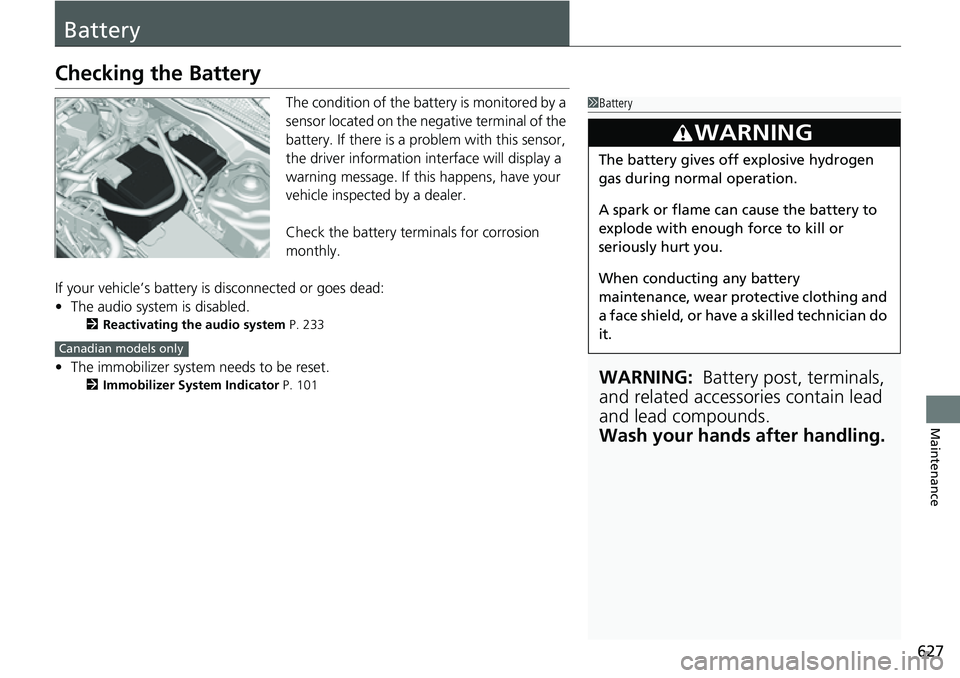
The condition of the battery is monitored by a
sensor located on the negative terminal of the
battery. If there is a problem with this sensor,
the driver information interface will display a
warning message. If this happens, have your
vehicle inspected by a dealer.
Check the battery terminals for corrosion
monthly.
If your vehicle’s battery is disconnected or goes dead:
• The audio system is disabled.
2 Reactivating the audio system P. 233
•The immobilizer system needs to be reset.
2 Immobilizer System Indicator P. 101
1Battery
WARNING: Battery post, terminals,
and related accessories contain lead
and lead compounds.
Wash your hands after handling.
3WARNING
The battery gives off explosive hydrogen
gas during normal operation.
A spark or flame can cause the battery to
explode with enough force to kill or
seriously hurt you.
When conducting any battery
maintenance, wear prot ective clothing and
a face shield, or have a skilled technician do
it.
Canadian models only