display HONDA CIVIC 2023 Owner's Manual
[x] Cancel search | Manufacturer: HONDA, Model Year: 2023, Model line: CIVIC, Model: HONDA CIVIC 2023Pages: 840, PDF Size: 26.53 MB
Page 138 of 840
uuGauges and Driver Information Interface uDriver Information Interface (A-type Meter)
136
Instrument Panel
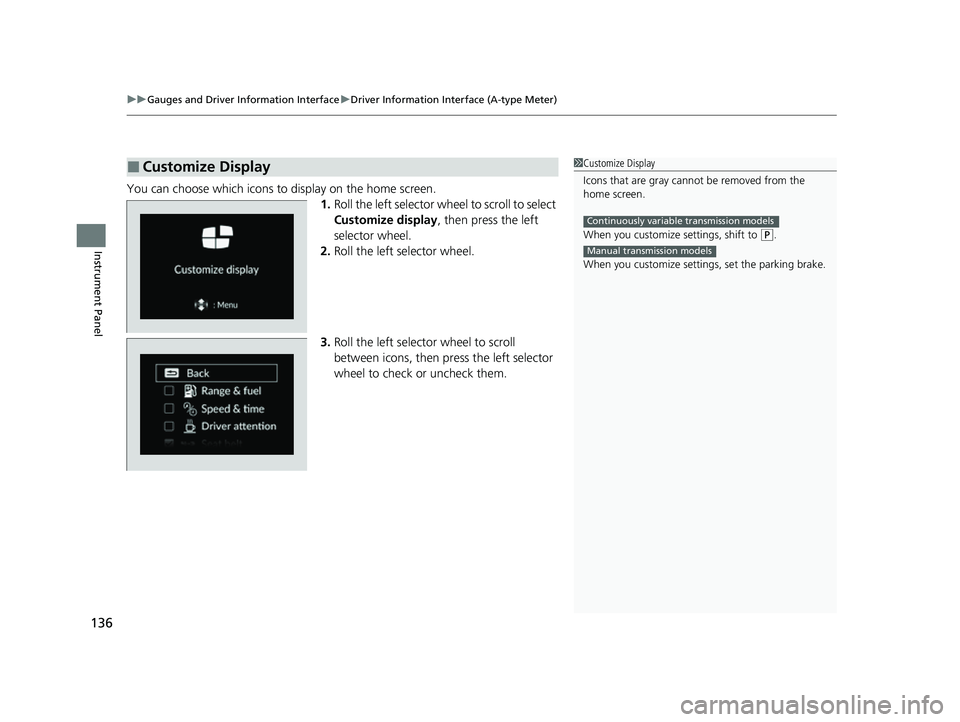
You can choose which icons to display on the home screen.
1.Roll the left selector wheel to scroll to select
Customize display , then press the left
selector wheel.
2. Roll the left selector wheel.
3. Roll the left selector wheel to scroll
between icons, then press the left selector
wheel to check or uncheck them.
■Customize Display1Customize Display
Icons that are gray cannot be removed from the
home screen.
When you customize settings, shift to
(P.
When you customize setti ngs, set the parking brake.
Continuously variable transmission models
Manual transmission models
23 CIVIC HATCHBACK TYPE R-31T406100_03.book 136 ページ 2022年6月23日 木曜日 午後9時28分
Page 139 of 840
Continued137
uuGauges and Driver Information Interface uDriver Information Interface (A-type Meter)
Instrument Panel
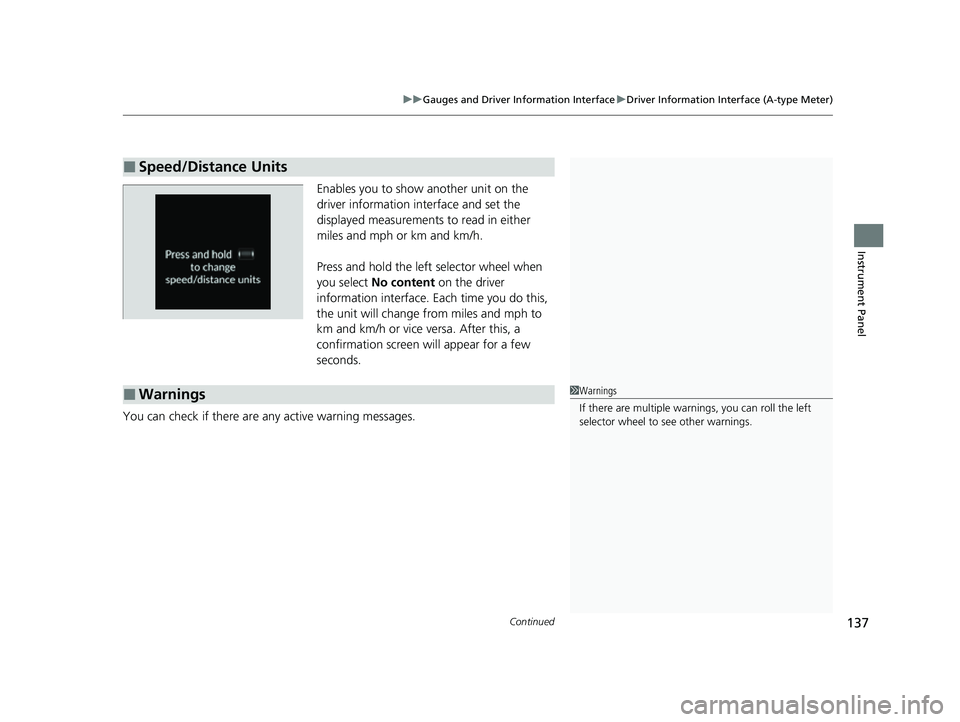
Enables you to show another unit on the
driver information interface and set the
displayed measurements to read in either
miles and mph or km and km/h.
Press and hold the left selector wheel when
you select No content on the driver
information interface. Each time you do this,
the unit will change from miles and mph to
km and km/h or vice versa. After this, a
confirmation screen will appear for a few
seconds.
You can check if there are any active warning messages.
■Speed/Distance Units
■Warnings1 Warnings
If there are multiple warnings, you can roll the left
selector wheel to see other warnings.
23 CIVIC HATCHBACK TYPE R-31T406100_03.book 137 ページ 2022年6月23日 木曜日 午後9時28分
Page 142 of 840
140
uuGauges and Driver Information Interface uDriver Information Interface (A-type Meter)
Instrument Panel
*1:Default Setting Setup Group Customizable Features
Description Selectable Settings
Driver assist
system setup
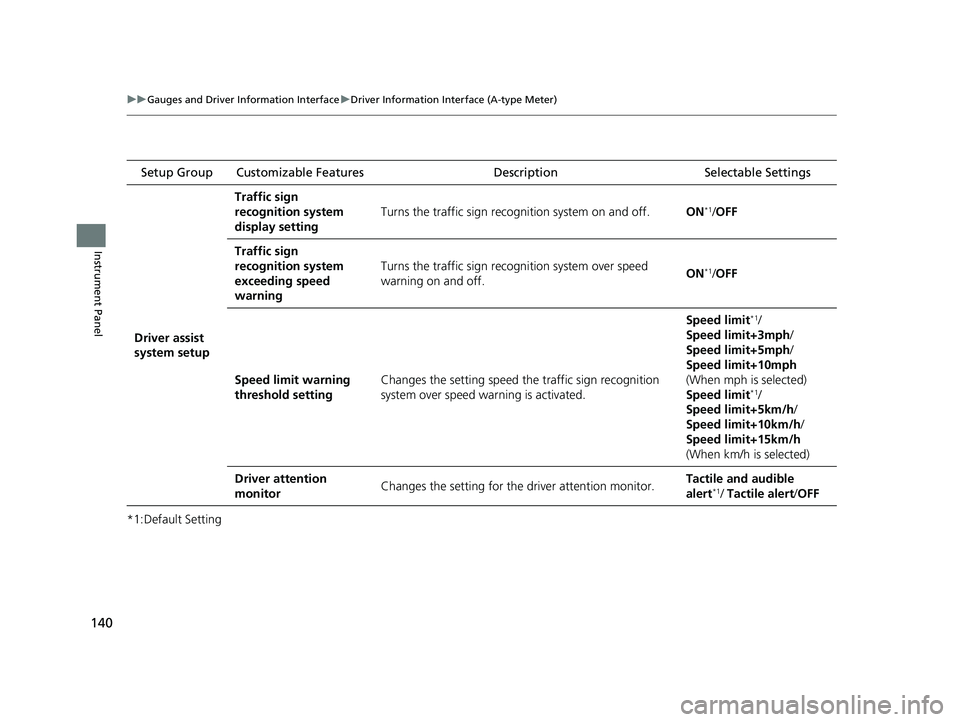
Traffic sign
recognition system
display setting
Turns the traffic sign recognition system on and off.ON*1/OFF
Traffic sign
recognition system
exceeding speed
warning
Turns the traffic sign recogn ition system over speed
warning on and off.ON*1/ OFF
Speed limit warning
threshold settingChanges the setting speed the traffic sign recognition
system over speed wa rning is activated.
Speed limit*1/
Speed limit+3mph /
Speed limit+5mph /
Speed limit+10mph
(When mph is selected)
Speed limit
*1/
Speed limit+5km/h /
Speed limit+10km/h /
Speed limit+15km/h
(When km/h is selected)
Driver attention
monitorChanges the setting for the driver attention monitor.Tactile and audible
alert*1/ Tactile alert /OFF
23 CIVIC HATCHBACK TYPE R-31T406100_03.book 140 ページ 2022年6月23日 木曜日 午後9時28分
Page 143 of 840
141
uuGauges and Driver Information Interface uDriver Information Interface (A-type Meter)
Continued
Instrument Panel
*1:Default Setting Setup Group Customizable Features
Description Selectable Settings
Meter setup
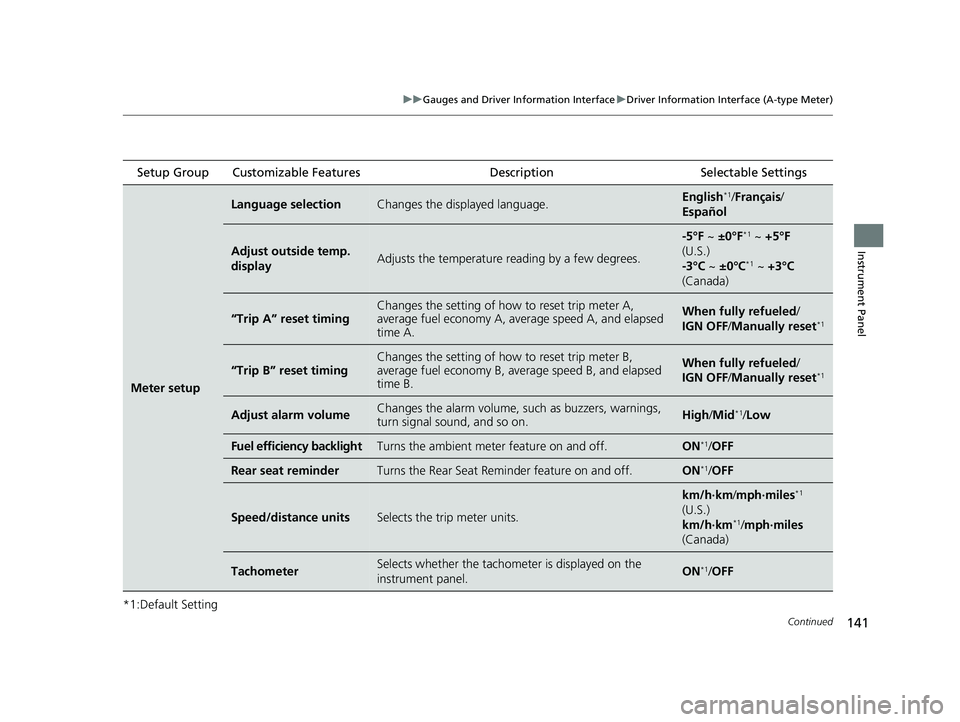
Language selectionChanges the displayed language.English*1/Français /
Español
Adjust outside temp.
displayAdjusts the temperature r eading by a few degrees.
-5°F ~ ±0°F*1 ~ +5°F
(U.S.)
-3°C ~ ±0°C
*1 ~ +3°C
(Canada)
“Trip A” reset timingChanges the setting of how to reset trip meter A,
average fuel economy A, av erage speed A, and elapsed
time A.When fully refueled/
IGN OFF /Manually reset*1
“Trip B” reset timing
Changes the setting of ho w to reset trip meter B,
average fuel economy B, av erage speed B, and elapsed
time B.When fully refueled/
IGN OFF /Manually reset*1
Adjust alarm volumeChanges the alarm volume, su ch as buzzers, warnings,
turn signal sound, and so on.High /Mid*1/Low
Fuel efficiency backlightTurns the ambient meter feature on and off.ON*1/ OFF
Rear seat reminderTurns the Rear Seat Reminder feature on and off.ON*1/OFF
Speed/distance unitsSelects the trip meter units.
km/h∙km /mph∙miles*1
(U.S.)
km/h∙km
*1/ mph∙miles
(Canada)
TachometerSelects whether the tachom eter is displayed on the
instrument panel.ON*1/ OFF
23 CIVIC HATCHBACK TYPE R-31T406100_03.book 141 ページ 2022年6月23日 木曜日 午後9時28分
Page 146 of 840
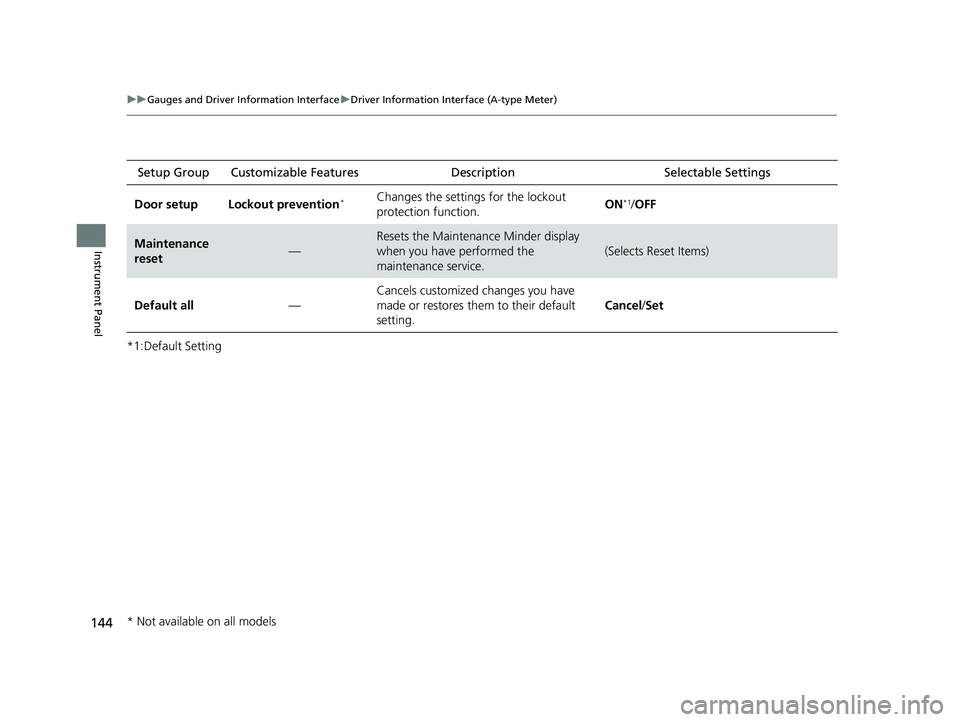
144
uuGauges and Driver Information Interface uDriver Information Interface (A-type Meter)
Instrument Panel
*1:Default SettingSetup Group Customizabl
e Features Description Selectable Settings
Door setup Lockout prevention
*Changes the settings for the lockout
protection function. ON*1/
OFF
Maintenance
reset—
Resets the Maintenance Minder display
when you have performed the
maintenance service.
(Selects Reset Items)
Default all —Cancels customized changes you have
made or restores them to their default
setting.
Cancel
/Set
* Not available on all models
23 CIVIC HATCHBACK TYPE R-31T406100_03.book 144 ページ 2022年6月23日 木曜日 午後9時28分
Page 148 of 840
146
uuGauges and Driver Information Interface uDriver Information Interface (A-type Meter)
Instrument Panel
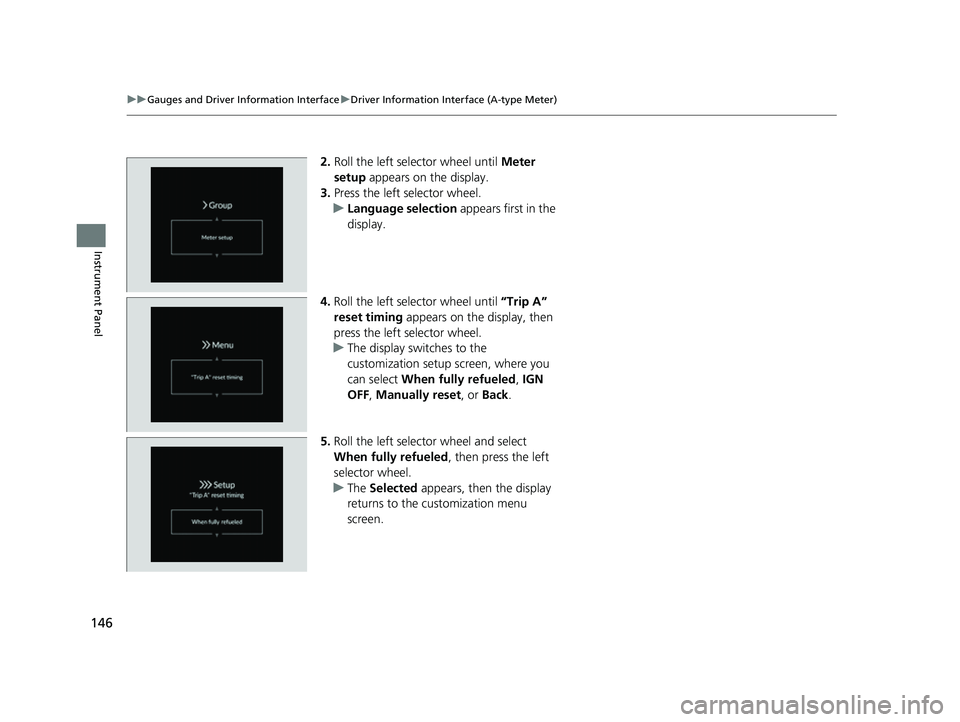
2. Roll the left selector wheel until Meter
setup appears on the display.
3. Press the left selector wheel.
u Language selection appears first in the
display.
4. Roll the left selector wheel until “Trip A”
reset timing appears on the display, then
press the left selector wheel.
u The display switches to the
customization setup screen, where you
can select When fully refueled , IGN
OFF , Manually reset , or Back.
5. Roll the left selector wheel and select
When fully refueled , then press the left
selector wheel.
u The Selected appears, then the display
returns to the customization menu
screen.
23 CIVIC HATCHBACK TYPE R-31T406100_03.book 146 ページ 2022年6月23日 木曜日 午後9時28分
Page 149 of 840
147
uuGauges and Driver Information Interface uDriver Information Interface (A-type Meter)
Instrument Panel
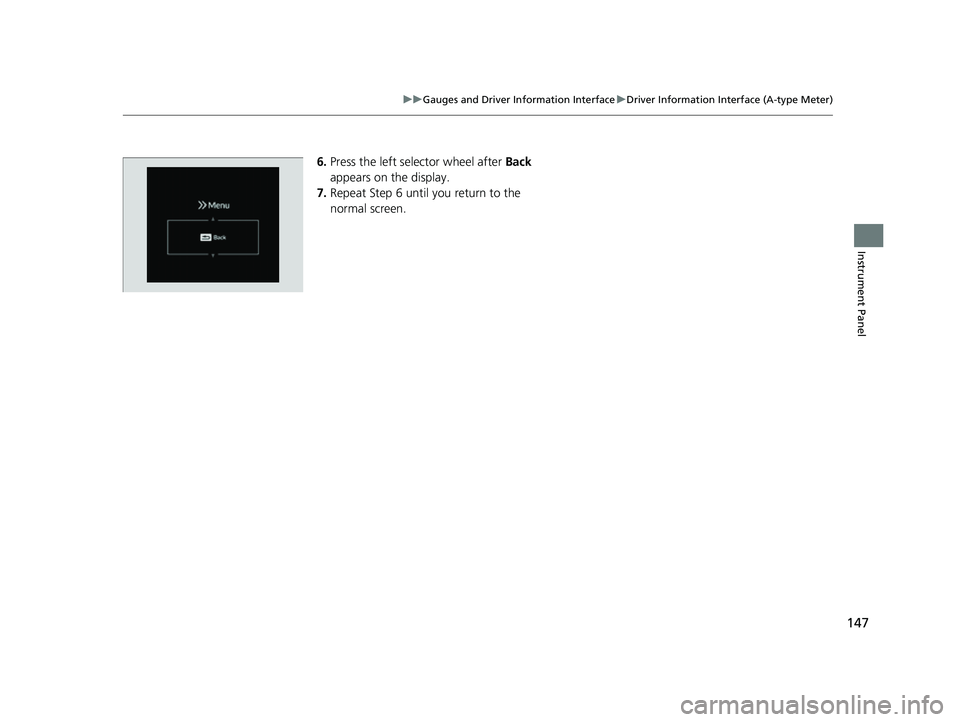
6. Press the left selector wheel after Back
appears on the display.
7. Repeat Step 6 until you return to the
normal screen.
23 CIVIC HATCHBACK TYPE R-31T406100_03.book 147 ページ 2022年6月23日 木曜日 午後9時28分
Page 150 of 840
148
uuGauges and Driver Information Interface uDriver Information Interface Left Side Area (B-type-Meter)
Instrument Panel
Driver Information Inte rface Left Side Area
(B-type-Meter)
Shows the current mode for audio and phone information, etc.
2Audio Remote Controls P. 260
2 Bluetooth ® HandsFreeLink ® P. 464
Shows the clock.
■Clock1 Clock
You can adjust the time manually and change the
clock display to show the 12 hour clock or 24 hour
clock. 2 Clock P. 174
You can choose whether the clock is displayed on the
driver information interface. 2 Customize Display P. 151
23 CIVIC HATCHBACK TYPE R-31T406100_03.book 148 ページ 2022年6月23日 木曜日 午後9時28分
Page 151 of 840
Continued149
uuGauges and Driver Information Interface uDriver Information Interface Left Side Area (B-type-Meter)
Instrument Panel
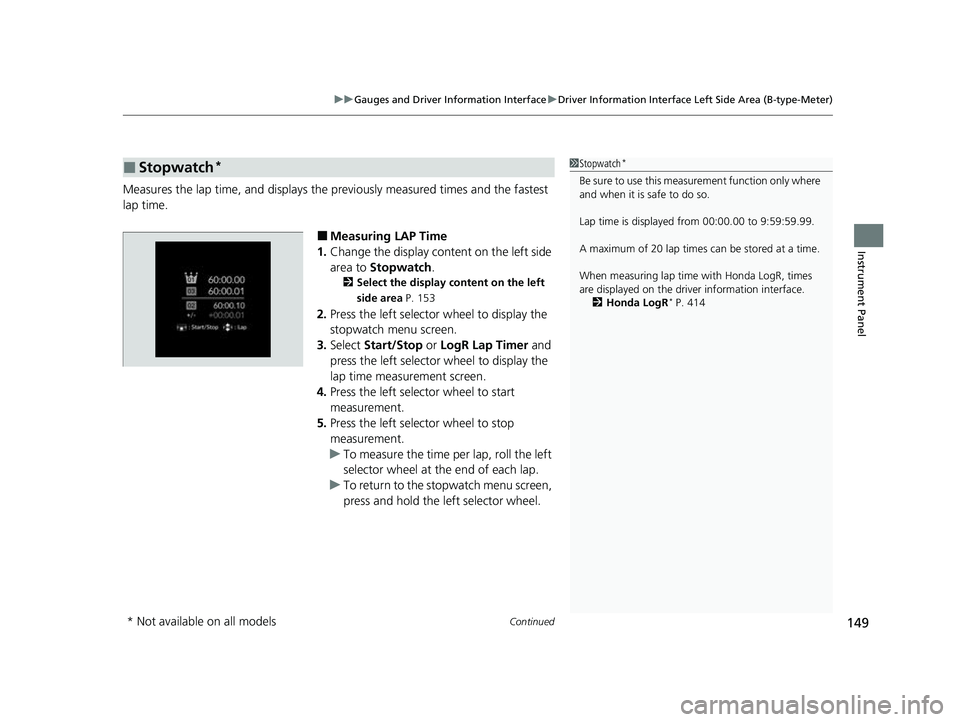
Measures the lap time, and displays the pr eviously measured times and the fastest
lap time.
■Measuring LAP Time
1. Change the display content on the left side
area to Stopwatch .
2Select the display content on the left
side area P. 153
2.Press the left selector wheel to display the
stopwatch menu screen.
3. Select Start/Stop or LogR Lap Timer and
press the left selector wheel to display the
lap time measurement screen.
4. Press the left selector wheel to start
measurement.
5. Press the left selector wheel to stop
measurement.
u To measure the time per lap, roll the left
selector wheel at the end of each lap.
u To return to the stopwatch menu screen,
press and hold the left selector wheel.
■Stopwatch*1Stopwatch*
Be sure to use this measurement function only where
and when it is safe to do so.
Lap time is displayed from 00:00.00 to 9:59:59.99.
A maximum of 20 lap times ca n be stored at a time.
When measuring lap time with Honda LogR, times
are displayed on the driver information interface. 2 Honda LogR
* P. 414
* Not available on all models
23 CIVIC HATCHBACK TYPE R-31T406100_03.book 149 ページ 2022年6月23日 木曜日 午後9時28分
Page 153 of 840
Continued151
uuGauges and Driver Information Interface uDriver Information Interface Left Side Area (B-type-Meter)
Instrument Panel
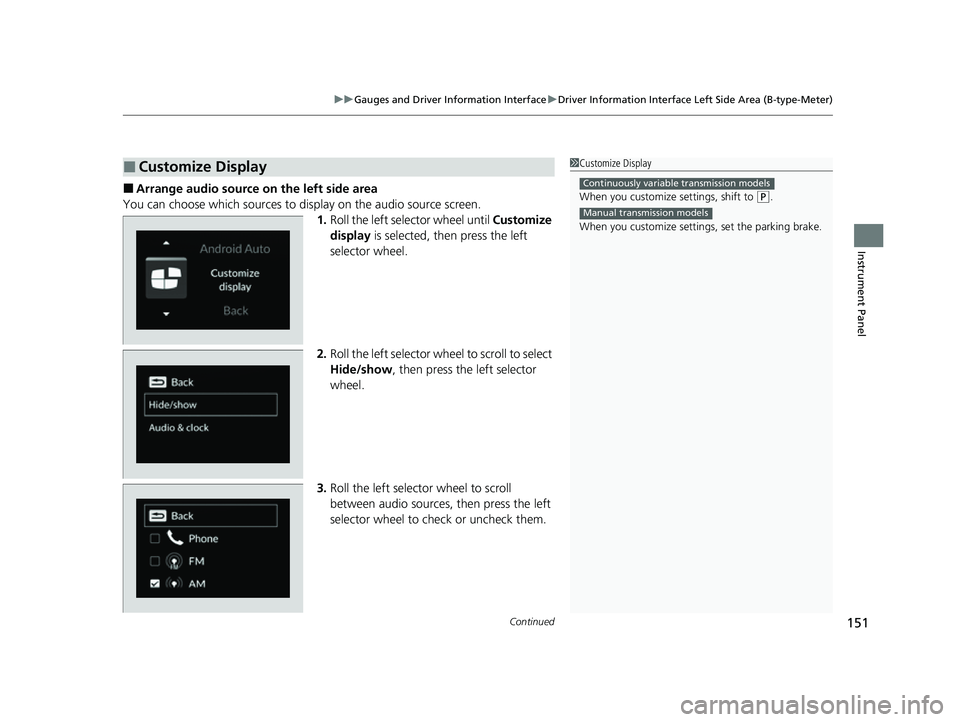
■Arrange audio source on the left side area
You can choose which sources to display on the audio source screen. 1.Roll the left selector wheel until Customize
display is selected, then press the left
selector wheel.
2. Roll the left selector wheel to scroll to select
Hide/show , then press the left selector
wheel.
3. Roll the left selector wheel to scroll
between audio sources, then press the left
selector wheel to check or uncheck them.
■Customize Display1Customize Display
When you customize settings, shift to
(P.
When you customize setti ngs, set the parking brake.
Continuously variable transmission models
Manual transmission models
23 CIVIC HATCHBACK TYPE R-31T406100_03.book 151 ページ 2022年6月23日 木曜日 午後9時28分