CD player HONDA CIVIC COUPE 1998 Owners Manual
[x] Cancel search | Manufacturer: HONDA, Model Year: 1998, Model line: CIVIC COUPE, Model: HONDA CIVIC COUPE 1998Pages: 251, PDF Size: 2.04 MB
Page 87 of 251
Comfort and Convenience Features
The heating and air conditioning* systems in your Honda provide a
comfortable driving environment in
all weather conditions.
The standard audio system has many features. This section de-
scribes those features and how to
use them. (If you selected an optional audio system, refer to the
operating instructions that came
with it.)
* Air conditioning is standard on the
EX model in the U.S. It is optional on
other models.
Heating and Cooling........................ 86
What Each Control Does............ 86How to Use the System............... 88
To Turn Everything Off............. 93
Audio System................................... 94 Operating the Radio.................... 94
Adjusting the Sound.................... 96 Radio Frequencies....................... 97
Radio Reception........................... 97
Digital Clock................................. 99Operating the Cassette Player...................................... 100
Tape Search Functions............. 100 Caring for the Cassette Player...................................... 102
Operating the Optional
CD Player/Changer.............. 103
Protecting Compact Discs........ 105
CD Changer Error Indications.............................. 106
Comfort and Convenience FeaturesMain Menu s t
Page 96 of 251
Audio System
AM/FM Stereo Audio System
Your Honda's audio system provides clear reception on both AM and FM
bands, while the preset buttons allow
you to easily select your favorite stations.
A cassette player, CD player or CD changer is available as optional
equipment. The cassette player is
standard on the Si model in Canada.
Operating the Radio
The ignition switch must be in
ACCESSORY (I) or ON (II) to operate the audio system. Turn the
system on by pressing the PWR/
VOL knob or the AM/FM button.
Adjust the volume by turning the
knob.
The band and frequency that the radio was last tuned to is displayed.
To change bands, press the AM/FM button. On the FM band, ST will bedisplayed if the station is broadcast-
ing in stereo. Stereo reproduction on
AM is not available.
You can use any of three methods to find radio stations on the selected
band: TUNE, SEEK, or the Preset
buttons.
TUNE — Use the TUNE/SEEK bar to tune the radio to a desired frequency. Press the right side ( )
to tune to a higher frequency, or the left side ( ) to tune to a lower
frequency. The frequency numbers
will start to change rapidly. Release the bar when the display reaches thedesired frequency. To change the
frequency in small increments, press and release the TUNE/SEEK bar
quickly.
SEEK — The SEEK function searches the band for a station with
a strong signal. To activate it, press
the TUNE/SEEK bar until you hear a beep, then release it. Depending on
which side of the bar you press, the system scans upward or downward
from the current frequency. It stops
when it finds a station with a strong
signal.
Preset — You can store the fre- quencies of your favorite radio
stations in the six preset buttons.
Each button will store one frequency
on the AM band, and two on the FM
band.
Comfort and Convenience FeaturesMain Menu Table of Contents s t
Page 102 of 251
Audio System
Operating the Cassette Player
Standard on Si model in Canada
The cassette system features Dolby
B* noise reduction, automatic
sensing of chromium-dioxide (CrO2)
tape, and autoreverse for continuous
play.
* Dolby noise reduction manufactured under
license from Dolby Laboratories Licensing Corpo-
ration. "DOLBY" and the double-D symbol
are trademarks of Dolby Laboratories
Licensing Corporation.
Make sure the tape opening on the
cassette is facing to the right, then
insert the cassette most of the way
into the slot. The system will pull it
in the rest of the way, and begin to
play.
The tape direction indicator will light to show you which side of the
cassette is playing. The
indicates
the side you inserted facing upward
is now playing. If you want to play the other side, press the PROG
button.
Dolby B noise reduction turns on
when you insert a cassette. If the tape was not recorded with Dolby Bnoise reduction, turn it off by
pressing the NR button.
When the system reaches the end of the tape, it will automatically reversedirection and play the other side. If
you want to remove the cassette
from the drive, press the EJECT
button.
If you turn the system off while a
tape is playing, either with the PWR/
VOL knob or by turning off the ignition, the cassette will remain in
the drive. When you turn the system
back on, the tape will begin playing
where it left off.
To switch to the radio or optional CD changer while listening to a tape, press the AM/FM or CD/TAPE
button. To change back to the cassette player, press the CD/TAPE
button.
Tape Search Functions
With a cassette playing, you can use the FF, REW, TMS, or REPEAT
function to find a desired program.FF/REW — Fast Forward and
Rewind mov e
the tape rapidly. Press
and release the REW side of the
TUNE/SEEK bar to rewind the tape, or the FF side to fast forward. Press
the PLAY button to take the system
out of rewind or fast forward. If the system reaches the end of the tape
while in fast forward or rewind, it automatically stops that function,
reverses direction, and begins to play.
Comfort and Convenience FeaturesMain Menu Table of Contents s t
Page 104 of 251
Audio System
Caring for the Cassette Player
The cassette player picks up dirt and oxides from the tape. This contami-
nation builds up over time and
causes the sound quality to degrade.
To prevent this, you should clean the player after every 30 hours of use.
Your dealer has a cleaning kit
available.
If you do not clean the cassette
player regularly, it may eventually
become impossible to remove the
contamination with a normal
cleaning kit.
Use 100-minute or shorter cassettes.Cassettes longer than that use
thinner tape that may break or jam
the drive. Look at the cassette before you
insert it. If the tape is loose, tighten
it by turning a hub with a pencil or
your finger.
If the label is peeling off, remove it
from the cassette or it could cause the cassette to jam in the player.
Never try to insert a warped ordamaged cassette in the player.
When they are not in use, store cassettes in their cases to protect
them from dust and moisture. Never
place cassettes where they will be exposed to direct sunlight, high heat,
or high humidity. If a cassette is
exposed to extreme heat or cold, letit reach a moderate temperature
before inserting it in the player.
Never try to insert foreign objects
into the cassette player. If you see the error indication " " on the display, press the
EJECT button and remove the
cassette from the unit. Make sure
the tape is not damaged. If the cassette will not eject or the error
indication stays on after the cassette
ejects, take the vehicle to your
Honda dealer.
If a problem develops in the connec-
tion between the cassette player and
the radio, you will see " " in
the display. Take the vehicle to your Honda dealer.
Comfort and Convenience FeaturesMain Menu Table of Contents s t
Page 105 of 251
Audio System
Operating the Optional CD
Player/Changer
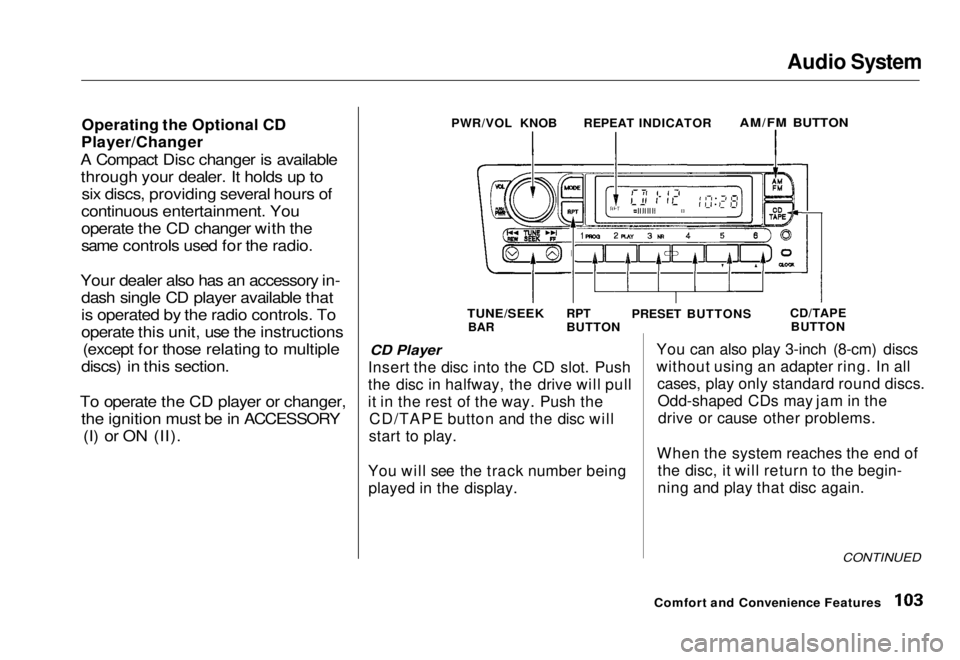
A Compact Disc changer is available through your dealer. It holds up to six discs, providing several hours of
continuous entertainment. You
operate the CD changer with the
same controls used for the radio.
Your dealer also has an accessory in- dash single CD player available that
is operated by the radio controls. To
operate this unit, use the instructions (except for those relating to multiple
discs) in this section.
To operate the CD player or changer, the ignition must be in ACCESSORY (I) or ON (II). CD Player
Insert the disc into the CD slot. Push
the disc in halfway, the drive will pull
it in the rest of the way. Push the CD/TAPE button and the disc will
start to play.
You will see the track number being played in the display. You can also play 3-inch (8-cm) discs
without using an adapter ring. In all
cases, play only standard round discs.Odd-shaped CDs may jam in thedrive or cause other problems.
When the system reaches the end of the disc, it will return to the begin-
ning and play that disc again.
CONTINUED
Comfort and Convenience Features
PWR/VOL KNOB
REPEAT INDICATOR
AM/FM BUTTON
TUNE/SEEK
BAR RPT
BUTTON
PRESET BUTTONS
CD/TAPE
BUTTONMain Menu Table of Contents s t
Page 106 of 251

Audio System
Press the EJECT button to remove
the disc from the player.
If you eject the disc, but do not
remove it from the slot, the system
will automatically reload the discafter 15 seconds and put the CD
player in pause mode. To begin
playing the disc, press the CD button.
CD Changer
Using the instructions that came
with the changer, load the desired CDs in the magazine, and load the
magazine in the changer. Play only
standard round discs. Odd-shaped CDs may jam in the drive or cause
other problems.
Press the CD/TAPE button. You will see "CD" in the display. The system
will start to play the first track of the
first disc. When that disc ends, the next disc in the magazine is loaded
and played. After the last disc
finishes, the system returns to disc 1. To select a different disc, press the
appropriate preset button (1 — 6). If
you select an empty slot in the magazine, the changer will, after
finding that slot empty, try to load the CD in the next slot. This
continues until it finds a CD to load
and play.
CD Player and Changer
You can use the TUNE/SEEK bar to select tracks within a disc. If you
press and release the TUNE/SEEK
bar, the system will move to the
beginning of a track. Press the side to move to the beginning
of the next track, and the side
to move to the beginning of the
current track.
If you press and hold the TUNE/
SEEK bar, you will hear a beep and
the system will continue to move across tracks. Release the bar when
you think it has reached the desired place on the disc. REPEAT - When you activate the
Repeat feature by pressing the RPT
button, the system continuously
replays the current track. You will see RPT in the display as a reminder.
Press the RPT button again to turn itoff.
To take the system out of CD mode, press the AM/EM button or insert acassette in the player. If a tape is
already in the cassette player, press
the CD/TAPE button. When you
return to CD mode, play will contin-
ue at the same point that it left off.
If you turn the system off while a CD
is playing, either with the PWR/VOL
knob or the ignition switch, play will continue at the same point when you
turn it back on.
Comfort and Convenience FeaturesMain Menu Table of Contents s t
Page 107 of 251
Audio System
Protecting Compact Discs
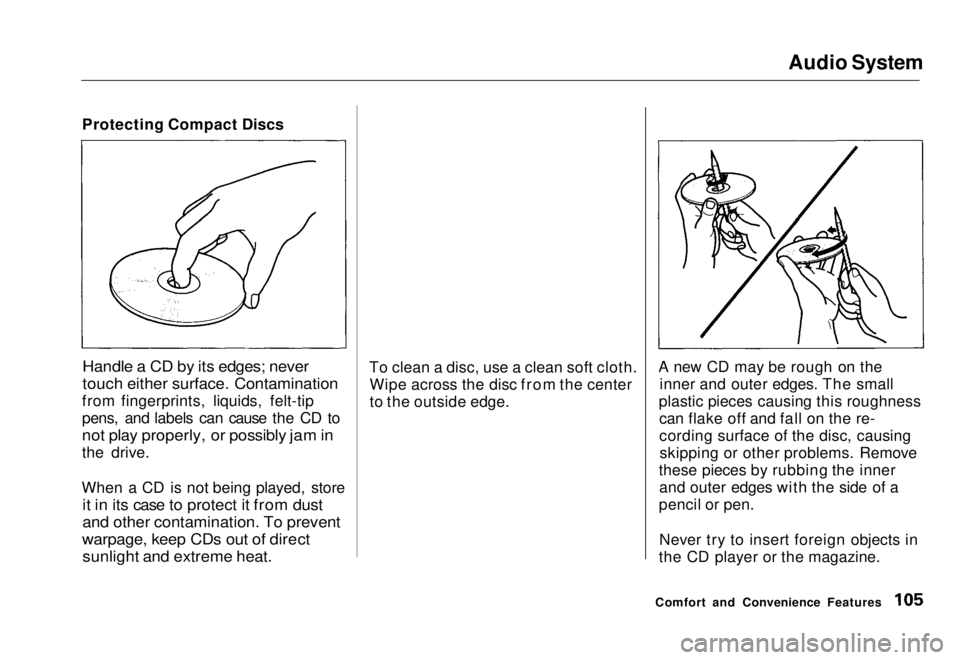
Handle a CD by its edges; never
touch either surface. Contamination
from fingerprints, liquids, felt-tip
pens, and labels can cause the CD to
not play properly, or possibly jam in
the drive.
When a CD is not being played, store
it in its case to protect it from dust
and other contamination. To prevent
warpage, keep CDs out of direct
sunlight and extreme heat.
To clean a disc, use a clean soft cloth.
Wipe across the disc from the center
to the outside edge. A new CD may be rough on the
inner and outer edges. The small
plastic pieces causing this roughness can flake off and fall on the re-
cording surface of the disc, causingskipping or other problems. Remove
these pieces by rubbing the inner and outer edges with the side of a
pencil or pen.
Never try to insert foreign objects in
the CD player or the magazine.
Comfort and Convenience FeaturesMain Menu Table of Contents s t
Page 248 of 251
Index
Before Driving............................... 107
Belts, Seat........................................... 6
Beverage Holder.............................. 82
Body Repair.................................... 200
Brakes
Anti-lock System (ABS)............ 135Break-in, New Linings .............. 108
Fluid............................................ 166Light, Burned-out...................... 192
Parking..........................................80
System Indicator.......................... 53
Wear Indicators......................... 134
Brakes, ABS Operation.................................... 134
System Indicator..................
53, 13 7
Braking System............................. .
134
Break-in, New Car......................... 108
Brightness Control, Instruments... 60
Brights, Headlights......................... 59
Bulb Replacement Back-up Lights........................... 193
Brake Lights............................... 192
Front Parking Lights................. 191
Front Side Marker Lights......... 191
Headlights.................................. 189
High-mount Brake Light.......... 194 Interior Light.............................. 195
License Plate Lights.................. 194
Rear Side Marker Lights.......... 193
Specifications............................. 234
Trunk Light................................ 196
Turn Signal Lights..................... 191
Bulbs, Halogen............................... 185
Cables, Jump Starting With.......... 213
Capacities Chart............................. 233 Carbon Monoxide Hazard.............. 47
Carrying Cargo.............................. 116
Cassette Player
Care............................................. 102
Operation.................................... 100
CAUTION, Explanation of............... ii
CD Changer.................................... 103
CD Player........................................ 103
Certification Label......................... 230
Chains............................................. 185
Change Oil
How to......................................... 157
When to....................................... 146
Changing a Flat Tire..................... 207 Changing Engine Coolant............. 161
Charging System Indicator .... 53,
218
Checking
Automatic Transmissio
n
Fluid........................................ 164
Battery Condition...................... 173
Brake Fluid................................. 167
Clutch Fluid................................ 167
Drive Belts.................................. 178
Engine Coolant........................... 112
Engine Oil..............................
111
Fuses........................................... 22 2
Manua
l Transmission Fluid..... 166
Power Steering Fluid................. 168
Checklist, Before Driving............. 120
Cleaner, Air.................................... 169
Cleaning Exterior....................................... 200
Interior........................................ 202
Seat Belts.................................... 202
Vinyl............................................202
Windows..................................... 203
Clock, Setting the............................ 99
Clutch Fluid.................................... 167
CO in the Exhaust......................... 240
Cold Weather, Starting in............. 121Main Menu s t