battery HONDA CIVIC COUPE 1998 Owners Manual
[x] Cancel search | Manufacturer: HONDA, Model Year: 1998, Model line: CIVIC COUPE, Model: HONDA CIVIC COUPE 1998Pages: 251, PDF Size: 2.04 MB
Page 55 of 251
Indicator Lights
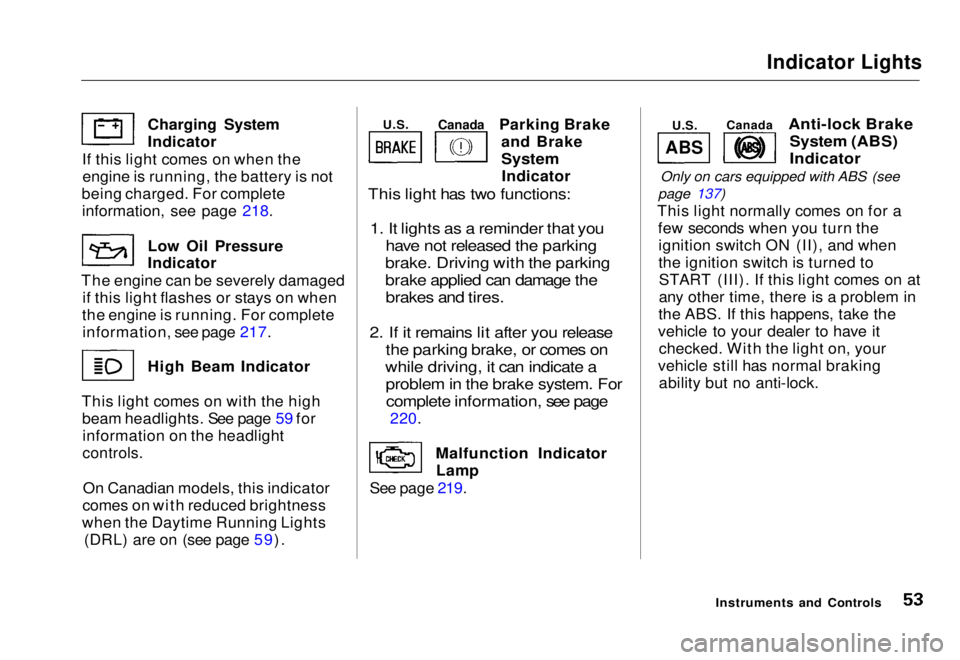
Parking Brake and Brake
System
Indicator
This light has two functions:
1. It lights as a reminder that you have not released the parking
brake. Driving with the parking
brake applied can damage the brakes and tires.
2. If it remains lit after you release the parking brake, or comes on
while driving, it can indicate a problem in the brake system. Forcomplete information, see page
220.
Malfunction Indicator Lamp
See page 219.
Anti-lock Brake
System (ABS)
Indicator
Only on cars equipped with ABS (see
page 137)
This light normally comes on for a few seconds when you turn theignition switch ON (II), and when
the ignition switch is turned toSTART (III). If this light comes on at
any other time, there is a problem in
the ABS. If this happens, take the
vehicle to your dealer to have it checked. With the light on, your
vehicle still has normal braking ability but no anti-lock.
Instruments and Controls
Charging System Indicator
If this light comes on when the engine is running, the battery is not
being charged. For complete
information
,
see page 218.
Low Oil
Pressure
Indicator
The engine can be severely damaged if this light flashes or stays on when
the engine is running. For complete information, see page 217. High Beam Indicator
This light comes on with the high beam headlights. See page 59 forinformation on the headlight
controls.
On Canadian models, this indicator
comes on with reduced brightness
when the Daytime Running Lights (DRL) are on (see page 59).
ABS
U.S.
Canada
U.S.
CanadaMain Menu Table of Contents s t
Page 72 of 251
Keys and Locks
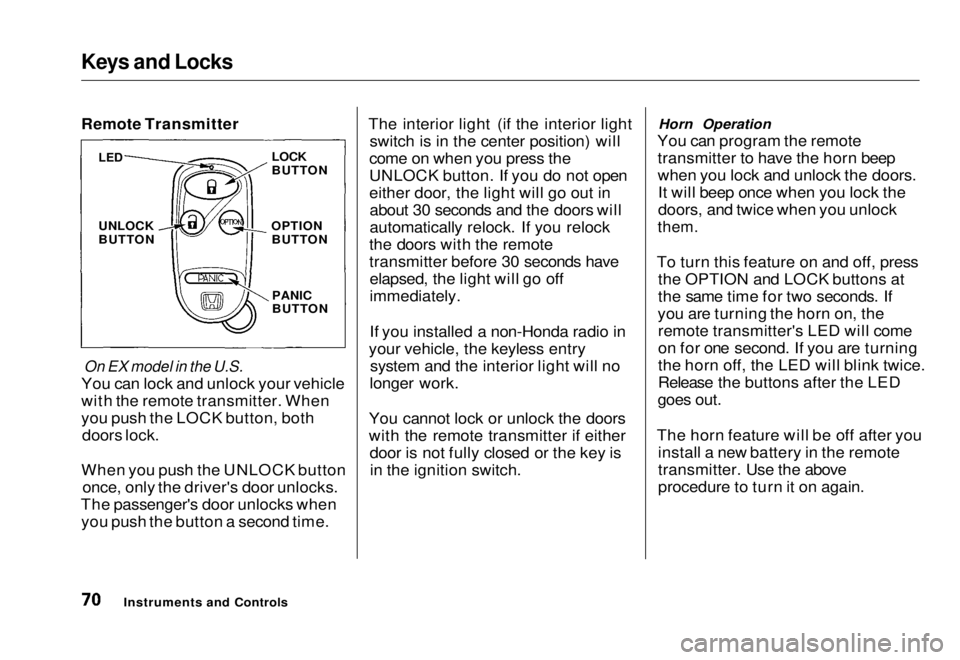
Remote Transmitter
On EX model in the U.S.
You can lock and unlock your vehicle
with the remote transmitter. When
you push the LOCK button, both doors lock.
When you push the UNLOCK button once, only the driver's door unlocks.
The passenger's door unlocks when you push the button a second time. The interior light (if the interior light
switch is in the center position) will
come on when you press the
UNLOCK button. If you do not open
either door, the light will go out in about 30 seconds and the doors will
automatically relock. If you relock
the doors with the remote
transmitter before 30 seconds have elapsed, the light will go off
immediately.
If you installed a non-Honda radio in
your vehicle, the keyless entry system and the interior light will no
longer work.
You cannot lock or unlock the doors
with the remote transmitter if either door is not fully closed or the key isin the ignition switch. Horn Operation
You can program the remote transmitter to have the horn beep
when you lock and unlock the doors.It will beep once when you lock the
doors, and twice when you unlock
them.
To turn this feature on and off, press the OPTION and LOCK buttons at
the same time for two seconds. If
you are turning the horn on, the remote transmitter's LED will come
on for one second. If you are turning
the horn off, the LED will blink twice.
Release the buttons after the LED
goes out.
The horn feature will be off after you install a new battery in the remote
transmitter. Use the above
procedure to turn it on again.
Instruments and Controls
LED
UNLOCK
BUTTON
LOCK
BUTTON
OPTION BUTTON
PANIC
BUTTONMain Menu Table of Contents s t
Page 73 of 251
Keys and Locks
Panic Mode
Panic mode allows you to remotely
sound your vehicle's horn to attract
attention. To activate this mode,
press and hold the PANIC button for
about one second. Your vehicle's
horn will beep for about 30 seconds.
To cancel PANIC mode before 30 seconds, press any button on the
remote transmitter. You can also
turn the ignition switch to
ACCESSORY (I) or ON (II).
Panic mode will not activate if the
ignition switch is in ACCESSORY (I)or ON (II).
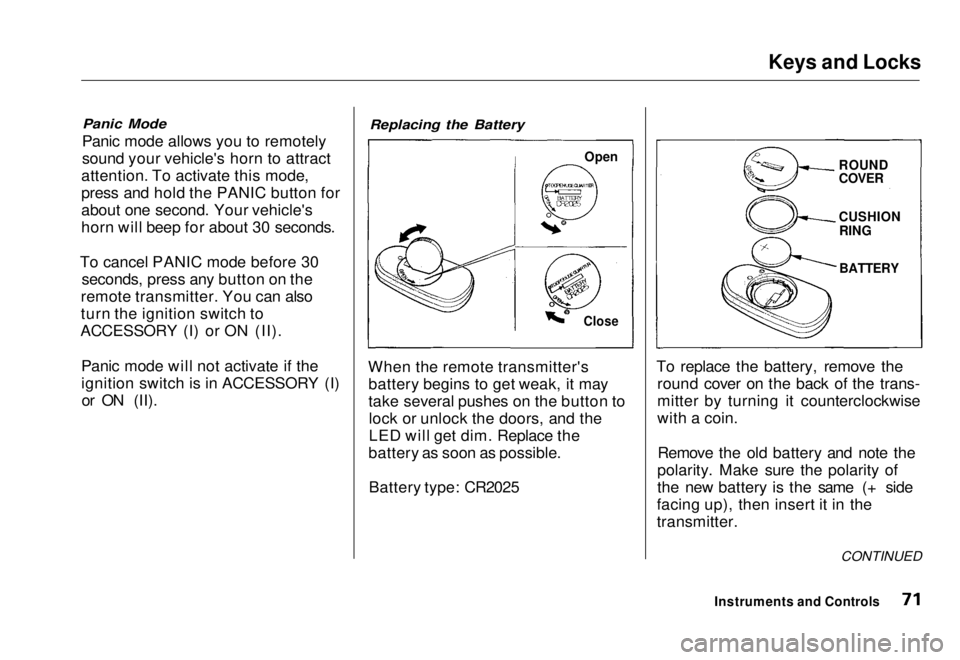
Replacing the Battery
When the remote transmitter's battery begins to get weak, it may
take several pushes on the button tolock or unlock the doors, and the
LED will get dim. Replace the
battery as soon as possible.
Battery type: CR2025 To replace the battery, remove the
round cover on the back of the trans-
mitter by turning it counterclockwise
with a coin.
Remove the old battery and note the
polarity. Make sure the polarity of
the new battery is the same (+ side
facing up), then insert it in the
transmitter.
Instruments and Controls
Open
Close
ROUND
COVER
CUSHION
RING
BATTERY
CONTINUEDMain Menu Table of Contents s t
Page 74 of 251
Keys and Locks
Reinstall the 0-ring. Align the
mark on the cover with the mark on the transmitter,
then set the cover in place and turn it
clockwise.
After the battery is changed, the transmitter must be synchronized
with the main unit. With the doors and trunk lid closed, press either theLOCK or UNLOCK button six times.
Test the transmitter by locking and unlocking the doors several times. Transmitter Care
Avoid severe shock to the trans- mitter, such as dropping or throwing
it. Also, protect it from extreme hotor cold temperatures.
Clean the transmitter case with a
soft cloth. Do not use strong
cleaners or solvents that could harm
the case. Immersing the transmitter in any liquid will harm the trans-
mitter and cause it to not function
properly.
Use the ring on the transmitter to
attach it to your main key ring. You
could damage the transmitter if you
try to use its ring as a key ring. If you lose a transmitter, you will
need to have the replacement
programmed to your vehicle's
system by your Honda dealer. Any
other transmitters you have will also
need to be reprogrammed.
As required by the FCC: This device complies with Part 15 of the
FCC rules. Operation is subject to the
following two conditions: (1) This device may not cause harmful interference, and (2) this device must accept any
interference received, including
interference that may cause undesired operation.
Changes or modifications not expressly
approved by the party responsible for
compliance could void the user's
authority to operate the equipment.
Instruments and ControlsMain Menu Table of Contents s t
Page 97 of 251
Audio System
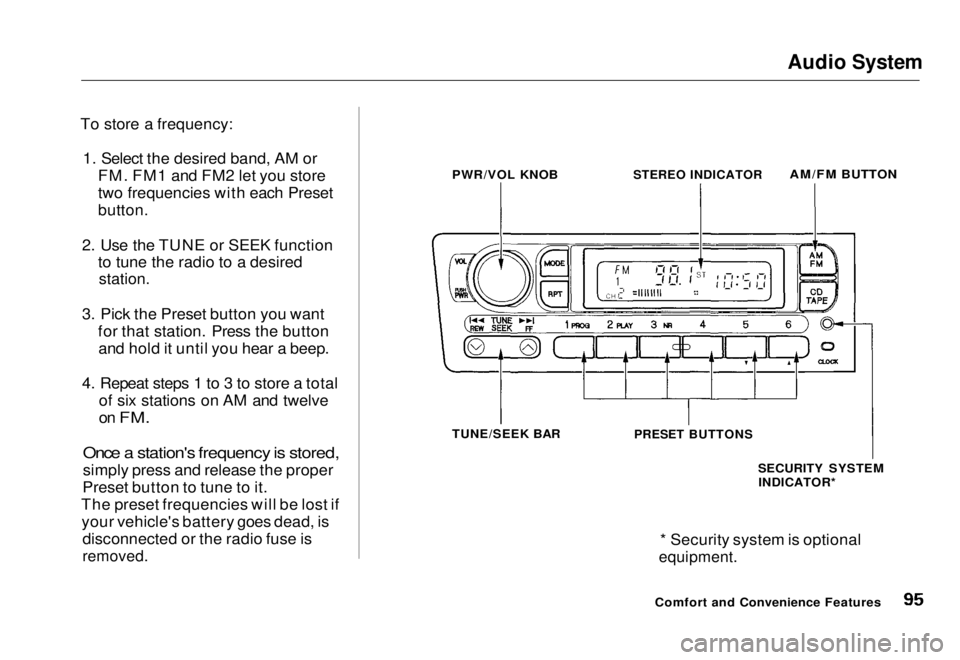
To store a frequency: 1. Select the desired band, AM or FM. FM1 and FM2 let you store
two frequencies with each Preset
button.
2. Use the TUNE or SEEK function to tune the radio to a desired
station.
3. Pick the Preset button you want for that station. Press the buttonand hold it until you hear a beep.
4. Repeat steps 1 to 3 to store a total of six stations on AM and twelve
on
FM.
Once a station's frequency is stored,
simply press and release the proper
Preset button to tune to it.
The preset frequencies will be lost if your vehicle's battery goes dead, is disconnected or the radio fuse is
removed.
* Security system is optional
equipment.
Comfort and Convenience Features
PWR/VOL KNOB
STEREO INDICATOR
AM/FM BUTTON
TUNE/SEEK BAR
PRESET BUTTONS
SECURITY SYSTEMINDICATOR*Main Menu Table of Contents s t
Page 123 of 251

Starting the Engine
1. Apply the parking brake.
2. In cold weather, turn off all electrical accessories to reduce
the drain on the battery.
3. Manual Transmission:
Push the clutch pedal down all the
way. START (III) does not
function unless the clutch pedal is
depressed.
Automatic Transmission (Including
CVT):
Make sure the shift lever is in Park. Press on the brake pedal.
4. Without touching the accelerator
pedal, turn the ignition key to the
START (III) position. If the enginedoes not start right away, do not
hold the key in START (III) for
more than 15 seconds at a time.
Pause for at least 10 seconds
before trying again.
5. If the engine does not start within
15 seconds, or starts but stalls
right away, repeat step 4 with the accelerator pedal pressed half-way
down. If the engine starts, release
pressure on the accelerator pedal so the engine does not race.
6. If the engine still does not start, press the accelerator pedal all the
way down and hold it there while starting in order to clear flooding.
As before, keep the ignition key in the START (III) position for no
more than 15 seconds. Return to step 5 if the engine does not start.
If it starts, lift your foot off theaccelerator pedal so the enginedoes not race.
Starting in Cold Weather at High
Altitud
e (Above 8,000 feet/
2,40
0 meters)
An engine is harder to start in cold
weather. The thinner air found athigh altitude above 8,000 feet (2,400 meters) adds to the problem.
Use the following procedure:
1. Turn off all electrical accessories to reduce the drain on the battery.
2. Push the accelerator pedal half- way to the floor and hold it there
while starting the engine. Do not
hold the ignition key in START(III) for more than 15 seconds.
When the engine starts, release the accelerator pedal gradually as
th
e
engine speeds up and smooths
out.
3. I
f the engine fails to start in step 2,
push the accelerator pedal to the
floor and hold it there while you
try to start the engine for no more
than 15 seconds. If the engine does not start, return to step 2.
DrivingMain Menu Table of Contents s t
Page 142 of 251
Maintenance
This section explains why it is important to keep your vehicle well
maintained and to follow basic
maintenance safety precautions.
This section also includes Maintenance Schedules for normaldriving and severe driving conditions,
a Maintenance Record, and instruc-
tions for simple maintenance tasks
you may want to take care of yourself.
If you have the skills and tools to per-
form more complex maintenance tasks on your Honda, you may want
to purchase the Service Manual. See
page 219 for information on how to obtain a copy, or see your Honda
dealer.
Maintenance Safety....................... 142
Important Safety Precautions.. 143
Maintenance Schedule.................. 144
Maintenance Record..................... 151
Owner Maintenance Checks........ 153
Fluid Locations............................... 154
Engine Oil....................................... 155 Adding Oil................................... 155Recommended Oil..................... 155Synthetic Oil............................... 156
Additives..................................... 156
Changing the Oil and Filter...... 157
Cooling System.............................. 159
Adding Engine Coolant............. 159Replacing Engine Coolant........ 161
Windshield Washers..................... 164
Transmission Fluid........................ 164
Automatic
Transmission.......................... 164
5-speed Manual
Transmission.......................... 166
Brake and Clutch Fluid................. 166
Brake System............................. 167Clutch System............................ 167
Power Steering............................... 168
Air Cleaner Element...................... 169 Spark Plugs..................................... 171
Replacement............................... 171
Specifications............................. 172
Battery............................................ 173
Wiper Blades.................................. 175
Air Conditioning System............... 177 Drive Belts...................................... 178
Timing Belt..................................... 178
Tires................................................ 179 Inflation....................................... 179
Recommended Tire Pressures
for Normal Driving............ 180
Inspection................................... 181
Maintenance............................... 181
Tire Rotation.............................. 182
Replacing Tires and Wheels ....
183
Wheels an d
Tires....................... 184
Winter Driving........................... 184 Snow Tires.............................. 184
Tire Chains............................. 185
Lights.............................................. 186 Headlight Aiming...................... 188
Replacing Bulbs......................... 189
Storing Your Vehicle..................... 197
MaintenanceMain Menu s t
Page 144 of 251
Maintenance Safety
Important Safety Precautions Before you begin any maintenance,
make sure your vehicle is parked on
level ground and that the parking
brake is set. Also, be sure the engine is off. This will help to eliminate
several potential hazards:
Carbon monoxide poisoning
from engine exhaust. Be sure there is adequate ventilation
whenever you operate the engine.
Burns from hot parts. Let theengine and exhaust system cool
before touching any parts.
Injury from moving parts. Do
not run the engine unless in-
structed to do so. Read the instructions before you
begin, and make sure you have the
tools and skills required.
To reduce the possibility of fire or explosion, be careful when working
around gasoline or batteries. Use a
nonflammable solvent, not gasoline, to clean parts. Keep cigarettes,sparks, and flames away from the
battery and all fuel-related parts.
You should wear eye protection and protective clothing when working
near the battery or when usingcompressed air.
MaintenanceMain Menu Table of Contents s t
Page 174 of 251
Battery
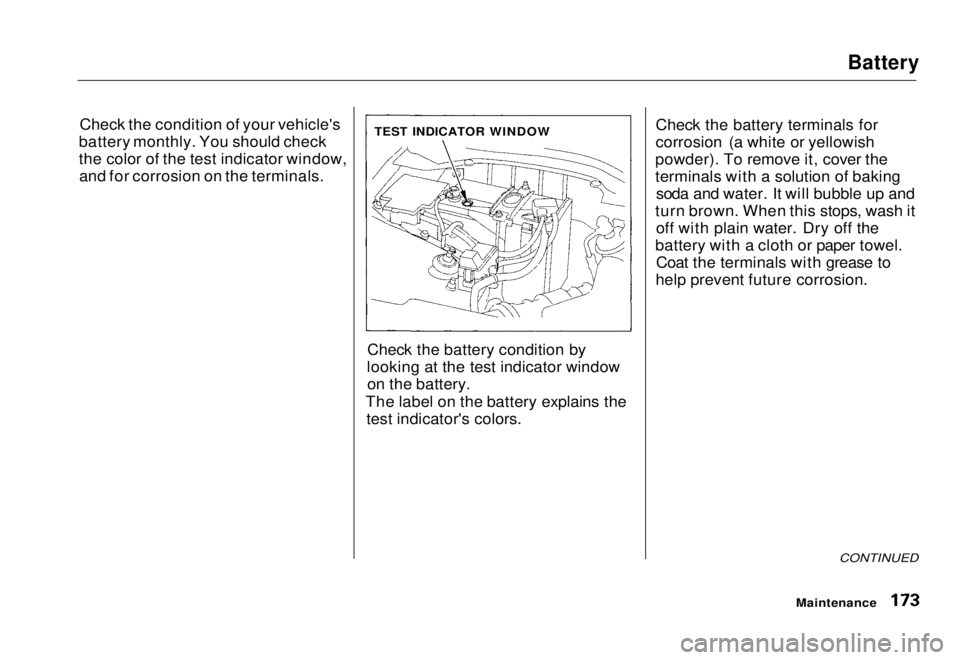
Check the condition of your vehicle's
battery monthly. You should check
the color of the test indicator window, and for corrosion on the terminals.
Check the battery condition by
looking at the test indicator window on the battery.
The label on the battery explains the test indicator's colors. Check the battery terminals for
corrosion (a white or yellowish
powder). To remove it, cover the
terminals with a solution of baking soda and water. It will bubble up and
turn brown. When this stops, wash it off with plain water. Dry off the
battery with a cloth or paper towel. Coat the terminals with grease to
help prevent future corrosion.
CONTINUED
Maintenance
TEST INDICATOR WINDOWMain Menu Table of Contents s t
Page 175 of 251
Battery
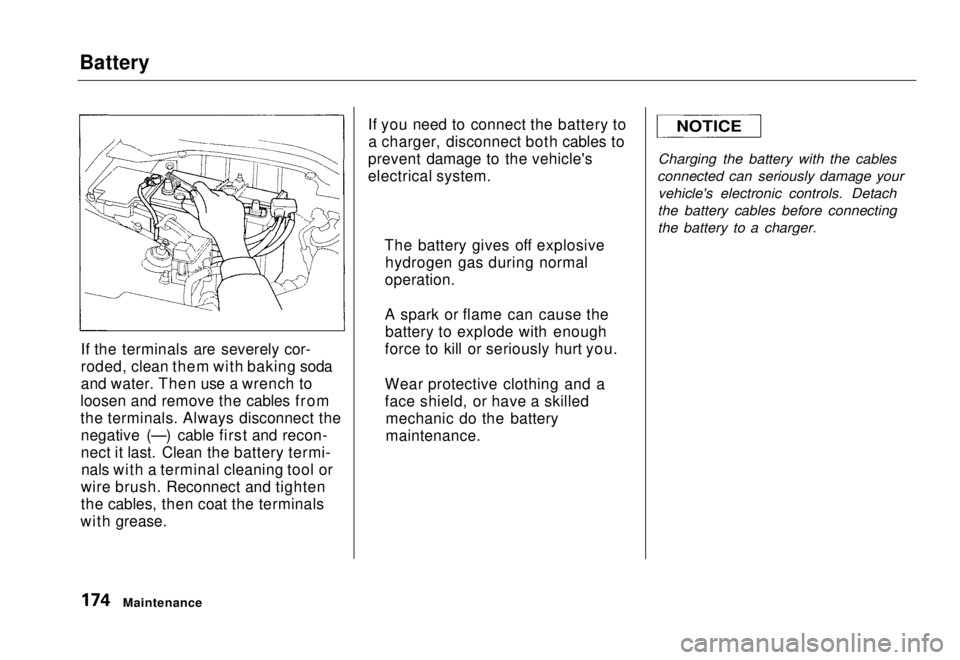
If the terminals are severely cor-
roded, clean them with baking soda
and water. Then use a wrench to
loosen and remove the cables from
the terminals. Always disconnect the negative (—) cable first and recon-
nect it last. Clean the battery termi-nals with a terminal cleaning tool or
wire brush. Reconnect and tighten
the cables, then coat the terminals
with grease. If you need to connect the battery to
a charger, disconnect both cables to
prevent damage to the vehicle's
electrical system.
Charging the battery with the cables
connected can seriously damage your vehicle's electronic controls. Detach
the battery cables before connecting
the battery to a charger.
Maintenance
The battery gives off explosive
hydrogen gas during normal
operation.
A spark or flame can cause the battery to explode with enough
force to kill or seriously hurt you.
Wear protective clothing and a
face shield, or have a skilled mechanic do the battery
maintenance.
NOTICEMain Menu Table of Contents s t