audio HONDA CIVIC COUPE 1998 User Guide
[x] Cancel search | Manufacturer: HONDA, Model Year: 1998, Model line: CIVIC COUPE, Model: HONDA CIVIC COUPE 1998Pages: 251, PDF Size: 2.04 MB
Page 102 of 251
Audio System
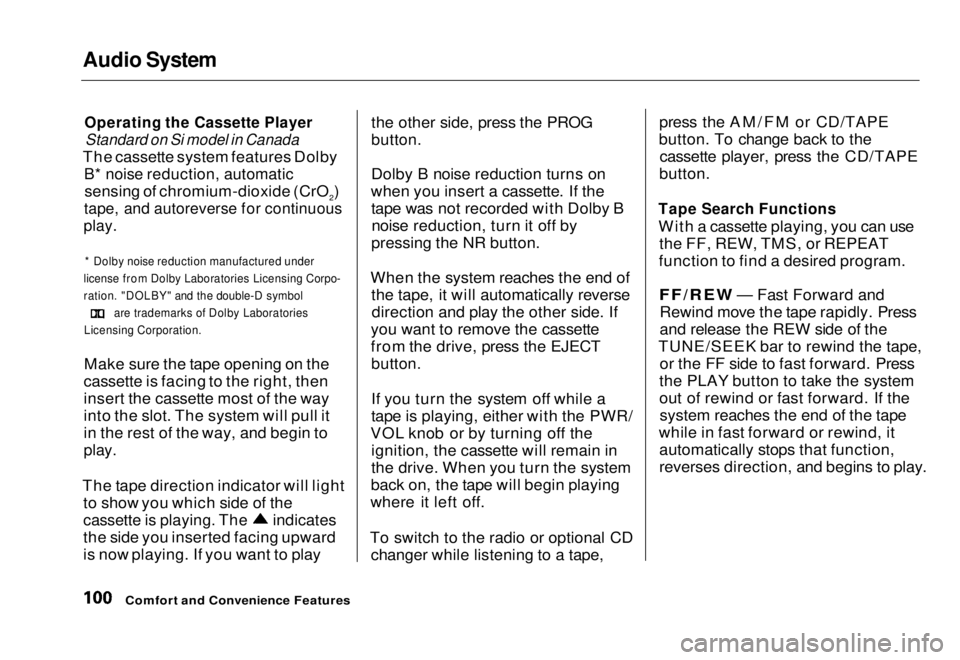
Operating the Cassette Player
Standard on Si model in Canada
The cassette system features Dolby
B* noise reduction, automatic
sensing of chromium-dioxide (CrO2)
tape, and autoreverse for continuous
play.
* Dolby noise reduction manufactured under
license from Dolby Laboratories Licensing Corpo-
ration. "DOLBY" and the double-D symbol
are trademarks of Dolby Laboratories
Licensing Corporation.
Make sure the tape opening on the
cassette is facing to the right, then
insert the cassette most of the way
into the slot. The system will pull it
in the rest of the way, and begin to
play.
The tape direction indicator will light to show you which side of the
cassette is playing. The
indicates
the side you inserted facing upward
is now playing. If you want to play the other side, press the PROG
button.
Dolby B noise reduction turns on
when you insert a cassette. If the tape was not recorded with Dolby Bnoise reduction, turn it off by
pressing the NR button.
When the system reaches the end of the tape, it will automatically reversedirection and play the other side. If
you want to remove the cassette
from the drive, press the EJECT
button.
If you turn the system off while a
tape is playing, either with the PWR/
VOL knob or by turning off the ignition, the cassette will remain in
the drive. When you turn the system
back on, the tape will begin playing
where it left off.
To switch to the radio or optional CD changer while listening to a tape, press the AM/FM or CD/TAPE
button. To change back to the cassette player, press the CD/TAPE
button.
Tape Search Functions
With a cassette playing, you can use the FF, REW, TMS, or REPEAT
function to find a desired program.FF/REW — Fast Forward and
Rewind mov e
the tape rapidly. Press
and release the REW side of the
TUNE/SEEK bar to rewind the tape, or the FF side to fast forward. Press
the PLAY button to take the system
out of rewind or fast forward. If the system reaches the end of the tape
while in fast forward or rewind, it automatically stops that function,
reverses direction, and begins to play.
Comfort and Convenience FeaturesMain Menu Table of Contents s t
Page 103 of 251
Audio System
TMS — The Tape Music Search function allows you to find the
beginning of a song or passage. Toactivate TMS, press FF or REW until
you hear a beep. You will see TMS displayed. When the system reaches
the beginning of the next song or
passage (FF), or the beginning of
the song just played (REW), it goes
back to PLAY mode.
REPEAT — The Repeat function continuously replays the currentsong or passage. Press the RPT
button to activate it; you will see RPT displayed as a reminder. When thesystem reaches the end of the song
or passage currently playing, it will automatically go into rewind. When
it senses the beginning of the same song or passage, the system returns
to PLAY mode. It will continue to
repeat this same program until you deactivate REPEAT by pressing the
button again. The TMS and REPEAT functions
use silent periods on the tape to find
the end of a song or passage. These
features may not work to your satisfaction if there is almost no gap
between selections, a high noise level between selections, or a silent
period in the middle of a selection.
Comfort and Convenience Features
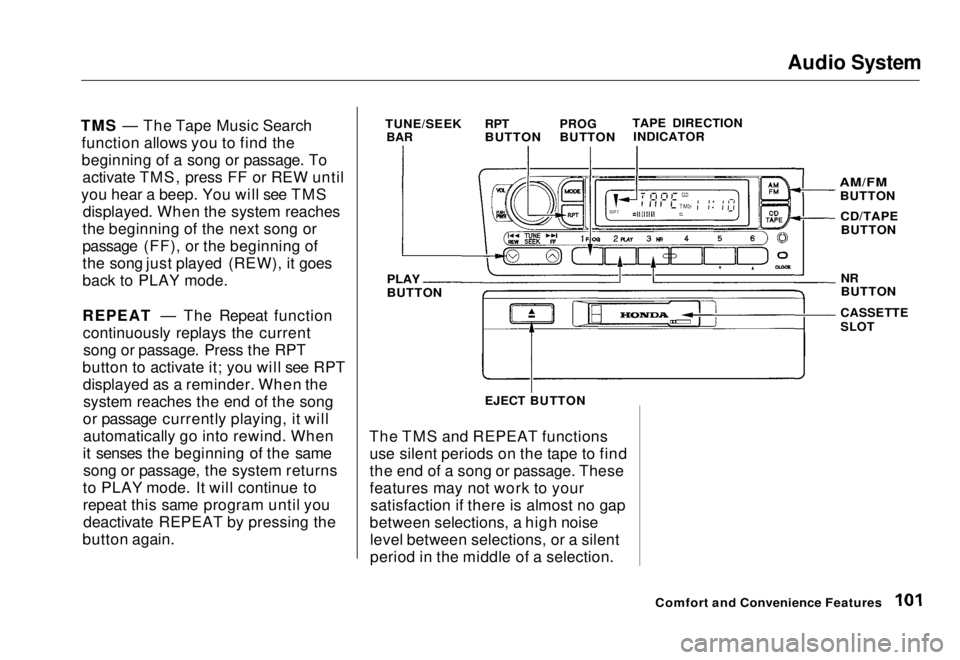
TUNE/SEEK
BAR
RPT
BUTTON
PROG
BUTTON
TAPE DIRECTION
INDICATOR
PLAY
BUTTON
AM/FM
BUTTON
CD/TAPEBUTTON
NR
BUTTON
CASSETTE
SLOT
EJECT BUTTONMain Menu Table of Contents s t
Page 104 of 251
Audio System
Caring for the Cassette Player
The cassette player picks up dirt and oxides from the tape. This contami-
nation builds up over time and
causes the sound quality to degrade.
To prevent this, you should clean the player after every 30 hours of use.
Your dealer has a cleaning kit
available.
If you do not clean the cassette
player regularly, it may eventually
become impossible to remove the
contamination with a normal
cleaning kit.
Use 100-minute or shorter cassettes.Cassettes longer than that use
thinner tape that may break or jam
the drive. Look at the cassette before you
insert it. If the tape is loose, tighten
it by turning a hub with a pencil or
your finger.
If the label is peeling off, remove it
from the cassette or it could cause the cassette to jam in the player.
Never try to insert a warped ordamaged cassette in the player.
When they are not in use, store cassettes in their cases to protect
them from dust and moisture. Never
place cassettes where they will be exposed to direct sunlight, high heat,
or high humidity. If a cassette is
exposed to extreme heat or cold, letit reach a moderate temperature
before inserting it in the player.
Never try to insert foreign objects
into the cassette player. If you see the error indication " " on the display, press the
EJECT button and remove the
cassette from the unit. Make sure
the tape is not damaged. If the cassette will not eject or the error
indication stays on after the cassette
ejects, take the vehicle to your
Honda dealer.
If a problem develops in the connec-
tion between the cassette player and
the radio, you will see " " in
the display. Take the vehicle to your Honda dealer.
Comfort and Convenience FeaturesMain Menu Table of Contents s t
Page 105 of 251
Audio System
Operating the Optional CD
Player/Changer
A Compact Disc changer is available through your dealer. It holds up to six discs, providing several hours of
continuous entertainment. You
operate the CD changer with the
same controls used for the radio.
Your dealer also has an accessory in- dash single CD player available that
is operated by the radio controls. To
operate this unit, use the instructions (except for those relating to multiple
discs) in this section.
To operate the CD player or changer, the ignition must be in ACCESSORY (I) or ON (II). CD Player
Insert the disc into the CD slot. Push
the disc in halfway, the drive will pull
it in the rest of the way. Push the CD/TAPE button and the disc will
start to play.
You will see the track number being played in the display. You can also play 3-inch (8-cm) discs
without using an adapter ring. In all
cases, play only standard round discs.Odd-shaped CDs may jam in thedrive or cause other problems.
When the system reaches the end of the disc, it will return to the begin-
ning and play that disc again.
CONTINUED
Comfort and Convenience Features
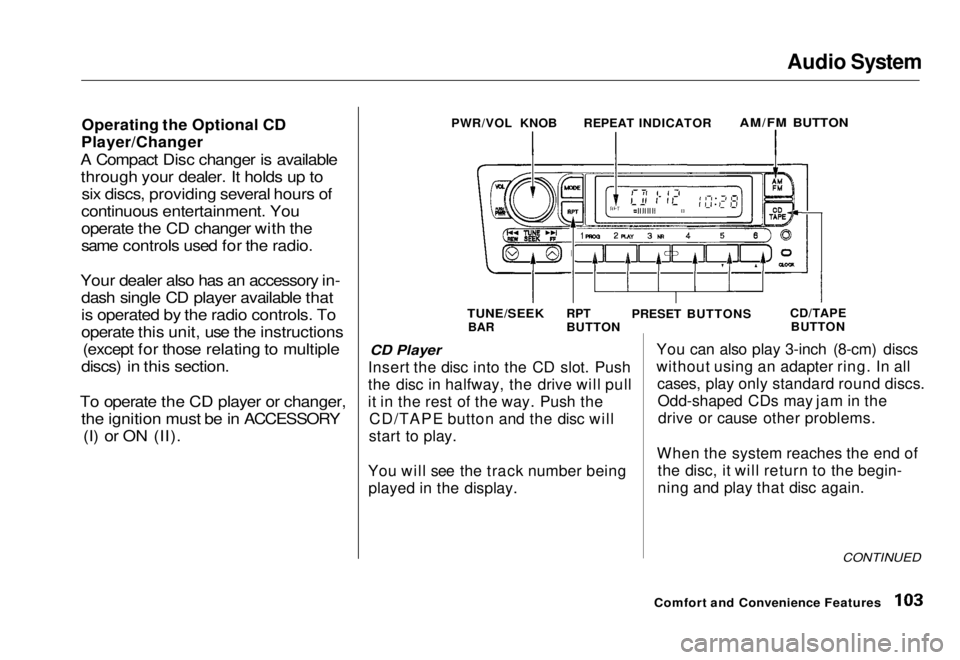
PWR/VOL KNOB
REPEAT INDICATOR
AM/FM BUTTON
TUNE/SEEK
BAR RPT
BUTTON
PRESET BUTTONS
CD/TAPE
BUTTONMain Menu Table of Contents s t
Page 106 of 251

Audio System
Press the EJECT button to remove
the disc from the player.
If you eject the disc, but do not
remove it from the slot, the system
will automatically reload the discafter 15 seconds and put the CD
player in pause mode. To begin
playing the disc, press the CD button.
CD Changer
Using the instructions that came
with the changer, load the desired CDs in the magazine, and load the
magazine in the changer. Play only
standard round discs. Odd-shaped CDs may jam in the drive or cause
other problems.
Press the CD/TAPE button. You will see "CD" in the display. The system
will start to play the first track of the
first disc. When that disc ends, the next disc in the magazine is loaded
and played. After the last disc
finishes, the system returns to disc 1. To select a different disc, press the
appropriate preset button (1 — 6). If
you select an empty slot in the magazine, the changer will, after
finding that slot empty, try to load the CD in the next slot. This
continues until it finds a CD to load
and play.
CD Player and Changer
You can use the TUNE/SEEK bar to select tracks within a disc. If you
press and release the TUNE/SEEK
bar, the system will move to the
beginning of a track. Press the side to move to the beginning
of the next track, and the side
to move to the beginning of the
current track.
If you press and hold the TUNE/
SEEK bar, you will hear a beep and
the system will continue to move across tracks. Release the bar when
you think it has reached the desired place on the disc. REPEAT - When you activate the
Repeat feature by pressing the RPT
button, the system continuously
replays the current track. You will see RPT in the display as a reminder.
Press the RPT button again to turn itoff.
To take the system out of CD mode, press the AM/EM button or insert acassette in the player. If a tape is
already in the cassette player, press
the CD/TAPE button. When you
return to CD mode, play will contin-
ue at the same point that it left off.
If you turn the system off while a CD
is playing, either with the PWR/VOL
knob or the ignition switch, play will continue at the same point when you
turn it back on.
Comfort and Convenience FeaturesMain Menu Table of Contents s t
Page 107 of 251
Audio System
Protecting Compact Discs
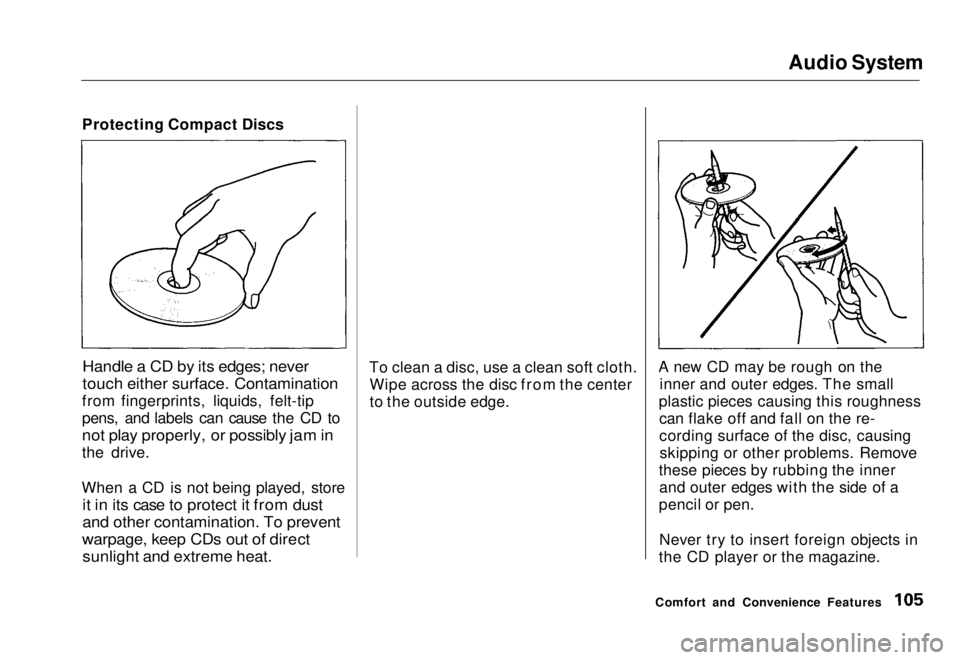
Handle a CD by its edges; never
touch either surface. Contamination
from fingerprints, liquids, felt-tip
pens, and labels can cause the CD to
not play properly, or possibly jam in
the drive.
When a CD is not being played, store
it in its case to protect it from dust
and other contamination. To prevent
warpage, keep CDs out of direct
sunlight and extreme heat.
To clean a disc, use a clean soft cloth.
Wipe across the disc from the center
to the outside edge. A new CD may be rough on the
inner and outer edges. The small
plastic pieces causing this roughness can flake off and fall on the re-
cording surface of the disc, causingskipping or other problems. Remove
these pieces by rubbing the inner and outer edges with the side of a
pencil or pen.
Never try to insert foreign objects in
the CD player or the magazine.
Comfort and Convenience FeaturesMain Menu Table of Contents s t
Page 108 of 251
Audio System
CD Changer Error Indications
If you see an error indication in the
display while operating the CD
changer, find the cause in the chart
to the right. If you cannot clear the
error indication, take the vehicle to
your Honda dealer.
Comfort and Convenience FeaturesMain Menu Table of Contents s t
Page 116 of 251
Accessories and Modifications
Modifying your vehicle, or installingsome non-Honda accessories, can
make your vehicle unsafe. Before
you make any modifications or add
any accessories, be sure to read the
following information.
Accessories
Your dealer has Genuine Honda accessories that allow you to
personalize your vehicle. These accessories have been designed and
approved for your vehicle, and are
covered by warranty.
Non-Honda accessories are usually
designed for universal applications.
Although aftermarket accessories may fit on your vehicle, they may not
meet factory specifications, and
could adversely affect your vehicle's
handling and stability. (See "Modifications" on page 115 for
additional information.) When properly installed, car phones,
alarms, two-way radios, and low-
powered audio systems should not
interfere with your vehicle's
computer-controlled systems, such as the SRS and anti-lock brake
system.
However, if electronic accessories
are improperly installed, or exceed
your vehicle's electrical system capacity, they can interfere with the operation of your vehicle, or even
cause the airbags to deploy.
Before installing any accessory:
Make sure the accessory does notobscure any lights, or interfere
with proper vehicle operation or performance.
Be sure electronic accessories do
not overload electrical circuits (see page 225). Have the installer contact your
Honda dealer for assistance before
installing any electronic accessory.
If possible, have your dealer inspect
the final installation.
Before Driving
Improper accessories or
modifications can affect your
vehicle's handling, stability and performance, and cause a
crash in which you can be hurt
or killed.
Follow all instructions in this
owner's manual regarding
accessories and modifications.Main Menu Table of Contents s t
Page 247 of 251
Index
Accessories and Modifications.... 114 Accessories................................. 114
Additional Safety Precaution.... 115Modifications............................. 115
ACCESSORY (Ignition Key Position)........................................ 68
Accessory Power Socket................ 83
Adding Automatic Transmission
Fluid........................................ 164
Brake Fluid................................. 167 Clutch Fluid................................ 167
Engine Coolant........................... 159
Engine Oil................................... 155
Manual Transmission Fluid..... 166Power Steering Fluid................. 168
Windshield Washer Fluid......... 164
Additional Information About Your Seat Belts........................ 40
Lap Belt......................................... 41
Lap/Shoulder Belt....................... 40
Seat Belt Maintenance................ 42
Seat Belt System Components... 40 Additional Information About
Your SRS................................... 43
Additional Safety Precautions.... 46 How Your Airbags Work............ 43
How Your SRS Indicator
Works........................................ 45
SRS Components......................... 43
Additives, Engine Oil..................... 156
Adjustments
Headlights.................................. 188
Head Restraints........................... 75
Mirrors.......................................... 79
Seats.............................................. 74
Steering Wheel............................ 63
Airbag (SRS)...................................... 7
Air Cleaner Element...................... 169
Air Conditioning............................... 86 Maintenance............................... 177
Usage............................................. 86
Air Outlets (Vents).......................... 88
Air Pressure, Tires........................ 180 High Speed Driving................... 236
Normal Driving.......................... 180
Alcohol in Gasoline........................ 238
Antifreeze....................................... 159
Anti-lock Brakes (ABS)
Indicator Light.....................
53, 137
Operation.................................... 13 6
Anti-thef
t Steering Column
Lock...............................................68
Appearance Care........................... 199
Ashtrays (Optional)......................... 83
Audio System................................... 94
Automatic Speed Control................ 64
Automatic Transmission............... 124
Capacity, Fluid........................... 233
Checking Fluid Level................ 164
Shifting........................................ 125
Shift Lever Position Indicator.. 124
Shift Lever Positions................. 125
Shift Lock Release..................... 128
Battery Charging SystemIndicator............................ 53,
218
Jump Starting............................ .
213
Maintenance............................... 173
Specifications............................. 234
CONTINUEDMain Menu s t