brake HONDA CIVIC COUPE 2014 9.G Navigation Manual
[x] Cancel search | Manufacturer: HONDA, Model Year: 2014, Model line: CIVIC COUPE, Model: HONDA CIVIC COUPE 2014 9.GPages: 441
Page 70 of 441
69
uuIndicators u
Continued
Instrument Panel
*1:Models with the smart entry system have an ENGINE START/STOP button instead of an ignition switch.
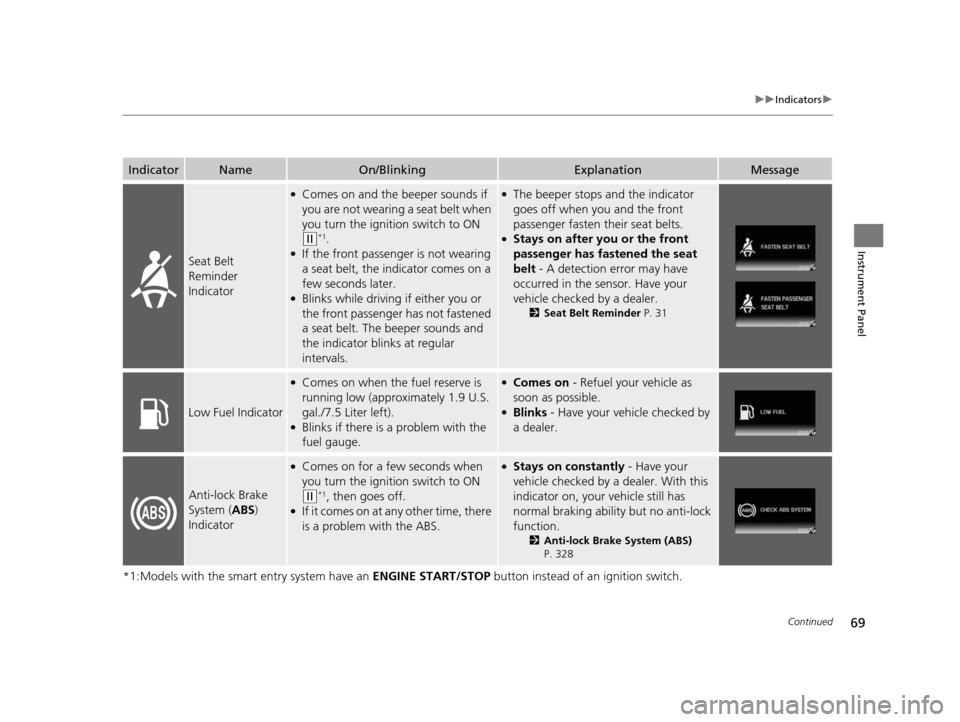
IndicatorNameOn/BlinkingExplanationMessage
Seat Belt
Reminder
Indicator
●Comes on and the beeper sounds if
you are not wearing a seat belt when
you turn the ignition switch to ON
(w*1.●If the front passenger is not wearing
a seat belt, the indicator comes on a
few seconds later.
●Blinks while driving if either you or
the front passenger has not fastened
a seat belt. The beeper sounds and
the indicator blinks at regular
intervals.
●The beeper stops and the indicator
goes off when you and the front
passenger fasten their seat belts.
●Stays on after you or the front
passenger has fastened the seat
belt - A detection error may have
occurred in the sensor. Have your
vehicle checked by a dealer.
2 Seat Belt Reminder P. 31
Low Fuel Indicator
●Comes on when the fuel reserve is
running low (approximately 1.9 U.S.
gal./7.5 Liter left).
●Blinks if there is a problem with the
fuel gauge.
●Comes on - Refuel your vehicle as
soon as possible.
●Blinks - Have your vehicle checked by
a dealer.
Anti-lock Brake
System ( ABS)
Indicator
●Comes on for a few seconds when
you turn the igniti on switch to ON
(w*1, then goes off.●If it comes on at any other time, there
is a problem with the ABS.
●Stays on constantly - Have your
vehicle checked by a dealer. With this
indicator on, your vehicle still has
normal braking ability but no anti-lock
function.
2 Anti-lock Brake System (ABS)
P. 328
14 CIVIC 2D_SI-31TS86210.book 69 ページ 2014年1月29日 水曜日 午後8時9分
Page 80 of 441
79
uuIndicators uintelligent Multi-Information Display (i-MID) Warning and Information Messages
Continued
Instrument Panel
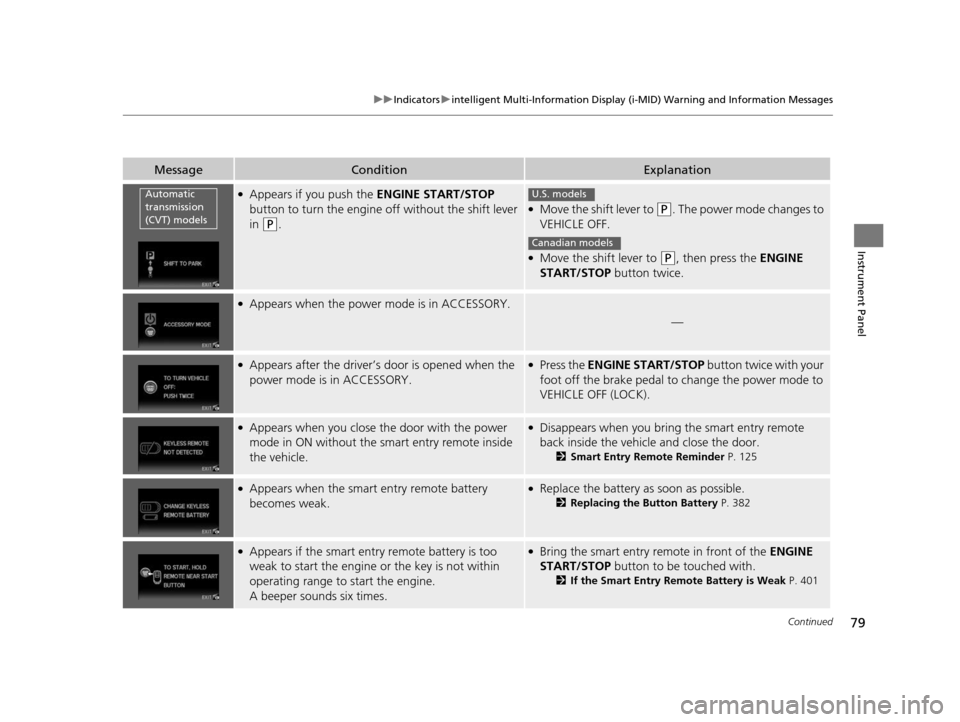
MessageConditionExplanation
●Appears if you push the ENGINE START/STOP
button to turn the engine off without the shift lever
in
(P.
●Move the shift lever to (P. The power mode changes to
VEHICLE OFF.
●Move the shift lever to (P, then press the ENGINE
START/STOP button twice.
●Appears when the power mode is in ACCESSORY.
—
●Appears after the driver’s door is opened when the
power mode is in ACCESSORY.●Press the ENGINE START/STOP button twice with your
foot off the brake pedal to change the power mode to
VEHICLE OFF (LOCK).
●Appears when you close th e door with the power
mode in ON without the smart entry remote inside
the vehicle.●Disappears when you bring the smart entry remote
back inside the vehicle and close the door.
2 Smart Entry Remote Reminder P. 125
●Appears when the smart entry remote battery
becomes weak.●Replace the battery as soon as possible.
2 Replacing the Button Battery P. 382
●Appears if the smart entry remote battery is too
weak to start the engine or the key is not within
operating range to start the engine.
A beeper sounds six times.●Bring the smart entry remote in front of the ENGINE
START/STOP button to be touched with.
2 If the Smart Entry Remote Battery is Weak P. 401
Automatic
transmission
(CVT) modelsU.S. models
Canadian models
14 CIVIC 2D_SI-31TS86210.book 79 ページ 2014年1月29日 水曜日 午後8時9分
Page 81 of 441
80
uuIndicators uintelligent Multi-Informat ion Display (i-MID) Warning and Information Messages
Instrument Panel
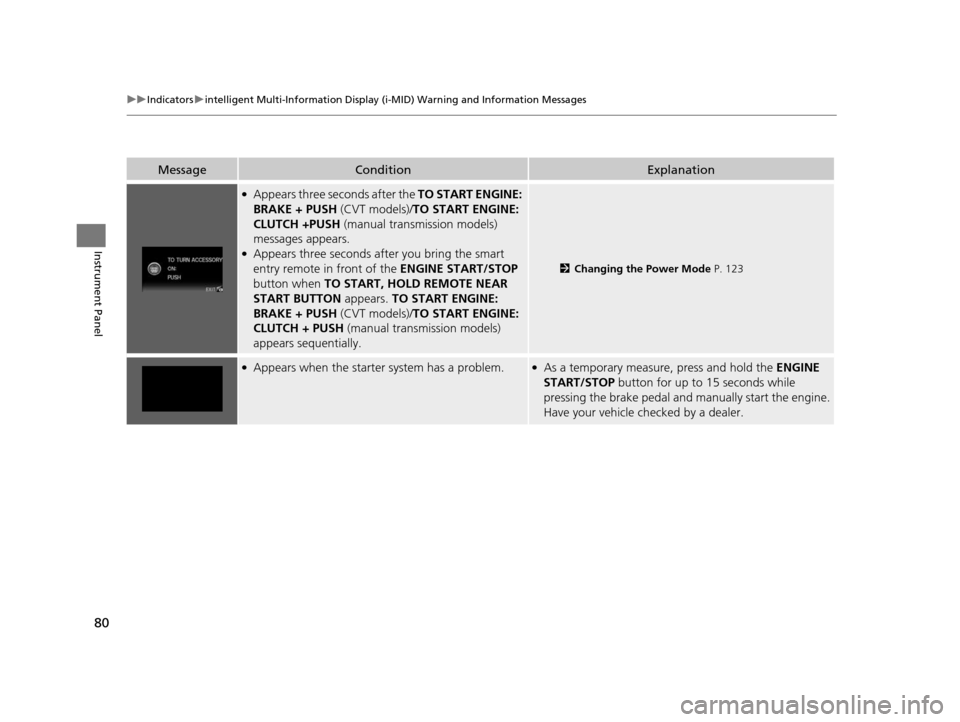
MessageConditionExplanation
●Appears three seconds after the TO START ENGINE:
BRAKE + PUSH (CVT models)/TO START ENGINE:
CLUTCH +PUSH (manual transmission models)
messages appears.
●Appears three seconds after you bring the smart
entry remote in front of the ENGINE START/STOP
button when TO START, HOLD REMOTE NEAR
START BUTTON appears. TO START ENGINE:
BRAKE + PUSH (CVT models)/TO START ENGINE:
CLUTCH + PUSH (manual transmission models)
appears sequentially.
2 Changing the Power Mode P. 123
●Appears when the starter system has a problem.●As a temporary measure, press and hold the ENGINE
START/STOP button for up to 15 seconds while
pressing the brake pedal and manually start the engine.
Have your vehicle ch ecked by a dealer.
14 CIVIC 2D_SI-31TS86210.book 80 ページ 2014年1月29日 水曜日 午後8時9分
Page 124 of 441
123
uuOperating the Switches Around the Steering Wheel uENGINE START/STOP Button*
Continued
Controls
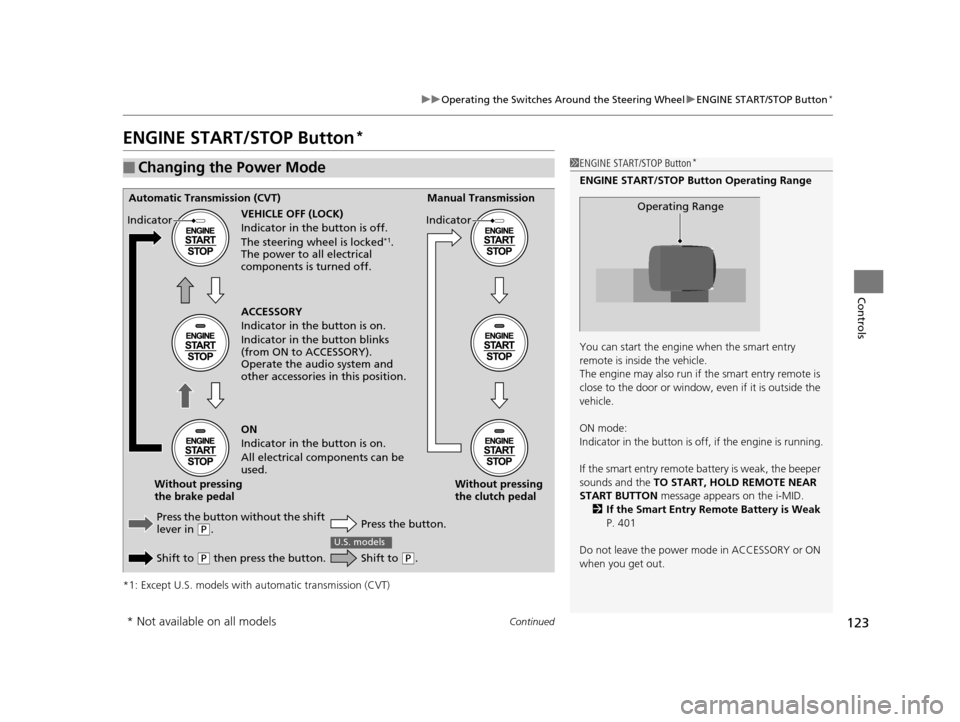
ENGINE START/STOP Button*
*1: Except U.S. models with automatic transmission (CVT)
■Changing the Power Mode1ENGINE START/STOP Button*
ENGINE START/STOP Button Operating Range
You can start the engine when the smart entry
remote is inside the vehicle.
The engine may also run if the smart entry remote is
close to the door or window, ev en if it is outside the
vehicle.
ON mode:
Indicator in the button is of f, if the engine is running.
If the smart entry remote battery is weak, the beeper
sounds and the TO START, HOLD REMOTE NEAR
START BUTTON message appears on the i-MID.
2 If the Smart Entry Remote Battery is Weak
P. 401
Do not leave the power mode in ACCESSORY or ON
when you get out.
Operating RangeAutomatic Transmission (CVT) Manual Transmission
VEHICLE OFF (LOCK)
Indicator in th e button is off.
The steering wheel is locked
*1.
The power to all electrical
components is turned off.
Press the button without the shift
lever in
( P.
Shift to
( P then press the button. Press the button.Without pressing
the clutch pedal
Without pressing
the brake pedal ACCESSORY
Indicator in the button is on.
Indicator in th
e button blinks
(from ON to ACCESSORY).
Operate the audio system and
other accessories in this position.
ON
Indicator in the button is on.
All electrical components can be
used.
Indicator
Indicator
Shift to (
P.
U.S. models
* Not available on all models
14 CIVIC 2D_SI-31TS86210.book 123 ページ 2014年1月29日 水曜日 午後8時9分
Page 131 of 441
130
uuOperating the Switches Around the Steering Wheel uFog Lights*
Controls
Fog Lights*
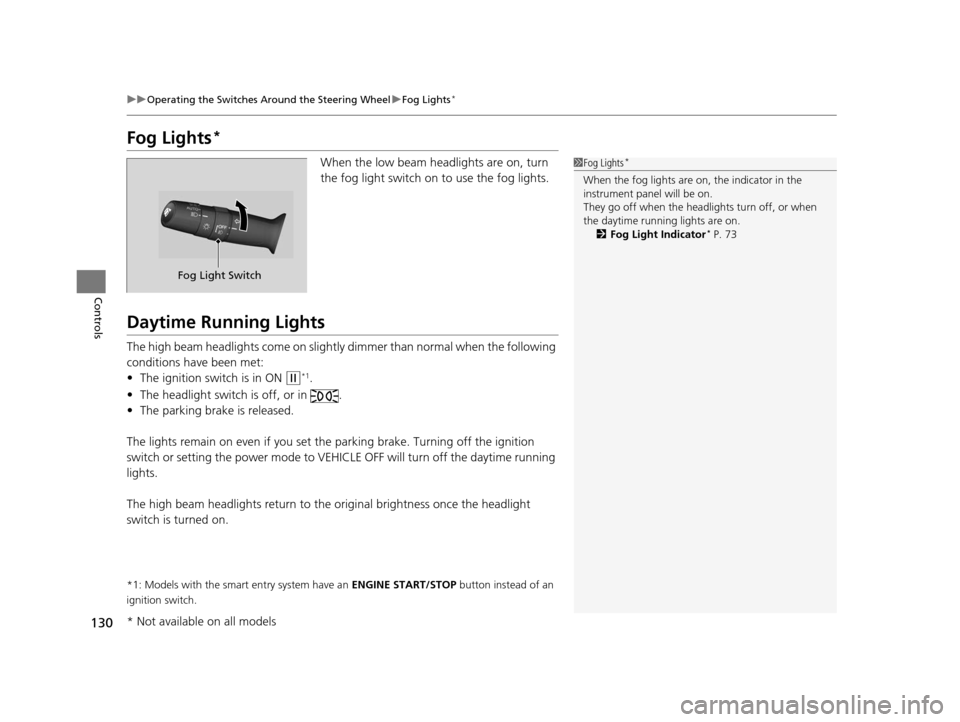
When the low beam headlights are on, turn
the fog light switch on to use the fog lights.
Daytime Running Lights
The high beam headlights come on slightly dimmer than normal when the following
conditions have been met:
• The ignition switch is in ON
(w*1.
• The headlight switch is off, or in .
• The parking brake is released.
The lights remain on even if you set th e parking brake. Turning off the ignition
switch or setting the power mode to VEHI CLE OFF will turn off the daytime running
lights.
The high beam headlights re turn to the original brightness once the headlight
switch is turned on.
*1: Models with the smart entry system have an ENGINE START/STOP button instead of an
ignition switch.
1 Fog Lights*
When the fog lights are on, the indicator in the
instrument pane l will be on.
They go off when the headlights turn off, or when
the daytime running lights are on. 2 Fog Light Indicator
* P. 73
Fog Light Switch
* Not available on all models
14 CIVIC 2D_SI-31TS86210.book 130 ページ 2014年1月29日 水曜日 午後8時9分
Page 144 of 441
143
uuAdjusting the Seats uRear Seats
Controls
Rear Seats
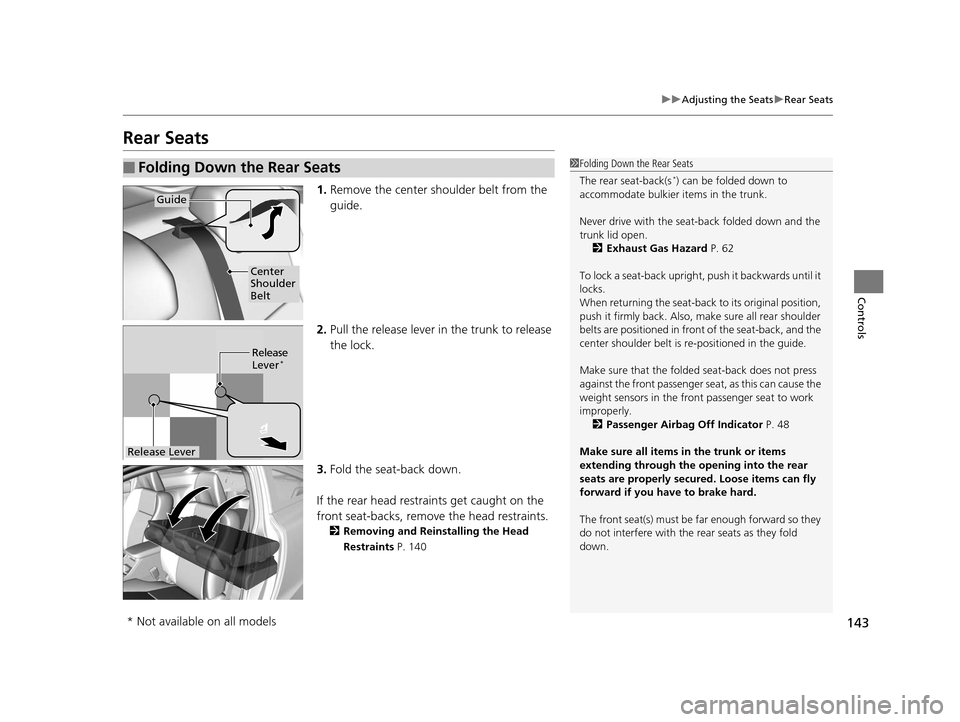
1. Remove the center shoulder belt from the
guide.
2. Pull the release lever in the trunk to release
the lock.
3. Fold the seat-back down.
If the rear head restraints get caught on the
front seat-backs, remove the head restraints.
2Removing and Reinstalling the Head
Restraints P. 140
■Folding Down the Rear Seats1Folding Down the Rear Seats
The rear seat-back(s
*) can be folded down to
accommodate bulkier items in the trunk.
Never drive with the seat-back folded down and the
trunk lid open. 2 Exhaust Gas Hazard P. 62
To lock a seat-back upright, push it backwards until it
locks.
When returning the seat-back to its original position,
push it firmly back. Also, m ake sure all rear shoulder
belts are positioned in front of the seat-back, and the
center shoulder belt is re -positioned in the guide.
Make sure that the folded seat-back does not press
against the front passenger se at, as this can cause the
weight sensors in the front passenger seat to work
improperly.
2 Passenger Airbag Off Indicator P. 48
Make sure all items in the trunk or items
extending through the opening into the rear
seats are properly secured. Loose items can fly
forward if you have to brake hard.
The front seat(s) must be far enough forward so they
do not interfere with the rear seats as they fold
down.
Guide
Center
Shoulder
Belt
Release
Lever*
Release Lever
* Not available on all models
14 CIVIC 2D_SI-31TS86210.book 143 ページ 2014年1月29日 水曜日 午後8時9分
Page 209 of 441
uuAudio System Basic Operation uPlaying a Video Using the HDMI ®
208
Features
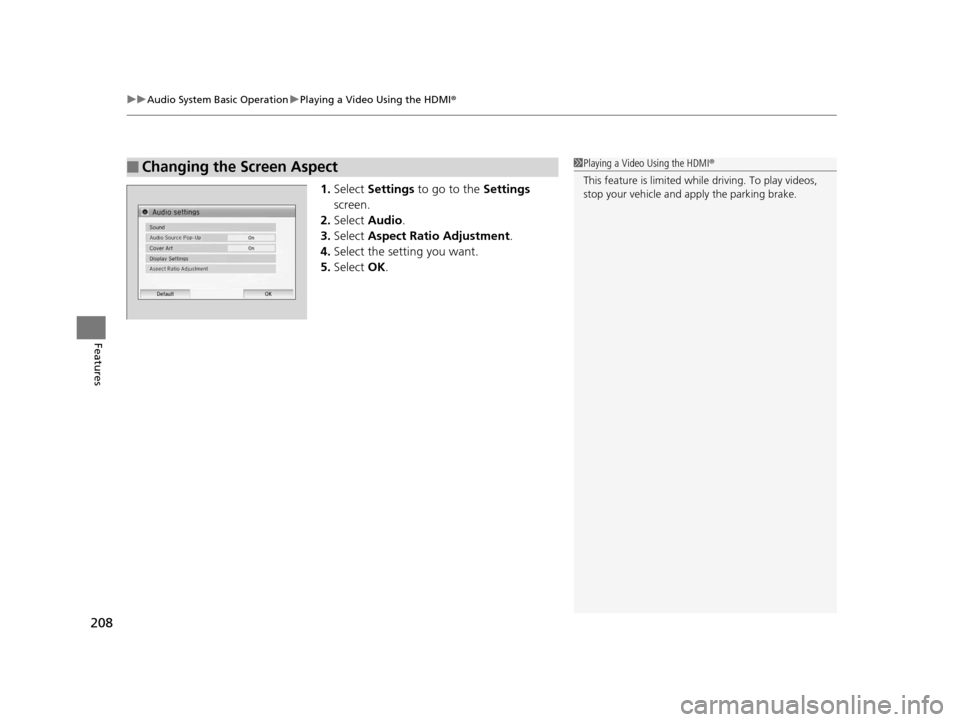
1.Select Settings to go to the Settings
screen.
2. Select Audio .
3. Select Aspect Ratio Adjustment .
4. Select the setting you want.
5. Select OK.
■Changing the Screen Aspect1Playing a Video Using the HDMI®
This feature is limited while driving. To play videos,
stop your vehicle and apply the parking brake.
14 CIVIC 2D_SI-31TS86210.book 208 ページ 2014年1月29日 水曜日 午後8時9分
Page 221 of 441
220
Features
Customized Features*
Use the audio/information screen to customize certain features.
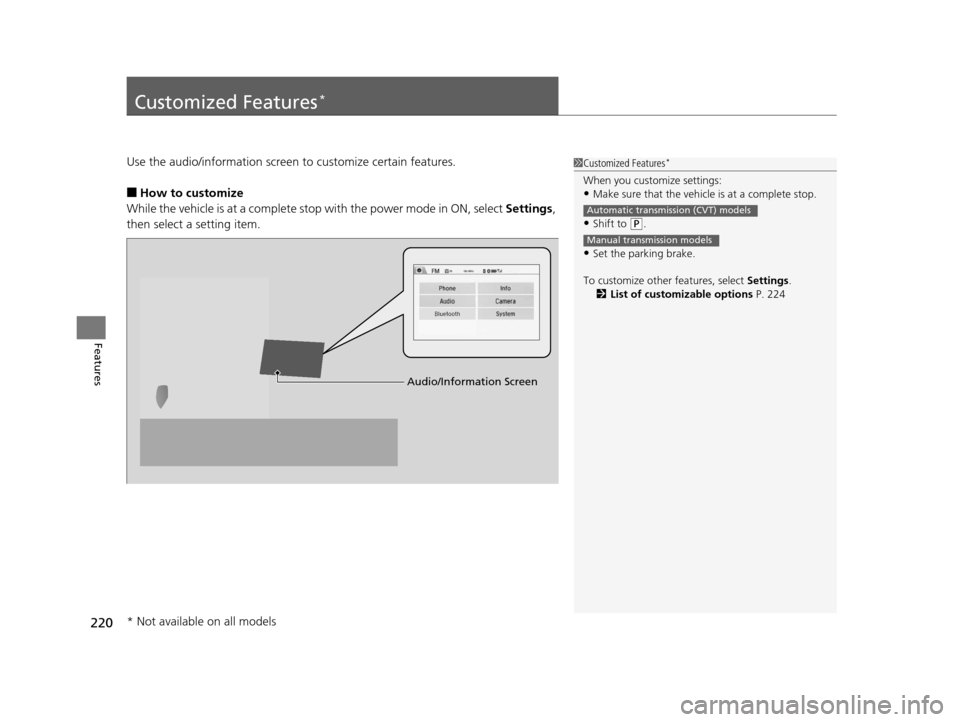
■How to customize
While the vehicle is at a complete stop with the power mode in ON, select Settings,
then select a setting item.
1 Customized Features*
When you customize settings:•Make sure that the vehicle is at a complete stop.
•Shift to (P.
•Set the parking brake.
To customize other features, select Settings.
2 List of customizable options P. 224
Automatic transmission (CVT) models
Manual transmission models
Audio/Information Screen
* Not available on all models
14 CIVIC 2D_SI-31TS86210.book 220 ページ 2014年1月29日 水曜日 午後8時9分
Page 292 of 441
291
Driving
This chapter discusses driving, refueling, and information on items such as accessories.
Before Driving
Driving Preparation .......................... 292
Maximum Load Limit........................ 295
Towing a Trailer
Towing Your Vehicle ........................ 297
When Driving Starting the Engine .................. 298, 300
Precautions While Driving................. 303
Automatic Transmission (CVT) .......... 304
Shifting ............................ 305, 307, 311
ECON Button
*................................. 314 Cruise Control ................................. 315
Vehicle Stability Assist (VSA®), aka Electronic
Stability Control (ESC), System ............... 318
LaneWatch
TM*.......................................... 320
Tire Pressure Monitoring System (TPMS) ... 322
Tire Pressure Monitoring System (TPMS) - Required Federal Explanation ............. 324
Braking
Brake System ................................... 326
Anti-lock Brake System (ABS) ........... 328
Brake Assist System.......................... 329 Parking Your Vehicle
When Stopped ................................ 330
Rearview Camera
*............................ 331
Refueling Fuel Information .............................. 332
How to Refuel ................................. 333
Fuel Economy Improving Fuel Economy .................. 335
Accessories and Modifications Accessories ...................................... 336
Modifications................................... 336
* Not available on all models
14 CIVIC 2D_SI-31TS86210.book 291 ページ 2014年1月29日 水曜日 午後8時9分
Page 294 of 441
Continued293
uuBefore Driving uDriving Preparation
Driving
• Store or secure all items on board properly.
u Carrying too much cargo, or improperly storing it, can affect your vehicle's
handling, stability, sto pping distance, and tires, and make it unsafe.
2Maximum Load Limit P. 295
•Do not pile items higher than the seat height.
u They can block your view and may be thrown forward in the event of sudden
braking.
• Do not place anything in the front seat footwells. Make sure to secure the floor
mat.
u An object or unsecured floor mat can in terfere with your brake and accelerator
pedal operation while driving.
• If you have any animals on board, do not let them move around in the vehicle.
u They may interfere with driving and a crash could occur.
• Securely close and lock both doors and the trunk.
2 Locking/Unlocking the Doors from the Inside P. 110
•Adjust your seating position properly.
u Adjust the head restraint, too.
2Adjusting the Seats P. 137
2 Adjusting the Head Restraints P. 139
•Adjust the mirrors and steering wh eel properly for your driving.
u Adjust them while sitting in the proper driving position.
2 Adjusting the Mirrors P. 135
2 Adjusting the Steering Wheel P. 134
■Interior Checks1Interior Checks
The headlight aim is set by the factory, and does not
need to be adjusted. Howeve r, if you regularly carry
heavy items in the trunk, have the aiming readjusted
at a dealer or by a qualified technician.
14 CIVIC 2D_SI-31TS86210.book 293 ページ 2014年1月29日 水曜日 午後8時9分